1
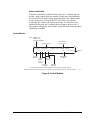
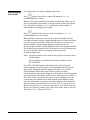
Depending on the particular release of software in your system, some
menu functions and system features may not be operable. If you attempt to
execute a function that is not operable, the panel will respond with the
message FUNCTION NOT ENABLED.
About the
Software
About
Addresses
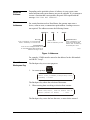
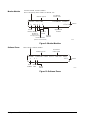
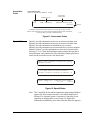
For certain functions such as Read Status, the operator must enter a
device, software zone, or annunciator point address. Leading zeroes are
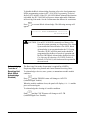
not required. The address assumes the following format:
LX X(D/M ) Y Y,
SLC Loop
E n te r “L ” fo llow e d by 1 to 10 for IFC -2 02 0.
E n te r “L ” fo llow e d by 1 to 2 fo r IF C -10 10 .
ZX XX
or
AXX PYY
S o ftw a re Zo ne
E n te r “Z” fo llo w e d b y 1 to 24 0.
SLC Loop Device
E n te r “D ” for an in te llig en t d ete cto r or “M ”
fo r a n ad dre ssa ble m o du le fo llow e d by a n
a dd ress in th e ran ge 1 to 9 9.
Annunciator Point
E n te r “A ” follo w ed b y 1 to 32
fo r th e an nu nciato r m o du le
a dd ress, th en “P ” fo llow e d by
th e m o du le p oint 1 to 64 .
A d drp ic !
Figure 1: Addresses
For example, L3M44 must be entered as the address for the 44th module
on LIB SLC Loop 3.
About the
Backspace Key
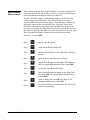
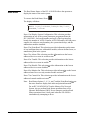
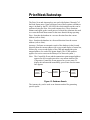
The Backspace key serves two purposes:
BACK
S PA C E
1.
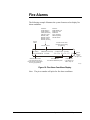
At a menu prompt:
PRESS 1=SYS,2=PTREAD,3=ALM,4=TBL,5=DIS,
6=MONON, 7=CLTON
:
s cintr1 !
The Backspace key aborts the selection of that menu.
2.
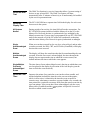
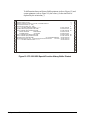
When entering data or making a selection from a menu:
ENTER LXX(D/M)YY, ZXXX OR AXXPYY FOR PT.
STATUS (BCKSPC TO ABORT)
: L4D3
s cintr2 !
The Backspace key erases the last character, or menu choice entered.
Operations—IFC-1010/2020 Operations
7