1
GP800 UPS
STATUS HANDLING
6 STATUS HANDLING
6.1 symbol signification
Note: If indicator light flash, the flash period is synchronal with that of
buzzer sounds
BZ
Flash
Buzzer beep
continously
BZ
p
e
e
b
r
e
z
z
u
B
crush out
BZ
s
d
n
o
pc
e
ee
bs
r
ru
eo
zf
z
uy
Br
e
v
e
Lit on
BZ
every one second
Buzzer
not beep
6.2 UPS run status indication and handling ways
when normal
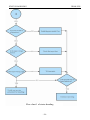
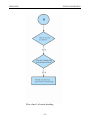
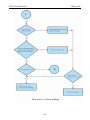
Please refer to indicator on UPS panel, LCD indicator value and buzzer
sound, you can know if UPS running is normal, if abnormal, please refer to
the handling way according to panel indicator status.
Sw itch O N
%
0
.
0
0
1
O ff
BZ
:
ED
NA
I
O
L
l
N
O
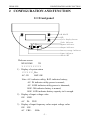
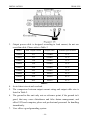
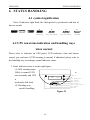
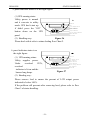
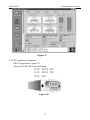
1. Panel indicator status is as the right figure:
(1) UPS running status:
Utility is normal, UPS
runs normally and UPS
is
used under full-load.
(2) Handing way:
needn’t handling.
On
D ow n
IN
Y
B
FAULT
BATT
OUT
Fault indicator
Bypass indicator
Output indicator
battery energy indicator
Input indicator
Switch OFF
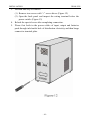
Figure 22
- 19 -
LCD
Cycle display button