1
Contents
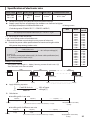
A
INSTALLATION PARTS
Safety precautions.......................................................................................................................................................3
Accessories.....................................................................................................................................................................5
Selecting the installation location...........................................................................................................................6
Indoor unit installation . ......................................................................................................................................... 16
Purging the unit........................................................................................................................................................ 17
Connecting the refrigerant pipe........................................................................................................................... 18
Cutting/flaring the pipes......................................................................................................................................... 19
Performing leak test & insulation......................................................................................................................... 20
Drain pipe and drain hose installation................................................................................................................ 22
Wiring work................................................................................................................................................................ 26
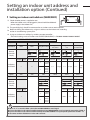
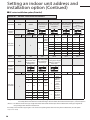
Setting an indoor unit address and installation option.................................................................................. 29
Final check and trial operation.............................................................................................................................. 38
Providing information for user.............................................................................................................................. 38
Troubleshooting........................................................................................................................................................ 38
Option table............................................................................................................................................................... 40
2
Safety
precautions
A
(Carefully follow the precautions listed below because they are essential to guarantee the safety of the
equipment.)
WARNING
• Always disconnect the air conditioner from the power supply before servicing it or
accessing its internal components.
• Verify that installation and testing operations are performed by qualified personnel.
• Verify that the air conditioner is not installed in an easily accessible area.
General information
Carefully read the content of this manual before installing the air conditioner and store the manual in a safe place in
order to be able to use it as reference after installation.
For maximum safety, installers should always carefully read the following warnings.
Store the operation and installation manual in a safe location and remember to hand it over to the new owner if the
air conditioner is sold or transferred.
This manual explains how to install an indoor unit with a split system with two SAMSUNG units. The use of other types
of units with different control systems may damage the units and invalidate the warranty. The manufacturer shall not
be responsible for damages arising from the use of non compliant units.
This product has been determined to be in compliance with the Low Voltage Directive (2006/95/EC),
and the Electromagnetic Compatibility Directive (2004/108/EC) of the European Union.
The manufacturer shall not be responsible for damage originating from unauthorized changes or the improper connection
of electric and hydraulic lines. Failure to comply with these instructions or to comply with the requirements set forth in the
“Operating limits” table, included in the manual, shall immediately invalidate the warranty.
The air conditioner should be used only for the applications for which it has been designed: the indoor unit is not
suitable to be installed in areas used for laundry.
Do not use the units if damaged. If problems occur, switch the unit off and disconnect it from the power supply.
In order to prevent electric shocks, fires or injuries, always stop the unit, disable the protection switch and contact
SAMSUNG’s technical support if the unit produces smoke, if the power cable is hot or damaged or if the unit is very
noisy.
Always remember to inspect the unit, electric connections, refrigerant tubes and protections regularly.
These operations should be performed by qualified personnel only.
The unit contains moving parts, which should always be kept out of the reach of children.
Do not attempt to repair, move, alter or reinstall the unit. If performed by unauthorized personnel, these operations
may cause electric shocks or fires.
Do not place containers with liquids or other objects on the unit.
All the materials used for the manufacture and packaging of the air conditioner are recyclable.
The packing material and exhaust batteries of the remote control(optional) must be disposed of in accordance with
current laws.
The air conditioner contains a refrigerant that has to be disposed of as special waste. At the end of its life cycle, the air
conditioner must be disposed of in authorized centers or returned to the retailer so that it can be disposed of correctly
and safely.
Installing the unit
IMPORTANT: When installing the unit, always remember to connect first the refrigerant tubes, then the electrical lines.
Always disassemble the electric lines before the refrigerant tubes.
Upon receipt, inspect the product to verify that it has not been damaged during transport. If the product appears
damaged, DO NOT INSTALL it and immediately report the damage to the carrier or retailer (if the installer or the
authorized technician has collected the material from the retailer.)
After completing the installation, always carry out a functional test and provide the instructions on how to operate
the air conditioner to the user.
Do not use the air conditioner in environments with hazardous substances or close to equipment that release free
flames to avoid the occurrence of fires, explosions or injuries.
The air conditioner should be used only for the applications for which it has been designed: the indoor unit is not
suitable to be installed in areas used for laundry.
3
Safety precautions
A
Our units must be installed in compliance with the spaces indicated in the installation manual to ensure either
accessibility from both sides or ability to perform routine maintenance and repairs. The units’ components must be
accessible and that can be disassembled in conditions of complete safety either for people or things.
For this reason, where it is not observed as indicated into the Installation Manual, the cost necessary to reach and repair
the unit (in safety, as required by current regulations in force) with slings, trucks, scaffolding or any other means of
elevation won’t be considered in-warranty and charged to end user.
Power supply line, fuse or circuit breaker
Always make sure that the power supply is compliant with current safety standards. Always install the air conditioner in
compliance with current local safety standards.
Always verify that a suitable grounding connection is available.
Verify that the voltage and frequency of the power supply comply with the specifications and that the installed power is
sufficient to ensure the operation of any other domestic appliance connected to the same electric lines.
Always verify that the cut-off and protection switches are suitably dimensioned.
Verify that the air conditioner is connected to the power supply in accordance with the instructions provided in the
wiring diagram included in the manual.
Always verify that electric connections (cable entry, section of leads, protections…) are compliant with the electric
specifications and with the instructions provided in the wiring scheme. Always verify that all connections comply with
the standards applicable to the installation of air conditioners.
Make sure that you earth the cables.
- Do not connect the earth wire to the gas pipe, water pipe, lighting rod or telephone wire.
If earthing is not complete, electric shock or fire may occur.
Install the circuit breaker.
- If the circuit breaker is not installed, electric shock or fire may occur.
Make sure that the condensed water dripping from the drain hose runs out properly and safely.
Install the power cable and communication cable of the indoor and outdoor unit at least 1m
away from the electric appliance.
Install the indoor unit away from lighting apparatus using the ballast.
- If you use the wireless remote control, reception error may occur due to the ballast of the
lighting apparatus.
Do not install the air conditioner in following places.
- Place where there is mineral oil or arsenic acid.
Resin parts flame and the accessories may drop or water may leak.
The capacity of the heat exchanger may reduce or the air conditioner may be out of order.
- The place where corrosive gas such as sulfurous acid gas generates from the vent pipe or air
outlet.
The copper pipe or connection pipe may corrode and refrigerant may leak.
- The place where there is a machine that generates electromagnetic waves.
The air conditioner may not operate normally due to control system.
- The place where there is a danger of existing combustible gas, carbon fiber or flammable
dust.
The place where thinner or gasoline is handled.
Gas may leak and it may cause fire.
4
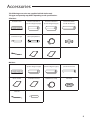
Accessories
A
The following accessories are supplied with the indoor unit.
The type and quantity may differ depending on the specifications.
Slim Duct :
Insulation cover
Thermal insulation A
(use for refrigerant pipe)
Thermal insulation B
(use for refrigerant pipe)
Thermal insulation
(use for drain hose)
Flexible hose
(natural drainage)
Flexible hose
(drain pump Built-in)
Flexible hose clamp
Grommet
Cable tie
Installation manual
User's manual
Insulation cover
Thermal insulation A
(use for refrigerant pipe)
Thermal insulation B
(use for refrigerant pipe)
Thermal insulation
(use for drain hose)
User's manual
Installation manual
Flexible hose clamp
Grommet
Cable tie
Flexible hose
Ma Duct :
5
Selecting
the installation location
A
Indoor Unit
There must be no obstacles near the air inlet and outlet.
Install the indoor unit on a ceiling that can support its weight.
Maintain sufficient clearance around the indoor unit.
Make sure that the water dripping from the drain hose runs away correctly and safely.
The indoor unit must be installed in this way, that they are out of public access. (Not touchable by the
users)
After connecting a chamber, insulate the connection part between the indoor unit and the chamber
with t10 or thicker insulation. Otherwise, there can be air leak or dew from the connection part.
Rigid wall without vibration.
Where it is not exposed to direct sunshine.
Where the air filter can be removed and cleaned easily.
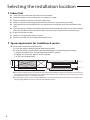
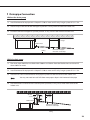
Space requirements for installation & service
Unit Depth(D)
Construction Standard for Inspection Hole.
1) In case, the ceiling is textile, Inspection hole dose not need.
2) In case, the ceiling is plaster board, Inspection hole depends on Inside height of the ceiling.
a. Height is more than 0.5m : Only “B” [Inspection for PBA] is applied.
b. Height is less than 0.5m : Both “A” & ”B” are applied.
c. “A” & ”B” are inspection holes.
20mm or more
Unit Width(W)
“A”=W+100mm
“B”=500mm
20mm or more
You must have 20mm or more space between the ceiling and the bottom of indoor unit. Otherwise, the noise from
the vibration of indoor unit may bother the user.When the ceiling is under construction, the hole for check-up must
be made to take service, clean and repair the unit.
It is possible to install the unit at an height of between 2.2~2.5m from the ground, if the unit has a duct with a well
defined lenght (300mm or more), to avoid fan motor blower contact.
6
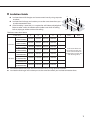
Insulation Guide
Insulate the end of the pipe and some curved area by using separate
insulator.
Insulate the discharge and suction part at the same time when you
insulate connection duct.
If the humidity is over 80%, it is required to add 10mm polyethylene
foam or other similar insulation to the indoor unit when installing
belt or pipe type indoor unit on the ceiling.
D
Back
Front
A
Thickness:more than 10mm
Indoor unit
Slim Duct
Ma Duct
2.2~3.6kW
(700x199x600)
4.5~5.6kW
(900x199x600)
7.1kW
(1100x199x600)
9.0~14.0kW
(1300x295x690)
4.5~7.1kW
(900x480x260)
9.0kW
(1150x480x260)
11.2kW
(1150x480x320)
12.8~14.0kW
(1200x650x360)
B
A
B
C
D
E
700x600
700x600
600x200
600x200
-
900x600
900x600
600x200
600x200
-
1100x600 1100x600
600x200
600x200
-
1300x690 1300x690
690x300
690x300
-
900x480
900x480
480x260
480x260
-
1150x480 1150x480
480x260
480x260
-
1150x480 1150x480
480x320
480x320
-
1200x650 1200x650
650x360
650x360
-
Front
C
Back
Insulate the front and
back side in proper size
at the same time when
insulating the suction duct
and discharge duct.
Insulate the end of the pipe and some curved area by using separate insulator.
Insulate the discharge and suction part at the same time when you insulate connection duct.
7
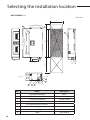
Selecting the installation location
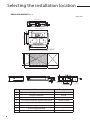
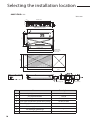
AM022/028/036FNLD
3x188.5=565.5
71 100 10
13
Unit : mm
600
477 Suspension podition
738.4 Suspension podition
6x100=600
660 Air outlet duct flange
18-Ø3.2 Hole
All around
650
700
700
500
100
199
145.5
151.6
182
26
OD25
115.5
18
800
246
Discharge side
8
333
No.
Name
Description
1
Liquid pipe connection
ø6.35
2
Gas pipe connection
ø12.70
3
Drain pipe connection
OD ø25, ID ø20
4
Drain pipe connection (Option drain pump)
OD ø25, ID ø20
5
Power supply/Communication connection
--
6
Power supply connection
--
7
Air discharge grille flange
--
8
Hook
ø9.52 or M10
Suction side
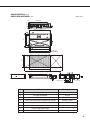
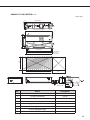
AM045/056FNLD
AM022/028/036FNMD
35256=768
71 100 10
11.9
Unit : mm
28
28
600
477 Suspension position
938.4 Suspension position
85100=800
860 Air outlet duct flange
22-ø3.2 Hole
All around
650
900
900
1000
100
199
151.6
OD32
30.5
115.5
145.5
18
500
Discharge side
182
246
333
No.
Name
1
Liquid pipe connection
ø6.35
2
Gas pipe connection
ø12.70
3
Drain pipe connection
OD ø25, ID ø20
4
Drain pipe connection (Option drain pump)
OD ø25, ID ø20
5
Power supply/Communication connection
--
6
Power supply connection
--
7
Air discharge grille flange
--
8
Hook
ø9.52 or M10
Suction side
Description
9
Selecting
the installation location
A
AM071FNLD
Unit : mm
35322=966
71 100 10
12.9
28
28
600
477 Suspension position
1138 Suspension position
105100=1000
1060 Air outlet duct flange
26-ø3.2 Hole
All around
650
1100
1100
1200
OD32
30.5
10
100
115.5
144.5
199
151.6
18
500
Discharge side
No.
Name
1
Liquid pipe connection
ø9.52
2
Gas pipe connection
ø15.88
182
246
333
Description
3
Drain pipe connection
OD ø25, ID ø20
4
Drain pipe connection (Option drain pump)
OD ø25, ID ø20
5
Power supply/Communication connection
--
6
Power supply connection
--
7
Air discharge grille flange
--
8
Hook
ø9.52 or M10
Suction side
AM090/112/128/140FNLD
45290=1160
83 2588=176 10
15.9
Unit : mm
28
28
600
477 Suspension position
1338 Suspension position
125100=1200
1260 Air outlet duct flange
32-ø3.2 Hole
All around
650
1300
1300
1400
247.6
25100=200
186
250
337
OD32
29
115.5
145.5
295
18
500
Discharge side
No.
Name
1
Liquid pipe connection
ø9.52
2
Gas pipe connection
ø15.88
3
Drain pipe connection
OD ø25, ID ø20
4
Drain pipe connection (Option drain pump)
OD ø25, ID ø20
5
Power supply/Communication connection
--
6
Power supply connection
--
7
Air discharge grille flange
--
8
Hook
ø9.52 or M10
Suction side
Description
11
Selecting
the installation location
A
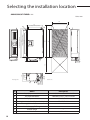
AM045/056/071FNMD
Unit : mm
530
480
397 (Suspension position)
6
8
900
1000
97
900
135x5=675
844 (Air outlet duct flange)
936 (Suspension position)
7
87
222
185
90
260
500
77
117
2
1
Discharge side
Suction side
5
12
4
3
76
132
139
No.
Name
Description
1
Liquid pipe connection
045/056:ø6.35 ,071:ø9.52
2
Gas pipe connection
045/056:ø12.7 ,071:ø15.88
3
Drain pipe connection
OD ø25, ID ø20
4
Drain pipe connection (Option drain pump)
OD ø25, ID ø20
5
Power supply/Communication connection
--
6
Air discharge grille flange
--
7
Suction flange
--
8
Hook
ø9.52 or M10
12
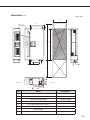
AM090FNMD
Unit : mm
530
97
1250
1188 (Suspension position)
1150
904 (Air outlet duct flange)
6X135=810
1150
480
397 (Suspension position)
18-Ø3.2 hole
(Air around)
222
90
260
185
500
90
67
117
Discharge side
ODØ32
Suction side
76
132
144
No.
Name
1
Liquid pipe connection
Description
ø9.52
2
Gas pipe connection
ø15.88
3
Drain pipe connection
OD ø25, ID ø20
4
Drain pipe connection (Option drain pump)
OD ø25, ID ø20
5
Power supply/Communication connection
--
6
Air discharge grille flange
--
7
Suction flange
--
8
Hook
ø9.52 or M10
13
Selecting
the installation location
A
AM112FNMD
Unit : mm
530
480
6
397(Suspension position)
8
87
1150
1250
1186(Suspension position)
1150
902(Air outlet duct flange)
135×6=810
7
222
27
107
Discharge side
320
229
125
500
157
Suction side
2
82
137
1
149
5
14
4
3
No.
Name
Description
1
Liquid pipe connection
ø9.52
2
Gas pipe connection
ø15.88
3
Drain pipe connection
OD ø25, ID ø20
4
Drain pipe connection (Option drain pump)
OD ø25, ID ø20
5
Power supply/Communication connection
6
Air discharge grille flange
7
Suction flange
8
Hook
ø9.52 or M10
AM128/140FNMD
Unit : mm
700
650
20-ø3.2hole
(All around)
534 (Suspension position)
8
7
86
1200
1300
6×150=900
1200
1000 (Air outlet duct flange)
1236 (Suspension position)
6
OD32
222
28
253
(Air outlet duct flange)
2×100=200
Discharge side
360
500
121
137
Suction side
80
4
170
244
299
5
1 2 3
No.
Name
1
Liquid pipe connection
Description
ø9.52
2
Gas pipe connection
3
Drain pipe connection
OD ø25, ID ø20
ø15.88
4
Drain pipe connection (Option drain pump)
OD ø25, ID ø20
5
Power supply/Communication connection
6
Air discharge grille flange
7
Suction flange
8
Hook
ø9.52 or M10
15
Indoor
unit installation
A
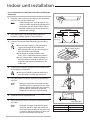
It is recommended to install theY-joint before installing the
indoor unit.
1
Place the pattern sheet on the ceiling at the spot where
you want to install the indoor unit.
NoteSince the diagram is made of paper, it may
shrink or stretch slightly due to temperature
or humidity. For this reason, before drilling
the holes maintain the correct dimensions
between the markings.
2
3
Insert bolt anchors, use existing ceiling supports or
construct a suitable support as shown in figure.
Install the suspension bolts depending on the ceiling
type.
4
Insert
Hole in anchor
Hole in plug
Suspension bolt( ø9.52 or M10)
Ensure that the ceiling is strong enough to
support the weight of the indoor unit.
Before hanging the unit, test the strength of
each attached suspension bolt.
If the length of suspension bolt is more
than 1.5m, it is required to prevent vibration.
If this is not possible, create an opening on
the false ceiling in order to be able to use it
to perform the required operations on the
indoor unit.
Ceiling support
Screw eight nuts to the suspension bolts making space
for hanging the indoor unit.
5
Concrete
You must install the suspension bolts more
than four when installing the indoor unit.
Hang the indoor unit to the suspension bolts between
two nuts.
NotePiping must be laid and connected inside
the ceiling when suspending the unit. If the
ceiling is already constructed, lay the piping
into position for connection to the unit
before placing the unit inside the ceiling.
6
Screw the nuts to suspend the unit.
7
Adjust level of the unit by using measurement plate for
all 4 sides.
Rubber
A
NoteFor proper drainage of condensate, give a
'A' slant to the left or right side of the unit
which will be connected with the drain hose,
as shown in the figure. Make a tilt when you
wish to install the drain pump, too.
16
Drain hose port
Unit
Slim Duct
Ma Duct
A
3mm
10mm
Purging
the unit
A
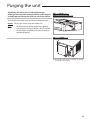
On delivery, the indoor unit is loaded with inert gas.
All this gas must therefore be purged before connecting the
assembly piping. To purge the inert gas, proceed as follows.
AMFNLD /
AM022/028/036FNMD
Unscrew the pinch pipe at the end of each refrigerant pipe.
Result: All inert gas escapes from the indoor unit.
NoteTo prevent dirt or foreign objects from getting
into the pipes during installation, do NOT remove
the pinch pipe completely until you are ready to
connect the piping.
AMFNMD
The designs and shape are subject to change
according to the model.
17
Connecting
the refrigerant pipe
A
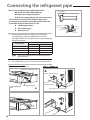
There are two refrigerant pipes of differing diameters:
A smaller one for the liquid refrigerant
A larger one for the gas refrigerant
The inside of copper pipe must be clean & has no dust.
The connection procedure for the refrigerant pipes varies
according to the exit position of the pipes from the indoor unit,
as seen when facing the indoor in the “A” side.
Liquid refrigerant port
Gas refrigerant port
Drain hose port
1
Refrigerant oil
Torque wrench
Remove the pinch pipe on the pipes and connect the
assembly pipes to each pipe, tightening the nuts, first
manually and then with a torque wrench, a spanner applying
the following torque.
Outer Diameter
6.35 mm
9.52 mm
12.70 mm
15.88 mm
Torque
kgf•cm
140~180
350~430
500~620
690~830
N•m
14~18
34~42
49~61
68~82
NoteMust apply refrigerant oil on the flaring area to
prevent a leak.
2
Be sure that there must be no crack or kink on the bended area.
AMFNLD /
AM022/028/036FNMD
AMFNMD
Drain hose connection port
A
Liquid refrigerant port
Liquid refrigerant
port
18
Gas refrigerant port
Gas
refrigerant port
A
Drain hose connection port
The designs and shape are subject to change according to the model.
Spanner
Flare nut
Union
Cutting/flaring
the pipes
A
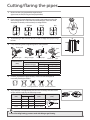
1
Make sure that you prepared the required tools.
(pipe cutter, reamer, flaring tool and pipe holder)
2
If you want to shorten the pipe, cut it using a pipe cutter ensuring that
the cut edge remains at 90° with the side of the pipe. There are some
examples of correctly and incorrectly cut edges below.
Oblique
Rough
Burr
3
To prevent a gas leak, remove all burrs at the cut edge of the pipe using a
reamer.
4
Carry out flaring work using flaring tool as shown below.
A
Flaring tool
York
Die
Die
Clutch type
Outer diameter
(mm)
Flare tool for
R410A clutch type
6.35
9.52
12.70
0~0.5
0~0.5
0~0.5
15.88
0~0.5
Flare nut
Copper
pipe
A(mm)
Conventional flare tool
Clutch type
Wing nut type
1.0~1.5
1.5~2.0
1.0~1.5
1.5~2.0
1.0~1.5
1.5~2.0
1.0~1.5
1.5~2.0
Check if you flared the pipe correctly. There are some examples of
incorrectly flared pipes below.
Inclined
Damaged Surface Cracked
Uneven Thickness
Align the pipes and tighten the flare nuts first manually and then with a
torque wrench, applying the following torque.
Outer diameter Connection Torque Flare dimension
(mm)
(mm)
kgf•cm
N•m
6.35
140~180
14~18
8.70~9.10
9.52
350~430
34~42
12.80~13.20
12.70
500~620
49~61
16.20~16.60
15.88
690~830
68~82
19.30~19.70
Flare shape
(mm)
45° ± 2°
6
Copper pipe
90° ±2°
5
Wing nut type
R 0.4~0.8
In case of needing brazing, you must work with Nitrogen gas blowing.
19
Performing
leak test & insulation
A
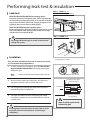
Leak test
AMFNLD /
AM022/028/036FNMD
LEAK TEST WITH NITROGEN (before opening valves)
In order to detect basic refrigerant leaks, before recreating the
vacuum and recirculating the R410A, it’s responsible of installer
to pressurize the whole system with nitrogen (using a pressure
regulator) at a pressure above 4.1MPa (gauge).
LEAK TEST WITH R410A (after opening valves)
Before opening valves, discharge all the nitrogen into the system
and create vacuum. After opening valves check leaks using a
leak detector for refrigerant R410A.
AMFNMD
Discharge all the nitrogen to create a vacuum and
charge the system.
Insulation
Once you have checked that there are no leaks in the system,
you can insulate the piping and hose.
1
The designs and shape are subject to change
according to the model.
No gap
To avoid condensation problems, place T13.0 or thicker
Acrylonitrile Butadien Rubber separately around each
refrigerant pipe.
NoteAlways make the seam of pipes face upwards.
2
Wind insulating tape around the pipes and drain hose
avoiding to compress the insulation too much.
3
Finish wrapping insulating tape around the rest of the
pipes leading to the outdoor unit.
4
The pipes and electrical cables connecting the indoor
unit with the outdoor unit must be fixed to the wall with
suitable ducts.
NBR(T13.0 or thicker)
Insulation cover pipe
Insulation pipe
Indoor unit
Be sure to overlap
the insulation
Must fit tightly against body
without any gap.
All refrigerant connection must be accessible, in order
to permit either unit maintenance or removing it
completely.
20
5
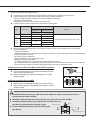
Select the insulator of the refrigerant pipe.
Insulate the gas side and liquid side pipe referring to the thickness according to the pipe size.
Indoor temperature of 30°C and humidity of 85% is the standard condition.
If install in a high humidity condition,use one grade thicker insulator by
referring to the table below.
If installing in an unfavorable conditions, use thicker one.
Insulator’s heat-resistance temperature should be more than 120°C.
Insulation Type(Heating/Cooling)
Standard
High humidity
Pipe
Pipe size
[30°C,85%]
[30°C,over85%]
EPDM,NBR
Liqued Φ6.35~Φ9.52
9t
9t
pipe
Φ12.7~Φ50.80
13t
13t
Φ6.35
13t
19t
Φ9.52~ Φ25.40
25t
Gas
19t
Pipe Φ28.58~ Φ44.45
32t
Φ50.80
25t
38t
Remarks
Internal temperature is higher than 120°C
When installing insulation in places and conditions below, use the same insulation that is used for high
humidity conditions.
<Geological condition>
- High humidity places such as shoreline, hot spring, near lake or river, and ridge (when the part of the building
is covered by earth and sand.)
<Operation purpose condition>
- Restaurant ceiling, sauna, swimming pool etc.
<Building construction condition>
- The ceiling frequently exposed to moisture and cooling is not covered.
e.g. The pipe installed at a corridor of a dormitory and studio or near an exit that opens and closes frequently.
- The place where the pipe is installed is highly humid due to the lack of ventilation system.
Refrigerant pipe before EEV kit and MCU or without EEV kit and MCU
You can contact the gas side and liquid side pipes but the
pipes should not be pressed.
When contacting the gas side and gas side pipe, use 1 grade
thicker insulator.
Insulation
Insulation
Liquid pipe
Gas pipe
10mm
10mm
10mm
Refrigerant pipe after EEV kit and MCU
Install the gas side and liquid side pipes, leave 10mm of space.
When contacting the gas side and liquid side pipe, use 1 grade
thicker insulator.
Gas pipe
Liquid pipe
Install the insulation not to get wider and use the adhesives on the connection part of it to
prevent moisture from entering.
Wind the refrigerant pipe with insulation tape if it is exposed to outside sunlight.
Install the refrigerant pipe respecting that the insulation does not
get thinner on the bent part or hanger of pipe.
Hanger
Additional insulation
Add the additional insulation if the insulation plate
gets thinner.
a
a×3
Refrigerant pipe insulation
21
Drain pipe and drain hose installation
A
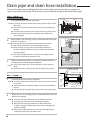
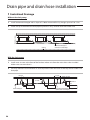
Care must be taken when installing the drain hose for the indoor unit to ensure that any condensate
water is correctly drained outside. The drain hose can be installed to the right or left side of the base pan.
AMFNLD /
AM022/028/036FNMD
1
Install the drain hose as short as possible.
note In order to discharge condensation water, the drain hose should
keep tilted.
Secure the drain hose with the cable-tie not to be separated from
the unit.
The drain pump connection port is used when using a drain pump.
Both ends of the drain hose must be fixed by PVC adhesive, to
prevent leakage.
2
Metal clamp
Drain socket
Drain hose
Cable tie
Drain piping
Indoor
unit
A-A’
Bonding
Large sealing pad
When there is no draining pump, insulate the drain hose and
then fix it as a picture.
note Insert the drain hose to bottom of the outfall of water basin.
Lock steel ring of the drain hose according to the figure.
Wind and wrap steel ring and drain hose fully with thermal
insulation sponge; fix both ends of external layer with ribbon for
thermal insulation.
After being installed, drain hose must be insulated fully by heat
insulating material.(To be provided at site.)
3
While using draining pump, insulate the drain hose with heat
insulating material according to the figure.
note Check if the rubber ring is installed properly on the draining
Tighten the clamp to the maximum.
pump.
Check if the drain cap blocks the outfall of drain pan properly.
AMFNMD
1
Install the drain hose as short as possible.
note In order to discharge condensation water, the drain hose should
keep tilted.
S ecure the drain hose with the cable-tie not to be separated from
the unit.
The drain pump connection port is used when using a drain pump.
When there is no draining pump, insulate the drain hose and
then fix it as a picture.
2
note Insert the drain hose to bottom of the outfall of water basin.
Lock steel ring of the drain hose according to the figure.
Wind and wrap steel ring and drain hose fully with thermal
insulation sponge; fix both ends of external layer with ribbon for
thermal insulation.
After being installed, drain hose must be insulated fully by heat
insulating material.(To be provided at site.)
22
Insulation cover band
Insulation drainpipe
Insulation cover drain
Indoor
Unit
Band(Not supplied)
Drain
hose
port
Adhesives
Flexible
hose
Band
Drainpipe
Band
Drainpipe Connection
Without the drain pump
1
Install horizontal drainpipe with a slope of 1/100 or more and fix it by hanger space of 1.0~1.5m.
2
Install U-trap at the end of the drainpipe to prevent a nasty smell to reach the indoor unit.
3
Do not install the drainpipe to upward position. It may cause water flow back to the unit.
1~1.5m
Hanger
Flexible hose
Horizontal drainpipe
more than 1/100 slope
Ceiling
With the drain pump
1
The drain pipe should be installed within 300mm to 550mm from the flexible hose and then lift
down 20mm or more.
2
Install horizontal drainpipe with a slope of 1/100 or more and fix it by hanger space of 1.0~1.5m.
3
Install the air vent in the horizontal drainpipe to prevent water flow back to the indoor unit.
Note
4
You may not need to install it if there were proper slope in the horizontal drainpipe.
The flexible hose should not be installed upward position, it may cause water flow back to the
indoor unit.
Air vent
300mm or less
Flexible hose
200mm
or more
1~1.5m
Hanger
20mm
or more
Within
300~550mm
Horizontal drainpipe
more than 1/100 slope
Ceiling
23
Drain
pipe and drain hose installation
A
Centralized Drainage
Without the drain pump
Install horizontal drainpipe with a slope of 1/100 or more and fix it by hanger space of 1.0~1.5m.
2
Install U-trap at the end of the drainpipe to prevent a nasty smell to reach the indoor unit.
100mm or more
1
Ceiling
Horizontal drainpipe
more than 1/100 slope
With the drain pump
1
Install main air vent at the front of the farthest indoor unit from the main drain when installed
indoor units are more than 3.
2
You may need to install individual air vent to prevent water flow back at the top of each indoor unit
drainpipe.
1~1.5m
Hanger
Individual
air vent
Main drainpipe
24
Main air vent
550mm or
less
Centralized horizontal drainpipe
(more than 1/100 slope)
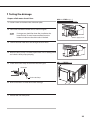
Testing the drainage
Prepare a little water about 2 liters.
1 Loosen screws and take out the side cover plate.
AMFNLD /
AM022/028/036FNMD
2 Pour water into the the indoor unit as shown in figure.
Note
Drainage test should be done after installation has
been finished. To avoid water overflow from the
indoor unit because the drain tube is blocked.
Water supply intake
3 Confirm that the water flows out through the drain hose.
4 When the drain pump is installed, operate the unit as cooling mode
and check a drain pump pumping.
5 Check drain water drops at the end of the drain pipe.
AMFNMD
Drainpipe
Drain water drops
6 Make sure there is no water leak at the drainage.
7 Reinstall the side cover plate.
25
Wiring
work
A
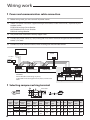
Power and communication cable connection
1
Before wiring work, you must turn off all power source.
2
Indoor unit power should be supplied through the breaker( ELCB or MCCB+ELB ) separated by the
outdoor power.
ELCB:Earth Leakage Circuit Breaker
MCCB:Molded Case Circuit Breaker
ELB:Earth Leakage Breaker
3
The power cable should be used only copper wires.
4
Connect the power cable{1(L), 2(N)} among the units within maximum length and communication
cable(F1, F2) each.
5
Connect F3, F4(for communication) when installing the wired remote control.
Outdoor Unit
Wired Remote
Control
220-240V~
or
ELCB
Indoor Unit 2
V2
L
V1
Indoor Unit 1
Indoor Unit 3
h ELCB : Essential Installation
WARNING :
Power off before connecting any wires;
Indoor PBA will be damaged while V1,V2,F3,F4 short each
other.
EEV kit
N
MCCB+
ELB
N
Indoor Unit 4
Indoor Unit 5
L
N
L
N
L
Indoor Unit 6
h Ceiling, wall-mounted indoor unit.
Selecting compressed ring terminal
Silver solder
B
D
d1
E
F
L
d2
t
Norminal Norminal
Standard
Standard
Standard
dimensions dimensions Standard
Allowance
Allowance
Allowance
Allowance
dimension
dimension
Min. Min. Max. dimension
Min.
for cable for screw dimension
(mm)
(mm)
(mm)
(mm)
(mm)
(mm)
(mm)
(mm)
(mm)
(mm2)
4
6.6
+0.3
+0.2
1.5
±0.2
3.4
1.7
±0.2
4.1
6
16
4.3
0.7
4
8
-0.2
0
4
6.6
+0.3
+0.2
2.5
±0.2
4.2
2.3
±0.2
6
6 17.5
4.3
0.8
4
8.5
-0.2
0
+0.3
+0.2
4
4
9.5
±0.2
5.6
3.4
±0.2
6
5
20
4.3
0.9
-0.2
0
26
Specification of electronic wire
Power supply
MCCB
Max : 242V
Min : 198V
XA
ELB or ELCB Power cable Earth cable
X A, 30mmA
0.1 s
2.5mm2
Communication cable
2.5mm2
0.75~1.5mm2
Decide the capacity of ELCB(or MCCB+ELB) by below formula.
Supply cords of parts of appliances for outdoor use shall not be lighter
Rating current
than polychloroprene sheathed flexible cord.
(Code designation IEC:60245 IEC 57 / CENELEC: H05RN-F )
The capacity of ELCB(or MCCB+ELB) X [A] = 1.25 X 1.1 X ∑Ai
Unit
Model
Rating
current
AMFNLD
022
028
036
045
056
0.30A
0.32A
0.33A
0.52A
0.53A
T X : The capacity of ELCB(or MCCB+ELB).
T ∑Ai : Sum of Rating currents of each indoor unit.
T Refer to each installation manual about the rating current of indoor unit.
Decide the power cable specification and maximum length within
10% power drop among indoor units.
n
Coef×35.6×Lk×ik
k=1
1000×Ak
∑(
AMFNMD
) < 10% of input voltage[V]
T coef: 1.55
T Lk: Distance among each indoor unit[m], Ak: Power cable specification[mm2]
ik: Running current of each unit[A]
Example of Installation
- Total power cable length L = 100(m), Running current of each units 1[A]
- Total 10 indoor units were installed
10[A]
ELCB
9[A]
071
090
112
128
140
0.60A
0.96A
0.96A
1.28A
1.43A
022
028
036
045
056
071
090
112
128
140
0.40A
0.40A
0.55A
1.15A
1.10A
1.25A
1.30A
1.17A
1.67A
1.86A
1[A]
or MCCB+
ELB
Indoor unit1
0[m]
10[m]
Indoor unit2
Indoor unit10
20[m]
100[m]
Apply following equation.
n
Coef×35.6×Lk×ik
k=1
1000×Ak
∑(
)<
10% of input
voltage[V]
hCalculation
Installing with 1 sort wire.
2.5[mm2]
2.5[mm2]
-2.2[V]
-2.0[V]
220[V]
208.8[V](Within 198V~242V)
it's okay
-(2.2+2.0+1.8+1.5+1.3+1.1+0.9+0.7+0.4+0.2)=-11.2[V]
Installing with 2 different sort wire.
4.0[mm2]
220[V]
············ 2.5[mm2] ············
-1.4[V]
4.0[mm2]
············ 2.5[mm2] ············
-1.2[V]
-(1.4+1.2+1.8+1.5+1.3+1.1+0.9+0.7+0.4+0.2)=-10.5[V]
209.5[V](Within 198V~242V)
it's okay
27
Wiring work(Contiued)
A
Select the power cable in accordance with relevant local and national regulations.
Wire size must comply with local and national code.
For the power cable, use the grade of H07RN-F or H05RN-F materials.
You should connect the power cable into the power cable terminal and fasten it with a clamp.
The unbalanced power must be maintained within 10% of supply rating among whole indoor
units.
If the power is unbalanced greatly, it may shorten the life of the condenser. If the unbalanced
power is exceeded over 10% of supply rating, the indoor unit is protected, stopped and the
error mode indicates.
To protect the product from water and possible shock, you should keep the power cable and
the connection cord of the indoor and outdoor units in the iron pipe.
Connect the power cable to the auxiliary circuit breaker.
An all pole disconnection from the power supply must be incorporated in the fixed
wiring(≥3mm).
You must keep the cable in a protection tube.
Keep distances of 50mm or more between power cable and communication cable.
Maximum length of power cables are decided within 10% of power drop. If it exceeds, you
must consider another power supplying method.
The circuit breaker(ELCB or MCCB+ELB) should be considered more capacity if many indoor
units are connected from one breaker.
Use round pressure terminal for connections to the power terminal block.
For wiring, use the designated power cable and connect it firmly, then secure to prevent outside pressure being exerted on the terminal board.
Use an appropriate screwdriver for tightening the terminal screws. A screwdriver with a small
head will strip the head and make proper tightening impossible.
Over-tightening the terminal screws may break them.
See the table below for tightening torque for the terminal screws.
Tightening torque
28
N•m
kgf•cm
M3.5
0.8~1.0
8.0~10.0
M4
1.2~1.5
12.0~14.7
Setting
an indoor unit address and
A
installation option
Set the indoor unit address and installation option with remote controller option.
Set the each option separately since you cannot set the ADDRESS setting and indoor unit installation setting
option at the same time. You need to set twice when setting indoor unit address and installation option.
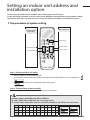
The procedure of option setting
Option setting mode
Entering mode for
option setting
Mode change
High Temp Button
High Fan Button
Low Temp Button
Low Fan Button
Step 1. Entering mode to set option
1. Remove batteries from the remote controller.
2. Insert batteries and enter the option setting mode while pressing High Temp button and Low Temp button.
3.
Check if you have entered the option setting status.
Step 2. The procedure of option setting
After entering the option setting status, select the option as listed below.
Option setting is available from SEG1 to SEG 24
SEG1, SEG7, SEG13, SEG19 are not set as page option.
Set the SEG2~SEG6, SEG8~SEG12 as ON status and SEG14~18, SEG20~24 as OFF status.
SEG1 SEG2 SEG3 SEG4 SEG5 SEG6 SEG7 SEG8 SEG9 SEG10 SEG11 SEG12
0
X
X
X
X
X
1
X
X
X
X
On(SEG1~12)
Off(SEG13~24)
X
SEG13 SEG14 SEG15 SEG16 SEG17 SEG18 SEG19 SEG20 SEG21 SEG22 SEG23 SEG24
2
X
X
X
X
X
3
X
X
X
X
X
29
Setting
an indoor unit address and
A
installation option (Contiued)
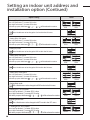
Option setting
1. Setting SEG2, SEG3 option
Press Low Fan button(∨) to enter SEG2 value.
Press High Fan button(∧) to enter SEG3 value.
Each time you press the button, … will be selected in rotation.
Status
SEG2
SEG3
SEG4
SEG5
SEG6
SEG8
SEG9
SEG10
SEG11
SEG12
SEG14
SEG15
2. Setting Cool mode
Press Mode button to be changed to Cool mode in the ON status.
3. Setting SEG4, SEG5 option
Press Low Fan button(∨) to enter SEG4 value.
Press High Fan button(∧) to enter SEG5 value.
Each time you press the button, … will be selected in rotation.
4. Setting Dry mode
Press Mode button to be changed to DRY mode in the ON status.
5. Setting SEG6, SEG8 option
Press Low Fan button(∨) to enter SEG6 value.
Press High Fan button(∧) to enter SEG8 value.
Each time you press the button, … will be selected in rotation.
6. Setting Fan mode
Press Mode button to be changed to FAN mode in the ON status.
7. Setting SEG9, SEG10 option
Press Low Fan button(∨) to enter SEG9 value.
Press High Fan button(∧) to enter SEG10 value.
Each time you press the button, … will be selected in rotation.
8. Setting Heat mode
Press Mode button to be changed to HEAT mode in the ON status.
9. Setting SEG11, SEG12 option
Press Low Fan button(∨) to enter SEG11 value.
Press High Fan button(∧) to enter SEG12 value.
Each time you press the button, … will be selected in rotation.
10. Setting Auto mode
Press Mode button to be changed to AUTO mode in the OFF status.
11. Setting SEG14, SEG15 option
Press Low Fan button(∨) to enter SEG14 value.
Press High Fan button(∧) to enter SEG15 value.
Each time you press the button, … will be selected in rotation.
30
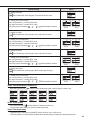
Option setting
Status
12. Setting Cool mode
Press Mode button to be change to Cool mode in the OFF status.
13. Setting SEG16, SEG17 option
Press Low Fan button(∨) to enter SEG16 value.
Press High Fan button(∧) to enter SEG17 value.
Each time you press the button, … will be selected in rotation.
SEG16
SEG17
SEG18
SEG20
SEG21
SEG22
SEG23
SEG24
14. Setting Dry mode
Press Mode button to be change to Dry mode in the OFF status.
15. Setting SEG18, SEG20 option
Press Low Fan button(∨) to enter SEG18 value.
Press High Fan button(∧) to enter SEG20 value.
Each time you press the button, … will be selected in rotation.
16. Setting Fan mode
Press Mode button to be change to Fan mode in the OFF status.
17. Setting SEG21, SEG22 option
Press Low Fan button(∨) to enter SEG21 value.
Press High Fan button(∧) to enter SEG22 value.
Each time you press the button, … will be selected in rotation.
18. Setting Heat mode
Press Mode button to be change to HEAT mode in the OFF status.
19. Setting SEG23, SEG24 mode
Press Low Fan button(∨) to enter SEG23 value.
Press High Fan button(∧) to enter SEG24 value.
Each time you press the button, … will be selected in rotation.
Step 3. Check the option you have set
After setting option, press
button to check whether the option code you input is correct or not.
Step 4. Input option
Press operation button
with the direction of remote control for set.
For the correct option setting, you must input the option twice.
Step 5. Check operation
1. Reset the indoor unit by pressing the RESET button of indoor unit or outdoor unit.
2. Take the batteries out of the remote controller and insert them again and then press the operation button.
31
Setting
an indoor unit address and
A
installation option (Contiued)
Setting an indoor unit address (MAIN/RMC)
Indoor Unit
1(L)
2(N)
1. Check whether power is supplied or not.
F2
F1
- When the indoor unit is not plugged in, there should be additional
power supply in the indoor unit.
2. The panel(display) should be connected to an indoor unit to receive option.
3. Before installing the indoor unit, assign an address to the indoor unit according
to the air conditioning system plan.
4. Assign an indoor unit address by wireless remote controller.
- The initial setting status of indoor unit ADDRESS(MAIN/RMC) is “0A0000-100000-200000-300000”.
Option No. : 0AXXXX-1XXXXX-2XXXXX-3XXXXX
Option
Explanation
SEG1
PAGE
SEG2
Mode
SEG3
SEG4
100-digit of indoor
Setting Main address
unit address
SEG5
SEG6
10-digit of indoor
unit
The unit digit of
an indoor unit
Remote
Controller
Display
Indication Details Indication Details Indication Details Indication Details Indication Details Indication Details
Indication
and Details
0
Option
SEG7
Explanation
PAGE
0
No Main
address
1
Main
address
setting
mode
A
SEG8
SEG9
0~9
100-digit
SEG10
Setting RMC address
0~9
10-digit
0~9
A unit
digit
SEG11
SEG12
Group channel(*16)
Group address
Remote
Controller
Display
Indication Details
Indication
and Details
__
Indication Details
0
No RMC
address
1
RMC
address
setting
mode
1
__
Indication Details Indication Details
RMC1
0~2
RMC2
0~F
When “A”~”F” is entered to SEG5~6, the indoor unit MAIN ADDRESS is not changed.
If you set the SEG 3 as 0, the indoor unit will maintain the previous MAIN ADDRESS even if you input the option value of SEG5~6.
If you set the SEG 9 as 0, the indoor unit will maintain previous RMC ADDRESS even if you input the option value of SEG11~12.
You cannot set SEG11 and SEG12 as F value at the same time.
32
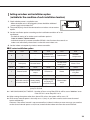
Setting an indoor unit installation option
(suitable for the condition of each installation location)
1. Check whether power is supplied or not.
Indoor Unit
- When the indoor unit is not plugged in, there should be additional
power supply in the indoor unit.
1(L)
2(N)
F2
F1
2. The panel(display) should be connected to an indoor unit to receive
option.
3. Set the installation option according to the installation condition of an air conditioner.
- The default setting of an indoor unit installation option is
“020010-100000- 200000-300000”.
- Individual control of a remote controller(SEG20) is the function that controls an
indoor unit individually when there is more than one indoor unit.
4. Set the indoor unit option by wireless remote controller.
02 series installation option
SEG1
SEG2
SEG3
SEG4
SEG5
SEG6
0
2
--
External room
temperature sensor
Central control
SEG7
SEG8
SEG9
SEG10
SEG11
SEG12
1
Drain pump
Hot water heater
--
EEV Step when
heating stops
Master / Slave
SEG13
SEG14
SEG15
SEG16
SEG17
SEG18
2
External control
External control
output
S-Plasma ion
Buzzer
Number of hours
using filter
SEG19
SEG20
SEG21
SEG22
SEG23
SEG24
3
Individual control of
a remote controller
Heating setting
compensation
EEV Step of stopped
unit during oil
return/defrost mode
Motion detect
sensor
--
FAN RPM
compensation
1WAY/2WAY/4WAY MODEL : Drain pump(SEG8) will be set to ‘USE + 3minute delay’ even if the drain
pump is set to 0.
1 WAY/2WAY/4WAY,DUCT MODEL : Number of hours using filter(SEG18) will be set to ‘1000hour’ even
if the SEG18 is set to exept for 2 or 6.
When setting the option other than above SEG values, the option will be set as “0”.
SEG5 central control option is basically set as 1 (Use), so you don’t need to set the central control
option additionally.
However, if the central control is not connected but it doesn’t indicate an error message, you need to
set the central control option as 0 (Disuse) to exclude the indoor unit from the central control.
33
Setting an indoor unit address and
A
installation
option (Contiued)
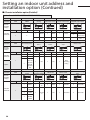
02 series installation option(Detailed)
Option No. : 02XXXX-1XXXXX-2XXXXX-3XXXXX
Option
SEG1
SEG2
Explanation
PAGE
MODE
SEG3
Use of robot
cleaning
SEG4
Use of external room
temperature sensor
SEG5
SEG6
Use of central control
FAN RPM compensation
Remote
Controller
Display
Indication Details Indication Details Indication Details Indication Details Indication
Details
0
Indication
and Details
0
2
Disuse
0
Option
SEG7
SEG8
SEG9
Use
1
SEG10
Explanation
PAGE
Use of drain pump
Use of hot water
heater
Use of electronic
heater
1
Disuse
0
Disuse
Use
1
Use
Indication
0
1
2
SEG11
EEV Step when heating
stops
Details
Disuse
RPM
compensation
High ceiling
KIT
SEG12
Master / Slave
Remote
Controller
Display
Indication
and Details
Indication Details Indication Details Indication Details Indication Details Indication
Details
Indication
0
Disuse
0
Disuse
0
Disuse
0
Default value
0
1
1
Option
Option
SEG13
Explanation
PAGE
Details
slave
Use
When an
indoor unit
1
Use
stops, drain
2
pump will
operate for
3min
SEG14
SEG15
Use of external
Setting the output
control
of external control
1
Use
Noise
decreasing
setting
1
SEG16
SEG17
S-Plasma ion
Buzzer control
1
master
SEG18
Number of hours using
filter
Remote
Controller
Display
Indication Details Indication Details Indication Details Indication Details Indication
0
Indication
and Details
1
2
2
3
34
Disuse
0
Thermo
on
ON/OFF
control
OFF
control
Window
ON/OFF
control
1
Operation
on
0
Disuse
1
Use
Details
Indication
Details
0
Use buzzer
2
1000 Hour
1
Disuse buzzer
6
2000 Hour
Option
Explanation
SEG19
PAGE
SEG20
Individual control of
a remote controller
SEG21
SEG22
SEG23
SEG24
Heating setting
compensation
EEV Step of stopped
unit during oil return/
defrost mode
Motion detect sensor
-
Remote
Controller
Display
Indication Details Indication Details Indication Details Indication
Details
0 or 1
channel 1
0
Disuse
Default
value
2
channel 2
1
2°C
3
channel 3
0
Indication
0
1
2
3
4
Indication
and Details
5
3
1
2
4
5°C
channel 4
Oil return
or Noise
decreasing
in defrost
mode
6
7
8
Details
Disuse
Turn out in 30min.
without motion
Turn out in 60min.
without motion
Turn out in 120min.
without motion
Turn out in 180min.
without motion
Turn out in 30min.
without motion
or *advanced
function
Turn out in 60min.
without motion
or *advanced
function
Turn out in 120min.
without motion
or *advanced
function
Turn out in 180min.
without motion
or *advanced
function
* Advanced function: Controlling cooling/heating current or power saving with motion detect.
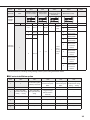
05 series installation option
SEG1
0
SEG7
1
SEG2
SEG3
SEG4
SEG5
SEG6
(When setting SEG3)
(When setting SEG3)
(When setting SEG3)
Use of Auto Change Over
Standard heating temp. Standard cooling temp. Standard for mode change
5
for HR only in Auto mode
Offset
Offset
Heating → Cooling
SEG8
SEG9
SEG10
SEG11
SEG12
Compensation option for
(When setting SEG3)
(When setting SEG3)
Long pipe or height
Standard for mode change Time required for mode
difference between
Cooling → Heating
change
indoor units
SEG13
SEG14
SEG15
SEG16
SEG17
SEG18
2
-
-
-
-
-
SEG19
SEG20
SEG21
SEG22
SEG23
SEG24
3
-
-
-
-
-
35
Setting an indoor unit address and
A
installation option (Contiued)
05 series installation option(Detailed)
Option No. : 05XXXX-1XXXXX-2XXXXX-3XXXXX
Option
Explanation
SEG1
SEG2
PAGE
SEG3
SEG4
Use of Auto Change
Over for HR only in
Auto mode
MODE
SEG5
(When setting SEG3)
Standard heating
temp. Offset
SEG6
setting SEG3)
(When setting SEG3) (When
Standard for mode
Standard cooling
change
temp. Offset
Heating → Cooling
Remote
Controller
Display
Indication Details Indication Details Indication Details Indication
0
Indication
and Details
0
5
1
Option
Explanation
SEG7
PAGE
SEG8
Details
Indication Details Indication Details
Follow
product
option
0
0
0
0
0
1
Use Auto
Change
Over for
HR only
1
2
3
4
5
6
7
0.5
1
1.5
2
2.5
3
3.5
1
2
3
4
5
6
7
0.5
1
1.5
2
2.5
3
3.5
1
2
3
4
5
6
7
1.5
2
2.5
3
3.5
4
4.5
SEG9
SEG10
SEG11
SEG12
(When setting SEG3)
Compensation option
(When setting SEG3)
Standard for mode
for Long pipe or height
Time required for
changing Cooling →
diffference between
mode change
Heating mode
indoor units
Remote
Controller
Display
Indication Details Indication Details Indication Details Indication
Indication
and Details
1)
0
1
0
5 min.
1
1.5
1
7 min.
2
2
2
9 min.
3
2.5
3
11 min.
4
3
4
13 min.
5
3.5
5
15 min.
6
4
6
20 min.
7
4.5
7
30 min.
0
1
1
2
Details
Use default
value
1) Height
difference1)
is more than
30m or
2) Distance2)
is longer
than 110m
1) Height
difference1) is
15~30m or
2) Distance2)
is 50~110m
Height difference : The difference of the height between the corresponding indoor uint and the indoor unit installed at the lowest place.
For example, When the indoor unit is installed 40m higher than the indoor unit installed at the lowest place, select the option "1".
Distance : The difference between the pipe length of the indoor unit istalled at farthest place from an outdoor unit and the pipe length of the
corresponding indoor unit from an outdoor unit.
For example, when the farthest pipe length is 100m and the corresponding indoor unit is 40m away from an outdoor unit, select the option
"2". (100 - 40 = 60m)
2)
36
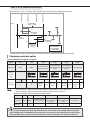
SEG 3, 4, 5, 6, 8, 9 additional information
Heating Thermo On
Heating Thermo Off
Cooling Thermo On
Cooling Thermo Off
When the SEG 3 is set as "1" and follow Auto Change Over for HR only operation, it will operate as follows.
Standard temp. for
Heating → Cooling
Temp.
c
b
Standard temp.
for Cooling
Ts
B
C
D
A
Set temp.
for Auto mode
a
Standard temp.
for Heating
d
Standard temp.
for Cooling →
Heating
A : Set with SEG4(˚C)
B : Set with SEG5(˚C)
C : Set with SEG6(˚C)
D : Set with SEG8(˚C)
Cooling/Heating mode can be changed when Thermo Off status is maintained during the time with SEG9.
Changing a particular option
You can change each digit of set option.
Option
SEG1
SEG2
SEG3
Explanation
PAGE
MODE
SEG4
SEG5
SEG6
The tens’ digit of an The unit digit of an
The option mode
option SEG you will option SEG you will
you want to change
change
change
Changed value
Remote
Controller
Display
Indication Details Indication Details Indication Details Indication Details Indication Details Indication Details
Indication
and Details
Note
0
D
Option
mode
1~6
Tens’ digit
of SEG
0~9
Unit digit
of SEG
0~9
The
changed
value
0~F
• When changing a digit of an indoor unit address setting option, set the SEG3 as ‘A’.
• When changing a digit of indoor unit installation option, set the SEG3 as ‘2’.
Ex) When setting the ‘buzzer control’ into disuse status.
Option
SEG1
SEG2
Explanation
PAGE
MODE
Indication
0
D
SEG3
SEG4
The tens’ digit of an
The option mode you
option SEG you will
want to change
change
2
1
SEG5
SEG6
The unit digit of an
option SEG you will
change
Changed value
7
1
If you are using heat pump model, mixed operation mode (two or more indoor units operating in different operation
mode simultaneously) is not available when the indoor units are connected to same outdoor unit. If you set the master
indoor unit with a remote controller, outdoor unit will operate in the mode which was set in the master indoor unit.
37
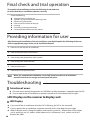
Final check and trial operation
To complete the installation, perform the following checks and tests
to ensure that the air conditioner operates correctly.
Check the following:
Strength of the installation site
Tightness of pipe connection to detect gas leak
Electric wiring connection
Heat-resistant insulation of the pipe
Drainage
Grounding conductor connection
Correct operation (follow the steps below)
Providing information for user
After finishing the installation of the air conditioner, you should explain the following to the user.
Refer to appropriate pages in the user & installation manual.
1
How to start and stop the air conditioner
2
How to select the modes and functions
3
How to adjust the temperature and fan speed
4
How to adjust the airflow direction
5
How to set the timers
6
How to clean and replace the filters
Note
W
hen you complete the installation successfully, hand over the user & installation
manual to the user for storage in a handy and safe place.
Troubleshooting
Detection of errors
If an error occurs during the operation, an LED flickers and the operation is stopped except the LED.
If you re-operate the air conditioner, it operates normally at first, then detect an error again.
LED Display on the receiver & display unit
LED Display
If you turn off the air conditioner when the LED is flickering, the LED is also turned off.
If you re-operate the air conditioner, it operates normally at first, then detect an error again.
When E108 error occurs, change the address and reset the system.Ex.) When address of the indoor
unit #1 and #2 are set as 5, address of the indoor unit #1 will become 5 and indoor unit #2 will
display E108, A002.
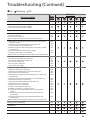
38
Troubleshooting (Contiued)
On
Flickering
Off
Abnormal condition
Error
code
Error on indoor temperature sensor (Short or Open)
E121
1. Error on Eva-in sensor (Short or Open)
2. Error on Eva-out sensor (Short or Open)
3. Discharge sensor error (Short or Open)
E122
E123
E126
Indoor fan error
E154
1. Error on outdoor temperature sensor (Short or Open)
2. Error on cond sensor
3. Error on discharge sensor
Other outdoor unit sensor error that is not on the above list
E221
E237
E251
1. When there is no communication between the indoor∙outdoor
units for 2 minutes
2. Communication error received from the outdoor unit
3. 3 miniute tracking error on outdoor unit
4. Communication error after tracking due to unmatching number
of installed units
5. Error due to repeated communication address
6. Communication address not confirmed
Other outdoor unit communication error that is not on the above list
E101
Self diagnosis error display
1. Error due to opened EEV (2nd detection)
2. Error due to closed EEV (2nd detection)
3. Eva in sensor is detached
4. Eva out sensor is detached
5. Thermal fuse error (Open)
LED Display
E102
E202
E201
E108
E109
E151
E152
E128
E129
E198
1. COND mid sensor is detached
2. Refrigerant leakage (2nd detection)
3. Abnomally high temperature on Cond (2nd detection)
4. Low pressure s/w (2nd detection)
5. Abnomally high temperature on discharged air on outdoor unit
(2nd detection)
6. Indoor operation stop due to unconfirmed error on outdoor unit
7. Error due to reverse phase detection
8. Comp stop due to freeze detection (6th detection)
9. High pressure sensor is detached
10. Low pressure sensor is detached
11. Outdoor unit copression ration error
12. Outdoor sump down_1 prevetion control
13. Compressor down due to low pressure sensor prevention
control_1
14. Simultaneous opening of cooling/heating MCU SOL valve
(1st detection)
15. Simultaneous opening of cooling/heating MCU SOL valve
(2nd detection)
Other outdoor unit self-diagnosis error that is not on the above list
E241
E554
E450
E451
E416
Flowating s/w (2nd detection)
E153
EEPROM error
E162
EEPROM option error
E163
Error due to incompatible indoor unit
E164
E559
E425
E403
E301
E306
E428
E413
E410
E180
E181
39
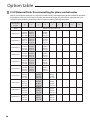
Option
table
A
E.S.P(External Static Pressure)setting for phase control motor
With its phase control motor,you can adjust the indoor unit fan speed depending on the installation condition.
If the external static pressure is high so that the duct becomes longer or if the external static pressure is low
so that the duct becomes shorter,adjust the fan speed by referring the following table.
Static Pressure
(mmAq)
0
2
3
Model
AM022FNLD
AM028FNLD
AM036FNLD
AM045FNLD
AM056FNLD
AM071FNLD
AM090FNLD
AM112FNLD
AM128FNLD
AM140FNLD
40
4
6
8
10
12
14
Option code for indoor unit
010054- 010054125A80- 125AC3_
201616- 201616331110
331110
010054- 010054125AE2- 125E15_
201C1C- 201C1C331110
331110
010054- 010054125E35- 125E68_
202424- 202424331110
331110
010054- 01005412599F- 125AE2_
202D2D- 202D2D331110
331110
010054- 010054125AC1- 125E34_
203838- 203838331110
331110
010054- 0100541259BB- 125D9E_
204747- 204747331110
331110
0100540100541B5AD41B596C_
205A5A205A5A331110
331110
0100540100541B5AD41B596C_
207070207070331110
331110
0100540100541B5E4B1B5AF5_
208080208080331110
331110
0100540100541B5E7F1B5E34_
208C8C208C8C331110
331110
010054125E08201616331110
010054125E7A201C1C331110
010054125ECD202424331110
010054125EF6202D2D331110
010054125EF9203838331110
010054125EF4204747331110
_
_
_
_
_
_
_
_
_
_
_
_
_
_
_
_
_
_
_
_
_
_
_
_
_
_
_
_
_
_
_
_
_
_
_
_
_
_
_
_
_
_
_
_
_
_
_
_
_
_
0100541B5E2A205A5A331110
0100541B5E2A207070331110
0100541B5E8F208080331110
0100541B5FC3208C8C331110
Static Pressure
(mmAq)
0
2
3
Model
6
8
10
12
14
_
_
_
_
_
_
_
_
_
_
_
_
_
_
_
_
_
_
_
_
_
_
_
_
010054122FF0207070331110
010054122AE2208080331110
010054122FF0207070331110
010054122E14208080331110
Option code for indoor unit
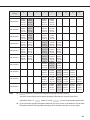
AM022FNMD
AM028FNMD
AM036FNMD
AM045FNMD
AM056FNMD
AM071FNMD
AM090FNMD
010054- 0100541350B6- 1350EA201616- 201616331110 331110
0100541350E8201C1C331110
0100541350EA202424331110
010054125550202D2D331110
010054125571203838331110
010054125904204747331110
01005413542C201C1C331110
0100541350FB202424331110
010054125571202D2D331110
010054125593203838331110
010054125936204747331110
_
_
_
_
_
_
_
_
_
AM112FNMD
_
_
_
AM128FNMD
_
_
_
AM140FNMD
_
_
_
Note
4
01005413541E201616331110
0100541355E4201616331110
010054135562201C1C331110
01005413542C202424331110
010054125583202D2D331110
0100541255C5203838331110
010054125979204747331110
010054125945205A5A331110
010054122E04207070331110
01005412296C208080331110
0100541359A9201C1C331110
0100541354CF202424331110
0100541255A4202D2D331110
0100541255F5203838331110
010054125DF9204747331110
010054125D29205A5A331110
010054122E26207070331110
01005412299E208080331110
010054125906202D2D331110
010054125957203838331110
010054125DFC204747331110
010054125DFD205A5A331110
010054122EBB207070331110
010054122AB0208080331110
0100541229CF208C8C331110
010054122AF2208C8C331110
010054- 010054- 010054- 010054122E24- 122E47- 122EAA- 122EFC208C8C- 208C8C- 208C8C- 208C8C331110 331110 331110 331110
_
010054122E36208080331110
represents E.S.P(External Static Pressure)range of factory setting.
You don’t have to adjust the fan speed separately if the external static pressure of the
installation place is in
. When it is out of
, input the appropriate option code.
If you input the inappropriate option code,error may occur or the air conditioner is out of order.
The option code must be inputted correctly by the installation specialist or service agent.
41
"EEE Yönetmeliğine Uygundur"
"This EEE is compliant with RoHS"
Duct Type Series
Slim Duct : AM***FNLD***
AM022/028/036FNMD***
Ma Duct : AM***FNMD***
Air Conditioner
installation manual
imagine the possibilities
Thank you for purchasing this Samsung product.
To receive more complete service, please
register your product at
www.samsung.com/register
EN DB68-03634A-1