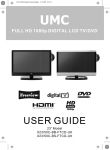
1
HD Ready LCD TV with Freeview & DVD
User Guide
Model No
X22/16B-GB-TCD-UK
universal english manual 02.pdf 6. 2. 2009 11:06:30
2
universal english manual 03.pdf 6. 2. 2009 11:07:02
Important information regarding the digital TV switchover
Television in the UK is going digital, bringing us all more choice and new services. Starting late
2007 and ending in 2012, television services in the UK will go completely digital, TV region by TV region.
How the switchover affects your TV equipment.
Your new TV has a digital tuner built in, which means it is ready to receive the Freeview signal by simply
connecting it into your aerial socket (you can check if you can get digital TV through your aerial now or
whether you will have to wait until the switchover at www.digitaluk.co.uk)
When the TV switchover happens in your area, there are at least two occasions when you will need to re-tune
your TV in order to continue receiving your existing TV channels and also to pick up new ones. Digital UK, the
body leading the digital switchover, will advise you when you need to retune during the switchover.
How to retune.
Retuning your TV is a very quick and simple process. We recommend that you retune
every few months to ensure you are receiving the very latest TV and radio channels
that are broadcast.
• In digital/freeview mode, on the remote control press ‘menu’ quickly followed by 8-8-8-8 (so
press the number 8 four times)
• You will now enter the ‘First time installation’ mode. (if you do not, please refer to the section
called ‘getting started’ later in this user guide)
First Time Installation
Country
UK
Language
English
Please ensure that the aerial is connected to the connector
labelled ‘ RF In ’ on the rear of the TV .Ensure that OK is
highlighted in yellow and press ‘OK’ on your remote .If after
this scan ,not all digital channels are found ,your aerial may
require a signal booster .alternatively ,upgrade your aerial
to a high gain digital version .
OK
Cancel
• Simply press ‘OK’ or ‘Enter’ on the remote control and your TV will retune.
If you do not retune your TV when advised to do so by Digital UK, you may lose some or all of your channels
until you do re-tune.
If you are missing any channels, it may be that they are not available in your area, or that your TV aerial
needs upgrading.
For help and support regarding the digital switchover, please contact Digital UK:
Telephone: 08456 50 50 50 (calls charged at local call rate, approx 3p per minute daytime or 1p per minute evenings from a BT landline)
Digital UK website: www.digitaluk.co.uk
If you require technical or warranty support on this television, please contact the manufacturer helpline, do
not contact Digital UK unless your query is regarding the digital switchover.
3
universal english manual 04.pdf 6. 2. 2009 11:07:23
WARNINGS
Caution
This television contains no user serviceable parts. Please refer to the manufacturer
or authorised repair agent in the event of malfunction. Do not remove the back cover
from the television.
Warning
To reduce the risk of fire, electric shock or damage to the television, do not expose
it to dust, rain or moisture, or place any objects filled with liquids on or near the television.
Do not place the television in a confined space, ensure that nothing can obstruct
the ventilation openings at the rear of the television.
Do not place naked flames on or near the television.
Dispose of this television and any components including batteries in an environmentally
friendly manner. If in doubt, please contact your local authority for details of recycling.
Your LCD TV should be cleaned using a dry or slightly damp cloth. You should not use
an alcohol based cleaner
Safety
For your safety, this appliance is fitted with a fused moulded 3 pin mains plug. Should
the fuse need to be replaced, ensure that any replacement is of the same amperage
and approved with the BSI mark. ( )
Never try and replace the mains plug unless you have adequate qualifications and are
legally authorised to do so. In the event that a replacement Mains cable is required,
contact the manufacturer for a suitable replacement.
Never use the television if it is damaged in any way.
Always place the television on a flat level surface avoiding anywhere which may
be subject to strong vibration. Ensure the television is not placed on top of the power
cable as the weight of the television may damage the cable and cause a safety hazard.
Never place mobile phones, speakers or any other device which may cause magnetic
or radio interference with the television. If interference is apparent, move the device
causing the interference away from the television.
Packaging
Please save the packaging for the television as you will need this in the event
of warranty/service repair or support. We are unable to carry out warranty/service
if you are unable to package it correctly. The safest way to package your item in the
event of warranty/service repair is in its original box/packaging
4
universal english manual 05.pdf 6. 2. 2009 11:07:47
5
universal english manual 06.pdf 6. 2. 2009 11:08:09
6
22_16 english manual 07.pdf 10. 2. 2009 13:04:22
CONTENTS
-
Important Guarantee Information
Digital Switchover information
Warnings
Contents
1
2-3
4-5
7
SETTING UP YOUR TV
- What is included in the box
- Removing the stand & wall
mounting
- Initial Set Up
- Remote control buttons and their
functions
- TV buttons and their functions
- Changing Source
- Inputs and Connections
12
13
14
14
TV MENU OPERATION
- Using the TV menu
- Picture Settings Menu
- Picture Mode Presets
- Brightness
- Colour Settings
- Tint
- Sharpness
- Colour Temperature
- Dynamic Noise Reduction
- Sound Settings Menu
- Volume
- Sound Mode Presets
- Bass
- Treble
- Balance
- Tuning Settings Menu
- Adjusting Country
- Auto Tuning
- Manual Tuning
- Program Edit / Channel Position
- Common Inferface Slot
- Timer Settings Menu
- Sleep Timer
- On Screen Display Timer
15
16
16
16
16
16
16
16
16
17
17
17
17
17
17
18
18
18
18
18
18
19
19
19
9
10
11
- General Settings Menu
- On Screen Display Language
- Picture Format
- Blue Screen
- Child Lock / Key Lock
- First Time Installation
- Reset Television
20
20
20
20
20
20
20
CHANNEL SERVICES
- Using Digital TV teletext
- Using Electronic Program Guide
- Using Analogue TV teletext
20
20
21
DVD MENU OPERATION
- System Set Up
- Adjusting TV System
- Adjusting Picture Format
- Return to Default
- Audio Set Up
- Adjusting Tone
- Digital Set Up
- Adjusting Dynamic Range
- Adjusting the sound
- Changing Regions
22
22
22
22
23
23
23
23
23
23
PC OPERATION
- Connecting to a PC
- PC Menu Settings
24
25
CONNECTING A GAMES CONSOLE
- Nintendo Wii
- PlayStation 3
- Xbox 360
26
26
26 - 27
GENERAL INFORMATION
- Connecting to a cable/satellite box
- Trouble Shooting
- Technical Specifications
- Index
28
29
30
31
If you experience any problems with this Television,
Please contact the helpline.
Customer Support/Technical Helpline
Sky Media UK LTD
Telephone: 0871 2000 463
Email: [email protected]
7
universal english manual 08.pdf 6. 2. 2009 11:09:22
8
19_16 english manual 09.pdf 10. 2. 2009 11:54:46
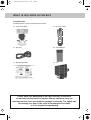
WHAT IS INCLUDED IN THE BOX
Accessories
Included with this TV are the following accessories:
1x - User Guide Book
1x - Remote control
DISPLAY
PICTURE
FORMAT
1x - RF lead
2x - AAA batteries
1x - Quick Start Guide
1x - TV
Please save your packaging as you will need this in the event
of warranty/service repair or support. We are unable to carry out
warranty/service if you are unable to package it correctly. The safest way
to package your item in the event of warranty/service repair
is in it’s original box/packaging.
9
22_16 english manual 10.pdf 10. 2. 2009 13:06:03
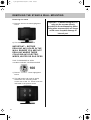
REMOVING THE STAND & WALL MOUNTING
Removing the stand
1) Remove the two screws highlighted
below
2) The stand will now come off
IMPORTANT— BEFORE
DRILLING ANY HOLES IN THE
WALL ENSURE YOU ARE NOT
DRILLING WHERE THERE
COULD BE ANY ELECTRIC
WIRES, WATER OR GAS PIPES
THIS TV REQUIRES A VESA
100 WALL MOUNT, OR EQUIVALENT
100
1) Remove the four screws highlighted
below.
2) The wall mount can now be easily
attached to the mounting holes
on the rear of the TV. These holes are
indicated in the picture below
10
Important – If wallmounting this TV,
only use the screws already
provided in the wallmounting holes.
Using other screws which are longer
could cause irrepable damage to
internal part.
universal english manual 11.pdf 6. 2. 2009 11:33:29
GETTING STARTED - INITIAL SET UP
IMPORTANT - AFTER TUNING DO NOT PRESS ANY BUTTONS FOR 20 SECONDS SO THE CHANNEL
INFORMATION CAN BE STORED.
TUNING IN
IMPORTANT — Please ensure the TV has
reached room temperature before
connecting the power for the first time
1) Connect the mains lead to your electrical outlet
2) Connect the RF Cable supplied to the
'RF' on the rear of the TV and connect
the other end of the cable to your TV Aerial outlet
If no channels are found the following screen will appear,
please refer to additional information below.
First Time Installation
Unfortunately the TV did not find any channels.
Please check your aerial connection
and refer to the user manual.
Do you wish to re tune your TV.
Yes
Do it next time
No
TYPICAL SET-UP
3) Switch on the TV using the power switch on the
rear of the television.
4) Install batteries in the remote control and press
the [STANDBY] button to turn on the TV.
Connect between TV and TV
Aerial socket
Signal Booster
Once you have connected a 'Signal booster' you will need
to retune the TV in order to receive all of the channels.
The ‘First Time Installation’ menu should
now appear. If it does not, please press
[LCD-MENU] then 8-8-8-8 and the menu will appear.
5) Press [OK] on the remote control whilst ‘OK’
is highlighted on screen.
First Time Installation
Country
UK
Language
English
Please ensure that the aerial is connected to the connector
labelled ‘ RF In ’ on the rear of the TV .Ensure that OK is
highlighted in yellow and press ‘OK’ on your remote .If after
this scan ,not all digital channels are found ,your aerial may
require a signal booster .alternatively ,upgrade your aerial
to a high gain digital version .
OK
Cancel
Tuning will now take place.
Additional Information - If the TV finds some, but not all, of the Digital channels,
the TV is functioning correctly but the signal being received is not strong enough.
(The signal strength needs to be above 85% - you can see the signal strength
the TV is receiving when you change channels/ programmes) you will
need to increase the signal reception in order to recieve all of the channels
available. The most economical way to do this is by purchasing
and connecting a 'signal booster' in between the TV and the TV aerial socket.
If this does not solve the problem, you will need to upgrade the TV
aerial to a digital hi-gain compatible aerial
11
universal english manual 12.pdf 6. 2. 2009 13:49:14
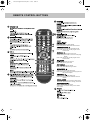
REMOTE CONTROL BUTTONS
DISPLAY
Digital mode: Exit the Digital menu.
DVD mode: Stop the DVD playing.
Digital mode: press to select NICAM.
DVD mode: press to select DVD audio channels.
GUIDE
Teletext mode: press to enter the teletext mode.
DVD mode: press to play a DVD program in fast
rewind mode.
PICTURE
FORMAT
Digital mode: press to display FAV menu.
Teletext mode: press hold on or off for current page
display.
DVD mode: press to play a DVD program in fast
forward mode
CH
VOL
VOL +/-
GUIDE
Digital mode: decrease fav channel.
DVD mode: press to go to DVD.
Digital mode: increase fav channel.
DVD mode: select different angle of DVD
CH +/-
Teletext mode: request the index page.
DVD mode: press to replay the current program from
the previous chapter.
Teletext mode: change the display size.
DVD mode: press to advance forward to the next
chapter.
Teletext mode: To reveal or hide the hidden words.
DVD mode: select the zoom to change picture size.
DVD mode: Sub coded page access.
Teletext mode: To switch the dialogue at the bottom
off the screen
12
22_16 english manual 13.pdf 10. 2. 2009 12:02:08
TV BUTTONS & THEIR FUNCTIONS
TOP PANEL BUTTONS
1
Select the input source
2
Displays Menu/OSD
3
Program/Channel down and menu down
4
Program/Channel up and menu up
5
Volume down and menu down
6
Volume up and menu up
7
DVD - Play/Pause
8
DVD - Eject
9
Switch between standby and television on
1
2
SOURCE MENU
3
CH-
4
CH+
5
VOL-
6
VOL+
7
8
9
STANDBY
13
22_16 english manual 14.pdf 10. 2. 2009 12:03:32
INPUTS & CONNECTIONS
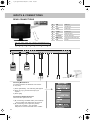
REAR CONNECTIONS
CI Port
HDMI
A
HDMI
VGA
B
VGA
SCART
S-VIDEO
YPbPr
VGA AUDIO
YPbPr/S-VIDEO AUDIO
RF IN
C
D
E
F
G
H
SCART
S-VIDEO
YPbPr
VGA AUDIO
A
HDMI
HDMI input
B
VGA
VGA-PC input
C
SCART
SCART input
D
S-VIDEO
S-Video input
E
YPbPr
Component input
F
VGA AUDIO
VGA-PC Audio input
G
YPbPr/S-VIDEO
AUDIO
Component/S-Video Audio input
H
RF IN
RF input
YPbPr/S-VIDEO AUDIO
RF IN
Connect between TV
and TV Aerial socket
Signal Booster
Choosing Mode/Source
To switch between the different connections
is very easy.
1) Press [SOURCE] - The following will appear
2) Press [\/] or [/\] to select the input you
require.
3) Press [OK]
Connecting HD Ready Devices
There are two options for HD.
1) By connecting via HDMI cable (not included)
– this provides both HD picture and sound.
2) By connecting via Component (YPbPr)
cable (not included) – this provides
HD picture. Source should be set to YPbPr.
14
22_16 english manual 15.pdf 11. 2. 2009 10:31:03
TV MENU OPERATION
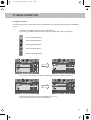
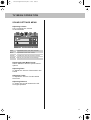
Using the TV menu
The following section will explain how to operate before explaining all the options available
to you.
1) Press [LCD MENU] and the menu will appear
2) Press [>] to select the next menu until you reach the menu you require
Picture Settings Menu
Sound Settings Menu
Tuning Settings Menu
Timer Settings Menu
General Settings Menu
3) To enter a sub menu and select a setting you wish to change press [\/]
4) Each option can be altered by pressing [>] or [<].
5) To exit at any point in time press [EXIT]
15
26_16 english manual 16.pdf 11. 2. 2009 9:06:29
TV MENU OPERATION
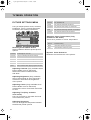
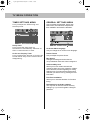
PICTURE SETTINGS MENU
Lets you adjust picture mode, contrast,
brightness, colour, tint and sharpness
to enhance the viewing experience.
Normal
For standard use
Sharp
For pictures with little movement
Sharpest
For pictures with nearly no movement
Soft
For pictures with large amount of movement
Softest
For pictures with lots of movement
Adjusting Colour Temperature (Only
available in PC mode)
There are 3 presets for colour temperature
Normal
Selecting Picture Mode Preset
Switch between different preset picture
options
Standard
All settings are set to 50
Personal
Lets you manually alter all the settings
Movie
Set to enhance when watching a movie
Sport
Set to enhance when watching a sport
Mild
Set to be lighter in colour and less bright
Game
Set to enhance when playing a games console
Adjusting Contrast (Only available when
Picture Mode is set to Personal)
Switch the balance between black
and white
Adjusting Brightness (Only available
when Picture Mode is set to Personal)
Increase or decrease the brightness
of the picture
Adjusting Colour (Only available when
Picture Mode is set to Personal)
Increase the colour from black and white
to vivid
Adjusting Tint (Only available
in PC mode)
Lets you increase or decrease the level
of tint within the picture
Adjusting Sharpness
You can change the sharpness between
the different preset options
16
Standard setting
Warm
Increased red within the picture
Cold
Increased blue within the picture
Dynamic Noise Reduction
Reduces the interference in the picture.
universal english manual 17.pdf 6. 2. 2009 13:53:36
TV MENU OPERATION
SOUND SETTINGS MENU
Adjusting Volume
Lets you adjust the volume
of the television
Voice
Emphasises voice over other sounds
Music
Emphasises music over voices
Theatre
Provides liver and full sound for movies
Personal
Selects your personal sound settings
Selecting Sound Mode Preset
Switch between different preset sound
options
Adjusting Bass
To adjust the amount of bass within the
sound
Adjusting Treble
To adjust the amount of treble within
the sound
Adjusting Balance
To switch the sound between the left
and right speakers
17
26_16 english manual 18.pdf 11. 2. 2009 9:08:24
TV MENU OPERATION
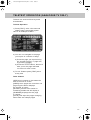
TUNING SETTINGS MENU
(Only Freeview & Analogue TV modes)
Adjusting Country
If you are moving country you may wish
to change the Country Settings
BBC1
BBC1
BBC2
BBC2
ITV1
ITV1
CH4
CH4
CH5
CH5
ITV2
BBC3
Auto Tuning
Scan for all channels based on the current
settings
BBC4
To swap channel press
on remote
move to the desired location and press
Common Interface Slot
(Only in Freeview Mode)
Pay per view services require a “smartcard” to
be inserted into the TV. If you subscribe to a
pay per view service the provider will issue you
with a ‘CAM’ card “smartcard”.
Manual Tuning
You may wish to manual search if you can’t find
a certain channel or if you wish to connect to a
Satellite/Cable box via RF/Aerial connector
Program Edit / Changing Channel Position
(Only Freeview & Analague TV modes)
You can change the analogue channel
position to suit your requirements.
Freeview mode – Press the [Green] button
to add the selected channel to your favorite,
press it a second time to remove. Press
the [Yellow] to delete the channel from the list.
WARNING – this will remove the channel
complete from the TV. Press [Blue] to lock
a channel (to do this the Child Lock function
must be set “ON”)
Analogue TV mode – Press the [>] to select
the change you wish to move. Move to the new
location and press OK]
18
The CAM can then be inserted into the COMMON
INTERFACE PORT. To access the card follow
the steps below.
26_16 english manual 19.pdf 11. 2. 2009 9:10:00
TV MENU OPERATION
TIMER SETTINGS MENU
GENERAL SETTINGS MENU
Sleep Timer
Lets you set the sleep timer so
the television automatically switches off
after a certain amount of time.
On Screen Menu Language
Lets you change the on screen menu language.
Lets you adjust the OSD timing and
the sleep timer
On Screen Display Timer
Lets you adjust the amount of time the On
Screen Menu stays on the screen before
disappearing.
Lets you adjust the language, picture size,
blue screen, add child lock, complete first
time installation and reset the television.
Picture Format
Lets you adjust the picture format
Blue Screen
Changes the background when there is
no input between clear and a blue background
Child Lock/Key Lock
Allows you to lock certain channels and
content so that it can not be viewed by children.
Once child lock has been applied go to tuning
settings menu, Program edit and select which
channels you wish to lock by pressing the blue
lock button
First Time Installation
Allows you to reset the television for first time
tuning.
Reset television to factory settings
You may wish to reset the menus to factory
settings e.g. if you have forgotten a changed
password
19
26_16 english manual 20.pdf 11. 2. 2009 10:06:18
ELECTRONIC PROGRAM GUIDE & DIGITAL TELETEXT
Electronic Program Guide (EPG)
The Electronic Program Guide (EPG) is
available in Digital TV mode. It is a 7 day
TV guide and provides information
about forthcoming programmes (where
supported by the broadcasted channel).
Digital TV Teletext
With Digital TV (Freeview) there is also
digital teletext available on some
channels. Simply follow the on screen
commands. Here is an example
of the BBC digital teletext service.
You can view the start and end time of all
programs and on all channels for the next
7 days.
1) To start digital teletext press RED
button.
It is very simple to operate.
1) Press [GUIDE]. The following menu will
appear.
EXIT
Quit
2) Navigate through the now and next menu
using the [>], [<], [V] and [/\] buttons
3) Press the [BLUE] button to enter the 7 day
menu. Reminders can now be added by
pressing [OK].
EXIT
QUIT
4) Press [EXIT] to exit the Electronic Program
Guide (EPG).
20
2) To select the information you require
you can scroll using [\/] or [/\] and press
[OK] alternatively you can key the page
number for example [3][0][0] followed
by [OK]
You can then navigate using the colour
buttons (Red, Green, Yellow, Blue),
the [\/] [/\] buttons and numbers.
If you wish to exit at anytime press [TEXT]
universal english manual 21.pdf 6. 2. 2009 13:59:07
TELETEXT OPERATION (ANALOGUE TV ONLY)
Teletext is a service offered by some
broadcasters.
Teletext Operation
1) Press [TEXT], after a few seconds
teletext page 100 should appear.
Here is an example of BBC1
2) You can now navigate to the page
you require in a number of ways:
a) Press the page you require using
the number buttons i.e. page 302,
by pressing [3][0][2]
b) Press the colour buttons, these will
take you to the page indicated
on screen for each colour
3) To exit Teletext press [TEXT] twice
at any time
Other buttons
[SIZE] this increases or decreases the
size of the text on screen
[INDEX] some pages are more than one
page long this button displays
the number of pages
[REVEAL] if there is an answer or
something hidden this will display it
[SUBPAGE] displays the sub page
if it exists
[HOLD] This stops the pages changing
when there are multiple pages
21
universal english manual 22.pdf 6. 2. 2009 13:59:36
DVD MENU OPERATION
SYSTEM SET UP
Adjusting TV System
Lets you adjust between NTSC, PAL,
AUTO (PAL is default for the UK)
1) Press [DVD-SETUP] to enter menu
2) Press [>] to select TV System
3) Press [>] to enter menu
4) Press [\/] or [/\] to highlight NTSC, PAL
or AUTO
5) Press [OK] to confirm
Returning to Default
This lets you switch the DVD menus show above
back to Default settings
1) Press [DVD-SETUP] to enter menu
2) Press [>] to select TV System
3) Press [\/] to select Default
4) Press [>] to enter menu
5) Press [>] to highlight Yes
6) Press [OK] to confirm
7) Press [DVD-SETUP] to exit
6) Press [DVD-SETUP] to exit
Adjusting Picture Format
This lets you select the format of the picture
that is being shown between 16:9, 4:3
LetterBox and 4:3.
1) Press [DVD-SETUP] to enter menu
2) Press [>] to select TV System
3) Press [\/] to select TV Type
4) Press [>] to enter menu
5) Press [\/] or [/\] to highlight 4:3PS,
4:3LB or 16:9
6) Press [OK] to confirm
7) Press [DVD-SETUP] to exit
22
universal english manual 23.pdf 6. 2. 2009 14:00:03
DVD MENU OPERATION
AUDIO SET UP
Adjusting Tone
Lets you increase or decrease the Tone
of the sound
1) Press [DVD-SETUP] to enter menu
2) Press [\/] to select Audio Set Up
3) Press [>] to enter menu
4) Press [\/] to select Tone
5) Press [>] to enter menu
6) Press [\/] or [/\] to increase or decrease
the tone
7) Press [OK] to confirm
8) Press [DVD-SETUP] to exit
DIGITAL SET UP
Adjusting Dynamic Range
This is the difference between the quietest and
loudest sounds. This setting works only with
DVD discs recorded in Dolby digital.
FULL: Set this to listen with the range recorded
on the disc.
4/8: Set this to listen with a range equivalent
to a normal television.
2/8: Set this to listen with a smaller difference
between the maximum and minimum volume.
1) Press [DVD-SETUP] to enter menu
2) Press [\/] twice to select Digital Set Up
3) Press [>] to select Dynamic Range
4) Press [>] to enter menu
5) Press [\/] or [/\] to increase or decrease
the Dynamic range
6) Press [[OK]] to confirm
Adjusting the Sound
Lets you change the sound between Stereo,
Mono Left, Mono Right and Mixed Mono.
1) Press [DVD-SETUP] to enter menu
2) Press [\/] twice to select Digital Set Up
3) Press [>] to enter menu
4) Press [\/] to select Dual Mono
5) Press [>] to enter menu
6) Press [\/] or [/\] to switch between Stereo,
Mono L, Mono R and Mix Mono
7) Press [OK] to confirm
8) Press [DVD-SETUP] to exit
Changing Regions
This TV/DVD player is pre-set to play Region 2 DVDs.
In the event you wish to use the TV/DVD in another
country that uses different region discs, please visit
www.skymediauk.co.uk. Select ‘product support’, ‘DVD
region code information’
7) Press [DVD-SETUP] to exit
23
universal english manual 24.pdf 6. 2. 2009 14:00:34
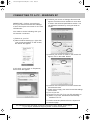
CONNECTING TO A PC - WINDOWS XP
IMPORTANT— Before connecting to
a PC you must ensure that the settings
of the PCs output are correct for the new
LCD Monitor.
4) Left click your mouse on Settings, this screen will
appear. Check the screen resolution is set to what
is show in the technical specifications section. You
can adjust the resolution by moving the slider on
screen.
You need to do the following with your
old monitor connected
1) Switch on your PC
2) When finished booting up, right click
your mouse anywhere on the screen,
the below will appear
5) Left click your mouse on Advance, this screen will
appear, click on tab called ‘Monitor’
3) left click your mouse on Properties,
this screen will appear
6) Left click on the drop down for Screen refresh rate
and select 60 Hertz.
7) Finally click on Apply, then click Yes and the settings
will be saved.
8) Turn off your PC.
9) Connect up your LCD TV to your PC and switch on.
10) Switch on your PC, Windows will automatically
Install the LCD TV.
For audio connection please refer to the Inputs and
Connections page.
For Windows Vista operating system the process is very similar to the above.
If you require additional support please contact the helpline.
24
universal english manual 25.pdf 6. 2. 2009 14:00:55
PC MENU OPERATION (VGA)
Auto Configuration of Screen
Lets you automatically configure the
television to be used as a computer monitor
Phase
To adjust delay time of phase in order to
reduce the noise of picture
Clock
Alter this in order to reduce the noise within
the picture
Horizontal Position
Changes the horizontal position of the picture
Vertical Position
Changes the vertical position of the
picture
Position Reset
To position of the picture to the factory settings
25
universal english manual 26.pdf 11. 2. 2009 13:28:41
CONNECTING A GAMES CONSOLE
Many people may wish to connect
a games console to the TV, here are some
of the most common examples:
Nintendo Wii
The Nintendo Wii is supplied with a AV
Multi Out plug to AV cable
PlayStation 3
The PS3 is supplied with an AV Cable
and a SCART block.
Option 1 – With cables provided
Option 2 – With optional HDMI cable.
A HDMI cable can output both video and
audio and enables you to enjoy
digital-quality video and audio with
minimal loss of picture quality
Xbox 360
The Xbox 360 is supplied with various
options cable options depending
on the version of console that you have.
Here are the best options to connect
to the TV.
Option 1 – With the AV Cable (Yellow,
Red & White cables) through the SCART block
SCART block
SCART block
Option 2 – With optional HDMI cable.
A HDMI cable can output both video and
audio and enables you to enjoy
digital-quality video and audio with
minimal loss of picture quality
26
IMPORTANT – the switch on the AV port
should be on ‘TV’
22_16 english manual 27.pdf 10. 2. 2009 12:06:37
CONNECTING A GAMES CONSOLE
Option 2 – With the HDMI to HDMI cable
A HDMI cable can output both video and
audio and enables you to enjoy
digital-quality video and audio with
minimal loss of picture quality
Option 3 – With Component Cables (Red,
Green, Blue cables - Picture) and Audio
cables (Red & White cables – Sound)
through an AV to 3.5mm splitter adapter.
IMPORTANT – the switch on the AV port
should be on ‘HDTV’
27
universal english manual 28.pdf 6. 2. 2009 14:01:58
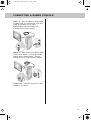
CONNECTING TO A CABLE/SATELLITE BOX
You may wish to connecting your TV to
a cable or satellite box.
Connecting via SCART
The best option if the cable/satellite box
is located next to the TV is via SCART
cable.
1) Connect the SCART cable from the
cable/satellite box to SCART of the TV
2) Switch on the cable/satellite box
3) Press [SOURCE]
4) Press [\/] or [/\] to select SCART
5) Press [OK]
The channel your cable/satellite box will
now be shown on the TV.
Connecting via RF
You may wish to share your cable/satellite
signal around the home by using an RF
connection. If this TV is to be connected
in this way, please follow the below.
Ensure the Sky signal is switched on,
before you start the below.
1) Connect the RF cable from the RF
output socket of the sky/cable box
to the ‘RF IN’ of the TV.
2) Switch the TV to analogue TV mode
3) Press [LCD-MENU] to enter menu
4) Press [>] twice to select Tuning Settings
Menu
5) Press [\/] to select Manual Tuning
Once tuning is complete the first channel
will appear. Press [CH+] to move through
the channel until you find the Sky channel.
The channel can then be moved if you
wish, please refer to the Tuning Setting
menu – Program Edit section of the manual.
Controlling your television using you
cable/satellite or universal remote control.
You may wish to use your cable/satellite or a
\universal remote control to operate some of the
functions of this TV. For this you require a ‘code’
that needs to be programmed into your
cable/satellite or universal remote control.
For codes for universal remote controls, please
visit our website where you will find the very
latest information and codes.
For codes for Sky/Sky+Sky HD, please note that
at the point of manufacture, BSkyB have not
launched the code required for this model of TV.
They are due to launch a new remote control
which should include the necessary code to
operate the functions of the TV during 2009
(called revision 9). The launch date was not
known at the time of printing this manual.
Please check our website for updates,
alternatively, see below some alternative options
of remote controls that are available.
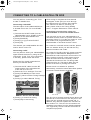
One for All
6) Press [>] to enter Auto tuning
7) Press [OK] to start tuning
28
Sky Originals
The One for All remote controls shown above will
operate all of the functions of the Sky box in the
same way the original remote control will, in
addition, they will also operate the functions of
this model of TV. The One for All versions are
available to purchase from the helpline/website.
The original Sky remote controls are shown for
comparison purposes
26_16 english manual 29.pdf 11. 2. 2009 10:08:26
TROUBLE SHOOTING
I have tuned in Digital TV but I am not
receiving any or all of the channels
and/or the channels I receive
are breaking up
1) Check you are in an area that can receive Freeview.
Visit www.freeview.co.uk or call 08701 111 270.
2) Check you have a suitable aerial. Many indoor
aerials will say they are digital ready, but you will
not get a good signal. The TV requires a minimum
of 85% signal strength
3) Consider purchasing a signal booster, it is
much cheaper than a digital aerial and cures 70%
of poor signal problems.
4) Failing the above for now use the For best
performance we recommend using an outdoor
hi-gain digital aerial. If you are receiving some
digital stations first try to connect a signal booster
in between the TV and TV aerial socket analogue
TV, until the signal becomes stronger in your area.
I have inserted a disc but it is not playing
1) Ensure you have inserted put the disc in
facing the correct way forward
2) Ensure the disc is clean and is not scratched
3) Some copied discs will not play.
4) Check the DVD is a region 2 disc – to
change the region of the DVD player, refer
to section ‘Changing Regions’.
The subtitles are switched on
when I am watching a DVD
Each time you press [Subtitles] button you switch
between the different languages. Off is one of the
options. If you still have subtitle on, access
through the DVD disc menu and switch off
I have connected my PS3 to the TV
via HDMI, but I am not receiving any
pictures or sound on my PC
1) Ensure the TVs source is on HDMI
2) Check your settings on your PS3 are as per
the PS3 instruction manual
I have connected my Xbox 360 to the TV
via Component Cables (Red, Green &
Blue) but I am not receiving any sound
Component cables only provide HD Pictures. For
the sound you will need to connect the Red &
White audio cables on the Xbox to the 3.5mm to
phono cables and insert this is the 3.5mm input
on the rear of the TV. Please refer to the
‘Connecting to a console’ pages.
VCR/DVD
Recorder
I have connected the TV to my VCR or
DVD Recorder via SCART but it is not
recording
In addition to connecting via SCART, you should
connect the aerial cable from the wall socket to
your VCR/DVD Recorder and another aerial
cable from the VCR/DVD Recorder to the TV
Connections
The television doesn’t have any outputs
for sound, however I would like to
connect to an external sound system
You can purchase a SCART block with a
changeable input/output switch. Then connecting
this to SCART and switching to output you can
run the Audio left/right to an external sound
system
TV
DVD
Game
Consoles
If you are still experiencing problems please contact the Helpline
Customer Support/Technical Helpline
Sky Media UK LTD
Telephone: 0871 2000 463
Email: [email protected]
Visit our web site www.skymediauk.co.uk for further Trouble shooting
and frequently asked questions.
29
22_16 english manual 30.pdf 10. 2. 2009 12:08:31
TECHNICAL SPECIFICATION
Panel
Input Signal
Size (Inches)
Resolution
Contrast Ratio
Brightness cd/m2
PC RGB
RF
Video
Sound
HDMI
Speaker Output Watts (RMS)
DVD player
Voltage
Power
Inc Stand
Dimensions
Exc Stand
Net (Kgs)
Weight
Gross (Kgs)
30
X22/16B-GB-TCD-UK
22"
1680x1050
1000:1
300
Yes
75 ohm Antenna / PAL-SECAM
1 x SCART, 1 x S-Video, 1 x Component
(YPbPr - 1080i)
1 x 3.5mm jack for PC, 1 x pair RCA for
YPbPr/S-Video
1 (up to 1080i)
2x3
Yes
100-240v 47-63Hz 1.5A
523W x 440H x 210D
523W x 382H x 95D
6,3
7,7
22_16 english manual 31.pdf 10. 2. 2009 13:05:13
INDEX
Adjusting Tone
Analogue TV teletext
Removing the stand & wall
mounting
Audio Set Up
Auto Tuning
Balance
Bass
Blue Screen
Brightness
Changing Regions
Changing Source
Child Lock / Key Lock
Colour Settings
Colour Temperature
Common Inferface Slot
Connecting to a cable/satellite box
Connecting to a PC
Contents
Country
Digital Set Up
Digital Switchover information
Digital TV teletext
Dynamic Noise Reduction
Dynamic Range
Electronic Program Guide
First Time Installation
General Settings Menu
Guarantee Information
Index
Initial Set Up
Inputs and Connections
23
21
10
23
18
17
17
20
16
23
14
20
16
16
18
28
24
7
18
23
2-3
20
16
23
20
20
20
1
31
11
14
Manual Tuning
Nintendo Wii
On Screen Display Language
On Screen Display Timer
PC Menu Settings
Picture Format
Picture Format
Picture Mode Presets
Picture Settings Menu
PlayStation 3
Program Edit / Channel Position
Remote control buttons and their
functions
Reset Television
Return to Default
Sharpness
Sleep Timer
Sound Mode Presets
Sound Settings Menu
System Set Up
Technical Specifications
Timer Settings Menu
Tint
Treble
Trouble Shooting
TV buttons and their functions
TV System
Using the TV menu
Volume
Warnings
What is included in the box
Xbox 360
18
26
20
19
25
20
22
16
16
26
18
12
20
22
16
19
17
17
22
30
19
16
17
29
13
22
15
17
4-5
9
26 - 27
OPTIONAL ACCESSORIES AND SPARE PARTS
If you wish to purchase additional accessories for example wall mounts, Sky remote controls
or replacement spare parts.
Please visit our website www.skymediauk.co.uk for further details.
You can find details of how to purchase either by visiting our web site or calling our
helpline on 0871 2000 463.
31
blank.pdf 6. 2. 2009 13:13:15
blank.pdf 6. 2. 2009 13:13:15
last.pdf 10. 2. 2009 12:42:19
X22/MAN/0017