1
MANUAL - AUTOMATIC DUST VACS - UR480-UR500 SERIES
Revised 2006-03
PREPARATION
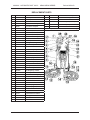
Note: Item numbers given below refer to the parts listing on page 6.
1.
2.
3.
4.
5
6.
7.
8.
9.
10.
11.
12.
13.
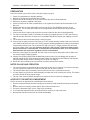
Check for transportation or handling damage.
Make sure all parts and accessories are included.
Release the two Rim Clamps on the unit and remove the Vacuum Head Assembly.
Make sure no packing material is left inside.
Check to make sure the Filter is seated firmly. If not, tighten the Round Cap Nut at the base of the
filter unit.
Remove the Vacuum Hose Assemblies from the bag (one for the UR480VAC and two for the
UR500VAC). The Air Hose (the smaller of the two) protrudes at both ends and is longer than the
Vacuum Hose.
Connect the Quick Coupler male end to the Air Inlets located on the Vacuum Head Assembly.
For easy tool changes, install a Female Quick Coupler (not supplied) to the 1/4” NPT connector provided at the other end of the Air Hose and a compatible Male Quick Coupler (not supplied) to the air
tool.
Lift the Vacuum Inlet covers and insert the Vacuum Hoses.
Connect the air supply to the Air Inlet Fitting (1/4” NPT female threads) located at the back of the Vacuum Head just above the Power Cord. The air pressure should be adjusted according to the pressure
requirements of the air tools. Do not exceed 150 PSI (10.3 kg/cm2). Some pressure drop is normal
due to the length of the hoses. Air pressure 20-30 PSI (1.5-2.0 kg/cm2) higher than what is specified for the air tool is recommended. To protect this unit and the air tools, an air line moisture
filter/lubricator and a pressure regulator are also recommended.
When the power supply is connected, the Pilot Lamp on the Vacuum Head will come on. Make sure
the correct voltage is being supplied.
Install a Dust Collector Bag inside the Main Body (bottom portion) by overlapping the top edge of
the Bag around the the top of the base container. Make sure that the Vacuum Balance Tube (square
tube) protrudes through a hole in the Bag (see the picture on Page 5).
Return the Vacuum Head to the unit and lock in position with the Rim Clamps.
NOTES ON USE AND OPERATION
1. The vacuum system is controlled by the on/off switch on the air tool. However, to clear the hose after
use, the vacuum will continue for a few seconds after the air tool is turned off.
2. The Vacuum Motor will momemtarily come on when the air tool is connected to the unit.
3. A Power Switch on the Vacuum Head Assembly overrides the on/off control by the air tool. This switch
should be turned off during regular usage.
4. The top of the Vacuum Head is designed to be used as a shelf to hold tools, sandpaper etc.
ACCESS TO THE MOTOR COMPARTMENT
Service work must be performed by a qualified service technician.
1. Remove Protector Molding from the top edge of the Vacuum Head Assembly and keep for reinstallation.
2. Remove the three mounting screws and lift off the Vacuum Head Cover.
3. Pull out the Separator.Plate (Item 2, Page 6) by the handle.
4. To re-install the Separator Plate, push it down until it sits firmly on top of the motor.
5. Re-install the Vacuum Head Cover and Protective Molding.
4