1
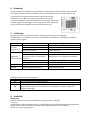
5. Control panel and use
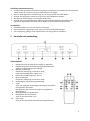
Control Panel
1
2
3
4
5
6
7
8
9
10
Power key
Press the key to turn ON/OFF the A/C
Mode key
Press the key to choose cooling, fan or auto-mode.
“DOWN” key
Press the key at cooling mode to reduce the setting
temperature;
Press it at timing mode to adjust timing ON/OFF time.
Press “Up” and “Down” keys simultaneously to switch
between °C/°F
Temperature/ time display window
This window displays the adjusted temperature and time
“UP” key
Press the key at cooling mode to increase the setting
temperature;
press it at timing mode to adjust timing ON/OFF time.
Speed key
Press the key to choose high/ mid/ low fan speed
Timer key
Press the key at standby mode to set TURN-ON time.
Press this key set TURN-OFF time when the unit is on
Remote controller receiving window
Recieving sensor for the remote control
℃/℉ switching key
Press the key to switch between ℃ and ℉.
Auto-swing key
Press this key at any time after turning on the A/C to
swing the wind louvers automatically
12