1
Introduction
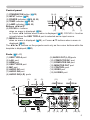
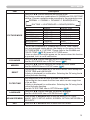
Control panel
(1) STANDBY/ON button (&18)
(3) (4)
(6)
(2) INPUT button (&20)
(3) POWER indicator (&18, 98, 99)
(4) TEMP indicator (&98, 99)
(5) LAMP indicator (&98, 99)
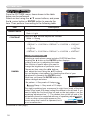
Buttons ◄/►/▲/▼
(6) FOCUS +/- buttons
(7)
(5)
(2)
(1)
when no menu is displayed (&24),
or Cursor ◄/► buttons when a menu is displayed (&28). FOCUS +/- function
is invalid when the USB TYPE A port is selected as the input source.
(7) MENU buttons
when no menu is displayed (&28), or Cursor ▲/▼ buttons when a menu is
displayed (&28).
The ◄/►/▲/▼ buttons on the projector work only as the cursor buttons while the
template is displayed (&51).
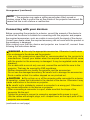
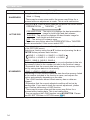
Ports (&9 ~ 13)
(1) USB TYPE A port
(2) LAN port
(3) HDMI port
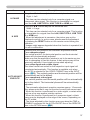
(4) USB TYPE B port
(5) MIC port
(6) AUDIO IN1 port
(7) AUDIO IN2 port
(8) AUDIO IN3(L,R) ports
(1)
(9) A
UDIO OUT (L,R) ports
(10) COMPUTER IN1 port
(11) COMPUTER IN2 port
(12) MONITOR OUT port
(13) CONTROL port
(14) VIDEO port
(15) S-VIDEO port
(4)
(3)
USB TYPE B
(11)
COMPUTER IN2
HDMI
(10)
COMPUTER IN1
USB
TYPE A
DC5V
0.5A
(2)
MIC AUDIO IN1 AUDIO IN3 AUDIO OUT
CONTROL
MONITOR OUT
VIDEO
AUDIO IN2
(13)
S-VIDEO
(12)
(5)
(7) (6) (8)
(9)
(14) (15)
5