1
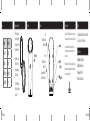
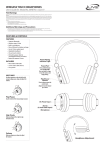
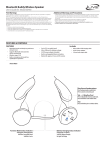
Power
Interchangeable Colored Rings
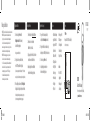
1.
Status
Indicator
Power Off
No light
Charging
Fully Charged
Low battery
Red light
Green light
Alarm
ISB03W-791-01-IB.indd 9-14
2.
If there is a ring already in
place, remove it gently by
pulling upward on the notch
at the bottom of the ring.
Align the new ring with
the notches on the unit,
and firmly press into place
until a snap is heard.
Note: Do not pull the ring too
forcefully as it may cause damage to the unit.
Introduction
International Support
Introduction
To download this User’s Guide in English, Spanish, or French, or to get answers to
frequently asked questions, visit the support section at www.iLiveElectronics.com
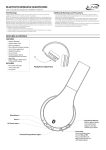
Pair
Press to begin connecting
a Bluetooth device.
Pairing Indicator
Line Input
Power
Adjust the switch to turn
the unit on or off.
Always be sure to switch to the
OFF position when not in use.
Micro USB
Charging Port
Charging Indicator
OFF ON
PAIR
LINE IN
DC IN
Para descargar este Manual del Usuario en inglés, español y francés, o para
obtener respuestas a preguntas frecuentes, visite la sección de apoyo en www.
iLiveElectronics.com
Pour télécharger ce guide de l’utilisateur en anglais, espagnol ou français, ou pour
obtenir des réponses à des questions fréquemment posées, consultez la rubrique
d’assistance sur www.iLiveElectronics.com
Warranty
For Warranty Information and the most up-to-date version of this
User’s Guide, go to: www.iLiveElectronics.com
Contact Information
Email Support: [email protected]
Email Parts: [email protected]
Phone Support: 1-888-999-4215
Website: www.iLiveElectronics.com
BATTERY
STATUS
4/18/2013 10:06:58 AM