1
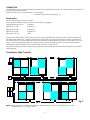
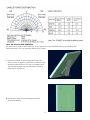
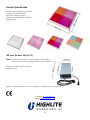
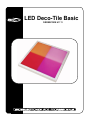
LED Deco-Tile Basic ORDERCODE 41111 Congratulations! You have bought a great, innovative product from Showtec. The Showtec LED Deco-Tile Basic brings excitement to any venue. You can rely on Showtec, for more excellent lighting products. We design and manufacture professional light equipment for the entertainment industry. New products are being launched regularly. We work hard to keep you, our customer, satisfied. For more information: [email protected] You can get some of the best quality, best priced products on the market from Showtec. So next time, turn to Showtec for more great lighting equipment. Always get the best -- with Showtec ! Thank you! Showtec Showtec LED Deco-Tile Basic™ Product Guide Warning..…...................................................................................……………………………………………………….. Safety-instructions………………………………………………………………………………………………………… Operating Determinations…….……………………………………………………………………………………….. Rigging…………………………….……………………………………………………………………………………….. 2 2 3 4 Description..…................................................................................……….…………………………………………….. 5 Features and Overview …………..……………………...….……………….………….……….……….……………. 5 Backside……………………………….…………………...…...….……………….…………………...………………… 5 Set Up and Operation.....................................................................……..………………………………………..….… 5 Stand-alone……………………..................................................……..…………………………………………….… 6 Controlled by DMX Controller..................................................……..……………………………………….……… 6 DMX Setting of the Deco-Tile..................................................……..…………………………………………..…… 7 Candle Power Distribution……..………………………………..…………..……………………………………...…… 8 Deco-tile structure and installation......................................………..........……..…………………………….…… 8 Maintenance...................................................................................………..………….…….………………………….. 9 Troubleshooting............................................................................………………….………………….………………... 9 No Light............................................………………….…………………………………………………………………. 9 Product Specifications.................................................................……………….…….………………………………... 10 1 WARNING CAUTION! Keep this device away from rain and moisture! FOR YOUR OWN SAFETY, PLEASE READ THIS USER MANUAL CAREFULLY BEFORE YOUR INITIAL START-UP! SAFETY INSTRUCTIONS Every person involved with the installation, operation and maintenance of this device has to: be qualified follow the instructions of this manual CAUTION! Be careful with your operations. With a dangerous voltage you can suffer a dangerous electric shock when touching the wires! Before your initial start-up, please make sure that there is no damage caused by transportation. Should there be any, consult your dealer and do not use the device. To maintain perfect condition and to ensure a safe operation, it is absolutely necessary for the user to follow the safety instructions and warning notes written in this manual. Please consider that damages caused by manual modifications to the device are not subject to warranty. This device contains no user-serviceable parts. Refer servicing to qualified technicians only. IMPORTANT: The manufacturer will not accept liability for any resulting damages caused by the nonobservance of this manual or any unauthorized modification to the device. Never let the power-cord come into contact with other cables! Handle the power-cord and all connections with the mains with particular caution! Never remove warning or informative labels from the unit. Do not open the device and do not modify the device. Do not connect this device to a dimmerpack. Do not shake the device. Avoid brute force when installing or operating the device.. Never look directly into the light source. Never leave any cables lying around. Do not switch the device on and off in short intervals. Never use the device during thunderstorms, unplug the device immediately. Only use device indoor, avoid contact with water or other liquids. Avoid flames and do not put close to flammable liquids or gases. Only operate the device after having familiarized with its functions. Always allow free air space of at least 50 cm around the unit for ventilation. Always disconnect power from the mains, when device is not used or before cleaning! Only handle the power-cord by the plug. Never pull out the plug by tugging the power-cord. Make sure that the device is not exposed to extreme heat, moisture or dust. Only install the LED Deco-Tile Basic with the hanging-bracket. Make sure that the available voltage is not higher than stated on the rear panel. 2 Make sure that the power-cord is never crimped or damaged. Check the device and the powercord from time to time. Make sure that no side forces can impact on the truss system. The cable insert or the female part in the device must never be strained. There must always be sufficient cable to the device. Otherwise, the cable may be damaged which may lead to deadly electrical shocks. If the external cable is damaged, it has to be replaced by a qualified technician. If device is dropped or struck, disconnect mains power supply immediately. Have a qualified engineer inspect for safety before operating. If the device has been exposed to drastic temperature fluctuation (e.g. after transportation), do not switch it on immediately. The arising condensation water might damage your device. Leave the device switched off until it has reached room temperature. If your Showtec device fails to work properly, discontinue use immediately. Pack the unit securely (preferably in the original packing material), and return it to your Showtec dealer for service. For adult use only. Lighteffect must be installed out of the reach of children. Never leave the unit running unattended. The user is responsible for correct positioning and operating of the LED Deco-Tile Basic. The manufacturer will not accept liability for damages caused by the misuse or incorrect installation of this device. This device falls under protection class I. Therefore it is essential to connect the yellow/green conductor to earth. Repairs, servicing and electric connection must be carried out by a qualified technician. WARRANTY: Till one year after date of purchase. CAUTION ! EYEDAMAGES !. Avoid looking directly into the light source. (meant especially for epileptics) ! OPERATING DETERMINATIONS This device is not designed for permanent operation. Consistent operation breaks will ensure that the device will serve you for a long time without defects. The minimum distance between light-output and the illuminated surface must be more than 0,5 meters. The maximum ambient temperature ta = 45°C must never be exceeded. The relative humidity must not exceed 50 % with an ambient temperature of 45° C. If this device is operated in any other way, than the one described in this manual, the product may suffer damages and the warranty becomes void. Any other operation may lead to dangers like short-circuit, burns, electric shock, lamp explosion, crash etc. You endanger your own safety and the safety of others! Improper installation can cause serious damage to people and property ! 3 Connection with the mains Connect the device to the mains with the power-plug. Always pay attention, that the right color cable is connected to the right place. International EU Cable UK Cable US Cable Pin L BROWN RED YELLOW/COPPER FASE N BLUE BLACK SILVER NUL YELLOW/GREEN GREEN GREEN EARTH Make sure that the device is always connected properly to the earth! Improper installation can cause serious damage to people and property ! 4 Description of the device Features The LED Deco-Tile Basic is a fabulous LED Lighteffect from Showtec. • Never change lamps again! • Each element is divided into 4 sections. • Dimensions 50 x 50cm • Topcover of the LED Deco-Tile Basic is made of strong plastic. • Plug-&-Play Overview Fig. 1 NOTE: It is not possible to connect a LED Deco Tile Basic 24V (41111) to a LED Deco Tile Pro 240V (41112). Backside Fig. 2 1) Master/Slave Switch 2) DMX IN 3) DMX OUT 4) Dipswitches NOTE: * Please make sure to also obtain the 41113 PSU (24V). This device is essential for using the LED Deco Tile Basic. 41113 PSU Set Up and Operation Before plugging the unit in, always make sure that the power supply matches the product specification voltage. Do not attempt to operate a 120V specification product on 230V power, or vice versa. Always disconnect from electric mains power supply before cleaning or servicing. Damages caused by non-observance are not subject to warranty. 5 CONNECTION The LED Deco uses a 2 pins extendable connector as its power cord connector, while its DMX signal wire uses a 8 pins crystal network plug. There are two ways to connect them: • Stand-alone • Controlled by DMX controller (Fig. 3) Stand-alone Set the Master/Slave Switch to Master. You can use the Dipswitches to play any of the built-in programs. All Dipswitches set to off: Program 1 Dipswitch #1 ON: Program 2 … Dipswitch #8 ON: Program 9 Dipswitch #9 ON: Program 10 Dipswitch #10 ON: Static Connect the first LED Deco-Tile to the second one using the signal link cable (the first Tile is the master and the others are the slaves). Connect the first Tile to the power source with the supplied cable. Connect the rest of the Deco-Tiles to eachother by linking the powercords and signal wires. After every 60 Deco-Tiles you have to use an extra powersupply. The power outlet of the last fixture must be covered with endcap for waterproof purpose. Each circuit can maximally connect 127 Deco-Tiles. (Turn off all the power when connecting, and all the unconnected power-connectors should be covered with endcaps). Controlled by DMX Controller Fig. 3 NOTE: When you want to control the LED Deco Tile by DMX, you have to set Dipswitch #1 to ON. Set Dipswitch # 10 to ON for Slave. 6 Fig. 4 In Fig. 4 you’ll see the DMX Dipswitch setting for DMX address 001. Channel 1 0-10 11-45 46-80 81-115 116-150 151-185 186-220 221-255 Off 4 Channels (CH2 Red, CH3 Green, CH4 Blue) 7 Channels (CH2-4 RGB Right part Tile, CH5-7 RGB Left part Tile) 7 Channels (CH2-4 RGB Bottom part Tile, CH5-7 RGB Top part Tile) 7 Channels (CH2-4 RGB Left Top+Right Bottom, CH5-7 RGB Left Bottom+Right Top) 13 Channels-control the colors RGB of each section independently 3 Channels (CH1 flow, CH 2 control each section with built-in programs, CH3 speed from slow to fast) 3 Channels sound-controlled (CH1 flow, CH 2 control each section with built-in programs, CH3 speed from slow to fast) DMX Setting of the Deco-Tile 1) Set the first panel’s switch to MASTER. 2) After you have set the DMX address, please turn the switch to SLAVE and connect to the DMX console! Then it will be controlled by DMX console! 3) Please note that the first channel of the DMX console is used to select the DMX mode for the Deco-Tile! You can push the first channel to set 4, 7 or 13 channels for the Deco-Tile! 11~45 is 4 channels 46~150 is 7 channels 151~185 is 13 channels. The 7 channels-mode has three different combinations of the segments! You can change the first channel to see the combination! As you can see there are four segments on the Deco-Tile! You can control the colors (RGB) of the whole tile by 3 channels, or control every 2 segments by 6 channels, or control each segment separately by 12 channels! Connect to DMX Controller Connect to DMX IN of the Deco-Tile Linking The First Deco-tile to the Second Deco-Tile Connect to DMX OUT of the first Deco-Tile Connect to DMX IN of the second Deco-Tile 7 Deco-tile structure and installation LED Deco-Tile is made of milky white PC, a slim aluminum board (oxidized surface), black ABS base. Fixed with screw. You can install the Deco-Tile in 2 ways: 1. Open two pieces of supporting panes and cross them to form a support on the back of the Deco-Tile and then install the Deco-Tile into your desired spot. The inclination angle can be altered by adjusting the position of the cross. 2. Mount the U hole to the mounting board with the screws directly. 8 Maintenance The operator has to make sure that safety-relating and machine-technical installations are to be inspected by an expert after every four years in the course of an acceptance test. The operator has to make sure that safety-relating and machine-technical installations are to be inspected by a skilled person once a year. The following points have to be considered during the inspection: 1. All screws used for installing the device or parts of the device have to be tightly connected and must not be corroded. 2. There may not be any deformations on housings, fixations and installation spots. 3. Mechanically moving parts like axles, eyes and others may not show any traces of wearing. 4. The electric power supply cables must not show any damages or material fatigue. The Showtec LED Deco-Tile Basic requires almost no maintenance. However, you should keep the unit clean. Otherwise, the fixture’s light-output will be significantly reduced. Disconnect the mains power supply, and then wipe the cover with a damp cloth. Do not immerse in liquid. Do not use alcohol or solvents. Keep connections clean. Disconnect electric power, and then wipe the connections with a damp cloth. Make sure connections are thoroughly dry before linking equipment or supplying electric power. Troubleshooting This troubleshooting guide is meant to help solve simple problems. If a problem occurs, carry out the steps below in sequence until a solution is found. Once the unit operates properly, do not carry out following steps. 1. If the device does not operate properly, unplug the device. 2. Check the power from the wall, all cables etc. 3. If all of the above appears to be O.K., plug the unit in again. 4. If you are unable to determine the cause of the problem, do not open the LED Deco-Tile Basic, as this may damage the unit and the warranty will become void. 5. Return the device to your Showtec dealer. No Light This troubleshooting guide is meant to help solve simple problems. If a problem occurs, carry out the steps below in sequence until a solution is found. Once the unit operates properly, do not carry out following steps. If the light effect does not operate properly, refer servicing to a technician. Response: Suspect two potential problem areas: the power supply or the LEDs. 1. Power supply. Check that the unit is plugged into an appropriate power supply. 2. The LEDs. Return the LED Deco-Tile Basic to your Showtec dealer. 9 Product Specification Model: Showtec LED Deco-Tile Basic Voltage: AC 230V-50Hz (CE) DMX input and DMX output Dimensions: 500x500x37mm (LxWxH) Weight: 4,8 kg LED Deco Tile Basic PSU (41113) NOTE: * Please make sure to also obtain the 41113 PSU (24V). This device is essential for using the LED Deco Tile Basic. Dimensions: 350x137x70mm (LxWxH) Weight: 3,46 kg Design and product specifications are subject to change without prior notice. Website: www.Highlite.nl Email: [email protected] 10 2007 Showtec.