1
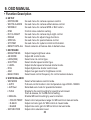
9. OSD MANUAL
7. SPECIAL
- PRIVACY
• ZONE NO.
• ZONE OP.
• X-POS
• Y-POS
• X-SIZ
• Y-SIZ
• COLOR
• TRANS.
- HLMASK
• LEVEL
• COLOR
- PATTERN
8. SYSTEM
- SDI FORMAT
- SDI FPS
- CVBS FORMAT
• CVBS OUT
◦ ON, OFF
◦ AUTO
• CVBS VIEW
◦ CROP
◦ FULL
- APPLY
- SYSTEM INFO.
• S/W VERSION
• SET VERSION
: Setting for protect private area in image using mask setting.
: Select private mask zone number.
: Select zone mask display on/off.
: Select zone horizontal position.
: Select zone vertical position.
: Select zone horizontal size.
: Select zone vertical size.
: Select mask color
: Select mask transparency level.
: Mask image high light area.
: Select high light level.
: Select mask color.
: Color bar display select.
: 1080P / 720P
: 30 or 25 fps in 1080p mode.
60 or 50 fps in 720p mode.
: NTSC / PAL
: Select mode for CVBS out action.
: Enable or Disable CVBS out data.
: Check automatically CVBS video cable connection.
If connected, CVBS out data is enable and WDR mode
is setted off automatically.
: CVBS out video angle setting.
: Cut the scene outside area for keep image aspect ratio.
: Fill the full angle scene into image with
H-V size & ratio change.
: Apply all video angle setting. Use the set button to apply.
: Camera’s basic software version.
: Camera’s feature control setting version.
22