1
Installing options
Recognizing installed options
The printer driver should automatically recognize the newly-installed option when the printer is turned on. If it does not, you
can add the appropriate option manually.
Note: If you have not installed your printer driver yet, follow the appropriate instructions on the Setup sheet
supplied with your printer. After you have installed a printer driver, return here to complete these
instructions.
1
Click Start Æ Settings Æ Printers.
2
Select the printer icon.
3
Click File Æ Properties.
4
Click the Install Options tab.
5
Add the appropriate options to your configuration:
Memory Card—Increase the printer memory to the desired number (maximum of 160 MB).
Flash Memory Card—Increase the printer flash memory to the desired number (maximum of 32 MB).
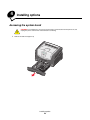
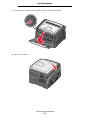
550-sheet drawer—Increase printing capacity by 300 sheets.
6
Click OK.
Recognizing installed options
34