1
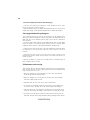
If fail, contact RMA
CLR CMOS and restart.
Yes
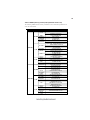
Halt at POST screen?
Yes
Check if monitor has
display
Yes
Check if Power Supply
Unit (PSU) is working
Power Bu on is pressed
but PC fails to start.
CMOS setup error,
-
need to CLRCMOS.
HDD problem.
-
Peripheral device issue
No
No
No
VGA not detected
- If 1 long beep and 8 short beeps:
inserted or memory failure
DIMM memory not properly
- If 3 short beeps:
Yes
Any Beep sound?
No
Yes
Check if monitor
has display
Restart the PC
is connected
if CPU 12V power
CLR CMOS and check
Basic Troubleshooting Flowchart
Board problem
-> contact RMA
a er modify BIOS se ng.
System fail to start or unstable
No
If board problem -> contact RMA
Problem with PSU or board?
Yes
and PSU switch is turned on?
AC power cord is plugged
CLR CMOS and restart
and restart.
or connect to wall socket
Turn on PSU switch
No
49