1
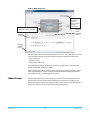
4. Check the Installed version level against the Desired version level. If the Desired is
newer, then click the Update button to download the new firmware to the MiniConverter; progress will be shown via the “Progress” thermometer bar. When you
click Update, MiniConfig will provide a dialog asking you to confirm that you really
want to update the firmware (see Figure 9).
Figure 9. Firmware Update Confirmation
Info Tab Screen
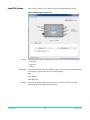
This screen provides basic information about the Mini-Converter. This information is
mostly useful when calling AJA Support for service or technical support.
Figure 10. MiniConfig, Info Screen
Name:
Type:
Assembly:
Serial Number:
V2Digital v1.0
This field allows you to give your Mini-Converter a name. This may be useful if you have
several Mini-Converters attached to a Mac/PC via USB so you can distinguish one of them
easily (especially if they’re the same model).
This is the factory set model name of the Mini-Converter.
This is the factory assembly number.
This is the factory set unique serial number of your unit. If you ever call AJA Support for
service, you may be asked for this number.
14
www.aja.com