1
CONNECTING AND OPERATING
THE DVIKVM EXTRA LONG RANGE EXTENDER
How to Connect the DVIKVM Extra Long Range Extender
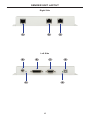
1. Connect the computer DVI output to the Sender Unit using the provided DVI
cable. Connect the monitor to the Receiver Unit using a DVI cable.
2. Connect the included USB cable from the computer to the Sender Unit.
3. Connect the USB devices to the Receiver Unit.
4. Connect the Ethernet port on the Sender Unit to an Ethernet source.
5. Connect the Ethernet port on the Receiver Unit to the Ethernet (LAN) port on
the display device.
6. Connect the RS-232 ports to the host and display devices.
7. Connect CAT-5e or CAT-6 cables between the Link ports on the Sender Unit
and the Link ports on the Receiver Unit.
NOTE: If terminating network cables in the field, please adhere to the TIA/
EIA568B specification (see page 14).
5. Connect the 5V DC locking power supplies to the Sender Unit and Receiver
Unit. Do not overtighten the locking connectors. Plug the two (2) AC power
cords from the power supplies to available electrical outlets.
Wiring Diagram for the DVIKVM Extra Long Range Extender Over One CAT5
CAT-5 LINK CABLE / ETHERNET
(Up to 330 ft)
RS-232 CABLE
USB CABLE
DVI CABLE
100BASE-T Router
or Ethernet switch
DVI Source
Computer
Receiver
Sender
USB External HDD
Monitor or Kiosk Touchscreen Display
GTB-DVIKVM-ELR
8