
1
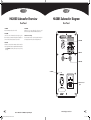
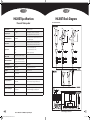
HA300T Mainspeaker Overview
HA300T Mainspeaker Diagram
Rear Panel
Rear Panel
This is where you may plug in microphones, instruments, keyboards, drum machines or other audio devices and
adjust the volume, bass and treble.
1. Power
This turns the HA300T mainspeaker on and off.
2. XLR Mic Input Jack Channel 1-2
Balanced. Appropriate for microphones, or balanced connections
from amplifiers or DI boxes.
3. ¼” Line Input Jack Channel 1-2
Balanced or unbalanced. Appropriate for instrument or line level
equipment connections.
4. AUX IN Channel 3
Unbalanced stereo 3.5mm mini jack input for CD/MP3 players.
5. CHANNEL Volume
This is the volume control for individual input channels.
6. Low EQ
This is the bass control used to boost or cut low frequencies on the
input channel using a low shelf filter with +/- 15dB of boost or cut,
below 800Hz. Useful for removing rumble on vocal or acoustic
guitar inputs.
7. High EQ
This is the treble control used to boost or cut high frequencies on the
input channel, using a high shelf filter with +/- 15dB of boost or cut
above 4kHz. Useful for adding clarity to vocals or acoustic guitars,
or removing hiss or unwanted cymbal pick-up.
8. Master Volume
This knob us used to control the overall output level of the HA300T
mainspeaker, and output level to the Subwoofer Out. This does not
affect the Link Output or Link Input levels.
9. Link IN
This balanced XLR line input accepts the Link Output from
another HA300T.
6
9709 Harbinger HA300 PA System Owners Manual.indd 6-7
10. LINK OUT
This balanced XLR line output connects to the Link In from another
HA300T using a standard Mic cable. Channels from both HA300T’s
are summed together.
7. High EQ
Using Link In and Link Out:
Channels from both HA300T’s are summed together. Use the channel
volume controls to get the mix of the 6 channels (If a channel is not
used turn the volume all the way down). MASTER volume controls
the loudness of the mix through its HA300T. It does not affect volume
of linked HA300T.
6. Low EQ
NOTE: The shield connection (pin 1) on this jack is connected to
chassis ground. It is not lifted.
5. CHANNEL Volume
11. Subwoofer Out
This line level, unbalanced ¼” output sends the low frequency signal
to the HA300S powered subwoofer, but will work with any powered
subwoofer that accepts a line level input.
4. AUX IN
Using Subwoofer Out:
A crossover is activated when plugging a standard ¼” mono (tip/
sleeve) plug into this jack. The crossover point is 150Hz. Frequencies
150Hz and below go to subwoofer output jack at all times.
8. Master Volume
3. ¼” Line Input
2. XLR MIC Input Jacks
Frequencies 150Hz and above go to HA300T speakers. HA300T
speakers are full range when the subwoofer out jack is not used.
NOTE: A standard ¼” mono (tip/sleeve) SHIELDED instrument cable
is recommended as the sleeve connection to ground activates the
crossover on HA300T speakers.
12. AC Power Cord Input
This is the AC Mains connection. Use only the specified IEC cable or a
UL listed replacement IOEC cable and 120V/60Hz outlet.
Owner’s Manual for the HA300 Compact PA System
10. LINK OUT
9. LINK IN
11. Subwoofer Out
12. AC Power Cord
Input
1. Power
www.harbingerproaudio.com
7
5/3/12 2:12 PM


![View User`s Manual [US] - Acoustic Amplification](http://vs1.manualzilla.com/store/data/005985253_1-d8c5e8224596dc85b40fdb714a0c7e6f-150x150.png)




![View User`s Manual [US] - Acoustic Amplification](http://vs1.manualzilla.com/store/data/005687953_1-09ed6117760df16c9056fa1c8c49b775-150x150.png)
![View User`s Manual [US] - Acoustic Amplification](http://vs1.manualzilla.com/store/data/005805370_1-0fda88921e56c0c9a0d78a1aaa3723de-150x150.png)


![View User`s Manual [US] - Acoustic Amplification](http://vs1.manualzilla.com/store/data/005929580_1-14523f44a960f194cc16791ff2ace09d-150x150.png)