1
GB
RX-V440RDS
AV Receiver
Ampli-tuner audio-vidéo
OWNER’S MANUAL
MODE D’EMPLOI
BEDIENUNGSANLEITUNG
BRUKSANVISNING
MANUALE DI ISTRUZIONI
MANUAL DE INSTRUCCIONES
GEBRUIKSAANWIJZING
Downloaded from www.Manualslib.com manuals search engine
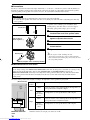
CAUTION: READ THIS BEFORE OPERATING YOUR UNIT.
1 To assure the finest performance, please read this
manual carefully. Keep it in a safe place for future
reference.
2 Install this sound system in a well ventilated, cool,
dry, clean place — away from direct sunlight, heat
sources, vibration, dust, moisture, and/or cold.
Allow ventilation space of at least 30 cm on the top,
20 cm on the left and right, and 20 cm on the back
of this unit.
3 Locate this unit away from other electrical
appliances, motors, or transformers to avoid
humming sounds.
4 Do not expose this unit to sudden temperature
changes from cold to hot, and do not locate this unit
in a environment with high humidity (i.e. a room with
a humidifier) to prevent condensation inside this unit,
which may cause an electrical shock, fire, damage to
this unit, and/or personal injury.
5 Avoid installing this unit where foreign object may
fall onto this unit and/or this unit may be exposed
to liquid dripping or splashing. On the top of this
unit, do not place:
– Other components, as they may cause damage
and/or discoloration on the surface of this unit.
– Burning objects (i.e. candles), as they may cause
fire, damage to this unit, and/or personal injury.
– Containers with liquid in them, as they may fall
and liquid may cause electrical shock to the
user and/or damage to this unit.
6 Do not cover this unit with a newspaper, tablecloth,
curtain, etc. in order not to obstruct heat radiation.
If the temperature inside this unit rises, it may
cause fire, damage to this unit, and/or personal
injury.
7 Do not plug in this unit to a wall outlet until all
connections are complete.
8 Do not operate this unit upside-down. It may
overheat, possibly causing damage.
9 Do not use force on switches, knobs and/or cords.
10 When disconnecting the power cord from the wall
outlet, grasp the plug; do not pull the cord.
11 Do not clean this unit with chemical solvents; this
might damage the finish. Use a clean, dry cloth.
12 Only voltage specified on this unit must be used.
Using this unit with a higher voltage than specified
is dangerous and may cause fire, damage to this
unit, and/or personal injury. YAMAHA will not be
held responsible for any damage resulting from use
of this unit with a voltage other than specified.
13 To prevent damage by lightning, disconnect the power
cord from the wall outlet during an electrical storm.
14 Do not attempt to modify or fix this unit. Contact
qualified YAMAHA service personnel when any
service is needed. The cabinet should never be
opened for any reasons.
15 When not planning to use this unit for long periods
of time (i.e. vacation), disconnect the AC power
plug from the wall outlet.
CAUTION
Downloaded from www.Manualslib.com manuals search engine
16 Be sure to read the “TROUBLESHOOTING” section
on common operating errors before concluding that
this unit is faulty.
17 Before moving this unit, press STANDBY/ON to set
this unit in standby mode, and disconnect the AC
power plug from the wall outlet.
18 VOLTAGE SELECTOR (China and General models only)
The VOLTAGE SELECTOR on the rear panel of this
unit must be set for your local main voltage
BEFORE plugging into the AC main supply.
Voltages are 110/120/220/240 V AC, 50/60 Hz.
This unit is not disconnected from the AC power
source as long as it is connected to the wall outlet,
even if this unit itself is turned off. This state is called
standby mode. In this state, this unit is designed to
consume a very small quantity of power.
WARNING
TO REDUCE THE RISK OF FIRE OR ELECTRIC
SHOCK, DO NOT EXPOSE THIS UNIT TO RAIN
OR MOISTURE.
■ For U.K. customers
If the socket outlets in the home are not suitable for the
plug supplied with this appliance, it should be cut off and
an appropriate 3 pin plug fitted. For details, refer to the
instructions described below.
Note
• The plug severed from the mains lead must be destroyed, as a
plug with bared flexible cord is hazardous if engaged in a live
socket outlet.
■ Special Instructions for U.K. Model
IMPORTANT
THE WIRES IN MAINS LEAD ARE COLOURED
IN ACCORDANCE WITH THE FOLLOWING
CODE:
Blue: NEUTRAL
Brown: LIVE
As the colours of the wires in the mains lead of this
apparatus may not correspond with the coloured
markings identifying the terminals in your plug,
proceed as follows:
The wire which is coloured BLUE must be connected
to the terminal which is marked with the letter N or
coloured BLACK. The wire which is coloured
BROWN must be connected to the terminal which is
marked with the letter L or coloured RED.
Making sure that neither core is connected to the earth
terminal of the three pin plug.
CONTENTS
CONTENTS ............................................................ 1
FEATURES ............................................................. 2
GETTING STARTED ............................................ 3
Supplied accessories .................................................. 3
Installing batteries in the remote control ................... 3
CONTROLS AND FUNCTIONS ......................... 4
PREPARATION
CONNECTIONS .................................................... 9
Set menu list ............................................................ 40
Adjusting the items on the set menu ....................... 40
SOUND 1 SPEAKER SET (speaker mode settings)
............................................................................. 41
SOUND 2 SP DISTANCE (speaker distance) ........ 43
SOUND 3 LFE LEVEL .......................................... 43
SOUND 4 D. RANGE (dynamic range) ................. 43
SOUND 5 CENTER GEQ
(center graphic equalizer) .................................... 44
SOUND 6 HP TONE CTRL
(headphone tone control) .................................... 44
INPUT 1 I/O ASSIGN (input/output assignment) .. 44
INPUT 2 INPUT MODE (initial input mode) ........ 44
OPTION 1 DISPLAY SET ...................................... 45
OPTION 2 MEM. GUARD (memory guard) ......... 45
OPTION 3 AUDIO MUTE ..................................... 45
OPTION 4 ZONE SET ........................................... 45
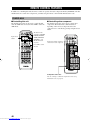
REMOTE CONTROL FEATURES ................... 46
BASIC
OPERATION
Before connecting components ................................. 9
Connecting video components ................................ 10
Connecting audio components ................................ 12
Connecting the antennas .......................................... 13
Connecting an external decoder .............................. 14
Connecting the speakers .......................................... 15
Connecting the power supply cords ........................ 18
Turning on the power .............................................. 18
SET MENU ........................................................... 40
PREPARATION
Front panel ................................................................. 4
Remote control .......................................................... 6
Front panel display .................................................... 8
ADVANCED OPERATION
INTRODUCTION
INTRODUCTION
Control area ............................................................. 46
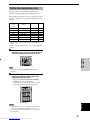
Setting the manufacturer code ................................. 47
Controlling other components ................................. 48
BASIC SYSTEM SETTINGS ............................. 19
SETTING THE SPEAKER LEVELS ................ 49
Using the basic menu .............................................. 19
Setting the unit to match your speaker system ........ 21
Setting speaker output levels (SP LEVEL) ............. 21
Adjusting the volume during playback ................... 49
Using the test tone ................................................... 49
ADDITIONAL INFORMATION
PLAYBACK .......................................................... 22
SOUND FIELD PROGRAM PARAMETER
EDITING .......................................................... 50
Input modes and indications .................................... 24
Selecting a sound field program .............................. 25
Changing parameter settings ................................... 50
Digital sound field parameter descriptions .............. 51
DIGITAL SOUND FIELD PROCESSING (DSP)
............................................................................ 28
TROUBLESHOOTING ....................................... 52
GLOSSARY .......................................................... 56
SPECIFICATIONS .............................................. 58
Understanding sound fields ..................................... 28
Hi-Fi DSP programs ................................................ 28
ADVANCED
OPERATION
BASIC OPERATION
ADDITIONAL
INFORMATION
CINEMA-DSP ...................................................... 29
Sound design of CINEMA-DSP ............................. 29
CINEMA-DSP Programs ........................................ 29
Sound field effects ................................................... 31
TUNING ................................................................ 32
Presetting stations .................................................... 33
Selecting a preset station ......................................... 35
RECEIVING RDS STATIONS ........................... 36
Description of RDS data ......................................... 36
Changing the RDS mode ......................................... 36
PTY SEEK function ................................................ 37
EON function .......................................................... 37
SLEEP TIMER ..................................................... 38
RECORDING ....................................................... 39
English
1
Downloaded from www.Manualslib.com manuals search engine
FEATURES
Built-in 6-channel power amplifier
◆ Minimum RMS output power
(0.06% THD, 20 Hz – 20 kHz, 8Ω)
[U.S.A. and Canada models]
Main:
75 W + 75 W
Center:
75 W
Rear:
75 W + 75 W
Rear center: 75 W
[Other models]
Main:
65 W + 65 W
Center:
65 W
Rear:
65 W + 65 W
Rear center: 65 W
Multi-mode digital sound field processing
◆ Dolby Pro Logic/Dolby Pro Logic II decoder
◆ Dolby Digital/Dolby Digital EX decoder
◆ DTS/DTS-ES Matrix 6.1, Discrete 6.1, DTS Neo:6
Decoder
◆ CINEMA DSP: Combination of YAMAHA DSP
technology and Dolby Pro Logic, Dolby Digital or
DTS
◆ Virtual CINEMA DSP
◆ SILENT CINEMA DSP
Sophisticated AM/FM Tuner
◆ 40-Station random access preset tuning
◆ Automatic preset tuning
◆ Preset station shifting capability (Preset editing)
Other features
◆ 96 kHz/24-bit D/A converter
◆ Set menu for optimizing this unit for your Audio/
Video system
◆ Test tone generator for easier speaker balance
adjustment
◆ 6-channel external decoder input
◆ Component video input/output capability
◆ Optical and coaxial digital audio signal jacks
◆ Sleep timer
◆ Remote control with preset manufacturer codes
◆ Zone B capability
■ About this manual
• y indicates a tip for your operation.
• Some operations can be performed by using either the buttons on the main unit or on the remote control. In cases
when the button names differ between the main unit and the remote control, the button name on the remote control is
given in parentheses.
• This manual is printed prior to production. Design and specifications are subject to change in part for the reason of
the improvement in operativity ability, and others. In this case, the product has priority.
Manufactured under license from Dolby Laboratories.
“Dolby”, “Pro Logic”, and the double-D symbol are
trademarks of Dolby Laboratories.
2
Downloaded from www.Manualslib.com manuals search engine
“DTS”, “DTS-ES Extended Surround” and “Neo:6” are
trademarks of Digital Theater System, Inc.
GETTING STARTED
INTRODUCTION
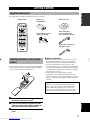
Supplied accessories
After unpacking, check that the following parts are contained.
Remote control
Batteries (2)
(AA, R06, UM-3)
AM loop antenna
SYSTEM
POWER
POWER
TV
AV
CD
STANDBY
POWER
MD/CD-R TUNER
DVD
D-TV/CBL
SLEEP
VCR
V-AUX
6CH INPUT
REC
AUDIO
DISC SKIP
CODE SET
AMP
75-ohm/300-ohm antenna
adapter (U.K. model)
TV
+
+
+
VOL
CH
VOLUME
–
–
MUTE
INPUT
Indoor FM antenna
(U.S.A., Canada, China,
Korea and General models)
–
MUTE
HALL
1
MUSIC
5
/DTS
9
JAZZ
ROCK
2
3
TV THTR MOVIE1
ENTERTAINMENT
4
MOVIE2
6
7
8
NIGHT
6.1/5.1
STEREO
0
+10
ENTER
LEVEL
SET MENU
TITLE
MENU
A/B/C/D/E
–
SELECT
+
TEST
DISPLAY
RETURN
PRESET/CH
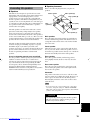
Installing batteries in the remote
control
Insert the batteries in the correct direction by aligning the
+ and – marks on the batteries with the polarity markings
(+ and –) inside the battery compartment.
2
1
3
Press the part marked with a
and slide off
the battery compartment cover.
2
Insert the four batteries supplied (AA, R06,
UM-3) according to the polarity markings on
the inside of the battery compartment.
3
Slide the cover back on so that it snaps into
place.
■ Notes on batteries
• Change all of the batteries if you notice a decrease in
the operating range of the remote control, that the
indicator does not flash, or the light becoming dim.
• Do not use old batteries together with new ones.
• Do not use different types of batteries (such as alkaline
and manganese batteries) together. Read the packaging
carefully as these different types of batteries may have
the same shape and color.
• If the batteries have leaked, dispose of them
immediately. Avoid touching the leaked material or
letting it come into contact with clothing, etc. Clean the
battery compartment thoroughly before installing new
batteries.
If the remote control is without batteries for more than
2 minutes, or if exhausted batteries remain in the
remote control, the contents of the memory may be
cleared. When the memory is cleared, insert new
batteries, set up the manufacturer code and program
any acquired functions that may have been cleared.
English
1
(Europe, U.K., Australia and
Singapore models)
3
Downloaded from www.Manualslib.com manuals search engine
CONTROLS AND FUNCTIONS
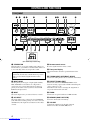
Front panel
1 2
3 4
5
6
78
90
q
VOLUME
INPUT
RDS MODE/FREQ
STANDBY
/ON
PRESET/TUNING FM/AM
EON
EDIT
EDIT
PTY SEEK
MODE
START
TUNING MODE MEMORY
AUTO/MANUAL MONO MAN`L/AUTO FM
INPUT MODE
6CH INPUT
VIDEO AUX
SILENT
SPEAKERS
A
STEREO
PROGRAM
A/B/C/D/E
PRESET/TUNING
NEXT
SET MENU
CONTROL
BASS/TREBLE
B
EFFECT
VIDEO
PHONES
w
e
t
r
RDS MODE/FREQ
y
u
i
o
L
AUDIO
R
p
EON
PTY SEEK
MODE
START
as df
(U.K. and Europe models only)
1 STANDBY/ON
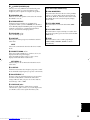
Turns the unit on, or sets it in standby mode. When you
turn the unit on, you will hear a click and there will be a 4
to 5-second delay before it can reproduce sound.
Standby mode
In this mode, the unit uses a small amount of power in
order to receive infrared-signals from the remote
control.
5 Remote control sensor
Receives signals from the remote control.
6 Front panel display
Shows information about the operational status of the
unit.
7 TUNING MODE (AUTO/MAN’L MONO)
Switches the tuning mode between automatic and manual.
2 INPUT MODE
Sets the priority for the types of input signals (AUTO,
DTS, ANALOG) received when one component is
connected to two or more input jacks. You cannot set
priority for an audio source if you have selected 6CH
INPUT as the input source.
8 PRESET/TUNING (EDIT)
Switches the function of PRESET/TUNING l / h
between selecting a preset station number and tuning (the
colon (:) turns on or off).
This button is also used to exchange the assignment of
two preset stations with each other.
3 INPUT
Selects the input source you want to listen to or watch.
9 FM/AM
Switches the reception band between FM and AM.
4 6CH INPUT
Selects the audio source connected to the 6CH INPUT
jacks. This selection takes priority over sources selected
with INPUT (or the input selector buttons on the remote
control).
0 MEMORY (MAN’L/AUTO FM)
Stores the current station in memory.
4
Downloaded from www.Manualslib.com manuals search engine
q VOLUME
Controls the output level of all audio channels.
This does not affect the OUT (REC) level.
CONTROLS AND FUNCTIONS
w
SILENT (PHONES jack)
Allows you to enjoy DSP effects when listening with
headphones. When you connect headphones to the
headphone jack, no signals are output to the speakers.
r STEREO/EFFECT
Switches between normal stereo and DSP effect
reproduction. When you select STEREO, the unit mixes
down all Dolby Digital and DTS signals (except the LFE
channel) as well as those 2-channel signals without
effects, to the main left and right speakers.
t PROGRAM l / h
Select the DSP program.
y A/B/C/D/E
Selects preset station groups A to E when the unit is in
tuner mode.
a RDS MODE/FREQ
Press this button when the unit is receiving an RDS
station, to cycle the display mode among PS mode,
PTY mode, RT mode, CT mode (if the station offers
those RDS data service) and/or frequency display
mode in turn.
INTRODUCTION
e SPEAKERS A/B
Turns the set of main speakers connected to the A and/or
B terminals on or off.
(U.K. and Europe models only)
s PTY SEEK MODE
Press this button to set the unit in the PTY SEEK
mode.
d PTY SEEK START
Press this button to begin searching for a station after
the desired program type has been selected in the PTY
SEEK mode.
f EON
Press this button to select a radio program type
(NEWS, INFO, AFFAIRS, SPORT) to tune in
automatically.
NEXT
Selects the set menu mode when the unit is not in tuner
mode.
u PRESET/TUNING l / h
Select preset station numbers 1 to 8 when a colon (:) is
displayed in the front panel display.
Select the tuning frequency when a colon (:) is not
displayed when the unit is in tuner mode.
SET MENU –/+
Adjust settings on the set menu when the unit is not in
tuner mode.
i CONTROL
Switches between Bass (low-frequency response) control
mode and Treble (high-frequency response) control mode.
o BASS/TREBLE –/+
Increase or decrease low/high-frequency response when
the unit is in Bass/Treble control mode. The sound
changes 2dB each time you press one of these buttons.
Control range: –10 to +10dB
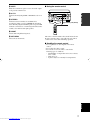
p VIDEO AUX jacks
Inputs for audio and video signals from a portable
external source (game console, etc.). Set the input source
to V-AUX to select source signals from these jacks.
English
5
Downloaded from www.Manualslib.com manuals search engine
CONTROLS AND FUNCTIONS
Remote control
This section describes the remote control controls and
their functions. Make sure that the AMP mode is selected
before starting operation.
2 Input selector buttons
Select the input source and set the remote control to
operate the selected source component.
7
1
3 DSP program
Select DSP programs when the remote control is in AMP
mode. Press one of these buttons repeatedly to select a
DSP program within a program group.
SYSTEM
POWER
POWER
TV
AV
CD
2
STANDBY
POWER
8
MD/CD-R TUNER
4 LEVEL
Selects the effect speaker channel to adjust.
SLEEP
9
DVD
D-TV/CBL
VCR
V-AUX
5 Multi control section
Used to change and implement settings.
6CH INPUT
REC
0
AUDIO
DISC SKIP
CODE SET
w
6 TEST
Outputs a test tone for use when adjusting the speaker
levels.
e
7 STANDBY
Sets this unit in standby mode.
r
8 SYSTEM POWER
Turns on the power of the unit.
q
AMP
TV
+
+
+
VOL
CH
VOLUME
–
–
–
MUTE
INPUT
MUTE
3
HALL
JAZZ
ROCK
1
2
3
MUSIC
5
/DTS
9
TV THTR MOVIE1
ENTERTAINMENT
6
7
8
6.1/5.1
STEREO
0
+10
ENTER
SET MENU
TITLE
MENU
A/B/C/D/E
5
–
SELECT
9 SLEEP
Sets the sleep timer.
4
MOVIE2
NIGHT
LEVEL
4
1 Infrared window
Outputs infrared control signals. Aim this window at the
component you want to operate.
+
t
y
i
u
0 6CH INPUT
Selects the audio source connected to the 6CH INPUT
jacks.
q CODE SET
Used to set up manufacturer codes (see page 47).
TEST
6
DISPLAY
RETURN
PRESET/CH
w AMP
Switches the function of the same controls between AMP
and the component selected using the input selector
buttons.
e VOLUME +/–
Increases or decreases the volume level.
6
Downloaded from www.Manualslib.com manuals search engine
CONTROLS AND FUNCTIONS
r MUTE
Mutes the sound. Press again to restore the audio output
to the previous volume level.
VOLUME
INPUT
PRESET/TUNING FM/AM
STANDBY
/ON
EDIT
TUNING MODE MEMORY
AUTO/MANUAL MONO MAN`L/AUTO FM
INPUT MODE
6CH INPUT
VIDEO AUX
SILENT
SPEAKERS
A
STEREO
PROGRAM
A/B/C/D/E
PRESET/TUNING
NEXT
SET MENU
EFFECT
BASS/TREBLE
VIDEO
PHONES
y STEREO
Switches between normal stereo and DSP effect
reproduction. When you select STEREO the unit mixes
down all Dolby Digital and DTS signals (except the LFE
channel) as well as those 2-channel signals without effect
sounds, to the main left and right speakers.
CONTROL
B
30°
30°
L
AUDIO
R
Approximately 6 m (20 feet)
INTRODUCTION
t 6.1/5.1
Switches the Dolby Digital EX or DTS ES decoder on or
off.
■ Using the remote control
SYSYTEM
POWER
POWER
TV
CD
STANDBY
POWER
AV
MD/CD-R TUNER
DVD
D-TV/CBL
SLEEP
VCR
V-AUX
6CH INPUT
REC
AUDIO
DISC SKIP
CODE SET
AMP
TV
+
VOL
+
+
VOLUME
CH
–
–
MUTE
INPUT
HALL
JAZZ
–
MUTE
1
2
TV SPORTS
MONO MOVIE
5
6
ROCK
3
ENTERTAINMENT
4
1 - MOVIE THTR - 2
7
8
/DTS - SELECT MATRIX 6.1 STEREO
u NIGHT
Sets the unit in night listening mode.
i SET MENU
Selects the set menu mode.
9
0
+10
LEVEL
ENTER
SET MENU
TITLE
MENU
A/B/C/D/E
–
SELECT
+
TEST
DISPLAY
RETURN
PRESET/CH
The remote control transmits a directional infrared beam.
Be sure to aim the remote control directly at the remote
control sensor on the main unit during operation.
■ Handling the remote control
• Do not spill water or other liquids on the remote
control.
• Do not drop the remote control.
• Do not leave or store the remote control in the
following types of conditions:
– high humidity or temperature such as near a heater,
stove or bath;
– dusty places; or
– in places subject to extremely low temperatures.
English
7
Downloaded from www.Manualslib.com manuals search engine
CONTROLS AND FUNCTIONS
Front panel display
1
2
3
4
VCR
ES
MATRIX DISCRETE VIRTUAL
DIGITAL SILENT
EX
PCM
PL
PL
V-AUX
D-TV/CBL
DVD
MD/CD-R
7
TUNER
~~~~~~~~~~~~~~
9
0
q
w e
8
CD
MUTE VOLUME
PS PTY RT CT STEREO AUTO SLEEP
EON PTY HOLD TUNED MEMORY
NIGHT
HiFi DSP
SP
AB
6
5
r t
dB
y u i o
s
L C R
ft
LFE RL RC RR
p
a
(U.K. and Europe models only)
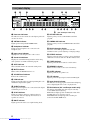
1 Processor indicators
The indicators for the various decoders light up when the
decoders are in use.
e HiFi DSP indicator
Lights up when you select a Hi-Fi DSP sound field
program.
2 VIRTUAL indicator
Lights up when using Virtual CINEMA DSP.
r CINEMA DSP indicator
Lights up when you select a CINEMA DSP sound field
program.
3 Headphones indicator
Lights up when headphones are connected to the
headphone jack.
4 Input source indicator
Highlights the current input source with a cursor.
5 Sound field indicator
Displays the sound field management the unit is using
when you listen to a DSP sound field program.
6 AUTO indicator
Shows that this unit is in the automatic tuning mode.
7 MUTE indicator
Flashes while the MUTE function is on.
8 VOLUME level indicator
Indicates the volume level.
9 PCM indicator
Lights up when this unit is reproducing PCM (pulse code
modulation) digital audio signals.
0 SILENT indicator
Lights up when headphones are connected and the digital
sound field processor is on.
q SP A B indicator
Lights up to indicate which set of main speakers is
selected. Both indicators light up when both sets of
speakers are selected.
w NIGHT indicator
Lights up when the unit is set to night listening mode.
8
Downloaded from www.Manualslib.com manuals search engine
t Multi-information display
Shows the current DSP program name and other
information when you are adjusting or changing settings.
y STEREO indicator
Lights up when the unit is receiving a strong signal from
a FM stereo broadcast while the “AUTO” indicator is lit.
u TUNED indicator
Lights up when this unit is tuned to a radio station.
i MEMORY indicator
Flashes to show a station can be stored in memory.
o SLEEP indicator
Lights up while the sleep timer is on.
p LFE indicator
Lights up when the input signal contains an LFE signal.
a Input channel indicator
The indicators for the appropriate sound channels light up
when a digital signal from a source is played back.
s RDS indicator (U.K. and Europe models only)
The name(s) of the RDS data offered by the currently
received RDS station light(s) up.
EON indicator lights up when an RDS station that offers
the EON data service is being received.
PTY HOLD indicator lights up while searching for
stations in the PTY SEEK mode.
CONNECTIONS
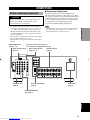
■ Connecting to digital jacks
Before connecting components
This unit has digital jacks for direct transmission of
digital signals through either coaxial or fiber optic cables.
You can use the digital jacks to input PCM, Dolby Digital
and DTS bitstreams. Use digital connections if you wish
to enjoy the multi-channel sound track of DVD material,
etc. with DSP effects. All digital input jacks are
acceptable for 96 kHz sampling digital signals.
CAUTION
Do not connect this unit or other components to the
mains power until all connections between the
components have been completed.
Note
• The OPTICAL jack on this unit conform to the EIA standard.
If you use a fiber optic cable that does not conform to this
standard this unit may not function properly.
PREPARATION
• Be sure all connections are made correctly, that is to
say L (left) to L, R (right) to R, “+” to “+” and “–” to
“–”. Some components require different connection
methods and have different jack names. Refer to the
operation instructions for each component you wish to
connect to this unit.
• After you have completed all connections, check them
again to make sure they are correct.
• The jack names correspond to the names on the input
selector.
This jack is reserved for factory use.
Do not connect any equipment to this jack.
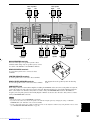
DIGITAL INPUT jacks
(pages 9 – 12)
Audio component jacks
(page 12)
Video component jacks
(pages 10 – 11)
Speaker terminals
(page 17)
COMPORNENT VIDEO
PR
AUDIO
R
DIGITAL
INPUT
CD
AUDIO
L
R
VIDEO
L
D-TV
/CBL
B
2
IN
(PLAY)
Y
VIDEO
DVD
CD
PB
DVD
A
MONITOR
OUT
D-TV
/CBL
MD
/CD-R
COAXIAL
OPTICAL
OUT
(REC)
TUNER
IN
VCR
DVD
1
R
MAIN
MAIN
L
SPEAKERS
R
AM
ANT
OUT
REAR
(SURROUND)
L
GND
SURROUND
A
VIDEO
75Ω UNBAL.
SUB
WOOFER
CENTER
6CH INPUT
SUB
WOOFER
MONITOR
OUT
B
FM
ANT
OUTPUT
CENTER
6CH INPUT jacks
(page 14)
Antenna input terminals
(page 13)
REAR
CENTER
AC OUTLETS
(page 18)
SUBWOOFER OUTPUT
jack (page 17)
English
9
Downloaded from www.Manualslib.com manuals search engine
CONNECTIONS
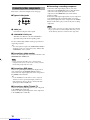
Connecting video components
Refer to the connection examples on the next page.
■ Types of video jacks
COMPONENT VIDEO
VIDEO
1
PR
PB
Y
2
1 VIDEO jack
Conventional composite video signal.
2 COMPONENT VIDEO jacks
Transmit color difference (PB, PR) and luminance
separately and provide the best quality picture.
Use the commercially available cable type specified for
connecting each jack.
y
• You can designate the input for the COMPONENT VIDEO A
and B jacks to suit your components by using “INPUT 1 I/O
ASSIGNMENT” on the set menu.
■ Connecting a video monitor
Connect the video input jack on your video monitor to the
MONITOR OUT VIDEO jack.
Note
• If you connect this unit with a source component using
Component video jacks, you also need to connect your video
monitor using Component video jacks.
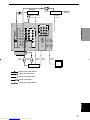
■ Connecting a DVD player
Connect the optical digital audio signal output jack on
your component to the DIGITAL INPUT jack and
connect the video signal output jack on the component to
the VIDEO jack on this unit.
y
• Use the AUDIO jacks on this unit for a video component
which does not have optical digital output jack. However,
multi-channel reproduction cannot be obtained with audio
signals input from the AUDIO jacks.
■ Connecting a digital TV/cable TV
Connect the video signal output jack on your component
to the VIDEO jack on this unit.
Connect the audio signal output jacks on the component
to the AUDIO jacks on this unit.
10
Downloaded from www.Manualslib.com manuals search engine
■ Connecting a recording component
Connect the audio signal input jacks on your video
component to the AUDIO OUT jacks on this unit. Then
connect the video signal input jack on the video
component to the VIDEO OUT jack on this unit for
picture recording.
Connect the audio signal output jacks on your component
to the AUDIO IN jacks on this unit. Then connect the
video signal output jack on the component to the VIDEO
IN jack on this unit to play a source from your recording
component.
Note
• Once you have connected a recording component to this unit,
keep its power turned on while using this unit. If the power is
off, this unit may distort the sound from other components.
CONNECTIONS
L
R
DVD player
AUDIO
OUTPUT
O
TV/digital TV/
cable TV
OPTICAL
OUTPUT
L
R
AUDIO
OUTPUT
VIDEO
OUTPUT
VIDEO
OUTPUT
COMPORNENT VIDEO
PR
AUDIO
CD
R
L
VIDEO
L
PB
Y
PREPARATION
R
DIGITAL
INPUT
AUDIO
DVD
A
VIDEO
CD
DVD
IN
(PLAY)
D-TV
/CBL
D-TV
/CBL
B
2
MONITOR
OUT
MD
/CD-R
COAXIAL
OPTICAL
OUT
(REC)
TUNER
IN
VCR
DVD
R
1
MAIN
MA
AM
ANT
OUT
GND
SURROUND
A
VIDEO
75Ω UNBAL.
SUB
WOOFER
SUB
WOOFER
CENTER
6CH INPUT
AUDIO
OUTPUT
B
FM
ANT
MONITOR
OUT
OUTPUT
L
R
AUDIO
INPUT
L
R
VIDEO
OUTPUT
VCR
VIDEO
INPUT
VIDEO
INPUT
Video monitor
indicates audio signal direction
L
indicates left analog cables
R
indicates right analog cables
O
indicates optical cables
indicates video signal direction
English
11
Downloaded from www.Manualslib.com manuals search engine
CONNECTIONS
y
Connecting audio components
• Use the AUDIO jacks on this unit for a CD recorder or MD
recorder which does not have optical digital input or output
jack.
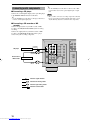
■ Connecting a CD player
Connect the coaxial digital output jack on your CD player
to the DIGITAL INPUT CD jack on this unit.
Note
• Once you have connected a recording component to this unit,
keep its power turned on while using this unit. If the power is
off, this unit may distort the sound from other components.
y
• Use the AUDIO jacks on this unit for a CD player which does
not have coaxial digital output jack.
■ Connecting a CD recorder or MD
recorder
Connect the input jacks on your CD recorder or MD
recorder to the MD/CD-R OUT (REC) jacks for analog
recording.
Connect the output jacks on your CD recorder or MD
recorder to the MD/CD-R IN (PLAY) jacks to play a
source from your recording component.
COMPORNENT VID
PR
AUDIO
R
COAXIAL
OUTPUT
CD player
DIGITAL
INPUT
CD
R
L
DVD
A
VIDEO
CD
DVD
IN
(PLAY)
D-TV
/CBL
D-TV
/CBL
B
MONITOR
OUT
MD
/CD-R
COAXIAL
AUDIO
OUTPUT
L
VIDEO
2
C
L
AUDIO
OPTICAL
OUT
(REC)
TUNER
IN
R
VCR
DVD
CD recorder or
MD recorder
1
MAIN
AM
ANT
OUT
GND
SURROUND
VIDEO
75Ω UNBAL.
L
AUDIO
INPUT
R
indicates signal direction
L
indicates left analog cables
R
indicates right analog cables
C
indicates coaxial cables
12
Downloaded from www.Manualslib.com manuals search engine
SUB
WOOFER
CENTER
6CH INPUT
SUB
WOOFER
OUTPUT
MONITOR
OUT
FM
ANT
PB
CONNECTIONS
Connecting the antennas
Both AM and FM indoor antennas are included with this
unit. In general, these antennas should provide sufficient
signal strength.
■ Connecting the AM loop antenna
1
Set up the AM loop antenna, then connect it
to the terminals on this unit.
2
Press and hold the tab to insert the AM loop
antenna lead wires into the AM ANT and
GND terminals.
3
Orient the AM loop antenna for the best
reception.
Connect each antenna correctly to the designated
terminals.
AM loop antenna
(included)
Indoor FM
antenna
(included)
PREPARATION
TUNER
AM
ANT
GND
75Ω UNBAL.
FM
ANT
Ground (GND terminal)
For maximum safety and minimum
interference, connect the antenna GND
terminal to a good earth ground. A good
earth ground is a metal stake driven into
moist earth.
1
75-ohm/300-ohm antenna adapter (U.K. model only)
2
11 (7/16)
8 (5/16)
Unit:
6 (1/14)
mm (inch)
Open the cover of the
included 75-ohm/300-ohm
antenna adapter.
Cut the external sleeve
of the 75-ohm coaxial
cable and prepare it for
connection.
Notes
• The AM loop antenna should be placed away from this unit.
• The AM loop antenna should always be connected, even if an
outdoor AM antenna is connected to this unit.
A properly installed outdoor antenna provides clearer
reception than an indoor one. If you experience poor
reception quality, an outdoor antenna may improve the
quality. Consult the nearest authorized YAMAHA
dealer or service center about the outdoor antennas.
3
Lead wire
FREQUENCY STEP switch (China and General
models only)
FM/AM
Because the inter-station frequency
spacing differs in different areas, set the
FREQUENCY STEP switch (located on
the rear panel) according to the frequency
spacing in your area.
North, Central and South America:
100 kHz/10 kHz
Other areas: 50 kHz/9 kHz
Before setting this switch, disconnect the
AC power plug of this unit from the AC
outlet.
50kHz/9kHz
Cut the lead wire and
remove it.
100kHz/10kHz
FREQUENCY
STEP
4
Clamp
with
pliers.
5
Clamp with
pliers.
Snap the cover into
place.
English
Insert the wire
into the slot.
Insert the cable wire into the
slot, and clamp it with pliers.
13
Downloaded from www.Manualslib.com manuals search engine
CONNECTIONS
Connecting an external decoder
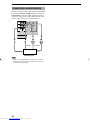
This unit is equipped with 6 additional input jacks (MAIN
left and right, CENTER, SURROUND left and right and
SUBWOOFER) for discrete multi-channel input from a
component equipped with a multi-channel decoder and 6
channel output jacks such as a DVD/SACD player.
VCR
MAIN
OUT
SURROUND
VIDEO
SUB
WOOFER
CENTER
6CH INPUT
SUB
WOOFER
MONITOR
OUT
OUTPUT
L
CENTER
L
R
R
SURROUND
SUBWOOFER
MAIN
DVD/SACD player
Note
• When you select 6CH INPUT as the input source, the unit
automatically turns off the digital sound field processor, and
you cannot use DSP programs.
14
Downloaded from www.Manualslib.com manuals search engine
CONNECTIONS
Connecting the speakers
■ Speakers
This unit has been designed to provide the best soundfield quality with a 6-speaker system, using main left and
right speakers, rear left and right speakers, a center
speaker, and a rear center speaker. If you use different
brands of speakers (with different tonal qualities) in your
system, the tone of a moving human voice and other types
of sound may not shift smoothly. We recommend that you
use speakers from the same manufacturer or speakers
with the same tonal quality.
The main speakers should be high-performance models
and have enough power-handling capacity to accept the
maximum output of your audio system. The other
speakers do not have to be equal to the main speakers. For
precise sound localization, however, it is ideal to use the
models of equivalent performance with the main
speakers.
Use of a subwoofer expands your sound field
It is also possible to further expand your system with the
addition of a subwoofer. The use of a subwoofer is
effective not only for reinforcing bass frequencies from
any or all channels, but also for reproducing the LFE
(low-frequency effect) channel with high fidelity when
playing back Dolby Digital or DTS signals. The
YAMAHA Active Servo Processing Subwoofer System is
ideal for natural and lively bass reproduction.
Refer to the following diagram when you place the
speakers.
Center speaker
Main speaker (R)
Rear speaker (R)
Subwoofer
Main
speaker (L)
1.8 m (6 feet)
Rear center
speaker
Rear speaker (L)
Main speakers
Place the main left and right speakers an equal distance
from the ideal listening position. The distance between
each speaker and each side of the video monitor should
also be the same.
PREPARATION
The main speakers are used for the main source sound
plus effect sounds. They will probably be the speakers
from your present stereo system. The rear speakers are
used for effect and surround sounds. The center speaker is
for the center sounds (dialog, vocals, etc.). The rear center
speaker supplements the rear (left and right) speakers and
provides for more realistic front-to-back transitions.
■ Speaker placement
Center speaker
Align the front face of the center speaker with the front
face of your video monitor. Place the speaker as close to
the monitor as possible (such as directly over or under the
monitor) and centrally between the main speakers.
Rear speakers
Place these speakers behind your listening position,
facing slightly inwards, about 1.8 m (6 feet) above the
floor.
Rear center speaker
Place the rear center speaker in the center between the
rear left and right speakers at the same height from the
floor as the rear speakers.
Subwoofer
The position of the subwoofer is not so critical, because
low bass sounds are not highly directional. However, it is
better to place the subwoofer near the main speakers.
Turn it slightly toward the center of the room to reduce
wall reflections.
Note
• If you do not use any of effect speakers (rear, center and/or
rear center), change the settings of “SOUND 1 SPEAKER
SET” items at the set menu to direct signals to other terminals
you have connected speakers to.
CAUTION
Use magnetically shielded speakers. If these speakers
still create interference with the monitor, place the
speakers away from the monitor.
English
15
Downloaded from www.Manualslib.com manuals search engine
CONNECTIONS
■ Connections
Be sure to connect the left channel (L), right channel (R), “+” (red) and “–” (black) in accordance with the markers on
this unit, the speakers, and the speaker cables. If the connections are faulty, no sound will be heard from the speakers,
and if the polarity of the speaker connections is incorrect, the sound will be unnatural and lack bass.
CAUTION
• Use speakers with the specified impedance shown on the rear panel of this unit.
• Do not let the bare speaker wires touch each other or any metal part of this unit. This could damage this unit and/
or the speakers.
A speaker cord is actually a pair of insulated cables
running side by side. One cable is colored or shaped
differently, perhaps with a stripe, groove or ridge.
10 mm (3/8”)
1
Red: positive (+)
Black: negative (–)
2
1
Remove approximately 10 mm (3/8”) of
insulation from each of the speaker cables.
4
2
Twist the exposed wires of the cable
together to prevent short circuits.
3
4
Unscrew the knob.
5
Tighten the knob to secure the wire.
3
5
Insert one bare wire into the hole in the side
of each terminal.
y
Banana plug
(With the exception of U.K. and Europe models)
• You can also use banana plug connectors. First, tighten the
knob and then insert the banana plug connector into the end of
the corresponding terminal.
(With the exception of U.K. and Europe models)
■ IMPEDANCE SELECTOR switch
WARNING
Do not change setting of the IMPEDANCE SELECTOR switch when the unit power is switched on, as doing so may
damage the unit. If this unit fails to turn on when STANDBY/ON (or SYSTEM POWER) is pressed, the
IMPEDANCE SELECTOR switch may not be fully slid to either position. If this is the case, slide the switch all the
way to either position when this unit is in standby mode. Be sure to move this switch only when this unit is in
standby mode.
Select the switch position (left or right) according to the impedance of the speakers in your system.
(General model)
Switch
position
Speaker
Impedance level
Main
If you use one/two set(s) of main speakers, the impedance of
each speaker must be 4 Ω/8 Ω or higher.
Left
Center,
Rear Center,
Rear
Main*
IMPEDANCE SELECTOR
SET BEFORE POWER ON
MAIN A OR B :
A+B :
CENTER
:
REAR CENTER :
REAR
:
4ΩMIN. /SPEAKER
8ΩMIN. /SPEAKER
6ΩMIN. /SPEAKER
6ΩMIN. /SPEAKER
6ΩMIN. /SPEAKER
MAIN A OR B : 8ΩMIN. /SPEAKER
A+B : 16ΩMIN. /SPEAKER
CENTER
: 8ΩMIN. /SPEAKER
REAR CENTER : 8ΩMIN. /SPEAKER
REAR
: 8ΩMIN. /SPEAKER
Right
Center,
Rear Center,
Rear
IMPEDANCE SELECTOR
switch
The impedance of each speaker must be 6 Ω or higher.
If you use one/two set(s) of main speakers, the impedance of
each speaker must be 8 Ω/16 Ω or higher.
The impedance of each speaker must be 8 Ω or higher.
* [Canada model only]
When the switch is set to right, you cannot use “A+B”.
16
Downloaded from www.Manualslib.com manuals search engine
CONNECTIONS
Main A speaker
Right
Left
1
Rear speaker
Right
Left
2
3
4
COMPORNENT VIDEO
PR
AUDIO
R
CD
L
R
VIDEO
L
PB
Y
VIDEO
D-TV
/CBL
B
DVD
CD
2
IN
(PLAY)
MONITOR
OUT
D-TV
/CBL
MD
/CD-R
COAXIAL
OPTICAL
OUT
(REC)
TUNER
IN
VCR
DVD
PREPARATION
DIGITAL
INPUT
AUDIO
DVD
A
1
R
MAIN
MAIN
L
SPEAKERS
R
AM
ANT
OUT
REAR
(SURROUND)
L
IMPEDANCE SELECTOR
SET BEFORE POWER ON
GND
SURROUND
A
MAIN A OR B :
A+B :
CENTER
:
REAR CENTER :
REAR
:
VIDEO
B
75Ω UNBAL.
SUB
WOOFER
CENTER
6CH INPUT
SUB
WOOFER
MONITOR
OUT
4ΩMIN. /SPEAKER MAIN A OR B : 8ΩMIN. /SPEAKER
8ΩMIN. /SPEAKER
A+B : 16ΩMIN. /SPEAKER
6ΩMIN. /SPEAKER CENTER
: 8ΩMIN. /SPEAKER
6ΩMIN. /SPEAKER REAR CENTER : 8ΩMIN. /SPEAKER
6ΩMIN. /SPEAKER REAR
: 8ΩMIN. /SPEAKER
FM
ANT
OUTPUT
CENTER
REAR
CENTER
6
5
Subwoofer
system
Right
Left
Main B speaker
MAIN SPEAKERS terminals
You can connect up to two speaker systems to these
terminals. When using only one speaker system, connect
it to either of the MAIN A or the MAIN B terminals.
Center
speaker
6
7
Rear center
speaker
1
5
2
REAR SPEAKERS terminals
A rear speaker system can be connected to these
terminals.
CENTER SPEAKER terminals
A center speaker can be connected to these terminals.
REAR CENTER SPEAKER terminals
A rear center speaker can be connected to these terminals.
3
7
4
The diagram shows the speaker layout in the listening
room.
SUBWOOFER jack
When using a subwoofer with built-in amplifier, including the YAMAHA Active Servo Processing Subwoofer System,
connect the input jack of the subwoofer system to this jack. This unit will direct low bass signals distributed from the
main, center and/or rear channels to this jack in accordance with your SPEAKER SET selections. The LFE (lowfrequency effect) signals generated when Dolby Digital or DTS is decoded are also directed to this jack in accordance
with your SPEAKER SET selections.
Notes
17
Downloaded from www.Manualslib.com manuals search engine
English
• The cut-off frequency of the SUBWOOFER jack is 90 Hz.
• If you do not use a subwoofer, allocate the signals to the main left and right speakers by changing the setting of “SOUND 1
SPEAKER SET” item “1E BASS” on the set menu to MAIN.
• Use the control on the subwoofer to adjust its volume level. You can also adjust the volume level by using this unit’s remote control
(see “SETTING THE SPEAKER LEVELS” on page 49).
CONNECTIONS
Connecting the power supply
cords
Turning on the power
When all connections are complete, turn on the power of
this unit.
VOLTAGE SELECTOR
1
VOLUME
INPUT
PRESET/TUNING FM/AM
STANDBY
/ON
EDIT
TUNING MODE MEMORY
AUTO/MANUAL MONO MAN`L/AUTO FM
VOLTAGE
SELECTOR
INPUT MODE
6CH INPUT
AC OUTLETS
SWITCHED
VIDEO AUX
SILENT
SPEAKERS
A
STEREO
PROGRAM
A/B/C/D/E
PRESET/TUNING
NEXT
SET MENU
CONTROL
BASS/TREBLE
B
EFFECT
VIDEO
PHONES
L
AUDIO
R
IMPEDANCE SELECTOR
SET BEFORE POWER ON
L
MAIN A OR B :
A+B :
CENTER
:
REAR CENTER :
REAR
:
4ΩMIN. /SPEAKER MAIN A OR B : 8ΩMIN. /SPEAKER
8ΩMIN. /SPEAKER
A+B : 16ΩMIN. /SPEAKER
6ΩMIN. /SPEAKER CENTER
: 8ΩMIN. /SPEAKER
6ΩMIN. /SPEAKER REAR CENTER : 8ΩMIN. /SPEAKER
6ΩMIN. /SPEAKER REAR
: 8ΩMIN. /SPEAKER
SYSTEM
POWER
POWER
TV
AV
CD
STANDBY
POWER
MD/CD-R TUNER
1
SLEEP
REAR
CENTER
DVD
D-TV/CBL
VCR
V-AUX
6CH INPUT
REC
AUDIO
DISC SKIP
CODE SET
AMP
(General model)
TV
+
+
+
■ Connecting the AC power cord
Plug in this unit to a wall outlet.
■ AC OUTLETS (SWITCHED)
U.S.A., Canada, China, Europe, Singapore and
General models .............................................. 2 OUTLETS
U.K. and Australia model ................................ 1 OUTLET
Use these outlets to connect the power cords from your
components to this unit. The power to the AC OUTLETS
is controlled by this unit’s STANDBY/ON (or SYSTEM
POWER and STANDBY). These outlets will supply
power to any source component connected to this unit
whenever this unit is turned on. The maximum power
(total power consumption of components) that can be
connected to the AC OUTLETS varies depending on the
area which it was purchasing.
China and General models ......................................... 50 W
Other models ......................................................... 100 W
■ VOLTAGE SELECTOR
(China and General models only)
The VOLTAGE SELECTOR on the rear panel of this unit
must be set for your local main voltage BEFORE
plugging into the AC main supply. Voltages are 110/120/
220/240 V AC, 50/60 Hz.
18
Downloaded from www.Manualslib.com manuals search engine
1
Press STANDBY/ON (SYSTEM POWER on
the remote control) to turn on the power of
this unit.
SYSTEM
POWER
STANDBY
/ON
Front panel
or
Remote control
The level of the main volume, and then the current
DSP program name appear on the front panel
display.
BASIC SYSTEM SETTINGS
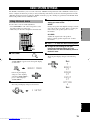
The “BASIC” menu allows you to set some of the basic “SOUND” menu parameters with a minimum of effort. If you
wish to configure the unit more precisely to suit your listening environment, use the more detailed parameters from the
“SOUND” menu instead of those under the “BASIC” menu (See page 41). Altering any parameters in the BASIC menu
will reset all parameters in the “SOUND” menu.
4
Using the basic menu
AMP
+
+
+
VOL
CH
VOLUME
1
–
–
–
MUTE
INPUT
HALL
JAZZ
ROCK
1
2
3
SP LEVEL
Adjusts the output levels of the speakers.
Refer to “Setting speaker output levels” for more
information.
MUTE
MUSIC
5
/DTS
9
TV THTR MOVIE1
ENTERTAINMENT
4
MOVIE2
6
7
8
NIGHT
6.1/5.1
STEREO
0
+10
ENTER
LEVEL
SET MENU
TITLE
MENU
2
4,7
A/B/C/D/E
–
+
SELECT
5
6
Press j / i to enter the desired setting mode.
7
Press u / d to exit from the set menu.
The front panel display changes in the following
order:
TEST
DISPLAY
RETURN
PRESET/CH
1
2
3,5
Press AMP.
Change the unit settings to suit your
listening environment. When you have
finished, the unit will automatically return to
the basic menu.
AMP
Press SET MENU.
“BASIC MENU” appears on the front panel display,
as shown here.
SET MENU
BASIC MENU
MENU
A/B/C/D/E
If the front panel display
changes to show anything
other than “BASIC MENU”,
press u until it displays
“BASIC MENU”.
3
PREPARATION
SETUP
Changes the speaker and amplifier settings to suit the
size of the room you are using. Refer to “Setting the
unit to match your speaker system” for more
information.
Use the remote control to make adjustments.
• Press SPEAKERS A or B on the front panel to select
the main speakers you want to use.
• Make sure you disconnect headphones from this unit.
TV
Press u / d to change the display to the
setting you want to alter.
–
SELECT
+
PRESET/CH
Press j / i to enter into the BASIC menu.
The front panel display changes as shown here:
Exit
–
SELECT
PRESET/CH
+
↑
BASIC
↓↑
SOUND
↓↑
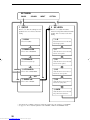
INPUT
↓↑
OPTION
↓
Exit
–
SELECT
+
1 SETUP
PRESET/CH
English
19
Downloaded from www.Manualslib.com manuals search engine
BASIC SYSTEM SETTINGS
SET MENU
BASIC
SOUND
INPUT
OPTION
1 SETUP
2 SP LEVEL
Press j / i to alter the settings for each
parameter. Use d to move to the next
setting.
Press j / i to adjust the balance
between each speaker and the left main
speaker. Use d to move to the next
setting.
1 ROOM
1 L-R
Choose from S/M/L.
Adjust the balance between the main
left and right speakers.
2 SUBWOOFER
2C
Choose either of YES/NONE.
Adjust the balance between the main
left and center speakers.
3 SPEAKERS
3 RL
Choose from 2/3/4/5/6 spk.
Adjust the balance between the main
left and rear left speakers.
CANCEL 4 SET/CANCEL
4 RC
Choose either of SET/CANCEL.
SET
YES
Adjust the balance between the rear
left and rear center speakers.
NO
5 CHECK OK:
5 RR
Choose either of YES/NO.
Adjust the balance between the rear
left and rear right speakers.
6 SWFR
Adjust the balance between the main
left speaker and the subwoofer.
• After altering the “1 SETUP” parameters, readjust the output levels of the speakers at “2 SP LEVEL”.
• See pages 38 – 44 for a detailed explanation of the “SOUND”, “INPUT” and “OPTION” menus.
20
Downloaded from www.Manualslib.com manuals search engine
BASIC SYSTEM SETTINGS
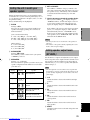
Setting the unit to match your
speaker system
Follow the instructions below to set the amplifier output
to match the size of your room and speakers. Press u / d
to cycle through parameters 1 through 4, and j / i to alter
the parameter setting.
Factory default settings are highlighted.
[U.S.A. and Canada models]
S: 16ft. x 3ft., 200sq.ft. (4.8 x 4m, 20m2)
M: 20ft. x 16ft., 300sq.ft. (6.3 x 5.0m, 30m2)
L: 26ft. x 19ft., 450sq.ft. (7.9 x 5.8m, 45m2)
If the volume of the test tone varies between speakers,
press j / i to change the display to “NO”. The unit
will automatically enter the “2 SP LEVEL” mode.
If the test tone is output at the same volume from all
of the speakers, select “CHECK OK: YES”. The unit
will exit from the SETUP menu.
Notes
• The unit cycles the test tone around each of the speakers in
turn twice.
• The indicator of the speaker currently outputting the test tone
flashes on the front panel display.
[Other models]
S: 3.6m x 2.8m, 10m2
M: 4.8m x 4.0m, 20m2
L: 6.3m x 5.0m, 30m2
2 SUBWOOFER
Settings: YES, NONE
Select YES if you have a subwoofer in your system,
or NONE if you do not.
3 SPEAKERS
Settings: 2, 3, 4, 5, 6 (spk)
Select the number of speakers you wish to use in your
speaker configuration. This number does not include
your subwoofer.
Setting
5 Use the test tone to check the speaker levels.
When you select SET in 4, the display changes to
“CHECK: TestTone”, and the unit outputs a test tone
to each of the speakers in turn. When the test tone
begins, the display changes to “CHECK OK: YES”.
Speaker
Display
Use this menu to compare and adjust the test tone output
from each speaker to the output from the left main (or left
rear) speaker so that the volume level for all speakers is
identical. Press u / d to select a speaker, then adjust the
balance using j / i.
Note
• The unit outputs the test tone from the selected speaker and
the left main (or left rear) speaker in turn. The indicator of the
speaker currently outputting the test tone flashes on the front
panel display.
L
3spk
L C R
Main L/Center/Main R
1 L-R
Adjusts the balance between the main left and right
speakers.
4spk
L
R
RL
RR
Main L/Main R/Rear L/
Rear R
2 C
Adjusts the balance between the main left and center
speakers.
Main L/Center/Main R/
Rear L/Rear R
3 RL
Adjusts the balance between the main left and rear
left speakers.
Main L/Center/Main R/
Rear L/Rear Center/Rear R
4 RC
Adjusts the balance between the rear left and rear
center speakers.
5spk
L C R
RL
6spk
RR
L C R
RL RC RR
Main L/Main R
Setting speaker output levels
(SP LEVEL)
2spk
R
PREPARATION
1 ROOM
Settings: S, M, L
Select the size of the room you have installed your
speakers in. Roughly speaking, the room sizes are
defined as follows:
4 SET or CANCEL
Select SET to confirm the changes you made to the
above three settings. The unit will output a test tone to
the speakers (see 5). Alternatively, select CANCEL
to exit this menu without altering any of the unit
settings.
6 SWFR
Adjust the balance between the main left speaker and
the subwoofer.
21
Downloaded from www.Manualslib.com manuals search engine
English
5 RR
Adjusts the balance between the rear left and rear
right speakers.
PLAYBACK
1
44
4
6
VOLUME
INPUT
PRESET/TUNING FM/AM
STANDBY
/ON
Rotate the INPUT selector (or press one of
the input selector buttons on the remote
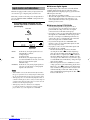
control) to select the input source.
The selected input source name and input mode
appear on the front panel display for a few seconds.
EDIT
TUNING MODE MEMORY
INPUT
AUTO/MANUAL MONO MAN`L/AUTO FM
INPUT MODE
6CH INPUT
VIDEO AUX
SILENT
SPEAKERS
A
STEREO
PROGRAM
A/B/C/D/E
PRESET/TUNING
NEXT
SET MENU
CONTROL
BASS/TREBLE
B
EFFECT
VIDEO
PHONES
L
AUDIO
CD
R
or
3
DVD
MD/CD-R TUNER
SLEEP
D-TV/CBL
V-AUX
VCR
6
7
Front panel
Remote control
SYSTEM
POWER
POWER
TV
AV
CD
4
DVD
STANDBY
POWER
MD/CD-R TUNER
SLEEP
D-TV/CBL
V-AUX
VCR
6CH INPUT
REC
AUDIO
DISC SKIP
CODE SET
1
VCR
+
+
CH
VOLUME
–
–
–
MUTE
INPUT
HALL
JAZZ
ROCK
1
2
3
5
/DTS
9
TV THTR MOVIE1
8
NIGHT
6.1/5.1
STEREO
0
+10
ENTER
EVE
1
4
MOVIE2
7
TUNER
CD
VOLUME
AUTO
L
R
To select the audio source connected to the 6CH
INPUT jacks
• Select the input to which the video source component is
connected before selecting an audio source.
Press 6CH INPUT until “6CH INPUT” appears on the
front panel display.
6
ENTERTAINMENT
6
MD/CD-R
Selected input source
MUTE
MUSIC
DVD
4
TV
+
D-TV/CBL
DVD
AMP
VOL
V-AUX
SP
A
7
SET MENU
6CH INPUT
Press STANDBY/ON (SYSTEM POWER on
the remote control) to turn on the power.
6CH INPUT
or
SYSTEM
POWER
STANDBY
/ON
Front panel
Remote control
or
Front panel
Remote control
2
Turn on the video monitor connected to this
unit.
3
Press SPEAKERS A or B
to select the main
speakers you want to use.
If you are using two sets of
main speakers, press both A
and B.
22
Downloaded from www.Manualslib.com manuals search engine
SPEAKERS
A
B
Note
• If “6CH INPUT” is shown on the front panel display, no other
source can be played. To select another input source, first
press 6CH INPUT so that “6CH INPUT” disappears from the
front panel display.
PLAYBACK
5
Start playback or select a broadcast station
on the source component.
Refer to the operation instructions for the
component.
6
Adjust the volume to the desired level.
The volume level is displayed digitally.
Example:
–70 dB
Control range: VOLUME MUTE (minimum) to
0 dB (maximum)
The volume level indicator also shows the current
volume level as a bar graph.
VOLUME
■ BGV (background video) function
The BGV function allows you to view images from a
video source together with sounds from an audio source.
For example, you can enjoy listening to classical music
while watching beautiful scenery from a video source on
the video monitor.
Select a source from the video group, then select a source
from the audio group using the input selector buttons on
the remote control.
CD
DVD
MD/CD-R TUNER
SLEEP
D-TV/CBL
V-AUX
VCR
+
VOLUME
or
Front panel
■ To mute the sound
–
Press MUTE on the
remote control.
To resume audio output, press
MUTE again.
Remote control
BASS/TREBLE
CONTROL
y
• You can change the amount by which the unit reduces the
volume in “OPTION 3 AUDIO MUTE” in the set menu.
• You can also cancel mute by pressing VOLUME +/–, etc.
• During muting, the MUTE indicator flashes on the front panel
display.
BASIC
OPERATION
If desired, use CONTROL and BASS/TREBLE –/+.
These controls only effect the sound from the main
speakers.
MUTE
■ Night listening mode
This mode reproduces dialogue clearly while reducing the
volume of loud sound effects for easier listening at low
volumes or at night.
Front panel
Notes
• If you increase or decrease the high-frequency or the lowfrequency sound to an extreme level, the tonal quality from the
center and rear speakers may not match that of the main left
and right speakers.
• If you have connected a recording component to the VCR
OUT, or MD/CD-R OUT jacks, and you notice distortion or
low volume during playback from other components, try
turning the recording component on.
Press NIGHT on the
remote control.
Press NIGHT once more to
return to normal reproduction.
NIGHT
0
Note
• Setting the unit in standby mode cancels night listening mode.
y
7
Select a DSP program if desired.
Use PROGRAM l / h (DSP program buttons on
the remote control) to select a DSP program. See
pages 28 – 30 for details about DSP programs.
When using the remote control, press AMP before
selecting a DSP program.
HALL
JAZZ
ROCK
1
2
3
ENTERTAINMENT
4
• You can use night listening mode with any of the sound field
programs.
• The NIGHT indicator on the front panel display lights when
the unit is in night listening mode.
• Night listening mode may vary in effectiveness depending on
the input source and surround sound settings you use.
■ When you have finished using this unit
PROGRAM
MUSIC
or
TV THTR MOVIE1
5
/DTS
9
Front panel
MOVIE2
6
7
8
NIGHT
6.1/5.1
STEREO
0
+10
ENTER
Press STANDBY/ON (STANDBY on the
remote control) to set this unit in standby
mode.
Remote control
STANDBY
STANDBY
/ON
English
Front panel
or
Remote control
23
Downloaded from www.Manualslib.com manuals search engine
PLAYBACK
■ Notes on digital signals
Input modes and indications
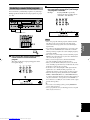
This unit is equipped with a variety of input jacks. You
can select the type of input signals you wish to use.
Each time you turn on the unit power, the input mode is
set to the “INPUT 2 INPUT MODE” setting defined in
the set menu.
Press INPUT MODE repeatedly until the
desired input mode is shown on the front
panel display.
INPUT MODE
Front panel
VCR
V-AUX
D-TV/CBL
DVD
MD/CD-R
TUNER
CD
VOLUME
SP
A
DVD
AUTO
L
R
Input mode
AUTO:
In this mode, the input signal is selected
automatically as follows:
1) Digital signal
2) Analog signal
DTS:
In this mode, only digital input signals
encoded with DTS are selected, even if the
unit is receiving another signal
simultaneously.
ANALOG: In this mode, only analog input signals are
selected, even the unit is receiving digital
signals at the same time.
Notes
• When AUTO is selected, this unit automatically determines
the type of signal. If it detects a Dolby Digital or DTS signal,
the decoder automatically switches to the appropriate setting.
• When playing a disc encoded with Dolby Digital or DTS on
some LD or DVD players, there is a delay in sound output for
a moment when playback resumes after a search, because the
unit must select the digital signal again.
• When playing a LD source that has not been digitally
recorded, the unit may not output any sound for some LD
players. In this case, set the input mode to ANALOG.
24
Downloaded from www.Manualslib.com manuals search engine
The digital input jacks of this unit can handle 96 kHz
sampling digital signals. Note the following when a
digital signal with a sampling frequency greater than 48
kHz is input to this unit:
• You cannot use any DSP programs.
• The unit will output sound as 2-channel stereo from the
main left and right speakers only. Therefore, you
cannot adjust the level of the effect speakers while
listening to such a source.
■ Notes on playing DTS-CD/LDs
• If the digital output data of the player has been
processed in any way, the unit may not be able to
perform DTS decoding even if there is a digital
connection between this unit and the player.
• If you play a source encoded with a DTS signal and set
the input mode to ANALOG, the unit may reproduce
the noise of an unprocessed DTS signal. In this case,
connect the source to a digital input jack on this unit
and set the input mode to AUTO or DTS.
• If you switch the input mode to ANALOG while
playing a source encoded with a DTS signal, the unit
does not output any sound.
• If you play a source encoded with a DTS signal with
the input mode set to AUTO;
– The unit automatically switches to the DTSdecoding mode (The “t” indicator lights up)
after detecting the DTS signal. When playback of
the DTS source is completed, the “t” indicator
may flash. While this indicator is flashing, the unit
can only reproduce DTS source. If you want to play
a normal PCM source immediately, change the input
mode back to AUTO.
– When the input mode is set to AUTO and a search
or skip operation is performed during playback of a
DTS source, the “t” indicator may flash. If this
state continues for longer than 30 seconds, the unit
will automatically switch from “DTS-decoding”
mode to PCM digital signal input mode. The “t”
indicator will turn off.
PLAYBACK
3
Selecting a sound field program
You can enhance your listening experience by selecting a
DSP program. For details about each program, see pages
28 – 30.
After selecting the desired program, press
the same button repeatedly to cycle through
sub-programs if available.
Example:
Pressing MOVIE 2 repeatedly
switches the sub-program between
“Adventure” and “General”.
HALL
JAZZ
ROCK
1
2
3
VOLUME
ENTERTAINMENT
4
INPUT
MUSIC
PRESET/TUNING FM/AM
STANDBY
/ON
5
EDIT
TV THTR MOVIE1
MOVIE2
6
7
8
NIGHT
6.1/5.1
STEREO
0
+10
ENTER
TUNING MODE MEMORY
/DTS
AUTO/MANUAL MONO MAN`L/AUTO FM
INPUT MODE
9
6CH INPUT
VIDEO AUX
SILENT
SPEAKERS
A
STEREO
PROGRAM
A/B/C/D/E
PRESET/TUNING
NEXT
SET MENU
BASS/TREBLE
CONTROL
B
EFFECT
VIDEO
PHONES
L
AUDIO
R
VCR
+
+
+
VOL
CH
VOLUME
–
–
MUTE
INPUT
JAZZ
ROCK
2
3
TV THTR MOVIE1
4
2,3
MOVIE2
6
7
8
6.1/5.1
STEREO
0
+10
ENTER
EVE
SET MENU
1
Press AMP.
2
Press one of the numeric buttons on the
remote control to select the desired
program.
The name of the selected program appears on the
front panel display.
AMP
HALL
JAZZ
ROCK
1
2
3
MUSIC
5
/DTS
9
VCR
TV THTR MOVIE1
ENTERTAINMENT
4
MOVIE2
6
7
8
NIGHT
6.1/5.1
STEREO
0
+10
ENTER
V-AUX
D-TV/CBL
CD
VOLUME
L C R
LFE RL
RR
• There are 9 programs with sub-programs available with this
unit. However, the selection depends on the input signal
format and not all sub-programs can be used with all input
signal formats.
• You cannot use the digital sound field processor with a source
connected to the 6CH INPUT jacks of this unit or when the
unit is reproducing a digital source with a sampling frequency
greater than 48 kHz.
• The acoustics of your listening room affect the DSP program.
Minimize the sound reflections in your room to maximize the
effect created by the program.
• When you select an input source, this unit automatically
selects the last DSP program used with that source.
• When you set this unit in standby mode, it stores the current
source and DSP program in memory and automatically selects
them when you turn on the power again.
• If the unit receives a Dolby Digital or DTS signal when the
input mode is set to AUTO, the DSP program (No. 7–9)
automatically switches to the appropriate decoding program.
• When the unit is reproducing a monaural source with PRO
LOGIC or PRO LOGIC/Enhanced, or PRO LOGIC II Movie,
no sound is output from the main and rear speakers. Sound can
only be heard from the center speaker. (If “1A CENTER” on
the set menu is set to NON, the center channel sound is output
from the main speakers.)
ENTERTAINMENT
NIGHT
9
TUNER
DVD
MD/CD-R
TUNER
CD
VOLUME
SP
A
Adventure
L C R
LFE RL
RR
BASIC
OPERATION
5
/DTS
MD/CD-R
Notes
–
MUTE
1
DVD
1
TV
HALL
D-TV/CBL
General
AMP
MUSIC
V-AUX
SP
A
PROGRAM l / h
y
• You can also select DSP program by pressing PROGRAM
l / h on the front panel.
• Select a program based on your listening preference. Program
names are just for reference.
English
25
Downloaded from www.Manualslib.com manuals search engine
PLAYBACK
■ Selecting PRO LOGIC, PRO LOGIC II or
Neo:6
You can listen to 2-channel sources decoded into five or
six discrete channels by selecting PRO LOGIC, PRO
LOGIC II or Neo:6 in program No. 9.
The display cycles as follows each time you press q/
DTS:
PRO LOGIC→PRO LOGIC Enhanced→PRO LOGIC II
Movie→PRO LOGIC II Music→Neo:6 Cinema→Neo:6
Music→PRO LOGIC→....
y
• You can select PRO LOGIC, PRO LOGIC Enhanced, PRO
LOGIC II Movie, PRO LOGIC II Music, Neo:6 Cinema, and
Neo:6 Music by pressing PROGRAM l / h on the front
panel repeatedly.
VOLUME
INPUT
PRESET/TUNING FM/AM
STANDBY
/ON
EDIT
TUNING MODE MEMORY
AUTO/MANUAL MONO MAN`L/AUTO FM
INPUT MODE
6CH INPUT
VIDEO AUX
SILENT
SPEAKERS
A
STEREO
PROGRAM
A/B/C/D/E
PRESET/TUNING
NEXT
SET MENU
BASS/TREBLE
CONTROL
B
EFFECT
VIDEO
PHONES
L
AUDIO
■ Playing Dolby Digital EX or DTS ES
material
R
Press 6.1/5.1 to turn on the Dolby Digital EX or DTS ES
decoder to listen to Dolby Digital EX and DTS ES
material with a rear center speaker.
PROGRAM l / h
6.1/5.1
AMP
VOL
+
+
CH
VOLUME
–
–
MUTE
INPUT
+10
2
TV
+
–
MUTE
HALL
JAZZ
ROCK
2
3
1
MUSIC
ENTERTAINMENT
5
/DTS
MOVIE2
6
7
8
NIGHT
6.1/5.1
STEREO
0
+10
ENTER
9
(Example)
4
TV THTR MOVIE1
LEVEL
ES
MATRIX
3
SET MENU
Select a 2-channel source and start playback
on the source component.
2
Press AMP.
3
Press q/DTS.
AMP
JAZZ
ROCK
1
2
3
MUSIC
5
/DTS
4
MOVIE2
6
7
8
NIGHT
6.1/5.1
STEREO
0
+10
ENTER
9
VCR
ENTERTAINMENT
TV THTR MOVIE1
V-AUX
D-TV/CBL
DVD
MD/CD-R
PL
TUNER
CD
VOLUME
SP
A
PRO LOGIC
V-AUX
D-TV/CBL
DVD
MD/CD-R
TUNER
L
CD
VOLUME
Matrix 6.1
1
HALL
VCR
SP
A
L C R
LFE RL
RR
Press 6.1/5.1 to choose the playback mode. (The modes
you can select vary depending on the format of the
material you are playing.)
AUTO:
This mode automatically switches to Dolby
Digital EX/DTS ES Matrix 6.1/DTS ES
Discrete 6.1 depending on the signal in the
input source that the unit detects. The rear
center speaker does not output sound for 5.1
channel sources.
Discrete 6.1: This mode can only be selected only when
the unit detects a source encoded with the
DTS ES Discrete format. (The DISCRETE
indicator lights up.)
Matrix 6.1: This mode allows for 6-channel playback of
the input source through the Matrix 6.1
EX or MATRIX
decoder. (Either
indicator lights up.)
OFF:
The rear center speaker does not output
sound in this mode.
R
Notes
• Some 6.1-channel compatible discs do not have a signal (flag)
that this unit can automatically detect. Select “Matrix 6.1” to
play these kinds of discs with 6.1-channel sound.
• 6.1-channel playback is not possible even if you press 6.1/5.1
in the following cases:
1 When “1C REAR LR” is set to NON.
2 When effects are turned off.
3 When the source connected to the 6CH INPUT jack is
being played.
4 When the unit is reproducing a Dolby Digital KARAOKE
source.
5 When headphones are connected to the PHONES jack.
• The input mode resets to AUTO when you turn the unit power
off.
26
Downloaded from www.Manualslib.com manuals search engine
PLAYBACK
■ Virtual CINEMA DSP
With Virtual CINEMA DSP, you can enjoy all DSP
programs without rear speakers. It creates virtual speakers
to reproduce a natural sound field.
You can listen to virtual CINEMA DSP by setting “1C
REAR LR” in the set menu to NON. Sound field
processing changes to VIRTUAL CINEMA DSP
automatically.
Note
• This unit is not set in the virtual CINEMA DSP mode even if
“1C REAR LR” is set to NON in the following cases:
– when the 6ch Stereo, DOLBY DIGITAL, Pro Logic, Pro
Logic II, or DTS program is selected;
– when the sound effect is turned off;
– when 6CH INPUT is selected as the input source;
– when a digital signal with a sampling frequency greater
than 48 kHz is input to this unit;
– when using the test tone; or
– when connecting the headphones.
■ SILENT CINEMA DSP
Notes
• This feature is not available when 6CH INPUT is selected or
the unit is receiving a digital signal with a sampling frequency
greater than 48 kHz.
• The sound from the LFE channel will be mixed and output
from the headphones.
■ Normal stereo reproduction
Press STEREO to turn off the sound effect
for normal stereo reproduction.
Press STEREO again to turn the sound effect back
on.
STEREO
STEREO
or
ENTER
EFFECT
Front panel
Remote control
• If you turn off the sound effects, no sound is output from the
center speaker, rear speakers, or rear center speaker.
• If you turn off the sound effects while the unit is reproducing
sound from a Dolby Digital or DTS signal, the dynamic range
of the signal is automatically compressed and the unit will
output mix the sounds of the center and rear speaker channels
and output them from the main speakers.
• The volume may be greatly reduced when you turn off the
sound effects or if you set “SOUND 4 D. RANGE (dynamic
range)” on the set menu to MIN. In this case turn on the sound
effect.
y
• During stereo reproduction, you can display information such
as the type, format and sampling frequency of the signal input
from the components connected to this unit.
(While playing a source)
1
2
Press AMP.
Press d to display the information about the
input signal.
–
SELECT
+
BASIC
OPERATION
You can enjoy a powerful sound field similar to what you
could expect from actual speakers through headphones,
with SILENT CINEMA DSP. You can listen to SILENT
CINEMA DSP by connecting your headphones to the
PHONES jack while the digital sound field processor is
on. The “SILENT” indicator lights up on the front panel
display. (When sound effects are off, the unit reproduces
the source in normal stereo.)
Notes
PRESET/CH
(Format): The display shows the signal format. When the
unit cannot detect a digital signal it
automatically switches to analog input.
in: The display shows the number of input signal
source channels, as follows: For multi-channel
soundtrack such as front 3 channels, rear 2
channels and LFE, the display shows “3/2/
LFE”.
For bilingual broadcasts where the signal is
split into 2 channels, the display shows “1+1”.
For signals with more than 3 channels the
display shows “MLT”.
fs: The display shows the sampling frequency.
When the unit is unable to detect the sampling
frequency “Unknown” shows in the front panel
display.
rate: The display shows the bit rate. When the unit is
unable to detect the bit rate “Unknown” shows
in the front panel display.
flg: The display shows the flag - data encoded in a
DTS or Dolby Digital signal that causes this
unit to automatically switch to the appropriate
decoder for playback.
English
27
Downloaded from www.Manualslib.com manuals search engine
DIGITAL SOUND FIELD PROCESSING (DSP)
Understanding sound fields
A sound field is defined as the “characteristic sound reflections of a
particular space.” In concert halls and other music venues, we hear
early reflections and reverberations as well as the direct sound
produced by the artist(s). The variations in the early reflections and
other reverberations among the different music venues is what gives
each venue its special and recognizable sound quality.
YAMAHA sent teams of sound engineers all around the world to
measure the sound reflections of famous concert halls and music
venues, and collect detailed sound field information such as the
direction, strength, range, and delay time of those reflections. Then
we stored this enormous amount of data in the ROM chips of this
unit.
■ Recreating a sound field
Recreating the sound field of a concert hall or an opera house requires localizing the virtual sound sources in your
listening room. The traditional stereo system that uses only two speakers is not capable of recreating a realistic sound
field. YAMAHA’s DSP requires four effect speakers to recreate sound fields based on the measured sound field data.
The processor controls the strength and delay time of the signals output from the four effect speakers to localize the
virtual sound sources and fully encompass the listener.
Hi-Fi DSP programs
The following list gives you a brief description of the sound fields produced by each of the DSP programs. Keep in
mind that most of these are precise digital recreations of actual acoustic environments.
No.
Program
Features
1
CONCERT HALL
A large round concert hall with a rich surround effect. Pronounced reflections from all directions
emphasize the extension of sounds. The sound field has a great deal of presence, and your virtual
seat is near the center, close to the stage.
2
JAZZ CLUB
This is the sound field at stage front in “The Bottom Line”, a famous New York jazz club, that
seats up to 300 people. Its wide left to right seating arrangement offers a real and vibrant sound.
3
ROCK CONCERT
The ideal program for lively, dynamic rock music. The data for this program was recorded at LA’s
“hottest” rock club. The listener’s virtual seat is at the center-left of the hall.
4
ENTERTAINMENT/
Disco
This program recreates the acoustic environment of a lively disco in the heart of a big city. The
sound is dense and highly concentrated. It is also characterized by a high-energy, “immediate”
sound.
ENTERTAINMENT/
6ch Stereo
Using this program increases the listening position range. This is a sound field suitable for
background music at parties, etc.
28
Downloaded from www.Manualslib.com manuals search engine
CINEMA-DSP
Sound design of CINEMA-DSP
Filmmakers intend for the dialog to be located right on the screen, the effect sound a little farther back, the music spread
even farther back, and the surround sound around the listener. Of course, all of these sounds must be synchronized with
the images on the screen.
CINEMA-DSP is an upgraded version of YAMAHA DSP specially designed for movie soundtracks. CINEMA-DSP
integrates the DTS, Dolby Digital, and Dolby Pro Logic surround sound technologies with YAMAHA DSP sound field
programs to provide a surround sound field. It recreates comprehensive movie sound design in your audio room. In
CINEMA-DSP sound field programs, YAMAHA’s exclusive DSP processing is added to the Main left and right, and
Center channels, so the listener can enjoy realistic dialogue, depth of sound, smooth transition between sound sources,
and a surround sound field that goes beyond the screen.
When a DTS or Dolby Digital signal is detected, the CINEMA-DSP sound field processor automatically chooses the
most suitable sound field program for that signal.
L SURROUND SOUND FIELD
DIALOG
EFFECT
BASIC
OPERATION
PRESENCE SOUND FIELD
MUSIC
R SURROUND SOUND FIELD
In addition to the DSP, this unit is equipped with a variety of precise decoders; Dolby Pro Logic decoder for Dolby
Surround sources, Dolby Pro Logic II decoder for Dolby Surround and 2-channel sources, Dolby Digital/DTS decoder
for multi-channel sources and Dolby Digital EX or DTS-ES decoder for adding a rear center channel. You can select
CINEMA-DSP programs to optimize these decoders and the DSP sound patterns depending on the input source.
CINEMA-DSP Programs
The following list gives you a brief description of the sound fields produced by each of the DSP programs. Keep in
mind that most of these are precise digital recreations of actual acoustic environments. Select the DSP program that you
feel sounds best regardless of the name and description given for it below.
■ For audio-video sources: No. 4 to 6
No.
Features
Program
ENTERTAINMENT/
Game
This program adds a deep and spatial feeling to video game sounds.
5
MUSIC VIDEO
This program lends an enthusiastic atmosphere to the sound, giving you the feeling you are at an
actual jazz or rock concert.
6
TV THEATER/
Mono Movie
This program is provided for reproducing monaural video sources (such as old movies). The
program produces the optimum reverberation to create sound depth using only the presence sound
field.
TV THEATER/Variety/
Sports
Though the presence sound field is relatively narrow, the surround sound field employs the sound
environment of a large concert hall. This effect enhances the experience of watching various TV
programs such as news, variety shows, music programs or sports programs.
29
Downloaded from www.Manualslib.com manuals search engine
English
4
CINEMA-DSP
■ For movie programs
No.
7
8
9
Program
MOVIE
THEATER 1
MOVIE
THEATER 2
Features
Spectacle
This program creates the extremely wide sound field of a 70-mm movie theater. It
precisely reproduces the source sound in detail, making both the video and the sound field
incredibly real. This is ideal for any kind of video source encoded with Dolby Surround,
Dolby Digital or DTS (especially large-scale movie productions).
Sci-Fi
This program clearly reproduces dialog and sound effects in the latest sound form of
science fiction films, thus creating a broad and expansive cinematic space amid the
silence. You can enjoy science fiction films in a virtual-space sound field that includes
Dolby Surround, Dolby Digital and DTS-encoded software employing the most advanced
techniques.
Adventure
This program is ideal for precisely reproducing the sound design of the newest 70-mm and
multichannel soundtrack films. The sound field is made to be similar to that of the newest
movie theaters, so the reverberations of the sound field itself are restrained as much as
possible.
General
This program is for reproducing sounds from 70-mm and multichannel soundtrack films,
and is characterized by a soft and extensive sound field. The presence sound field is
relatively narrow. It spatially spreads all around and toward the screen, restraining the
echo effect of conversations without losing clarity.
Straight Decode
The built-in decoder reproduces source sounds and sound-effects precisely.
No DSP effect is applied in this program.
Enhanced Mode
This program ideally simulates the multi-surround speaker systems of the 35-mm film
theaters. Dolby Pro Logic decoding, Dolby Digital decoding or DTS decoding and digital
sound field processing create precise effects without altering the original sound orientation.
The surround effects produced by this sound field wrap around the viewer naturally from
the back to the left and right, and toward the screen.
Straight Decode
This unit is equipped with various precise decoders;
• Dolby Digital/DTS decoder for multi-channel reproduction of the original sound
• Dolby Digital EX/DTS ES decoder for an additional rear center channel
• Dolby Pro Logic/Pro Logic II/DTS Neo:6 decoder for multi-channel reproduction of 2-channel sources
Select any of the Straight Decode modes in Program 9 (except for the sub-program “Enhanced”) to use any of these
decoders for reproducing the original sound without any sound effects added. In this case, no DSP effect is applied and
the DSP indicator turns off.
Note
• When playing a monaural source with a CINEMA DSP program, the source signal is directed to the center channel, and the main
and rear speakers output effect sounds.
30
Downloaded from www.Manualslib.com manuals search engine
CINEMA-DSP
Sound field effects
The 6-channel soundtracks found on 70-mm film produce precise sound field localization and rich, deep sound without
using matrix processing. This unit’s MOVIE THEATER programs provide the same quality of sound and sound
localization that 6-channel soundtracks do. The built-in Dolby Digital or DTS decoder brings the professional-quality
sound designed for movie theaters into your home. With this unit’s MOVIE THEATER programs, you can use Dolby
Digital or DTS technology to recreate a dynamic sound that gives you the feeling of being in a public theater.
■ Dolby Digital/DTS + DSP sound field effect
Presence DSP
sound field
Left surround DSP
sound field
These programs use YAMAHA’s tri-field DSP processing
on each of the Dolby Digital or DTS signals for the front,
left surround, and right surround channels. This
processing enables this unit to reproduce the immense
sound field and surround expression of a Dolby Digitalor DTS-equipped movie theater without sacrificing the
clear separation of all channels.
Right surround DSP
sound field
These programs provide you with the maximum experience of the spacious surround effects by adding an extra rear
center DSP sound field created from the rear center channel.
■ Dolby Pro Logic + DSP sound field effect
Presence DSP
sound field
Most movie material has 4-channel (left, center, right, and
surround) sound information encoded by Dolby Surround
matrix processing and stored on the left and right tracks.
These signals are processed by the Dolby Pro Logic
decoder. The MOVIE THEATER programs are designed
to recreate the spaciousness and delicate nuances of
sound that tend to be lost in the encoding and decoding
processes.
BASIC
OPERATION
■ Dolby Digital EX/DTS-ES + DSP sound field effect
Surround DSP
sound field
■ Dolby Pro Logic II/DTS Neo:6
This unit comes with Dolby Pro Logic II and DTS Neo:6 decoders which decode 2-channel Dolby Surround data into
five or six full range channels. Both decoders have two modes, MOVIE/CINEMA for movies, and MUSIC for 2channel sources.
English
31
Downloaded from www.Manualslib.com manuals search engine
TUNING
There are 2 methods of tuning; automatic and manual.
Automatic tuning is effective when station signals are
strong and there is no interference.
4
■ Automatic tuning
1
Press PRESET/TUNING l / h once to begin
automatic tuning.
Press h to tune in to a higher frequency, or press l
to tune in to a lower frequency.
PRESET/TUNING
3 3 2
SET MENU
VOLUME
INPUT
PRESET/TUNING FM/AM
STANDBY
/ON
EDIT
TUNING MODE MEMORY
AUTO/MANUAL MONO MAN`L/AUTO FM
INPUT MODE
6CH INPUT
VIDEO AUX
SILENT
SPEAKERS
A
STEREO
PROGRAM
A/B/C/D/E
PRESET/TUNING
NEXT
SET MENU
CONTROL
BASS/TREBLE
B
VCR
EFFECT
VIDEO
PHONES
L
AUDIO
V-AUX
D-TV/CBL
DVD
MD/CD-R
SP
A
A
TUNED
AUTO
AM 1530 kHz
When the unit is tuned in to a station, the “TUNED”
indicator lights up and the frequency of the station
received is shown on the front panel display.
4
1
TUNER
R
Rotate the INPUT selector (or press TUNER
on the remote control) to select TUNER as
the input source.
■ Manual tuning
If the signal from the station you are trying to select is
weak, you must tune in to it manually.
INPUT
CD
or
DVD
Front panel
2
MD/CD-R TUNER
SLEEP
D-TV/CBL
V-AUX
VCR
1
Select TUNER and the reception band
following steps 1 and 2 described in
“Automatic tuning” at left.
2
Press TUNING MODE (AUTO/MAN’L MONO)
until the “AUTO” indicator disappears from
the front panel display.
Remote control
Press FM/AM to select the reception band.
“FM” or “AM” appears on the front panel display.
TUNING MODE
AUTO
AUTO/MANUAL MONO
Disappears
FM/AM
or
If the colon (:) appears on the front panel display,
press PRESET/TUNING (EDIT) to turn it off.
3
Press TUNING MODE (AUTO/MAN’L MONO)
so that the “AUTO” indicator lights up on the
front panel display.
TUNING MODE
EDIT
D-TV/CBL
DVD
MD/CD-R
A
TUNER
TUNED
AM 1440 kHz
Lights up
3
If the colon (:) appears on the front panel display,
press PRESET/TUNING (EDIT) to turn it off.
VCR
V-AUX
SP
A
PRESET/TUNING
EDIT
V-AUX
SP
A
AUTO
AUTO/MANUAL MONO
VCR
PRESET/TUNING
A
D-TV/CBL
DVD
MD/CD-R
TUNER
TUNED
AUTO
Press PRESET/TUNING
l / h to tune in to the
desired station manually.
Hold down the button to
continue searching.
PRESET/TUNING
SET MENU
AM 1440 kHz
Note
• Manually tuning in to an FM station will automatically change
the reception mode to monaural to increase the signal quality.
32
Downloaded from www.Manualslib.com manuals search engine
TUNING
Notes
Presetting stations
■ Automatically presetting stations (for FM
stations)
You can use the automatic preset tuning feature to store
FM stations. This function enables the unit to
automatically tune in to FM stations with strong signals,
and to store up to 40 (8 stations x 5 groups) of those
stations in order. You can then recall any preset station
easily by selecting the preset number.
2
13
VOLUME
INPUT
PRESET/TUNING FM/AM
STANDBY
/ON
EDIT
TUNING MODE MEMORY
AUTO/MANUAL MONO MAN`L/AUTO FM
INPUT MODE
6CH INPUT
VIDEO AUX
SILENT
SPEAKERS
A
STEREO
PROGRAM
A/B/C/D/E
PRESET/TUNING
NEXT
SET MENU
BASS/TREBLE
CONTROL
B
EFFECT
VIDEO
PHONES
AUDIO
R
Press FM/AM to select the FM band.
FM/AM
2
Press TUNING MODE (AUTO/MAN’L MONO)
until the “AUTO” indicator lights up on the
front panel display.
TUNING MODE
AUTO
Memory back-up
The memory back-up circuit prevents the stored data
from being lost even if this unit is set in standby mode,
the power cord is disconnected from the AC outlet, or
the power supply is temporarily cut due to power
failure. However, if the power is cut for more than one
week, the preset stations may be cleared. If so, store
the stations again.
Lights up
AUTO/MANUAL MONO
3
Automatic preset tuning options
You can select the preset number from which this unit
will store FM stations and/or begin tuning toward lower
frequencies. After pressing MEMORY in step 3:
1. Press A/B/C/D/E and PRESET/TUNING l / h to
select the preset number under which the first station
will be stored. Automatic preset tuning will stop when
stations have all been stored up to E8.
2. Press PRESET/TUNING (EDIT) to turn off the colon
(:) and then press PRESET/TUNING l to begin
tuning toward lower frequencies.
BASIC
OPERATION
1
L
• Any stored station data existing under a preset number is
cleared when you store a new station under that preset number.
• If the number of the received stations does not reach E8,
automatic preset tuning has automatically stopped after
searching all stations.
• Only FM stations with sufficient signal strength are stored
automatically by automatic preset tuning. If the station you
want to store is weak in signal strength, tune in to it manually
in the monaural mode, and store it by following the procedure
described in “Manually presetting stations”.
Press and hold MEMORY (MAN’L/AUTO FM)
for at least 3 seconds.
The preset number and the “MEMORY” and
“AUTO” indicators flash. After about 5 seconds,
automatic preset tuning starts, beginning at the
frequency currently displayed and moving toward the
higher frequencies.
MEMORY
MAN`L/AUTO FM
VCR
V-AUX
D-TV/CBL
DVD
MD/CD-R
SP
A
TUNER
AUTO
MEMORY
A1:FM 89.9 MHz
When automatic preset tuning is completed, the front
panel display shows the frequency of the last preset
station.
English
33
Downloaded from www.Manualslib.com manuals search engine
TUNING
■ Manually presetting stations
You can store up to 40 stations (8 stations x 5 groups)
manually.
4
2,5
Press PRESET/TUNING l / h to select a
preset station number (1 to 8) while the
“MEMORY” indicator is flashing.
Press h to select a higher preset station number.
Press l to select a lower preset station number.
PRESET/TUNING
VOLUME
INPUT
SET MENU
PRESET/TUNING FM/AM
STANDBY
/ON
EDIT
TUNING MODE MEMORY
AUTO/MANUAL MONO MAN`L/AUTO FM
INPUT MODE
6CH INPUT
VIDEO AUX
SILENT
SPEAKERS
A
STEREO
PROGRAM
A/B/C/D/E
PRESET/TUNING
NEXT
SET MENU
CONTROL
BASS/TREBLE
B
EFFECT
VIDEO
PHONES
L
AUDIO
R
VCR
V-AUX
D-TV/CBL
DVD
MD/CD-R
SP
A
TUNER
TUNED MEMORY
C3:AM 1440 kHz
3 4
Preset number
1
Tune in to a station.
See page 32 for tuning instructions.
VCR
V-AUX
D-TV/CBL
DVD
MD/CD-R
SP
A
A
5
TUNER
TUNED
AM 1440 kHz
Press MEMORY (MAN’L/AUTO FM) on the
front panel while the “MEMORY” indicator is
flashing.
The station band and frequency appear on the front
panel display with the preset group and number you
have selected.
When tuned to a station, the front panel display
shows the frequency of the station received.
2
MEMORY
MAN`L/AUTO FM
Press MEMORY (MAN’L/AUTO FM).
The “MEMORY” indicator flashes for about
5 seconds.
MEMORY
VCR
MEMORY
SP
A
MAN`L/AUTO FM
Press A/B/C/D/E repeatedly to select a preset
station group (A to E) while the “MEMORY”
indicator is flashing.
The group letter appears. Check that the colon (:) is
showing on the front panel display.
A/B/C/D/E
NEXT
VCR
V-AUX
D-TV/CBL
DVD
SP
A
MD/CD-R
TUNER
TUNED MEMORY
C :AM 1440 kHz
Preset group
34
Downloaded from www.Manualslib.com manuals search engine
D-TV/CBL
DVD
MD/CD-R
TUNER
TUNED
C3:AM 1440 kHz
Flashes
3
V-AUX
Shows the displayed station has been stored as C3.
6
Repeat steps 1 to 5 to store other stations.
Notes
• Any stored station data existing under a preset number is
cleared when you store a new station under that preset number.
• The reception mode (stereo or monaural) is stored along with
the station frequency.
TUNING
■ Exchanging preset stations
Selecting a preset station
You can recall any desired station simply by selecting the
preset station number under which it was stored.
You can exchange the assignment of two preset stations.
The example below describes the procedure for
exchanging preset station “E1” with “A5”.
2,4
VOLUME
INPUT
PRESET/TUNING FM/AM
STANDBY
/ON
VOLUME
EDIT
INPUT
TUNING MODE MEMORY
AUTO/MANUAL MONO MAN`L/AUTO FM
PRESET/TUNING FM/AM
INPUT MODE
STANDBY
/ON
6CH INPUT
EDIT
TUNING MODE MEMORY
VIDEO AUX
SILENT
SPEAKERS
A
STEREO
PROGRAM
PRESET/TUNING
A/B/C/D/E
AUTO/MANUAL MONO MAN`L/AUTO FM
BASS/TREBLE
CONTROL
B
INPUT MODE
EFFECT
6CH INPUT
SET MENU
NEXT
VIDEO
PHONES
L
AUDIO
R
VIDEO AUX
SILENT
SPEAKERS
A
STEREO
PROGRAM
A/B/C/D/E
PRESET/TUNING
NEXT
SET MENU
CONTROL
BASS/TREBLE
B
EFFECT
VIDEO
PHONES
L
AUDIO
R
1 2
1,3 1,3
MUTE
INPUT
HALL
JAZZ
ROCK
ENTERTAINMENT
1
2
3
4
MUTE
MUSIC
5
/DTS
9
TV THTR MOVIE1
MOVIE2
6
7
8
NIGHT
6.1/5.1
STEREO
0
+10
ENTER
LEVEL
SET MENU
TITLE
+
SELECT
TEST
DISPLAY
RETURN
PRESET/CH
1
Select preset station “E1” by using the
A/B/C/D/E and PRESET/TUNING l / h.
See “Selecting a preset station” at left.
2
Press and hold PRESET/TUNING (EDIT) for
at least 3 seconds.
“E1” and the “MEMORY” indicator flash on the
front panel display.
Press A/B/C/D/E (A/B/C/D/E on the remote
control) to select the preset station group.
The preset group letter appears on the front panel
display and changes each time you press A/B/C/D/E.
A/B/C/D/E
VCR
PRESET/TUNING
SET MENU
or
D-TV/CBL
DVD
MD/CD-R
TUNER
TUNED MEMORY
E1:FM 87.5 MHz
EDIT
MENU
NEXT
A/B/C/D/E
3
Front panel
2
V-AUX
SP
A
BASIC
OPERATION
1
2
MENU
A/B/C/D/E
–
1
Remote control
Press PRESET/TUNING l / h (PRESET u /
d on the remote control) to select a preset
station number (1 to 8).
The preset group and number appear on the front
panel display along with the station band and
frequency, and the “TUNED” indicator lights up.
VCR
–
SELECT
or
+
DVD
MD/CD-R
TUNER
TUNED MEMORY
Press PRESET/TUNING (EDIT) again.
The stations stored at the two preset assignments are
exchanged.
VCR
PRESET/CH
PRESET/TUNING
Remote control
D-TV/CBL
A5:FM 90.6 MHz
SET MENU
Front panel
V-AUX
SP
A
4
PRESET/TUNING
Select preset station “A5” by using the
A/B/C/D/E and PRESET/TUNING l / h.
“A5” and the “MEMORY” indicator flash on the
front panel display.
EDIT
V-AUX
D-TV/CBL
DVD
MD/CD-R
SP
A
EDIT
TUNER
MEMORY
E1-A5
Shows the exchange of stations has been
completed.
VCR
V-AUX
D-TV/CBL
DVD
MD/CD-R
SP
A
TUNER
TUNED
C3:AM 1440 kHz
English
35
Downloaded from www.Manualslib.com manuals search engine
RECEIVING RDS STATIONS
RDS (Radio Data System) is a data transmission system used by FM stations in many countries.
RDS data contains a variety of information such as PS (Program Service name), PTY (Program Type), RT (Radio Text),
CT (Clock Time), EON (Enhanced Other Networks), and others.
Description of RDS data
This unit can receive, PS, PTY, RT, CT, and EON data
when tuned to stations broadcasting RDS.
■ PS (Program Service name) mode:
The name of the RDS station being received is displayed.
■ PTY (Program Type) mode:
Changing the RDS mode
This unit provides four modes for displaying RDS data.
The PS, PTY, RT and/or CT mode indicators that
correspond to the RDS data services offered by the station
light up on the front panel display when an RDS station is
being received. Press RDS MODE/FREQ repeatedly to
cycle the display through the RDS data offered by the
transmitting station in the order shown below.
There are 15 program types used to classify RDS stations.
RDS MODE/FREQ
EON
PS mode
News
NEWS
AFFAIRS
Current affairs
INFO
General information
SPORT
Sports
EDUCATE
Education
DRAMA
Drama
CULTURE
Culture
SCIENCE
Science
VARIED
Light entertainment
POP M
Pops
ROCK M
Rock
M.O.R. M
Middle-of-the-road music
(easy-listening)
LIGHT M
Light classics
CLASSICS
Serious classics
OTHER M
Other music
■ RT (Radio Text) mode:
Information about the program (such as the title of the
song, name of the singer, etc.) on the RDS station being
received is displayed using a maximum of 64
alphanumeric characters, including the umlaut symbol.
Any other characters used in RT data are displayed with
under-bars.
■ CT (Clock Time) mode:
The current time is displayed and updated every minute.
“CT WAIT” may appear if the data is accidentally cut off.
■ EON (Enhanced Other Networks):
Refer to the following page.
36
Downloaded from www.Manualslib.com manuals search engine
PTY mode
RT mode
CT mode
RDS mode
OFF
Notes
• Do not press RDS MODE/FREQ when an RDS station is
being received until one or more RDS mode indicators light
up on the front panel display. You cannot change the mode if
you press this button prior to this. This is because this unit has
not finished receiving all of the RDS data on the station.
• RDS data not offered by the station cannot be selected.
• This unit cannot utilize the RDS data service if the signal
received is not strong enough. In particular, the RT mode
requires a large amount of data, so it is possible that the RT
mode may not be displayed even if other RDS modes (PS,
PTY, etc.) are displayed.
• Sometimes, RDS data cannot be received in poor reception
conditions. If this is the case, press TUNING MODE so that
the “AUTO” indicator disappears from the front panel display.
Although this will change the reception mode to monoaural,
RDS data may be displayed when you change the display to
RDS mode.
• If the signal strength is weakened by external interference
during the reception of an RDS station, the RDS data service
may cut off suddenly and “...WAIT” will appear on the front
panel display.
RECEIVING RDS STATIONS
PTY SEEK function
EON function
If you select the desired program type, the unit
automatically searches all preset RDS stations that are
broadcasting a program of the required type.
1
Press PTY SEEK MODE to set the unit in
PTY SEEK mode.
The program type of the station the unit is currently
receiving , or “NEWS” flashes on the front panel
display.
This function uses the EON data service on the RDS
station network. If you select the desired program type
(NEWS, INFO, AFFAIRS or SPORT), the unit
automatically searches for all preset RDS stations that are
scheduled to broadcast a program of the required type and
switches from the station being currently received to the
new station when the broadcasts starts.
Note
• This function can only be used when an RDS station that
offers the EON data service is being received. When the unit is
tuned to such a station, the “EON” indicator lights up on the
front panel display.
PTY SEEK
MODE
START
Flashes
2
Check that the “EON” indicator lights up on
the front panel display.
If the “EON” indicator does not light up, tune in to
another RDS station so that the “EON” indicator
lights up.
2
Press EON repeatedly to select the desired
program type (NEWS, INFO, AFFAIRS or
SPORT).
The selected program type name appears on the front
panel display.
SET MENU
Press PTY SEEK START to begin searching
all preset RDS stations.
The selected program type flashes and the “PTY
HOLD” indicator lights up on the front panel display
while the unit is searching for stations.
PTY SEEK
MODE
START
PTY HOLD
Lights up
• The unit will stop searching if a station that is
broadcasting a program of the required type is
found.
• If the station found is not the desired one, press
PTY SEEK START again. The unit begins
searching for another station that is broadcasting a
program of the same type.
BASIC
OPERATION
PRESET/TUNING
3
1
Press PRESET/TUNING l / h to select the
desired program type.
The selected program type appears on the front panel
display.
EON
• If a preset RDS station of the selected program
type starts broadcasting, the unit will automatically
switch from the program being currently received
to that program. (EON indicator flashes.)
• When broadcasting of the required program ends,
the unit returns to the previous station (or another
program on the same station).
■ To cancel this function
Press EON repeatedly until the program type name
disappears from the front panel display.
■ To cancel this function
Press PTY SEEK MODE twice.
English
37
Downloaded from www.Manualslib.com manuals search engine
SLEEP TIMER
Use this feature to automatically set this unit in standby
mode after the amount of time you have set. The sleep
timer is useful when you are going to sleep while this unit
is playing or recording a source. The sleep timer also
automatically turns off the external component(s)
connected to AC OUTLET(S).
■ Canceling the sleep timer
Press SLEEP repeatedly until “SLEEP OFF”
appears on the front panel display.
After a few seconds, “SLEEP OFF” disappears, the
“SLEEP” indicator goes off and the display returns
to the previous indication.
The sleep timer can only be set with the remote control.
SLEEP
y
• By connecting a commercially available timer to this unit, you
can also set a wake-up timer. Refer to the operation
instructions of the timer.
y
■ Setting the sleep timer
• The sleep timer setting can also be canceled by setting this
unit in standby mode by using STANDBY on the remote
control (or STANDBY/ON on the front panel) or by
disconnecting the AC power cord from the AC outlet.
SYSTEM
POWER
POWER
TV
AV
CD
DVD
STANDBY
POWER
MD/CD-R TUNER
SLEEP
D-TV/CBL
V-AUX
VCR
2
6CH INPUT
REC
AUDIO
DISC SKIP
CODE SET
AMP
TV
+
+
+
1
Select a source and start playback on the
source component.
2
Press SLEEP repeatedly
to set the amount of time.
Each time you press SLEEP,
the front panel display changes
as shown below.
VCR
SP
A
V-AUX
D-TV/CBL
MD/CD-R
TUNER
CD
SLEEP
HiFi DSP
SLEEP
3
DVD
SLEEP
120min
VOLUME
L
R
The “SLEEP” indicator lights up on the front
panel display soon after the sleep timer has
been set.
The display then returns to the previous indication.
VCR
SP
A
V-AUX
D-TV/CBL
DVD
MD/CD-R
TUNER
HiFi DSP
ROCK CONCERT
38
Downloaded from www.Manualslib.com manuals search engine
CD
SLEEP
VOLUME
L
R
RECORDING
Recording adjustments and other operations are
performed on other recording components. Refer to the
operation instructions for these components for details on
their operation .
2
VOLUME
INPUT
PRESET/TUNING FM/AM
STANDBY
/ON
EDIT
TUNING MODE MEMORY
AUTO/MANUAL MONO MAN`L/AUTO FM
INPUT MODE
6CH INPUT
VIDEO AUX
SILENT
SPEAKERS
A
STEREO
PROGRAM
A/B/C/D/E
PRESET/TUNING
NEXT
SET MENU
CONTROL
BASS/TREBLE
B
EFFECT
VIDEO
PHONES
L
AUDIO
R
POWER
TV
AV
CD
POWER
MD/CD-R TUNER
DVD
D-TV/CBL
SLEEP
VCR
V-AUX
■ Special considerations when recording
DTS material
6CH INPUT
REC
AUDIO
DISC SKIP
CODE SET
The DTS signal is a digital bitstream. Attempting to
digitally record the DTS bitstream will result in noise
being recorded. Therefore, if you want to use this unit to
record sources that have DTS signals recorded on them,
the following considerations and adjustments need to be
made.
AMP
TV
+
+
+
1
Turn on the power of this unit and all
connected components.
2
Select the source component you want to
record from.
INPUT
CD
or
DVD
Front panel
MD/CD-R TUNER
SLEEP
D-TV/CBL
V-AUX
VCR
BASIC
OPERATION
2
STANDBY
• Do a test recording before you start an actual recording.
• When this unit is set in standby mode, you cannot record
between the components connected to it.
• DSP programs and volume, bass, and treble settings do not
affect the recorded material.
• You cannot record from a source connected to the 6CH
INPUT jacks on this unit.
• Input sources are not output to the same OUT (REC) channel.
(For example, the signal input from VCR IN is not output to
VCR OUT.)
• Check the copyright laws in your country if you wish to
record from records, CDs, radio, etc. Recording of
copyrighted material may infringe copyright laws.
If you playback a video source that uses scrambled or
encoded signals to prevent it from being dubbed, the
picture itself may be disturbed due to those signals.
SYSTEM
POWER
Notes
For LDs, DVDs and CDs encoded with DTS, follow the
operating instructions of your player to set it to output an
analog signal, if it is compatible with the DTS format.
Remote control
3
Start playback (or select a broadcast station)
on the source component.
4
Start recording on the recording component.
English
39
Downloaded from www.Manualslib.com manuals search engine
SET MENU
You can set the following parameters on the set menu to
obtain a better sound from the unit. Change the settings to
reflect the needs of your listening environment.
Set menu list
Adjusting the items on the set
menu
Use the remote control to make adjustments.
The set menus are divided by use and function into the 4
categories listed here.
AMP
1
TV
■ BASIC
+
+
+
VOL
CH
VOLUME
–
–
MUTE
INPUT
–
MUTE
HALL
The BASIC area contains the basic parameters that you
must set before using this unit. It consists of the following
menus. See pages 19 – 21 for a detailed explanation.
1
MUSIC
5
/DTS
9
JAZZ
ROCK
2
3
ENTERTAINMENT
4
TV THTR MOVIE1
MOVIE2
6
7
8
NIGHT
6.1/5.1
STEREO
0
+10
ENTER
LEVEL
2
3,5,8
SET MENU
TITLE
1 SETUP
MENU
A/B/C/D/E
–
+
SELECT
TEST
2 SP LEVEL (Speaker level)
DISPLAY
RETURN
PRESET/CH
4,6,7
■ SOUND
The SOUND area contains parameters for altering sound
output. It consists of the following menus that you can
use to alter the quality and tone of the sound output by the
system.
1 SPEAKER SET
2 SP DISTANCE (Speaker distance)
3 LFE LEVEL (Low frequency effect level)
4 D. RANGE (Dynamic range)
5 CENTER GEQ (Center graphic equalizer)
6 HP TONE CTRL (Headphone tone control)
y
• You can change set menu parameters while the unit is
reproducing sound.
• You can use NEXT and SET MENU +/– on the front panel to
change these settings, if the unit is not set to TUNER mode.
Press NEXT to select the category or field you wish to change,
and SET MENU +/– to change the parameters.
Note
• You cannot change some set menu parameters while the unit is
in night listening mode.
1
Press AMP.
AMP
2
Press SET MENU to enter
the set menu.
SET MENU
■ INPUT
The INPUT area contains parameters concerned with
signal input. It consists of the following menus that you
can use to change the assignment of input jacks.
MENU
1 I/O ASSIGN
A/B/C/D/E
2 INPUT MODE
3
Press u / d repeatedly to select the desired
menu.
4
5
Press j / i to enter the selected menu.
■ OPTION
This is a supplementary set up menu provided for your
convenience. It consists of the following menus that you
can use to change display brightness, protect existing
settings, and perform other non-essential functions.
1 DISPLAY SET
Press u / d repeatedly to select the item
you want to adjust.
2 MEM. GUARD
3 AUDIO MUTE
–
4 ZONE SET
• In the descriptions for each item from the following page, the
default setting is indicated in bold.
40
Downloaded from www.Manualslib.com manuals search engine
SELECT
+
PRESET/CH
y
• By pressing SET MENU repeatedly, you can select items in
the same order as when pressing d.
SET MENU
6
Press j / i once to enter
the setup mode of the
selected item.
The last setting you adjusted
appears on the front panel
display.
–
+
SELECT
PRESET/CH
Use this feature to select suitable output modes for your
speaker configuration.
Depending on the menu item,
press u/d to select a sub
item.
Note
–
+
SELECT
PRESET/CH
7
–
+
SELECT
Press u / d repeatedly until the menu
disappears or just press one of the DSP
program group buttons to exit from the set
menu.
–
SELECT
+
HALL
JAZZ
ROCK
1
2
3
MUSIC
or
5
/DTS
PRESET/CH
• Some menu item settings have no effect when the unit is
reproducing a source with a digital signal sampling frequency
greater than 48 kHz.
■ 1A CENTER (center speaker mode)
Press j / i repeatedly to
change the menu item
setting.
PRESET/CH
8
SOUND 1 SPEAKER SET
(speaker mode settings)
9
TV THTR MOVIE1
ENTERTAINMENT
4
If you add a center speaker to your speaker configuration,
this unit can provide better dialog localization for several
listeners and superior synchronization of sound and
images.
Choices: LRG (large), SML (small), NON (none)
LRG
Select this if you have a large center speaker. The unit
directs the entire range of the center channel signal to the
center speaker.
MOVIE2
6
7
8
NIGHT
6.1/5.1
STEREO
0
+10
ENTER
NON
Select this if you do not have a center speaker. The unit
directs all of the center channel signal to the main left and
right speakers.
ADVANCED
OPERATION
Memory back-up
The memory back-up circuit prevents the stored data
from being lost even if this unit is in standby mode.
However, if the power cord is disconnected from the
AC outlet, or the power supply is cut for more than
one week, the stored data will be lost. If this happens,
adjust the items again.
SML
Select this if you have a small center speaker. The unit
directs the low-frequency signals (90 Hz and below) of
the center channel to the speakers selected with “1E
BASS”.
The BASIC and SOUND menus
The “BASIC” menu allows you to easily set the
“SOUND 1 SPEAKER SET” and “SOUND 2 SP
DISTANCE” parameters. It is not necessary to reset
any of the parameters in the “BASIC” menu, but you
can access more detailed parameters in the “SOUND”
menu if you wish.
Note
• After altering parameters in the “SOUND” menu, if you
select “BASIC 1 SETUP” and then select “SET”, the
parameters from the “SOUND” menu alter in response to
any changes you make in “BASIC 1 SETUP”. Do not enter
the “BASIC 1 SETUP” menu unless you wish to change
these settings. If you accidentally enter the “BASIC 1
SETUP” menu, select CANCEL to return to the “BASIC”
menu. (page 20)
English
41
Downloaded from www.Manualslib.com manuals search engine
SET MENU
■ 1B MAIN (main speaker mode)
Choices: LARGE, SMALL
LARGE
Select this if you have large main speakers. The unit
directs the entire range of the main left and right channel
signals to the main left and right speakers.
SMALL
Select this if you have small main speakers. The unit
directs the low-frequency signals (90 Hz and below) of
the main channel to the speakers selected with “1E
BASS”.
■ 1C REAR LR (rear speaker mode)
Choices: LRG (large), SML (small), NON (none)
LRG
Select this if you have large rear left and right speakers or
if a rear subwoofer is connected to the rear speakers. The
entire range of the rear channel signal is directed to the
rear left and right speakers.
SML
Select this if you have small rear left and right speakers.
The low-frequency signals (90 Hz and below) of the rear
channel are directed to the speakers selected with “1E
BASS”.
NON
Select this if you do not have rear speakers.
■ 1D REAR CT (rear center speaker mode)
If you add a rear center speaker to your speaker
configuration, this unit can provide more realistic frontto-back transitions.
Choices: LRG (large), SML (small), NON (none)
LRG
Select this if you have a large rear center speaker. The
unit directs the entire range of the rear center channel
signal to the rear center speaker.
SML
Select this if you have a small rear center speaker. The
unit directs the low-frequency signals (90 Hz and below)
of the rear center channel to the speakers selected with
“1E BASS”.
NON
Select this if you do not have a rear center speaker. The
unit directs all of the rear center channel signal to the rear
left and right speakers.
■ 1E BASS (bass out mode)
LFE signals carry low-frequency effects when this unit
decodes a Dolby Digital or DTS signal. Low-frequency
signals are defined as 90 Hz and below. The Lowfrequency signals can be directed to both main left and
right speakers, and to the subwoofer (subwoofer can be
used for both stereo reproduction and the DSP program).
Choices: SWFR (subwoofer), MAIN, BOTH
y
• This unit is set in the virtual CINEMA DSP mode when you
select NON for “1C REAR LR”. In this case, the rear center
speaker will automatically be set to NON and the “1D REAR
CT” item will be skipped.
SWFR
Select this if you use a subwoofer. The unit directs the
LFE signals to the subwoofer.
MAIN
Select this if you do not use a subwoofer. The unit directs
LFE signals to the main speakers.
BOTH
The unit directs LFE signals to the subwoofer. Lowfrequency signals designated to the main channels in
accordance with other speaker mode settings are directed
to both main speakers and the subwoofer.
Note
• When you select MAIN for “1E BASS”, the unit directs the
low-frequency signals (90 Hz and below) of the main channel
to the main speakers even if you select SMALL for the main
speaker mode.
42
Downloaded from www.Manualslib.com manuals search engine
SET MENU
SOUND 2 SP DISTANCE
(speaker distance)
Use this feature to adjust the delay applied to center and
rear center channel sounds. This feature works when there
is sound output from the center speakers with a source
such as Dolby Digital or DTS. Ideally, the center speaker
and the rear speakers should be the same distance from
the main listening position as the left and right main
speakers. However, in most home situations, the center
speaker or the rear center speaker is placed in line with
the main speakers or the rear speakers. By delaying the
sound from the center speaker and the rear speakers, you
can adjust the apparent distance from the center speaker
and the rear speakers to the main listening position to
make it seem the same as the distance between the
listening position and main left and right speakers.
1
2
Press u / d to select “UNIT”.
3
Press u / d to select the speaker for which
you want to adjust the delay.
4
Press j / i to set the delay.
Press i for higher values and j for lower values.
Press j / i to select the unit “meters” or
“feet” to be used in setting.
Control range:
SPEAKER ............ –20 to 0 dB
HEADPHONE ..... –20 to 0 dB
Initial setting: 0 dB
1
Press u / d to select the item to be
adjusted.
2
Press j to adjust the LFE level.
Note
• Adjust the LFE level according to the capacity of your
subwoofer or headphones.
SOUND 4 D. RANGE
(dynamic range)
Use this feature to adjust the dynamic range. This setting
is effective only when the unit is decoding Dolby Digital
signals.
R
ADVANCED
OPERATION
C
Use this feature to adjust the output level of the LFE
(low-frequency effect) channel when playing back a
Dolby Digital or DTS signal. The LFE signal carries lowfrequency special effect sound which is only added to
certain scenes.
Choices: MAX, STD (standard), MIN (minimum)
C
L
SOUND 3 LFE LEVEL
MAX
Select MAX for feature films.
STD
Select STD for general use.
RL
RC
RR
RR
RL
MIN
Select MIN for listening to sources at low volume levels.
RC
■ Setting by “meters”
Control range:
Initial settings:
0.3 to 24.00 m (for main L/R, center,
rear L/R, rear center)
3.00 m (for main L/R, center, rear L/
R), 2.10 m (for rear center)
■ Setting by “feet”
Control range:
Initial settings:
1 to 80 ft (for main L/R, center, rear
L/R, rear center)
10.0 ft (for main L/R, center, rear L/
R), 7.0 ft (for rear center)
Note
English
• No delay will be set if you set the same distance for the main
L/R and center, or the rear L/R and rear center.
43
Downloaded from www.Manualslib.com manuals search engine
SET MENU
SOUND 5 CENTER GEQ (center
graphic equalizer)
Use this feature to adjust the built-in 5-band graphic
equalizer so that the center speaker tonal quality matches
that of the left and right main speakers. You can select the
100 Hz, 300 Hz, 1 kHz, 3 kHz, or 10 kHz frequencies.
Control range (dB): –6 to +6
Initial setting: 0 dB for 5-band
1
Press d to select a higher frequency and u
to select a lower frequency.
2
Press j / i to adjust the level of that
frequency.
Note
• You can monitor the center speaker sound while adjusting this
parameter by using the test tone. Press TEST before starting
the foregoing procedure. Once you begin this procedure, the
test tone remains at the center speaker and you can hear how
the sound changes as you adjust the various frequency levels.
To stop the test tone, press TEST.
SOUND 6 HP TONE CTRL
(headphone tone control)
Use this feature to adjust the level of the bass and treble
when you are using headphones.
Control range (dB):
BASS .................... –6 to +3
TRBL (treble) ....... –6 to +3
Initial setting:
BASS .................... 0 dB
TRBL .................... 0 dB
INPUT 1 I/O ASSIGN (input/
output assignment)
You can assign jacks according to the component to be
used if this unit’s COMPONENT VIDEO input jack or
DIGITAL INPUT/OUTPUT jack settings (component
names for jacks) differ from those of the component. This
lets you to change the jack assignment and effectively
connect more components.
Once assigned, select that component with INPUT (or the
input selector buttons on the remote control).
■ 1A for COMPONENT VIDEO INPUT jacks
Choices:
[A] DVD, VCR, V-AUX, D-TV/CBL
[B] DVD, VCR, V-AUX, D-TV/CBL
■ 1C for OPTICAL INPUT jacks
Choices:
(1) MD/CD-R, CD, VCR, V-AUX,
D-TV/CBL, DVD
■ 1D for COAXIAL INPUT jack
Choices:
(2) MD/CD-R, CD, VCR, V-AUX,
D-TV/CBL, DVD
Notes
• You cannot select a specific item more than once for the same
type of jack.
• When you connect a component to both the COAXIAL and
OPTICAL jacks, priority is given to the input signals from the
COAXIAL jack.
INPUT 2 INPUT MODE
(initial input mode)
Use this feature to designate the input mode for sources
connected to the DIGITAL INPUT jacks when you turn
this unit on (see page 24 for details about the input
mode).
Choices: AUTO, LAST
AUTO
Select this setting to allow the unit to automatically detect
the type of input signal and select the appropriate input
mode.
LAST
Select this setting to set this unit to automatically select
the last input mode used for the respective sources.
44
Downloaded from www.Manualslib.com manuals search engine
SET MENU
OPTION 1 DISPLAY SET
■ DIMMER
Use this to adjust the brightness of the front panel display.
OPTION 4 ZONE SET
■ SP B (speaker B set)
Use this feature to select the location of the main speakers
connected to the SPEAKERS B terminals.
Control range: –4 to 0
Choices: MAIN, ZONE B
OPTION 2 MEM. GUARD
(memory guard)
Use this feature to prevent accidental changes to settings
on the unit.
Choices: ON, OFF
Select ON to protect the following features:
• All set menu items
• Center, rear speakers, rear center, and subwoofer levels
• DSP program parameters
Notes
• When this item is set to ON, you cannot use the test tone.
• When this item is set to ON, you cannot select any other set
menu items.
MAIN
Select this to turn on/off SPEAKERS A and B when the
speakers connected to the SPEAKERS B terminals are set
in the main room.
ZONE B
Select this if the speakers connected to the SPEAKERS B
terminals are set another room. If SPEAKERS A is turned
OFF and SPEAKERS B is turned ON, all the speakers
including the subwoofer in the main room are muted and
the unit outputs sound from SPEAKERS B only.
Notes
• If you connect headphones to the PHONES jack on the unit,
the sound is output from both headphones and SPEAKERS B.
• When a DSP program is selected, the unit automatically enters
the Virtual CINEMA DSP mode.
OPTION 3 AUDIO MUTE
ADVANCED
OPERATION
Adjusts the amount by which the MUTE function reduces
the output volume.
Choices: MUTE, –50dB, –20dB
MUTE
Completely halts all output of sound.
–50dB
Reduces the volume of the present sound output by 50dB.
–20dB
Reduces the volume of the present sound output by 20dB.
English
45
Downloaded from www.Manualslib.com manuals search engine
REMOTE CONTROL FEATURES
In addition to controlling this unit, the remote control can operate other A/V components made by YAMAHA and other
manufacturers. To control other components, you must set up the remote control with the manufacturer codes.
Control area
■ Controlling this unit
The shaded areas below can be used to control this unit
when the AMP mode is selected. Press AMP to select the
AMP mode.
SYSTEM
Input selector
buttons
POWER
POWER
TV
AV
CD
DVD
STANDBY
POWER
MD/CD-R TUNER
SLEEP
D-TV/CBL
V-AUX
VCR
6CH INPUT
REC
AUDIO
DISC SKIP
CODE SET
The buttons in the
dotted lines (SYSTEM
POWER, STANDBY,
SLEEP, 6CH INPUT,
VOLUME +/– and
MUTE) function in
any mode.
■ Controlling other component
The shaded areas below can be used to control other
components. Each button has a different function
depending on the selected components. Select the
component to be controlled by pressing an input selector
button.
SYSTEM
POWER
POWER
TV
AV
CD
Input selector buttons switch the
control area for each component.
DVD
STANDBY
POWER
MD/CD-R TUNER
D-TV/CBL
SLEEP
VCR
V-AUX
AMP
Press AMP to control
this unit.
TV
+
+
+
VOL
CH
VOLUME
–
–
MUTE
INPUT
6CH INPUT
REC
AUDIO
DISC SKIP
–
MUTE
JAZZ
ROCK
ENTERTAINMENT
1
2
3
4
MUSIC
5
/DTS
9
TV THTR MOVIE1
MOVIE2
6
7
8
NIGHT
6.1/5.1
STEREO
0
+10
ENTER
+
VOL
–
MUTE
HALL
LEVEL
SET MENU
TITLE
MENU
A/B/C/D/E
–
SELECT
+
TV
HALL
1
MUSIC
5
+
/DTS
TEST
9
VOLUME
+
–
CH
–
MUTE
INPUT
JAZZ
ROCK
2
3
ENTERTAINMENT
TV THTR MOVIE1
4
MOVIE2
6
7
8
NIGHT
6.1/5.1
STEREO
0
+10
ENTER
DISPLAY
RETURN
PRESET/CH
LEVEL
SET MENU
TITLE
MENU
A/B/C/D/E
–
SELECT
+
TEST
DISPLAY
RETURN
PRESET/CH
Component control area
You can control up to 7 different components. You can set up
manufacturer code (see page 48).
46
Downloaded from www.Manualslib.com manuals search engine
REMOTE CONTROL FEATURES
Setting the manufacturer code
You can control other components with the remote
control by setting the appropriate manufacturer code.
The following table shows factory-set component controls
(Library: component category) and the manufacturer code
for each.
Component
control
(buttons)
Component category
(Library)
Manufacturer
Code
CD
CD player
YAMAHA
199
MD/CD-R
CD recorder
YAMAHA
499
TUNER*1
Tuner
YAMAHA
fixed
DVD
DVD player
YAMAHA
699
D-TV/CBL*2
–
–
–
V-AUX
–
–
–
VCR
–
–
–
*1
You have control only over this unit and other YAMAHA
tuners.
*2 You can only set TV manufacturer codes for the D-TV/CBL
buttons.
1
Press and hold CODE SET. With CODE SET
depressed, press an input selector button to
select the component you want to set up.
CD
MD/CD-R TUNER
DVD
D-TV/CBL
SLEEP
VCR
V-AUX
ADVANCED
OPERATION
6CH INPUT
REC
AUDIO
DISC SKIP
CODE SET
AMP
TV
Note
• You must press and hold CODE SET throughout this
procedure.
2
With CODE SET depressed, use the numeric
buttons to enter the 3 digit code of your
component’s manufacturer.
• Refer to the LIST OF MANUFACTURER’S
CODES at the end of this manual.
• To reset the code, enter the factory-set code for
each component shown in the above table.
6CH INPUT
REC
AUDIO
DISC SKIP
CODE SET
AMP
TV
+
+
+
VOL
CH
VOLUME
–
–
MUTE
INPUT
–
MUTE
HALL
1
MUSIC
5
/DTS
9
JAZZ
ROCK
2
3
TV THTR MOVIE1
ENTERTAINMENT
4
MOVIE2
6
7
8
NIGHT
6.1/5.1
STEREO
0
+10
ENTER
LEVEL
SET MENU
TITLE
MENU
English
Notes
• If the manufacturer of your component has more than one
code, try each of them until you find the correct one.
• You can only assign one manufacturer code to each input
selector button.
47
Downloaded from www.Manualslib.com manuals search engine
REMOTE CONTROL FEATURES
Controlling other components
You can operate other components if you have set the
manufacturer code for your component in the remote
control. Note, however, that some buttons may not
operate the component correctly.
Once you select an input source, the remote control
switches to the mode for operating the component.
1
SYSTEM
2
POWER
POWER
TV
AV
CD
STANDBY
POWER
MD/CD-R TUNER
DVD
D-TV/CBL
MUTE
SLEEP
VCR
HALL
JAZZ
ROCK
1
2
3
V-AUX
6CH INPUT
REC
8
MUSIC
5
/DTS
AUDIO
3
DISC SKIP
AMP
4
5
6
7
DVD player
1 AV POWER
*1
2 TV POWER
3 REC/DISC SKIP
w
e
r
AUDIO
*2
TV VOL –
6 TV MUTE
7 TV INPUT
+
+
CH
VOLUME
–
–
–
MUTE
INPUT
HALL
JAZZ
ROCK
ENTERTAINMENT
1
2
3
4
VOL
CD player
7
8
6.1/5.1
STEREO
+10
ENTER
LEVEL
SET MENU
TITLE
MENU
PRESET/CH
*2
Disc skip
Play
Play
VCR search backward
Search backward
Search backward
Search forward
Search forward
*3
Search forward
Search forward
*3
VCR search forward
Power
*2
TV power
VCR rec
Search backward
r
Tuner
*1
Power
VCR play
Search backward
DISPLAY
RETURN
*1
TV power
*3
Play
+
SELECT
TEST
CD/MD recorder
*2
TV power
Play
w
e
A/B/C/D/E
–
Power
*2
*3
9
0
q
*1
VCR power
Rec
6
0
MUTE
*3
TV power
Disc skip
+
TV, digital/cable TV
Power
*2
TV power
TV power
Rec (MD)
Audio
d
t
y
a
4 TV CH +
TV CH –
5 TV VOL +
VCR
*1
Power
TV
4
MOVIE2
NIGHT
9
CODE SET
ENTERTAINMENT
TV THTR MOVIE1
Pause
Pause
*3
VCR pause
Skip backward
Pause
Pause
Skip backward
Skip backward
Skip forward
Skip forward
Skip forward
Stop
*2
TV channel up
*2
TV channel down
*2
TV volume up
*2
TV volume down
Stop
*2
*3
VCR stop
TV channel up
TV channel up
TV channel down
TV channel down
*2
*2
TV volume up
*2
TV volume down
*2
TV mute
*2
*2
TV input
*2
TV volume up
TV volume down
Stop
*2
TV channel up
*2
TV channel down
*2
TV volume up
*2
TV volume down
Stop
*2
TV channel up
*2
TV channel down
*2
TV volume up
*2
TV volume down
*2
TV channel up
*2
TV channel down
*2
TV volume up
*2
TV volume down
TV mute
TV mute
*2
TV mute
*2
TV mute
*2
TV input
TV input
*2
TV input
*2
TV input
*2
Numeric buttons
Numeric buttons
TV mute
TV input
8 1-9, 0, +10
9 TITLE
0 PRESET/CH u
Numeric buttons
Up
VCR channel up
Preset up
PRESET/CH d
PRESET/CH j
PRESET/CH i
SELECT
q RETURN
w ENTER
e MENU
r DISPLAY
Down
VCR channel down
Preset down
Numeric buttons
Numeric buttons
Preset stations (1-8)
Title
Left
Right
Select
Return
Title/Index
Enter
Enter
Index
Index
Display
Display
Menu
Display
A/B/C/D/E
*1 This button functions only when the original remote control of the component has a POWER button.
*2 These buttons can operate your TV without switching the input if the manufacturer code is set in D-TV/CBL.
*3 These buttons can operate your VCR without switching the input to VCR if the manufacturer code is set in VCR.
48
Downloaded from www.Manualslib.com manuals search engine
SETTING THE SPEAKER LEVELS
Adjusting the volume during
playback
You can adjust the volume of the speakers while listening
to sound playback.
Using the test tone
Use the test tone to set speaker levels so that the volume
from each speaker is identical when heard from your
listening position.
AMP
AMP
TV
TV
1
+
+
+
VOL
CH
VOLUME
+
+
+
–
–
VOL
CH
VOLUME
MUTE
INPUT
–
–
–
MUTE
INPUT
HALL
JAZZ
ROCK
ENTERTAINMENT
MUSIC
1
2
3
4
5
5
HALL
/DTS
9
2
TV THTR MOVIE1
1
/DTS
MOVIE2
6
7
8
9
NIGHT
6.1/5.1
STEREO
LEVEL
0
+10
ENTER
TITLE
LEVEL
–
MENU
SELECT
2,5
+
TEST
3
ENTERTAINMENT
4
MOVIE2
6
7
8
NIGHT
6.1/5.1
STEREO
0
+10
ENTER
SET MENU
MENU
SELECT
+
DISPLAY
PRESET/CH
3
Press AMP.
1
2
Press AMP.
3
Press u / d repeatedly to select a speaker
to adjust.
Each time you press d, the unit will cycle through
the speakers in the following order:
TEST LEFT(main L)→TEST
CENTER(center)→TEST RIGHT(main R)→TEST R
SUR.(rear R)→TEST REAR CNTR(rear
center)→TEST L SUR.(rear L)→TEST
SUBWOOFER(subwoofer)→.....
(Press u to cycle the speakers in the reverse order.)
4
5
Press j / i to adjust speaker volumes.
y
• Pressing LEVEL once opens the level display. Press u / d at
this time to select a speaker.
Press j / i to adjust the speaker volume.
• The center and rear speakers can be adjusted by a
maximum of –10dB ~ +10dB.
• The main speakers and subwoofer can be adjusted
by a maximum of –20dB ~ 0dB.
Notes
• You cannot adjust speaker levels if the “SOUND 1 SPEAKER
SET” parameter in the set menu is set to NON.
• You cannot adjust the subwoofer level if the “1E BASS”
parameter in “SOUND 1 SPEAKER SET” in the set menu is
set to MAIN.
• If you use LEVEL to adjust speaker levels, the speaker levels
you previously set with the test tone will also change.
• If you select “BASIC 1 SETUP” in the set menu and then
select “SET”, speaker levels change in response to any
changes you make in “BASIC 1 SETUP”.
4
Press TEST.
The unit will output a test tone.
ADVANCED
OPERATION
Press LEVEL repeatedly to select the
speaker you want to adjust.
The unit cycles through the speakers in the following
order each time you press LEVEL:
MAIN L→CENTER→MAIN R→R SUR.
(rear R)→REAR CT (rear center)→L SUR.
(rear L)→SWFR (subwoofer)→.....
3
TEST
RETURN
DISPLAY
PRESET/CH
3
ROCK
2
A/B/C/D/E
A/B/C/D/E
RETURN
1
2
JAZZ
TV THTR MOVIE1
SET MENU
TITLE
–
–
MUTE
MUTE
MUSIC
1
Press TEST when you have completed your
adjustment.
The test tone halts.
Notes
• You cannot enter test mode if headphones are connected to the
PHONES jack. Remove the headphones from the PHONES
jack.
• You cannot adjust speaker volumes if the “SOUND 1
SPEAKER SET” parameter on the set menu is set to NON.
• You cannot adjust the subwoofer level if the “1E BASS”
parameter in “SOUND 1 SPEAKER SET” in the set menu is
set to MAIN.
• If you select “BASIC 1 SETUP” in the set menu and then
select “SET”, speaker levels change in response to any
changes you make in “BASIC 1 SETUP”.
y
49
Downloaded from www.Manualslib.com manuals search engine
English
• Depending on the source the unit is reproducing, the speaker
levels set with the test tone may not be to your liking. If this is
the case, adjust the speaker levels while listening to the
source.
SOUND FIELD PROGRAM PARAMETER EDITING
5
Changing parameter settings
The initial sound field program settings will provide you
with an excellent listening experience as they are. It is not
necessary to alter these settings, but you can create an
original listening environment by doing so.
Note
• The editable parameters vary depending on the sound field
program you select. Refer to the explanation for the parameter.
AMP
1
TV
+
+
+
VOL
CH
VOLUME
–
–
MUTE
INPUT
–
MUTE
HALL
JAZZ
ROCK
2
3
1
MUSIC
5
/DTS
ENTERTAINMENT
TV THTR MOVIE1
7
8
NIGHT
6.1/5.1
STEREO
0
+10
ENTER
9
2
4
MOVIE2
6
LEVEL
SET MENU
TITLE
MENU
3
A/B/C/D/E
–
+
SELECT
TEST
DISPLAY
RETURN
PRESET/CH
4
1
Press AMP.
2
Select a sound field program.
AMP
HALL
JAZZ
ROCK
1
2
3
MUSIC
5
/DTS
9
3
ENTERTAINMENT
TV THTR MOVIE1
4
MOVIE2
6
7
8
NIGHT
6.1/5.1
STEREO
0
+10
ENTER
Press u / d to select the
parameter you want to
change.
–
SELECT
+
PRESET/CH
4
Press j / i to change the
parameter setting.
–
SELECT
PRESET/CH
50
Downloaded from www.Manualslib.com manuals search engine
+
Repeat steps 2 – 4 if you wish to alter other
parameters.
Note
• You cannot alter these parameters if the “OPTION 2 MEM.
GUARD” parameter in the set menu is set to ON. Change this
setting to OFF if you wish to alter any other parameters.
SOUND FIELD PROGRAM PARAMETER EDITING
Digital sound field parameter descriptions
You can adjust the values of certain digital sound field parameters so the sound fields are recreated accurately in your
listening room. Not all of the following parameters are found in every program.
■ DSP LEVEL
Function:
Description:
This parameter adjusts the level of all the DSP effect sounds within a narrow range.
Depending on the acoustics of your listening room, you may want to increase or decrease the DSP
effect level relative to the direct sound.
Control Range: –6 dB to +3 dB
■ DELAY
Function:
Adjusts the time difference between the beginning of the sound from the main speakers and the
beginning of the sound effect from the rear speakers. The larger the value, the later the sound effect is
generated.
Control range: 1 to 99 ms (Control range varies depending on the input source and the DSP program you use.)
For 6ch Stereo
Function:
These parameters adjust the volume level for each channel in 6-channel stereo mode.
Control range: 0 to 100%
■ CT LEVEL (Center level)
■ RL LEVEL (Rear left level)
■ RR LEVEL (Rear right level)
■ RC LEVEL (Rear center level)
For PRO LOGIC II Music
■ PANORAMA
Function:
Choices:
Extends the front stereo image to include the surround speakers for a wraparound effect.
OFF/ON, initial setting is OFF.
■ DIMENSION
Function:
Gradually adjusts the soundfield either towards the front or towards the rear.
Control range: –3 (towards the rear) to +3 (towards the front), initial setting is STD (standard).
Function:
Adjusts the center image from all three front speakers to varying degrees. A larger value adjusts the
center image towards the main left and right speakers.
Control range: 0 (center channel sound is output only from center speaker) to 7 (center channel sound is output only
from main left and right speakers), initial setting is 3.
ADDITIONAL
INFORMATION
■ CT WIDTH (Center width)
For DTS Neo:6 Music
■ C. IMAGE (Center Image)
Function:
This parameter adjusts the center image from all three front speakers to varying degrees.
Control Range: 0 to 0.5
English
51
Downloaded from www.Manualslib.com manuals search engine
TROUBLESHOOTING
Refer to the chart below when this unit does not function properly. If the problem you are experiencing is not listed
below or if the instruction below does not help, set this unit to standby mode, disconnect the power cord, and contact the
nearest authorized YAMAHA dealer or service center.
■ General
Problem
This unit fails to turn
on when STANDBY/
ON (or SYSTEM
POWER) is pressed,
or enters in standby
mode soon after the
power has been
turned on.
Cause
Remedy
Refer to
page
The power cord is not connected or the
plug is not completely inserted.
Connect the power cord firmly.
–
The IMPEDANCE SELECTOR switch on
the rear panel is not fully set to either the
left or right position.
Set the switch fully to the left or right position when
this unit is in standby mode.
16
The protection circuitry has been
activated.
Make sure all speaker wire connections on this unit
and on all speakers are secure and that the wire for
each connection is not touching anything other than
its respective connection.
16 – 17
This unit has been exposed to a strong
external electric shock (such as lightning
and strong static electricity).
Set this unit in standby mode, disconnect the power
cord, plug it back in after 30 seconds, then use it
normally.
–
Incorrect input or output cable connections.
Connect the cables properly. If the problem persists,
the cables may be defective.
10 – 17
No appropriate input source is selected.
Select an appropriate input source with INPUT or
6CH INPUT (or the input selector buttons).
The speaker connections are not secure.
Secure the connections.
The main speakers have not been selected
properly.
Select the main speakers with SPEAKERS A and/or
B.
22
The volume is turned down.
Turn up the volume.
23
The sound is muted.
Press MUTE or any operation buttons on the unit to
cancel mute and adjust the volume.
–
Digital signals which this unit cannot
reproduce are being received from a
source component e.g; a CD-ROM.
Play a source whose signals this unit can reproduce.
–
The picture does not
appear.
The output and input for the picture are
connected to different types of video
jacks.
Connect components using the same type of video
jacks (VIDEO (composite) or COMPONENT
VIDEO) for both the input and output.
The sound suddenly
goes off.
The protection circuit has been activated
because of a short circuit, etc.
Check the IMPEDANCE SELECTOR switch is set to
the appropriate position and then turn the unit back
on.
16
Check the speaker wires are not touching each other
and then turn the unit back on.
–
The sleep timer has turned the unit off.
Turn on the power, and play the source again.
–
The sound is muted.
Press MUTE or any operation buttons on the unit to
cancel a mute and adjust the volume.
–
No sound.
52
Downloaded from www.Manualslib.com manuals search engine
22
16 – 17
10 – 11
TROUBLESHOOTING
Problem
Cause
Remedy
Refer to
page
Only the speaker on
one side can be
heard.
Incorrect cable connections.
Connect the cables properly. If the problem persists,
the cables may be defective.
16
No sound from the
effect speakers.
The sound effect is switched off.
Press STEREO/EFFECT to turn it on.
–
A Dolby Surround, Dolby Digital or DTS
decoding DSP program is being used with
material not encoded with Dolby
Surround, Dolby Digital or DTS.
Select another DSP program.
A digital signal with a sampling
frequency of greater than 48 kHz is input
to this unit.
No sound from the
center speaker.
–
The output level of the center speaker is
set to minimum.
Raise the level of the center speaker.
49
“SOUND 1A CENTER” on the set menu
is set to NON.
Select the appropriate mode for your center speaker.
41
One of the Hi-Fi DSP programs (1 to 4)
has been selected (except for 6ch Stereo).
Select another DSP program.
The source encoded with a Dolby Digital
or DTS signal does not have a center
channel signal.
No sound from the
rear speakers.
No sound from the
subwoofer.
25 – 30
–
The output level of the rear speakers is set
to minimum.
Raise the output level of the rear speakers.
A monaural source is being played with
program 9.
Select another DSP program.
“SOUND 1E BASS” on the set menu is
set to MAIN when a Dolby Digital or
DTS signal is being played.
Select SWFR or BOTH.
42
“SOUND 1E BASS” on the set menu is
set to SWFR or MAIN when a 2-channel
source is being played.
Select BOTH.
42
49
25 – 30
ADDITIONAL
INFORMATION
The source does not contain low bass
signals (90 Hz and below).
Poor bass
reproduction.
25 – 30
–
“SOUND 1E BASS” on the set menu is
set to SWFR or BOTH and your system
does not include a subwoofer.
Select MAIN.
The speaker mode settings (main, center,
rear, or rear center) on the set menu does
not match your speaker configuration.
Select the appropriate position for each speaker based
on the size of the speakers in your configuration.
42
41 – 42
English
53
Downloaded from www.Manualslib.com manuals search engine
TROUBLESHOOTING
Problem
No sound from the rear
center speaker.
Cause
Remedy
Refer to
page
“SOUND 1C REAR LR” or “SOUND 1D
REAR CT” on the set menu is set to NON.
Select LRG or SML.
42
The Dolby Digital EX or the DTS-ES
decoder is not switched on.
Press 6.1/5.1 on the remote control to switch the
decoder on.
–
A “humming” sound can
be heard.
Incorrect cable connections.
Firmly connect the audio plugs. If the problem
persists, the cables may be defective.
–
The volume level cannot
be increased, or the
sound is distorted.
The component connected to the OUT
(REC) jacks of this unit is turned off.
Turn on the power to the component.
–
The sound effect cannot
be recorded.
It is not possible to record the sound effect
with a recording component.
The sound field
parameters and some
other settings on the
unit cannot be changed.
“OPTION 2 MEM. GUARD” in the set
menu is set to ON.
Set “OPTION 2 MEM. GUARD” in the set menu
to OFF.
–
The unit does not
operate properly.
The internal microcomputer has been
frozen by an external electric shock (such
as lightning or excessive static electricity)
or by a power supply with low voltage.
Disconnect the AC power cord from the outlet
and then plug it in again after about 30 seconds.
–
“CHECK SP WIRES”
appears on the front
panel display.
The speaker cables are short circuited.
Make sure all speaker cables are connected
correctly.
–
There is noise interference from digital or
high-frequency
equipment, or this unit.
This unit is too close to the digital or highfrequency equipment.
Move this unit further away from such
equipment.
–
The unit suddenly turns
into standby mode.
The internal temperature has become too
high and the overheat protection circuitry
has been activated.
Wait until the unit cools down and then turn it
back on.
–
54
Downloaded from www.Manualslib.com manuals search engine
–
TROUBLESHOOTING
■ Tuner
Problem
Cause
FM stereo reception is
noisy.
FM
AM
Remedy
The characteristics of FM stereo
broadcasts may cause this problem
when the transmitter is too far away or
the antenna input is poor.
Refer to
page
Check the antenna connections.
Try using a high-quality directional FM
antenna.
13
Use the manual tuning method.
32
There is distortion, and
clear reception cannot
be obtained even with a
good FM antenna.
There is multipath interference.
Adjust the antenna position to eliminate
multipath interference.
–
The desired station
cannot be tuned in with
the automatic tuning
method.
The station is too weak.
Use a high-quality directional FM antenna.
–
Use the manual tuning method.
32
Previously preset
stations can no longer
be tuned in.
The unit has been disconnected for a
long period.
Re-store the stations.
33
The desired station
cannot be tuned in with
the automatic tuning
method.
The signal is weak or the antenna
connections are loose.
Tighten the AM loop antenna connections and
orient it for best reception.
–
Use the manual tuning method.
32
There are continuous
crackling and hissing
noises.
Noises result from lightning,
fluorescent lamps, motors, thermostats
and other electrical equipment.
Use an outdoor antenna and a ground wire.
This will help somewhat, but it is difficult to
eliminate all noise.
13
There are buzzing and
whining noises
(especially in the
evening).
A TV set is being used nearby.
Move this unit away from the TV.
–
■ Remote control
The remote control does
not work nor function
properly.
Cause
Remedy
Refer to
page
Wrong distance or angle.
The remote control will function within a
maximum range of 6 m (20 feet) and no more
than 30 degrees off-axis from the front panel.
7
Direct sunlight or lighting (from an
inverter type of fluorescent lamp, etc.) is
striking the remote control sensor of this
unit.
Reposition this unit.
–
The batteries are weak.
Replace all batteries with new ones.
3
The manufacture code has not correctly
set.
Set the code correctly.
47
Try setting another code of the same manufacturer.
47
–
English
Even if the manufacturer code is correctly
set, there are some models that do not
respond to the remote control.
55
Downloaded from www.Manualslib.com manuals search engine
ADDITIONAL
INFORMATION
Problem
GLOSSARY
■ Dolby Surround
Dolby Surround uses a 4 channel analog recording system
to reproduce realistic and dynamic sound effects: 2 main
left and right channels (stereo), a center channel for
dialog (monaural), and a rear channel for special sound
effects (monaural). The rear channel reproduces sound
within a narrow frequency range.
Dolby Surround is widely used with nearly all video tapes
and laser discs, and in many TV and cable broadcasts as
well. The Dolby Pro Logic decoder built into this unit
employs a digital signal processing system that
automatically stabilizes the volume on each channel to
enhance moving sound effects and directionality.
■ Dolby Digital
Dolby Digital is a digital surround sound system that
gives you completely independent multi-channel audio.
With 3 front channels (left, center, and right), and 2 rear
stereo channels, Dolby Digital provides 5 full-range audio
channels. With an additional channel especially for bass
effects, called LFE (low frequency effect), the system has
a total of 5.1 channels (LFE is counted as 0.1 channel).
By using 2-channel stereo for the rear speakers, more
accurate moving sound effects and surround sound
environment are possible than with Dolby Surround. The
wide dynamic range (from maximum to minimum
volume) reproduced by the 5 full-range channels and the
precise sound orientation generated using digital sound
processing provide listeners with previously unheard of
excitement and realism.
With this unit, any sound environment from monaural up
to a 5.1-channel configuration can be freely selected for
your enjoyment.
Dolby Digital EX creates 6 full-bandwidth output
channels from 5.1-channel sources. This is done using a
matrix decoder that derives 3 surround channels from the
2 in the original recording. For the best results, Dolby
Digital EX should be used with movie sound tracks
recorded with Dolby Digital Surround EX. With this
additional channel, you can experience more dynamic and
realistic moving sound especially with scenes with “flyover” and “fly-around” effects.
■ Dolby Pro Logic II
Dolby Pro Logic II is an improved technique used to
decode vast numbers of existing Dolby Surround
software. This new technology enables a discrete 5channel playback with 2 main left and right channels, 1
center channel, and 2 rear left and right channels (instead
of only 1 rear channel for conventional Pro Logic
technology). A music mode is also available for 2-channel
sources in addition to the movie mode.
56
Downloaded from www.Manualslib.com manuals search engine
■ DTS (Digital Theater Systems) Digital
Surround
DTS digital surround was developed to replace the analog
soundtracks of movies with a 6-channel digital sound
track, and is now rapidly gaining popularity in movie
theaters around the world. Digital Theater Systems Inc.
has developed a home theater system so that you can
enjoy the depth of sound and natural spatial
representation of DTS digital surround in your home.
This system produces practically distortion-free 6-channel
sound (technically, a left, right and center channels, 2 rear
channels, plus an LFE 0.1 channel as a subwoofer, for a
total of 5.1 channels).
The unit incorporates DTS-ES decoder that enables 6.1channel reproduction by adding the rear center channel to
existing 5.1-channel format.
■ Neo:6
Neo:6 decodes the conventional 2-channel sources for 6
channel playback by a specific decoder. It enables
playback with the full-range of channels with higher
separation just like digital discrete signal playback. Two
modes are available; “Music mode” for playing music
sources and “Cinema mode” for movies.
■ LFE 0.1 channel
This channel is for the reproduction of low bass signals.
The frequency range for this channel is 20 Hz to 120 Hz.
This channel is counted as 0.1 because it only enforces a
low frequency range compared to the full-range
reproduced by the other 5 channels in a Dolby Digital or
DTS 5.1 channel systems.
■ CINEMA DSP
Since the Dolby Surround and DTS systems were
originally designed for use in movie theaters, their effect
is best felt in a theater having many speakers and
designed for acoustic effects. Since home conditions,
such as room size, wall material, number of speakers, and
so on, can differ so widely, it’s inevitable that there are
differences in the sound heard as well. Based on a wealth
of actually measured data, YAMAHA CINEMA DSP uses
YAMAHA original sound field technology to combine
Dolby Pro Logic, Dolby Digital and DTS systems to
provide the visual and audio experience of movie theater
in the listening room of your own home.
■ SILENT CINEMA
YAMAHA has developed a natural, realistic sound effect
DSP algorithm for headphones.
Parameters for headphones have been set for each sound
field so that accurate representations of all the sound field
programs can be enjoyed using headphones.
GLOSSARY
■ Virtual CINEMA DSP
YAMAHA has developed a virtual CINEMA DSP
algorithm that allows you to enjoy DSP sound field
surround effects even without any rear speakers by using
virtual rear speakers.
It is even possible to enjoy virtual CINEMA DSP using a
minimal 2-speaker system that does not include a center
speaker.
■ PCM (Linear PCM)
Linear PCM is a signal format under which an analog
audio signal is digitized, recorded and transmitted without
using any compression. This is used as a method of
recording CDs and DVD audio. The PCM system uses a
technique for sampling the size of the analog signal per
very small unit of time. Standing for “pulse code
modulation”, the analog signal is encoded as pulses and
then modulated for recording.
■ Sampling frequency and number of
quantized bits
When digitizing an analog audio signal, the number of
times the signal is sampled per second is called the
sampling frequency, while the degree of fineness when
converting the sound level into a numeric value is called
the number of quantized bits.
The range of rates that can be played back is determined
based on the sampling rate, while the dynamic range
representing the sound level difference is determined by
the number of quantized bits. In principle, the higher the
sampling frequency, the wider the range of frequencies
that can be played back, and the higher the number of
quantized bits, the more finely the sound level can be
reproduced.
■ Component video signal
ADDITIONAL
INFORMATION
With the component video signal system, the video signal
is separated into the Y signal for the luminance and the PB
and PR signals for the chrominance. Color can be
reproduced more faithfully with this system because each
of these signals is independent. The component signal is
also called the “color difference signal” because the
luminance signal is subtracted from the color signal.
A monitor with component input jacks is required in
order to use the component signal for output.
English
57
Downloaded from www.Manualslib.com manuals search engine
SPECIFICATIONS
AUDIO SECTION
FM SECTION
• Minimum RMS Output Power for Main, Center, Rear, Rear Center
[U.S.A. and Canada models]
20 Hz to 20 kHz, 0.06% THD, 8 Ω ....................................... 75 W
1 kHz, 0.7% THD, 8 Ω .......................................................... 90 W
[Other models]
20 Hz to 20 kHz, 0.06% THD, 8 Ω ....................................... 65 W
1 kHz, 0.7% THD, 8 Ω .......................................................... 80 W
• Tuning Range
[U.S.A. and Canada models] ............................ 87.5 to 107.9 MHz
[Other models] .............................................. 87.50 to 108.00 MHz
• DIN Standard Output Power
[Europe model]
1 kHz, 0.7% THD, 4 Ω ........................................................ 110 W
• IEC Power
[U.K., Europe and Singapore models]
1 kHz, 0.06% THD, 8 Ω ........................................................ 75 W
• Maximum Power (EIAJ)
[China, Korea and General models]
1 kHz, 10% THD, 8 Ω ........................................................... 95 W
• Dynamic Power (IHF) 8/6/4/2 Ω
[U.S.A. and Canada models] ............................ 95/120/150/190 W
[Other models] .................................................. 85/105/140/170 W
• Damping Factor
20 Hz to 20 kHz, 8 Ω ................................................. 100 or more
• Frequency Response
CD to Main L/R ...................................... 10 Hz to 100 kHz, –3 dB
• Total Harmonic Distortion
20 Hz to 20 kHz, 40 W, 8 Ω, Main L/R ................................ 0.06%
• Signal to Noise Ratio (IHF-A Network)
CD (250 mV, shorted) to Main L/R, Effect Off .................. 100 dB
• Residual Noise (IHF-A Network)
Main L/R ................................................................ 150 µV or less
• Channel Separation (1 kHz/10 kHz)
CD (5.1 kΩ terminated) to Main L/R ........................ 60 dB/45 dB
• Tone Control (Main L/R)
BASS Boost/Cut ...................................................... ±10 dB/60 Hz
TREBLE Boost/Cut ............................................... ±10 dB/20 kHz
• Phones Output ........................................................... 150 mV/100 Ω
• Input Sensitivity
CD, etc .................................................................... 150 mV/47 kΩ
6CH INPUT ............................................................ 150 mV/47 kΩ
• Output Level
OUT (REC) ........................................................... 150 mV/1.2 kΩ
OUTPUT SUBWOOFER ............................................. 4 V/1.2 kΩ
VIDEO SECTION
• Video Signal Type ...................................................... NTSC or PAL
• Signal to Noise Ratio ............................................................... 50 dB
• Frequency Response (MONITOR OUT)
Composite ................................................. 5 Hz to 10 MHz, –3 dB
Component ............................................... 5 Hz to 30 MHz, –3 dB
58
Downloaded from www.Manualslib.com manuals search engine
• 50 dB Quieting Sensitivity (IHF, 100% mod.)
Mono/Stereo ........................ 2.0 µV (17.3 dBf) /25 µV (39.2 dBf)
• Usable sensitivity (IHF, Mono) ............................ 1.0 µV (11.2 dBf)
• Signal to Noise Ratio (IHF)
Mono/Stereo .............................................................. 76 dB/70 dB
• Harmonic Distortion (1 kHz)
Mono/Stereo ................................................................. 0.2%/0.3%
• Stereo Separation (1 kHz) ....................................................... 42 dB
• Frequency Response ........................... 20 Hz to 15 kHz +0.5, –2 dB
AM SECTION
• Tuning Range ......................................... 530/531 to 1710/1611 kHz
• Usable Sensitivity ............................................................. 300 µV/m
GENERAL
• Power Supply
[U.S.A. and Canada models] ............................... AC 120 V/60 Hz
[Australia model] ................................................. AC 240 V/50 Hz
[U.K., Europe and Singapore models] ................ AC 230 V/50 Hz
[Korea model] ...................................................... AC 220 V/60 Hz
[China and General models] ..... AC 110/120/220/240 V, 50/60 Hz
• Power Consumption
[U.S.A. and Canada models] .................................. 270 W/360 VA
[Other models] ..................................................................... 270 W
Standby Mode ......................................................... approx. 0.9 W
• AC Outlets
[U.S.A., Canada, Europe and Singapore models]
.......................................................... 2 (Total 100 W maximum)
[China and General models] .................. 2 (Total 50 W maximum)
[U.K. and Australia models] ......................... 1 (100 W maximum)
• Dimension (W x H x D)
..................... 435 x 161 x 390 mm (17-1/8” x 6-3/8” x 15-3/8”)
• Weight .............................................................. 11.0 kg (24 lbs 4 oz)
*Specifications are subject to change without notice.
LIST OF MANUFACTURER’S CODES
LISTE DES CODES FABRICANTS
LISTE DER HERSTELLER-CODES
LISTA ÖVER TILLVERKARKODER
LISTA DEI CODICI DEL FABBRICANTE
LISTA DE CÓDIGOS DE FABRICANTES
LIJST MET FABRIKANTENCODES
TV
Yamaha
Admiral
Aiwa
Akai
Alba
AOC
Bell&Howell
Bestar
Blaupunkt
Blue sky
Brandt
Brocsonic
Bush
Clatronic
Craig
Croslex
Curtis Mathis
Daewoo
Daytron
Dual
Emerson
Ferguson
First line
Funai
Fisher
Fraba
GE
LG/Goldstar
Goodmans
Grundig
Hitachi
ICE
Irradio
Itt/Nokia
JC Penny
JVC
Kendo
KTV
Loewe
LXI
Magnavox
Matsui
Mitsubishi
NEC
Nokia
Nokia Oceanic
Nordmende
Onwa
Panasonic
Philco
Philips
Pioneer
Portland
Quasar
Radio Shack
RCA
SABA
299
292
294
295
296
297
292
298
229
298
223
297
296
298
224
225
297
297
239
298
297
223
298
277
295
298
293
297
296
229
297
296
296
244
293
296
298
297
298
293
297
295
299
297
244
245
265
296
234
297
225
226
297
234
299
293
223
292
293
276 283 284
296
222
Samsung
Sanyo
Schneider
Scott
Sharp
Siemens
Signature
Sony
Sylvania
Telefunken
Thomson
Toshiba
Videch
Wards
297
295
296
297
292
229
292
263
297
269
223
292
297
297
239 248 262 275
233 279 272 273 274 212
399
395
396
322
392
393
325
327
322
325
396
396
396
397
328
392
333
327
393
397
328
396
334
332
325
325
393
392
392
396
392
396
395
393
325
392
396
396
328
333
399
392 393 394
239 232 213
214
225
264 265 266
266
226 267 215
242
239 232
VCR
226
298 224 227 228
224 239 232
265 266
278
233
297
298
298
238
239
234 235 236
239 237
223
249
242 243 285
245
297 234 237
246 247 286
239
248
297 225 226 233
225 239
297 259 287
252 282
245
266
235 236 253 288 211
225 239
235
256
235
293
297
269
254 255 268
297
234 256 257 258
265 266
I
Downloaded from www.Manualslib.com manuals search engine
Yamaha
Admiral
Aiwa
Akai
Audio Dynamic
Bell&Howell
Blaupunkt
Brocsonic
Bush
Canon
CGM
Citizen
Craig
Curtis Mathis
Daewoo
DBX
Dimensia
Emerson
Fisher
Funai
GE
LG/Goldstar
Goodmans
Grundig
Hitachi
Instant Replay
Itt/Nokia
JC Penny
JVC
Kendo
Kenwood
Loewe
Luxor
LXI
Magnavox
Marantz
Marta
Matsui
Memorex
Minolta
Mitsubishi
397 398 329
323 324
394
326
328
332
328 333
334 335
394
334
336
333 387
388
337
338
333 349 342 343
328
393 394 328 333 349
394 344 345 346 347
394 396
337
396 397 336 349
326 328
394
336
349
344 348 359 352 353
Multitech
NEC
Nokia
Nokia Oceanic
Okano
Olympic
Orion
Panasonic
Pentax
Philco
Philips
Phonola
Pioneer
Quasar
RCA/PROSCAN
Realistic
Samsung
Sansui
Sanyo
Schneider
Scott
Seleco
Sharp
Siemens
Signature 2000
Sony
Sylvania
Symphonic
Tandberg
Tashiro
Tatung
Teac
Technics
Telefunken
Thorn
Toshiba
Universum
W.WHouse
Wards
397
392
393
395
323
325
327
325
333
325
325
337
325
325
325
393
354
394
393
337
399
322
395
393
395
368
397
397
334
396
392
392
325
376
393
335
396
396
395
348 354
394 344 383
395
MD Recorder
328
CD player
328 355 378 384 385 386
349
328
326 328 337 356 357
Yamaha
328
326 328 333 335 349 358 369
397 328 336 359 362
358 363 364 365 366
Yamaha
Yamaha
599
199
CD Recorder
499
336 367
335 336 348 359 352 354 358
362 382
397
379 372 373 374 375
325 326 328
394
394 397
328
377
396
369 389
327 376
396 336 362
DVD player
Yamaha
DENON
Funai
HITACHI
JVC
KENWOOD
Mitsubishi
Onkyo
Panasonic
Philips
Pioneer
RCA
Samsung
Sharp
Sony
Toshiba
LG/GOLD STAR
THOMSON
699
623
625
626
627
628
629
632
623
699
636
639
642
643
644
634
645
646
622 623 647
624
633 634
635
647
637 638
II
Downloaded from www.Manualslib.com manuals search engine
RX-V440RDS
YAMAHA
YAMAHA
YAMAHA
YAMAHA
YAMAHA
YAMAHA
YAMAHA
ELECTRONICS CORPORATION, USA 6660 ORANGETHORPE AVE., BUENA PARK, CALIF. 90620, U.S.A.
CANADA MUSIC LTD. 135 MILNER AVE., SCARBOROUGH, ONTARIO M1S 3R1, CANADA
ELECTRONIK EUROPA G.m.b.H. SIEMENSSTR. 22-34, 25462 RELLINGEN BEI HAMBURG, F.R. OF GERMANY
ELECTRONIQUE FRANCE S.A. RUE AMBROISE CROIZAT BP70 CROISSY-BEAUBOURG 77312 MARNE-LA-VALLEE CEDEX02, FRANCE
ELECTRONICS (UK) LTD. YAMAHA HOUSE, 200 RICKMANSWORTH ROAD WATFORD, HERTS WD1 7JS, ENGLAND
SCANDINAVIA A.B. J A WETTERGRENS GATA 1, BOX 30053, 400 43 VÄSTRA FRÖLUNDA, SWEDEN
MUSIC AUSTRALIA PTY, LTD. 17-33 MARKET ST., SOUTH MELBOURNE, 3205 VIC., AUSTRALIA
Downloaded from www.Manualslib.com manuals search engine
Printed in Malaysia
WA88370