1
5.0 CONNECTION AND OPERATION
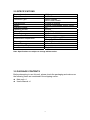
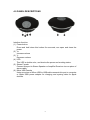
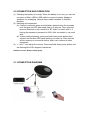
(1) Checking the battery is enough. When the battery is run out, you can use
one piece of Micro USB to USB cable to connect to power Adapter or
computer for recharging. Using a stereo cable connects to Amplifier
Receiver.
(2) Matching and connection:
(a) If haven’t matched, press and hold down power button five seconds
until the blue-red LED alternately flash is to start up. Then open the
phone’s Bluetooth mode, search the “BT Audio” to match with it. If
having the password, password is 0000. After connected, it can work
well.
(b) If have matched already, press and hold down power button three
second until the blue LED rapid flashing is to start up. Then devices
will be memory to connect as before, and it can’t connect to other
equipment.
(3) “+ “and "-" can adjust the volume. Press and hold down power button until
the flashing blue LED stopped is shutdown.
Attention: Insert / Extract cable gently.
5.1 CONNECTION DIAGRAM
5