1
Table of Contents
Table of Contents
Product Overview............................................................... 3
Package Contents............................................................................ 3
System Requirements.................................................................... 3
Introduction...................................................................................... 4
Features............................................................................................... 5
Hardware Overview........................................................................ 6
LEDs.................................................................................................. 6
Installation.......................................................................... 7
Getting Started................................................................................. 7
Remove Existing Installations................................................. 7
Disable Other Wireless Adapters............................................ 8
Wireless Installation Considerations.......................................10
Driver/Software Installation......................................................11
Hardware Installation...................................................................14
Connect to your Wireless Network......................................15
Manual Connect.........................................................................17
Connect to a Wireless Network........................................28
Using Windows Vista®..................................................................28
Using Windows® XP......................................................................29
Wireless Security..............................................................30
What is WPA™?................................................................................30
Configure WPA/WPA2-Personal................................................31
Using the D-Link Utility...........................................................31
Using Windows Vista®..............................................................36
Using Windows® XP...................................................................38
Configure WPA/WPA2-Enterprise............................................40
Using the D-Link Utility...........................................................40
Troubleshooting...............................................................41
Windows® 7 Troubleshooting....................................................46
Wireless Basics..................................................................48
Configuration....................................................................20
D-Link Wireless Connection Manager....................................20
Wireless Networks.....................................................................21
My Wireless Networks..............................................................22
Support.........................................................................................25
About.............................................................................................26
Networking Basics............................................................52
Check your IP address..................................................................52
Windows® XP/2000 Users........................................................52
Windows 7/Vista® Users...........................................................52
Statically Assign an IP address..................................................53
Windows® XP/2000 Users........................................................53
Windows 7/Vista® Users...........................................................54
Connect to a Wireless Network........................................27
Using Windows® 7.........................................................................27
Technical Specifications...................................................55
D-Link DWA-566 User Manual
2
Section 1 - Product Overview
Product
PackageOverview
Contents
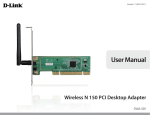
D-Link DWA-566 Wireless N 300 Dual Band PCIe Desktop Adapter
Two Antennas
Low Profile Bracket
CD with drivers and software
If any of the above items are missing, please contact your reseller.
System Requirements
• A desktop computer with an available 64-bit PCI Express slot
• 1Ghz processor / 512 MB RAM / 200 MB available space / CD-ROM drive
• Windows® 7, Vista®, or XP (Service Pack 2 or higher)
• An access point or wireless router
D-Link DWA-566 User Manual
3
Section 1 - Product Overview
Introduction
The DWA-566 Wireless N 300 Dual Band PCIe Desktop Adapter is a convenient wireless connectivity solution for desktops. The
device installs into a desktops PCI Express slot.
The DWA-566 provides a fast wireless connection and a superior reception, 802.11n. The DWA-566 is designed for use in homes
and small businesses that demand higher networking. Maximize wireless performance by connecting the Wireless N 300 Dual
band PCIe Desktop Adapter to a wireless N router and stay connected. The DWA-566 supports WEP, WPA and WPA2 enhanced
security. This feature greatly enhances personal data and prevents outside intrusion.
The dual band technology in the DWA-566 supports 2.4GHz or 5GHz wireless signals. This allows you to check e-mail and
browse the Internet using the 2.4GHz band or stream HD movies and other media on the 5GHz band. The 5GHz band helps
avoid interference by providing a cleaner wireless band for HD signals.
Maximum wireless signal rate derived from IEEE Standard 802.11g and 802.11n specifications. Actual data throughput will vary. Network conditions and environmental factors,
including volume of network traffic, building materials and construction, and network overhead, lower actual data throughput rate. Environmental factors will adversely affect
wireless signal range.
•
D-Link DWA-566 User Manual
4
Section 1 - Product Overview
Features
•Faster Wireless Networking* - Enable wireless connectivity on your Desktop PC computer with the
DWA-566. With the performance of D-Link’s Wireless N line of wireless products, the DWA-566 delivers an unsurpassed
wireless experience. Perform multiple network tasks at once with the speed provided by this Wireless Adapter.
•Compatible with 802.11g Devices - Fully compatible with the 802.11g standards, the DWA-566 can connect
with existing 802.11g compliant routers, access points and cards. That means you can still communicate with
colleagues and friends while you have the ability to link to even more wireless networks.
•Better Security with WPA/WPA2 - With the DWA-566 in your Desktop PC, you can securely connect to a wireless
network using WPA/WPA2 (Wi-Fi Protected Access) for wireless authentication. WPA/WPA2 provides you with a
much higher level of security for your data and communication than what has previously been available.
• Total Performance - Upgrade your computer with the latest 802.11n technology.
• Total Wireless Protection - Connect to secure wireless networks using WPA and WPA2.
• Total Connection - Operates on the 2.4GHz and the 5.15 ~ 5.85GHz frequency.
Maximum wireless signal rate derived from IEEE Standard 802.11g and 802.11n specifications. Actual data throughput will vary. Network conditions and environmental
factors, including volume of network traffic, building materials and construction, and network overhead, lower actual data throughput rate. Environmental factors will
adversely affect wireless signal range.
•
D-Link DWA-566 User Manual
5
Section 1 - Product Overview
Hardware Overview
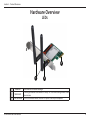
LEDs
3
1
1
2
3
2
Antennas
Two antennas for better coverage.
A solid light indicates that wireless is ready. This LED blinks during wireless data
WLAN LED
transmission.
PCIe Connector The PCIe connector will fit into the PCI Express slot on your computer.
D-Link DWA-566 User Manual
6
Section 2 - Installation
Installation
This section will walk you through the installation process. If you have a built-in wireless adapter, please disable it in device
manager before installing your D-Link adapter. Also, if you have previously installed another wireless adapter, please make
sure any software is uninstalled.
Getting Started
Before installing your new D-Link wireless adapter, please verify the following:
• Remove any previous installations of wireless adapters
• Disable any built-in wireless adapters
• Verify the settings such as the SSID and security settings of the network(s) you want to connect to
Remove Existing Installations
If you’ve installed a different manufacture’s adapter or a different model D-Link adapter, make sure the software is uninstalled
before installing the new software. Some utilities may cause a conflict with the new software. If you plan to use multiple
adapters at different times, make sure the utilities are not set to load when your computer boots up. Windows® 7, Vista® and XP
users may use the built-in wireless utility for all adapters.
To remove any old software:
Windows® 7 users: Click Start > Control Panel > Uninstall Programs.
Windows Vista®/XP users: Click Start > Control Panel > Add or Remove Programs.
D-Link DWA-566 User Manual
7
Section 2 - Installation
Disable Other Wireless Adapters
To prevent any conflicts with the D-Link wireless adapter, it is recommended to disable any wireless adapter (as well as any
unused Ethernet adapters).
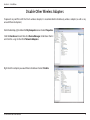
From the desktop, right-click on the My Computer icon and select Properties.
Click the Hardware tab and then click Device Manager. Scroll down the list
and click the + sign to the left of Network Adapters.
Right-click the adapter you would like to disable and select Disable.
D-Link DWA-566 User Manual
8
Section 2 - Installation
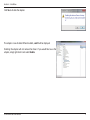
Click Yes to disable the adapter.
The adapter is now disabled. When disabled, a red X will be displayed.
Disabling the adapter will not remove the drivers. If you would like to use the
adapter, simply right-click it and select Enable.
D-Link DWA-566 User Manual
9
Section 2 - Installation
Wireless Installation Considerations
The D-Link wireless adapter lets you access your network using a wireless connection from virtually anywhere within the
operating range of your wireless network. Keep in mind that the number, thickness and location of walls, ceilings, or other
objects that the wireless signals must pass through, may limit the range. Typical ranges vary depending on the types of materials
and background RF (radio frequency) noise in your home or business. The key to maximizing wireless range is to follow these
basic guidelines:
1.Keep the number of walls and ceilings between the D-Link adapter and other network devices to a minimum
- each wall or ceiling can reduce your adapter’s range from 3-90 feet (1-30 meters.) Position your devices so
that the number of walls or ceilings is minimized.
2.Be aware of the direct line between network devices. A wall that is 1.5 feet thick (.5 meters), at a 45-degree
angle appears to be almost 3 feet (1 meter) thick. At a 2-degree angle it looks over 42 feet (14 meters) thick!
Position devices so that the signal will travel straight through a wall or ceiling (instead of at an angle) for better
reception.
3.Building Materials make a difference. A solid metal door or aluminum studs may have a negative effect on
range. Try to position access points, wireless routers, and computers so that the signal passes through drywall
or open doorways. Materials and objects such as glass, steel, metal, walls with insulation, water (fish tanks),
mirrors, file cabinets, brick, and concrete will degrade your wireless signal.
4.Keep your product away (at least 3-6 feet or 1-2 meters) from electrical devices or appliances that generate RF
noise.
5.If you are using 2.4GHz cordless phones or X-10 (wireless products such as ceiling fans, lights, and home security
systems), your wireless connection may degrade dramatically or drop completely. Make sure your 2.4GHz phone
base is as far away from your wireless devices as possible. The base transmits a signal even if the phone in not
in use.
D-Link DWA-566 User Manual
10
Section 2 - Installation
Driver/Software Installation
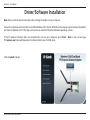
Note: Please install the drivers before physically installing the adapter into your computer.
Turn on the computer and insert the D-Link DWA-566 Driver CD in the CD-ROM drive. The step-by-step instructions that follow
are shown in Windows Vista®. The steps and screens are similar for the other Windows operating systems.
If the CD Autorun function does not automatically start on your computer, go to Start > Run. In the run box type
“D:\autorun.exe” (where D: represents the drive letter of your CD-ROM drive).
Click on Install to begin.
D-Link DWA-566 User Manual
11
Section 2 - Installation
Select your language and click Next to continue.
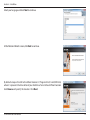
At the Welcome Wizard screen, click Next to continue.
By default setup will install to the default location: C:\Program Files\D-Link\DWA-566,
where C: represents the drive letter of your hard drive. To install to a different location
click Browse and specify the location. Click Next.
D-Link DWA-566 User Manual
12
Section 2 - Installation
Select the Program Files folder location. Click Next to continue. The drivers will install. This
may take 1-2 minutes.
Once the drivers are installed, click Next to continue.
Click Finish to complete the driver installation. You can now install the adapter into your
computer. Please turn off and unplug the power to your computer.
D-Link DWA-566 User Manual
13
Section 2 - Installation
Hardware Installation
Step 1 - Open the side panel of your computer and then
remove the metal cover bracket on your PCI Express slot.
Step 2 - Insert the DWA-566 firmly into the PCI Express slot
and screw it in place. You may either leave the antennas on
or unscrew them to make it easier to install.
Step 3 - Replace the computer case cover and plug the
power back. If you took off the antennas during installation,
re-attach them now.
D-Link DWA-566 User Manual
14
Section 2 - Installation
Connect to your Wireless Network
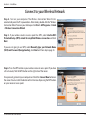
Step 4 - Turn on your computer. The Wireless Connection Wizard starts
automatically once the PC is powered on. Alternatively, double-click the “Wireless
Connection Wizard” icon on your desktop or click Start > All Programs > D-Link
> Wireless Connection Wizard.
Step 5 - If your wireless router or access point has WPS, select Use the WiFi
Protected Setup (WPS) wizard for simplified Wireless connection and click
Next.
If you are not going to use WPS, select Manually type your Network Name
(SSID) and Password (Encryption Key), click Next and then skip to page 18.
Step 6 - Press the WPS button on your wireless router or access point. If you have
a D-Link router, find the WPS button on the right side of the router.
Once pressed, go back to your computer and click the Connect Now button on
the screen. You must click the button within 2 minutes of pressing the WPS button
on your router or access point.
D-Link DWA-566 User Manual
15
Section 2 - Installation
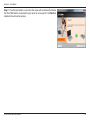
Step 7 - Once the connection is successful, the screen will automatically indicate
that the DWA-566 has connected to your router or access point. Click Finish to
complete the connection process.
D-Link DWA-566 User Manual
16
Section 2 - Installation
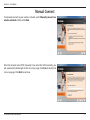
Manual Connect
To manually connect to your wireless network, select Manually connect to a
wireless network and then click Next.
Enter the network name (SSID) manually. If you enter the SSID incorrectly, you
will automatically be brought to the site survey page. Click Scan to display the
site survey page. Click Next to continue.
D-Link DWA-566 User Manual
17
Section 2 - Installation
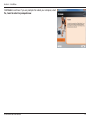
Click the Scan button to display a list of wireless networks (site survey). Click on
the network name (SSID) and click Next.
If the wireless network you want to connect to has a lock icon, you will need to
enter the encryption password. Click Next to continue.
Note: Click “Show text in the password field” to display the characters that you type
in the space provided. If you choose not to select this checkbox, the characters that
you type in the field provided will be in asterisk (*) form.
D-Link DWA-566 User Manual
18
Section 2 - Installation
Click Finish to continue. If you are prompted to reboot your computer, select
Yes, I want to restart my computer now.
D-Link DWA-566 User Manual
19
Section 3 - Configuration
Configuration
This section will show you how to configure your new D-Link wireless adapter using the D-Link Utility as well as Windows® XP
Zero Configuration and Windows 7/Vista® WLAN Auto Configuration.
D-Link Wireless Connection Manager
The D-Link DWA-566 uses the Wireless Connection Manager as the management software. The manager provides the user an
easy interface to change any settings related to the wireless adapter. Clicking on the Wireless Connection Manager icon on
the desktop will start the Configuration.
If you are using Windows® 7, Vista®, or XP, please skip to pages 27, 28 or 29 respectively.
Double-click the Wireless Connection Manager icon on your desktop.
D-Link DWA-566 User Manual
20
Section 3 - Configuration
Wireless Networks
The Wireless Networks (Site Survey) page will display all wireless networks that are available in your area. To connect to a
network, simply highlight the wireless network (SSID) and click Connect.
SSID: The SSID (Service Set Identifier) is the name of the
wireless network.
MAC: Displays the MAC address of the wireless device.
Signal: Displays the Link Quality of the wireless connection.
Security: If there is a “lock” icon, this means the wireless
network is secure. You must know the encryption
key/security settings to connect.
Channel: Displays the channel of the wireless network.
WPS Button: Connect to a wireless network using Wi-Fi®
Protected Setup. Refer to the next page.
Refresh Button: Rescans for available wireless networks in your
area.
Connect Button: Highlight a wireless network and click the Connect
button. If the network is secure, a pop-up window
will appear. Enter the security information to
connect (refer to the Wireless Security section for
more information).
Activate Button: Select a wireless network profile from the
drop-down menu and click Activate to connect.
Allow up to 30 seconds to connect.
D-Link DWA-566 User Manual
21
Section 3 - Configuration
My Wireless Networks
The My Wireless Networks page will allow you to create, edit, and delete wireless network profiles. Every time you connect to
a network using the Wireless Networks page, a profile will automatically be created.
New Button: Click New to create a new wireless network profile
(refer to page 23).
Modify: Click Modify to edit a current profile (refer to page
24).
Delete: Click Delete to remove a profile.
Activate: Click Activate to use a profile. Allow up to 30
seconds to connect to the wireless network.
Profile Details: The Profile Details section will display information
about the wireless network such as the network
name (SSID), network type (Infrastructure or AdHoc), and if the network is secured.
D-Link DWA-566 User Manual
22
Section 3 - Configuration
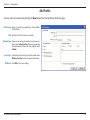
Add Profile
You may add a new network by clicking the New button from the My Wireless Networks page.
Profile Name: Enter a name for your profile (e.g. Home, Office,
Coffee Shop).
SSID: Enter the SSID of the wireless network.
Network Type: If you are connecting to a wireless router or access
point, select Infrastructure. If you are connecting
to another wireless client such as an adapter, select
Ad-Hoc.
Set Security: Select the type of security used. Please refer to the
Wireless Security section for more information.
OK Button: Click OK to save your settings.
D-Link DWA-566 User Manual
23
Section 3 - Configuration
Modify Profile
You may edit an existing profile by clicking the Modify button from the My Wireless Networks page.
Profile Name: Enter a name for your profile (e.g. Home, Office,
Coffee Shop).
SSID: Displays the SSID of the network.
Network Type: Displays the network type.
Set Security: Select the type of security used. Please refer to the
Wireless Security section for more information.
OK Button: Click OK to save your settings.
D-Link DWA-566 User Manual
24
Section 3 - Configuration
Support
If you need help, click the Support button. A panel will appear to the right of the utility which will display information about
the utility.
D-Link DWA-566 User Manual
25
Section 3 - Configuration
About
The About screen gives you information about the Firmware and Utility Versions of the DWA-566.
D-Link DWA-566 User Manual
26
Section 3 - Configuration
Connect to a Wireless Network
Using Windows® 7
Windows 7 users may use the built-in wireless utility. If you are using another company’s utility or Windows 2000, please refer to
the user manual of your wireless adapter for help with connecting to a wireless network. Most utilities will have a “site survey”
option similar to the Windows® 7 utility as seen below.
If you receive the Wireless Networks Detected bubble, click on
the center of the bubble to access the utility.
or
Left-click the wireless icon in your system tray (lower-right corner
next to the time).
The utility will display any available wireless networks in your area.
Click on a network (displayed using the SSID) and click the Connect
button.
If you get a good signal but cannot access the Internet, check your
TCP/IP settings for your wireless adapter. Refer to the Networking
Basics section in this manual for more information.
D-Link DWA-566 User Manual
27
Section 3 - Configuration
Connect to a Wireless Network
Using Windows Vista®
Windows Vista users may use the built-in wireless utility. If you are using another company’s utility or Windows 2000, please
refer to the user manual of your wireless adapter for help with connecting to a wireless network. Most utilities will have a “site
survey” option similar to the Windows Vista® utility as seen below.
If you receive the Wireless Networks Detected bubble, click on
the center of the bubble to access the utility.
or
Right-click on the wireless computer icon in your system tray
(lower-right corner next to the time). Select Connect to a network.
The utility will display any available wireless networks in your area.
Click on a network (displayed using the SSID) and click the Connect
button.
If you get a good signal but cannot access the Internet, check the
TCP/IP settings for your wireless adapter. Refer to the Networking
Basics section in this manual for more information.
D-Link DWA-566 User Manual
28
Section 3 - Configuration
Connect to a Wireless Network
Using Windows® XP
Windows XP users may use the built-in wireless utility (Zero Configuration Utility). The following instructions are for Service
Pack 2 users. If you are using another company’s utility or Windows 2000, please refer to the user manual of your wireless
adapter for help with connecting to a wireless network. Most utilities will have a “site survey” option similar to the Windows
XP utility as seen below.
If you receive the Wireless Networks Detected bubble, click on the
center of the bubble to access the utility.
or
Right-click on the wireless computer icon in your system tray (lowerright corner next to the time). Select View Available Wireless
Networks.
The utility will display any available wireless networks in your area.
Click on a network (displayed using the SSID) and click the Connect
button.
If you get a good signal but cannot access the Internet, check the
TCP/IP settings for your wireless adapter. Refer to the Networking
Basics section in this manual for more information.
D-Link DWA-566 User Manual
29
Section 4 - Wireless Security
Wireless Security
This section will show you the different levels of security you can use to protect your data from intruders. The
DWA-566 offers the following types of security:
• WPA/WPA2-Personal • WPA/WPA2-Enterprise
What is WPA™?
WPA, or Wi-Fi® Protected Access, is a Wi-Fi standard that was designed to improve the security features of WEP (Wired Equivalent
Privacy). The 2 major improvements over WEP:
• Improved data encryption through the Temporal Key Integrity Protocol (TKIP). TKIP scrambles the keys using a
hashing algorithm and, by adding an integrity-checking feature, ensures that the keys haven’t been tampered
with. WPA2™ is based on 802.11i and uses Advanced Encryption Standard instead of TKIP.
• User authentication, which is generally missing in WEP, through the extensible authentication protocol (EAP).
WEP regulates access to a wireless network based on a computer’s hardware-specific MAC address, which is
relatively simple to be sniffed out and stolen. EAP is built on a more secure public-key encryption system to
ensure that only authorized network users can access the network.
WPA/WPA2-Personal uses a passphrase or key to authenticate your wireless connection. The key is an alpha-numeric password
between 8 and 63 characters long. The password can include symbols (!?*&_) and spaces. This key must be the exact same key
entered on your wireless router or access point.
WPA/WPA2-Enterprise incorporates user authentication through the Extensible Authentication Protocol (EAP). EAP is built on
a more secure public key encryption system to ensure that only authorized network users can access the network.
D-Link DWA-566 User Manual
30
Section 4 - Wireless Security
Configure WPA/WPA2-Personal
Using the D-Link Utility
It is recommended to enable WPA/WPA2-Personal on your wireless router or access point before configuring your wireless
adapter. If you are joining an existing network, you will need to know the WPA/WPA2-Personal passphrase being used.
1. Open the Wireless Connection Manager by double-clicking on the D-Link icon on your desktop.
2. Highlight the wireless network (SSID) you would like to connect to and
click Connect. If the network is using WPA/WPA2-Personal, the screen
(as shown to the bottom-right) will appear.
3. Enter the WPA/WPA2-Personal passphrase exactly as it is on your wireless
router or access point. Click the Show text in the password field box to
see the passphrase. Unchecking it will hide it.
4. Click OK to connect to the network. Allow up to 30 seconds to connect.
If you would like to create a new network and enter the WPA/WPA2-Personal
settings, refer to the next page.
D-Link DWA-566 User Manual
31
Section 4 - Wireless Security
It is recommended to enable WPA/WPA2-Personal on your wireless router or access point before configuring your wireless
adapter. Make sure you enter the passphrase exactly the same on all wireless devices.
1. Open the Wireless Connection Manager by double-clicking on the D-Link icon on your desktop. Click on New to create a
new profile or highlight an existing profile and click Modify.
2. Select WPA/WPA2-Personal under Set Security Option.
3. Select TKIP or AES, or Auto.
4. Enter the passphrase exactly as it is on your wireless router or
access point.
5. Click OK to connect to the network. Allow up to 30 seconds to
connect.
D-Link DWA-566 User Manual
32
Section 4 - Wireless Security
Configure WPA/WPA2 Personal
Using Windows® 7
It is recommended to enable wireless security (WPA/WPA2) on your wireless router or access point before configuring your
wireless adapter. If you are joining an existing network, you will need to know the security key or passphrase being used.
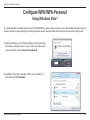
1.Click on the wireless icon in your system tray (lower-right
corner).
2.The utility will display any available wireless networks in your
area.
D-Link DWA-566 User Manual
33
Section 4 - Wireless Security
3. Highlight the wireless network (SSID) you would like to connect
to and click the Connect button.
If you get a good signal but cannot access the Internet, check your
TCP/IP settings for your wireless adapter. Refer to the Networking
Basics section in this manual for more information.
4. The following window appears while your computer tries to
connect to the router.
D-Link DWA-566 User Manual
34
Section 4 - Wireless Security
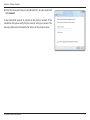
5. Enter the same security key or passphrase that is on your router
and click Connect. You can also connect by pushing the WPS
button on the router.
It may take 20-30 seconds to connect to the wireless network. If the
connection fails, please verify that the security settings are correct.
The key or passphrase must be exactly the same as on the wireless
router.
D-Link DWA-566 User Manual
35
Section 4 - Wireless Security
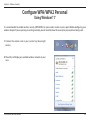
Configure WPA/WPA-Personal
Using Windows Vista®
It is recommended to enable wireless security (WPA/WPA2) on your wireless router or access point before configuring your
wireless adapter. If you are joining an existing network, you will need to know the security key or passphrase being used.
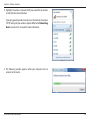
1.Open the Windows Vista® Wireless Utility by right-clicking on
the wireless computer icon in your system tray (lower right
corner of screen). Select Connect to a network.
2.Highlight the wireless network (SSID) you would like to
connect to and click Connect.
D-Link DWA-566 User Manual
36
Section 4 - Wireless Security
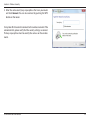
3.Enter the same security key or passphrase that is on your router and
click Connect.
It may take 20-30 seconds to connect to the wireless network. If the
connection fails, please verify that the security settings are correct. The
key or passphrase must be exactly the same as on the wireless router.
D-Link DWA-566 User Manual
37
Section 4 - Wireless Security
Configure WPA/WPA2-Personal
Using Windows® XP
It is recommended to enable WPA/WPA2-Personal on your wireless router or access point before configuring your wireless
adapter. If you are joining an existing network, you will need to know the WPA/WPA2-Personal key being used.
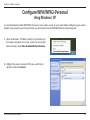
1. Open the Windows® XP Wireless Utility by right-clicking on
the wireless computer icon in your system tray (lower-right
corner of screen). Select View Available Wireless Networks.
2. Highlight the wireless network (SSID) you would like to
connect to and click Connect.
D-Link DWA-566 User Manual
38
Section 4 - Wireless Security
3. The Wireless Network Connection box will appear. Enter the WPA/
WPA2-Personal passphrase and click Connect.
It may take 20-30 seconds to connect to the wireless network. If the
connection fails, please verify that the WPA/WPA2-Personal settings are
correct. The WPA/WPA2-Personal passphrase must be exactly the same as
on the wireless router or access point.
D-Link DWA-566 User Manual
39
Section 4 - Wireless Security
Configure WPA/WPA2-Enterprise
Using the D-Link Utility
WPA/WPA2-Enterprise is for advanced users who are familiar with using a RADIUS server and setting up certificates.
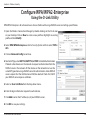
1.Open the Wireless Connection Manager by double-clicking on the D-Link icon
on your desktop. Click on New to create a new profile or highlight an existing
profile and click Modify.
2.Select WPA/WPA2-Enterprise under Set Security Option and then select TKIP or
AES.
3. Click on Advanced Config to continue.
4.Next to EAP Type, select EAP-TLS, EAP-TTLS, or PEAP. Extensible Authentication
Protocols allow devices on the network to request authentication from the
RADIUS server in the network. All the devices on the network must use the
same EAP type when using a RADIUS server for authentication. Some RADIUS
servers require that the Validate Server field be selected. Check this field if
your RADIUS server requires validation.
5. Select an User Certificate from the drop-down menu.
6. Enter the login information required to authenticate.
7. Click Add to enter the IP address(es) of your RADIUS servers.
8. Click OK to save your settings.
D-Link DWA-566 User Manual
40
Section 5 - Troubleshooting
Troubleshooting
This chapter provides solutions to problems that can occur during the installation and operation of the DWA-566. Read the
following descriptions if you are having problems. (The examples below are illustrated in Windows® XP. If you have a different
operating system, the screenshots on your computer will look similar to the following examples.)
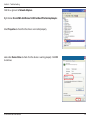
1. How do I know if my adapter is installed properly?
Go to Start > My Computer > Properties.
Select the Hardware Tab.
D-Link DWA-566 User Manual
41
Section 5 - Troubleshooting
Click the + sign next to Network Adapters.
Right-click on D-Link DWA-566 Wireless N 300 Dual Band PCIe Desktop Adapter .
Select Properties to check that the drivers are installed properly.
D-Link DWA-566 Wireless N 300 Dual Band PCIe Desktop Adapter
Look under Device Status to check that the device is working properly. Click OK
to continue.
D-Link DWA-566
Wireless N 300 Dual Band PCIe Desktop Adapter
D-Link DWA-566 User Manual
42
Section 5 - Troubleshooting
2. I cannot connect to the access point or the wireless router.
• Make sure that the SSID on the DWA-566 Wireless N 300 Dual Band PCIe Desktop Adapter is exactly the same
as the SSID on the Access Point or wireless router.
• Move the DWA-566 and Access Point or Wireless router into the same room and then test the wireless connection.
• Disable all security settings. (WEP, MAC Address Control, AES)
• Make sure that the Radio is not locked down to a different frequency
• Turn off your Access Point and the computer with the DWA-566. Turn on the Access Point, and then turn on the
computer with the DWA-566.
• Refresh the DWA-566 Utility
3. The DWA-566 Power and Link lights are not on.
• Check to see if the DWA-566 desktop adapter is firmly inserted into the PCI Express slot of your laptop computer.
4. I forgot my encryption key.
• Reset the Access Point to its factory default settings and restore the DWA-566 Wireless N 300 Dual Band PCIe
Desktop Adapter to the factory default settings. The default settings are listed in the Configuration section in
this manual.
D-Link DWA-566 User Manual
43
Section 5 - Troubleshooting
5. The computer does not recognize the DWA-566 Wireless Adapter.
• Make sure that the DWA-566 Wireless Adapter is properly seated in the computer’s PCI Express slot.
• If Windows does not detect the hardware upon insertion of the adapter, make sure to completely remove drivers
that were previously loaded. To remove the drivers, do the following:
A. Under Tools > select Folder Options… > select View > under Hidden files and folders > select Show
hidden files and folders.
B. Uncheck Hide extension for known file types > click on Apply
C. Search for previously loaded driver files. Remove these files from the INF and SYSTEM (DRIVERS) folders
in the Windows directory. Note: Windows® XP and 2000 will rename .inf files that have not received WHQL
certification into oem.inf files (e.g., oem1.inf).
6. The computer with the DWA-566 installed is unable to connect to the wireless network and/or the Internet.
• Check that the LED indicators for the broadband modem are indicating normal activity. If not, there may be a
problem with the broadband connection.
• Check that the LED indicators on the wireless router are functioning properly. If not, check that the AC power
and Ethernet cables are firmly connected.
• Check that the IP Address, subnet mask, gateway, and DNS settings are correctly entered for the network.
D-Link DWA-566 User Manual
44
Section 5 - Troubleshooting
• In Infrastructure mode, make sure the same Service Set Identifier (SSID) is specified on the settings for the
wireless clients and access points. The SSID factory default setting for D-Link products is default.
• In Ad-Hoc mode, both wireless clients will need to have the same SSID. Please note that it might be necessary
to set up one client to establish a BSS (Basic Service Set) and wait briefly before setting up other clients. This
prevents several clients from trying to establish a BSS at the same time, which can result in multiple singular
BSSs being established, rather than a single BSS with multiple clients associated to it.
• Check that the Network Connection for the wireless client is configured properly. Select AP (Infrastructure)
when connecting to an access point and select Ad-Hoc mode when connecting without an access point.
Double-click on the WLAN icon in the taskbar > click on Configuration to change the settings for the wireless
adapter.
• If Security is enabled, make sure that the correct encryption keys are entered on both the DWA-566 and the access
point. Double-click on the WLAN icon in the taskbar > click Encryption. Check to see that the key selected is set
to the same key as other devices on the network.
7. How can I troubleshoot distance issues using the DWA-566?
• Move the DWA-566 and Access Point or Wireless router into the same room and then test the wireless connection.
• Change the channel of the Access Point.
• Move devices within the line of sight.
D-Link DWA-566 User Manual
45
Section 5 - Troubleshooting
Windows® 7 Troubleshooting
Go to Start > Computer > Properties.
Select the Device Manager
D-Link DWA-566 User Manual
46
Section 5 - Troubleshooting
Click the + sign next to Network Adapters.
Right-click on DWA-566 Wireless N 300 Dual Band PCIe Desktop
Adapter .
Select Properties to check that the drivers are installed properly.
Look under Device Status to check that the device is working properly. Click
OK to continue.
D-Link DWA-566 User Manual
47
Appendix A - Wireless Basics
Wireless Basics
D-Link wireless products are based on industry standards to provide easy-to-use and compatible high-speed wireless
connectivity within your home, business or public access wireless networks. Strictly adhering to the IEEE standard, the D-Link
wireless family of products will allow you to securely access the data you want, when and where you want it. You will be able
to enjoy the freedom that wireless networking delivers.
A wireless local area network (WLAN) is a cellular computer network that transmits and receives data with radio signals instead of
wires. Wireless LANs are used increasingly in both home and office environments, and public areas such as airports, coffee shops
and universities. Innovative ways to utilize WLAN technology are helping people to work and communicate more efficiently.
Increased mobility and the absence of cabling and other fixed infrastructure have proven to be beneficial for many users.
Wireless users can use the same applications they use on a wired network. Wireless adapter cards used on laptop and desktop
systems support the same protocols as Ethernet adapter cards.
Under many circumstances, it may be desirable for mobile network devices to link to a conventional Ethernet LAN in order to
use servers, printers or an Internet connection supplied through the wired LAN. A Wireless Router is a device used to provide
this link.
D-Link DWA-566 User Manual
48
Appendix A - Wireless Basics
What is Wireless?
Wireless or Wi-Fi technology is another way of connecting your computer to the network without using wires. Wi-Fi uses radio
frequency to connect wirelessly, so you have the freedom to connect computers anywhere in your home or office network.
Why D-Link Wireless?
D-Link is the worldwide leader and award winning designer, developer, and manufacturer of networking products.
D-Link delivers the performance you need at a price you can afford. D-Link has all the products you need to build your network.
How does wireless work?
Wireless works similar to how cordless phone work, through radio signals to transmit data from one point A to point B. But
wireless technology has restrictions as to how you can access the network. You must be within the wireless network range area
to be able to connect your computer. There are two different types of wireless networks Wireless Local Area Network (WLAN),
and Wireless Personal Area Network (WPAN).
Wireless Local Area Network (WLAN)
In a wireless local area network, a device called an Access Point (AP) connects computers to the network. The access point has
a small antenna attached to it, which allows it to transmit data back and forth over radio signals. With an indoor access point
as seen in the picture, the signal can travel up to 300 feet. With an outdoor access point the signal can reach out up to 30 miles
to serve places like manufacturing plants, industrial locations, college and high school campuses, airports, golf courses, and
many other outdoor venues.
Wireless Personal Area Network (WPAN)
D-Link DWA-566 User Manual
49
Appendix A - Wireless Basics
Bluetooth is the industry standard wireless technology used for WPAN. Bluetooth devices in WPAN operate in a range up to
30 feet away.
Compared to WLAN the speed and wireless operation range are both less than WLAN, but in return it doesn’t use nearly as
much power which makes it ideal for personal devices, such as mobile phones, PDAs, headphones, laptops, speakers, and other
devices that operate on batteries.
Who uses wireless?
Wireless technology as become so popular in recent years that almost everyone is using it, whether it’s for home, office, business,
D-Link has a wireless solution for it.
Home
• Gives everyone at home broadband access
• Surf the web, check email, instant message, and etc
• Gets rid of the cables around the house
• Simple and easy to use
Small Office and Home Office
• Stay on top of everything at home as you would at office
• Remotely access your office network from home
• Share Internet connection and printer with multiple computers
• No need to dedicate office space
D-Link DWA-566 User Manual
50
Appendix A - Wireless Basics
Where is wireless used?
Wireless technology is expanding everywhere not just at home or office. People like the freedom of mobility and it’s becoming
so popular that more and more public facilities now provide wireless access to attract people. The wireless connection in public
places is usually called “hotspots”.
Using a D-Link wireless desktop adapter with your laptop, you can access the hotspot to connect to Internet from remote
locations like: Airports, Hotels, Coffee Shops, Libraries, Restaurants, and Convention Centers.
Wireless network is easy to setup, but if you’re installing it for the first time it could be quite a task not knowing where to start.
That’s why we’ve put together a few setup steps and tips to help you through the process of setting up a wireless network.
Tips
Here are a few things to keep in mind, when you install a wireless network.
Centralize your router or Access Point
Make sure you place the router/access point in a centralized location within your network for the best performance. Try to
place the router/access point as high as possible in the room, so the signal gets dispersed throughout your home. If you have
a two-story home, you may need a repeater to boost the signal to extend the range.
Eliminate Interference
Place home appliances such as cordless telephones, microwaves, and televisions as far away as possible from the router/access
point. This would significantly reduce any interference that the appliances might cause since they operate on same frequency.
Security
Don’t let your next-door neighbors or intruders connect to your wireless network. Secure your wireless network by turning on
the WPA or WEP security feature on the router. Refer to product manual for detail information on how to set it up.
D-Link DWA-566 User Manual
51
Appendix B - Networking Basics
Networking Basics
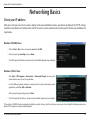
Check your IP address
After you install your new D-Link wireless adapter and have established a wireless connection, by default, the TCP/IP settings
should be set to obtain an IP address from a DHCP server (i.e. router) automatically. To verify your IP address, please follow the
steps below.
Windows® XP/2000 Users
• Click on Start > Run. In the run box type cmd and click OK.
• At the prompt, type ipconfig and press Enter.
• This will display the IP address, subnet mask, and the default gateway of your adapter.
Windows 7/Vista® Users
• Click Start > All Programs > Accessories > Command Prompt. You may need
administrative access to run this application.
• For all additional prompt windows inquiring of running the command prompt
application, select Yes, OK, or Continue.
• At the prompt, type ipconfig and press Enter.
• This will display the IP address, subnet mask, and default gateway of your adapter.
If the address is 0.0.0.0, check your adapter installation, security settings, and the settings on your router. Some firewall software programs may
block a DHCP request on newly installed adapters.
D-Link DWA-566 User Manual
52
Appendix B - Networking Basics
Statically Assign an IP address
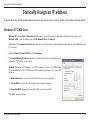
If you are not using a DHCP capable gateway/router, or you need to assign a static IP address, please follow the steps below:
Windows® XP/2000 Users
• Windows® XP - Click on Start > Control Panel. Make sure you are in Classic View. Double-click on the Network Connections icon.
Windows® 2000 – From the desktop, right-click My Network Places > Properties.
• Right-click on the Local Area Connection which represents your D-Link wireless network adapter (or other adapter) which will be connected
to your router.
• Highlight Internet Protocol (TCP/IP) and click Properties.
• Click Use the following IP address and enter an IP address that is on the same subnet as your
network or LAN IP address on your router.
Example: If the router’s LAN IP address is 192.168.0.1, make your IP address 192.168.0.X where
X is a number between 2 and 99. Make sure that the number you choose is not in use on the
network.
• Set Default Gateway the same as the LAN IP address of your router or gateway.
• Set Primary DNS the same as the LAN IP address of your router or gateway.
• The Secondary DNS is optional (you may enter a DNS server from your ISP).
• Click OK to save your settings.
D-Link DWA-566 User Manual
53
Appendix B - Networking Basics
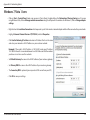
Windows 7/Vista® Users
• Click on Start > Control Panel (make sure you are in Classic View). Double-click on the Network and Sharing Center icon. If you are
using Windows Vista, click on Manage network connections along the left panel in the window. For Windows 7, click on Change adapter
settings.
• Right-click on the Local Area Connection which represents your D-Link wireless network adapter which will be connected to your network.
• Highlight Internet Protocol Version 4 (TCP /IPv4) and click Properties.
• Click Use the following IP address and enter an IP address that is on the same
subnet as your network or LAN IP address on your router or network.
Example: If the router’s LAN IP address is 192.168.0.1, make your IP address
192.168.0.X where X is a number between 2 and 99. Make sure that the number
you choose is not in use on the network.
• Set Default Gateway the same as the LAN IP address of your router or gateway.
• Set Primary DNS the same as the LAN IP address of your router or gateway.
• The Secondary DNS is optional (you may enter a DNS server from your ISP).
• Click OK to save your settings.
D-Link DWA-566 User Manual
54
Appendix C - Technical Specifications
Technical Specifications
Standards*
• IEEE 802.11g
• IEEE 802.11n
• IEEE 802.11a
Security
• Wi-Fi Protected Access (WPA™ & WPA2™)
• 64/128-bit WEP
• Wi-Fi Protected Setup - PIN & PBC
Frequency Range
• 2.4GHz to 2.483GHz
• 5.15GHz to 5.35GHz
Dimensions
• L = 63.5mm (2.5inches)
• W = 55mm (2.2inches)
• H = 11.42mm (0.4inches)
Weight
• 42.5 g (1.5 oz)
Warranty
• 1 Year Limited
External Antenna Type
• Dipole with detachable reverse SMA connector
Operating Temperature
• 0 to 40 ºC (32 to 104 ˚F)
Humidity
• 95% maximum (non-condensing)
Maximum wireless signal rate derived from IEEE Standard 802.11g and 802.11n specifications. Actual data throughput will vary. Network conditions and environmental factors,
including volume of network traffic, building materials and construction, and network overhead, lower actual data throughput rate. Environmental factors will adversely affect
wireless signal range.
•
D-Link DWA-566 User Manual
55
CE Mark Warning:
This is a Class B product. In a domestic environment, this product may cause radio interference, in which case the user may be required to take
adequate measures.
FCC Statement:
This equipment has been tested and found to comply with the limits for a Class B digital device, pursuant to part 15 of the FCC Rules. These limits are
designed to provide reasonable protection against harmful interference in a residential installation. This equipment generates, uses, and can radiate
radio frequency energy and, if not installed and used in accordance with the instructions, may cause harmful interference to radio communication.
However, there is no guarantee that interference will not occur in a particular installation. If this equipment does cause harmful interference to radio
or television reception, which can be determined by turning the equipment off and on, the user is encouraged to try to correct the interference
by one or more of the
following measures:
• Reorient or relocate the receiving antenna.
• Increase the separation between the equipment and receiver.
• Connect the equipment into an outlet on a circuit different from that to which the receiver is connected.
• Consult the dealer or an experienced radio/TV technician for help.
FCC Caution:
Any changes or modifications not expressly approved by the grantee of this device could void the user’s authority to operate the equipment.
This device complies with Part 15 of the FCC Rules. Operation is subject to the following two conditions:
(1) This device may not cause harmful interference, and (2) this device must accept any interference received, including interference that may cause
undesired operation.
D-Link DWA-566 User Manual
56
IMPORTANT NOTICE:
FCC Radiation Exposure Statement:
This equipment complies with FCC radiation exposure limits set forth for an uncontrolled environment. This equipment should be installed and
operated with minimum distance 20cm between the radiator & your body. This transmitter must not be co-located or operating in conjunction
with any other antenna or transmitter.
The availability of some specific channels and/or operational frequency bands are country dependent and are firmware programmed at the factory
to match the intended destination. The firmware setting is not accessible by the end user.
For detailed warranty information applicable to products purchased outside the United States, please contact the corresponding local D-Link
office.
Industry Canada Notice:
This device complies with RSS-210 of the Industry Canada Rules. Operation is subject to the following two conditions:
(1) This device may not cause harmful interference, and (2) this device must accept any interference received, including interference that may cause
undesired operation.
IMPORTANT NOTE:
Radiation Exposure Statement:
This equipment complies with IC radiation exposure limits set forth for an uncontrolled environment. This equipment should be installed and
operated with minimum distance 20cm between the radiator & your body.
This device has been designed to operate with an antenna having a maximum gain of 2 dB. Antenna having a higher gain is strictly prohibited per
regulations of Industry Canada. The required antenna impedance is 50 ohms.
D-Link DWA-566 User Manual
57