1
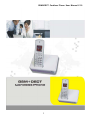
GSM+DECT Cordless Phone User Manual V1.0
1
GSM+DECT Cordless Phone User Manual V1.0
Contents
1 SAFETY INSTRUCTION ...................................................................... 4
3 PARTS CHECKING LIST ..................................................................... 5
4 FEATURES AND SPECIFICATIONS .................................................. 6
5 INSTALLATION ..................................................................................... 8
6 OUTLOOK DESCRIPTION AND KEY DESCRIPTION ................ 10
7.OPERATION ......................................................................................... 12
8. SETTING MENU ................................................................................. 14
9. IMPORTANT SAFETY AND LEGAL INFORMATION................. 25
10. OPERATIONAL WARNINGS .......................................................... 28
11. BATTERIES AND CHARGERS....................................................... 28
12. FCC NOTICE TO USERS................................................................. 31
13. MAINTENANCE ............................................................................... 33
2
GSM+DECT Cordless Phone User Manual V1.0
To reduce the risk of fire, electric shock and /or personal injury, please read
this manual before using this unit. You must use the phone under the
network cover. Don't use it where there is mark of close radio receiving or
translating unit, including hospital, gas station and chemical storage. Etc.
GSM+DECT cordless products adopt advanced Module, with new
appearance, good performance and reliable quality. Easily installation,
more flexible and convenient compared with corded phone. It can be used
as long as there is power supply, and area covered by GSM network.
3
GSM+DECT Cordless Phone User Manual V1.0
1 Safety Instruction
Warning:
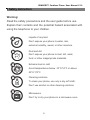
Read the safety precautions and the user guide before use.
Explain their contents and the potential hazard associated with
using the telephone to your children.
Liquids of any kind
Don’t expose your phone to water, rain,
extreme humidity, sweat, or other moisture.
Dust and dirt
Don’t expose your phone to dust, dirt, sand,
food, or other inappropriate materials.
Extreme heat or cold
Avoid temperatures below -10°C/14°F or above
45°C/113°F.
Cleaning solutions
To clean your phone, use only a dry soft cloth.
Don’t use alcohol or other cleaning solutions.
Microwaves
Don’t try to dry your phone in a microwave oven.
4
GSM+DECT Cordless Phone User Manual V1.0
The Falling
Don’t drop your phone.
Safety Standards
Orgtel GSM DECT Phone follows various safety standards, including
FCC / CE. The power adapter of product follows the UL standard, the
phone can only be used the power adapter provided by inner
packaging, the damage caused due to the use of other power adapter,
which does not belong to the scope of quality assurance of the
manufacturer.
Quality Assurance
We have been reached a distribution agreement with distributors, end
users can replace, repair or return directly from the purchase, If bought
the product directly from our company, please check with your sales
service representative to obtain RMA (Commodities Retreat operation
and management) code. Our company reserves the right to change
the warranty policy without advance notice.
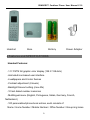
3 Parts Checking List
5
GSM+DECT Cordless Phone User Manual V1.0
Handset
Base
Battery
Power Adapter
4 Features and SPECIFICATIONS
Handset Features:
-1.5” CSTN full graphic color display (128 X 128 dots)
-Animated icon-based user interface
-6 wallpapers and 8 color themes
-Contrast adjustment (8 levels)
-Backlight timeout setting (max 40s)
-10 last dialed number memories
-Multilingual menu (English, Portuguese, Italian, Germany, French,
Netherland )
-100 personalized phone book entries, each consists of:
Name / Home Number / Mobile Number / Office Number / Group ring tones
6
GSM+DECT Cordless Phone User Manual V1.0
(4 groups, each with individual ring tone)
-9 Speed Dial memories
-Phonebook searching by name
-Phonebook memory status indication
-Speaker phone
-Headset connection
-Continuous talk time: 6 hours/ standby time: 80 hours
-20 entries of Caller ID log, allows record review/ call back/ delete/ store to
phonebook
-Alarm clock / baby call / DND
-Ring tones (13 polyphonic melodies, 6 volume levels, mute)
-Talk time and clock display
-Time format adjustment (12/ 24 hours)
-Handset name edit
Call functionalities and System Features:
Multi-handset: Maximum of 6 handsets can be registered to the base unit
Intercom between any two handsets
Call transfer and call conferencing
DECT radio performance: Indoor: 50m / Outdoor: 300m
GSM: Supported band: GSM900MHz or 850MHz
Supported SIM card 1.8V/ 3.0V
Technical Specifications:
GSM (base unit)
Operating Frequency band: GSM900MHz ( or 850MHz optional)
7
GSM+DECT Cordless Phone User Manual V1.0
Carrier spacing: 200kHz
Max output Power: 2W @ 900MHz
Input dynamic range: 62dB
Receiving sensitivity: < -104dBm
Max FRE deviation: ±0.1ppm
Phase error: < 5°RMS
FRE optional: > +9dBc @ 200kHz
DECT (Base unit + handset)
Operating Frequency Band: 1.8GHz or 1.91~1.93GHz or DECT6.0 Optional
Carrier: 10 (1.728KHz spacing)
Max output Power: 1/4W (250mW)
Modulation: GFSK
Audio CODEC: G.726
Receiving sensitivity: < -86dBm
5 Installation
Note: Before operating the phone, you must insert a valid SIM card to the
base unit.
Step 1: Make sure that the base unit is disconnected from the power supply/
adapter
Step 2: Open up the base station casing (loosen the 5 screws at the bottom
8
GSM+DECT Cordless Phone User Manual V1.0
casing) and flip over the PCB so that you can access to the bottom side of the
PCB where the SIM card slot is located.
Step 3: Insert a valid (3V) SIM card to the SIM card slot
Step 4: Close the casing then power up the base unit using the provided 6V
2.3A power adapter
Step 5: Insert 2 x AAA rechargeable batteries to the handset and it will
automatically power up
Step 6: Register: Press the register/paging button on the base (inside the
slot for handset) for above 15 seconds, the red LED on base will flash, then
set the handset ->Menu ->Setup ->Register ->New Register-> Select a
base->Input the phone code “0000”-> Searching” will be shown on the display,
wait for approx 5 ~ 10 sec to let the handset link up with the base station.
Please make sure the LED on base flashes while you set the handset. If it
doesn’t flash, press the register/paging button again till it flashes. Please
follow the same procedures to setup other handsets. Total 6 handsets can be
linked to one base.
Step 7: As soon as the synchronization process (between handset and base)
is completed, the handset name will be displayed on the screen. (The
handset name is “HANDSET” by default), indicating that the system
is ready to be used.
9
GSM+DECT Cordless Phone User Manual V1.0
Step 8: If SIM REMOVED is shown, it means that the SIM card is not
inserted properly and no SIM is detected by the system. In this
case, you will have to re-install the SIM card and try again (repeat
Step 1 ~5).
Step 9: If ENTER PIN is shown, it means that the SIM card is required a PIN
check. Please enter a 4-digit PIN in HS setup menu. If wrong inputs
of PIN code excess the trial number, 8-digit PUK and a new PIN is
required. The new PIN will replace the original one. Please beware
about that if the wrong input of PUK over trial number, the SIM card
will be locked permanently. Please obtain the correct PUK code from
the service provider before trial the PUK.
6 Outlook description and key description
6.1 General Appearance
10
GSM+DECT Cordless Phone User Manual V1.0
6.2 Key description
Left / right soft key
Up key
Down key
Off-hook
On-hook /power on/off
Speakerphone
Intercom
11
GSM+DECT Cordless Phone User Manual V1.0
Call log
Phonebook
Ringer on/off
Keypad lock on /off
7.Operation
7.1 Dialing a number
(1) Pre-dial: First enter the intended number to be called and press
Off-HOOK key to dial out. “Connecting” will be shown on the screen
indicating that the call request is under processing. As soon as the call
connection is successfully established, “IN USE” and the call duration
timer will be shown.
(2) Off-hook dial: Just like conventional PSTN phones, first press the
Off-HOOK key to go off-hook, you will then hear a dial tone and enter the
intended number to be called. When you finish entering the last digit,
wait for a timeout (approx 3s), the input number will be sent out to the
network and same as the previous case, “Connecting” will be displayed.
(3) Phone Book dial: First find the number you want to call in phonebook,
and then press the Off-Hook.
(4) Speed-dial: First enter in phonebook and set a speed dial number(about
how to set speed dial on Page 18 ),then press the key(number 1~9) as
your set for 3 seconds, and then you can dial.
(5) Call log dial: review number from missed call / received call /dialed call,
then press off-hook key.
12
GSM+DECT Cordless Phone User Manual V1.0
NOTE: In case error occurs during the connection (could be due to GSM
network failure, breakage of radio link possibly caused by
interference), the call will be aborted and the handset will return to
the idle (standby) screen.
7.2 RINGER ON/OFF SHORTCUT KEY
At Standby mode, pressing and hold Digit * key for 3 seconds an ICON on the
LCD will be displayed indicating that the unit is set to Ringer OFF.
To restore the ring feature, press and hold * key for 3 seconds again, the
RING OFF icon will disappear and the ring feature is restored to the last
setting ring level.
7.3 KEYPAD LOCK
In standby mode, press and hold # key for 3 seconds, a confirmation tone will
be heard that means the keypad is locked.
To unlock the keypad, press (UNLOCK) key, the LCD will display “CONFIRM”.
Press (OK), a confirmation tone will be heard and the keypad is unlocked.
7.4 speakerphone
7.5 intercom
7.6 call log
7.8 phonebook
13
GSM+DECT Cordless Phone User Manual V1.0
8. Setting Menu
8.1. PHONEBOOK
A maximum of 100 phonebook entries, each consists of 16 characters and 16
digits number.
Press the (MENU) then press (ENTER) after you choose the phonebook then
it will show the stored names.
NOTE: The LCD will display overwrite if a new number is added with a
same name as a stored name.
ADD NEW NUMBER
- In the Phonebook access Menu, press (OPTION) and select [ADD] then
press (ENTER).
- “NAME” will be displayed, enter the contact name and press (ENTER) to
confirm.
- Telephone number can be enter on 3 category which are HOME NUMBER,
MOBILE NUMBER, or OFFICE NUMBER. It will display the HOME
NUMBER, enter the desired number and press ENTER to confirm. To save
the number on other category, press (ENTER) to go to next category.
Repeat the above steps to save other phonebook entry, if phonebook is full
and you try to save an entry again, MEMORY FULL message will be shown
on the LCD.
VIEWING ALL NUMBERS
- In the Phonebook access Menu, it will show all the name lists. Select which
name you desired.
- Press (OPTION), select [DETAILS] then press (ENTER) to view the detailed
14
GSM+DECT Cordless Phone User Manual V1.0
name and number.
- Select the number (HOME, MOBILE, or OFFICE) of the contact you wish to
call the press either the soft key CALL or Off-HOOK key.
EDITING A NUMBER
- In the Phonebook access Menu, press (OPTION) and select [EDIT] then
press (ENTER).
- “NAME” will be displayed, press (DELETE) to change the name of contact
and press (ENTER) to confirm.
- Telephone number can be change on 3 category which are HOME
NUMBER, MOBILE NUMBER, or OFFICE NUMBER. First, it will display the
HOME NUMBER, edit the desired number using the (DELETE) and press
ENTER to confirm. To save the number on other category, press (ENTER)
to go to next category.
Alphanumeric keypad:
1
1.,:;‘”()<>&%!?¡¿
2
ABC2ÂÆÄβÇ
abc2âæäàβÇ
3
DEF3É
def3éè
4
GHI4
ghi4ì
5
JKL5^{}\[~]ı€
jkl5^{}\[~]ı€
6
MNO6ÑÖØ
mno6ñöøò
7
PQRS7
pqrs7
8
TUV8Ü
tuv8ùü
15
GSM+DECT Cordless Phone User Manual V1.0
9
WXYZ9
0
0&%*#=₤$¥_@ΦΔ
wxyz9
SETTING INDIVIDUAL RINGER TONE
- In the Phonebook access Menu, select the desired name then press
(OPTION) and select [SET RINGER] then press (ENTER).
- Choose the desired ring tone then press (ENTER), a confirmation tone will
be heard confirming that the selected tone is set.
SETTING A GROUP
- In the Phonebook access Menu, select the desired name then press
(OPTION) and select [SET GROUP] then press (ENTER).
- Choose the desired group then press (ENTER), a confirmation tone will be
heard confirming that the selected tone is set.
DELETING PHONEBOOK NUMBER
- In the Phonebook access Menu, Select the name you desired to delete by
scrolling ▲ or ▼ button.
- Press (OPTION) and select [DELETE] then press (ENTER).
- Select the name you desired to delete by scrolling ▲ or ▼
- A confirmation tone will be heard, confirming that the selected name is
deleted.
16
GSM+DECT Cordless Phone User Manual V1.0
DELETE ALL PHONEBOOK NUMBER
- In the Phonebook access Menu, press (OPTION) and select [DELETE ALL]
then press (ENTER).
- The LCD will display “CONFIRM?”. Press (ENTER) to confirm the deletion
or press (BACK) to deny.
-All entries in phonebook are deleted once the (ENTER) is pressed and the
LCD will display “EMPTY”.
SETTING SPEED DIAL
- In the Phonebook access Menu, select the desired name then press
(OPTION) and select [SPEED DIAL) then press (ENTER).
- Select from the 3 telephone number category for speed dial. HOME
NUMBER, MOBILE NUMBER, or OFFICE NUMBER
- Select the location from 1 ~ 9 then press (ENTER) to confirm. A
confirmation beep will be heard.
NOTE: There are 2 ways to access the Speed dialing:
- In standby mode, press and hold the number location (1 ~ 9) for 3 seconds.
The name and number will be display and automatically dialed out.
- In Standby mode, press the number location (1 ~ 9) then press the
OFF-HOOK key to dial out the selected number.
17
GSM+DECT Cordless Phone User Manual V1.0
MEMORY STATUS
- In the Phonebook access Menu, press (OPTION) and select [MEMORY
STATUS] then press (ENTER). It will display the Total Used memory on the
LCD.
8.2. FUNCTIONS
NONDISTURB
- This will set the phone at No Ringing from 1 to 16 Hours. This can be switch
to OFF.
ALARM 1
- Define active alarm time. (Alarm tone lasts for 1 minute)
ALARM2
- Define active alarm time. (Alarm tone lasts for 1 minute)
INTERCOM MODE
- This is used to call another handset as a function of walkie-talkie. The
handsets will ring if there is an incoming call.
BABY CALL
- Allows you to dial out the pre-defined telephone number. (Speakerphone is
always ON when pressing any key except the (MENU) key.
8.3. PROFILE
18
GSM+DECT Cordless Phone User Manual V1.0
Sub-menu for setting LCD display, ring tone and volume
DISPLAY
- Set the WALLPAPER, COLOR, CONTRAST, CHARGE DISPLAY,
BACKLIGHT TIME and MENU STYLE
SET RINGER
- Set GROUP and default ring Tones (13 Polyphonic ring tones available).
PAGE TONE
- Set the paging ring tone. There are 4 choices of ringer tone.
VOLUME
- Set the volume level of the ringer (from level 1 to 6).
KEY TONE
- Select key tone options (TONE, MUSIC or OFF).
8.4. SETUP (handset)
Enter handset setup menu
ANY KEY ANSWER
- Set auto answer an incoming call.
UNIT NAME
- Set the Handset name displayed in Standby mode (maximum of 10
19
GSM+DECT Cordless Phone User Manual V1.0
characters)
LANGUAGE
- Set the desired language to be displayed
REGISTER
- Register a new handset to the base station
NOTE: The Auto Base search will only active once there is power interruption
on the power supply of the base unit or the other base unit is out of range.
SET TIME
-
Set the Date and Time
TIME FORMAT
-
Set the format of time in 12-HOUR or 24-HOUR format.
SET DEFAULT
-
To turn all handset settings to default status.
8.5. BASE SETUP
NOTE: The default Base PIN code is “0000”
CALL BARRING
- Select which number to be barred. There are 4 settings available for dialed
calls.
20
GSM+DECT Cordless Phone User Manual V1.0
DEREGISTER
- Select a handset and deregister it from the base. To register the handset to
base again or to another base, please follow the procedures in 1.
Installation->Step 6 Coding
CHANGE BASE PIN
-
Change the default pin number for accessing the BASE setup menu
SIM SECURITY
-Enter Pin and Sim lock
SET DEFAULT
- Change all base settings to default features.
8.6. SMS
Consists of 3 options
-
Write Message
-
Inbox
-
Outbox
WRITE MESSAGE
-
Type in your message (max. of 160 characters)
-
Enter the phone number for which the message is to be delivered
-
Upon successful delivery of the message, the sent message will be
stored in the OUTBOX automatically.
21
GSM+DECT Cordless Phone User Manual V1.0
-
Alternatively, if the message is undelivered, the unsent message will be
stored in the “Outbox” for later editing.
INBOX
View -
View the selected message details
Reply -
Reply a message to the sender
Forward -
Forward a received message to other recipient
Delete -
Delete a selected inbox message
Delete ALL -
Delete all inbox messages
OUTBOX
View -
View the selected message details
Resend-
Resend the message to the receiver
Delete -
Delete a selected outbox message
Delete ALL -
Delete all outbox messages
8.7. CALL LOG
- Access the Missed, Received and Dialed call lists.
MISSED CALL
- View all the missed calls (CID). The shortcut key is ▲.
RECEIVED CALL
-
View all the received call numbers. The shortcut key is ▼.
DIALED CALL
22
GSM+DECT Cordless Phone User Manual V1.0
-
View all the dialed call numbers.
STORE CALLER ID RECORD TO PHONEBOOK
- To review the Caller ID lists, press the ▲for Missed Calls or ▼ for the
Received Calls.
- Press ▲ or ▼ to scroll the lists of caller IDs that you desired to store in the
Phonebook.
- Press (OPTION) key to display the option menu then select STORE.
- Input the caller’s name and press (ENTER) key to confirm. Hit (ENTER)
again to confirm the number, a confirmation tone will be heard that means
storing is confirmed.
DELETE A SINGLE CALLER ID
- To review the Caller ID lists, press the ▲for Missed Calls or ▼ for the
Received Calls.
- Press ▲ or ▼ to scroll the lists of caller IDs that you desire to delete from
the lists.
- Press (OPTION) key to display the option menu then select DELETE.
- A confirmation tone will be heard that means the deleting of caller ID is
confirmed.
DELETE ALL THE CALLER ID
- To review the Caller ID lists, press the ▲for Missed Calls or ▼ for the
Received Calls.
- Press (OPTION) key to display the option menu then select DELETE ALL.
23
GSM+DECT Cordless Phone User Manual V1.0
- The LCD display will display “CONFIRM?”. Press (ENTER) key to delete all
caller ID records and press (BACK) to go back to the previous sub-menu.
A confirmation tone will be heard that means all caller ID lists are deleted
and “EMPTY” will be displayed on the LCD.
CALLING BACK THE LISTED CALLER ID
- To review the Caller ID lists, press the ▲for Missed Calls or ▼ for the
Received Calls.
- Press ▲ or ▼ to scroll the lists of caller IDs that you desired to call.
- Press Off-HOOK key, the caller ID entry will be dialed out.
INTERCOM BETWEEN HANDSETS
- Press INT key and enter a single digit handset number that you wish to call.
- The called Handset will display ANS and MUTE
- To answer an intercom call, press the (ANS) or (Off-HOOK) key
- To end an intercom call, press ON-HOOK key or soft key END.
CALL TRANSFER BETWEEN HANDSETS
- During an external call, press the INT key followed by the corresponding
handset number that you want to transfer to.
- The external call will be put on hold while the internal called handset rings.
- After the internal called handset has been answered, you can talk as an
intercom between handsets and when the Handset that transferring the call
hang up the call transfers is completed.
-You also can use the Handset call the external phone,and press INT key
24
GSM+DECT Cordless Phone User Manual V1.0
followed by the corresponding handset number that you want to transfer to,
and the another one can talk with the external phone.
9. Important safety and legal information
This section contains important information on the safe and efficient
operation of your phone device. Read this information before using your
phone device.
Exposure to Radio Frequency (RF) Energy
Your phone device contains a transmitter and receiver. When it is ON, it
receives and transmits RF energy. When you communicate with your phone
device, the system handling your call controls the power level at which your
mobile device transmits.
Your phone device is designed to comply with local regulatory requirements
in your country concerning.
Operational Precautions
For optimal mobile device performance and to be sure that human exposure
to RF energy does not exceed the guidelines set forth in the relevant
standards, always follow these instructions and precautions.
Product Operation
When placing or receiving a phone call, hold your mobile device just like you
are using a landline phone.
If you wear the mobile device on your body, always place the mobile device in
25
GSM+DECT Cordless Phone User Manual V1.0
a Orgtel -supplied or approved clip, holder holster, case, or body harness. If
you do not use a body-worn accessory supplied or approved by Orgtel, keep
the mobile device and its antenna at least 2.5 centimeters (1 inch) from your
body when transmitting.
When using any data feature of the mobile device, with or without an
accessory cable, position the mobile device and its antenna at least 2.5
centimeters (1 inch) from your body.
Using accessories not supplied or approved by Orgtel may cause your mobile
device to exceed RF energy exposure guidelines.
RF Energy Interference/Compatibility
Nearly every electronic device is subject to RF energy interference from
external sources if inadequately shielded, designed, or otherwise configured
for RF energy compatibility. In some circumstances your mobile device may
cause interference with other devices.
Follow Instructions to Avoid Interference Problems
Turn off your mobile device in any location where posted notices instruct you
to do so. These locations include hospitals or health care facilities that may
be using equipment that is sensitive to external RF energy.
In an aircraft, turn off your mobile device whenever instructed to do so by
airline staff. If your mobile device offers an airplane mode or similar feature,
consult airline staff about using it in flight.
Pacemakers
If you have a pacemaker, consult your physician before using this device.
26
GSM+DECT Cordless Phone User Manual V1.0
Persons with pacemakers should observe the following precautions:
z
ALWAYS keep the mobile device more than 20 centimeters (8 inches)
from your pacemaker when the mobile device is turned ON.
z
DO NOT carry the mobile device in the breast pocket.
z
Use the ear opposite the pacemaker to minimize the potential for
z
Turn OFF the mobile device immediately if you have any reason to
interference.
suspect that interference is taking place.
Hearing Aids
Some mobile devices may interfere with some hearing aids. In the event of
such interference, you may want to consult your hearing aid manufacturer or
physician to discuss alternatives.
Other Medical Devices
If you use any other personal medical device, consult your physician or the
manufacturer of your device to determine if it is adequately shielded from RF
energy.
Driving Precautions
Check the laws and regulations on the use of mobile devices in the area
where you drive. Always obey them.
When using your mobile device while driving, please:
z
Give full attention to driving and to the road. Using a mobile device may
be distracting. Discontinue a call if you can’t concentrate on driving.
z
Use handsfree operation, if available.
27
GSM+DECT Cordless Phone User Manual V1.0
z
Pull off the road and park before making or answering a call if driving
conditions so require.
10. Operational Warnings
Obey all posted signs when using mobile devices in public areas, such as
health care facilities or blasting areas.
Automobile Air Bags
Do not place a mobile device in the air bag deployment area. Potentially
Explosive Atmospheres Areas with potentially explosive atmospheres are
often but not always posted, and can include fueling areas such as below
decks on boats, fuel or chemical transfer or storage facilities, or areas where
the air contains chemicals or particles, such as grain, dust, or metal powders.
When you are in such an area, turn off your mobile device, and do not
remove, install, or charge batteries. In such areas, sparks can occur and
cause an explosion or fire.
Damaged Products
If your mobile device or battery has been submerged in water, punctured, or
subjected to a severe fall, do not use it until you take it to a Orgtel Authorized
Service Center. Do not attempt to dry it with an external heat source, such as
a microwave oven.
11. Batteries and Chargers
28
GSM+DECT Cordless Phone User Manual V1.0
If jewelry, keys, beaded chains, or other conductive materials touch exposed
battery terminals, this could complete an electrical circuit (short circuit),
become very hot, and could cause damage or injury. Be careful when
handling a charged battery, particularly when placing it inside a pocket, purse,
or other container with metal objects.
Use only Orgtel Original batteries and chargers.
Caution: To avoid risk of personal injury, do not dispose of your battery in a
fire.
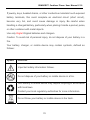
Your battery, charger, or mobile device may contain symbols, defined as
follows:
Symbol
Definition
Important safety information follows.
Do not dispose of your battery or mobile device in a fire.
Your battery or mobile device may require recycling in accordance
with local laws.
Contact your local regulatory authorities for more information.
Do not throw your battery or mobile device in the trash.
29
GSM+DECT Cordless Phone User Manual V1.0
Do not let your battery, charger, or mobile device get wet.
Listening at full volume to music or voice through a headset may
damage your hearing.
Choking Hazards
Your mobile device or its accessories may include detachable parts, which
may present a choking hazard to small children. Keep your mobile device
and its accessories away from small children.
Glass Parts
Some parts of your mobile device may be made of glass. This glass could
break if the product is dropped on a hard surface or receives a substantial
impact. If glass breaks, do not touch or attempt to remove. Stop using your
mobile device until the glass is replaced by a qualified service center.
Seizures/Blackouts
Some people may be susceptible to epileptic seizures or blackouts when
exposed to flashing lights, such as when playing video games. These may
occur even if a person has never had a previous seizure or blackout.
If you have experienced seizures or blackouts, or if you have a family history
30
GSM+DECT Cordless Phone User Manual V1.0
of such occurrences, please consult your physician before playing video
games or enabling a flashing-lights feature (if available) on your mobile
device.
Discontinue use and consult a physician if any of the following symptoms
occur: convulsion, eye or muscle twitching, loss of awareness, involuntary
movements, or disorientation. It is always a good idea to hold the screen
away from your eyes, leave the lights on in the room, take a 15-minute break
every hour, and stop use if you are very tired.
Caution About High Volume Usage
Listening at full volume to music or voice through a
headset may damage your hearing.
Repetitive Motion
When you repetitively perform actions such as pressing keys or entering
finger-written characters, you may experience occasional discomfort in your
hands, arms, shoulders, neck, or other parts of your body. If you continue to
have discomfort during or after such use, stop use and see a physician.
12. FCC Notice to Users
Vogtec has not approved any changes or modifications to this device by the
user. Any changes or modifications could void the user’s authority to operate
31
GSM+DECT Cordless Phone User Manual V1.0
the equipment.
This device complies with part 15 of the FCC Rules. Operation is subject to
the following two conditions: (1) This device may not cause harmful
interference, and (2) this device must accept any interference received,
including interference that may cause undesired operation.
If your mobile device or accessory has a USB connector, or is otherwise
considered a computer peripheral device whereby it can be connected to a
computer for purposes of transferring data, then it is considered a Class B
device and the following statement applies:
This equipment has been tested and found to comply with the limits for a
Class B digital device, pursuant to part 15 of the FCC Rules. These limits are
designed to provide reasonable protection against harmful interference in a
residential installation. This equipment generates, uses and can radiate radio
frequency energy and, if not installed and used in accordance with the
instructions, may cause harmful interference to radio communications.
However, there is no guarantee that interference will not occur in a particular
installation. If this equipment does cause harmful interference to radio or
television reception, which can be determined by turning the equipment off
and on, the user is encouraged to try to correct the interference by one or
more of the following measures:
z
Reorient or relocate the receiving antenna.
z
Increase the separation between the equipment and the receiver.
z
Connect the equipment to an outlet on a circuit different from that to
which the receiver is connected.
z
Consult the dealer or an experienced radio/TV technician for help.
32
GSM+DECT Cordless Phone User Manual V1.0
13. Maintenance
• Do not place the unit in direct sunlight
• Avoid very high or very low temperatures
• Do not place the phone near by other electronics
• Do not clean the phone with liquids or sprays
• Always place the phone on a clear and flat surface
33