1
2 Basic flying
Read this section before basic flight testing.
2.1Control Mode Instruction
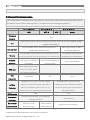
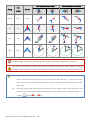
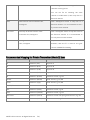
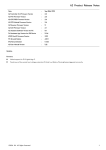
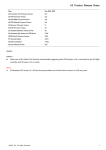
The aircraft performs differently when using different control modes. Please read the following table to know
the different control modes, which may help you to achieve a more involved flight experience.
Control Mode 3
Control Mode 2
GPS
ATTI. 2
Command
Roll and Pitch
Throttle
Manual
YES
Linearity
Yaw
Control Mode 1*
ATTI. 1
Control the aircraft to rotate in clockwise and counter clockwise direction. Maximum rudder
angular velocity 150°/s
Aircraft attitude control; Mid point of stick is for 0˚
Max-angular velocity is 150°/s.
attitude, and its endpoint is 35˚.
No attitude angle limit.
Aircraft height control. Maintain the altitude best above 1
No altitude locking when the
meter from ground when the throttle stick is in mid position.
throttle stick is in mid position.
All Sticks
Lock position if GPS signal
Only attitude stabilizing. No
Released
is adequate.
position locking.
Keep original attitude.
When GPS signal has been
GPS Lost
lost for 3s, system enters
---
---
CL
None
ATTI. Mode automatically.
IOC
Supported
CL/HL/POI
The flight control system will enter FailSafe
The flight control system will enter
FailSafe
Mode if the Transmitter signal is lost and no
FailSafe Mode if the Transmitter signal is
Protection
matter if Transmitter signal recovers or not,
lost and the system will exit Failsafe once
system will not exit failsafe mode automatically.
the signal recovers.
GPS Involved
YES
NO
Low-voltage
LED alert with Descending or Go Home &
Protection
Landing precautions
Environment
Open flying field;
Narrow Space;
recommended
Good GPS signal
GPS signal bad
Only LED alert
Regain control in emergency
*Default is Manual; users can set to ATTI.1 in Assistant software. The biggest difference between ATTI.1 and ATTI.2
is that they are working differently in the protection situations.
© 2013 DJI Innovations. All Rights Reserved
19 |