1
English
6
Hotkeys
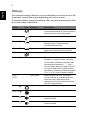
The computer employs hotkeys or key combinations to access most of the
computer's controls like screen brightness and volume output.
To activate hotkeys, press and hold the <Fn> key before pressing the other
key in the hotkey combination.
Hotkey
Function
Description
<Fn> + <F3>
Icon
Communication
Enables/disables the computer’s
communication devices. Communication
devices may vary by configuration.
<Fn> + <F4>
Sleep
Puts the computer in Sleep mode.
<Fn> + <F5>
Display toggle
Switches display output between the
display screen, external monitor
(if connected) and both.
<Fn> + <F6>
Screen blank
Turns the display screen backlight off to
save power. Press any key to return.
<Fn> + <F8>
Speaker toggle
Turns the speakers on and off.
<Fn> + <F11>
Num Lock
When Num Lock is on, the embedded
keypad is in numeric mode. The keys
function as a calculator (complete with
the arithmetic operators +, -, *, and /).
Use this mode when you need to do a lot
of numeric data entry. A better solution
would be to connect an external keypad.
<Fn> + <F11> only for certain models.
<Fn> +
<F12>
Scroll Lock
When Scroll Lock is on, the screen
moves one line up or down when you
press the up or down arrow keys
respectively. Scroll Lock does not work
with some applications.
<Fn> + < >
Brightness up
Increases the screen brightness.
<Fn> + < >
Brightness down Decreases the screen brightness.
<Fn> + < >
Volume up
Increases the sound volume (only for
certain models).
<Fn> + < >
Volume down
Decreases the sound volume (only for
certain models).