Download User Manual - Projector Central
Transcript
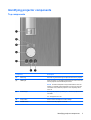
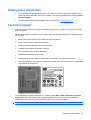
Identifying projector components Top components Component Description (1) Focus ring Move the ring to the left or right to adjust the focus of the projector. (2) TEMP light When the light is on, indicates that temperature is over 47.5°C and that the projector will automatically shut down. NOTE: Excessive temperature may indicate that the vents are blocked. To maintain optimal temperature, be sure the vents are not blocked. Also, allow the projector to cool completely after it turns off. (3) STATUS light Blinking: The projector is powering on, or one of the projector's fans has failed. On: The projector is in use. (4) 4-way button Press to select and adjust on-screen settings. (5) POWER button Press to turn the projector on and off. Identifying projector components 3