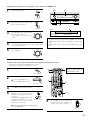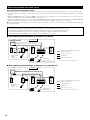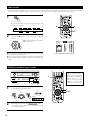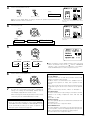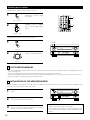
1
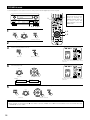
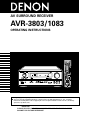
AV SURROUND RECEIVER
AVR-3803/1083
OPERATING INSTRUCTIONS
AMP
REMOTE
SENSOR
SURROUND
BACK CH
SIGNAL
AUTO
INPUT
PCM
VOLUME LEVEL
OUTPUT
DIGITAL
ON / STANDBY
DTS
SIGNAL
DETECT
2 We greatly appreciate your purchase of the AVR-3803/1083.
2 To be sure you take maximum advantage of all the features the AVR-3803/1083 has to offer, read these
instructions carefully and use the set properly. Be sure to keep this manual for future reference, should any
questions or problems arise.
“SERIAL NO.
PLEASE RECORD UNIT SERIAL NUMBER ATTACHED TO THE REAR OF THE
CABINET FOR FUTURE REFERENCE”
2 SAFETY PRECAUTIONS
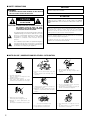
CAUTION
WARNING:
TO PREVENT FIRE OR SHOCK HAZARD, DO NOT EXPOSE
THIS APPLIANCE TO RAIN OR MOISTURE.
TO PREVENT ELECTRIC SHOCK, MATCH WIDE BLADE OF PLUG
TO WIDE SLOT, FULLY INSERT.
ATTENTION
CAUTION
POUR ÉVITER LES CHOCS ÉLECTRIQUES, INTERODUIRE LA
LAME LA PLUS LARGE DE LA FICHE DANS LA BORNE
CORRESPONDANTE DE LA PRISE ET POUSSER JUSQU’ AU
FOND.
RISK OF ELECTRIC SHOCK
DO NOT OPEN
CAUTION: TO REDUCE THE RISK OF ELECTRIC SHOCK, DO
NOT REMOVE COVER (OR BACK). NO USERSERVICEABLE PARTS INSIDE. REFER SERVICING
TO QUALIFIED SERVICE PERSONNEL.
The lightning flash with arrowhead symbol, within an
equilateral triangle, is intended to alert the user to the
presence of uninsulated “dangerous voltage” within
the product’s enclosure that may be of sufficient
magnitude to constitute a risk of electric shock to
persons.
This device complies with Part 15 of the FCC Rules. Operation is subject to
the following two conditions: (1) This device may not cause harmful
interference, and (2) this device must accept any interference received,
including interference that may cause undesired operation.
This Class B digital apparatus meets all requirements of the Canadian
Interference-Causing Equipment Regulations.
Cet appareil numérique de la classe B respecte toutes les exigences du
Règlement sur le matériel brouilleur du Canada.
The exclamation point within an equilateral triangle is
intended to alert the user to the presence of important
operating and maintenance (servicing) instructions in
the literature accompanying the appliance.
2 NOTE ON USE / OBSERVATIONS RELATIVES A L’UTILISATION
• Avoid high temperatures.
Allow for sufficient heat dispersion when
installed on a rack.
• Eviter des températures élevées
Tenir compte d’une dispersion de chaleur
suffisante lors de l’installation sur une étagère.
• Keep the set free from moisture, water, and
dust.
• Protéger l’appareil contre l’humidité, l’eau et
lapoussière.
• Unplug the power cord when not using the set
for long periods of time.
• Débrancher le cordon d’alimentation lorsque
l’appareil n’est pas utilisé pendant de longues
périodes.
• Do not let foreign objects in the set.
• Ne pas laisser des objets étrangers dans
l’appareil.
• Do not let insecticides, benzene, and thinner
come in contact with the set.
• Ne pas mettre en contact des insecticides, du
benzène et un diluant avec l’appareil.
• Handle the power cord carefully.
Hold the plug when unplugging the cord.
• Manipuler le cordon d’alimentation avec
précaution.
Tenir la prise lors du débranchement du cordon.
* (For sets with ventilation holes)
• Do not obstruct the ventilation holes.
• Ne pas obstruer les trous d’aération.
2
• Never disassemble or modify the set in any
way.
• Ne jamais démonter ou modifier l’appareil
d’une manière ou d’une autre.
SAFETY INSTRUCTIONS
1.
2.
3.
4.
5.
6.
7.
8.
9.
10.
11.
12.
Read Instructions – All the safety and operating instructions
should be read before the product is operated.
Retain Instructions – The safety and operating instructions
should be retained for future reference.
Heed Warnings – All warnings on the product and in the
operating instructions should be adhered to.
Follow Instructions – All operating and use instructions should
be followed.
Cleaning – Unplug this product from the wall outlet before
cleaning. Do not use liquid cleaners or aerosol cleaners.
Attachments – Do not use attachments not recommended by
the product manufacturer as they may cause hazards.
Water and Moisture – Do not use this product near water – for
example, near a bath tub, wash bowl, kitchen sink, or laundry
tub; in a wet basement; or near a swimming pool; and the like.
Accessories – Do not place this product on an unstable cart,
stand, tripod, bracket, or table. The product may fall, causing
serious injury to a child or adult, and serious damage to the
product. Use only with a cart, stand, tripod, bracket, or table
recommended by the manufacturer, or sold with the product.
Any mounting of the product should follow the manufacturer’s
instructions, and should use a
mounting accessory
recommended by the
manufacturer.
A product and cart
combination should be
moved with care. Quick
stops, excessive force,
and uneven surfaces may
cause the product and cart
combination to overturn.
Ventilation – Slots and openings in the cabinet are provided for
ventilation and to ensure reliable operation of the product and to
protect it from overheating, and these openings must not be
blocked or covered. The openings should never be blocked by
placing the product on a bed, sofa, rug, or other similar surface.
This product should not be placed in a built-in installation such
as a bookcase or rack unless proper ventilation is provided or
the manufacturer’s instructions have been adhered to.
Power Sources – This product should be operated only from the
type of power source indicated on the marking label. If you are
not sure of the type of power supply to your home, consult your
product dealer or local power company. For products intended
to operate from battery power, or other sources, refer to the
operating instructions.
Grounding or Polarization – This product may be equipped with
a polarized alternating-current line plug (a plug having one blade
wider than the other). This plug will fit into the power outlet
only one way. This is a safety feature. If you are unable to
insert the plug fully into the outlet, try reversing the plug. If the
plug should still fail to fit, contact your electrician to replace your
obsolete outlet. Do not defeat the safety purpose of the
polarized plug.
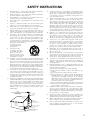
FIGURE A
EXAMPLE OF ANTENNA GROUNDING
AS PER NATIONAL
ELECTRICAL CODE
ANTENNA
LEAD IN
WIRE
GROUND
CLAMP
15.
16.
17.
18.
19.
20.
21.
22.
23.
24.
ANTENNA
DISCHARGE UNIT
(NEC SECTION 810-20)
ELECTRIC
SERVICE
EQUIPMENT
13.
25.
Power-Cord Protection – Power-supply cords should be routed
so that they are not likely to be walked on or pinched by items
placed upon or against them, paying particular attention to
cords at plugs, convenience receptacles, and the point where
they exit from the product.
Outdoor Antenna Grounding – If an outside antenna or cable
system is connected to the product, be sure the antenna or
cable system is grounded so as to provide some protection
against voltage surges and built-up static charges. Article 810
of the National Electrical Code, ANSI/NFPA 70, provides
information with regard to proper grounding of the mast and
supporting structure, grounding of the lead-in wire to an
antenna discharge unit, size of grounding conductors, location
of antenna-discharge unit, connection to grounding electrodes,
and requirements for the grounding electrode. See Figure A.
Lightning – For added protection for this product during a
lightning storm, or when it is left unattended and unused for
long periods of time, unplug it from the wall outlet and
disconnect the antenna or cable system. This will prevent
damage to the product due to lightning and power-line surges.
Power Lines – An outside antenna system should not be
located in the vicinity of overhead power lines or other electric
light or power circuits, or where it can fall into such power lines
or circuits. When installing an outside antenna system,
extreme care should be taken to keep from touching such
power lines or circuits as contact with them might be fatal.
Overloading – Do not overload wall outlets, extension cords, or
integral convenience receptacles as this can result in a risk of
fire or electric shock.
Object and Liquid Entry – Never push objects of any kind into
this product through openings as they may touch dangerous
voltage points or short-out parts that could result in a fire or
electric shock. Never spill liquid of any kind on the product.
Servicing – Do not attempt to service this product yourself as
opening or removing covers may expose you to dangerous
voltage or other hazards. Refer all servicing to qualified
service personnel.
Damage Requiring Service – Unplug this product from the
wall outlet and refer servicing to qualified service personnel
under the following conditions:
a) When the power-supply cord or plug is damaged,
b) If liquid has been spilled, or objects have fallen into the
product,
c) If the product has been exposed to rain or water,
d) If the product does not operate normally by following the
operating instructions. Adjust only those controls that are
covered by the operating instructions as an improper
adjustment of other controls may result in damage and will
often require extensive work by a qualified technician to
restore the product to its normal operation,
e) If the product has been dropped or damaged in any way, and
f) When the product exhibits a distinct change in performance
– this indicates a need for service.
Replacement Parts – When replacement parts are required, be
sure the service technician has used replacement parts
specified by the manufacturer or have the same characteristics
as the original part. Unauthorized substitutions may result in
fire, electric shock, or other hazards.
Safety Check – Upon completion of any service or repairs to this
product, ask the service technician to perform safety checks to
determine that the product is in proper operating condition.
Wall or Ceiling Mounting – The product should be mounted to a
wall or ceiling only as recommended by the manufacturer.
Heat – The product should be situated away from heat sources
such as radiators, heat registers, stoves, or other products
(including amplifiers) that produce heat.
GROUNDING CONDUCTORS
(NEC SECTION 810-21)
GROUND CLAMPS
POWER SERVICE GROUNDING
ELECTRODE SYSTEM
(NEC ART 250, PART H)
NEC - NATIONAL ELECTRICAL CODE
3
2 INTRODUCTION
Thank you for choosing the DENON AVR-3803/1083 Digital A / V Surround Receiver. This remarkable component has been engineered to provide
superb surround sound listening with home theater sources such as DVD, as well as providing outstanding high fidelity reproduction of your
favorite music sources.
As this product is provided with an immense array of features, we recommend that before you begin hookup and operation that you review the
contents of this manual before proceeding.
TABLE OF CONTENTS
z
x
c
v
b
n
m
,
.
Before Using ...............................................................................................4
Cautions on Installation ...............................................................................4
Cautions on Handling ..................................................................................5
Features ......................................................................................................5
Connections ..........................................................................................6~13
Part Names and Functions..................................................................14, 15
Setting up the system ........................................................................16~33
Remote Control Unit...........................................................................34~46
⁄0
⁄1
⁄2
⁄3
⁄4
⁄5
⁄6
⁄7
Surround .............................................................................................55~61
DSP Surround Simulation ...................................................................62~67
Listening to the Radio.........................................................................68~70
Last Function Memory ..............................................................................70
Initialization of the Microprocessor ...........................................................70
Troubleshooting.........................................................................................71
Additional Information.........................................................................72~82
Specifications ............................................................................................83
Operation ............................................................................................47~54
2 ACCESSORIES
Check that the following parts are included in addition to the main unit:
q Operating instructions…..1
t R6P/AA batteries .............3
w Warranty ( for North America model only )………...........1
y AM loop antenna…...............1 u FM indoor antenna…1
r
t
e Service station list…….....1
y
r Remote control unit
(RC-921)............…......1
u
1 BEFORE USING
Pay attention to the following before using this unit:
• Moving the set
To prevent short circuits or damaged wires in the connection cords,
always unplug the power cord and disconnect the connection cords
between all other audio components when moving the set.
• Store this instructions in a safe place.
After reading, store this instructions along with the warranty in a
safe place.
• Before turning the power switch on
Check once again that all connections are proper and that there are
not problems with the connection cords. Always set the power
switch to the standby position before connecting and disconnecting
connection cords.
• Note that the illustrations in this instructions may differ from
the actual set for explanation purposes.
2 CAUTIONS ON INSTALLATION
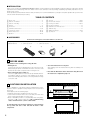
4 inch/10 cm or more
Noise or disturbance of the picture may be generated if this unit or
any other electronic equipment using microprocessors is used near a
tuner or TV.
If this happens, take the following steps:
• Install this unit as far as possible from the tuner or TV.
• Set the antenna wires from the tuner or TV away from this unit’s
power cord and input/output connection cords.
• Noise or disturbance tends to occur particularly when using indoor
antennas or 300 Ω/ohms feeder wires. We recommend using
outdoor antennas and 75 Ω/ohms coaxial cables.
For heat dispersal, leave at least 4 inch/10 cm of space between
the top, back and sides of this unit and the wall or other
components.
4
B
4 inch/10 cm or more
Wall
3 CAUTIONS ON HANDLING
• Switching the input function when input jacks are not
connected
A clicking noise may be produced if the input function is switched
when nothing is connected to the input jacks. If this happens, either
turn down the MASTER VOLUME control or connect components
to the input jacks.
• Whenever the power switch is in the STANDBY state, the
apparatus is still connected on AC line voltage.
Please be sure to unplug the cord when you leave home for,
say, a vacation.
• Muting of PRE OUT jacks, HEADPHONE jack and SPEAKER
terminals
The PRE OUT jacks, HEADPHONE jack and SPEAKER terminals
include a muting circuit. Because of this, the output signals are
greatly reduced for several seconds after the power switch is
turned on or input function, surround mode or any other-set-up is
changed. If the volume is turned up during this time, the output will
be very high after the muting circuit stops functioning. Always wait
until the muting circuit turns off before adjusting the volume.
4 FEATURES
1. Digital Surround Sound Decoding
Featuring 32 bit high speed DSP, operating entirely in digital
domain, surround sound from digital sources such as DVD, LD,
DTV and satellite are faithfully re-created.
2. Dolby Pro Logic II decoder
Dolby Pro Logic II is a new format for playing multi-channel audio
signals that offers improvements over conventional Dolby Pro
Logic. It can be used to decode not only sources recorded in Dolby
Surround but also regular stereo sources into five channels (front
left/right, center and surround left/right). In addition, various
parameters can be set according to the type of source and the
contents, so you can adjust the sound field with greater precision.
3. Dolby Digital
Using advanced digital processing algorithms, Dolby Digital
provides up to 5.1 channels of wide-range, high fidelity surround
sound. Dolby Digital is the default digital audio delivery system for
DVD and North American DTV.
4. DTS (Digital Theater Systems)
DTS provides up to 5.1 channels of wide-range, high fidelity
surround sound, from sources such as laser disc, DVD and
specially-encoded music discs.
5. DTS-ES Extended Surround and DTS Neo:6
The AVR-3803/1083 can be decoded with DTS-ES Extended Surround,
a new multi-channel format developed by Digital Theater Systems Inc.
The AVR-3803/1083 can be also decoded with DTS Neo:6, a surround
mode allowing 6.1-channel playback of regular stereo sources.
6. DTS 96/24 compatibility
The AVR-3803/1083 can be decoded with sources recorded in DTS
96/24, a new multi-channel digital signal format developed by Digital
Theater Systems Inc.
DTS 96/24 sources can be played in the multi-channel mode on the
AVR-3803/1083 with high sound quality of 96 kHz/24 bits or 88.2
kHz/24 bits.
7. Wide screen mode for a 7.1-channel sound even with
5.1-channel sources
DENON has developed a wide screen mode with a new design
which recreates the effects of the multi surround speakers in
movie theaters. The result is 7.1-channel sound taking full
advantage of surround back speakers, even with Dolby Pro Logic
or Dolby Digital/DTS 5.1-channel signals.
8. Dual Surround Speaker Mode
Provides for the first time the ability to optimize surround sound
reproduction using two different types of surround sound speakers
as well as two different surround speaker positions:
(1) Movie Surround
Motion picture soundtracks use the surround channel(s) to
provide the ambient elements of the acoustic environment they
want the audience to realize. This is best accomplished by the
use of specially-designed surround speakers that offer a wide
diffusion pattern (bipolar dispersion) or by using surround
speakers that provide broad dispersion with a minimum of onaxis localization (dipolar dispersion). Side wall mounting (closer
to the ceiling) of the surround speakers provides the greatest
envelopment, minimizing localization of direct sound from the
speakers.
(2) Music Surround
With full range discrete surround channels, as well as three
discrete full range front channels, digital formats such as Dolby
and DTS offer thrilling surround sound music listening.
Producers of multi-channel discrete digital music recordings
almost always favor the use of direct radiating (monopolar)
surround speakers, placed in the rear corners of the room,
since that is how they configure their studios during the
mixing/creation process.
The DENON AVR-3803/1083 provides the ability to connect two
different sets of surround speakers, and place them in the
appropriate locations in your AV theater room, so that you can
enjoy both movie soundtracks and music listening, with optimum
results and no compromise.
9. Multi Zone Music Entertainment System
Multi Source Function:
This unit’s Multi Source function lets you select different audio
sources for listening Different sources can thus be enjoyed in the
main room (MAIN) and the subroom (ZONE 2) simultaneously.
10.Component Video Switching
In addition to composite video and “S” video switching, the AVR3803/1083 provides 2 sets of component video (Y, PB/CB, PR/CR)
inputs, and one set of component video outputs to the television,
for superior picture quality.
11.Video Select Function
Allow you to watch one source (visual) while listening to another
source (audio).
12.Future Sound Format Upgrade Capability via Eight Channel
Inputs & Outputs
For future multi-channel audio format(s), the AVR-3803/1083 is
provided with 7.1 channel (seven main channels, plus one low
frequency effects channel) inputs, along with a full set of 7.1
channel pre-amp outputs, controlled by the 8 channel master
volume control. This assures future upgrade possibilities for any
future multi-channel sound format.
13.Video Conversion Function
The AVR-3803/1083 is equipped with a function for up-converting
video signals.
Because of this, the AVR-3803/1083’s MONITOR OUT jack can be
connected to the monitor (TV) with a set of cables offering a higher
quality connection, regardless of how the player and the AVR3803/1083’s video input jacks are connected.
5
5 CONNECTIONS
• Do not plug in the AC cord until all connections have been
completed.
• Be sure to connect the left and right channels properly (left with
left, right with right).
• Insert the plugs securely. Incomplete connections will result in the
generation of noise.
• Use the AC OUTLETS for audio equipment only. Do not use
them for hair driers, etc.
• Note that binding pin plug cords together with AC cords or placing
them near a power transformer will result in generating hum or
other noise.
• Noise or humming may be generated if a connected audio
equipment is used independently without turning the power of this
unit on. If this happens, turn on the power of the this unit.
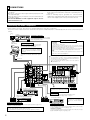
Connecting the audio components
• When making connections, also refer to the operating instructions of the other components.
The power to these outlets is turned on and off when the power is switched between on and standby from the remote control unit or power
switch.
OUTPUT
R
L
CD player
Connecting a CD player
Connect the CD player’s analog output
jacks (ANALOG OUTPUT) to this unit’s CD
jacks using pin plug cords.
DIGITAL AUDIO
R
L
Turntable
(MM cartridge)
Connecting the AC OUTLETS
AC OUTLETS
• SWITCHED
(total capacity – 120 W (1 A.))
The power to these outlets is turned on and off in conjunction with the
POWER operation switch on the main unit, and when the power is switched
between on and standby from the remote control unit.
No power is supplied from these outlets when this unit’s power is at standby.
Never connect equipment whose total capacity is above 120 W (1 A.).
NOTE:
Only use the AC OUTLETS for audio equipment. Never use them for hair
driers, TVs or other electrical appliances.
Connecting a turntable
Connect the turntable’s output cord to the AVR3803/1083’s PHONO jacks, the L (left) plug to the L
jack, the R (right) plug to the right jack.
NOTE:
This unit cannot be used with MC cartridges
directly. Use a separate head amplifier or step-up
transformer.
If humming or other noise is generated when the
ground wire is connected, disconnect the ground
wire.
Connecting the pre-out jacks
Use these jacks if you wish to connect external power amplifier(s) to
increase the power of the front, center and surround sound channels, or
for connection to powered loudspeakers.
To use Surround back with one speaker, connect the speaker to
SURR. BACK L CH.
Ground wire
R
L
R
L
L
R
R
L
CD player or other component
equipped with digital output jacks
Route the connection cords, etc., in such a
way that they do not obstruct the ventilation
holes.
AC CORD
AC 120 V, 60 Hz
DIGITAL AUDIO
OPTICAL COAXIAL
TRIGGER OUT
OUTPUT
Turn the DC 12V voltage on and off for the individual functions.
For details, see “Setting the Trigger Setup” on page 31.
MD recorder, CD recorder or other component
equipped with digital input/output jacks
R
B
L
R
CD recorder or Tape deck
L
B
INPUT OUTPUT
OPTICAL
Connecting the DIGITAL jacks
R
INPUT
Use these for connections to audio equipment with digital output. Refer to page 24 for
instructions on setting this terminal.
NOTES:
• Use 75 Ω/ohms cable pin cords for coaxial connections.
• Use optical cables for optical connections, removing the cap before connecting.
6
L
R
L
OUTPUT
NOTE:
If humming noise is generated by a
tape deck, etc., move the tape deck
away.
Connecting a tape deck
Connections for recording:
Connect the tape deck’s recording input jacks (LINE IN or REC) to this unit’s tape
recording (CDR/TAPE OUT) jacks using pin plug cords.
Connections for playback:
Connect the tape deck’s playback output jacks (LINE OUT or PB) to this unit’s tape
playback (CDR/TAPE IN) jacks using pin plug cords.
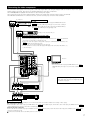
Connecting the video components
•
•
•
•
•
To connect the video signal, connect using a 75 Ω/ohms video signal cable cord. Using an improper cable can result in a drop in video quality.
When making connections, also refer to the operating instructions of the other components.
The AVR-3803/1083 is equipped with a function for up-converting video signals.
The signal connected to the video signal terminal is output to the S-Video and component video monitor out terminals.
The REC OUT terminals have no conversion function, so when recording only connect the video terminals.
TV or DBS tuner
AUDIO
R
R
OUT
L
VIDEO
OUT
Connecting a TV or DBS tuner
TV or DBS
• Connect the TV’s or DBS tuner’s video output jack (VIDEO OUTPUT) to the
VIDEO (yellow) TV or DBS IN jack using a 75 Ω/ohms video coaxial pin
plug cord.
• Connect the TV’s or DBS tuner’s audio output jacks (AUDIO OUTPUT) to
the AUDIO TV or DBS IN jacks using pin plug cords.
B
L
AUDIO
OUT
R
L
VIDEO
OUT
B
DVD player or video disc player (VDP), etc.
L
R
Connecting a DVD player or a video disc player (VDP)
DVD
• Connect the video disc player’s video output jack (VIDEO OUTPUT) to the VIDEO (yellow) DVD IN
jack using a 75 Ω/ohms video coaxial pin plug cord.
• Connect the video disc player’s analog audio output jacks (ANALOG AUDIO OUTPUT) to the
AUDIO DVD IN jacks using pin plug cords.
• A VDP can be connected to the VDP jacks in the same way.
• It is also possible to connect a video disc player, DVD player, video camcorder, Video Game, etc.,
to the V.AUX jacks.
R
VIDEO
IN
L
Monitor TV
R
L
MONITOR OUT
• Connect the TV’s video input jack (VIDEO INPUT) to the VIDEO
MONITOR OUT jack using a 75 Ω/ohms video coaxial pin plug
cord.
L
R
R
L
R
L
R
L
Note on connecting the digital input jacks
• Only audio signals are input to the digital input jacks.
For details, see page 6.
R
R
OUT
L
R
L
R
IN
L
AUDIO
R
R
OUT
L
R
L
R
AUDIO
Video deck 2
L
OUT IN
VIDEO
Video deck 1
L
IN
L
OUT IN
VIDEO
Connecting a video decks
• There are two sets of video deck (VCR) jacks, so two video decks can be connected for simultaneous recording or video copying.
Video input/output connections:
• Connect the video deck’s video output jack (VIDEO OUT) to the VIDEO (yellow) VCR-1 IN jack, and the video deck’s video input jack (VIDEO IN) to the VIDEO
(yellow) VCR-1 OUT jack using 75 Ω/ohms video coaxial pin plug cords.
Connecting the audio output jacks
• Connect the video deck’s audio output jacks (AUDIO OUT) to the AUDIO VCR-1 IN jacks, and the video deck’s audio input jacks (AUDIO IN) to the AUDIO VCR-1
OUT jacks using pin plug cords.
Connect the second video deck to the VCR-2 jacks in the same way.
7
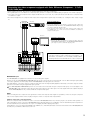
Connecting the video components equipped with S-Video jacks
• When making connections, also refer to the operating instructions of the other components.
• A note on the S input jacks
The input selectors for the S inputs and Video inputs work in conjunction with each other.
• The AVR-3803/1083 is equipped with a function for converting video signals.
• The signal connected to the S-Video signal terminal is output to the composite video and component video monitor out terminals.
• The REC OUT terminals have no conversion function, so when recording only connect the S-Video terminals.
DVD player or video disc player (VDP)
S-VIDEO
B
Connecting a monitor TV
MONITOR OUT
• Connect the TV’s S video input (S-VIDEO INPUT) to the S-VIDEO MONITOR
OUT jack using a S jack connection cord.
OUT
Connecting a DVD player or a video disc player (VDP)
DVD
• Connect the DVD player’s S-Video output jack to the S-VIDEO
DVD IN jack using a S-Video connection cord.
• A VDP can be connected to the VDP jacks in the same way.
• It is also possible to connect a video disc player, DVD player,
video camcorder, game machine, etc., to the V.AUX jacks.
S-VIDEO
IN
Monitor TV
TV or satellite broadcast tuner
S-VIDEO
B
OUT
Connecting a TV or DBS tuner
• Connect the TV’s or DBS tuner’s S video output jack (SVIDEO OUTPUT) to the S-VIDEO TV or DBS IN jack
using an S-Video connection cord.
S-VIDEO
OUT
IN
Video deck 1
Connecting the video decks
• Connect the video deck’s S output jack (S-OUT) to the
S-VIDEO VCR-1 IN jack and the video deck’s S input jack
(S-IN) to the S-VIDEO VCR-1 OUT jack using S-Video
connection cords.
• Connect the video deck’s S output jack (S-OUT) to the
S-VIDEO VCR-2 IN jack and the video deck’s S input jack
(S-IN) to the S-VIDEO VCR-2 OUT jack using S-Video
connection cords.
S-VIDEO
OUT
IN
Connect the components’ audio inputs and outputs as described on page 7.
8
Video deck 2
Connecting the video component equipped with Color Difference (Component - Y, PR/CR,
PB/CB) Video jacks
• When making connections, also refer to the operating instructions of the other components.
• The signals input to the color difference (component) video jacks are not output to the VIDEO output jack (yellow) or the S-Video output jack.
• Some video sources with component video outputs are labeled Y, CB, CR, or Y, Pb, Pr, or Y, R-Y, B-Y. These terms all refer to component video
color difference output.
• The function assigned to the component video input can be changed at the system setup. For details, see “Setting the video setup” on page
25.
COMPONENT
VIDEO OUT
DVD player
Connecting a DVD player
DVD IN jacks
• Connect the DVD player’s color difference (component) video output jacks
(COMPONENT VIDEO OUTPUT) to the COMPONENT VIDEO-1 IN jack using
75 Ω/ohms coaxial video pin-plug cords.
• In the same way, another video source with component video outputs such
as a TV/DBS tuner, etc., can be connected to the VIDEO-2 color difference
(component) video jacks.
B
Y
CB
CR
Monitor TV
COMPONENT
VIDEO IN
Y CB CR
Connecting a monitor TV
MONITOR OUT jack
• Connect the TV’s color difference (component) video input jacks
(COMPONENT VIDEO INPUT) to the COMPONENT MONITOR OUT
jack using 75 Ω/ohms coaxial video pin-plug cords.
• The color difference input jacks may be indicated differently on
some TVs, monitors or video components (“CR, CB and Y”, “RY, B-Y and Y”, “Pr, Pb and Y”, etc.). For details, carefully read the
operating instructions included with the TV or other component.
MONITOR OUT jacks
The AVR-3803/1083 is equipped with a function for up-converting video signals.
Because of this, the AVR-3803/1083’s MONITOR OUT jack can be connected to the monitor (TV) with a set of cables offering a higher quality
connection, regardless of how the player and the AVR-3803/1083’s video input jacks are connected.
Generally speaking, connections using the component video jacks offer the highest quality playback, followed by connections using the S-Video
jacks, then connections using the regular video jacks (yellow).
If the AVR-3803/1083’s MONITOR OUT jack is not connected to the monitor (TV) using the component video jacks, connect the player to the
AVR-3803/1083’s video input jacks using either the video jacks (yellow) or the S-Video jacks. The video signals will not be output if the player
and the AVR-3803/1083 are only connected with the component video jacks.
NOTE:
Down-converting from the component video signal to the S-Video and composite video signal is not possible, so when not using the component
video monitor output terminal connect the player using the S-Video or composite video input terminal.
Cautions on the video conversion function:
When the component video terminals are used to connect the AVR-3803/1083 with a TV (or monitor, projector, etc.) and the video (yellow) or S
video terminals are used to connect the AVR-3803/1083 with a VTR, depending on the combination of the TV and VTR the picture may flicker in
the horizontal direction, be distorted, be out of sync or not display at all when playing video tapes.
If this happens, connect a commercially available video stabilizer, etc., with a TBC (time base corrector) function between the AVR-3803/1083 and
the VTR, or if your VTR has a TBC function, turn it on.
9
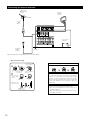
Connecting the antenna terminals
DIRECTION OF
BROADCASTING
STATION
AM LOOP
ANTENNA
(Supplied)
FM ANTENNA
75 Ω/ohms
COAXIAL
CABLE
AM OUTDOOR
ANTENNA
FM INDOOR
ANTENNA
(Supplied)
GROUND
• An F-type FM antenna cable plug can be connected directly.
AM loop antenna assembly
1
4
2
Remove the vinyl tie
and take out the
connection line.
Connect to the AM
antenna terminals.
2. Insert the conductor.
3. Return the lever.
3
Bend in the reverse
direction.
a. With the antenna
on top any stable
surface.
Mount
b. With the antenna
attached to a wall.
Installation hole
Mount on wall, etc.
10
Connection of AM antennas
1. Push the lever.
Note to CATV system installer:
This reminder is provided to call the CATV system installer’s
attention to Article 820-40 of the NEC which provides
guidelines for proper grounding and, in particular, specifies
that the cable ground shall be connected to the grounding
system of the building, as close to the point of cable entry
as practical.
Notes:
• Do not connect two FM antennas simultaneously.
• Even if an external AM antenna is used, do not disconnect
the AM loop antenna.
• Make sure AM loop antenna lead terminals do not touch
metal parts of the panel.
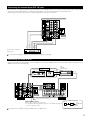
Connecting the external input (EXT. IN) jacks
• These jacks are for inputting multi-channel audio signals from an outboard decoder, or a component with a different type of multi-channel
decoder, such as a DVD Audio player, a multi-channel SACD player, or other future multi-channel sound format decoder.
• When making connections, also refer to the operating instructions of the other components.
R
L
R
L
L
Center
Subwoofer
Surround back
Surround
Front
R
Decoder with 8- or 6-channel
analog output
For instructions on playback using the external input (EXT. IN) jacks, see page 50.
Connecting the ZONE 2 jacks
• If another pre-main (integrated) amplifier or power amplifier is connected, the ZONE 2 jacks can be used to play a different program source in
ZONE 2 the same time. (See page 54)
RC-616
INFRARED
RETRANSMITTER
ZONE 2
Integrated pre-main amplifier
RC-617
INFRARED SENSOR
B
OUTPUT INPUT
+
+
AUX OUT
L
R
Extension jacks for future use.
Serial Control cable
SERIAL CONTROL terminal
• Connect when using an external controller.
• Use an adapter cable (sold separately) as shown on the diagram at the right to
connect the external controller.
RS232C
GND
∆3.5
STEREO PLUG
TXD
RXD
(PC OUT) (PC IN)
For instructions on operations using the ZONE 2 jacks, see page 53, 54.
11
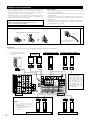
Speaker system connections
• Connect the speaker terminals with the speakers making sure that like
polarities are matched (≈ with ≈ , √ with √ ). Mismatching of polarities will
result in weak central sound, unclear orientation of the various instruments,
and the sense of direction of the stereo being impaired.
• When making connections, take care that none of the individual conductors
of the speaker cord come in contact with adjacent terminals, with other
speaker cord conductors, or with the rear panel.
Speaker Impedance
• Speakers with an impedance of from 6 to 16 Ω/ohms can be connected for
use as front and center speakers.
• Speakers with an impedance of 6 to 16 Ω/ohms can be connected for use as
surround speakers.
• Be careful when using two pairs of surround speakers (A + B) at the same
time, since use of speakers with an impedance of less than 8 Ω/ohms will
lead to damage.
• The protector circuit may be activated if the set is played for long periods of
time at high volumes when speakers with an impedance lower than the
specified impedance are connected.
NOTE:
NEVER touch the speaker terminals when the power is on.
Doing so could result in electric shocks.
Connection the speaker terminals
1. Loosen by turning
counterclockwise
2. Insert the cord.
3. Tighten by turning
clockwise.
Connecting banana plugs
Either tightly twist or terminate the core wires.
banana plug
Turn clockwise to tighten, then
insert the banana plug.
Connections
• When making connections, also refer to the operating instructions of the other components.
Connection jack for subwoofer
with built-in amplifier (super
woofer), etc.
FRONT SPEAKER
SYSTEMS
(L)
CENTER SPEAKER SYSTEM
(R)
SURROUND SPEAKER SYSTEMS (A)
(L)
(R)
• Precautions when
connecting speakers
If a speaker is placed near a
TV or video monitor, the
colors on the screen may
be disturbed by the
speaker’s magnetism. If
this should happen, move
the speaker away to a
position where it does not
have this effect.
NOTES:
• To use Surround back with one
speaker, connect the speaker to
SURR. BACK L CH.
• The settings must be changed to use
this speaker for ZONE 2.
See page 27.
(L)
(R)
SURROUND BACK/ZONE 2 SPEAKER SYSTEMS
12
(L)
(R)
SURROUND SPEAKER SYSTEMS (B)
Protector circuit
• This unit is equipped with a high-speed protection circuit. The purpose of this circuit is to protect the speakers under
circumstances such as when the output of the power amplifier is inadvertently short-circuited and a large current flows, when
the temperature surrounding the unit becomes unusually high, or when the unit is used at high output over a long period
which results in an extreme temperature rise.
When the protection circuit is activated, the speaker output is cut off and the power supply indicator LED flashes. Should
this occur, please follow these steps: be sure to switch off the power of this unit, check whether there are any faults with
the wiring of the speaker cables or input cables, and wait for the unit to cool down if it is very hot. Improve the ventilation
condition around the unit and switch the power back on.
If the protection circuit is activated again even though there are no problems with the wiring or the ventilation around the
unit, switch off the power and contact a DENON service center.
Note on speaker impedance
• The protector circuit may be activated if the set is played for long periods of time at high volumes when speakers with an
impedance lower than the specified impedance (for example speakers with an impedance of lower than 4 Ω/ohms) are
connected. If the protector circuit is activated, the speaker output is cut off. Turn off the set’s power, wait for the set to cool
down, improve the ventilation around the set, then turn the power back on.
13
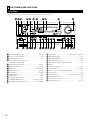
6 PART NAMES AND FUNCTIONS
Front Panel
• For details on the functions of these parts, refer to the pages given in parentheses ( ).
@8 @7 @6
@5 @4 @3 @2
REMOTE
SENSOR
@1 @0
ON / STANDBY
q
AUTO
w er t y
OUTPUT
DTS
SIGNAL
DETECT
u i o !0 !1 !2
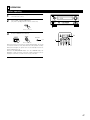
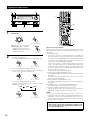
q Power ON/STANDBY switch..............................................(47, 70)
w Headphones jack (PHONES) ....................................................(51)
e VIDEO SELECT button .............................................................(51)
r Surround speaker system indicators
(SURROUND SPEAKER A/B)
t PURE DIRECT button/indicator ..........................................(50, 70)
y ZONE 2 button/indicator.....................................................(53, 70)
u MODE button.........................................................(48, 50, 59, 61)
i ANALOG button .................................................................(48, 50)
o EXT. IN button ....................................................................(48, 50)
!0 DIMMER button .......................................................................(52)
!1 STATUS button .........................................................................(52)
!2 SURROUND BACK button .......................................................(59)
!3 SURROUND MODE button .............................(49, 56, 58, 59, 64)
!4 SURROUND PARAMETER button .........................(57, 58, 60, 64)
14
!8
VOLUME LEVEL
SURROUND
BACK CH
SIGNAL
DIGITAL
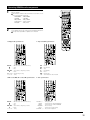
INPUT
PCM
!9
!3 !4 !5 !6 !7
!5 SELECT knob...........................................(49, 51, 56 ~ 60, 64, 66)
!6 TONE DEFEAT button ..............................................................(51)
!7 TONE CONTROL button ....................................................(51, 66)
!8 MASTER VOLUME control ......................................................(49)
!9 Master volume indicator (VOLUME LEVEL) ............................(49)
@0 Display
@1 INPUT mode indicators ............................................................(49)
@2 SIGNAL indicators ..............................................................(49, 59)
@3 Remote control sensor (REMOTE SENSOR) ...........................(34)
@4 Power indicator ........................................................................(47)
@5 FUNCTION knob ..................................(48, 52, 53, 59, 61, 68, 70)
@6 TUNING PRESET button ..........................................................(70)
@7 SOURCE selector button .........................................................(48)
@8 ZONE 2/REC button ...........................................................(52, 53)
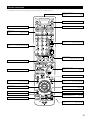
Remote control unit
• For details on the functions of these parts, refer to the pages given in parentheses ( ).
Remote control signal
transmitter ..............................................(34)
Power buttons .................................(36~47)
ZONE 2 buttons .....................................(53)
ZONE1 (MAIN) buttons ..........................(53)
Mode selector
buttons .................................(35, 37, 47, 53)
Tuner system/System
buttons.....................(35, 38, 53, 68, 69, 70)
Input source selector
buttons ....................(35~38, 48, 59, 61, 68)
Surround buttons
...........................(49, 50, 56, 58, 59, 61, 63)
BACK LIGHT button
System buttons..........................(35, 37, 38)
Master volume control
buttons .............................................(49, 53)
MUTING button......................................(51)
SYSTEM SETUP/SETUP
button.............................(18, 33, 37, 38, 61)
Cursor buttons........................................(16)
ON SCREEN/DISPLAY button ....(37, 52, 69)
TEST TONE button .................................(55)
SURROUND PARAMETER
button.......................(37, 57, 58, 60, 63, 65)
CH SELECT/ENTER button
...................................................(16, 55, 56)
RETURN button......................................(38)
SURROUND SPEAKER/
SURROUND BACK button ...............(52, 59)
SYSTEM CALL buttons ..........................(40)
INPUT MODE selector
buttons .................................(48, 50, 59, 61)
15
7 SETTING UP THE SYSTEM
• Once all connections with other AV components have been completed as described in “CONNECTIONS” (see pages 6 to 13), make the various
settings described below on the monitor screen using the AVR-3803/1083’s on-screen display function.
These settings are required to set up the listening room’s AV system centered around the AVR-3803/1083.
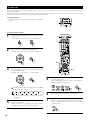
• Use the following buttons to set up the system:
• Check that the remote control unit is set to AMP mode.
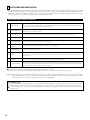
SYSTEM SETUP button
Press this to display the system setup menu.
CURSOR buttons
F and G:
Use these to move the cursors (F and G) to the
left and right on the screen.
D and H:
Use these to move the cursors (D and H) to the
up and down on the screen.
ENTER button
Press this to switch the display.
Also use this button to complete the setting.
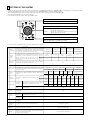
• System setup items and default values (set upon shipment from the factory)
System setup
q
w
e
r
t
Default settings
Speaker
Configuration
Input the combination of speakers in your system and their
corresponding sizes (SMALL for regular speakers, LARGE for fullsize, full-range) to automatically set the composition of the signals
output from the speakers and the frequency response.
Surround
Speaker
Setting
Use this function when using multiple surround speaker
combinations for more ideal surround sound. Once the
combinations of surround speakers to be used for the
different surround modes are preset, the surround
speakers are selected automatically according to the
surround mode.
EXT. IN
Surround
speaker
A
A
A
A
A
This adjusts the volume of the signals output from the speakers and
subwoofer for the different channels in order to obtain optimum
effects.
80 Hz
LFE
Front L & R
Center
Sub Woofer
Surround L & R
SBL & SBR
12 ft (3.6 m)
12 ft (3.6 m)
12 ft (3.6 m)
10 ft (3.0 m)
10 ft (3.0 m)
Front L
Front R
Center
Surround
L
Surround
R
Surround
Back L
Surround
Back R
Subwoofer
0 dB
0 dB
0 dB
0 dB
0 dB
0 dB
0 dB
0 dB
Input
source
CD
DVD
VDP
TV
DBS
V. AUX
VCR-1
VCR-2
CDR/TAPE
Digital
Inputs
COAX1
COAX2
OPT1
OPT2
OPT3
OFF
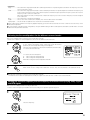
OPT4
OFF
OPT5
DVD
VDP
TV
DBS
VCR-1
VCR-2
V. AUX
—
—
VIDEO1
NONE
NONE
VIDEO2
NONE
NONE
NONE
—
—
Component
In Assign
This assigns the color difference (component) video
input jacks for the different input sources.
Video Input
Mode
Set the input signal to be output from the monitor
output terminal.
Turn the audio compression on or off when down-mixing Dolby
Digital signals.
AUTO
OFF
Power AMP
Assignment
Set this to switch the surround back channel’s
power amplifier for use for zone 2.
Surround Back
Zone2
vol. Level
This sets the output level for the zone 2 output
jacks.
Variable
i
Audio Delay
Set the audio delay to delay time the sound and synchronize it with
the picture.
o
Ext. In
Subwoofer
Level
Set the Ext. In Subwoofer terminal playback level.
!0
Auto Surround
Mode
Set the Auto surround mode function.
!1
On Screen
Display
This sets whether or not to display the on-screen display that
appears on the monitor screen when the controls on the remote
control unit or main unit are operated.
A setting to prevent flickering.
16
Small / 2spkrs
DSP
SIMULATION
Video Setup
Zone 2
Control
Small
5CH/7CH
STEREO
Delay Time
u
Large
WDE SCREEN
This parameter is for optimizing the timing with which the audio
signals are produced from the speakers and subwoofer according to
the listening position.
Dolby Digital
Setup
Surround Back Sp.
Yes
This selects the subwoofer speaker for playing deep bass signals.
y
Surround Sp.
A/B
Small
Subwoofer mode
This assigns the digital input jacks for the different input
sources.
Sub Woofer
DOLBY/
DTS
SURROUND
Set the frequency (Hz) below which the bass sound of the various
speakers is to be output from the subwoofer.
Digital In
Assignment
Center Sp.
Surround
mode
Crossover
Frequency
Channel
Level
Front Sp.
0 ms
Subwoofer = +15 dB
Auto Surround Mode = ON
On Screen Display = ON / Mode 1
System setup
!2
!3
!4
Trigger Out
Setup
Auto Tuner
Presets
Setup Lock
Default settings
TUNER CDR/TAPE
PHONO
CD
OFF
OFF
DVD
VDP
TV
DBS
VCR-1
ON
ON
ON
ON
ON
VCR-2 V. AUX
Set the Trigger Out output for the different input sources.
FM stations are received automatically and stored in the memory.
OFF
OFF
A1 ~ A8
87.5/89.1/98.1/107.9/90.1/90.1/90.1/90.1 MHz
B1 ~ B8
520/600/1000/1400/1500/1710 kHz, 90.1/90.1 MHz
C1 ~ C8
90.1 MHz
D1 ~ D8
90.1 MHz
E1 ~ E8
90.1 MHz
Set whether or not to lock the system setup settings so that they
cannot be changed.
ON
ON
Setup Lock = OFF
NOTES:
• The on-screen display signals are output with priority to the S-VIDEO MONITOR OUT jack during playback of a video component. For example, if the TV monitor
is connected to both the AVR-3803/1083’s S-Video and video monitor output jacks and signals are input to the AVR-3803/1083 from a video source (VDP, etc.)
connected to both the S-Video and video input jacks, the on-screen display signals are output with priority to the S-Video monitor output. If you wish to output
the signals to the video monitor output jack, do not connect a cord to the S-VIDEO MONITOR OUT jack. (For details, see page 33.)
• The AVR-3803/1083’s on-screen display function is designed for use with high resolution monitor TVs, so it may be difficult to read small characters on TVs with
small screens or low resolutions.
• The setup menu is not displayed when headphones are being used.
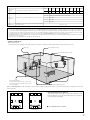
• Speaker system layout
Basic system layout
• The following is an example of the basic layout for a system consisting of eight speaker systems and a television monitor:
Subwoofer
Center speaker system
Surround back speaker systems
Front speaker systems
Set these at the sides of the TV or screen with
their front surfaces as flush with the front of the
screen as possible.
Surround speaker systems
With the AVR-3803/1083 it is also possible to use the surround speaker selector function to choose the best layout for a variety of sources and
surround modes.
• Surround speaker selector function
This function makes it possible to achieve the optimum sound
fields for different sources by switching between two systems of
surround speakers (A and B).
A
B
A
SB
SB
Using A only
B
A
B
A
SB
SB
B
SB: SURROUND BACK SPEAKER
Using B only
17
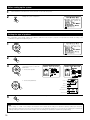
Before setting up the system
1
2
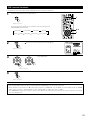
Check that all the connections are correct, then turn on the main unit’s power.
Display the System Setup Menu.
Setting the type of speakers
• The composition of the signals output to the different channels and the frequency response are adjusted automatically according to the
combination of speakers actually being used.
1
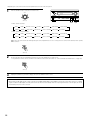
At the System Setup Menu select “Speaker Configuration”.
2
Switch to the speaker configuration screen.
3
Set whether or not speakers are
connected and, if so, their size
parameters.
• To select the speaker
• To select the parameter
Center Sp.
Front Sp.
Subwoofer
Surround Sp. A
Surround back Sp.
Surround Sp. B
4
Press the ENTER button to finalize the setting.
NOTE:
• Select “Large” or “Small” not according to the actual size of the speaker but according to the speaker’s capacity for playing low frequency
(bass sound below frequency set for the Crossover Frequency mode and below) signals. If you do not know, try comparing the sound at both
settings (setting the volume to a level low enough so as not to damage the speakers) to determine the proper setting.
18
• Parameters
Large...................Select this when using speakers that have sufficient performance for reproducing bass sound below the frequency set for the
Crossover Frequency mode.
Small...................Select this when using speakers that do not have sufficient performance for reproducing bass sound below the frequency set
for the Crossover Frequency mode. When this is set, bass sound with a frequency below the frequency set for the Crossover
Frequency mode is sent to the subwoofer.
When this setting is selected, low frequencies of below the frequency set for the Crossover Frequency mode are assigned
to the subwoofer.
None……............Select this when no speakers are installed.
Yes/No….............Select “Yes” when a subwoofer is installed, “No” when a subwoofer is not installed.
2spkrs/1spkr .......Set the number of speakers to be used for the surround back channel.
If the subwoofer has sufficient low frequency playback capacity, good sound can be achieved even when “Small” is set for the front, center
and surround speakers.
For the majority of speaker system configurations, using the SMALL setting for all five main speakers and Subwooofer On with a connected
subwoofer will yield the best results.
Selecting the Surround Speakers for the different surround modes
This screen is displayed when using both surround speakers A and B.
• At this screen preset the surround speakers to be used in the different surround modes.
1
When either “Large” or “Small” has been set for both speakers A and B
on the System Setup Menu (when using both A and B surround
speakers), the surround speaker setting screen appears.
Select the surround speakers to be used in the different surround modes.
• To select the surround mode
• To select the surround speaker
A:
When using surround speakers A
B:
When using surround speakers B
A+B: When using both surround speakers A and B
2
Enter the setting.
When “Front” is set to “Large” and “Subwoofer” is set to “Yes”, the set switches to the subwoofer mode.
Speaker type setting when using both surround speakers A and B
If “Small” is set for either surround speakers A or B, the output is the same as when “Small” is set for both A and B.
Setting the crossover frequency and low frequency distribution when playing Dolby Digital
and DTS signals
This screen is not displayed when not using a subwoofer.
• Set the crossover frequency and subwoofer mode according to the speaker system being used.
1
Select the “Crossover Frequency” mode.
Select the frequency.
19
2
Select the “Subwoofer Mode”.
Select the setting.
3
Enter the setting.
The System Setup Menu reappears.
NOTES:
— Assignment of low frequency signal range —
• The only signals produced from the subwoofer channel are LFE signals (during playback of Dolby Digital or DTS signals) and the low
frequency signal range of channels set to “SMALL” in the setup menu. The low frequency signal range of channels set to “LARGE” are
produced from those channels.
— Crossover Frequency —
• When “Subwoofer” is set to “Yes” at the “Speaker Configuration Setting”, set the frequency (Hz) below which the bass sound of the
various speakers is to be output from the subwoofer (the crossover frequency).
• For speakers set to “Small”, sound with a frequency below the crossover frequency is cut, and the cut bass sound is output from the
subwoofer instead.
NOTE: For ordinary speaker systems, we recommend setting the crossover frequency to 80 Hz. When using small speakers, however,
setting the crossover frequency to a high frequency may improve frequency response for frequencies near the crossover frequency.
— Subwoofer mode —
• The subwoofer mode setting is only valid when “LARGE” is set for the front speakers and “YES” is set for the subwoofer in the “Speaker
Configuration” settings (see page 18).
• When the “LFE+MAIN” playback mode is selected, the low frequency signal range of channels set to “LARGE” are produced
simultaneously from those channels and the subwoofer channel.
In this playback mode, the low frequency range expand more uniformly through the room, but depending on the size and shape of the room,
interference may result in a decrease of the actual volume of the low frequency range.
• Selection of the “LFE ” play mode will play the low frequency signal range of the channel selected with “LARGE” from that channel only.
Therefore, the low frequency signal range that are played from the subwoofer channel are only the low frequency signal range of LFE (only
during Dolby Digital or DTS signal playback) and the channel specified as “SMALL” in the setup menu.
• Select the play mode that provides bass reproduction with quantity.
• When the subwoofer is set to “Yes”, bass sound is output from the subwoofer regardless of the subwoofer mode setting in surround modes
other than Dolby/DTS.
• In surround modes other than Dolby Digital and DTS, if the subwoofer is set to “YES”, the low frequency portion is always output to the
subwoofer channel. For details, refer to “Surround Modes and Parameters” on page 67.
20
Setting the Delay Time
• Input the distance between the listening position and the different speakers to set the delay time for the surround mode.
• The delay time can be set separately for surround speakers A and B.
Preparations:
Measure the distances between the listening position and the speakers (L1 to L5 on the diagram at
the right).
L1: Distance between center speaker and listening position
L2: Distance between front speakers and listening position
L3: Distance between surround speakers and listening position
L4: Distance between surround back speakers and listening position
L5: Distance between subwoofer and listening position
FL
Subwoofer
L1
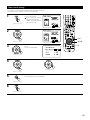
At the System Setup Menu select “Delay Time”.
2
Switch to the Delay Time screen.
3
Select the desired unit, meters or feet.
Select (darken) the desired units, “Meters” or “Feet”.
FR
L2
Listening position
L5
L3
SL
SBL
1
Center
L4
SR
SBR
Example: When “Feet” is selected
4
5
Once “Meters” or “Feet” is selected in step 3, the
Delay Time screen appears automatically.
Select the speaker to be set.
21
6
Set the distance between the
center speaker and listening
position.
The distance changes in units of
1 foot (0.1 meters) each time the
button is pressed. Select the
value closest to the measured
distance.
Example: When the distance is set to 12 feet
for the center speaker
If “Yes” is selected for “Default”, the settings are automatically reset
to the default values.
Please note that the difference of distance for every speaker should be
20 ft (6.0 m) or less. If you set an invalid distance, a CAUTION notice,
such as screen right will appear. In this case, please relocate the blinking
speaker(s) so that its distance is no larger than the value shown in
highlighted line.
7
Enter the setting.
The System Setup Menu reappears.
The AVR-3803/1083 automatically sets the optimum surround delay time for the listening room.
NOTE:
• If the distance unit is changed after the delay time is set, the settings are reset to the factory default values (see page 16, 17).
Setting the Channel Level
•
•
•
•
Use this setting to adjust so that the playback level between the different channels is equal.
From the listening position, listen to the test tones produced from the speakers to adjust the level.
The level can also be adjusted directly from the remote control unit. (For details, see page 55.)
When using both surround speakers A and B, their playback levels can be adjusted separately.
1
At the System Setup Menu select “Channel Level”.
2
Switch to the Channel Level screen.
3
Select “Test Tone”.
22
4
Select the mode.
Select “Auto” or “Manual”.
• Auto:
Adjust the level while listening to the test tones produced
automatically from the different speakers.
• Manual:
Select the speaker from which you want to produce the test tone to
adjust the level.
Example: When the “Auto” mode is selected
Select “Surr. Sp.”, then select the surround speaker(s) from which you want to produce the test
tone (A, B or A+B).
• Surr. Sp.: A
Adjusts the balance of the playback level between the channels when using surround speaker A.
• Surr. Sp.: B
Adjusts the balance of the playback level between the channels when using surround speaker B.
• Surr. Sp.: A+B
Adjusts the balance of the playback level between the channels when using surround speakers
A and B at the same time.
The “Surr. Sp.” can only be selected when both surround speakers A and B have been selected
at the System Setup Menu (when both A and B have been set to “Large” or “Small”).
5
6
Select “Test Tone Start”.
7
Select “Yes”.
8
a. If the “Auto” mode is selected:
Test tones are automatically emitted from the different speakers.
The test tones are emitted from the different speakers in the
following order, at 4-second intervals the first time and second time
around, 2-second intervals the third time around and on:
1spkr
SB
FL
C
FR
SR
SBR
SBL
SL
SW
Flashing
2spkrs
When the surround back speaker setting is set to “1spkr” for
“Speaker Configuration”, this is set to “SB”.
Example: When the volume is set to –11.5 dB
while the test tone is being
produced from the Front Lch
speaker
Use the CURSOR left and right buttons to adjust all the speakers to the
same volume.
The volume can be adjusted between –12 dB and +12 dB in units of
1 dB.
b. When the “Manual” mode is selected
Use the CURSOR up and down to select
the speaker for which you want to output
test tones, then use the CURSOR left and
right to adjust so that the volume of the
test tones from the various speakers is
the same.
Flashing
Example: When the volume is set to –11.5 dB
while the Front Lch speaker is
selected
23
9
After the above settings are completed, press the ENTER button.
The “Channel Level” screen reappears.
To cancel the settings, select “Level Clear” and “Yes” on the “Channel Level” screen, then make the settings again.
The level of each channel should be adjusted to 75 dB (C-weighted, slow meter mode) on a sound level meter at the listening position.
If a sound level meter is not available adjust the channels by ear so the sound levels are the same. Because adjusting the subwoofer level test
tone by ear is difficult, use a well known music selection and adjust for natural balance.
NOTE:
When adjusting the level of an active subwoofer system, you may also need to adjust the subwoofer’s own volume control.
When you adjust the channel levels while in the SYSTEM SETUP CHANNEL LEVEL mode, the channel level adjustments made will affect
all surround modes. Consider this mode a Master Channel Level adjustment mode.
After you have completed the SYSTEM SETUP CHANNEL LEVEL adjustments, you can then activate the individual surround modes and
adjust channel levels that will be remembered for each of those modes. Then, whenever you activate a particular surround sound mode,
your preferred channel level adjustments for just that mode will be recalled. Check the instructions for adjusting channel levels within each
surround mode on page 55.
You can adjust the channel levels for each of the following surround modes: PURE DIRECT/DIRECT, STEREO, DOLBY/DTS SURROUND,
5/7 CH STEREO, WIDE SCREEN, SUPER STADIUM, ROCK ARENA, JAZZ CLUB, CLASSIC CONCERT, MONO MOVIE, VIDEO GAME,
MATRIX and VIRTUAL.
When using either surround speakers A or B, or when using surround speakers A and B at the same time, be sure to adjust the balance of
playback levels between each channel for the various selections of “A or B” and “A and B”.
Setting the Digital In Assignment
• This setting assigns the digital input jacks of the AVR-3803/1083 for the different input sources.
1
At the System Setup Menu select “Digital In Assignment”.
2
Switch to the Digital Inputs screen.
3
4
24
Select the digital input jack to be assigned to the input source.
• To select the input source
• To select the digital input jack
Select “OFF” for input sources for which no digital input jacks are used.
If “Yes” is selected for “Default”, the settings are automatically reset to the default
values.
Enter the setting.
The System Setup Menu reappears.
NOTES:
• The OPTICAL 4 and 5 jacks on the AVR-3803/1083’s rear panel are equipped with an optical digital output jack for recording digital signals on
a CD recorder, MD recorder or other digital recorder. Use this for digital recording between a digital audio source (stereo - 2 channel) and a
digital audio recorder.
• Do not connect the output of the component connected to the OPTICAL 4 OUT jack on the AVR-3803/1083’s rear panel to any jack other than
the OPTICAL 4 IN jack.
• Do not connect the output of the component connected to the OPTICAL 5 OUT jack on the AVR-3803/1083’s rear panel to any jack other than
the OPTICAL 5 IN jack.
• “PHONO” and “TUNER” cannot be selected on the Digital In Assignment.
Setting the Video Setup
• This setting assigns the color difference (component) video input jacks of the AVR-3803/1083 for the different input sources.
[1] Setting the Component In Assign.
1
At the System Setup Menu select “Video Setup” and
press the ENTER button.
2
The “Video Setup” screen appears.
Select “Component In Assign.” and press the ENTER
button.
3
Switch to the Component In Assign. screen.
4
Select the component (Y, PB/CB and PR/CR) video input terminal to be assigned to the input source.
q Input source selection
w Component video terminal selection
Select “NONE” for sources for which the component (Y, PB/CB and PR/CR) video input is not to be used.
When the default, “Yes”, is selected, the settings are reset to the factory defaults.
5
Press the ENTER button to complete the setting.
At the “Video Setup” screen, select “Exit” and press the ENTER button.
The System Setup Menu reappears.
25
[2] Setting the Video Input Mode
1
At the System Setup Menu select “Video Setup” and
press the ENTER button.
2
The “Video Setup” screen appears.
Select “Video Input Mode” and press the ENTER
button.
3
Switch the Video Input Mode screen.
4
q Select the input source for which you
want to set the Video Input Mode.
w Select the mode.
AUTO:
When there are multiple input signals, the input signals are detected and the input signal to be output from the video
monitor output terminal is selected automatically in the following order: component video, S-Video, composite video.
Component: The signal connected to the component video terminal is always played.
Video conversion is not conducted, so no image is output from the monitor output terminal when there is no input signal
to the component terminal.
S-Video:
The signal connected to the S-Video terminal is always played.
The S-Video input signal is converted and output from the composite and component monitor output terminal.
Video:
The signal connected to the composite video terminal is always played.
The composite video input signal is up-converted and output from the S-Video and component monitor output terminals.
NOTE:
Down-converting from the component video signal to the S-Video and composite video signal is not possible, so when not using the
component video monitor output terminal connect the player using the S-Video or composite video input terminal.
Cautions on the video conversion function:
When the component video terminals are used to connect the AVR-3803/1083 with a TV (or monitor, projector, etc.) and the video (yellow)
or S video terminals are used to connect the AVR-3803/1083 with a VTR, depending on the combination of the TV and VTR the picture
may flicker in the horizontal direction, be distorted, be out of sync or not display at all when playing video tapes.
If this happens, connect a commercially available video stabilizer, etc., with a TBC (time base corrector) function between the AVR3803/1083 and the VTR, or if your VTR has a TBC function, turn it on.
5
26
Enter the setting.
At the “Video Setup” screen, select “Exit” and press the ENTER button.
The System Setup Menu reappears.
Setting the Dolby Digital Setup
Sets the down-mixing method when not using a center speaker or surround speakers.
OFF: The dynamic range is not compressed.
ON:
The dynamic range is compressed automatically according to the combination of speakers being used.
1
At the System Setup Menu select “Dolby Digital
Setup” and press the ENTER button.
2
Select “ON” if you want to use the Dolby Digital Down-mix, “OFF” if
you do not want to use it.
3
Enter the setting.
The System Setup Menu reappears.
Setting the ZONE2 Control
[1] Setting the power amplifier assignment
Make this setting to switch the power amplifier for the surround back channel to ZONE2.
If ZONE2 is selected, the signal that selected at ZONE2 is output at “SURR. BACK/ZONE2 PREOUT” terminals.
1
At the System Setup Menu select “Zone2 Control”
and press the ENTER button.
2
The “Zone2 Control” screen appears.
Select “Power Amp Assignment” and press the
ENTER button.
3
Select “Surround Back” to use as the surround back
channel, “Zone2” to use as Zone 2 out.
When “Surround Back” is selected
When “Zone2” is selected
27
4
Enter the setting.
At the “Zone2 Control” screen, select “Exit” and press the ENTER button.
The System Setup Menu reappears.
[2] Setting the Zone2 vol. level
Set the Zone 2 pre-out output level adjustment.
1
At the System Setup Menu select “Zone2 Control”
and press the ENTER button.
2
The “Zone2 Control” screen appears.
Select “Zone2 Vol. Level” and press the ENTER
button.
3
Select the desired settimg.
Variable:
The level can be adjusted freely using the buttons on the remote control
unit.
0 dB, -40 dB:
The output level is fixed at the set level and the volume can no longer be
adjusted.
4
Enter the setting.
At the “Zone2 Control” screen, select “Exit” and press the ENTER button.
The System Setup Menu reappears.
Setting the Audio Delay
This function allows you to adjust the time delay of the video and audio signals and store these settings for the different input sources.
The setting is made while watching a DVD or other software, so it is not made here.
By default, this is not displayed when no digital signals are being input.
For instructions on making the setting, refer to page 61.
NOTE:
The audio delay setting does not apply when playing in the EXT. IN mode or in the analog input direct mode or stereo mode (T0NE DEFEAT “ON”).
28
Setting the Ext. In Subwoofer Level
• Set the method of playback of the analog input signal connected to the Ext.In Subwoofer.
1
At the System Setup Menu select “Ext.In Subwoofer Level”.
2
Switch to the Ext.In Subwoofer Level screen.
3
Select the desired setting.
4
Enter the setting.
The System Setup Menu reappears.
Select according to the specifications of the player being used. Also refer to the player’s operating instructions.
+15dB (default) recommended. (0, +5, 10 and +15 can be selected.)
Setting the Auto Surround Mode
The surround mode used at last for the four types of input signals shown below is stored in the memory, and the signal is automatically played
with that surround mode the next time it is input.
Note that the surround mode setting is also stored separately for the different input sources.
q
w
e
r
Analog and PCM 2-channel signals
2-channel signals of Dolby Digital, DTS or other multi-channel format
Multi-channel signals of Dolby Digital, DTS or other multi-channel format
Multi-channel signal when conducting playback using the EXT.IN
During playback in the PURE DIRECT mode, the surround mode does not change even if the input signal is changed.
1
At the System Setup Menu select “Auto Surround
Mode” and press the ENTER button.
29
2
Select “ON” if you want to use the auto surround mode, “OFF” if you
do not want to use it.
3
Enter the setting.
The System Setup Menu reappears.
Setting the On Screen Display (OSD)
• Use this to turn the on-screen display (messages other than the menu screens) on or off.
• Sets the on-screen display’s display mode.
Mode 1: Prevents flickering of the on-screen display when there is no video signal.
Mode 2: Flickering is not prevented.
Use this mode if the on-screen display does not appear in the mode 1, as may happen according to the TV being used.
1
2
3
4
30
At the System Setup Menu select “On Screen Display”
and press the ENTER button.
Select “ON” or “OFF”.
Select the On Screen Display mode and select
“Mode1” or “Mode2”.
Enter the setting.
The System Setup Menu reappears.
Setting the Trigger Out Setup
• Sets the Trigger Out output for the different input sources.
1
At the System Setup Menu select “Trigger Out Setup”.
2
Switch to the Trigger Out Setup screen.
3
4
Select the input source and select “ON” or “OFF”.
Enter the setting.
The System Setup Menu reappears.
Auto Tuner Presets
Use this to automatically search for FM broadcasts and store up to 40 stations at preset channels A1 to 8, B1 to 8, C1 to 8, D1 to 8 and E1 to 8.
NOTE:
• If an FM station cannot be preset automatically due to poor reception, use the “Manual tuning” operation to tune in the station, then preset it
using the manual “Preset memory” operation.
1
At the System Setup Menu select “Auto Tuner Presets”.
2
Switch to the Auto Preset Memory screen.
31
3
Use the CURSOR button to select “Yes”.
“Search” flashes on the screen and searching begins.
“Completed” appears once searching is completed.
The display automatically switches to screen.
This completes system setup. Once these settings are made, there is no need to change them unless different AV components are connected
or the speakers are repositioned.
Protecting the setting
The system setup settings can be locked so that they cannot be changed easily.
1
At the System Setup Menu select “Setup Lock”.
2
Switch to the Setup Lock screen.
3
Select “ON”, to lock the system setup settings.
4
Press jog stick “ENTER” to finalize the setting and exit the system setup mode.
When the setup lock function is activated, the settings listed below cannot be changed, and “Setup Locked” is
displayed when related buttons are operated.
• System setup settings
• Surround parameter settings
• Tone control settings
• Channel level settings (including test tones)
To unlock, press the System Setup button again and display the Setup Lock screen, then select “OFF” and press
“ENTER”.
System setup is complete. Once these settings are made, there is no need to change them unless different AV components are
connected or the speakers are repositioned.
32
After completing system setup
This button can be pressed at any time during the system setup process to complete the process.
1
At the System Setup Menu, press the SYSTEM SETUP button.
The changed settings are entered and the on-screen display turns off.
• On-screen display signals
Signals input to the AVR-3803/1083
On-screen display signal output
VIDEO signal input jack
(yellow)
S-video signal input jack
Video signal output to VIDEO
MONITOR OUT jack (yellow)
Video signal output to SVideo MONITOR OUT jack
Video signal output to Color Difference
(Component) Video MONITOR OUT jack
1
E
E
C
C
C
2
C
E
C
C
C
3
E
C
C
C
C
4
C
C
E
C
C
(C: Signal
E: No signal)
(C: On-screen signals output
E: On-screen signals not output)
NOTE:
• When a component video signal is input and when the “Video Input Mode” is set to the component fixed mode at system setup, the onscreen display is only displayed when the System Setup, Surround Parameters and On Screen buttons are operated.
33
8 REMOTE CONTROL UNIT
• The included remote control unit (RC-921) can be used to operate not only the AVR-3803/1083 but other remote control compatible DENON
components as well. In addition, the memory contains the control signals for other remote control units, so it can be used to operate non-Denon
remote control compatible products.
Inserting the batteries
q Remove the remote control unit’s rear cover.
w Set three R6P/AA batteries in the battery compartment in the
indicated direction.
Notes on Batteries
• Use R6P/AA batteries in the remote control unit.
• The batteries should be replaced with new ones approximately
once a year, though this depends on the frequency of usage.
• Even if less than a year has passed, replace the batteries with new
ones if the set does not operate even when the remote control unit
is operated nearby the set. (The included battery is only for verifying
operation. Replace it with a new battery as soon as possible.)
• When inserting the batteries, be sure to do so in the proper
direction, following the “≈” and “√” marks in the battery
compartment.
• To prevent damage or leakage of battery fluid:
• Do not use a new battery together with an old one.
• Do not use two different types of batteries.
• Do not short-circuit, disassemble, heat or dispose of batteries in
flames.
• Remove the batteries from the remote control unit when you do
not plan to use it for an extended period of time.
• If the battery fluid should leak, carefully wipe the fluid off the inside
of the battery compartment and insert new batteries.
• When replacing the batteries, have the new batteries ready and
insert them as quickly as possible.
e Put the rear cover back on.
Using the remote control unit
• Point the remote control unit at the remote sensor on the main unit
as shown on the diagram.
• The remote control unit can be used from a straight distance of
approximately 23 feet / 7 meters from the main unit, but this
distance will be shorter if there are obstacles in the way or if the
remote control unit is not pointed directly at the remote sensor.
• The remote control unit can be operated at a horizontal angle of up
to 30 degrees with respect to the remote sensor.
B
30°
30°
23 feet/Approx. 7 m
34
NOTES:
• It may be difficult to operate the remote control unit if the remote
sensor is exposed to direct sunlight or strong artificial light.
• Do not press buttons on the main unit and remote control unit
simultaneously. Doing so may result in malfunction.
• Neon signs or other devices emitting pulse-type noise nearby may
result in malfunction, so keep the set as far away from such
devices as possible.
Operating DENON audio components
1
Use the mode selector buttons to select the component you
want to operate.
The function switches as shown below each time one of
the mode buttons is pressed.
AMP/ZONE2 : AMP, ZONE2
CDR/MD
: CDR,MD
DBS/CABLE : DBS, CABLE
VCR-1/VCR-2 : VCR-1, VCR-2
DVD/VDP
: DVD, VDP
2
AMP
1
Operate the audio component.
• For details, refer to the component’s operating instructions.
It may not be possible to operate some models.
1. CD player (CD) system buttons
6, 7
:
:
1
:
8, 9 :
3
:
DISC SKIP +:
0~9, +10 :
2
Manual search (forward and reverse)
Stop
Play
Auto search (to beginning of track)
Pause
(for CD changers only)
10 key
2. Tape deck (TAPE) system buttons
:
:
2
:
1 :
3
:
8 :
A/B :
6
7
Rewind
Fast forward
Stop
Forward play
Pause
Reverse play
Switch between sides A and B
3. MD recorder (MD), CD recorder (CDR) system buttons
4. Tuner system buttons
6, 7
TUNING +, –
BAND
MODE
MEMORY
SHIFT
CHANNEL +, –
:
:
1
:
8, 9 :
3
:
0~9, +10 :
2
Manual search (forward and reverse)
Stop
Play
Auto search (to beginning of track)
Pause
10 key
:
:
:
:
:
:
Tuning up/down
Switch between AM and FM bands
Switch between AUTO and MONO
Preset memory
Switch preset channel range
Preset channel up/down
35
Preset memory
The included remote control unit can be used to operate devices of different brands by registering the preset number corresponding to the brand
of your device.
For some models the remote control unit or the device may not operate properly. In this case, use the learning function (page 39) to store your
device’s remote control signals in the included remote control unit.
For instructions on resetting the preset memory, see page 42.
1
Press the power ON/SOURCE button and the OFF button at
the same time.
• “PRE” appears on the remote control unit’s display.
2
Use the • and ª cursor buttons to display “PRE” on the
remote control unit, then press the ENTER button.
1
DVD
1
4
The remote control unit’s display switches as follows each
time the • and ª cursor buttons are pressed.
PRE
LRN
CALL
PUNCH
BLKT
2, 3
2, 3
RST
3
The “SEL” indicator flashes and the device selection mode is
set.
Use the • and ª cursor buttons to display the mode you want
to preset, then press the ENTER button.
4
1
2
3
4
5
6
7
8
9
0
The display switches as shown below each time the • and
ª cursor buttons are pressed.
CD
CDR
TV
CABLE
MD
DBS
TAPE
VCR2
ZONE2
DVD
VCR1
VDP
Referring to the included List of
Preset Codes, use the number
buttons to input the preset code (a
4-digit
number)
for
the
manufacturer of the component
whose signals you want to store in
the memory.
5
“OK” is displayed when the signals are registered and the
mode is terminated.
6
To store the codes of another component in the memory,
repeat steps 1 to 5.
It is also possible to select the mode directly using the
mode buttons.
NOTES:
• Depending on the model and year of manufacture, this function cannot be used for some models, even if the your device is listed on the
included list of preset codes.
• Some manufacturers use more than one type of remote control code. Refer to the included list of preset codes to change the number and
check it out.
• For the CDR/MD, DBS/CABLE, VCR-1/VCR-2 and DVD/VDP modes, the unused mode can be deleted.
To delete an unused mode, select the mode to be deleted when registering the preset memory, input preset number “9999”, then press the
ENTER button.
For example, when the MD mode is deleted, only the CDR mode is displayed when the CDR/MD button is pressed.
This setting can be canceled by resetting the preset memory or registering another preset signal.
The preset codes are as follows upon shipment from the factory and after resetting:
TV, VCR1 ......................................................................HITACHI
CD, MD, TAPE, CDR, VDP, DVD..................................DENON
VCR2, DBS...................................................................SONY
CABLE..........................................................................ABC
36
Operating a component stored in the preset memory
1
Press the mode selector button for the component you want
to operate.
AMP
1
NOTE:
• For the DVD player remote control buttons, function names may
differ according to manufacturer. Compare with the remote
control operation of the various components.
2
Operate the component.
• For details, refer to the component’s operating instructions.
Some models cannot be operated with this remote control unit.
2. Video disc player (VDP) system
buttons
1. Digital video disc player (DVD,
DVD SETUP) system buttons
POWER : Power on/standby
(ON/SOURCE)
6,7 : Manual search
(forward and reverse)
2
: Stop
1
: Play
8,9 : Auto search
(to beginning of track)
3
: Pause
0 ~ 9, +10 : 10 key
DISC SKIP +: Disc skip
(for DVD changer only)
DISPLAY : Display
MENU : Menu
RETURN : Return
SETUP : Setup
DVD
POWER
: Power on/standby
(ON/SOURCE)
6,7
: Manual search
(forward and reverse)
2
: Stop
1
: Play
8,9
: Auto search (cue)
3
: Pause
0~9, +10
: 10 key
VDP
37
3. Video deck (VCR-1/VCR-2)
system buttons
POWER
: Power on/standby
(ON/SOURCE)
6,7
: Manual search
(forward and reverse)
2
: Stop
1
: Play
3
: Pause
Channel +, – : Channels
VCR1
4. Monitor TV (TV), digital
broadcast satellite (DBS) tuner
and cable (CABLE) system
buttons
POWER
:
(ON/SOURCE)
SETUP
:
RETURN
:
•, ª, 0, 1
:
ENTER
CHANNEL
+, –
0~9, +10
TV/VCR
38
Power on/standby
Setup
Menu
Cursor up, down, left
and right
: Enter
: Switch channels
: Channels
: Switch between TV
and video player
TV
Learning function
If your AV component is not a Denon product or if it cannot be operated using the preset memory, it can be controlled with the accessorious
remote control unit by storing its remote control signals in the remote control unit.
For some remote control signals it is not possible to “learn” the signals or the device will not operate properly. In such cases use the remote
control unit included with the device to operate it.
1
Press the power ON/SOURCE button and the OFF button
simultaneously.
• “PRE” appears on the remote control unit’s display.
1, 4, 8
DVD
1, 4, 8
7
2
Use the • and ª cursor buttons to display “LRN” on the
remote control unit’s display, then press the ENTER button.
• “SEL” is displayed.
3
Use the • and ª cursor buttons to select the mode for the
button to be “learned”, then press the ENTER button.
• “KEY” is displayed.
4
Press the button to be “learned” while “KEY” is displayed.
“START” appears.
• “AGAIN” is displayed if a button that cannot be “learned”
is pressed.
• To cancel, press the power ON/SOURCE button and the
OFF button simultaneously.
5
Point the remote control units directly at each other and press
and hold in the button on the other remote control unit which
you want to “learn”.
2, 3
2, 3, 7
6
“OK” appears on the remote control unit’s display and
learning is completed.
• “KEY” is displayed. Other keys can be “learned” by
repeating steps 4 to 6.
7
The mode can be switched by pressing a mode button while
the “KEY” indicator is lit.
When the “ENTER” button is pressed, the “KEY” display
reappears and the learning standby mode is set.
8
To cancel the learning mode, press the power ON/SOURCE
button and the OFF button simultaneously again.
Registering is not possible in the receiver mode.
Other remote
control unit
39
System call
The accessorious remote control unit is equipped with “system call” function allowing a series of remote control signals to be transmitted by
pressing a single button.
This function can be used for example to turn on the amplifier’s power, select the input source, turn on the monitor TV’s power, turn on the source
component’s power and set the source to the play mode, all at a signal button.
(1) System call buttons
Up to 10 signals each can be stored at the “CALL1” and “CALL2”
buttons.
1
(2) Storing system call signals
1
Press the power ON/SOURCE button and the OFF button at
the same time.
• “PRE” appears on the remote control unit’s display.
1
DVD
1
5
2
Use the • and ª cursor buttons to display “CALL” on the
remote control unit, then press the ENTER button.
• Display “SEL” on the remote control unit’s display.
2, 3
3
Use the • and ª cursor buttons to display the name of the
device you want to register at the system call button, then
press the ENTER button.
• Display “KEY” on the remote control unit’s display.
7
2, 3
5
The mode can be switched by pressing a mode button while
the “KEY” indicator is lit.
Press the ENTER button to turn the “KEY” indicator back on,
setting the registration standby mode.
6
Repeat steps 4 and 5 to register the desired buttons.
7
Press the “CAL1” or “CAL2” button while the “KEY”
indicator is lit to register the signals at the system call button.
• “OK” is displayed and the set returns to the normal
operating mode.
The display switches as shown below each time the • and
ª cursor buttons are pressed.
AMP
TV
CD
CABLE
CDR
MD
DBS
TAPE
VCR2
ZONE2
VCR1
DVD
VDP
It is also possible to select the mode directly using the
mode buttons.
4
40
Press the button you want to register. “SET” is displayed and
the button is registered.
• Once the button is registered, the “KEY” indicator
reappears and the next button can be registered.
NOTES:
• The remote control signals of the buttons pressed while registering the system call signals are emitted, so be careful not to operate the
components accidentally (cover the remote sensors, for example).
• If you exceed the number of signals that can be registered, “FULL” appears on the remote control unit’s display and only the number of
signals that can be registered are registered (up to 10 operations).
(3) Using the system call function
1
Press the button at which the system call signals have been stored.
• The stored signals are transmitted successively.
Punch Through
(1) Punch through button
Buttons used in the CD, CDR, TAPE, DVD, VDP, VCR1 and VCR2
modes can be assigned to the buttons shown on the diagram at
the right which are not normally used in the AMP, TV, DBS and
CABLE modes.
For example, when the CD mode is set to the punch through mode
in the AMP mode, the CD mode’s PLAY, STOP, MANUAL
SEARCH, AUTO SEARCH, PAUSE and DISC SKIP buttons’ signals
are sent in the AMP mode.
1
1
DVD
(2) Making the punch through setting
1
Press the power ON/SOURCE button and the OFF button at
the same time.
• “PRE” appears on the remote control unit’s display.
(1)
2, 3, 4
2
Use the • and ª cursor buttons to display “PUNCH” on the
remote control unit, then press the ENTER button.
• “SEL” appears on the remote control unit’s display.
2, 3, 4
3
Use the • and ª cursor buttons to display the mode for which
you want to make the punch through setting, then press the
ENTER button.
• “SEL” appears on the remote control unit’s display.
The display switches as shown below each time the • and
ª cursor buttons are pressed.
AMP
DBS
CABLE
TV
4
Use the • and ª cursor buttons to display the mode you want
to punch through, then press the ENTER button.
• “OK” is displayed and the punch through is set.
The display switches as shown below each time the • and
ª cursor buttons are pressed.
CD
CDR
VCR2
It is also possible to select the mode directly using the
mode buttons.
MD
VCR1
TAPE
DVD
VDP
It is also possible to select the mode directly using the
mode buttons.
41
Setting the back light’s lighting time
1
Press the power ON/SOURCE button and the OFF button at
the same time.
• “PRE” appears on the remote control unit’s display.
2
Use the • and ª cursor buttons to display “BKLT” on the
remote control unit, then press the ENTER button.
• “05SEC” appears on the remote control unit’s display.
1
DVD
1
2, 3
3
Use the • and ª cursor buttons to adjust the lighting time (3
sec ~ 30 sec), then press the ENTER button.
• “OK” is displayed and that lighting time is set.
2, 3
Resetting
(1) Resetting the preset memory
1
Press the power ON/SOURCE button and the OFF button at
the same time.
• “PRE” appears on the remote control unit’s display.
2
Use the • and ª cursor buttons to display “RST” on the
remote control unit, then press the ENTER button.
1
DVD
1
2, 3, 4
2, 3, 5
42
3
Use the • and ª cursor buttons to display “PRE” on the
remote control unit, then press the ENTER button.
• After “SEL” is displayed on the remote control unit’s
display, the registered preset memory is displayed on the
remote control unit’s display.
4
Use the • and ª cursor buttons to
select the code to be reset.
5
When the mode you want to reset is shown on the remote
control unit’s display, press the ENTER button to reset the
preset memory.
• The LCD’s back light flashes during the resetting operation,
and when the operation is completed, “OK” is displayed
and the set returns to the normal operating mode.
(2) Resetting “learned” buttons
1
Press the power ON/SOURCE button and the OFF button at
the same time.
• “PRE” appears on the remote control unit’s display.
2
Use the • and ª cursor buttons to display “RST” on the
remote control unit’s display, then press the ENTER button.
• “PRE” is displayed.
1
DVD
1
2, 3, 4
3
Use the • and ª cursor buttons to display “LRN” on the
remote control unit’s display, then press the ENTER button.
• “SEL” is displayed.
2, 3, 4
4
Use the • and ª cursor buttons to select the mode of the
button to be reset, then press the ENTER button.
• The LCD’s back light flashes during the resetting operation,
and when the operation is completed, “OK” is displayed
and the set returns to the normal operating mode.
43
(3) Resetting the system call buttons
1
Press the power ON/SOURCE button and the OFF button at
the same time.
• “PRE” appears on the remote control unit’s display.
2
Use the • and ª cursor buttons to display “RST” on the
remote control unit, then press the ENTER button.
• “PRE” appears on the remote control unit’s display.
3
Use the • and ª cursor buttons to display “CALL” on the
remote control unit, then press the ENTER button.
• “SEL” appears on the remote control unit’s display.
1
DVD
1
2, 3, 4
2, 3, 5
4
Press the • and ª cursor buttons to select the system call
setting to be reset.
The remote control unit’s display switches as shown
below each time the • and ª cursor buttons are pressed.
SYS CALL 1
SYS CALL 2
5
44
To reset CALL 1 or CALL 2, select “CALL 1” or CALL 2”, then
press the ENTER button.
• The LCD’s back light flashes during the resetting operation,
and when the operation is completed, “OK” is displayed
and the set returns to the normal operating mode.
(4) Resetting the punch through setting
1
Press the power ON/SOURCE button and the OFF button at
the same time.
• “PRE” appears on the remote control unit’s display.
2
Use the • and ª cursor buttons to display “RST” on the
remote control unit, then press the ENTER button.
3
Use the • and ª cursor buttons to display “PUNCH” on the
remote control unit, then press the ENTER button.
• “SEL” appears on the remote control unit’s display.
1
DVD
1
2, 3, 4
2, 3, 4
4
Use the • and ª cursor buttons to display the mode whose
punch through setting you want to cancel, then press the
ENTER button.
• The LCD’s back light flashes during the resetting operation,
and when the operation is completed, “OK” is displayed
and the set returns to the normal operating mode.
The display switches as shown below each time the • and
ª cursor buttons are pressed.
AMP
DBS
CABLE
TV
It is also possible to select the mode directly using the
mode buttons.
45
(5) All reset function
• This function is for resetting all the settings to the factory defaults.
1
Press the power ON/SOURCE button and the OFF button at
the same time. “PRE” appears on the remote control unit’s
display.
2
Use the • and ª cursor buttons to display “RST” on the
remote control unit, then press the ENTER button.
1
DVD
1
2, 3
3
46
Use the • and ª cursor buttons to display “ALL” on the
remote control unit, then press the ENTER button.
• The LCD’s back light flashes during the resetting operation,
and when the operation is completed, “OK” is displayed
and the set returns to the normal operating mode.
2, 3
9 OPERATION
Before operating
1
2
Refer to “CONNECTIONS” (pages 6 to 13) and check that all
connections are correct.
Select “AMP” using the AMP button.
(only when operating with the remote control unit)
3
(Remote control unit)
3
Turn on the power.
Press the POWER switch (button).
AMP
3
ON/STANDBY
Light
(Main unit)
2
(Remote control unit)
When pressed, the power turns on and the display lights. The sound
is muted for several seconds, after which the unit operates normally.
When pressed again, the power turns off, the standby mode is set
and the display turns off.
Whenever the ON/STANDBY button is in the STANDBY state, the
apparatus is still connected on AC line voltage. Please be sure to
unplug the cord when you leave home for, say, a vacation.
47
Playing the input source
1
1
5
1
3
2
3
5
1
Select the input source to be played.
Example: CD
FUNCTION
(Main unit)
(Remote control unit)
To select the input source when
ZONE2/REC OUT or TUNING
PRESET is selected, press the
SOURCE button then operate the
input function selector.
2
(Main unit)
Select the input mode.
• Selecting the analog mode
Press the ANALOG button to switch to the analog input.
(Main unit)
(Remote control unit)
• Selecting the external input (EXT. IN) mode
Press the EXT. IN (on the EXT. IN button on the remote
control unit) to switch the external input.
(Main unit)
(Remote control unit)
• Selecting the AUTO, PCM and DTS modes
The mode switches as shown below each time the INPUT
MODE button is pressed.
AUTO
(Main unit)
PCM
DTS
(Remote control unit)
2
Input mode selection function
Different input modes can be selected for the different input sources.
The selected input modes for the separate input sources are stored in
the memory.
q AUTO (auto mode)
In this mode, the types of signals being input to the digital and
analog input jacks for the selected input source are detected and
the program in the AVR-3803/1083’s surround decoder is selected
automatically upon playback. This mode can be selected for all
input sources other than PHONO and TUNER.
The presence or absence of digital signals is detected, the signals
input to the digital input jacks are identified and decoding and
playback are performed automatically in DTS, Dolby Digital or PCM
(2 channel stereo) format. If no digital signal is being input, the
analog input jacks are selected.
Use this mode to play Dolby Digital signals.
w PCM (exclusive PCM signal playback mode)
Decoding and playback are only performed when PCM signals are
being input.
Note that noise may be generated when using this mode to play
signals other than PCM signals.
e DTS (exclusive DTS signal playback mode)
Decoding and playback are only performed when DTS signals are
being input.
r ANALOG (exclusive analog audio signal playback mode)
The signals input to the analog input jacks are played.
t EXT. IN (external decoder input jack selection mode)
The signals being input to the external decoder input jacks are
played without passing through the surround circuitry.
NOTE:
• Note that noise will be output when CDs or LDs recorded in DTS
format are played in the “PCM” (exclusive PCM signal playback) or
“ANALOG” (exclusive PCM signal playback) mode. Select the
AUTO or DTS mode when playing signals recorded in DTS from a
laser disc player or CD player.
Note on playing a source encorded with DTS
• Noise may be generated at the beginning of playback and
while searching during DTS playback in the AUTO mode. If
so, play in the DTS mode.
48
3
Input mode display
Select the play mode.
One of these lights, depending on the
input signal.
• In the AUTO mode
Example: Stereo
INPUT
SELECT
AUTO
PCM
DTS
DIGITAL
ANALOG
• In the DIGITAL PCM mode
INPUT
AUTO
(Main unit)
PCM
DTS
DIGITAL
(Remote control unit)
To select the surround mode while adjusting the surround
parameters, channel volume or tone control, press the
surround mode button then operate the selector.
• In the DIGITAL DTS mode
INPUT
AUTO
PCM
DTS
DIGITAL
• In the ANALOG mode
INPUT
AUTO
PCM
DTS
ANALOG
(Main unit)
4
Start playback on the selected component.
• For operating instructions, refer to the component’s
manual.
Input signal display
• DOLBY DIGITAL
SIGNAL
DIGITAL
5
Adjust the volume.
• DTS
MASTER VOLUME
SIGNAL
DIGITAL
The volume level is
displayed on the
master volume level
display.
• PCM
SIGNAL
(Main unit)
(Remote control unit)
The volume can be adjusted within the range of –80 to 0 to 18 dB,
in steps of 0.5 dB. However, when the channel level is set as
described on page 22 or pages 55 and 56, if the volume for any
channel is set at +1 dB or greater, the volume cannot be adjusted
up to 18 dB. (In this case the maximum volume adjustment range
is “18 dB — (Maximum value of channel level)”.)
Input mode when playing DTS sources
• Noise will be output if DTS-compatible CDs or LDs are played in the
“ANALOG” or “PCM” mode.
When playing DTS-compatible sources, be sure to connect the
source component to the digital input jacks (OPTICAL/COAXIAL)
and set the input mode to “DTS”.
DIGITAL
The DIGITAL indicator lights when digital signals are being input
properly. If the DIGITAL indicator does not light, check whether
the digital input component setup (page 24) and connections are
correct and whether the component’s power is turned on.
NOTE:
• The DIGITAL indicator will light when playing CD-ROMs
containing data other than audio signals, but no sound will be
heard.
49
Playback using the external input (EXT. IN) jacks
1
Set the external input (EXT.
IN) mode.
Press the EXT. IN to switch
the external input.
(Main unit)
(Remote control unit)
Once this is selected, the input signals connected to the FL
(front left), FR (front right), C (center), SL (surround left), SR
(surround right), SBL (surround back left) and SBR (surround
back right) channels of the EXT. IN jacks are output directly to
the front (left and right), center, surround (left and right) and
surround back (left and right) speaker systems as well as the
pre-out jacks without passing through the surround circuitry.
In addition, the signal input to the SW (subwoofer) jack is
output to the PRE OUT SUBWOOFER jack.
2
2 1
2
1
Cancelling the external input mode
To cancel the external input (EXT. IN) setting, press the input
mode (AUTO, PCM, DTS) or ANALOG button to switch to the
desired input mode. (See page 48.)
(Main unit)
(Remote control unit)
• When the input mode is set to the external input (EXT. IN), the
surround mode (DIRECT, STEREO, DOLBY/DTS SURROUND,
5/7CH STEREO, WIDE SCREEN or DSP SIMULATION) cannot be
set.
NOTES:
• In play modes other than the external input mode, the signals
connected to these jacks cannot be played. In addition, signals
cannot be output from channels not connected to the input
jacks.
• The external input mode can be set for any input source. To
watch video while listening to sound, select the input source to
which the video signal is connected, then set this mode.
Playing audio sources (CDs and DVDs)
The AVR-3803/1083 is equipped with three 2-channel playback modes exclusively for music.
Select the mode to suit your tastes.
1
PURE DIRECT mode
In this mode, the music is played with an extremely high level
of sound quality.
When this mode is set, all the video-related circuits are turned
off so that music signals can be reproduced with high quality.
When an analog mode is selected, the digital processing
circuitry is also turned off to achieve analog sound with even
higher purity. (See NOTES)
• The PURE DIRECT indicator lights.
1
Light
1
(Main unit)
2
3
(Remote control unit)
DIRECT mode
Use this mode to achieve good quality 2channel sound while watching images. In
this mode, the audio signals bypass such
circuits as the tone circuit and are
transmitted directly, resulting in good
quality sound.
(Remote control unit)
STEREO mode
Use this mode to adjust the tone and
achieve the desired sound while watching
images.
(Remote control unit)
50
3
2
NOTES:
• The system setup function cannot be used when the PURE DIRECT
mode is set. To use the system setup function, cancel the PURE
DIRECT mode.
• The ZONE2 video output is not output in the PURE DIRECT mode.
• The channel level and surround parameters in the PURE DIRECT
mode are the same as in the DIRECT mode.
• When the PURE DIRECT button is pressed or the SELECT knob is
turned while in the PURE DIRECT mode, the PURE DIRECT mode
is cancelled.
• The subwoofer’s channel level must be set to “OFF” in order to
turn off the digital circuit in the PURE DIRECT mode.
After starting playback
[1] Adjusting the sound quality (TONE)
The tone control function will not work in the direct mode.
1
The tone switches as follows each time the TONE CONTROL
button is pressed.
BASS
TREBLE
(Main unit)
2
With the name of the volume to be
adjusted selected, turn the SELECT
knob to adjust the level.
2 31
SELECT
(Main unit)
• To increase the bass or treble: Turn the control clockwise.
(The bass or treble sound can be increased to up to +10 dB
in steps of 2 dB.)
• To decrease the bass or treble: Turn the control clockwise.
(The bass or treble sound can be decreased to up to –10 dB
in steps of 2 dB.)
3
If you do not want the bass and treble to be adjusted, turn on
the tone defeat mode.
The signals do not pass through the
bass and treble adjustment circuits,
providing higher quality sound.
[2] Listening over headphones
1
Plug the headphones’ plug into
the jack.
PHONES
Connect the headphones to
the PHONES jack.
The pre-out output (including
the
speaker
output)
is
automatically turned off when
headphones are connected.
1
1
NOTE:
To prevent hearing loss, do not raise the volume level excessively
when using headphones.
[3] Turning the sound off temporarily (MUTING)
1
Use this to turn off the audio output
temporarily.
Press the MUTING button.
Cancelling MUTING mode.
Press the MUTING button again.
1
(Remote control unit)
[4] Combining the currently playing sound with the desired image
1
Simulcast playback
Use this switch to monitor a
video source other than the
audio source.
Press the VIDEO SELECT
button, turn the FUNCTION
knob until the desired
source appears on the
display.
Cancelling simulcast playback.
FUNCTION
1 1
1
(Main unit)
• Select “SOURCE” using the VIDEO SELECT button and
the FUNCTION button.
• Switch the program source to the component connected to
the video input.
Display
IN=V SOURCE
51
[5] Checking the currently playing program source, etc.
1
On screen display
• Each time an operation is performed,
a description of that operation
appears on the display connected to
the unit’s VIDEO MONITOR OUT
jack. Also, the unit’s operating status
can be checked during playback by
pressing the remote control unit’s ON
SCREEN/DISPLAY button.
Such information as the position of
the input selector and the surround
parameter settings is output in
sequence.
Front panel display
• Descriptions of the unit’s operations
are also displayed on the front panel
display. In addition, the display can be
switched to check the unit’s
operating status while playing a
source by pressing the STATUS
button.
1
(Remote control unit)
1
Using the dimmer function
• Use this to change the brightness of the display.
The display brightness changes in four steps
(bright, medium, dim and off) by pressing the
main unit’s DIMMER button repeatedly.
(Main unit)
(Main unit)
[6] Switching the surround speakers
1
The surround speakers switch as
shown below each time the SPEAKER
button is pressed.
SURROUND A
SURROUND B
SURROUND A+B
1
(Remote control unit)
This operation is possible when the setting for using both
surround speakers A and B is made at “Speaker
Configuration” in the System Setup Menu.
Multi-source recording/playback
[1] Playing one source while recording another (REC OUT mode)
1
Press the ZONE2/REC button.
2,4
2
(Main unit)
2
With “RECOUT SOURCE” displayed,
turn the FUNCTION knob to select the
source you wish to record.
• The “REC” indicator and the
indicator of the selected source
light.
FUNCTION
1
(Main unit)
Display
3
Set the recording mode.
• For operating instructions, refer to the manual of the
component on which you want to record.
4
To cancel, turn the function knob and select “SOURCE”.
• When “SOURCE” is selected, the “REC” indicator turns
off.
FUNCTION
(Main unit)
52
2
REC
PHONO CD TUNER
VCR
-1 -2
RECOUT
DVD /
/
VDP TV / DBS
TAPE -1 -2
SOURCE
NOTES:
• Recording sources other than digital inputs selected in the REC
OUT mode are also output to the Zone 2 preout jacks.
• Digital signals are not output from the REC SOURCE or audio
output jacks.
[2] Outputting a program source to an amplifier, etc., in a different room (ZONE2 mode)
1
Press the ZONE2 button.
3,5
3
Light
(Main unit)
2
Press the ZONE2/REC button.
The display switches as follows each
time the button is pressed.
2
With “ZONE2 SOURCE” displayed, turn
the FUNCTION knob and select the
source you wish to output.
• The indicator of the selected source
light.
2
Display
(Main unit)
3
1
FUNCTION
MULTI
PHONO CD TUNER
VCR
-1 -2
ZONE2
(Main unit)
4
Start playing the source to be output.
• For operating instructions, refer to the manuals of the
respective components.
5
To cancel, turn the function knob and
select “SOURCE”.
DVD /
/
VDP TV / DBS
TAPE -1 -2
SOURCE
NOTES:
• The signals of the source selected in the ZONE2 mode are also
output from the VCR-1, VCR-2 and CDR/TAPE recording output
jacks.
• Digital signals are not output from the ZONE2 audio output
jacks.
FUNCTION
(Main unit)
[3] Remote control unit operations during multi-source playback (selecting the input source)
This operation is possible when ZONE2 mode is selected.
This operation is not possible in the REC OUT mode.
1
Select “ZONE2” using the AMP button.
The main zone output can be
turned on and off with the
“MAIN ON/OFF” button.
2
1
(Remote control unit)
2
Press the ZONE2 “ON” button.
To cancel the ZONE2 mode.
Press the ZONE2 “OFF” button.
3
5
(Remote control unit)
3
4
Press the input source button
• The ZONE2 source switches directly.
The output level of the ZONE 2 OUT
terminals can be controlled using the
VOLUME + and - buttons on the remote
control unit.
The output level of ZONE 2 OUT can be
controlled only if ZONE2 vol. level is set
“Variable” at Zone2 Control in System
Setup Menu. (See page 28)
4
(Remote control unit)
5
When the ZONE2 SOURCE function is
set to TUNER, the preset channel can
be selected using the CHANNEL + and
- buttons on the remote control unit.
DEFAULT SETTING (ZONE2 VOLUME LEVEL) :
- - - dB (MINIMUM)
(Remote control unit)
53
Multi-zone playback with multi-source
MULTI ZONE MUSIC ENTERTAINMENT SYSTEM
• When the outputs of the “ZONE 2” OUT terminals are wired and connected to integrated amplifiers installed in other rooms, different sources
can be played in rooms other than the main zone in which this unit and the playback devices are installed. (Refer to ZONE 2 on the diagram
below.)
• ZONE 2 SPEAKER OUT can be used when “ZONE2” is selected at System Setup Menu “Power Amp Assignment”. In this case, Surround
Back Speaker OUT cannot be used for MAIN ZONE. (See page 27.)
• When a sold separately room-to-room remote control unit (DENON RC-616, 617 or 618) is wired and connected between the MAIN ZONE and
ZONE 2, the remote-controllable devices in the main zone can be controlled from ZONE 2 using the remote control unit.
To control playback devices other than the ones above, either use that device’s remote control unit or preset a separately sold programmable
remote control unit.
NOTES:
• For the AUDIO output, use high quality pin-plug cords and wire in such a way that there is no humming or noise.
• For instructions on installation and operation of separately sold devices, refer to the devices’ operating instructions.
• When the PURE DIRECT mode is set for the main zone, no signals are output to the ZONE 2 video terminals.
• Signals are output from the ZONE 2 video terminals even when ZONE 2 is set to “OFF”.
2 MULTI ZONE MUSIC ENTERTAINMENT SYSTEM (When using PREOUT)
ZONE 2
MAIN ZONE
TV or MONITOR
B
B
RC-617
ROOM-TO-ROOM REMOTE CONTROL SYSTEM
(separately sold) control line
INTEGRATED
AMPLIFIER
AVR-3803
PROGRAMMABLE
REMOTE
CONTROL UNIT
ZONE2 AUDIO signal cable
SPEAKER cable
ZONE 2 VIDEO signal cable
SYSTEM REMOTE
CONTROL UNIT RC-921
RC-616
* Refer to CONNECTIONS on pages 6 to 13.
2 MULTI ZONE MUSIC ENTERTAINMENT SYSTEM (When using SPEAKER OUT)
ZONE 2
MAIN ZONE
TV or MONITOR
B
RC-617
ROOM-TO-ROOM REMOTE CONTROL SYSTEM
(separately sold) control line
AVR-3803
PROGRAMMABLE
REMOTE
CONTROL UNIT
SPEAKER cable
ZONE 2 VIDEO signal cable
RC-616
54
ZONE2 SPEAKER cable
SYSTEM REMOTE
CONTROL UNIT RC-921
* Refer to CONNECTIONS on pages 6 to 13.
10 SURROUND
Before playing with the surround function
• Before playing with the surround function, be sure to use the test tones to adjust the playback level from the different speakers. This adjustment
can be performed with the system setup (see page 22) or from the remote control unit, as described below.
• Adjusting with the remote control unit using the test tones is only possible in the “Auto” mode and only effective in the DOLBY/DTS
SURROUND modes. The adjusted levels for the different modes are automatically stored in the memory.
1
Press the TEST TONE button.
(Remote control unit)
Test tones are output from the
different speakers. Use the channel
volume adjust buttons to adjust so
that the volume of the test tones is
the same for all the speakers.
2
2
2
1, 3
(Remote control unit)
3
After completing the adjustment,
press the TEST TONE button again.
(Remote control unit)
• After adjusting using the test tones, adjust the channel levels either according to the playback sources or to suit your tastes, as described below.
1
Select the speaker whose level you
want to adjust.
(Remote control unit)
The channel switches as shown below each time the button
is pressed.
FL
C
FADER
2
FR
SR
SW
SBR
SBL
SL
2
2
1
Adjust the level of the selected
speaker.
(Remote control unit)
When the surround back speaker setting is set to “1spkr” for
“Speaker Configuration”, this is set to “SB”.
NOTES:
• The adjustment range for the different channels is +12 dB to
–12 dB.
• The sound from the subwoofer can be cut by lowering the SW
(subwoofer) setting one step from –12 dB (setting it to “OFF”).
55
Fader function
• This function makes it possible to lower the volume of the front channels (FL, C and FR) or the rear channels (SL, SR, SBL and SBR) together.
Use it for example to adjust the balance of the sound from the different positions when playing multi-channel music sources.
1
Select “FADER”.
(Remote control unit)
The channel switches in the order shown below each time
this button is pressed.
2
FL
C
FR
FADER
2
SR
SW
SBR
2
SBL
SL
1
Press the 0 button to reduce the volume of the front
channels, the 1 button to reduce the volume of the rear
channels.
The fader function does not affect
the SW channel.
(Remote control unit)
The channel whose channel level is adjusted lowest can be faded
to –12 dB using the fader function.
If the channel levels are adjusted separately after adjusting the
fader, the fader adjustment values are cleared, so adjust the fader
again.
This is only displayed when setting the fader control.
Dolby Surround Pro Logic II mode
The Dolby Surround Pro
Logic II Cinema or Music
mode can be chosen directly
by pressing the CINEMA or
MUSIC button on the
remote control unit during
playback in the Dolby
Surround Pro Logic II mode.
1
1 3, 5 1, 4, 6
1
Select the Dolby Surround Pro Logic II mode.
• The Dolby Pro Logic indicator lights.
3
Light
4, 5, 6
SELECT
Display
(Main unit)
2
56
(Remote control unit)
Play a program source with the
mark.
• For operating instructions, refer to the manuals of the
respective components.
3
Set the surround parameter mode.
Display
MODE cinema
(Main unit)
(Remote control unit)
The on-screen display differs according to whether the operation is performed from the
main unit or the remote control unit.
4
This is the screen when operated with the remote
control unit.
Select the play mode.
SELECT
(Main unit)
(Remote control unit)
Display
MODE cinema
5
MODE music
MODE emulation
This is the screen when operated with the remote
control unit.
Select the various parameters. (See “Surround parameters q” for a description of the various parameters.)
(Main unit)
(Remote control unit)
MODE CINEMA
MODE MUSIC
MODE EMULATION
CINEMA EQ
PANORAMA
CINEMA EQ
DIMENSION
When set with the on-screen display using the remote control unit
while in the MUSIC mode, set the “ ” mark to “OPTION 0”
using the D and H cursor buttons, then press the F cursor button.
Press the ENTER button to return to the previous screen.
CENTER WIDTH
6
Set the various surround parameters.
SELECT
(Main unit)
7
(Remote control unit)
When the surround parameters are set using the buttons on
the main unit, stop operating buttons after completing the
settings. The settings are automatically finalized and the
normal display reappears after several seconds.
When the settings are made using the buttons on the remote
control unit, press the SURR. PARA. button to finish.
NOTE:
• There are four Dolby Surround Pro Logic modes (NORMAL,
PHANTOM, WIDE and 3 STEREO). The AVR-3803/1083 sets the
mode automatically according to the types of speakers set
during the system setup process (page 18).
Surround parameters q
Pro Logic II Mode:
The Cinema mode is for use with stereo television shows and all
programs encoded in Dolby Surround.
The Music mode is recommended as the standard mode for
autosound music systems (no video), and is optional for A/V
systems.
The Pro Logic mode offers the same robust surround processing
as original Pro Logic in case the source contents is not of optimum
quality.
Select one of the modes (“Cinema”, “Music” or “Emulation”).
Panorama Control:
This mode extends the front stereo image to include the surround
speakers for an exciting “wraparound” effect with side wall
imaging.
Select “OFF” or “ON”.
Dimension Control:
This control gradually adjust the soundfield either towards the front
or towards the rear.
The control can be set in 7 steps from 0 to 6.
Center Width Control:
This control adjust the center image so it may be heard only from
the center speaker; only from the left/right speakers as a phontom
image; or from all three front speakers to varying degrees.
The control can be set in 8 steps from 0 to 7.
57
DTS NEO:6 mode
• Surround playback can be performed for the analog input and PCM digital input 2-channel signals.
1
The DTS NEO:6 Cinema or
Music mode can be chosen
directly by pressing the
CINEMA or MUSIC button on
the remote control unit
during playback in the DTS
NEO:6 mode.
1 3, 5 1, 4, 5
1
Select the DTS NEO:6 mode.
3, 5
SELECT
4, 5
(Main unit)
2
3
(Remote control unit)
Play a program source.
Set the surround parameter mode.
(Main unit)
(Remote control unit)
This is the screen when operated with the remote
control unit.
4
Select the play mode.
SELECT
(Main unit)
(Remote control unit)
Display
MODE cinema
5
This is the screen when operated with the remote
control unit.
MODE music
Set the various surround parameters. (See “Surround parameters e” on page 66 for a description of the various parameters.)
SELECT
(Main unit)
(Remote control unit)
NOTE:
• When “Default” is selected and the 0 cursor button is pressed, “MODE” and “TONE” are automatically reset to the default values and
“CINEMA EQ” is set to “OFF”.
58
Dolby Digital mode (only with digital input) and DTS Surround mode (only with digital input)
1
Select the input source.
Playback with a digital input
q Select an input source set to digital (COAXIAL/OPTICAL)
(see page 24).
1
FUNCTION
(Main unit)
3
(Remote control unit)
w Set the input mode to “AUTO” or “DTS”.
1
(Main unit)
2
3 2 4,5 2,6
(Remote control unit)
Select the Dolby/DTS Surround mode.
AMP
(Remote control unit)
When performing this operation from the main unit’s panel,
press the SURROUND MODE button, then turn the SELECT
knob and select Dolby Pro logic II or DTS NEO:6.
1
SELECT
2
(Main unit)
3
(Main unit)
Play a program source with the
,
mark.
Light
• The Dolby Digital indicator lights
when playing Dolby Digital sources.
Light
• The DTS indicator lights when playing
DTS sources.
DIGITAL
SIGNAL
DETECT
Light
• The SIGNAL DETECT LED lights
when playing 6.1-channel surround
sources containing the identification
signal.
4
5, 6
3
1
When the SIGNAL DETECT LED is lit, we recommend
turning the surround back channel using the SURROUND
BACK button on the remote control unit and main unit
during playback.
Operate the SURROUND BACK button to switch Surround
Back CH ON/OFF.
(Main unit)
SURROUND
BACK CH
OUTPUT
Light
(Remote control unit)
• Lights when the Surround Back CH is
on.
59
Display the
surround parameter
menu.
4
(Main unit)
(Remote control unit)
NOTE: The display on the screen differs depending on
whether you are performing the operation from
the main unit or the remote control unit.
5
6
Select the various parameters.
(Main unit)
(Remote control unit)
Adjust the parameter settings.
SELECT
(Main unit)
(Remote control unit)
2 Dialogue Normalization
The dialogue normalization function is activated automatically when playing Dolby Digital program sources.
Dialogue normalization is a basic function of Dolby Digital which automatically normalizes the dialog level (standard level) of the signals which are
recorded at different levels for different program sources, such as DVD, DTV and other future formats that will use Dolby Digital.
These contents can be verified with the STATUS button.
Display
OFFSET
- 4dB
The number indicates the normalization level when the currently playing program is normalized to the
standard level.
NOTE:
• When “Default” is selected and the 0 cursor button is pressed, “CINEMA EQ.” and “D.COMP.” are automatically turned off, “LFE” is reset,
and the tone is set to the default value.
Surround parameters w
CINEMA EQ. (Cinema Equalizer):
The Cinema EQ function gently decreases the level of the extreme high frequencies, compensating for overly-bright sounding motion picture
soundtracks. Select this function if the sound from the front speakers is too bright.
This function only works in the Dolby Pro Logic II, Dolby Digital, DTS Surround, DTS NEO:6 and WIDE SCREEN modes. (The same contents are set for
all operating modes.)
D.COMP. (Dynamic Range Compression):
Motion picture soundtracks have tremendous dynamic range (the contrast between very soft and very loud sounds). For listening late at night, or
whenever the maximum sound level is lower than usual, the Dynamic Range Compression allows you to hear all of the sounds in the soundtrack (but
with reduced dynamic range). (This only works when playing program sources recorded in Dolby Digital or DTS.) Select one of the four parameters
(“OFF”, “LOW”, “MID” (middle) or “HI” (high)). Set to OFF for normal listening.
LFE (Low Frequency Effect):
This sets the level of the LFE (Low Frequency Effect) sounds included in the source when playing program sources recorded in Dolby Digital or DTS.
If the sound produced from the subwoofer sounds distorted due to the LFE signals when playing Dolby Digital or DTS sources when the peak limiter is
turned off with the subwoofer peak limit level setting (system setup menu), adjust the level as necessary.
Program source and adjustment range:
1. Dolby Digital:
–10 dB to 0 dB
2. DTS Surround:
–10 dB to 0 dB
When DTS encoded movie software is played, it is recommended that the LFE LEVEL be set to 0 dB for correct DTS playback.
When DTS encoded music software is played, it is recommended that the LFE LEVEL be set to –10 dB for correct DTS playback.
TONE:
This adjusts the tone control. (See “Surround parameters e” on page 66.)
SB CH OUT:
(1) Dolby Digital/DTS source
“OFF” ....................Playback is conducted without using the surround back speaker.
“NON MTRX”........Playback is conducted using the surround back speaker.
The same signals those of the surround channels are output from the surround back channels.
“MTRX ON” ..........Playback is conducted using the surround back speaker.
Surround back chnnel is reproduced using digital matrix processing.
(2) Other source
“OFF” ....................Playback is conducted without using the surround back speaker.
“ON” .....................Playback is conducted using the surround back speaker.
NOTE: This operation can be performed directly using the “SURROUND BACK” button on the main unit’s panel.
60
Adjusting the Audio Delay
When watching a DVD or other video source, the picture on the monitor may seem delayed with respect to the sound. In this case, adjust the
audio delay to delay the sound and synchronize it with the picture.
The audio delay setting is stored separately for each input source.
1
1
q Select the input source.
FUNCTION
(Main unit)
(Remote control unit)
w Set the input mode to “AUTO”.
1
(Main unit)
(Remote control unit)
1
e Select the Dolby/DTS Surround.
1
(Remote control unit)
r Play a program source (DVD, etc.).
2
Press the SYSTEM SETUP button and display the System
Setup Menu screen.
2, 7
3, 5
4, 6
(Remote control unit)
3
Select “Audio Delay” on the System Setup Menu screen.
1
5
Set the delay time. (0 ms ~ 200 ms)
(Remote control unit)
(Remote control unit)
4
With a movie source, for example, adjust so that the
movement of the actors’ lips is synchronized with the sound.
Switch to the Audio Delay adjustment screen.
6
Enter the setting.
The System Setup Menu reappears.
(Remote control unit)
(Remote control unit)
7
Press the SYSTEM SETUP button to complete the setting.
NOTE:
The audio delay setting does not apply when playing in the EXT. IN
mode or in the analog input direct mode or stereo mode (TONE
DEFEAT “ON”).
61
11 DSP SURROUND SIMULATION
• The AVR-3803/1083 is equipped with a high performance DSP (Digital Signal Processor) which uses digital signal processing to synthetically
recreate the sound field. One of ten preset surround modes can be selected according to the program source and the parameters can be
adjusted according to the conditions in the listening room to achieve a more realistic, powerful sound. These surround modes can also be used
for program sources not recorded in Dolby Surround Pro Logic, Dolby Digital or DTS.
Surround modes and their features
1
WIDE SCREEN
Select this to achieve an atmosphere like that of a movie theater with a large screen. In this mode, all signal sources are played
in the 7.1-channel mode, including Dolby Pro Logic and Dolby Digital 5.1-channel sources. Effects simulating the multi surround
speakers of movie theaters are added to the surround channels.
2
SUPER STADIUM
Select this when watching baseball or soccer programs to achieve a sound as if you were actually at the stadium. This mode
provides the longest reverberation signals.
3
ROCK ARENA
Use this mode to achieve the feeling of a live concert in an arena with reflected sounds coming from all directions.
4
JAZZ CLUB
This mode creates the sound field of a live house with a low ceiling and hard walls. This mode gives jazz a very vivid realism.
5
CLASSIC CONCERT
Select this for the sound of a concert hall rich in reverberations.
6
MONO MOVIE
(NOTE 1)
Select this when watching monaural movies for a greater sense of expansion.
7
VIDEO GAME
Use this to enjoy video game sources.
8
MATRIX
Select this to emphasize the sense of expansion for music sources recorded in stereo. Signals consisting of the difference
component of the input signals (the component that provides the sense of expansion) processed for delay are output from the
surround channel.
9
VIRTUAL
Select this mode to enjoy a virtual sound field, produced from the front 2-channel speakers.
10
5CH/7CH STEREO
The front left channel signals are output to the surround and surround back signal left channels, the front right channel signals are
output to the surround and surround back signal right channels, and the in-phase component of the left and right channels is output
to the center channel. Use this mode to enjoy stereo sound.
Depending on the program source being played, the effect may not be very noticeable.
In this case, try other surround modes, without worrying about their names, to create a sound field suited to your tastes.
NOTE 1: When playing sources recorded in monaural, the sound will be one-sided if signals are only input to one channel (left or right), so input
signals to both channels. If you have a source component with only one audio output (monophonic camcorder, etc.) obtain a “Y” adaptor
cable to split the mono output to two outputs, and connect to the L and R inputs.
Personal Memory Plus
This set is equipped with a personal memorize function that automatically memorizes the surround modes and input modes selected for the
input different sources. When the input source is switched, the modes set for that source last time it was used are automatically recalled.
The surround parameters, tone control settings and playback level balance for the different output channels are memorized for each
surround mode.
62
DSP surround simulation
• To operate the surround mode and surround parameters from the remote control unit.
1
Select the surround mode for the input channel.
1
(Remote control unit)
The surround mode switches in the following order each time the DSP
SIMULATION button is pressed:
WIDE SCREEN
VIRTUAL
MATRIX
2
SUPER STADIUM
VIDEO GAME
ROCK ARENA
MONO MOVIE
JAZZ CLUB
CLASSIC CONCERT
2, 4
3
Display the surround parameter screen on the monitor.
The screen for the selected surround mode appears.
(Remote control unit)
Set the parameters.
3
(Remote control unit)
4
To end the setting mode, press the surround parameter button again.
(Remote control unit)
NOTES:
• The surround speaker setting can also be changed with the SPEAKER button on the remote control unit.
• When “Default” is selected and the 0 courser button is pressed, “CINEMA EQ.” and “D.COMP.” are automatically turned off, “ROOM
SIZE” is set to “medium”, “EFFECT LEVEL” to “10”, “DELAY TIME” to “30ms” and “LFE” to “0dB”.
• The “ROOM SIZE” expresses the expansion effect for the different surround modes in terms of the size of the sound field, not the actual
size of the listening room.
63
• Operating the surround mode and surround parameters from the main unit‘s panel.
1
Turn the SELECT knob to select the surround mode.
SELECT
(Main unit)
1 2
1,3
• When turned clockwise
DIRECT
VIRTUAL
STEREO
MATRIX
DOLBY PRO LOGIC II
VIDEO GAME
DTS NEO:6
MONO MOVIE
5/7CH STEREO
WIDE SCREEN
CLASSIC CONCERT
JAZZ CLUB
5/7CH STEREO
WIDE SCREEN
CLASSIC CONCERT
JAZZ CLUB
SUPER STADIUM
ROCK ARENA
• When turned counterclockwise
DIRECT
VIRTUAL
STEREO
MATRIX
DOLBY PRO LOGIC II
VIDEO GAME
DTS NEO:6
MONO MOVIE
SUPER STADIUM
ROCK ARENA
To select the surround mode while adjusting the surround parameters or tone control, press the surround mode button then operate
the selector.
(Main unit)
2
Press the SURROUND PARAMETER button.
Press and hold in the surround parameter button to select the parameter you want to set.
• The parameters which can be set differ for the different surround modes. (Refer to “Surround Modes and Parameters” on page 67.)
(Main unit)
3
Display the parameter you want to adjust, then turn the SELECT knob to set it.
NOTE:
• When playing PCM digital signals or analog signals in the DOLBY PRO LOGIC II, DTS NEO:6 modes and the input signal switches to a digital
signal encoded in Dolby Digital, the Dolby surround mode switches automatically. When the input signal switches to a DTS signal, the mode
automatically switches to DTS surround.
64
Tone control setting
• Use the tone control setting to adjust the bass and treble as desired.
• To operate the tone control from the remote control unit.
1
Display the surround parameter
screen on the monitor.
The screen for the selected
surround mode appears.
“TONE” cannot be selected
in the Direct mode.
(Remote control unit)
2
Select “TONE”.
1, 6
2, 3, 4
(Remote control unit)
5
Switch to the Tone Control
screen.
Select Tone Defeat OFF.
3
(Remote control unit)
4
To select Bass or Treble.
To set the level.
(Remote control unit)
(Remote control unit)
5
Enter the setting.
The surround menu screen re-appears.
(Remote control unit)
6
To end the setting mode, press the surround parameter button again.
(Remote control unit)
65
• To operate the tone control from the main unit.
1
The tone switches as follows each time the TONE CONTROL
button is pressed.
BASS 0
1 TREBLE
(Main unit)
2
2
SELECT
1
With the name of the volume to be adjusted selected, turn the SELECT knob to adjust the level.
• To increase the bass or treble:
Turn the control clockwise. (The bass or treble sound can be increased to up to +10 dB in steps of 2 dB.)
• To decrease the bass or treble:
Turn the control clockwise. (The bass or treble sound can be decreased up to –10 dB in steps of 2 dB.)
(Main unit)
Surround parameters e
MODE: (DTS NEO:6)
• Cinema
This mode is optimum for playing movies. Decoding is performed with emphasis on separation performance to achieve the same
atmosphere with 2-channel sources as with 6.1-channel sources.
This mode is effective for playing sources recorded in conventional surround formats as well, because the in-phase component is assigned
mainly to the center channel (C) and the reversed phase component to the surround (SL, SR and SB channels).
• Music
This mode is suited mainly for playing music. The front channel (FL and FR) signals bypass the decoder and are played directly so there is
no loss of sound quality, and the effect of the surround signals output from the center (C) and surround (SL, SR and SB) channels add a
natural sense of expansion to the sound field.
ROOM SIZE:
This sets the size of the sound field.
There are five settings: “small”, “med.s” (medium-small), “medium”, “med.l” (medium-large) and “large”. “small” recreates a small sound
field, “large” a large sound field.
EFFECT LEVEL:
This sets the strength of the surround effect.
The level can be set in 15 steps from 1 to 15. Lower the level if the sound seems distorted.
DELAY TIME:
In the matrix mode only, the delay time can be set within the range of 0 to 300 ms.
TONE CONTROL:
This can be set individually for the separate surround modes other than Direct.
However, the same contents are set for DOLBY/DTS modes.
66
2 Surround modes and parameters
Signals and adjustability in the different modes
Channel output
Mode
SURROUND
SUBSURROUND
L/R
WOOFER BACK L/R
When
playing
Dolby
Digital
signals
When
playing
DTS
signals
When
playing
PCM
signals
When
playing
ANALOG
signals
FRONT L/R
CENTER
PURE DIRECT, DIRECT
C
E
E
B
E
C
C
C
C
STEREO
C
E
E
B
E
C
C
C
C
EXTERNAL INPUT
C
B
B
B
B
E
E
E
C
DOLBY PRO LOGIC II
C
B
B
B
B
C *
E
C
C
DTS NEO:6
C
B
B
B
B
E
C
C
DOLBY DIGITAL
C
B
B
B
B
C *
C
E
E
E
DTS SURROUND (DTS ES MTRX 6.1)
C
B
B
B
B
E
C
E
E
5/7CH STEREO
C
B
B
B
B
C
C
C
C
WIDE SCREEN
C
B
B
B
B
C
C
C
C
SUPER STADIUM
C
B
B
B
B
C
C
C
C
ROCK ARENA
C
B
B
B
B
C
C
C
C
JAZZ CLUB
C
B
B
B
B
C
C
C
C
CLASSIC CONCERT
C
B
B
B
B
C
C
C
C
VIDEO GAME
C
B
B
B
B
C
C
C
C
MONO MOVIE
C
B
B
B
B
C
C
C
C
MATRIX
C
B
B
B
B
C
C
C
C
VIRTUAL
C
E
E
B
E
C
C
C
C
C:
E:
B:
C:
E:
Signal
No signal
Turned on or off by speaker configuration setting
* Only for 2 ch contents.
Able
Unable
Signals and adjustability in the different modes
Parameter (default values are shown in parentheses)
SURROUND PARAMETER
PRO LOGIC II MUSIC MODE
ONLY
Mode
PURE DIRECT, DIRECT
STEREO
EXTERNAL INPUT
EFFECT
LEVEL
DELAY
TIME
E
E
E
E
E
E
E
E
E
C (OFF) C (0dB)
E
E
E
E
E
E
E
E
E
E
C (OFF) C (0dB)
E
E
E
E
E
E
E
E
E
E
E
E
E
E
E
C (NON MTRX)
C (OFF)
C (3)
C (0)
E
E
E
E
E
E
C (NON MTRX)
E
E
E
C (0.2)
MODE
CINEMA
EFFECT LEVEL
EQ.
E
E
E
E
C (0dB)
E
E
E
E
E
C (0dB)
C (CINEMA) C (OFF)
DTS NEO:6
C (0dB)
C (CINEMA) C (OFF)
When playing
Dolby Digital/DTS
signals
ROOM
SIZE
TONE
CONTROL
DOLBY PRO LOGIC II
SURROUND PANORAMA DIMENSION CENTER
WIDTH
BACK
NEO:6 MUSIC
MODE ONLY
CENTER
IMAGE
D. COMP
E
LFE
E
C (OFF) C (0dB)
(Note3)
E
E
(Note4)
DOLBY DIGITAL
C (0dB)
E
C (OFF)
E
E
E
E
E
C (MTRX ON)
E
E
E
E
C (OFF) C (0dB)
DTS SURROUND (DTS ES MTRX 6.1)
C (0dB)
E
C (OFF)
E
E
E
E
E
C (MTRX ON)
E
E
E
E
C (OFF) C (0dB)
5/7CH STEREO
C (0dB)
E
E
E
E
E
E
E
C
E
E
E
E
C (OFF) C (0dB)
WIDE SCREEN
C (0dB)
E
E
E
E
C
E
E
E
E
C (OFF) C (0dB)
SUPER STADIUM
C (Note1)
E
E
E
E
C (Medium) C (10)
E
C
E
E
E
E
C (OFF) C (0dB)
ROCK ARENA
C (Note2)
E
E
E
E
C (Medium) C (10)
E
C
E
E
E
E
C (OFF) C (0dB)
JAZZ CLUB
C (0dB)
E
E
E
E
C (Medium) C (10)
E
C
E
E
E
E
C (OFF) C (0dB)
CLASSIC CONCERT
C (0dB)
E
E
E
E
C (Medium) C (10)
E
C
E
E
E
E
C (OFF) C (0dB)
VIDEO GAME
C (0dB)
E
E
E
E
C (Medium) C (10)
E
C
E
E
E
E
C (OFF) C (0dB)
MONO MOVIE
C (0dB)
E
E
E
E
C (Medium) C (10)
E
C
E
E
E
E
C (OFF) C (0dB)
MATRIX
C (0dB)
E
E
E
E
E
E
C (30msec)
C
E
E
E
E
C (OFF) C (0dB)
VIRTUAL
C (0dB)
E
E
E
E
E
E
E
E
E
E
E
E
C (OFF) C (0dB)
(Note
(Note
(Note
(Note
1)
2)
3)
4)
C (OFF) C (ON) C (10)
BASS: +6 dB, TREBLE: 0 dB
BASS: +8 dB, TREBLE: 4 dB
Cinema, Emulation Mode only
Cinema Mode only
C:
E:
Adjustable
Not adjustable
67
12 LISTENING TO THE RADIO
• Check that the remote control unit is set to AMP.
Auto tuning
1
Set the input function to “TUNER”.
1
FUNCTION
(Main unit)
2
(Remote control unit)
Watching the display, press the
BAND button to select the desired
band (AM or FM).
AMP
(Remote control unit)
3
Press the MODE button to set the
auto tuning mode.
“Auto” appears on the display.
3
2
(Remote control unit)
1
4
4
Press the TUNING UP or DOWN
button.
Automatic searching begins, then
stops when a station is tuned in.
(Remote control unit)
If tuning does not stop at the desired station, use to the “Manual
tuning” operation.
Manual tuning
1
4
Set the input function to “TUNER”.
FUNCTION
Press the TUNING UP or DOWN button
to tune in the desired station.
The frequency changes continuously
when the button is held in.
(Remote control unit)
(Main unit)
2
(Remote control unit)
Watching the display, press the
BAND button to select the desired
band (AM or FM).
(Remote control unit)
3
Press the MODE button to set the
manual tuning mode.
Check that the display’s “AUTO”
indicator turns off.
(Remote control unit)
68
NOTES:
• When in the auto tuning mode on the FM band, the “STEREO”
indicator lights on the display when a stereo broadcast is tuned in.
At open frequencies, the noise is muted and the “TUNED” and
“STEREO” indicators turn off.
• When the manual tuning mode is set, FM stereo broadcasts are
received in monaural and the “STEREO” indicator turns off.
Preset memory
1
2
Use the “Auto tuning” or “Manual tuning” operation to tune
in the station to be preset in the memory.
Press the MEMORY button.
(Remote control unit)
AMP
2, 5
Press the SHIFT button and select
the desired memory block (A to E).
3
4
(Remote control unit)
4
3
Press the CHANNEL + (UP) or –
(DOWN) button to select the
desired preset channel (1 to 8).
(Remote control unit)
Press the MEMORY button again
to store the station in the preset
memory.
5
(Remote control unit)
To preset other channels, repeat steps 2 to 5.
A total of 40 broadcast stations can be preset — 8 stations
(channels 1 to 8) in each of blocks A to E.
Checking the preset stations
• The preset (broadcast) stations can be checked on the on screen display.
1
Press the ON SCREEN/DISPLAY button repeatedly until the “Tuner Preset Stations” screen appears
on the OSD.
1
(Remote control unit)
69
Recalling preset stations
• Recalling preset stations from the remote control unit.
1
Watching the display, press the
SHIFT button to select the preset
memory block.
1
(Remote control unit)
2
Watching the display, press the
CHANNEL + (UP) or – (DOWN)
button to select the desired preset
channel.
2
(Remote control unit)
• Recalling preset stations from the main unit‘s panel.
1
Press the TUNING PRESET button.
1 2
(Main unit)
2
FUNCTION
Turn the FUNCTION knob and
select the desired preset channel.
(Main unit)
13 LAST FUNCTION MEMORY
• This unit is equipped with a last function memory which stores the input and output setting conditions as they were immediately before the
power is switched off.
This function eliminates the need to perform complicated resettings when the power is switched on.
• The unit is also equipped with a back-up memory. This function provides approximately one week of memory storage from when the main
unit’s power switch is off and with the power cord disconnected.
14 INITIALIZATION OF THE MICROPROCESSOR
When the indication of the display is not normal or when the operation of the unit does not shows the reasonable result, the initialization of the
microprocessor is required by the following procedure.
1
Switch off the unit and remove the AC cord from the wall
outlet.
2
Hold the following PURE DIRECT button and ZONE 2 button,
and plug the AC cord into the wall outlet.
3
Check that the entire display is flashing with an interval of
about 1 second, and release your fingers from the 2 buttons
and the microprocessor will be initialized.
70
1
2
NOTES:
• If step 3 does not work, start over from step 1.
• If the microprocessor has been reset, all the settings are reset
to the default values (the values set upon shipment from the
factory).
15 TROUBLESHOOTING
If a problem should arise,first check the following table.
1. Are the connections correct ?
2. Have you operated the receiver according to the Operating Instructions ?
3. Are the speakers, turntable and other components operating property ?
If this unit is not operating properly, check the items listed in the table below. Should the problem persist, there may be a malfunction.
Disconnect the power immediately and contact your store of purchase.
When playing Records
Common problems when listening to the CD’s, Records, Tapes and FM broadcasts, etc.
Symptom
DISPLAY not lit and sound not produced
when power switch set to on.
DISPLAY lit but sound not produced.
Measures
Page
• Power cord not plugged in securely.
• Check the insertion of the power cord plug.
• Turn the power on with the remote control
unit after turning the POWER switch on.
6
47
• Speaker cords not securely connected.
• Improper position of the audio function
button.
• Volume control set to minimum.
• MUTING is on.
• Digital signals not input Digital input
selected.
• Connect securely.
• Set to a suitable position.
12
48
• Turn volume up to suitable level.
• Switch off MUTING.
• Input digital signals or select input jacks to
which digital signals are being input.
49
51
48
• Speaker terminals are short-circuited.
• Switch power off, connect speakers
properly, then switch power back on.
• Turn off the set’s power, then ventilate it
well to cool it down.
Once the set is cooled down, turn the
power back on.
• Turn off the set’s power, then ventilate it
well to cool it down.
Once the set is cooled down, turn the
power back on.
12
• Block the ventilation holes of the set.
DISPLAY not lit and power indicator is
flashing rapidly.
• The unit is operating at continuous high
power conditions and/or inadequate
ventilation.
4, 13
4, 13
Sound produced only from one channel.
• Incomplete connection of speaker cords.
• Incomplete connection of input/output
cords.
• Connect securely.
• Connect securely.
Positions of instruments reversed during
stereo playback.
• Reverse connections of left and right
speakers or left and right input/output
cords.
• Check left and right connections.
12
The on screen display is not displayed.
• “On screen display” is set to off on the
system setup menu screen.
• Set “on screen display” on the system
setup menu screen to on.
30
• Ground wire of turntable not connected
properly.
• Incomplete PHONO jack connection.
• TV or radio transmission antenna nearby.
• Connect securely.
6
Humming noise produced when Record is
playing.
• Connect securely.
• Contact your store of purchase.
6
—
• Turntable and speaker systems too close
together.
• Floor is unstable and vibrates easily.
• Separate as much as possible.
—
• Use cushions to absorb speaker vibrations
transmitted by floor. If turntable is not
equipped with insulators, use audio
insulators (commonly available).
—
• Stylus pressure too weak.
• Dust or dirt on stylus.
• Cartridge defective.
• Apply proper stylus pressure.
• Check stylus.
• Replace cartridge.
—
—
—
• MC cartridge being used.
• Replace with MM cartridge or use a head
amplifier or step-up transformer.
6
• Batteries dead.
• Remote control unit too far from this unit.
• Obstacle between this unit and remote
control unit.
• Different button is being pressed.
• < and > ends of battery inserted in reverse.
• Replace with new batteries.
• Move closer.
• Remove obstacle.
34
34
34
• Press the proper button.
• Insert batteries properly.
—
34
Howling noise produced when volume is
high.
Sound is distorted.
Volume is weak.
Remote control
unit
Cause
This unit does not operate properly when
remote control unit is used.
12
6 ~ 13
71
16 ADDITIONAL INFORMATION
Optimum surround sound for different sources
There are currently various types of multi-channel signals (signals or formats with more than two channels).
2 Types of multi-channel signals
Dolby Digital, Dolby Pro Logic, DTS, high definition 3-1 signals (Japan MUSE Hi-Vision audio), DVD-Audio, SACD (Super Audio CD), MPEG multichannel audio, etc.
“Source” here does not refer to the type of signal (format) but the recorded content. Sources can be divided into two major categories.
2 Types of sources
• Movie audio
Signals created to be played in movie theaters. In general sound is recorded to be played in movie theaters equipped
with multiple surround speakers, regardless of the format (Dolby Digital, DTS, etc.).
Movie theater sound field
FL
SW
C
FR
SL
Listening room sound field
SR
FL
SW
C
SL
FR
SR
SB
In this case it is important to achieve the same sense of
expansion as in a movie theater with the surround channels.
To do so, in some cases the number of surround speakers is
increased (to four or eight) or speakers with bipolar or dipolar
properties are used.
SL: Surround L channel
SR: Surround R channel
SB: Surround back channel
SB
Multiple surround speakers
(For 6.1-channel system)
• Other types of audio These signals are designed to recreate a 360° sound field using three to five speakers.
FL
SW
C
FR
In this case the speakers should surround the listener from all sides to create a uniform sound
field from 360°. Ideally the surround speakers should function as “point” sound sources in the
same way as the front speakers.
SL
SR
These two types of sources thus have different properties, and different speaker settings, particularly for the surround speakers, are required
in order to achieve the ideal sound.
The AVR-3803/1083 is equipped the function of surround speakers selection that makes it possible to change the settings according to the
combination of surround speakers being used and the surrounding environment in order to achieve the ideal surround sound for all sources.
This means that you can connect a pair of bipolar or dipolar surround speakers (mounted on either side of the prime listening position), as well
as a separate pair of direct radiating (monopolar) speakers placed at the rear corners of the listening room.
72
Surround back speakers
A 6.1-channel system is a conventional 5.1-channel system to which the “surround back” (SB) channel has been added. This makes it easy to
achieve sound positioned directly behind the listener, something that was previously difficult with sources designed for conventional multi
surround speakers. In addition, the acoustic image extending between the sides and the rear is narrowed, thus greatly improving the expression
of the surround signals for sounds moving from the sides to the back and from the front to the point directly behind the listening position.
Change of positioning and acoustic image
with 5.1-channel systems
FL
SW
C
Change of positioning and acoustic image
with 6.1-channel systems
FR
FL
SW
C
SL ch
SL ch
SR ch
Movement of acoustic image from SR to SL
FR
SR ch
SB ch
Movement of acoustic image from SR to SB to SL
With this set, speaker(s) for 1 or 2 channels are required to achieve a 6.1-channel system (DTS-ES, etc.). Adding these speakers, however,
increases the surround effect not only with sources recorded in 6.1 channels but also with conventional 2- to 5.1-channel sources. The WIDE
SCREEN mode is a mode for achieving surround sound with up to 7.1 channels using surround back speakers, for sources recorded in
conventional Dolby Surround as well as Dolby Digital 5.1-channel and DTS Surround 5.1-channel sources. Furthermore, all the Denon original
surround modes (see page 62) are compatible with 7.1-channel playback, so you can enjoy 7.1-channel sound with any signal source.
2 Number of surround back speakers
Though the surround back channel only consists of 1 channel of playback signals for 6.1-channel sources (DTS-ES, etc.), we recommend using
two speakers. When using speakers with dipolar characteristics in particular, it is essential to use two speakers.
Using two speakers results in a smoother blend with the sound of the surround channels and better sound positioning of the surround back
channel when listening from a position other than the center.
2 Placement of the surround left and right channels when using surround back speakers
Using surround back speakers greatly improves the positioning of the sound at the rear. Because of this, the surround left and right channels
play an important role in achieving a smooth transition of the acoustic image from the front to the back. As shown on the diagram above, in a
movie theater the surround signals are also produced from diagonally in front of the listeners, creating an acoustic image as if the sound were
floating in space.
To achieve these effects, we recommend placing the speakers for the surround left and right channels slightly more towards the front than
with conventional surround systems. Doing so sometimes increases the surround effect when playing conventional 5.1-channel sources in the
6.1 surround or DTS-ES Matrix 6.1 mode. Check the surround effects of the various modes before selecting the surround mode.
73
Speaker setting examples
Here we describe a number of speaker settings for different purposes. Use these examples as guides to set up your system according to the type
of speakers used and the main usage purpose.
1. DTS-ES compatible system (using surround back speakers)
(1) Basic setting for primarily watching movies
This is recommended when mainly playing movies and using regular single way or 2-way speakers for the surround speakers.
Front speakers
Center speaker
Monitor
Subwoofer
60°
Surround
speakers
60°
Surround back speakers
As seen from above
• Set the front speakers with their front surfaces as flush with the TV
Surround speaker
Surround back
or monitor screen as possible. Set the center speaker between the
speaker
front left and right speakers and no further from the listening position
Point slightly
Front speaker
than the front speakers.
downwards
• Consult the owner’s manual for your subwoofer for advice on placing
the subwoofer within the listening room.
• If the surround speakers are direct-radiating (monopolar) then place
60 to 90 cm
them slightly behind and at an angle to the listening position and
parallel to the walls at a position 60 to 90 centimeters (2 to 3 feet)
above ear level at the prime listening position.
As seen from the side
• When using two surround back speakers, place them at the back
facing the front at a narrower distance than the front left and right speakers. When using one surround back speaker,
place it at the rear center facing the front at a slightly higher position (0 to 20 cm) than the surround speakers.
• We recommend installing the surround back speaker(s) at a slightly downward facing angle. This effectively prevents
the surround back channel signals from reflecting off the monitor or screen at the front center, resulting in interference
and making the sense of movement from the front to the back less sharp.
• Connect the surround speakers to the surround speaker A jacks on the AVR-3803/1083 and set all settings on the setup
menu to “A”. (This is the factory default setting. For details, see page 16.)
(2) Setting for primarily watching movies using diffusion type speakers for the surround speakers
For the greatest sense of surround sound envelopment, diffuse radiation speakers such as bipolar types, or dipolar types, provide a wider
dispersion than is possible to obtain from a direct radiating speaker (monopolar). Place these speakers at either side of the prime listening
position, mounted above ear level.
Path of the surround sound from the
speakers to the listening position
Surround
speakers
60°
Surround back speakers
As seen from above
74
• Set the front speakers, center speaker and subwoofer in the same
Surround back
Surround speaker
positions as in example (1).
speaker
• It is best to place the surround speakers directly at the side or slightly
Point slightly
downwards
to the front of the viewing position, and 60 to 90 cm above the ears.
Front speaker
• Same as surround back speaker installation method (1).
Using dipolar speakers for the surround back speakers as well is
more effective.
60 to 90 cm
• Connect the surround speakers to the surround speaker A jacks on
the AVR-3803/1083 and set all settings on the setup menu to “A”.
(This is the factory default setting. For details, see page 16.)
As seen from the side
• The signals from the surround channels reflect off the walls as
shown on the diagram at the left, creating an enveloping and realistic surround sound presentation.
For multi-channel music sources however, the use of bipolar or dipolar
speakers mounted at the sides of the listening position may not be satifactory in order to create a coherent 360 degree
surround sound field. Connect another pair of direct radiating speakers as described in example (3) and place them at
the rear corners of the room facing towards the prime listening position.
(3) When using different surround speakers for movies and music
To achieve more effective surround sound for both movies and music, use different sets of surround speakers and different surround
modes for the two types of sources.
Front speakers
Center speaker
Monitor
Subwoofer
45° ~ 60°
Surround
speakers A
• Set the front speakers slightly wider apart than the setup for watching movies only and point them toward the listening
position in order assure clear positioning of the sound.
• Set the center speaker in the same positions as in example (1).
• Set surround speakers A for watching movies in the positions described in example (1) or (2), depending on the types
of speakers used.
• Set surround speakers B for playing multi-channel music at the same height as the front speakers and slightly at an angle
to the rear of the listening position, and point them toward the listening position.
• Connect the surround speakers for watching movies to the surround speaker A jacks on the AVR-3803/1083, the
surround speakers for playing multi-channel music to the surround speaker B jacks. Set the surround speaker selection
on the setup menu. (For instructions, see page 19.)
Surround speakers A Surround back
speaker
Front speaker
120°
Point slightly
downwards
60 to 90 cm
Surround back
speakers (A)
Surround speakers B
Surround
speakers B
As seen from the side
As seen from above
2. When not using surround back speakers
Front speakers
Center speaker
Monitor
Subwoofer
60°
• Set the front speakers with their front surfaces as flush with the TV or
monitor screen as possible. Set the center speaker between the front left
and right speakers and no further from the listening position than the front
speakers.
• Consult the owner’s manual for your subwoofer for advice on placing the
subwoofer within the listening room.
• If the surround speakers are direct-radiating (monopolar) then place them
slightly behind and at an angle to the listening position and parallel to the
walls at a position 60 to 90 centimeters (2 to 3 feet) above ear level at the
prime listening position.
• Connect the surround speakers to the surround speaker A jacks on the
AVR-3803/1083 and set all settings on the setup menu to “A”. (This is the
factory default setting. For details, see page 16.)
Surround speaker
Front speaker
60 to 90 cm
As seen from the side
120°
Surround speakers
As seen from above
75
Surround
The AVR-3803/1083 is equipped with a digital signal processing circuit that lets you play program sources in the surround mode to achieve the
same sense of presence as in a movie theater.
Dolby Surround
(1) Dolby Digital
Dolby Digital is the multi-channel digital signal format developed by Dolby Laboratories.
Dolby Digital consists of up to “5.1” channels - front left, front right, center, surround left, surround right, and an additional channel exclusively
reserved for additional deep bass sound effects (the Low Frequency Effects – LFE – channel, also called the “.1” channel, containing bass
frequencies of up to 120 Hz).
Unlike the analog Dolby Pro Logic format, Dolby Digital’s main channels can all contain full range sound information, from the lowest bass, up
to the highest frequencies – 22 kHz. The signals within each channel are distinct from the others, allowing pinpoint sound imaging, and Dolby
Digital offers tremendous dynamic range from the most powerful sound effects to the quietest, softest sounds, free from noise and distortion.
2 Dolby Digital and Dolby Pro Logic
Comparison of home surround systems
Dolby Digital
Dolby Pro Logic
No. recorded channels (elements)
5.1 ch
2 ch
No. playback channels
5.1 ch
4 ch
L, R, C, SL, SR, SW
L, R, C, S (SW - recommended)
Playback channels (max.)
Digital discrete processing
Dolby Digital encoding/decoding
Audio processing
High frequency playback limit of surround
channel
Analog matrix processing Dolby Surround
20 kHz
7 kHz
2 Dolby Digital compatible media and playback methods
Marks indicating Dolby Digital compatibility:
.
The following are general examples. Also refer to the player’s operating instructions.
Media
LD (VDP)
Dolby Digital output jacks
Coaxial Dolby Digital RF output jack
Playback method (reference page)
1
Set the input mode to “AUTO”.
(Page 48)
DVD
Optical or coaxial digital output
(same as for PCM)
2
Set the input mode to “AUTO”.
(Page 48)
Others
(satellite broadcasts, CATV, etc.)
Optical or coaxial digital output
(same as for PCM)
Set the input mode to “AUTO”.
(Page 48)
1 Please use a commercially available adapter when connecting the Dolby Digital RF output jack of the LD player to the digital input jack.
Please refer to the instruction manual of the adapter when making connection.
2 Some DVD digital outputs have the function of switching the Dolby Digital signal output method between “bit stream” and “(convert to)
PCM”. When playing in Dolby Digital surround on the AVR-3803/1083, switch the DVD player’s output mode to “bit stream”. In some cases
players are equipped with both “bit stream + PCM” and “PCM only” digital outputs. In this case connect the “bit stream + PCM” jacks
to the AVR-3803/1083.
(2) Dolby Pro Logic II
• Dolby Pro Logic II is a new multi-channel playback format developed by Dolby Laboratories using feedback logic steering technology and
offering improvements over conventional Dolby Pro Logic circuits.
• Dolby Pro Logic II can be used to decode not only sources recorded in Dolby Surround ( ) but also regular stereo sources into five channels
(front left, front right, center, surround left and surround right) to achieve surround sound.
• Whereas with conventional Dolby Pro Logic the surround channel playback frequency band was limited, Dolby Pro Logic II offers a wider
band range (20 Hz to 20 kHz or greater). In addition, the surround channels were monaural (the surround left and right channels were the
same) with previous Dolby Pro Logic, but Dolby Pro Logic II they are played as stereo signals.
• Various parameters can be set according to the type of source and the contents, so it is possible to achieve optimum decoding (see page
56).
Sources recorded in Dolby Surround
These are sources in which three or more channels of surround have been recorded as two channels of signals using Dolby Surround
encoding technology.
Dolby Surround is used for the sound tracks of movies recorded on DVDs, LDs and Video cassettes to be played on stereo VCRs, as well
as for the stereo broadcast signals of FM radio, TV, satellite broadcasts and cable TV.
Decoding these signals with Dolby Pro Logic II makes it possible to achieve multi-channel surround playback. The signals can also be
played on ordinary stereo equipment, in which case they provide normal stereo sound.
76
There are two types of DVD Dolby surround recording signals.
q 2-channel PCM stereo signals
w 2-channel Dolby Digital signals
When either of these signals is input to the AVR-3803/1083, the surround mode is automatically set to Dolby Pro Logic II when the
“DOLBY/DTS SURROUND” mode is selected.
2
Sources recorded in Dolby Surround are indicated with the logo mark shown below.
Dolby Surround support mark:
Manufactured under license from Dolby Laboratories.
“Dolby”, “Pro Logic”,”Surround EX” and the double-D symbol are trademarks of Dolby Laboratories.
DTS Digital Surround
Digital Theater Surround (also called simply DTS) is a multi-channel digital signal format developed by Digital Theater Systems.
DTS offers the same “5.1” playback channels as Dolby Digital (front left, front right and center, surround left and surround right) as well as the
stereo 2-channel mode. The signals for the different channels are fully independent, eliminating the risk of deterioration of sound quality due to
interference between signals, crosstalk, etc.
DTS features a relatively higher bit rate as compared to Dolby Digital (1234 kbps for CDs and LDs, 1536 kbps for DVDs) so it operates with a
relatively low compression rate. Because of this the amount of data is great, and when DTS playback is used in movie theaters, a separate CDROM synchronized with the film is played.
With LDs and DVDs, there is of course no need for an extra disc; the pictures and sound can be recorded simultaneously on the same disc, so
the discs can be handled in the same way as discs with other formats.
There are also music CDs recorded in DTS. These CDs include 5.1-channel surround signals (compared to two channels on current CDs). They do
not include picture data, but they offer surround playback on CD players that are equipped with digital outputs (PCM type digital output required).
DTS surround track playback offers the same intricate, grand sound as in a movie theater, right in your own listening room.
2 DTS compatible media and playback methods
Marks indicating DTS compatibility:
and
.
The following are general examples. Also refer to the player’s operating instructions.
Media
Dolby Digital output jacks
Playback method (reference page)
CD
Optical or coaxial digital output
(same as for PCM)
2
Set the input mode to “AUTO” or “DTS” (page 48).
Never set the mode to “ANALOG” or “PCM”.
1
LD (VDP)
Optical or coaxial digital output
(same as for PCM)
2
Set the input mode to “AUTO” or “DTS” (page 48).
Never set the mode to “ANALOG” or “PCM”.
1
DVD
Optical or coaxial digital output
(same as for PCM)
3
Set the input mode to “AUTO” or “DTS” (page 48).
1 DTS signals are recorded in the same way on CDs and LDs as PCM signals. Because of this, the un-decoded DTS signals are output as
random “hissy” noise from the CD or LD player’s analog outputs. If this noise is played with the amplifier set at a very high volume, it may
possibly cause damage to the speakers. To avoid this, be sure to switch the input mode to “AUTO” or “DTS” before playing CDs or LDs
recorded in DTS. Also, never switch the input mode to “ANALOG” or “PCM” during playback. The same holds true when playing CDs or
LDs on a DVD player or LD/DVD compatible player. For DVDs, the DTS signals are recorded in a special way so this problem does not occur.
2 The signals provided at the digital outputs of a CD or LD player may undergo some sort of internal signal processing (output level
adjustment, sampling frequency conversion, etc.). In this case the DTS-encoded signals may be processed erroneously, in which case they
cannot be decoded by the AVR-3803/1083, or may only produce noise. Before playing DTS signals for the first time, turn down the master
volume to a low level, start playing the DTS disc, then check whether the DTS indicator on the AVR-3803/1083 (see page 59) lights before
turning up the master volume.
3 A DVD player with DTS-compatible digital output is required to play DTS DVDs. A DTS Digital Output logo is featured on the front panel of
compatible DVD players. Recent DENON DVD player models feature DTS-compatible digital output – consult the player’s owner’s manual
for information on configuring the digital output for DTS playback of DTS-encoded DVDs.
Manufactured under license from Digital Theater Systems, Inc. US Pat. No. 5,451,942, 5,956,674, 5,974,380, 5,978,762 and other world-wide
patents issued and pending.
“DTS”,”DTS-ES Extended Surround” and “Neo:6” are trademarks of Digital Theater Systems, Inc. ©1996, 2000 Digital Theater Systems, Inc.
All Rights Reserved.
77
DTS-ES Extended Surround
TM
DTS-ES Extended Surround is a new multi-channel digital signal format developed by Digital Theater Systems Inc. While offering high compatibility
with the conventional DTS Digital Surround format, DTS-ES Extended Surround greatly improves the 360-degree surround impression and space
expression thanks to further expanded surround signals. This format has been used professionally in movie theaters since 1999.
In addition to the 5.1 surround channels (FL, FR, C, SL, SR and LFE), DTS-ES Extended Surround also offers the SB (Surround Back, sometimes
also referred to as “surround center”) channel for surround playback with a total of 6.1 channels. DTS-ES Extended Surround includes two signal
formats with different surround signal recording methods, as described below.
2
DTS-ESTM Discrete 6.1
DTS-ES Discrete 6.1 is the newest recording format. With it, all 6.1 channels (including the SB channel) are recorded independently using a
digital discrete system. The main feature of this format is that because the SL, SR and SB channels are fully independent, the sound can be
designed with total freedom and it is possible to achieve a sense that the acoustic images are moving about freely among the background
sounds surrounding the listener from 360 degrees.
Though maximum performance is achieved when sound tracks recorded with this system are played using a DTS-ES decoder, when played
with a conventional DTS decoder the SB channel signals are automatically down-mixed to the SL and SR channels, so none of the signal
components are lost.
2
DTS-ESTM Matrix 6.1
With this format, the additional SB channel signals undergo matrix encoding and are input to the SL and SR channels beforehand. Upon
playback they are decoded to the SL, SR and SB channels. The performance of the encoder used at the time of recording can be fully matched
using a high precision digital matrix decoder developed by DTS, thereby achieving surround sound more faithful to the producer’s sound design
aims than with conventional 5.1- or 6.1-channel systems.
In addition, the bit stream format is 100% compatible with conventional DTS signals, so the effect of the Matrix 6.1 format can be achieved
even with 5.1-channel signal sources. Of course it is also possible to play DTS-ES Matrix 6.1 encoded sources with a DTS 5.1-channel decoder.
When DTS-ES Discrete 6.1 or Matrix 6.1 encoded sources are decoded with a DTS-ES decoder, the format is automatically detected upon
decoding and the optimum playing mode is selected. However, some Matrix 6.1 sources may be detected as having a 5.1-channel format, so the
DTS-ES Matrix 6.1 mode must be set manually to play these sources.
(For instructions on selecting the surround mode, see page 59.)
The DTS-ES decoder includes another function, the DTS Neo:6 surround mode for 6.1-channel playback of digital PCM and analog signal sources.
2
78
DTS Neo:6TM surround
This mode applies conventional 2-channel signals to the high precision digital matrix decoder used for DTS-ES Matrix 6.1 to achieve 6.1channel surround playback. High precision input signal detection and matrix processing enable full band reproduction (frequency response of
20 Hz to 20 kHz or greater) for all 6.1 channels, and separation between the different channels is improved to the same level as that of a digital
discrete system.
DTS Neo:6 surround includes two modes for selecting the optimum decoding for the signal source.
• DTS Neo:6 Cinema
This mode is optimum for playing movies. Decoding is performed with emphasis on separation performance to achieve the same
atmosphere with 2-channel sources as with 6.1-channel sources.
This mode is effective for playing sources recorded in conventional surround formats as well, because the in-phase component is assigned
mainly to the center channel (C) and the reversed phase component to the surround (SL, SR and SB channels).
• DTS Neo:6 Music
This mode is suited mainly for playing music. Changes in the sound quality are reduced by decoding with emphasis on the front channel
signals (FL and FR), and a natural sense of expansion is given to the sound field by the effect of the surround signals output from the center
(C) and surround (SL, SR and SB) channels.
DTS 96/24
The sampling frequency, number of bits and number of channels used for recording of music, etc., in studios has been increasing in recent years,
and there are a growing number of high quality signal sources, including 96 kHz/24 bit 5.1-channel sources.
For example, there are high picture/sound quality DVD video sources with 96 kHz/24 bit stereo PCM audio tracks.
However, because the data rate for these audio tracks is extremely high, there are limits to recording them on two channels only, and since the
quality of the pictures must be restricted it is common to only include still pictures.
In addition, 96 kHz/24 bit 5.1-channel surround is possible with DVD audio sources, but DVD audio players are required to play them with this high
quality.
DTS 96/24 is a multi-channel digital signal format developed by Digital Theater Systems Inc. in order to deal with this situation.
Conventional surround formats used sampling frequencies of 48 or 44.1 kHz, so 20 kHz was about the maximum playback signal frequency. With
DTS 96/24, the sampling frequency is increased to 96 or 88.2 kHz to achieve a wide frequency range of over 40 kHz.
In addition, DTS 96/24 has a resolution of 24 bits, resulting in the same frequency band and dynamic range as 96 kHz/24 bit PCM.
As with conventional DTS Surround, DTS 96/24 is compatible with a maximum of 5.1 channels, so sources recorded using DTS 96/24 can be
played in high sampling frequency, multiple channel audio with such normal media as DVD videos and CDs.
Thus, with DTS 96/24, the same 96 kHz/24 bit multi-channel surround sound as with DVD-Audio can be achieved while viewing DVD-Video images
on a conventional DVD-Video player ( 1). Furthermore, with DTS 96/24 compatible CDs, 88.2 kHz/24 bit multi-channel surround can be achieved
using normal CD/LD players ( 1).
Even with the high quality multi-channel signals, the recording time is the same as with conventional DTS surround sources.
What’s more, DTS 96/24 is fully compatible with the conventional DTS surround format, so DTS 96/24 signal sources can be played with a
sampling frequency of 48 kHz or 44.1 kHz on conventional DTS or DTS-ES surround decoders ( 2).
1: A DVD player with DTS digital output capabilities (for CD/LD players, a player with digital outputs for conventional DTS CDs/LDs) and a
disc recorded in DTS 96/24 are required.
2: The resolution is 24 or 20 bits, depending on the decoder.
79
System setup items and default values (set upon shipment from the factory)
System setup
q
w
e
r
t
Default settings
Speaker
Configuration
Input the combination of speakers in your system and their
corresponding sizes (SMALL for regular speakers, LARGE for fullsize, full-range) to automatically set the composition of the signals
output from the speakers and the frequency response.
Surround
Speaker
Setting
Use this function when using multiple surround speaker
combinations for more ideal surround sound. Once the
combinations of surround speakers to be used for the
different surround modes are preset, the surround
speakers are selected automatically according to the
surround mode.
EXT. IN
Surround
speaker
A
A
A
A
A
This adjusts the volume of the signals output from the speakers and
subwoofer for the different channels in order to obtain optimum
effects.
Surround L & R
SBL & SBR
12 ft (3.6 m)
12 ft (3.6 m)
12 ft (3.6 m)
10 ft (3.0 m)
10 ft (3.0 m)
Front L
Front R
Center
Surround
L
Surround
R
Surround
Back L
Surround
Back R
Subwoofer
0 dB
0 dB
0 dB
0 dB
0 dB
0 dB
0 dB
0 dB
VDP
TV
DBS
V. AUX
VCR-1
VCR-2
CDR/TAPE
COAX1
COAX2
OPT1
OPT2
OPT3
OFF
OPT4
OFF
OPT5
DVD
VDP
TV
DBS
VCR-1
VCR-2
V. AUX
—
—
VIDEO1
NONE
NONE
VIDEO2
NONE
NONE
NONE
—
—
Component
In Assign
This assigns the color difference (component) video
input jacks for the different input sources.
Video Input
Mode
Set the input signal to be output from the monitor
output terminal.
AUTO
Turn the audio compression on or off when down-mixing Dolby
Digital signals.
OFF
Power AMP
Assignment
Set this to switch the surround back channel’s
power amplifier for use for zone 2.
Surround Back
Zone2
vol. Level
This sets the output level for the zone 2 output
jacks.
Variable
Ext. In
Subwoofer
Level
Set the Ext. In Subwoofer terminal playback level.
!0
Auto Surround
Mode
Set the Auto surround mode function.
!1
On Screen
Display
This sets whether or not to display the on-screen display that
appears on the monitor screen when the controls on the remote
control unit or main unit are operated.
A setting to prevent flickering.
!2
Trigger Out
Setup
Sets the Trigger Out output for the different input sources.
80
Sub Woofer
DVD
o
Setup Lock
Center
CD
Set the audio delay to delay time the sound and synchronize it with
the picture.
!4
LFE
Front L & R
Digital
Inputs
Audio Delay
Auto Tuner
Presets
80 Hz
Input
source
i
!3
Small / 2spkrs
DSP
SIMULATION
Video Setup
u
Small
5CH/7CH
STEREO
Delay Time
Zone 2
Control
Large
WDE SCREEN
This parameter is for optimizing the timing with which the audio
signals are produced from the speakers and subwoofer according to
the listening position.
Dolby Digital
Setup
Surround Back Sp.
Yes
This selects the subwoofer speaker for playing deep bass signals.
y
Surround Sp.
A/B
Small
Subwoofer mode
This assigns the digital input jacks for the different input
sources.
Sub Woofer
DOLBY/
DTS
SURROUND
Set the frequency (Hz) below which the bass sound of the various
speakers is to be output from the subwoofer.
Digital In
Assignment
Center Sp.
Surround
mode
Crossover
Frequency
Channel
Level
Front Sp.
FM stations are received automatically and stored in the memory.
Set whether or not to lock the system setup settings so that they
cannot be changed.
0 ms
Subwoofer = +15 dB
Auto Surround Mode = ON
On Screen Display = ON / Mode 1
TUNER CDR/TAPE
PHONO
CD
OFF
OFF
OFF
OFF
DVD
VDP
TV
DBS
VCR-1
ON
ON
ON
ON
ON
A1 ~ A8
87.5/89.1/98.1/107.9/90.1/90.1/90.1/90.1 MHz
B1 ~ B8
520/600/1000/1400/1500/1710 kHz, 90.1/90.1 MHz
C1 ~ C8
90.1 MHz
D1 ~ D8
90.1 MHz
E1 ~ E8
90.1 MHz
Setup Lock = OFF
VCR-2 V. AUX
ON
ON
Surround modes and parameters
Signals and adjustability in the different modes
Channel output
Mode
SURROUND
SUBSURROUND
L/R
WOOFER BACK L/R
When
playing
Dolby
Digital
signals
When
playing
DTS
signals
When
playing
PCM
signals
When
playing
ANALOG
signals
FRONT L/R
CENTER
PURE DIRECT, DIRECT
C
E
E
B
E
C
C
C
C
STEREO
C
E
E
B
E
C
C
C
C
EXTERNAL INPUT
C
B
B
B
B
E
E
E
C
DOLBY PRO LOGIC II
C
B
B
B
B
C *
E
C
C
DTS NEO:6
C
B
B
B
B
E
C
C
DOLBY DIGITAL
C
B
B
B
B
C *
C
E
E
E
DTS SURROUND (DTS ES MTRX 6.1)
C
B
B
B
B
E
C
E
E
5/7CH STEREO
C
B
B
B
B
C
C
C
C
WIDE SCREEN
C
B
B
B
B
C
C
C
C
SUPER STADIUM
C
B
B
B
B
C
C
C
C
ROCK ARENA
C
B
B
B
B
C
C
C
C
JAZZ CLUB
C
B
B
B
B
C
C
C
C
CLASSIC CONCERT
C
B
B
B
B
C
C
C
C
VIDEO GAME
C
B
B
B
B
C
C
C
C
MONO MOVIE
C
B
B
B
B
C
C
C
C
MATRIX
C
B
B
B
B
C
C
C
C
VIRTUAL
C
E
E
B
E
C
C
C
C
C:
E:
B:
C:
E:
Signal
No signal
Turned on or off by speaker configuration setting
* Only for 2 ch contents.
Able
Unable
Signals and adjustability in the different modes
Parameter (default values are shown in parentheses)
SURROUND PARAMETER
PRO LOGIC II MUSIC MODE
ONLY
Mode
PURE DIRECT, DIRECT
STEREO
EXTERNAL INPUT
TONE
CONTROL
MODE
CINEMA
EFFECT LEVEL
EQ.
ROOM
SIZE
EFFECT
LEVEL
DELAY
TIME
SURROUND PANORAMA DIMENSION CENTER
WIDTH
BACK
NEO:6 MUSIC
MODE ONLY
CENTER
IMAGE
When playing
Dolby Digital/DTS
signals
D. COMP
LFE
E
E
E
E
E
E
E
E
E
E
E
E
E
C (OFF) C (0dB)
C (0dB)
E
E
E
E
E
E
E
E
E
E
E
E
C (OFF) C (0dB)
E
E
E
E
E
E
E
E
E
E
E
E
E
E
E
E
E
E
C (NON MTRX)
C (OFF)
C (3)
C (0)
E
E
E
E
E
E
C (NON MTRX)
E
E
E
C (0.2)
DOLBY PRO LOGIC II
C (0dB)
C (CINEMA) C (OFF)
DTS NEO:6
C (0dB)
C (CINEMA) C (OFF)
E
E
C (OFF) C (0dB)
(Note3)
E
E
(Note4)
DOLBY DIGITAL
C (0dB)
E
C (OFF)
E
E
E
E
E
C (MTRX ON)
E
E
E
E
C (OFF) C (0dB)
DTS SURROUND (DTS ES MTRX 6.1)
C (0dB)
E
C (OFF)
E
E
E
E
E
C (MTRX ON)
E
E
E
E
C (OFF) C (0dB)
5/7CH STEREO
C (0dB)
E
E
E
E
E
E
E
C
E
E
E
E
C (OFF) C (0dB)
WIDE SCREEN
C (0dB)
E
E
E
E
C
E
E
E
E
C (OFF) C (0dB)
SUPER STADIUM
C (Note1)
E
E
E
E
C (Medium) C (10)
E
C
E
E
E
E
C (OFF) C (0dB)
ROCK ARENA
C (Note2)
E
E
E
E
C (Medium) C (10)
E
C
E
E
E
E
C (OFF) C (0dB)
JAZZ CLUB
C (0dB)
E
E
E
E
C (Medium) C (10)
E
C
E
E
E
E
C (OFF) C (0dB)
CLASSIC CONCERT
C (0dB)
E
E
E
E
C (Medium) C (10)
E
C
E
E
E
E
C (OFF) C (0dB)
VIDEO GAME
C (0dB)
E
E
E
E
C (Medium) C (10)
E
C
E
E
E
E
C (OFF) C (0dB)
MONO MOVIE
C (0dB)
E
E
E
E
C (Medium) C (10)
E
C
E
E
E
E
C (OFF) C (0dB)
MATRIX
C (0dB)
E
E
E
E
E
E
C (30msec)
C
E
E
E
E
C (OFF) C (0dB)
VIRTUAL
C (0dB)
E
E
E
E
E
E
E
E
E
E
E
E
C (OFF) C (0dB)
(Note
(Note
(Note
(Note
1)
2)
3)
4)
C (OFF) C (ON) C (10)
BASS: +6 dB, TREBLE: 0 dB
BASS: +8 dB, TREBLE: 4 dB
Cinema, Emulation Mode only
Cinema Mode only
C:
E:
Adjustable
Not adjustable
81
2 Differences in surround mode names depending on the input signals
Input signals
DTS
Surround Mode
DOLBY DIGITAL
ANALOG
LINEAR PCM
DTS (5.1 ch)
DTS 96/24 (5.1 ch)
DTS (6.1 ch)
D. D. (2 ch)
D. D. (5.1 ch)
PURE DIRECT, DIRECT
C
C
C
C
C
C
C
STEREO
C
C
C
C
C
C
C
DTS NEO:6
DTS NEO:6
✳DTS ES MTRX
✳DTS ES MTRX
B ES DSCRT6.1
DTS NEO:6
E
DTS SURROUND
DTS 96/24
ES MTRX6.1
E
E
DTS SURROUND
✳DTS SURROUND
DOLBY SURROUND
DOLBY
DOLBY
PRO LOGIC II
PRO LOGIC II
C
C
DSP SIMULATION
C:
✳:
B:
E:
C
E
C
DOLBY
✳DOLBY DIGITAL EX
PRO LOGIC II
DOLBY DIGITAL
C
C
C
Selectable
The surround mode name differs depending on the “SB CH OUT” surround parameter setting.
The surround mode name differs depending on the input signal.
Not selectable
Relationship between the video input signal and monitor output according to the VIDEO
INPUT MODE settings
VIDEO INPUT
Mode
Input signals
S-VIDEO
VIDEO
COMPONENT
S-VIDEO
E
E
C
VIDEO
VIDEO
VIDEO
E
C
E
S-VIDEO
S-VIDEO
S-VIDEO
VIDEO ✳3
AUTO
VIDEO INPUT
Mode
C
C
S-VIDEO
S-VIDEO
E
E
COMPONENT
E
E
C
E
C
COMPONENT ✳1
VIDEO
VIDEO
C
C
E
COMPONENT ✳2
S-VIDEO
S-VIDEO
C
C
C
COMPONENT ✳2
S-VIDEO
VIDEO ✳3
MONITOR OUT
S-VIDEO
VIDEO
COMPONENT
S-VIDEO
VIDEO
E
E
C
E
E
E
E
C
E
E
E
E
E
C
C
E
E
E
C
E
E
COMPONENT
E
E
C
E
C
COMPONENT
E
E
C
C
E
COMPONENT
E
E
C
C
C
COMPONENT
E
E
Input signals
MONITOR OUT
COMPONENT
S-VIDEO
VIDEO
COMPONENT
S-VIDEO
E
E
C
E
E
E
E
C
E
S-VIDEO
S-VIDEO
S-VIDEO
VIDEO
E
C
C
S-VIDEO
S-VIDEO
S-VIDEO
C
E
E
E
E
E
C
E
C
E
E
E
C
C
E
S-VIDEO
S-VIDEO
S-VIDEO
C
C
C
S-VIDEO
S-VIDEO
S-VIDEO
Input signals
MONITOR OUT
COMPONENT
S-VIDEO
VIDEO
COMPONENT
S-VIDEO
VIDEO
E
E
C
VIDEO
VIDEO
VIDEO
E
C
E
E
E
E
E
C
C
VIDEO
VIDEO
VIDEO
C
E
E
E
E
E
C
E
C
VIDEO
VIDEO
VIDEO
C
C
E
E
E
E
C
C
C
VIDEO
VIDEO
VIDEO
VIDEO
C:
E:
82
E
C
Input signals
S-VIDEO
VIDEO INPUT
Mode
VIDEO
COMPONENT
COMPONENT
VIDEO INPUT
Mode
MONITOR OUT
COMPONENT
Signal input
No signal
E
:
COMPONENT :
✳1
:
✳2
:
✳3
:
Not output
On-screen display only displayed for SYSTEM SETUP, SURR.PARA and ON SCREEN buttons
On-screen display superimposed on video signal and output
On-screen display superimposed on S-video signal and output
The on-screen display is not displayed when a cable is connected to the S-VIDEO monitor
output terminal.
17 SPECIFICATIONS
2
Audio section
• Power amplifier
Rated output:
Front:
Dynamic power:
Output terminals:
• Analog
Input sensitivity / input impedance:
Frequency response:
S/N:
Distortion:
Rated output:
• Digital
D/A output:
2
2
2
2
110 W + 110 W
150 W + 150 W
Center:
110 W
150 W
Surround:
110 W + 110 W
150 W + 150 W
Surround Back: 110 W + 110 W
150 W + 150 W
140 W x 2 ch (8 Ω/ohms)
210 W x 2 ch (4 Ω/ohms)
240 W x 2 ch (2 Ω/ohms)
Front, Center, Surr. Back/Zone 2:
Surround:
A or B
A + B
(8
(6
(8
(6
(8
(6
(8
(6
Ω/ohms,
Ω/ohms,
Ω/ohms,
Ω/ohms,
Ω/ohms,
Ω/ohms,
Ω/ohms,
Ω/ohms,
20 Hz ~ 20 kHz with 0.05%
1 kHz with 0.7% T.H.D.)
20 Hz ~ 20 kHz with 0.05%
1 kHz with 0.7% T.H.D.)
20 Hz ~ 20 kHz with 0.05%
1 kHz with 0.7% T.H.D.)
20 Hz ~ 20 kHz with 0.05%
1 kHz with 0.7% T.H.D.)
T.H.D.)
T.H.D.)
T.H.D.)
T.H.D.)
6 ~ 16 Ω/ohms
6 ~ 16 Ω/ohms
8 ~ 16 Ω/ohms
200 mV / 47 kΩ/kohms
10 Hz ~ 100 kHz: +0, –3 dB (DIRECT mode)
102 dB (DIRECT mode)
0.005% (20 Hz ~ 20 kHz) (DIRECT mode)
1.2 V
Rated output — 2 V (at 0 dB playback)
Total harmonic distortion — 0.008% (1 kHz, at 0 dB)
S/N ratio — 102 dB
Dynamic range — 96 dB
Format — Digital audio interface
Digital input:
• Phono equalizer (PHONO input — REC OUT)
Input sensitivity:
2.5 mV
RIAA deviation:
±1 dB (20 Hz to 20 kHz)
Signal-to-noise ratio:
74 dB (A weighting, with 5 mV input)
Rated output / Maximum output:
150 mV / 8 V
Distortion factor:
0.03% (1 kHz, 3 V)
Video section
• Standard video jacks
Input / output level and impedance:
1 Vp-p, 75 Ω/ohms
Frequency response:
5 Hz ~ 10 MHz — +0, –3 dB
• S-video jacks
Input / output level and impedance:
Y (brightness) signal — 1 Vp-p, 75 Ω/ohms
C (color) signal — 0.286 Vp-p, 75 Ω/ohms
Frequency response:
5 Hz ~ 10 MHz — +0, –3 dB
• Color component video jacks
Input / output level and impedance:
Y (brightness) signal — 1 Vp-p, 75 Ω/ohms
PB/CB (blue) signal — 0.7 Vp-p, 75 Ω/ohms
PR/CR (red) signal — 0.7Vp-p, 75 Ω/ohms
Frequency response:
DC ~ 100 MHz — +0, –3 dB
Tuner section
[FM] (note: µV at 75 Ω/ohms, 0 dBf=1 x 10–15 W) [AM]
Receiving Range:
87.50 MHz ~ 107.90 MHz
520 kHz ~ 1710 kHz
Usable Sensitivity:
1.0 µV (11.2 dBf)
18 µV
50 dB Quieting Sensitivity:
MONO
1.6 µV (15.3 dBf)
STEREO 23 µV (38.5 dBf)
S/N (IHF-A):
MONO
77 dB
STEREO 72 dB
Total Harmonic Distortion (at 1 kHz):
MONO
0.15%
STEREO 0.3%
General
Power supply:
AC 120 V, 60 Hz
Power consumption:
7.0 A
1 W Max (Standby)
Maximum external dimensions:
434 (W) x 171 (H) x 416 (D) mm (17-3/32” x 6-47/64” x 16-3/8”)
Mass:
16.5 kg (36 lbs 6 oz)
Remote control unit (RC-921)
Batteries:
R6P/AA Type (three batteries)
External dimensions:
58 (W) x 230 (H) x 37 (D) mm (2-9/32” x 9-1/16” x 1-29/64”)
Mass:
230 g (Approx. 8 oz) (including batteries)
* For purposes of improvement, specifications and design are subject to change without notice.
83
16-11, YUSHIMA 3-CHOME, BUNKYOU-KU, TOKYO 113-0034, JAPAN
Telephone: (03) 3837-5321
Printed in Japan 511 3965 008