1
Application User Manual
IP Intercom
Project name:
IP Intercom
Application
abcl_ip_intercom_vb0111_20121207
Document revision:
1.2
Date:
07.12.2012
Author:
Jagdeesh Pal
Table of Contents
1 Introduction.......................................................................................................................................................4
1.1 About this document ....................................................................................................................................4
1.2 Features........................................................................................................................................................4
1.3 System overview...........................................................................................................................................4
2 Quick Start Guide..........................................................................................................................................5
2.1 Connecting an Annuncicom 100 device........................................................................................................5
2.1.1 STEP 1................................................................................................................................................5
2.1.2 STEP 2................................................................................................................................................6
2.1.3 STEP 3................................................................................................................................................6
2.1.4 STEP 4................................................................................................................................................6
2.2 Configuring ip-intercom.................................................................................................................................6
2.3 Initiating communication................................................................................................................................8
3 User Interface................................................................................................................................................9
3.1 HOME.........................................................................................................................................................10
3.2 PROFILES...................................................................................................................................................12
3.3 CONFIGURATION (ADVANCED ).................................................................................................................12
3.3.1 NETWORK SETTINGS......................................................................................................................13
3.3.2 STREAMING.....................................................................................................................................15
3.3.3 AUDIO...............................................................................................................................................17
3.3.4 CONTROL INTERFACES..................................................................................................................18
3.3.5 SERIAL GATEWAY............................................................................................................................19
3.3.6 SECURITY........................................................................................................................................22
3.4 STATUS.......................................................................................................................................................23
3.5 DEFAULTS...................................................................................................................................................25
3.6 UPDATE......................................................................................................................................................25
3.6.1 Updating a device using the web UI..................................................................................................26
3.6.2 Updating the device using the RS-232 serial port.............................................................................26
3.7 REBOOT.....................................................................................................................................................27
4 Configuration Parameters..........................................................................................................................28
4.1 EEPROM setup parameters and default values..........................................................................................28
5 Advanced Use of the IP-intercom.............................................................................................................32
5.1 Command Interface.....................................................................................................................................32
5.1.1 Command interface Protocol............................................................................................................32
5.1.2 List of commands.............................................................................................................................33
5.2 Discovering Devices....................................................................................................................................38
5.3 CGI WEB interface......................................................................................................................................38
5.3.1 rc.cgi.................................................................................................................................................38
5.3.2 setup.cgi...........................................................................................................................................39
5.3.3 BAS.cgi ............................................................................................................................................40
2
5.4 Serial gateway.............................................................................................................................................40
5.5 SNMP TRAPS.............................................................................................................................................41
5.6 Streaming....................................................................................................................................................42
5.7 Receiving Stream........................................................................................................................................43
5.8 Status Change Monitoring...........................................................................................................................44
5.9 Play a MP3 from ROM/USB filesystem........................................................................................................44
5.10 Sys-log message.......................................................................................................................................44
5.11 BCL Application........................................................................................................................................44
6 Acceptance Reviews and Approvals.........................................................................................................45
7 Document management.............................................................................................................................45
Index of Tables
Table 1: EEPROM Settings.................................................................................................................................26
Table 2: Supported Commands..........................................................................................................................30
Table 3: CGI WEB Interfaces..............................................................................................................................31
Table 4: rc.cgi Commands .................................................................................................................................31
Table 5: Serial Gateway Protocols......................................................................................................................33
Table 6: Serial Port Settings................................................................................................................................33
Table 7: Supported systems for local playback...................................................................................................36
3
1 Introduction
1.1
About this document
This document is describing the configuration, supported communication protocols and default
settings of the ip-intercom BCL application.
The ip-Intercom application is the successor of former ABCL annuncicom full-duplex FW from
BARIX, providing in addition many enhancements and new features. The most important
improvements include:
•
command interface for setting audio and communication parameters dynamically;
•
using the BCL LINK command for better quality and low latency of the audio;
•
an improved and user friendly version of the WEB UI.
A full list of all supported features is given below.
1.2
1.3
Features
•
Stream audio to unicast/broadcast/multicast destinations.
•
TCP/UDP command interface to control the device remotely.
•
Serial gateway for tunneling serial data to network and vice versa.
•
Sending SNMP traps on IO/Relay state change.
•
Audio playback from unicast/broadcast/multicast source.
•
Sending syslog messages to remote host.
•
Interface to discover devices running ip-intercom.
•
Play a mp3 audio file from USB/FLASH file system.
•
CGI WEB interface to update application variables and EEPROM settings.
System overview
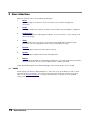
An example full-duplex system, controlled by a master, is shown in picture below:
4
Introduction
Picture 1: System Overview
The two annuncicom devices run the ip_intercom application, and can communicate over LAN.
The master is responsible for initiating any kind of communication between the two devices. This
can be done either manually by sending the corresponding commands to the devices, or
automatically from an application running on the PC that provides such functionality.
The typical use cases that can be initiated by the master are:
5
1.
Full-duplex audio between two ip-intercom devices.
2.
Send audio to single destination.
3.
Stream audio to a broadcast/multicast address.
4.
Listen for broadcast/multicast audio.
5.
AiPhone panel support on Annuncicom-200.
Introduction
2 Quick Start Guide
This chapter explains how to do the initial setup of the ip-intercom assuming that you have already
pre-loaded it on the device. If this is not the case, then refer to “Updating device” for more
information about loading the SW on the device and reverting to factory defaults.
2.1
Connecting an Annuncicom 100 device
As an example we will show here how to setup a simple ip-intercom system using two
Annuncicom 100 devices. Setup the two devices following the steps described below.
2.1.1 STEP 1
Plug a standard (straight) network cable into the LAN port of the Annuncicom and the other end
into your switch connected to your LAN.
2.1.2 STEP 2
Annuncicom 100 is designed to work with electret microphones by providing 2.7V (max 300μA)
bias power. Connect your electret microphone as shown on Illustration 1: Connecting Annuncicom
100.
In most of the cases, for 2 pin microphones you need to shorten the Mic and + pins as the internal
circuitry of Ann 100 provides the separating capacitor of 390 nF.
If your mic has 3 pins (output, bias/power, ground) then connect them to pins Mic, +, and ground
accordingly. For more information about the specific microphone you might be using, please refer
to its technical specification and proposed wiring diagram.
2.1.3 STEP 3
Connect your speaker to pins 5 and 6 of the upper connector. The Annuncicom 100 built-in
amplifier is able to drive 2W on 4Ω speakers. If more power is needed, then use the Line Out on
the front panel to connect the Annuncicom 100 to your external audio amplifier.
2.1.4 STEP 4
Last, you need to connect one button to be able to stream to configured host . Connect your
button on pins 1 and 3 of the lower connector thus shortening input 0 (IN0) to ground to activate
the digital input.
With this step, your Annuncicom 100 is ready to be configured ip-intercom communication.
6
Illustration 1: Connecting Annuncicom 100
Quick Start Guide
2.2
Configuring ip-intercom
Once the Annuncicom 100 is connected, then power up the device. The device will try to get
automatically IP address using DHCP, and announce it on the speaker. If you have no DHCP
server, the device may get a default IP address (for example 192.168.1.168). In this case refer to
the NETWORK settings for more information how to configure the device with a static IP.
After boot, open the device web page with your favourite browser. You will see the home page of
the ip-intercom.
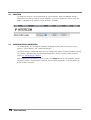
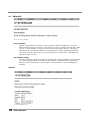
Picture 2: Hope page
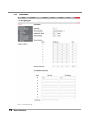
This is showing the audio status and streaming status. Streaming status is showing “Not Active”
because the its not yet configured.
Next, click on the “Configuration” tab from the navigation menu. The Basic configuration menu
page will show up.
7
Quick Start Guide
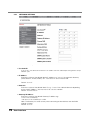
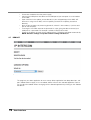
Picture 3: Basic Settings
This web page provides the interface to make the device working with bare minimum configuration.
All other configurations are taken as default. More parameter can be set from advanced
configuration settings tab.
•
Streaming mode
"send always" will stream always to the configured destination. If not configured, no
audio is streamed.
"send on I0/DI1" will stream if the I0 (Annuncicom100/Legacy) or DI1 (Annuncicom1000 /
Exstreamer1000 ) is activated.
Default:"send on I0/DI1"
•
Stream Audio to IP:Port
Set the IP address and the port of the destination where you want to stream the audio.
The destination IP could be unicast, multicast, broadcast address. Sending the stream can
be disabled by setting IP and port to 0.
Default: "0.0.0.0:0"
•
Receive Audio from IP:Port
Set the source IP and port from where audio shall be accepted. Source IP could be
unicast,multicast cast address. Set the source IP address to 0.0.0.0 to receive broadcast
audio.
Default: "0.0.0.0:4444"
2.3
Initiating communication
This section will describe an example to start ip-intercom communication between two devices as
depicted in “System Overview”. Commands used here are described in section Command
Interface of this document.
Devices are set to stream on IO so that they will not start streaming until the reception of start
streaming command or button is pressed. For example, as a result of following the steps in the
8
Quick Start Guide
previous two sections we may have two devices already setup:
•
•
device A (ip 192.168.11.209)
device B(ip 192.168.11.208)
The following steps describe how the user can initiate the communication between these two
devices:
1.
2.
3.
4.
5.
6.
9
Open terminal on PC. Use telnet command to connect to the command interface of the
device A:
$telnet 192.168.11.208 12302 <CR>
Set the streaming destination and port:
c=77&ip=192.168.11.208&port=3030 <CR>
Open another terminal on PC. Use telnet command to connect to the command interface of
the device B as shown in step 1 for device A.
Listening audio source on the device B:
c=76&ip=192.168.11.209&port=3030 <CR>
Start streaming from device A by typing command below in respective terminal:
c=83 <CR>
To Stop streaming send command:
c=84 <CR>
Quick Start Guide
3 User Interface
WEB user interface consist of the following web pages:
1.
Home
Main web page of the device. It shows the current status and few configuration
parameters.
2.
Profile
Selects the profile to be used by the device. At the moment only one profile is supported.
3.
Configuration
This is the configuration web page of the device. It has two sections - basic settings, and
advanced settings.
4.
Status
This web page shows the current status/values of the configured parameters. Some
parameters can be changed dynamically and are reflected by this page.
5.
Defaults
The web page to restore the factory default settings.
6.
Update
The web page to update the firmware and applications.
7.
Reboot
The web page to reboot and select default application. The values of dynamic parameters
will lost and system will start with their default values stored in EEPROM.
To get detailed description of the above web pages, refer to later sections of this chapter.
3.1
HOME
Home page of the device is depicted below. Its shows the status of the device as well as some
important dynamic parameters. The value of the dynamic parameters are setup by the user by
means of the command interface. This page is refreshed every 5 seconds to show updated
settings and status.
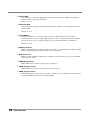
10
User Interface
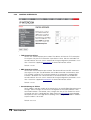
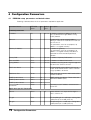
Picture 4: Home web page
1.
Audio Status
Shows the status of the following audio parameters:
•
Current Set Volume:
Displays the current set volume in %
•
Mic gain:
Displays current set gain in dB
•
A/D Amplifier gain:
Displays current set A/D Amplifier gain in dB
•
Left Output Peak Level
Displays the current left ouput peak level in dBFS (dB full scale)
•
Right Output Peak Level
Displays the current right output peak level in dBFS (dB full scale)
•
Left Input Peak Level
Displays the current left input peak level in dBFS (dB full scale).
•
Right Input Peak Level
Displays the current right input peak level in dBFS (dB full scale).
2.
Streaming Status
Shows the status of the following audio parameters:
•
11
Outgoing Stream :
Displays the status of outgoing stream. Whether that is active or not.
User Interface
•
Streaming to (IP:Port) :
Displays current set destination for outgoing stream.
•
Incoming Stream :
Displays the status of incoming stream. Whether device is receiving any audio or not.
•
Receiving Audio from(IP:Port) :
Displays current set audio source to receive audio.
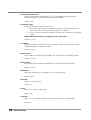
3. DEVICE I/O STATUS
Displays the available I/Os of the device. Device I/O enumeration, bit "0" correspond to the first
device input, for example IN0 for Annuncicom 100.
•
Inputs
This section is displayed differently depending on the device HW type.
For example If Annuncicom 155 is detected, it displays the inputs, indicated with the following
states:
Button pressed (input activated)
Button released (input not active)
Not available on the HW
•
Relays
Monitors the device relays, indicated with the following states:
Relay activated
Relay not active
Not available on the HW
NOTE: please read the ABCL Firmware documentation and the product manual to understand
how input, output and relays are mapped, and where they are available.
12
User Interface
3.2
PROFILES
This page lets you easily set the application for a given purpose. When a predefined setting is
selected, the non relevant settings are set to defaults, so use this feature with caution. Only one
profile is supported at the moment, so no selection is available.
Picture 5: profile
3.3
CONFIGURATION (ADVANCED )
This web page lets you to configure the device according to your needs. It comprises of two
sections - “Basic Settings” and “Advanced Settings”.
The “Basic Settings” tab provides bare minimum configuration options to make the device working.
This chapter is describing only the advanced configuration settings. For Basic Settings refer to
section 2.2 “Configuring ip-intercom” .
After configuring your parameters, you must press the “Apply” button on the left bottom side of
the page to save it in the EEPROM. The device will store these parameters in the EEPROM and
restart to take it into effect.
13
User Interface
3.3.1
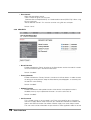
NETWORK SETTINGS
Picture 6: Network settings
➢ Use SonicIP
If set to "yes", the device will announce its IP address over the audio output during device startup.
Default: "yes"
➢ IP Address
Enter the 4 values of the desired device IP address e.g. "0.0.0.0" for automatic discovery
(DHCP/BOOTP, IPzator, AutoIP) OR "192.168.0.12" for an internal LAN.
Default: "0.0.0.0"
➢ Netmask
Enter the 4 values of the desired Static IP e.g. : "0.0.0.0" for a default Netmask depending
on the used IP Address. "255.255.255.0" for a C class network.
Default: "255.255.255.0"
➢ Gateway IP Address
Enter the 4 values of the desired Gateway IP address e.g.:
"0.0.0.0" for no Gateway
"192.168.0.1" for a Gateway in a LAN
Note: The Gateway has to be set only when connecting to other devices over the WAN
(through a router).
Default: "0.0.0.0"
14
User Interface
➢ Primary DNS
In this field you can give the desired primary and alternative DNS IP address to be able to
connect to URLs (e.g. www.radio.com).
Default: "0.0.0.0"
➢ Alternative DNS
In this field you can give the desired alternative DNS IP address in case the primary DNS is
not reachable.
Default: "0.0.0.0"
➢ Syslog Address
Destination address for syslog messages sent by the BCL program via the SYSLOG
command. Set this to your syslog logging machine, if your syslog messages are recorded
centrally. If set to 0.0.0.0, syslog messages are sent over local network as broadcast.
Default: "0.0.0.0"
➢ DHCP Host Name
Name of the device sent in DHCP request. If left empty, a name based on the device's MAC
address is generated automatically. Enter up to 15 Characters.
➢ Web Server Port
Defines the port where the webserver of the device can be reached. If set to "0" the default
HTTP port 80 is used.
➢ SNMP System Name
SNMP MIB entry for system name (system.sysName.0)
➢ SNMP System Location
SNMP MIB entry for system location (system.sysLocation.0)
➢ SNMP System Contact
SNMP MIB entry for system contact (system.sysContact.0). This parameter can be queried
using any SNMP browser but can not be updated.
15
User Interface
3.3.2
STREAMING
➢ RTP Mode
Picture 7: Streaming Settings
16
User Interface
➢ RTP Mode
Select audio streaming protocol. Select one of the following options.
1.
2.
"on":Audio will be transmitted over RTP (used in VoIP systems) .
"off":Audio will be transmitted using raw UDP protocol.
Default: on
➢ Streaming Mode
Select audio streaming mode. Select one of the following options.
1.
"send always" will stream always to configured destination. Entry 0 from “Stream Audio to”
table is selected by default for streaming. Other entries from the table can be selected using
command interface.
As the application is designed for intercom operations therefore only one streaming
destination can activated at a time.
2.
3.
4.
"send on command" will stream if it has received command to start streaming ( c=83 ).
“send level” will start streaming audio if input audio level becomes above the threshold “Input
Trigger Level” level.
“respond” will stream audio to the host from which it is receiving audio. the device will learn
the destination ip and port from the incoming audio stream.
The devices will stop streaming if it does not receive audio for “Inactivity Timeout” period.
Default: send on command.
➢ Stream Audio to
Set the destination host IP and port where you want to stream the audio. Destination IP
could be unicast, multicast, broadcast address. It can be changed also over command
interface. Set the port to 0 to disable the streaming.
Default: 0.0.0.0:4444
➢ Audio Buffer Delay
The RTP decoder keeps constant decoding latency within one frame accuracy.
Set the required delay in milliseconds.The delay value should be set large
enough to cope with network jitter (difference in packets delivery time) and
possible packet loss. Increase the value if you are experiencing audio dropout.
The lowest recommended setting is about 80ms for uLaw/ALaw 8kHz.
Default: 100 msec
➢ Relay Off Delay
Set this to activate relay when there is incoming audio. If there is no audio for this configured
interval, relay shall be opened. To disable it, set it to 0. Using this parameter, the output
relay activation can be prolonged, which can be useful when the relay is being used to
control, for example, an amplifier. The relay off delay is needed when using MP3 encoding,
where the unpredictable nature of the compression means that it is not possible to predict
how long the audio will take to reach and transmit at the remote end.
17
User Interface
Default: 1200 msec
➢ Stream Audio to
Use this table to configure a list of destinations. A destination from this table can be
selected for streaming using SETTARGET command.
➢ Receive Audio from
Set the IP address of remote host from whom audio shall be accepted. Set UDP port
number on which device shall listen for audio stream. Source IP could be
unicast,multicast cast address. Set remote host IP to “0.0.0.0” to receive audio
broadcast.
Default: 0.0.0.0:4444
➢ IO COMMAND INTERFACE
Use this table to list the commands to be executed on IO changes. Command
specified in “On Push” column will be executed on corresponding IO button pushed
( connected to the ground ). Command specified in “On Release” column will be
executed on corresponding IO button release ( disconnected from ground ).
When audio input source “SUB AiPhone” is selected, command interface for I0 is
disabled.
Default :
IO Name
On Push
On Release
I0
c=83
c=84
I1-I8
➢ On Startup
List the commands to be executed on application startup. Check the Command
Interface for the list of commands.
3.3.3
AUDIO
Picture 8: Audio Settings
➢ Input Source
18
User Interface
Select desired audio input source. The device can encode audio from line-in and
microphone.
Default: Line-in
➢ Encoding
Select desired audio encoding from one of following supported options.
1.
2.
3.
4.
5.
6.
uLaw / 24 kHz
uLaw / 8 kHz (G.711)
aLaw / 24 kHz
aLaw / 8 kHz (G.711)
PCM / 24 kHz (16bit)
PCM / 8 kHz (16bit)
Default: PCM/24kHz(16 bit)
➢ Volume
Select desired volume level. It also can be set at run time using command interface.
Volume can be selected in 5% steps from 0 to 100%. Setting volume level 0 will mute
the speaker.
Default : 50 %
➢ Microphone Gain
Select desired microphone gain from 21 dB to 43.5dB in 1.5 dB steps. It can be set at
run time also using command interface. This gain is not valid if audio input source linein is selected.
Default: 21 dB
➢ A/D Amplifier Gain
A/D converter pre-amplification in dB. Increase if the audio signal too faint, decrease if
it's too loud or overdriven. Select desired Amplifier gain from -3db to 19.5 dB in 1.5dB
steps. It can be set at run time also using command interface.
Default: 0 dB
➢ Audio Echo Cancellation
Enable or disable the AEC here. Enabling audio echo cancellation will reduce the echo
and improves the voice quality. Echo cancellation can be enabled only with
uLaw,aLaw,PCM 8kHz audio quality set and full duplex mode is used. The Application
is always in the full duplex mode except when “SUB( AiPhone)” audio input source is
set. This feature is only available on devices having IPAM 102, and IPAM 302.
Default: "disabled"
19
User Interface
3.3.4
CONTROL INTERFACES
Picture 9: Control Interface settings
➢ TCP Control Local Port
Set the TCP control interface port number. The devices will listen for TCP connection
on this port. Only one TCP connection is possible at a time. Set to 0 to disable TCP
control interface. You can use this interface to change configuration parameters at run
time. Check the supported command list in command interface section.
Default : 12302
➢ UDP Control Local Port
Set the UDP control interface port number. The device will listen for UDP command
messages on this port. The device does not handle commands simultaneously from
TCP and UDP interface. TCP command interface has more priority therefore UDP
interface is disabled if TCP control interface is connected. Set to 0 to disable UDP
control interface. You can use this interface to change configuration parameters at run
time. Check the supported command list in command interface section.
Default : 12303
➢ Send IO Change to IP:Port
Set IP address and port number of the remote host to send IO/Relay/Streaming status
changes. Status changes are sent to this configured host with UDP protocol. If TCP
command interface is connected, status changes are sent to TCP remote host and it
will not be sent to this configured host. Refer command GETSTATUS to get detailed
description of status message format. Sending status change is disabled if IP address
or port number is set to zero.
Default: 0.0.0.0:0
20
User Interface
➢ Send SNMP trap to host
Set the IP address of remote host to send SNMP traps on input state and relay state
change. Refer SNMP Traps to see complete details of traps sent by the device.
Default: 0.0.0.0
➢ UDP Discovery Port
The UDP port to discover devices running ip-intercom. This port is fixed to 12301 and
is not configurable.
3.3.5
SERIAL GATEWAY
This web page allows you to configure the device for the serial gateway function. Only relevant
fields are shown in particular selected mode. Most of the Barix devices has only one serial port
therefore second serial gateway will not work on those devices. The second serial gateway
function will work only if the device have seconds serial port. Refer hardware guide to know
capabilities of your device. Refer the section 5.4 to learn more about the serial gateway
functions.
Picture 10: Serial gateway settings
21
User Interface
➢ Serial Gateway Protocol
Select communication protocol "UDP" or "TCP" to enable gateway functionality.
Further parameters are shown based on the selected mode.
Default: “TCP”
➢ Connection Type
Select the connection type you want to use.
1. Active: Device will try connect remote host actively. If the connecting with the
remote host fails, it will try to reconnect again in 10 seconds.
2. Passive: Listen for incoming connection. Only one TCP connection is possible at
a time.
NOTE: UDP Protocol does not support passive connection.
Default: “Passive”
➢ Local Port
Set port number to listen for TCP passive connection. When connection type “active”
selected, local port is selected at random.
Default: “10001”
➢ Remote Host
Set IP address of remote host to establish TCP connection or to send UDP packet.
Default: “0.0.0.0”
➢ Remote Port
Set TCP/UDP port number of the remote Host to establish active connection.
Default: “0.0.0.0”
➢ Baud Rate
Select the serial transmission speed ("300" to "230400" Baud).
Default: "9600"
➢ Data Bits
Select "7" or "8" data bits.
Default: "8"
➢ Parity
Select "no", "even" or "odd" parity.
Default: "no"
➢ Stop Bits
Select "1" or "2" stop bits. When parity bit is used, 2 stop bit is not possible.
Default: "1"
22
User Interface
➢ Flow Control
Select the type of flow control:
"none": RTS/CTS signals are not used.
"Software flow control(XON/XOFF)" or "Hardware flow control (RTS/CTS)": When using
RS-232 serial port.
"RS485 direction control": This must be set when using RS-485 serial port.
Default: "none".
3.3.6 SECURITY
Picture 11: Security Settings
➢ Reset Function
Enable or disable the "Reset" function on the Reset button and on the web UI. In order
to restart the device press the Reset button once.
Default: "enabled"
➢ Factory Defaults
Enable or disable the "Factory Defaults" function on the Reset button. In order to revert
all settings to factory defaults keep the Reset button pressed(approx. 10 seconds) until
the red LED starts blinking.
Default: "enabled"
➢ Update Function
Enable or disable the web update function of the device. If the update function is
disabled, the only way to update the firmware is to use the serial rescue.
Default: "enabled"
➢ Set Password
This is visible as long as no password is set. Enter a password (up to 25 characters)
and hit the "Apply" button. After the restart you should close the browser window and
open a new browser window. You will be asked to supply user name and password.
The user name can be omitted but the password has to be supplied in order to see the
23
User Interface
web configuration.
Note: After applying the changes for the password, please restart your browser and
reload the home page of the device. If you do not do this, the browser may enter into
endless loop asking for the password because of the non protected configuration page
still stored in its cache.
➢ Old Password / New Password
These fields are visible as long as a password is set.To allow free access (clearing the
password) enter the old password and leave the field "New Password" empty, then hit
the "Apply" button. After the restart you will not be asked for user name and password
anymore.To change the password enter the old password and enter the new password
in the field "New Password", then hit the "Apply" button. After the restart you will be
asked for user name and password. The user name can be omitted but the new
password has to be supplied in order to see the web configuration.
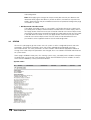
3.4
STATUS
Click on this web page to get the current status of system as well as configured dynamic and static
parameters. The dynamic parameters shows the current selected value selected by user from
command interface. The static parameters are those stored in EEPROM and need device reboot on
change. If the value of dynamic parameters are changed, that is not stored in EEPROM and will be lost
on system restart.
Status page is divided in three parts, first showing system status, second dynamic variables, third part
of configuration is to show the static parameter settings from EEPROM. Dynamic variables are those
which can be modified by user by command interface.
System status:
Picture 12: Status: System Settings
24
User Interface
Dynamic parameters:
Picture 13: Status: Dynamic Settings
25
User Interface
Static Parameters:
Picture 14: Status: Static Settings
26
User Interface
3.5
DEFAULTS
Picture 15: Factory Defaults
Factory defaults
Click on "Factory defaults" to revert all settings except "Network configuration" to factory
defaults.While restarting the device a screen appears showing a number counting down. Upon
start up, a screen appears stating the successful reverting to factory defaults. This process
might be necessary whenever a different kind of application is being uploaded compared to
current one. If factory default setting is not restored when new application is uploaded, new
application might not work.
Hard default settings
To revert all settings (including the "Network configuration") to factory defaults the Reset button
has to be pressed for about 10 seconds while the device is powered. Restoring the factory
defaults on Reset button press is not possible if “Factory Default” in security web page is
disabled.
UPDATE
Picture 16: Update device
27
User Interface
3.6.1 Updating a device using the web UI
The web page “UPDATE” allows you to update firmware and application. Follow steps described
below in order to update new firmware.
•
Click on "Please click here to continue" to launch the update process. Before you click the link
note that the update process can only be cancelled by power cycling the device.
•
The device will restart in a special mode called Bootloader and a screen appears showing a
number counting down.Please note that in this mode the standard http port 80 is always used.
To upload a resource click on "Browse..." to locate the firmware or application file you want to
update. Once selected, click on "Upload". This process can take a few minutes. After a
successful upload the following text appears:
"Resource" successfully loaded.
•
Click on update before updating the next component or
unplug the power supply to reboot the device.
If you choose "update" you may upload another resource or click the "reboot" button.
If you choose to reboot the following text appears:
rebooting...
Click here to reload the main page.
•
The device takes a few seconds to reboot. If you have a fixed IP address or DHCP resolves to
the IP address used before, the main page will appear.
If previous firmware was different, it is recommended to restore the factory defaults after
uploading firmware to avoid any unexpected behaviour.
•
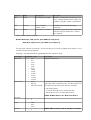
Current Version of firmwares and application.
It also displays the current version of firmware.
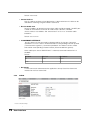
Field
Parameters
MAC
MAC address of the device.
Firmware
Current version of the Firmware.
Bootloader
Current version of the Bootloader.
Song
Current versions of the 2 FW extension modules.
File System
Current version of file system extension module.
3.6.2
Updating the device using the RS-232 serial port
Sometimes when the device is not accessible via the LAN, or the image in the flash memory is
corrupted for some reason, then a serial rescue may be needed to reset the device to the factory
defaults1.
So, here are the steps that need to be executed to do the serial rescue:
1
Rescuing the IP Intercom using the serial port is more complex, and requires some engineering work. Please contact BARIX
Support to get more information.
28
User Interface
•
•
•
•
•
•
3.7
Disconnect the device from the power supply;
Connect the COM port of the device to the COM port of your computer via a null modem
serial cable;
Open a terminal in the update_rescue directory in your unzipped copy of the ABCL SIP
firmware. If using Linux or Mac, switch to update_rescue/linux or update_rescue/mac
directory;
Start the rescue process by executing ipamresX, where X is the number (1-4) of the serial
port on the computer;
If running on Linux /Mac execute the ipamresd.sh script, giving the device name of your
COM port as a parameter. For example ./seriald.sh /dev/tty.UC-232AC
Power on the device, and wait for the update to finish. The device will reboot automatically.
NOTE: All other settings except the network settings will be lost !
REBOOT
Picture 17: Reboot Device
This page lets you select application for next startup. Select application from drop down box and
press reboot button to apply it. On next reboot, device will start with selected application. Device
can also be set to reboot without changing current selected application by clicking on link “Reboot
the device”.
29
User Interface
4 Configuration Parameters
4.1
EEPROM setup parameters and default values
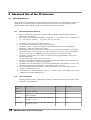
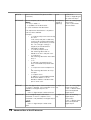
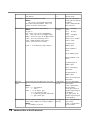
Followings table describes the list of parameters required for application.
Parameters Name
EEPROM
offset
size Default Description
value
IP Address
D0
4
0.0.0.0 IP Address of device. If address is set to
0.0.0.0, device tries to get address using
DHCP protocol.
Netmask
B8
1
0
Gateway IP Address
D4
4
0.0.0.0 Ip address of gateway.
This parameters must be set properly if ip
address is assigned manually and device is
expected to communicate beyond local
network.
Primary DNS
D64
4
0.0.0.0 IP address of primary DNS server.
Alternative DNS
D68
4
0.0.0.0 IP Address of fallback DNS server.
Syslog Address
D200
4
0.0.0.0 IP address of syslog server. Log message will
be sent to this server as unicast.
DHCP Host Name
S98
15
“”
Null terminated string to identify this host at
DHCP server. Some servers use this name to
assign ip address to device.
Web Server Port
W196
2
80
Web server port to access web interface/CGI
interface of device.
SNMP System Name
S205
16
“”
SNMP System Location
S223
16
“”
SNMP settings for devices. These values are
reported on SNMP query.
SNMP System Contact
S241
16
“”
Use SonicIP®
B198
1
yes
Parameter to set IP address announcement
ON or OFF.
Standard parameters
Number of bits set for network address.
Setting its value to 24 would result in netmask
255.255.255.0.
This parameters must be set properly if ip
address is assigned manually.
Application Specific Parameters
Volume
B500
1
10
Linear volume in 5% steps for the range 0100%, values 0-20
AD-gain
B501
1
2
A/D amplifier gain in 1.5dB steps starting from
-3dB (value 0) to 19.5dB (value 15)
Mic-gain
B502
1
0
Microphone gain in 1.5dB steps starting from
21dB (value 0) to 43.5dB (value 15)
30
Configuration Parameters
Input mode
B510
1
0x81
Audio Input:
0x01 = Line In
0x02 = Mic In
Audio channel:
0x80 = Mono
0x00 = Stereo
BITWISE OR the above two values to get
desired input mode.
NOTE: Microphone input is always mono.
Setting microphone input to stereo will copy
left channel to right channel.
Encoding Type
B511
1
10
Encoding type for audio.
6 = uLaw/24kHz
7 = uLaw/8kHz
8 = aLaw/24kHz
9 = aLaw/8kHz
10 = PCM/24kHz
11 = PCM/8kHz
Encoding Quality
B512
1
0
MP3 Audio encoding quality. 0 is lowest and 7
is highest .
Streaming Mode
B520
1
1
Streaming mode:
0 = send always
1 = send on Input1
2 = respond
3 = send on level
Input Trigger Level
W521
2
1000
Trigger level to stop/start streaming.
The device will start audio streaming when
audio input level is above this level.
Inactivity Timeout
W523
2
1000
Inactivity timeout to stop streaming.
The device will stop audio streaming when
audio input level is below “Input Trigger Level “
for this period. Unit is in milliseconds.
RTP Delay
W525
2
100
Maximal buffer level the device keeps for
playback. Unit is is milliseconds.
Frame Size
W527
2
20
Number of data bytes transmitted in audio
packets equivalent to this playback
time(milliseconds).
RTP mode
B529
1
0x02
bit 0 = Send periodic keepalive messages.
bit 1 = RTP mode on
Destination IP to stream Audio
D530
4
0
Ip address of remote device where audio shall
be sent.
Destination Port to stream
Audio
W534
2
0
UDP port of remote device where audio shall
be sent.
UDP port to receive audio
W536
2
3030
Local UDP port to receive audio.
reserved
W538
2
0
31
Configuration Parameters
Ip address of audio source
D540
4
0
Ip address of remote device to listen for audio.
This could be unicast address or multicast
address. To receive broadcast audio on
configured port, set this to zero.
Relay off timeout
W544
2
1200
Set the relay off when there is no audio for time
period of time.
45
0
reserved
Serial gateway 1 type
B601
1
2
Serial gateway type.
0: Disabled.
1: UDP
2: TCP
Serial gateway 1 connection
type
B602
1
1
Connection Type
0: Active
1: Passive
Serial gateway 1 TCP/UDP
destination IP
D604
4
0.0.0.0 Ip address for active connection for serial
gateway.
Serial gateway 1 TCP/UDP
listen port
Also used for UDP destination
port.
W608
2
10000
Reserved.
B610
1
0
Serial gateway 2 Gateway type
B611
1
2
Serial gateway type.
0: Disabled.
1: UDP
2: TCP
Serial gateway 2 Connection
type
B612
1
1
Connection Type
0: Active
1: Passive
High Quality Audio
B613
1
0
Bitwise flags:
Bit 0 set (1): enable high quality audio.
Bit 0 clear (0) : disable high quality audio.
Serial gateway 2 TCP/UDP
destination IP
D614
4
0.0.0.0 Ip address for active connection for serial
gateway.
Serial gateway 2 TCP/UDP
listen port
Also used for UDP destination
port.
W618
2
10000
UDP/TCP port to listen for serial gateway
connection in passive mode.
UDP/TCP port to for serial gateway active
connection.
Local TCP Command port
W620
2
12302
Command port to listen for incoming TCP
connection.
Local UDP command port
W622
2
12303
Command port to listen for UDP commands.
Send IO change to HOST
D624
4
0.0.0.0 IP address of remote device where IO changes
shall be sent.
Remote port to send IO
W628
2
0
IP address to send SNMP trap
on INPUT change
D630
4
0.0.0.0 Ip address of SNMP master to send the trap.
0.0.0.0 is to disable sending trap.
32
Configuration Parameters
UDP/TCP port to listen for serial gateway
connection in passive mode.
UDP/TCP port to for serial gateway active
connection.
Port of remote device where IO change shall
be sent.
reserved
W634
4
0
UDP discovery port
W638
2
12301
reserved
640-649
10
0
Destination IP 2
D650
4
0.0.0.0
Destination port 2
W654
2
0
Destination IP 3
D656
4
0.0.0.0
Destination port 3
W660
2
0
Destination IP 4
D662
4
0.0.0.0
Destination port 4
W666
2
0
Destination IP 5
D668
4
0.0.0.0
Destination port 5
W672
2
0
Destination IP 6
D674
4
0.0.0.0
Destination port 6
W678
2
0
Destination IP 7
D680
4
0.0.0.0
Destination port 7
W684
2
0
Destination IP 8
D686
4
0.0.0.0
Destination port 8
W690
2
0
reserved
692-699
9
0
Init Sequence
700-744
45
I0 pushed command
745-789
45
c=83
Command executed when Input 0 is pushed.
Default command to execute on this event is
“Stop Streaming Audio”.
I0 released command
790-834
45
c=84
Command executed when Input 0 is release.
Default command to execute on this event is
“Stop Streaming Audio”.
I1 pushed command
835-879
45
Command executed when Input 1 is pushed.
I1 released command
880-924
45
Command executed when Input 1 is released.
I2 pushed command
925-969
45
Command executed when Input 2 is pushed.
I2 released command
970-1014
45
Command executed when Input 2 is released.
I3 pushed command
1015-1059
45
Command executed when Input 3 is pushed.
I3 released command
1060-1104
45
Command executed when Input 3 is released.
I4 pushed command
1105-1149
45
Command executed when Input 4 is pushed.
I4 released command
1150-1194
45
Command executed when Input 4 is released.
I5 pushed command
1195-1239
45
Command executed when Input 5 is pushed.
I5 released command
1240-1284
45
Command executed when Input 5 is released.
I6 pushed command
1285-1329
45
Command executed when Input 6 is pushed.
33
Configuration Parameters
Fixed UDP port to listen for discovery message
“c=65535”.
UDP discover port is fixed and can not be
changed.
Command executed at start up.
I6 released command
1330-1374
45
Command executed when Input 6 is released.
I7 pushed command
1375-1419
45
Command executed when Input 7 is pushed.
I7 released command
1420-1464
45
Command executed when Input 7 is released.
Table 1: EEPROM Settings
Multi-byte values are stored in EEPROM in little endian format except IP
address(stored as big endian). Big endian format is MSB first, and little
endian is LSB
34
Configuration Parameters
5 Advanced Use of the IP-intercom
5.1
Command Interface
The ip-intercom is implementing a command interface to accept any command from the master. On
reception of the command from the remote panel, the device takes the corresponding action.
Sections below are describing the communication protocol and its limitations.
5.1.1
Command interface Protocol
1. Request commands and responses are printable text based. Non printable characters in
command is not allowed.
2. Every command must be terminated by carriage ( CR - “\r” hex 0x0d ) return or line feed ( LF “\n”, hex 0x0a ) or comma “,” ( hex 0x2C ) or null ( hex 0x00 )
3. Parameters of commands are separated by “&”.
4. All commands and parameter names are case sensitive.
5. The device sends a “nack” message if the requested command is not supported or
parameters of the command are not correct.
6. Some commands do not send back a response as a result of their execution. For example,
setting the volume with command “l=15” does not return any result. In this case the device
sends an “ack” reply as a feedback that the command is successfully executed.
7. The device shall not reply “ack” if there is a response message generated as result of the
command execution.
i.e. command “q=all” returns the state of all I/Os.
8. The command interface supports TCP and UDP protocol that can be active simultaneously.
The reply is sent back to the originating interface.
9. The default TCP command port is 12302 and the default UDP command port is 12303. The
command interface will be disabled if the corresponding port is set to 0.
10. TCP command connection has priority. If TCP connection is active ( connected ), status
changes shall be sent to it only.
11. IO and Relay count are counted from 0 to max - 1. Where “max” is the number of IO or relays
available on the hardware being used.
5.1.2
List of commands
Following are the list of the supported commands. Optional parameters of the command are
enclosed in square brackets.
35
Command
name
Description
Command
Response
MUTEON
Mute the speaker.
c=40
“ack”
MUTEOFF
Mute off the speaker. Restore original volume c=41
level of speaker.
“ack”
RTSSET
Sets output RTS ( pin 7 on DB9 connector )
to logic 1 ( -12V )
c=60
“ack”
RTSRESET
Sets output RTS ( pin 7 on DB9 connector )
to logic 0 ( +12V )
c=61
“ack”
Advanced Use of the IP-intercom
GETCTS
Returns the state of CTS ( pin 8 on DB9
connector )
c=62
“CTS0,0” or
“CTS0,1” depending on
the state of CTS pin.
SETTARGET
Set the temporary destination for streaming.
Where:
e → entry in table 0-7
i → ip address of the destination.
p → port number of the destination.
c=77[&entry
=e][&ip=i]
[&port=p]
“ack” : on setting target
successfully.
“nack”: if parameters
are not correct.
SETDOUT
Sets the digital output. Command parameter c=78[&n=co
“n=count” is optional. If this parameter is not unt]
provided, first digital output is set.
Where:
count → digital output number to be set.
“ack” : on setting digital
output successfully.
“nack” : if devices does
not have requested
digital output.
RESETDOUT
Rests the digital output. Command
c=79[&n=co
parameter “n=count” is optional. If this
unt]
parameter is not provided, first digital output
is reset.
Where:
count → digital output number to be
reset.
“ack” : on resetting
digital output
successfully.
“nack” : if devices does
not have requested
digital output.
The sequence of the elements is important
and must be as defined.
Example:
•
c=77&entry=2&ip=192.168.2.223&p
ort=1234
it will store ip and port in table entry
2 and use for streaming destination.
Old settings stored at entry 2 will be
lost. This change in settings is
temporary and restored from
EEPROM on reboot.
•
c=77&entry=2&port=3030
Set streaming destination as
broadcast in row 2 and port 3030.
•
c=77&entry=2
Set streaming destination from table
entry 2.
•
c=77
IP and port is restored from first
entry in EEPROM setup destination
table.
•
c=77&ip=192.168.2.223&port=123
4
Set streaming destination to this ip
and port.
•
c=77&port=3040
IP address is not provided therefore
destination address is set to
broadcast address and destination
port is set to 3030.
36
Advanced Use of the IP-intercom
PULSERELAY Pulse the requested relay. Maximum
possible pulse duration is 99899
milliseconds.
c=80[&n=co
unt]
[&dur=time]
Example:
•
c=80
will pulse first relay of the device for
3000 milliseconds.
•
c=80&n=3
Will pulse third relay of the device for
3000 milliseconds.
•
c=80&n=4&dur=5000
Will pulse fourth relay of the device
for 5000 milliseconds.
37
“ack” : on setting relay
“nack” : if the device
does not have
requested relay or
parameters is wrong.
CLOSERELAY Close the Relay. Command parameter
c=81[&n=co
“n=count” is optional. If this parameter is not unt]
provided, first relay shall be closed.
Where:
count → relay number to be closed.
“ack” : on closing relay
successfully.
“nack” : if devices does
not have requested
relay output.
OPENRELAY
Open the Relay. Command parameter
c=82[&n=co
“n=count” is optional. If this parameter is not unt]
provided, first relay shall be opened.
Where:
count → Relay number to be opened.
“ack” : on opening relay
successfully.
“nack” : if devices does
not have requested
relay output.
SETTALK
Starts talking/streaming. The device will not
start streaming if destination is not set.
Streaming will start as soon as target is set.
c=83
ack
RESETTALK
Stops talking/streaming.
c=84
ack
FORCETALK
Starts talking/streaming even if there is an
incoming stream. As this application is fullduplex, this command is identical to
SETTALK.
c=91
ack
DEVICE
Command to get device type and its
capabilities. On receive of this command,
devices shall reply with following formatted
HTML like string.
c=65535
<ANNUNCICOMIC>
<NAME>DHCP name
of device</NAME>
<SOFTWARE> ABCL
application name and
version </SOFTWARE>
<MAC> MAC address
of device </MAC>
<IP>IP address of
device </IP>
<HWTYPE> Hardware
type </HWTYPE>
</ANNUNCICOMIC>
SET/GET
VOLUME
Set volume 0 .
Set maximum volume.
Restore default volume from EEPROM.
I=0
l=20
l=
“ack” : on setting
volume successfully.
“nack”: if parameter is
not correct.
Advanced Use of the IP-intercom
Get Volume.
l=?
volume=value
PLAYSONG
Play local audio file from ROM.
Where:
file_name → name of file from ROM
filesystem to be played back. If file is not
present no action shall be taken.
m=file_name “ack”: On successful
queuing of mp3 files for
playback.
“nack”: Requested file
does not exist.
GETSTATUS
Get the status of IO's and streams.
q=io_type[&n “Ix,y”
for input
Where:
=count]
status.
io_type →:
“Rx,y” for relay
“all”. return status of all io listed below.
status.
“din”. return the status of all digital inputs
“Ox,y” for digital
“dout”: return the status of all digital output.
output status.
“strm”: return the streaming status.
Where x is IO number
“aud”: audio playback active status.
and y is value.
“relay”: return the status of relay.
“A1,Source IP
count → IO number for current request.
address,port”
When playback is
active.
“A0,IP Address,port”
When playback is not
active.
“S1,destination IP
address,port”
When streaming to
destination.
“S0,destination IP
address,port”
When not streaming to
destination.
38
SET/GET
GAIN
Set/Get the gain of audio inputs mic or line
in.
Where:
input → 0 – microphone
1 – line in
value → “0” set lowest gain.
“15”: set maximum gain.
“” : set default gain from EEPROM.
“?” : get current gain
i=input&gain
=value
“ack” on setting gain
successfully.
“nack” if parameters
are not correct.
“amp_gain=value” on
request to get the gain
of amplifier.
“mic_gain=value” on
request to get the gain
of microphone.
SETSOURCE
Set the source of audio stream, this could be c=76[&ip=i&
either unicast address of multicast address. port=p]
Where:
“i” → Ip address of source.
“ack” : if source is set
successfully.
“nack” : is parameters
are not correct.
Advanced Use of the IP-intercom
“p” → port to listen for audio.
Source ip address can not be a set to
broadcast. To listen on any broadcast set ip
address null and provide only port number.
I.e s=&ip=&port=3030. This will listen on port
3030 without any specific ip.
If this command is used without
parameters, ip and port configured in
EEPROM setup is restored.
Setting new source is immediately taken into
account.
LINEIN
Select Line-In as input.
c=28
“ack”
MICIN
Select Microphone as input.
c=29
“ack”
BALANCEL10
BALANCEL09
--BALANCE00
--BALANCER09
BALANCER10
Set balance to left (right off).
Set balance to level 9 on left side.
“ack” on success
“nack” if parameters
are not correct.
Set balance to level 9 on right side.
Set balance to right (left off).
b=-10
b=-9
--b=0
--b=9
b=10
Get balance
b=?
balance=value
Set minimal bass level.
Set bass level to -9.
“ack”
“nack” if parameters is
not correct.
Set bass level to 9.
Set maximal bass level.
B=-10
B=-9
--B=0
--B=9
B=10
Get bass
B=?
Set minimal treble level.
Set treble level to -9.
Set treble level to 9.
Set maximal treble level.
t=-10
t=-9
--t=0
--t=9
t=10
Get treble
t=?
BASSM10
BASSM09
--BASSP00
--BASSP09
BASSP10
TREBLEM10
TREBLEM09
--TREBLEP00
--TREBLEP09
TREBLEP10
Set balance to middle.
Set neutral bass level.
Set neutral treble level.
LOUDNESS00 Set minimal loudness level.
LOUDNESS01 Set loudness level 1.
--LOUDNESS20 Set maximal loudness level.
SENDUDPST
39
--bass=value
“ack”
“nack” if parameter is
not correct
–
treble=value
v=0
v=1
--v=20
“ack” on success
“nack” if parameter is
not correct.
Get loudness
v=?
loudness=value
Send a command string in an UDP packet
r=…
“ack” on success
Advanced Use of the IP-intercom
RING
Syntax: r=udp://<ip>:<port> |
entry=<num> /<cmd_seq>
Where:
<ip> ip address of remote host.
<port> UDP port of the remote host.
<num> entry number in “Stream Audio to”
table
<cmd_seq>:= <cmd> | [<cmd>,<cmd>]
Sequence of commands.
Examples:
1. r=udp://192.168.0.22:12301/v=2
send message “v=2” to remote host
192.168.0.22 on port 12301.
2.
r=udp://192.168.0.22:12301/v=2&t=3,c=78
But in above command sequence the last
command “c=78” is local
3. r=udp://192.168.0.22:12301/
[v=2&t=3,c=78],c=78
Send two commas to remote host
192.168.0.22 and c=78 locally.
4. r=udp://entry=0/v=2&t=3,c=78
Send command to the remote host listed in
entry 0 in “Stream Audio to” table.
40
Advanced Use of the IP-intercom
“nack” if any of the
parameter is not
correct.
5.2
Discovering Devices
The IP-intercom listens for discovery command “c=65535” on fixed UDP port 12301. This command is
also supported on the TCP/UDP command interfaces but the reply message is formatted differently. Any
standard tool like netcat can be used from linux/Mac PC terminal to send query message or you can
develop own application to use this command and discover devices. On the reception of discover
message, device sends two replies as below:
1. ANNBAR,IP address of device,MAC address of device,device type,ABCL application name and
version,DHCP name of device\r
2. <ANNUNCICOMIC><NAME>DHCP name of device</NAME> <SOFTWARE>ABCL application
name and version</SOFTWARE><MAC>MAC address of device</MAC><IP>IP address of device
</IP><HWTYPE>Hardware type</HWTYPE></ANNUNCICOMIC>\r
In above messages “\r” (in hex 0x0D ) is carriage return.
5.3
CGI WEB interface
The Web interface can be accessed using any web browser. Using web interface, system parameters as
well as application parameter can be modified. Web interface also can be accessed from any tools like
netcat/wget/curl or from your own application on “Web Server Port” using HTTP method GET. You can
read http://www.w3.org/Protocols/rfc2616/rfc2616-sec9.html to get more details about HTTP protocol
GET method. The data sent to the web server must comply with HTTP 1.1 protocol.
Following is the list of CGI interfaces:
Interface name
Description
setup.cgi
- WEB Interface to update Configuration parameters stored in EEPROM.
BAS.cgi
- WEB Interface to update BCL application's variables.
rc.cgi
- WEB interface to execute command by firmware.
Table 2: CGI WEB Interfaces
For Example:
after making TCP connection from any application to device 192.168.40.43 and sending following
message will reboot the device.
“GET /rc.cgi?c=99 HTTP/1.1\r\nHost: 192.168.40.43\r\nConnection: keep-alive\r\n\r\n”
in above example, “\r” is carriage return ( ASCII hex code 0x0d ) and “\n” is line feed ( ASCII hex code
0x0a ).
5.3.1 rc.cgi
Following is the list of supported commands by rc.cgi interface.
Element
Description
Reserved
command
c=0->c=93,
c=95->98
DEFAULTS
Loads defaults into Setup rom : config.bin and appconfig.bin (if present)
and stores in EEPROM
c=94
DEVICERESET Hard reboot of device.
c=99
BOOTLOADER Starts the bootloader. The application will be left. It isn't running until the
next reboot.
c=100
PASSWORD
If password is set and not send in HTTP request header, a=must be used a=…
with commands.
GETDYNFILE
The response is the dynamic file stored in a cob file with that name. e.g.:
L=index.html
L=…
Table 3: rc.cgi Commands
5.3.2
setup.cgi
The configuration options can be changed and saved in EEPROM from the web UI of the device
using any web browser. The Web browser uses web interface “setup.cgi” of the device to store the
parameters setting. This web interface “setup.cgi” can be accessed also from any tool like
netcat/wget/curl or from your own application on the “Web Server Port”. The data sent to the web
server port must comply with HTTP 1.1 protocol. For example, to select serial gateway 1 protocol
“TCP” and connection type “passive” of the device “192.168.11.227” , do the following (on Linux or
Mac PC).
$echo -e "GET /setup.cgi?B601=2&B602=1 HTTP/1.1\r\n" | nc -w 1 192.168.11.227 80
Where:
•
echo with option “-e” is used to print text with translated “\r\n” to their actual value( hex 0x0d
0x0a)
•
“GET” is http method to be used to interact with cgi interface.
•
“/setup.cgi” is name of cgi interface to store settings.
•
“B601” and “B601” are the EEPROM offset of parameters to be changes to new values.
•
“HTTP/1.1” http protocol header mark.
•
“nc” is netcat to make TCP connection on web server port. Option “-w 1” is to not to close
connection immediately, so web server have some time to process request. Application must
wait for web server response “HTTP 200 OK\r\n” for about ~1000ms.
•
“192.168.11.227” is IP address of device to store parameters.
•
“80” Web server port of device. Default port is “80”.
Or simply type http://device_ip/setup.cgi?B601=2&B602=1 in your web browser address bar.
As many as required parameters can be added in the command to update the EEPROM values. The
device will reboot after storing values in EEPROM.
When updating DWORD type parameters(parameter name starting with letter “D” i.e. D530), use byte
name 4 times. For example you want to set “Destination IP to stream Audio” 192.168.11.21.
parameter name is D530, use B530,B531,B532,B533. Here prefix “B” is to save value in 1 byte,
therefore need 4 times to store DWORD address. See the example below how to store DWORD value
in EEPROM in little endian sequence(MSB first).
$echo -e "GET /setup.cgi?B530=192&B531=168&B532=11&B533=21 HTTP/1.1\r\n" | nc -w 1
192.168.11.227 80
All multibyte values in EEPROM are saved in little endian format except IP
addresses(stored as big endian, MSB first).
Use setup.cgi interface from script or from any other tool with caution, If settings are
messed up, device may not be reachable and can malfunction.
5.3.3
BAS.cgi
If ip-intercom is running, the value of any variable can be modified using this interface. It returns HTTP
error number 405 if the requested variable does not exist and does not return anything on success.
Names of the variables should be as defined by in the application. For example, string variables have
“$” postfix. See examples below which is modifying variable of the application running on the device
“192.168.11.209”.
5.4
•
http://192.168.11.209/BAS.cgi?val$=20
Set the string variable “val$” to “20”.
•
http://192.168.11.209/BAS.cgi?temp=20
Set the integer variable “temp” to 20 .
•
http://192.168.11.209/BAS.cgi?temp2(20)=30
Set 20th element of the integer array variable “temp2” to 30.
Serial gateway
Serial gateway functions are provided with UDP or TCP interface but only one can be used at a time on
single serial port. To avoid sending too many packets with single bytes payload, serial data are read at 25
ms interval(40Hz).
The table below describes the mode of operation and required configurations:
Interface
Mode
Configuration
Description
UDP
Active
Destination ip and port.
No filter is set based on the source ip. The
data is selected from the port number. The
Ip address and port number is required for
it.
TCP
Passive
Listen TCP port.
Default 10000.
The device shall listen for incoming
connection.
TCP
Active
Destination IP and port
The device shall try to connect remote host
and connecting to remote host is retried
in10 seconds.
Table 4: Serial Gateway Protocols
Default: Gateway1, TCP, passive, port 10000 (at serial port 1)
Gateway2, TCP, passive, port 10001 (at serial port 2)
The serial port selection and settings are only possible at the startup so reboot of the devices is must
to make the new settings effective.
Following is the table describing supported baud rates and flow control.
Parameters
supported values
Description
Baud rate
•
•
•
•
•
•
•
•
•
•
•
•
300
600
1200
2400
4800
9600
19200
38400
76800
57600
115200
230400
Supported baud rates.
Flow control.
•
•
•
None,
RS-485,
HW Flow Control
1. The RS-485 flow control is half duplex, RTS line pulled
high when there is data to be sent. This flow control must
be used when connecting with RS-485 serial port.
2. HW Flow Control:
It will pull RTR high if it can receive the data.
Sends data if CTS is set HIGH from partner.
NOTE: All Barix devices are DTE serial device.
Data bits
•
•
7
8
Parity
•
•
•
Odd
even
none
Stop bit
•
1
NOTE: When parity is used, 2 stop bits can not be
•
2
used.
Table 5: Serial Port Settings
Default settings: 9600 baud, 8 data bits, 1 stop bit, no parity.
5.5
SNMP TRAPS
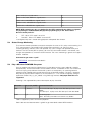
If configured, the device sends SNMP traps on input and relay status change. abcl trap 2 is sent on
relay change and abcl trap 4 is sent on input change.
Reported objects in trap are:
•
system up time.
P(Public).1.3.0
•
IO number.
E(Barix).unit(3).io(2).ioTable(1).ioEntry(1).ioIndex(1).Offset
•
Value of IO.
E(Barix).unit(3).io(2).ioTable(1).ioEntry(1).ioValue(2).Offset
Here “E” is Barix Enterprise and “P” is public object.
5.6
Streaming
The streaming destinations can be set from the remote control panel using the command interface or
can be configured from the web UI. The destination set from the command interface is not stored in
the EEPROM. It will be lost if the device reboots. Only one destination can be set for the streaming at
a time. The streaming destinations could be unicast,multicast or broadcast ip4 address. Any
controller/PC host using command interface to start/stop the streaming may not be aware of the
broadcast address of the device therefore ip address zero is considered to be broadcast address.
Leaving IP address blank “0.0.0.0” and setting the destination port will stream audio as broadcast.
When the RTP streaming mode is set to “RTP mode”, 4 LSB bytes of MAC address is used as
identifier ( SSRC ) of the stream.
The ip-intercom operates in following modes and streams audio to configured destination. The
streaming mode can be configured from the web UI and will be set only at startup. Changing mode
requires the device to reboot to take new settings into effect.
1. Stream always
If the destination ip and port is set, audio stream shall be sent always to the configured destination.
This streaming destinations can be overwritten by “stream to” command. Check the command
table for details.
2. Stream on command .
Streams shall be sent to configured destination when device receives talk command “c=83” and
stops streaming on command “c=84”.
3. Respond
The device will stream audio as long as it receives audio from any host. The host sending audio to
it is selected as streaming destination.
4. Stream on Level
The device will start streaming audio when audio input level becomes above the thrshold “Input
Trigger Level”.
Supported audio formats:
Audio format
RTP Payload type
uLaw / 24 kHz,8 bit mono
98
uLaw / 8 kHz (G.711),8 bit mono
0
aLaw / 24 kHz,8 bit mono
97
aLaw / 8 kHz (G.711),8 bit mono
8
PCM / 24 kHz,16bit, MSB first, signed,mono
99
PCM / 8 kHz ,16bit,MSB first, signed, mono
96
PCM/44.1 kHz, 16bit,MSB first,signed,stereo
10
PCM/48 kHz, 16Bit,MSB first,signed,stereo
103
NOTE: RTP payload types 0, 8, are defined by the RTP standard. Barix defines assignment
for payload types 10,96,97,98,99,103 (dynamic payload types) in the above tables.
Streaming Protocol:
1. RTP . When “RTP mode” set to ON.
2. Raw UDP. When “RTP Mode” set to off OFF.
Streaming status:
When the device is sending audio packets to the configured destination, it is considered as streaming
even if streaming silence. The streaming status is sent to the active command interface. For more
details about status notification, refer later section “Status Change Monitoring” of this chapter.
5.7
Receiving Stream
The device can be configured dynamically to receive audio from a particular ip:port using the
command interface. If ip and port both are set to 0, the network audio playback shall be disabled.
The Ip address can be set multicast/unicast. If only the receiving port is set, ip-intercom will accept
audio from any host who is sending on this particular UDP port.
The audio playback shall be always active until disabled.
Supported audio formats:
Audio format
RTP Payload type
uLaw / 24 kHz,8 bit mono
98
uLaw / 8 kHz (G.711),8 bit mono
0
aLaw / 24 kHz,8 bit mono
97
aLaw / 8 kHz (G.711),8 bit mono
8
PCM / 24 kHz,16bit, MSB first, signed,mono
99
PCM / 8 kHz ,16bit,MSB first, signed, mono
96
PCM/44.1 kHz, 16bit,MSB first,signed,stereo
10
PCM/48 kHz, 16Bit,MSB first,signed,stereo
103
NOTE: RTP payload types 0, 8, are defined by the RTP standard. Barix defines assignment
for payload types 10,96,97,98,99,103 (dynamic payload types) in the above tables.
Receive stream protocol:
1.
RTP . When “RTP mode” set to ON.
2.
Raw UDP . When “RTP Mode” set to off OFF.
if configured, relay one is closed during playback and opened after timeout.
5.8
Status Change Monitoring
The command interface provides commands to enquire the status of IO's,relays and streaming. If the
TCP command port is connected or UDP remote command port is set, the input status,
streaming/receiving and relay status are reported. The status changes are reported to only one
interface. The TCP control port has priority. So If the TCP command interface is connected, status
changes are reported to it, not over the UDP interface. The status monitoring is generic and supports
all Barix hardware.
Command to get status: “q=all”.
See GETSTATUS command for more details.
5.9
Play a MP3 from ROM/USB filesystem
You can send the command “m=filename.mp3” to the device to play a mp3 audio files stored in
flash(COB Files). Due to the limitations of the cob file structure, a audio files in flash can not be more
than 64k. Playing a mp3 file from the local file system has more priority, so streaming/network
playback will be stopped and resumed after finishing the local file playback. The flash is the default
filesystem to play local file on request of the command “m=” . This can be changed by setting the
application variable “file_sys_for_audio$” using “BAS.cgi” interface. Only mp3 audio files are
supported.
Following is the supported filesystem and examples to play a local file.
Filesystem
file_sys_for_audio$
Command example.
USB
C_R:usb://
“m=/music/abc.mp3” to play music file “abc.mp3” from “music”
folder.
“m=/abc.mp3” to play music file “abc.mp3” from root folder.
ROM
F_R:
“m=baring.mp3”
Note: flash filesystem does not contains any folders.
Table 6: Supported systems for the local playback
Refer “abcl technical documentation's guide” to get more details about WEB interfaces.
5.10 Sys-log message
Ip-intercom sends syslog message on crucial events as local network broadcast e. g. when new
destination selected. The device can also be configured to send log messages to a remote host.
Check the network settings to configure syslog remote host.
5.11 BCL Application
ip-intercom is developed using new features available in ABCL package version 0.36 which
includes BCL interpreter version 1.5 . The Interpreter 1.5 is enhanced in many ways including length
of variable names. Ip-intercom application is utilizing the enhanced features of it and therefore can not
be tokenized with previous versions of tokenizers.
6 Acceptance Reviews and Approvals
Table1:
Reviewers
Name
Role
Date
Aleksandar Simeonov
Engineer
28.04.11
Role
Date
Name
Table2:
Approvals
7 Document management
Doc ID
Table1:
References
Doc Title
Version
Author
Date
<YYYYMMDD>
<YYYYMMDD>
<YYYYMMDD>
Version
Table2:
Version History
Author
Description
Date
0.1 Jagdeesh
Initial draft
15.04.11
1.0 Jagdeesh
Reviewed by Aleksandar and changes are
incorporated.
28.04.11
1.1 Jagdeesh
44.1 and 48 kHz sampling rate added.
19.07.11
1.2 Jagdeesh
More commands added.
24/10/12