1
Table of Contents
1 Introduction.......................................................................................................................................................4
1.1 About this document ....................................................................................................................................4
1.2 Features........................................................................................................................................................4
1.3 System overview...........................................................................................................................................4
2 Quick Start Guide..........................................................................................................................................5
2.1 Connecting an Annuncicom 100 device........................................................................................................5
2.1.1 STEP 1................................................................................................................................................5
2.1.2 STEP 2................................................................................................................................................6
2.1.3 STEP 3................................................................................................................................................6
2.1.4 STEP 4................................................................................................................................................6
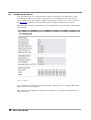
2.2 Configuring ip-intercom.................................................................................................................................6
2.3 Initiating communication................................................................................................................................8
3 User Interface................................................................................................................................................9
3.1 HOME.........................................................................................................................................................10
3.2 PROFILES...................................................................................................................................................12
3.3 CONFIGURATION (ADVANCED ).................................................................................................................12
3.3.1 NETWORK SETTINGS......................................................................................................................13
3.3.2 STREAMING.....................................................................................................................................15
3.3.3 AUDIO...............................................................................................................................................17
3.3.4 CONTROL INTERFACES..................................................................................................................18
3.3.5 SERIAL GATEWAY............................................................................................................................19
3.3.6 SECURITY........................................................................................................................................22
3.4 STATUS.......................................................................................................................................................23
3.5 DEFAULTS...................................................................................................................................................25
3.6 UPDATE......................................................................................................................................................25
3.6.1 Updating a device using the web UI..................................................................................................26
3.6.2 Updating the device using the RS-232 serial port.............................................................................26
3.7 REBOOT.....................................................................................................................................................27
4 Configuration Parameters..........................................................................................................................28
4.1 EEPROM setup parameters and default values..........................................................................................28
5 Advanced Use of the IP-intercom.............................................................................................................32
5.1 Command Interface.....................................................................................................................................32
5.1.1 Command interface Protocol............................................................................................................32
5.1.2 List of commands.............................................................................................................................33
5.2 Discovering Devices....................................................................................................................................38
5.3 CGI WEB interface......................................................................................................................................38
5.3.1 rc.cgi.................................................................................................................................................38
5.3.2 setup.cgi...........................................................................................................................................39
5.3.3 BAS.cgi ............................................................................................................................................40
2