1
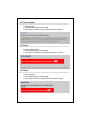
4.2.7 Firmware Update
To update firmware,
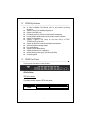
1. Click the update button on the Home page
2. Click “Apply” to activate. Don’t power off the switch while it’s working.
4.2.8 Default
To restore to default values,
3. Click the default button on the Home page
4. Click “Apply” to activate. Don’t power off the switch while it’s working.
4.2.9 Reboot
To reboot the switch,
1. Click the Reboot button on the Home page
2. Click “Apply” to activate. Don’t power off the switch while it’s working.
18