1
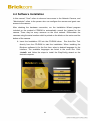
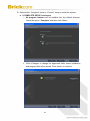
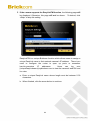
c. If the connection was successful, the user will see the message:
“Congratulations. The installation of the camera is complete.”
When this window is displayed, click <PC-NVR> to start the PC-NVR
program, <Live View> to view the live video from the connected IP
camera, or <X> in the top right corner of the screen to close the
installation window. If the user starts the PC-NVR program, please refer
to the PC-NVR user manual.
Once installation is complete, the Administrator should proceed to the
next section "Accessing the Network Camera" for necessary changes
and configurations.
40