1
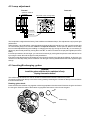
4.2 Lamp adjustment
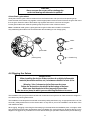
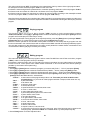
Correct
Incorrect
optimum distance
1-1,5 mm
rear panel of the moving head
Screw"B"
Screw"A"
The lampholder is aligned at the factory. Due to differences between lamps, fine adjustment may improve light
performance.
Strike the lamp, cancel all effects, open the shutter and set the dimmer intensity onto 100 % and focus the light
on a flat surface (wall) or use function "LAAd" in the Special functions . As the optimum distance of the lamp
from lens was adjusted during the installing or changing the lamp (by turning the screw "A"), it is necessary to
adjust only the second position by turning the screw "B", in order to center the hot-spot (the brightest part of the
beam).
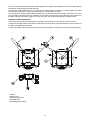
If the hot spot seems to be too bright, you can lower its intensity by moving the lamp closer to the reflector. Do so
by turning the srew "A" until the light is evenly distributed.
If the light on the edge seems to be brighter as in the center, the lamp is too close at the reflector. In this case, you
need to move the lamp away from the reflector until the light is evenly distributed and the beam appears bright
enough.
4.3 Inserting/Exchanging gobos
DANGER!
Install the gobos with the device switched off only.
Unplug from mains before!
Turn off the lamp and allow it to cool for at least 10 minutes.Disconnect the fixture from power.
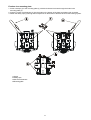
To insert the gobos open the top cover of the moving-head by loosening the 3 screws on the top cover and follow
the instructions below:
Rotating gobo-wheel:
Press the ends of the fixation-ring together with an appropriate tool and remove it.Remove the gobo and insert
the new gobo. Press the ends of the fixation-ring together and insert it in the front of the gobo.
fixation ring
gobo
8