1
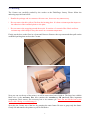
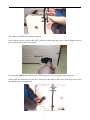
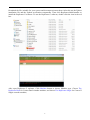
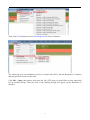
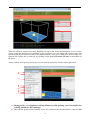
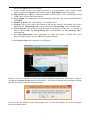
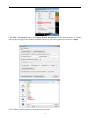
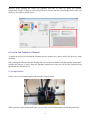
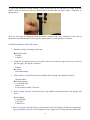
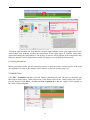
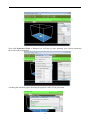
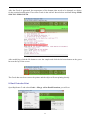
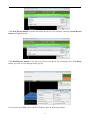
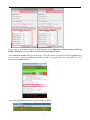
www.ff3dp.com Creator Start-up Guide Zhejiang Flashforge 3D Technology Co., Ltd. www.ff3dp.com Contents Precautions:.......................................................................................................................................... 1 1. What's in the box?.............................................................................................................................1 2. Unboxing.......................................................................................................................................... 2 3. Initial Hardware Installation.............................................................................................................5 4. Software Installation.........................................................................................................................7 5. USB Connection & Temperature Settings......................................................................................12 6. Feed in and Withdraw Filament......................................................................................................16 6.1 Set up Filament.....................................................................................................................16 6.2 Feed in Filament with LCD Screen...................................................................................... 17 6.3 Withdraw Filament with LCD Screen.................................................................................. 18 6.4 Feed in Filament with Replicator G Control Panel.............................................................. 18 6.5 Setting Parameters................................................................................................................ 19 7. Initial Print......................................................................................................................................19 8. Dual Extruder Print.........................................................................................................................21 i Precautions: [★★★ Make sure you read and understand the steps detailed in this guide] ! The Creator is very sensitive to static electricity, so make sure you contact a grounded object before operating the machine. ! Before repairing or making any alterations to the creator it is essential that the machine is turned off and the power cord is unplugged. ! The Creator operates at very high temperature; allow the nozzle, the extruded plastic and heating plate to cool before touching. ! Some plastic filaments may give off a little odour when heated, because of this the machine should always be set up in a well-ventilated area. ! Do not wear gloves when operating or repairing, as entanglement may occur and cause injury. ! Do not leave the machine unattended when in operation. 1. What's in the box? Along with your Creator 3D printer, this package contains the following: The accessory box on top of the machine includes: 1 or 2 extruder heads, 4G SD card, Hex wrench tool box. Under the build platform in the Creator framework, there are: 1kg white ABS filament, 1kg blue PLA filament (only for dual extruders). Under the creator you’ll find: Power cord, USB A to B cable, 1 or 2 filament guide tubes. 1 or 2 filament holders Sensor line 1 2. Unboxing The Creator was carefully packed by the worker at the FlashForge factory. Please follow the unboxing steps laid out below. ! Handle the package and its contents with extra care, do not use any unnecessary. ! Do not remove the thin yellow film from the heating plate. It is heat resistant tape that improves the adhesion of the extruded plastic to the plate. ! Do not remove the wrapping around the nozzle. It consists of a ceramic fibre fabric and heatresistant tape which helps to keep the nozzle at a constant temperature. Firstly put the box on the floor in a clean and flat area. Remove the top carton and then pull out the cardboard packing that encloses the Creator. Now you can see the top of the printer, as well as some other boxes inside it. The large box with the black wire is the accessory box, this contains the extruder(s), SD card and other important components. Don't remove the accessory box or its contents yet. Note: Do not lift the box by the black cable! Doing so could damage it. Now take the Creator out of the box by grasping the outer frame. Be sure to grasp only the frame. Gently lift and transfer the printer to your work surface. 2 With the Creator removed, you will find the power supply and cable, the USB A to B cable and a filament guide tube. Remove them from the box and set them aside. Now open the accessory box and remove the accessory sleeve. You will find the extruder in the protective packaging along the black cable, carefully remove it and place it on your work surface. Remove the cardboard packing material and take the accessory box from the printer, set aside for later. 3 The build platform should now be visible. It is an aluminum plate covered in a thin polyamide film. This is the surface that your objects will be printed on. Remember: Do not remove the film. The next step is to raise the build platform; there are two ways to do this: 1) Turn the screw which is behind the rotating platform. 2) Grasp the printing platform with one hand on each side, raising it slowly and keeping it level. Stop once the platform is just shy of the bronze nozzle. Now you should be able to see underneath the build platform, you'll find the filament here; either one or two rolls, depending on whether your Creator has one or two extruders. It’s easiest to remove the filament by setting aside the remaining packaging material. To do this, take out the long box at the front, then the small box on the right and finally the two wire trays. 4 You have now finished unboxing! The next task is to set up the hardware. 3. Initial Hardware Installation Start by installing the extruder. You'll need two silver screws from the bolt tool plate found in the accessory box, and the appropriate hex wrench. First, lower the build platform using one of the methods described in the previous section. Holding the extruder by both sides, take it out of the accessory sleeve and position it on the extruder seat with the fan facing forward. Align the screw holes and fasten with the shortest silver screws. Next is the installation of the filament bracket. If you have two brackets, install one on each side; If you only have one, install it on the right hand side (when viewing the creator from the front). The installation of the filament bracket is very simple – just insert it into the circular opening and tighten the nut behind. Then install the filament guide tube to the empty spot on the extruder, put one end of the guide tube into the hole. 5 The hardware installation is almost complete. Next, with the power switch in the 'OFF' position, confirm that the power cord is plugged into the power outlet next to the power switch. Now plug the USB A to B cable into the USB B-type port, do not plug the other end in yet. Finally take the filament out of the box, install it on the bracket and screw in the nut, however the nut should not be overtightened. 6 Congratulations! You have completed the initial hardware installation! If you're ready to start printing, proceed to the next step: Software Installation. 4. Software Installation ReplicatorG0040 is the best software to use with the single or dual extruder Creator. It can be downloaded from our official website by following the link below: www.ff3dp.com/#!download/c58h 7 Download the files suitable for your system and decompress/extract them. After this run the Python installation file and the Python acceleration components. Then click Replicator-0040-Installer to install the Replicator G software. To run the Replicator G software, double click the icon in the red box. After open Replicator G software, Click Machine button to choose Machine type. Choose The Replicator Dual for Creator Dual-extruder machine, and choose The Replicator Single for Creator II Single-extruder machine; 8 Then click GCode button to select Skeinforge(50) for Gcode Generator; The following gives an introduction on how to import files(.STL) into the Replicator G software and then generate Gcode to print with. Click File > Open, then browse and select the file (.STL) that you would like to print, import the file by double-clicking. Then the work of the drawing design will appear on the Replicator G interface. 9 When the object is imported you may find that it is not on the virtual build platform or even on the screen, using the function keys indicated by the red boxes you can change the camera angle and reposition the object onto the center of the build platform. Once you've done this, the next step is to generate the Gcode; this is achieved by clicking on the button(Generate GCode) at the bottom of the panel. A new window will open up, giving you several options on how the Gcode will be generated: A B C D E F G H I A. Slicing profile, select Replicator slicing defaults for ABS printing, and select Replicator 2 slicing defaults for PLA printing. B. This tells the printer which extruder to use for a dual-extruder headed printer, either the left 10 C. D. E. F. G. H. I. head or the right head can be selected. If your sample will have any hanging surfaces, it is recommended to have support. None means no support. Exterior means surface support. Full support means all support. Object infill, where 100% is a solid print, 0% is a hollow object. The recommended setting is 10%, this will save time and filament. Layer Height, this controls the vertical resolution of the print. The recommended thickness is 0.27mm. Number of shells is the wall thickness; it’s usually set at 1. Feedrate is the speed at which the filament is fed into the extruder. This usually set between 30 and 70. For ABS printing, 60 is recommended, for PLA printing, 100 is recommended. Travel feedrate is the speed at which the printer head moves over the base, it’s usually set between 30 and 100. For ABS printing, 80 is recommended, for PLA printing, 120 is recommended The Print Temperature is the temperature to which the nozzle is heated. This varies between filament types. Set it to 220 for the default filament. Click Generate Gcode and a progress bar will appear. However, for users who did not choose the default installation path in the installation of Python, clicking the Generate Gcode button in Replicator G, will result in dialogue box popping up alerting that the executable Python file cannot be found. First click the ‘No’ button to dismiss the dialogue box. To solve this problem we need to configure the corresponding menu. 11 Click File > Preferences, then click Select Python interpreter on the Advanced tab. A window will pop up, navigate to the Python installation directory and select python.exe and click ‘Open’. Click ‘Close’ on the Preferences menu and you are done! 12 The machine will now work as normal when generating Gcode. Now we will start a preliminary test on the machines connections and we will heat the platform and extruder ready for printing. 5. USB Connection & Temperature Settings Firstly, connect the machine and computer with the provided USB A to B cable. The USB port on the machine is bound by the red box in the above image. After connecting the cable, open the Replicator G software, we are going to connect the computer and printer. 13 Click Machine > Connection (serial port) > Rescan serial ports, if no new ports appear then the software driver has not been installed. To install the driver manually, click 'My computer' then right click properties, the basic system parameters appear. Then select Device Manager. Locate the software driver shown in the red box, right click and select Update Driver Software. 14 Click Browse… to find the location of ReplicatorG0040 on your system. Click FTDI USB Drivers in the driver folder before confirmation and click ‘OK’. The drivers will then be installed. The next step is to connect the printer. Rescan the serial ports and select the one that appears on your machine (on our test machine the port was COM10). Now we can connect the machine, select the function key in the red box. 15 If the red area turns green it means the printer is connected with the computer. Now we need to heat the extruder and build platform. An interface will appear by clicking the cross-shaped function key. Input the following target values; 220 degrees for the extruder and 115 degrees for the heating 16 platform. After entering the values, the platform will start to warm up. When the extruder temperature reaches 50 degrees, the cooling fan will activate and the current temperature value will display to the right as shown below. 6. Feed in and Withdraw Filament To make the process of feeding the filament into the printer easy, please follow the next few steps carefully: After putting the filament into the feeding hole, do not push it further until the extruder temperature reaches 200 degrees or more. Once the machine reaches this point you will feel the filament being pulled into the extruder head. 6.1 Set up Filament Firstly, remove the filament guide tube from the extruder head. When you have removed the guide tube you can remove the filament that is inside the guide tube. 17 To avoid any blockages during printing, please ensure that the two threads are loaded from the middle. There are two wire trays, one runs clockwise and the other one runs counter - clockwise, as shown below: There are two ways of feeding the filament into the extruder head, one is using the LCD screen on the printer itself and the other is by using the control panel on the Replicator G software. 6.2 Feed in Filament with LCD Screen 1. Start the machine, the display indicates: ▶Build from SD Preheat Utilities 2. Using the directional arrows to the right of the screen click the page down key to scroll to the next page. The display will show: Preheat ▶Utilities Info and Settings 3. Select Utilities; click the M key in the middle of the keypad. The display will show: Monitor Mode ▶Change filament Level Build Plate Home Axes Feed operation with LCD screen 4. Select Change filament; click the M key in the middle of the button board. The display will show: ▶Load Right Unload Right Load Left Unload Left 5. Select Load right. Click the M key on the button board. The display will indicate: I'm heating up my extruder! At this time, the temperature of the right nozzle is being heated up.When the 18 temperature of the nozzle reaches 220 degrees, click the M key on the keypad, the nozzle should start extruding material, if not, keep clicking the M key until it does. 6.3 Withdraw Filament with LCD Screen Notes of withdrawing filament !!! 1. If you just finish your printing or feed in the filament and want to withdrawing the filament, at this moment, the extruder is still over 200 degrees, firstly pull the filament in a little, then directly pull it out. 2. If you want to change another color filament, please firstly do as following shows: 1) Turn on the power switch, you will see the LCD panel shows: Build from SD ▶Preheat Utilities 2) Using the directional arrows to the right of the screen click the page down key to scroll to the next page, and select Preheat,Click M key in the middle,then you will see: ▶Start Preheat Right Tool OFF Left Tool OFF Platform OFF 3) Click page down key to select Left Tool (or Right Tool), Click M key , you will see: ▶Start Preheat Right Tool Left Tool Platform ON ON OFF 4) Click page up key back to Start Preheat,and click M key, you will see: Heating: R Extruder: 033/230C L Extruder: 033/230C Platform: 024 This means the left extruder is heating up, when it reach 220℃, firstly push in the filaments a little bit when seeing filament comes out from nozzle, then pull it out. Till this step you have get rid of the filament successfully. 6.4 Feed in Filament with Replicator G Control Panel The following can only be performed while the printer is connected to the computer. Open the Replicator G software, click the icon in the red box, this is the control panel icon. The dialogue box shown below will then pop up. 19 To heat the right extruder and feed material, click the right extruder on the upper right corner of the control panel and manually modify the temperature in the right target of extruder temperature control and change the temperature to 220 degrees. A red line will be plotted in the temperature map. When the actual (Current) temperature reaches 220 degrees you can pull the filament out. 6.5 Setting Parameters Before generating Gcode, specific parameters can be set up to customize various aspects of the print. An explanation to each of the settings can be found in a previous section (page 10). 7. Initial Print Click File > Examples and then select the 20mm_Calibration_Box.stl. The preview interface will then appear along with a virtual impression of the 20mm cube on the virtual printer bed. On the preview interface click Move > Centre and Put on platform so that the sample will be printed on the centre of the build plate. 20 Next click Generate GCode, a dialogue box will pop up, after inputting your chosen parameters the Gcode will be generated. A loading bar will then appear showing the progress of the Gcode generation. 21 After the Gcode is generated, the temperature of the bottom plate needs to be changed, see below for the required modification. First select Gcode in the red box shown below and then change M109 S110 T0 to M109 S115 T0. After modifying, click the file button to save the sample and click the left most button on the green bar near the top of the screen. The Gcode has now been sent to the printer and the object will start printing shortly. 8. Dual Extruder Print Open Replicator G and select Gcode > Merge .stl for Dual Extrusion, you will see: 22 Click first Browse button to locate and select the file for Left Extruder, and then second Browse button for Right Extruder : Click third Browse button to save these two files as one .gcode file on desktop; now click Merge button, you will see two dialogue boxes pop up: If you want to print dual colors with PLA filament, then do following settings: 23 If you want to print dual colors with ABS filament, select Replicator slicing defaults in Slicing Profile column, and lower Feedrate to 60 and Travel Feedrate to 80; Click Generate Gcode option for both boxes. After the Gcode is generated, click the gcode in the red box below and revise HBP temperature to 50 if you print with PLA and then save this modification in File column. Click following button to export .x3g file for SD card print. 24