1
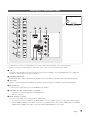
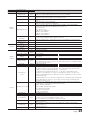
Channel Common Elements [+ Icon-method]
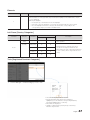
Channel list representation rules
Standard
Item
Construction
Digital channels
•Check Box + Status Icon + Digital Channel Number + Channel Name
•Channel number representation format: ###-### (The channel number is
represented by ‘-’.)
Analog channels
•Check Box + Analog Icon + Analog Channel Number + Channel Name
•Channel number representation format: ### (‘-’ is not used to represent analog
channel numbers.)
Digital channels
•Check Box + Status Icon + Digital Channel Number + Channel Name
•Channel number representation format: ### (For the maximum length of the
channel number, follow the regional specifications.)
Analogue channels
•Check Box + Analog Icon + Analog Channel Number + Channel Name
•Channel number representation format: ### (For the maximum length of the
channel number, follow the regional specifications.)
ATSC
DVB (CHEM)
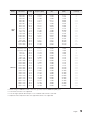
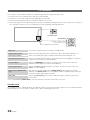
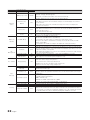
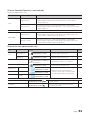
Channel list icon representation rules
Item
Dynamic SI
Icon
Example
Channels deleted
by Dynamic SI
Channels added by
Dynamic SI
Analogue Channel Icon
Source Channel Icon
Antenna Icon
Air
Cable
Satellite
Scrambled Channel Icon
Video Mute
Priority
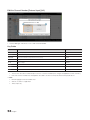
NNNNNNNN CH. NAME
•Channels that have been deleted by the
Dynamic SI but not by the user.
1
NNNNNNNN CH. NAME
•Channels that have been added by the
Dynamic SI but not by the user.
2
•The Analogue channel icon is displayed.
3
•A channel that is an input source.
4
•Represents the live channels from the
antennas. The Air, Cable or Satellite antenna
icons are displayed with the lowest priority.
5
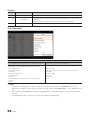
NNNNNNNN CH. NAME (The
edited channel name.)
NNNNNNNN CH. NAME
NNNNNNNN CH. NAME
NNNNNNNN CH. NAME
NNNNNNNN CH. NAME
NNNNNNNN CH. NAME
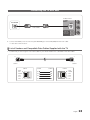
•The scrambled channel icon. This appears for the
Satellite antenna.
-
NNNNNNNN CH. NAME
•A screen-muted channel. Audio and channel
information is provided.
-
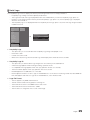
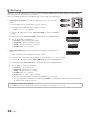
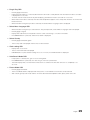
English
51