1
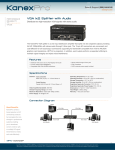
VGA SPLITTER 1×2 with audio USER MANUAL Table of Contents 1.0 Introduction……………………………………………………..2 2.0 Specifications…………………………………….………..……2 3.0 Package Contents………………………………………….…..3 4.0 Panel Descriptions…………………………………….…….…3 5.0 Connection and Operation..................................................3 1 VGA SPLITTER 1×2 with audio VGA SPLITTER 1×2 with audio 1.0 INTRODUCTION This product is an VGA splitter 1x2 with audio. It distributes the input of the VGA signal and stereo audio signal into the two identical outputs simultaneously. This product has the ability of buffering and amplifying. Each amplifier splitter’s output can achieve long distance transmission of VGA signal of up to 15 meters. This VGA Splitter offers solutions for monitors or projectors retail and show site, and Projector factory, noise, space and security concerns, data center control, information distribution, conference room presentation, school and corporate training environments. 1.1 FEATURES This VGA Splitter has many features that enable it to perform in a superior manner. Among those features you will find: Easy to Use: Install in seconds, no need of setting. Connects VGA source to two VGA displays at the time. Connects stereo audio source to two audio receivers at the time. Supports highest video resolution up to 1920 x 1200 and 1080p Supports highest video Amplifier Bandwidth to 500MHz 2.0 SPECIFICATIONS Signal Inputs/Output Input video Signal Maximum Single Link Range Operating Frequency Vertical Frequency Range Video Amplifier Bandwidth Input/Output connector Input Output Mechanical Size(L-W-H) Weight(Net) Environmental Operating Temperature Operating Humidity Storage Temperature Storage Humidity Power Requirement External Power Supply 1.2 volts p-p 1920X1200,1080p 30-170 Hz 500MHz VGA 15pin male VGA 15pin female 120x71x24.5mm 250g 0℃ to +70℃ 10% to 85 % RH (no condensation) -10℃ to +80℃ 5% to 90 % RH (no condensation) 5V DC@2A 2 VGA SPLITTER 1×2 with audio Power consumption (Max) 5W(max) 3.0 PACKAGE CONTENTS 1) Main unit 2) 1.8M VGA cable(M-F) 3) 5V/2A DC Power Supply. 4.0 PANEL DESCRIPTIONS 5.0 CONNECTION AND OPERATION 1) Connect the supplied VGA cable(M-F) from VGA device into VGA input of the main unit. 2) Connect stereo audio cable(M-M) from audio device into the audio input of the main unit. 3) Connect the VGA cable(M-M) from your displays into the VGA output of the main unit 4) Connect stereo audio cable(M-M) from audio receiver into the audio output of the main unit. 5) Insert the DC side of 5v power supply into the main unit and then connect the AC side of the power supply into the wall outlet. *please refer to the connection diagram section. Attention: Insert / Extract cable gently. 3 VGA SPLITTER 1×2 with audio 5.1 CONNECTION DIAGRAM P/N4005 4