1
INM Impressario
For Adobe® Director®
Version 4.0.0
User Manual
© Integration New Media, Inc. 2003–2008 | Version 4.0.0| 2008-11-19
Contents
Contents
2 Welcome to INM Impressario
8 INM Impressario Web Links
8 Key Features of INM Impressario
9 What’s New in Version 4
10 New features in version 4
10 New features in version 3
10 Release notes
11 Getting Started
12 System Requirements
12 Special Considerations
12 Installation
13 Installation for users of INM Impressario 1.x, 2.x or 3.x 13 Installation for new users
14 Creating an Impressario Member
14 Creating Multiple Impressario Members at Once
17 Inserting a Customizable Toolbar
17 Creating Your Own User Interface
20 Entering Your License Key
20 Using the Trial Version
21 Contacting INM
22 Customization of INM Impressario
22 INM Services
22 Working with INM Impressario
Navigation and Scrolling
Custom scrollbar graphics
Bookmarks
Bookmark behavior parameters
Hyperlinks
23 23 23 24 25 26 How to create links
27 Event triggered for hyperlinks
27 PDF Forms
INM Impressario User Manual
© 2003-2008 Integration New Media, Inc. (INM)
27 p.2/145
October 31, 2008
Data entry
27 Limitations on text fields
28 Events triggered for form controls
28 Password protected forms
28 PDF Notes
29 Customization of PDF Content
29 Displaying Line Art, Text and Images
29 Localization of the User Interface
30 Tell INM Impressario which language file to use
30 Scripting with Impressario
31 Managing Errors
32 Setting the global alert level
32 Checking for errors
32 Ensure the correct PathType
33 Check for correct Password
33 PDF Generation and Customization
36 Generating PDFs via templates
36 Placeholder items in PDF templates
37 Dynamic items
37 Limitations concerning placeholder items:
40 Samples for Creating PDFs from Template
40 Customizing content in an existing PDF
41 Customizing text within a PDF
41 Customizing images within a PDF
41 Inserting, deleting and moving pages
44 General notes on modifying PDFs
44 Delivering Your Project
45 How to Reduce the Resource Files Needed
45 Fonts
45 CMaps files
45 Creating a projector on Windows
46 Creating a projector on Mac OS X
46 Distributing Cross-platform Projects on CD-ROM
47 Distributing INM Impressario Shockwave Movies
47 Auto-downloading INM Impressario for Shockwave
47 INM Impressario User Manual
© 2003-2008 Integration New Media, Inc. (INM)
p.3/145
October 31, 2008
Providing for Accessibility
49 Keyboard Shortcuts
49 Using Director’s Accessibility Features
50 INM Impressario Properties
51 AutoDownload (member)
51 Filename (member)
52 Highlighting (sprite)
53 Page (member or sprite)
53 Password (member)
55 PathType (member)
55 Permissions (member)
56 Rotation (sprite)
57 Scrollbars (member or sprite)
57 ScrollH (member or sprite)
58 ScrollHMax (sprite)
59 ScrollV (member or sprite)
60 ScrollVMax (sprite)
61 TotalPages (member)
61 TrackView (sprite)
62 UpdateURL (member)
62 ViewOptions (member or sprite)
63 ZoomMode (member or sprite)
64 Zoom (member or sprite)
65 INM Impressario Methods
67 AddListener (sprite)
67 CreateBookmark (sprite)
68 CreateFromTemplate (member)
68 DeletePages (member)
69 Email (member)
69 Find(sprite)
70 GetDocumentProperty (member)
72 GetError (member)
73 GetError (sprite)
73 INM Impressario User Manual
© 2003-2008 Integration New Media, Inc. (INM)
p.4/145
October 31, 2008
GetFields (member)
74 GetAllFields (member)
75 GetBookmarks (member)
76 GetHighlightColors (member)
77 GetKeyResponse (sprite)
77 GetPageImage (member)
78 GetPageText (member)
78 GetPageText (sprite)
79 GetPDFVersion (member)
79 GetSelectedText (sprite)
80 GetStatus (member)
80 GetStatus (sprite)
81 GetTool (sprite)
81 GetView (member)
82 GetView (sprite)
82 GoNextView (sprite)
83 GoPreviousView (sprite)
83 GoToBookmark (sprite)
83 IMP_GetAlertLevel (global)
84 IMP_GetLanguage (global)
84 IMP_GetSmoothing (global)
85 IMP_GetXtraVersion (global)
85 IMP_SetAlertLevel (global)
86 IMP_SetLanguage (global)
86 IMP_SetProgressIndicator (global)
87 IMP_SetSmoothing (global)
88 InsertAutoValues (member)
88 InsertImage (member)
89 InsertPageItems (member)
90 InsertPages (member)
91 InsertRepeating (member)
92 InsertSliding (member)
94 InsertText (member)
95 INM Impressario User Manual
© 2003-2008 Integration New Media, Inc. (INM)
p.5/145
October 31, 2008
Merge (member)
96 MovePages (member)
96 Print (member)
97 RemoveListener (sprite)
98 ReplaceImage (member)
98 Save (member)
99 SaveFromTemplate (member)
100 SetFields (member)
101 SetFocus (sprite)
101 SetHighlightColors(member)
102 SetKeyResponse (sprite)
102 SetTool (sprite)
104 SetView (member)
105 SetView (sprite)
106 INM Impressario Events
107 How INM Impressario Events are Received
107 Events for Page and Document Changes
107 #IMP_DocumentChanged
107 #IMP_PageChanged
108 Events for Form Controls and Hyperlinks
109 #IMP_AutodownloadRequest
109 #IMP_HyperlinkClick
110 #IMP_GotFocus
112 #IMP_KeyPress
113 #IMP_LostFocus
114 #IMP_MouseClick
115 #IMP_MouseEnter
116 #IMP_MouseLeave
118 #IMP_MouseWithin
119 INM Impressario Behaviors
121 How to Access INM Impressario Behaviors
121 How to Use Behaviors
121 INM Impressario Standard Behaviors Reference
122 EmailPDF
122 FindText with dialog
122 INM Impressario User Manual
© 2003-2008 Integration New Media, Inc. (INM)
p.6/145
October 31, 2008
FindText from field
123 GetCurrentPage
123 GetCurrentZoom
124 GetNumberOfPages
124 GetPageText
124 GoFirst, Last, Next, Previous
125 GoPreviousNextView
125 GoToPage from field
126 GoToPage
126 Link
126 Link from field
127 Print
128 Print Current Page
128 Print Member Off Stage
129 Save from field
130 Save with dialog
130 Scroll Horizontal
131 Scroll Vertical
131 SetTool
132 SetView
132 Zoom
133 INM Impressario Customization Behaviors
133 InsertText Using Template
133 InsertImage Using Template
134 Create PDF from Template
134 Error Codes
136 Errors
136 Warnings
140 Index
142 Adobe, Acrobat, Director and Xtra are registered trademarks of Adobe Systems Incorporated in
the United States and/or other countries. Apple, Mac and Macintosh are trademarks or registered
trademarks of Apple Computer, Inc. in the United States and/or other countries. Microsoft,
Windows and Windows NT are trademarks or registered trademarks of Microsoft Corporation,
registered in the U.S. and/or other countries.
Other trademarks, trade names and product names contained in this manual may be the
trademarks or registered trademarks of their respective owners, and are hereby acknowledged.
INM Impressario User Manual
© 2003-2008 Integration New Media, Inc. (INM)
p.7/145
October 31, 2008
Welcome to INM Impressario
Welcome to INM Impressario—the most powerful publishing and printing tool
for high-impact visuals, with the ability to finely tune and personalize the user
experience.
Convert files from your favorite format — MS Word, PowerPoint, Visio,
Freehand, Quark Xpress, etc. — to PDF and let INM Impressario transform
them into Director sprites.
With INM Impressario and Director, you have the freedom and control to
create engaging user experiences that will truly impress your audience.
INM Impressario Web Links
To assist you in working with INM Impressario, we have provided an
extensive product support network. The INM Impressario home page is your
main source of information for product updates and news.
http://www.impressario.com
Here you’ll also find links to:
•
Technical Requirements
•
Benefits and Features
•
Gallery of INM Impressario projects
•
First Steps tutorial
•
Manuals
•
Free Tools
•
Knowledgebase
•
Release Notes
•
and more
Support main page – On INM’s support main page you will find our online
support form, which sends your case immediately to our support team.
http://support.INM.com/
INM Impressario discussion list - Learn from the experience of other
developers by joining this e-mail discussion list.
http://forums.INM.com/
INM Impressario User Manual
© 2003-2008 Integration New Media, Inc. (INM)
p.8/145
October 31, 2008
Key Features of INM Impressario
INM Impressario allows you to quickly and easily integrate PDF (Portable
Document Format) content within Director’s multimedia authoring
environment.
Here are some of the key features you’ll discover.
Creative freedom
With INM Impressario and Director, you have the freedom and control to
create engaging user experiences that will truly impress your audience. Apply
Director’s inks and transparency to your PDF document sprites, or place
objects on top of your PDF document for a completely integrated look and
feel.
Easy to use
Simply insert an Impressario member into your Director cast, select the PDF
document to display and any custom display options you want. Then position
it on the stage and… magic – the document appears directly within your
interface.
WYSIWYG authoring
The INM Impressario WYSIWYG display gives you an instant view of your
document even at authoring time, so you can get just the right look for a
perfect display, on any playback platform.
Automatic or customized user interface
Users can navigate, print and interact with PDF documents via the INM
Impressario standard toolbars. Or you can create your own custom buttons
and attach pre-built behaviors for rapid design. The powerful Lingo API of INM
Impressario offers even greater possibilities.
Creation of PDF content at runtime
The Full version of INM Impressario allows you to create new PDF documents
at runtime, based on template PDF files created using Adobe Acrobat or
Adobe LiveCycle Designer. Insert HTML-formatted text and images to create a
PDF that users can view on screen, print or e-mail.
Add or modify the content of existing PDF documents by setting the values of
text fields and replacing existing images inside the documents. Creative use
of Director’s native imaging Lingo allows for endless possibilities.
INM Impressario User Manual
© 2003-2008 Integration New Media, Inc. (INM)
p.9/145
October 31, 2008
Effortless deployment
INM Impressario contains everything necessary for your end-users to view
the final result on Windows or Mac. No third-party applications are required,
so you don’t have to worry about your end-user’s configuration or what they
have installed.
Proven technology
INM Impressario uses the Adobe® PDF Library to provide precision graphics,
fonts and layout, as well as accurate representation of on screen and printed
material.
Never before has it been easier to make engaging presentations using PDFs in
Director!
For a complete listing of INM Impressario features, visit the Benefits and
Features page on the INM Impressario website:
http://www.impressario.com/info/
What’s New in Version 4
INM Impressario 4 brings the compatibility with Adobe Director 11 and
combines it with the new level of PDF generation features created in version
3. This positions INM Impressario as the best solution for printing within
Director.
New features in version 4
•
Compatibility with Adobe Director 11
•
New Adobe PDF libraries version 8 now included
New features in version 3
•
Ability to insert formatted content (text and images) at runtime, to
generate new PDF documents based on initial template documents.
•
Ability to create bookmarks in a PDF at runtime
•
Ability to find and highlight multiple search terms in different colors
•
A new Flash-based Search Panel to accompany the Searchable PDF
Library solution.
•
Ability to email a PDF document by clicking a toolbar button (or
using the Lingo method).
•
Partial support for notes (comments) within a PDF – the text of the
note is returned in the Impressario event IMP_MouseClick.
•
GetDocumentProperty now returns a list of all PDF document
properties and their values (enhancement)
INM Impressario User Manual
© 2003-2008 Integration New Media, Inc. (INM)
p.10/145
October 31, 2008
•
Tooltip text is returned for hyperlinks in the Impressario events
IMP_MouseEnter, IMP_MouseLeave, IMP_HyperlinkClick, etc.
(enhancement)
•
PDFs can now be automatically downloaded from a web URL if a
more recent version of the PDF is available. (enhancement)
Release notes
You will find release notes for the current version of INM Impressario, as well
as previous versions, on the INM website at:
http://www.INM.com/products/impressario-dir/support/release-notes.php
INM Impressario User Manual
© 2003-2008 Integration New Media, Inc. (INM)
p.11/145
October 31, 2008
Getting Started
This section covers the most common tasks for new users of INM Impressario,
such as:
•
Installation
•
How to create an Impressario member
•
How to insert a predefined customizable toolbar
•
How to create your own user interfaces
•
Entering your license key
System Requirements
•
Windows: Windows 2003/XP/Vista
•
Mac: Mac OS X, version 10.4 or higher (Mac Intel only)
•
Adobe Director version 11 ONLY
(INM Impressario version 4 is not backwards compatible with
previous versions of Director. If you need to use INM Impressario
for Director versions 8.5 to MX2004, you will need INM Impressario
version 3. For a special combo price, please contact us.
•
INM Impressario version 4.x supports PDF documents that conform
to version 1.7 of the Portable Document Format (PDF) standard,
equivalent to Acrobat 8, or lower.
Note: If your project requires support for platforms other than those mentioned above,
please contact Integration New Media at [email protected]
See Special considerations below for additional information.
Special Considerations
•
Plug-ins, such as QuickTime™ and Flash™, are not supported.
•
Comments and notes in PDF documents are partially supported.
See PDF Notes.
•
INM Impressario displays images on screen in RGB color. PDF
documents created for print, using CMYK color may appear
differently when viewed with INM Impressario.
•
Alpha channel in PDF documents is not supported.
•
PDF document pages that contain large, high-resolution images
(1MB) may be slow to display and interact with.
•
JavaScript actions encoded within PDF documents are not
supported, except for hyperlinks. The workaround solution is to
INM Impressario User Manual
© 2003-2008 Integration New Media, Inc. (INM)
p.12/145
October 31, 2008
use Impressario Events, and perform the equivalent actions from
Director.
•
Most high - ASCII characters are supported for text fields.
However, there are a few rare exceptions. Please see the list of
unsupported characters, on our website, for more precision.
•
Double-byte characters are not supported for form fields.
•
Single-line text fields are limited to 253 characters; multi-line text
fields are limited to 1024 characters.
•
The ReplaceImage() method, used to replace bitmaps within your
PDF documents, requires defining "containers", which are only
supported with Acrobat 6 and higher.
•
For Shockwave deployment, we recommend high-speed Internet
access. In addition to the INM Impressario Xtra VeriSign package
one-time download; you will need to take into account the
download time for each PDF document displayed.
•
In Shockwave the Find dialog box is not supported. However, you
can modify the Impressario toolbar behavior to open your own
dialog box. See examples on the INM Impressario website for
ideas.
Installation
Installation for users of INM Impressario 1.x, 2.x or 3.x
Before installing INM Impressario 4.x, you need to uninstall any previous
versions of INM Impressario (or at least remove them from the Director Xtras
folder). If the installer for INM Impressario 4.x detects another version of
INM Impressario on your system it will ask if you want to "Install a new
instance" or "Maintain or Update an instance …". At this screen, click Cancel,
remove the old version (via Control Panel on Windows, or by deleting the
entire Impressario folder on Mac), and run the INM Impressario 4 installer
again.
If you want to keep the older version of INM Impressario (in case you have
purchased it and you are now evaluating the INM Impressario 4 trial), first
create a backup folder outside of Director; name it something like
"Impressario-3" and copy the entire Impressario folder (in Xtras) to that
backup folder.
Then you can run the installer for INM Impressario 4.
Note that if you have not purchased a license for INM Impressario 4, you
need to use the Trial key information to evaluate the product. INM
Impressario 3 and older licenses are not valid for this version.
INM Impressario User Manual
© 2003-2008 Integration New Media, Inc. (INM)
p.13/145
October 31, 2008
Installation for new users
To install INM Impressario for authoring in Director, download the
compressed installer from the INM website, decompress it and double-click
the Impressario-installer file.
By default, the installer selects the path of the most recent version of Director
currently on your hard drive. You can, however browse to select an alternate
path: however, to install for authoring in Director, you must make sure to
select the folder of the Director application itself. The Impressario files will be
placed in a folder named “INM Impressario”, in Director’s Xtras folder (for
Director 11, this folder is: “Adobe Director 11/Configuration/Xtras”). The
Impressario library casts will be placed in Director’s Libs folder (for Director
11, this folder is: “Adobe Director 11/Configuration/Libs”).
Once you open an INM Impressario project in Director, you will be prompted
to insert either your full license details or to enter a trial key. If you are
evaluating the trial version of INM Impressario, the trial key information was
sent to you via e-mail when you filled in the user registration form on the INM
web site. Simply click on “Enter Key” and enter either the trial information
you received or, if you purchased a full license, enter the information that was
sent to you by e-mail, when your purchase was made. If you do not enter
the user information correctly, you will not be able to continue using INM
Impressario.
To ensure that the installation was successful:
1
Launch Director.
2
Click Director’s Insert menu, and make sure there is a new item
named Integration New Media > INM Impressario.
3
In the Xtras menu there should be several new INM Impressario
submenus: INM Impressario, INM Impressario > Tools and
INM Impressario > Tutorials.
Creating an Impressario Member
1
Click Insert > Integration New Media > INM Impressario…
INM Impressario User Manual
© 2003-2008 Integration New Media, Inc. (INM)
p.14/145
October 31, 2008
Insert > Integration New Media > INM Impressario…
2
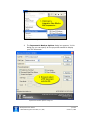
The Impressario Member Options dialog box appears. In this
dialog box you can specify all the properties needed to display
your PDF document.
Impressario Member Options dialog box
INM Impressario User Manual
© 2003-2008 Integration New Media, Inc. (INM)
p.15/145
October 31, 2008
Note that these properties can also be dynamically modified at
runtime.
3
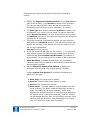
Specify the Impressario Member Options. In the Link File box,
type in the full path, or click Browse to locate a PDF document.
You can also leave this box empty and set the Impressario
FileName property through Lingo or a Behavior, at runtime.
4
The Path Type drop-down list displays Absolute by default, and
is disabled if your movie is not yet saved. To select a path type
that is Relative to movie, you must first save your movie. Keep
the Absolute path type if the path to the document will always be
the same for all end-users.
5
If the PDF document is password protected, you may enter the
password in the Password text box. The password property can
also be set via Lingo. If the password is incorrect when you click
OK, an error is generated.
See also Password property.
6
If the PDF document specified is a URL (http://…), or if you want
to be able to hyperlink to PDFs that are located on the Internet,
check the box labeled Enable Auto-Download. This feature is
only available if you are using the Full version of INM Impressario.
7
Show Scrollbars is checked by default for new Impressario
members. Keep this box checked to automatically display vertical
and horizontal scrollbars.
8
Choose Document Default View Options to display the
document with the initial view settings saved in Acrobat.
Choose Custom View Options to override the defaults and
specify the following:
a) Start Page: The initial page to display.
b) Scroll H: The horizontal scroll position in pixels.
c) Scroll V: The vertical scroll position.
d) Zoom Mode: "Fit Page" displays the entire page within the
sprite rectangle, "Fit Width" scales the document so that its
width is the same as the sprite rectangle, "Actual Size"
displays the document at 100% of its original size, aligned to
the top left corner of the sprite rectangle. "Custom" unlocks
the percentage text box. Here you can specify an exact Zoom
value to scale the document, as a percentage of its original
size. The valid Zoom range is 8% to 1600%.
INM Impressario User Manual
© 2003-2008 Integration New Media, Inc. (INM)
p.16/145
October 31, 2008
9
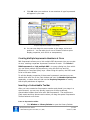
Click OK when you are done. A new member of type Impressario
will appear in your cast.
Drag an Impressario member to the stage
10 You can now drag this cast member to the stage, resize and
position it. You can also give it one of Director’s native sprite
display properties, such as ink or transparency.
Creating Multiple Impressario Members at Once
INM Impressario allows you to link multiple PDF documents into your project
at once, creating a separate Impressario member for each. Click Xtras >
INM Impressario > Link multiple PDF… to open a dialog box from which
you can select multiple PDF documents, using the Shift key and Ctrl
(Windows) or Command (Mac) keys. When using this option, the PDFs need
to be in the same folder.
To edit the display properties of these new Impressario members you can
double-click each one in the Cast window and open its Member Options box
separately, or select them all and use the Property Inspector to modify
their display attributes all together.
Inserting a Customizable Toolbar
After you have created an Impressario member and placed it on stage in a
sprite channel, you can very quickly insert one of the pre-defined,
customizable toolbars that come with INM Impressario. The toolbars are
Flash assets and they become active when you drag the special Impressario
Toolbar behavior onto them.
Insert an Impressario toolbar
1
Click Window > Library Palette to open the Library Palette.
INM Impressario User Manual
© 2003-2008 Integration New Media, Inc. (INM)
p.17/145
October 31, 2008
2
From the upper left corner of the palette window, select INM
Impressario Tools > Toolbars to open that castlib.
3
Select one of the predefined, customizable toolbars and drag it to
your stage. It must be placed in a score channel below the
Impressario member that you want it to control.
Drag toolbar from the Toolbars Castlib in the Library Palette
4
Set the ink property of the toolbar sprite to Background
Transparent, because the tool tip area of the toolbar will overlap
your Impressario sprite.
Apply the toolbar behavior
1
Now drag the Impressario Toolbar behavior onto the toolbar sprite
on stage. The parameters dialog box opens.
INM Impressario User Manual
© 2003-2008 Integration New Media, Inc. (INM)
p.18/145
October 31, 2008
Customize toolbar behavior parameters
2
In the drop-down list of the “Impressario sprite is in channel”
option, select the sprite channel that contains your Impressario
member. By default, the first Impressario sprite found is selected.
3
Specify how you want the toolbar aligned to your Impressario
sprite: Top or Bottom, for horizontal toolbars, Left or Right, for
vertical toolbars, or None, to position the toolbar yourself. If you
select None, you can position and scale the toolbar to your liking.
With the other alignment settings the toolbar sprite is resized to
its default dimensions.
4
Use the checkboxes in the dialog box to turn on and off the
various toolbar button groups.
5
Choose the Language for tool tips that appear when a user
holds the mouse over a toolbar button.
6
Change the upper and lower zoom limits to suit your needs.
7
Click OK and run your movie. You will see the toolbar snap into
position, displaying only the buttons you selected.
INM Impressario User Manual
© 2003-2008 Integration New Media, Inc. (INM)
p.19/145
October 31, 2008
Toolbar background images
Within the Toolbars cast there are also bitmap images that match the
backgrounds of the toolbar Flash assets. You can use these background
images to extend the length of your toolbar to fit your Director movie size.
Creating Your Own User Interface
It’s easy to create your own buttons and user interface elements to enhance
and personalize your INM Impressario project. You can implement most user
interactions using the Impressario behaviors, without requiring any Lingo.
Using Behaviors
Create your own buttons in Director or in the design tool of your choice. Then
attach Impressario behaviors to the buttons to implement the most common
interactions, such as opening a PDF document, navigating, changing the zoom
and printing.
See INM Impressario Behaviors.
Using Lingo
For even more sophisticated functionality, INM Impressario comes with an
extensive Lingo API that allows you to access Impressario member and sprite
properties and methods.
See INM Impressario Properties and INM Impressario Methods.
Entering Your License Key
When you run a movie or projector using the trial version of INM Impressario,
a "Trial Version" splash screen appears to alert end-users that the Xtra has
not been licensed for distribution. Users must click this screen to proceed
with the movie.
Once you purchase a license from Integration New Media, you will receive an
e-mail containing a full license key, which you must enter from within
Director.
To enter your full license key, and remove the "Trial" splash screen, follow
these steps:
1
Open a movie that contains at least one Impressario member.
2
In Director’s menu, click Xtras > INM Impressario > Enter
Key…
3
Enter the name of the license owner, the name of the
company (if you provided one at the time of purchase) and the
license key that is e-mailed to you upon purchase of the license.
This information is case sensitive. To avoid errors in typing, we
INM Impressario User Manual
© 2003-2008 Integration New Media, Inc. (INM)
p.20/145
October 31, 2008
recommend you copy/paste the license number directly from the
e-mail.
4
Save your current movie in order for it to be licensed.
This procedure only has to be done once; you will now be able to create new
INM Impressario movies and projectors that are legal for distribution.
Using the Trial Version
The free 30–day trial version of INM Impressario contains all the functionality
of the distribution version; except that it displays a "Trial Version" splash
screen the first time it loads a sprite of type Impressario at authoring and
runtime.
After installation, you must enter a trial User Name, Company and Key. To do
so, in Director’s menu, click Xtras > INM Impressario > Enter Key… The
trial information was sent to you via e-mail when you completed the user
registration form on the INM website. The information is case sensitive. If
you do not enter the information correctly, you will not be able to continue
using INM Impressario.
How to activate the trial version
If you received INM Impressario from another user and did not install the Xtra
using the INM Impressario installer, you still must enter a trial license key (or
a purchased license key) to activate INM Impressario. Follow the instructions
in the section entitled Entering your license key, but you will enter the trial
user name, company name and key, instead of the full license information. If
you do not have a trial license key, go to the INMs website:
http://www.impressario.com
In order to ship a product containing INM Impressario you must purchase an
end-user license for the software and enter the full license key and user
information once, on the machine where the projector will be created.
Please make sure to read and agree to the License Agreement before
purchasing your INM Impressario license.
To purchase a license:
Visit our online store:
https://store.INM.com or
Call us:
+1 800 400 1772 (North America) or +1 514 871 1333 Option 5.
INM Impressario User Manual
© 2003-2008 Integration New Media, Inc. (INM)
p.21/145
October 31, 2008
Contacting INM
We encourage you to contact us with questions, comments or feedback. We
can be reached at:
Integration New Media, Inc. (INM)
1600 Rene-Levesque Blvd W, Suite 900
Montreal, QC H3H 1P9
Canada
Phone:
+1 514 871 1333 Option 5
+1 800 400 1772 (North America)
Info:
[email protected]
Sales:
[email protected]
Support: [email protected]
Web:
http://www.impressario.com
Customization of INM Impressario
If you need specific functionality that is not available in the off-the–shelf
version of INM Impressario, we may be able to create a customized version of
the Xtra just for you. INM will ensure your satisfaction by drafting
specifications based on your requirements and giving you the opportunity to
review and sign off on them. We will then deliver the customized version
within an agreed timeframe.
INM Services
Whether you are faced with a project that requires more man-power than you
have available, or you just don't have time to spend learning a new product,
our Developer Assistance and Project Development Services may be
just what you need.
Our experienced engineers can offer assistance at many levels, from project
design and analysis to coding of specialized functionality in Director and
Flash; we can even modify the product for specialized functionality.
Contact our services team to find out more:
Phone: + 1 514 871 1333 Option 4
or + 1 877 637 4384 Option 4 (USA and Canada)
E-mail: [email protected]
INM Impressario User Manual
© 2003-2008 Integration New Media, Inc. (INM)
p.22/145
October 31, 2008
Working with INM Impressario
This section covers concepts and practices that you will find useful while
working with INM Impressario, such as:
•
Navigation and scrolling
•
Bookmarks
•
Hyperlinks
•
PDF forms
•
Customization of PDF content
•
Localization of the user interface
•
Lingo syntax
•
Managing errors
Navigation and Scrolling
INM Impressario provides horizontal and vertical scrollbars as an optional
property of the Impressario member. By default they are "On", which means
they are displayed when needed. The vertical scrollbar allows you to access
all pages throughout the document. However, INM Impressario is designed
based on a "single-page" display mode, which means that when you scroll
down past the bottom of a page, the next page is loaded into the sprite; you
do not see the two consecutive pages displayed at the same time.
The hand tool moves the current page within the Impressario sprite’s
rectangle. Dragging the hand to the bottom of the page does not
automatically display the following page.
Setting the Page property allows you to navigate to a specific page in the
document. To change the current page of an Impressario sprite, either set
the sprite property Page directly in Lingo, or use one of the page navigation
behaviors: GoFirst,Last,Next,Previous,
GoToPage
GoToPage from field.
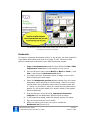
Custom scrollbar graphics
If you don't like the look of the standard Impressario scrollbars, there is a
vertical scrollbar behavior that comes with the Bookmarks castlib. It uses the
bitmap members to implement vertical scrolling of the PDF document. To
change the look of the scrollbar (for both Bookmarks panel and the
Impressario sprite) all you need to do is replace the small bitmaps that are
used to construct the buttons and background of the scrollbar. See
Bookmarks to find out how to access this castlib.
INM Impressario User Manual
© 2003-2008 Integration New Media, Inc. (INM)
p.23/145
October 31, 2008
The Bookmarks castlib contains bitmap images that you can replace
to create your own custom scrollbar.
Bookmarks
To help you implement bookmarks quickly, in any project, we have supplied a
Lingo-based bookmarks panel that is very easy to use. Follow the steps
below to implement bookmarks in your INM Impressario project:
1
Copy the Bookmarks.cst castlib file from Director's Libs > INM
Impressario Tools folder to the location of your movie.
2
From the Director menu choose Modify > Movie > Casts..., click
Link... and select the Bookmarks.cst castlib.
3
You need to have an Impressario sprite on stage in your movie
before following the next steps.
4
Select the Bookmarks-preview bitmap member from the linked
Bookmarks castlib and drag it onto the stage. Place it in a sprite
channel below the Impressario sprite that will communicate with
it. Resize it to the area in which you would like the bookmarks to
appear; it's just a place-holder so it doesn't matter if the graphic
becomes distorted.
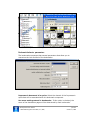
5
Drag the Behavior script named s_impressario bookmark
navigator onto the Bookmarks-preview sprite on stage.
6
In the parameters dialog, select the display options you desire.
7
Play your movie and see how it works!
8
When you deploy your movie, be sure to include the
Bookmarks.cst file next to it.
INM Impressario User Manual
© 2003-2008 Integration New Media, Inc. (INM)
p.24/145
October 31, 2008
Drag the bookmark navigator behavior onto the Bookmarks-preview sprite
Bookmark behavior parameters
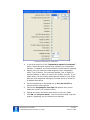
The bookmarks component has several parameters that allow you to
customize the look and feel of the bookmarks:
Customize Bookmark behavior parameters
Impressario document is in sprite: Select the channel of the Impressario
sprite that will be associated with this bookmark component.
Use zoom settings stored in bookmarks: If this option is checked, the
zoom of the destination pages will be determined by each bookmarks'
INM Impressario User Manual
© 2003-2008 Integration New Media, Inc. (INM)
p.25/145
October 31, 2008
settings, as saved in the original PDF document. If left unchecked, the zoom
setting will not change as you navigate.
Display tooltip: If this option is checked long bookmark names will be
displayed as tooltips when your mouse hovers over them. If unchecked, a
horizontal scrollbar will enable you to see bookmark names that are longer
than the sprite rectangle.
Vertical scrollbar buttons scroll speed: This setting allows you to control
the speed for vertical scrolling within the component.
Hilite color: The color used to highlight bookmarks.
Hilite (selected) blend: The degree of opacity used to highlight the selected
bookmark.
Hilite (rollover) blend: The degree of opacity used to highlight bookmarks
as your mouse rolls over them.
Tooltip background: The background color of the tooltips that show long file
names (if this option is checked above).
Hyperlinks
INM Impressario supports hyperlinks as follows:
•
Links to places within the PDF document: This link is specified
as Goto Page in Acrobat. INM Impressario displays the destination
view of the current document.
•
Links to external PDF documents: This link is specified as Goto
Page in Acrobat. INM Impressario displays the destination
document and the precise page location, if one is specified.
•
HTTP links to PDF documents: The destination PDF document is
downloaded to a temporary folder and displayed within the
Impressario sprite.
The file remains on the local computer until the Director session is
finished, so if the same document is called for multiple times within
the same runtime session, the file does not need to be downloaded
again.
•
HTTP links to non-PDF URLs: The destination URL is opened in
the default web browser.
•
Links to open a file: INM Impressario attempts to open the
application that is associated to the requested file, using the
default file association of the operating system.
The GoPreviousView() and GoNextView() methods, or their equivalent
Behaviors or Toolbar buttons, allow users to browse forward and backward
between hyperlinks accessed.
INM Impressario User Manual
© 2003-2008 Integration New Media, Inc. (INM)
p.26/145
October 31, 2008
How to create links
When creating a link to another PDF document, you need to define the link
using the action "Go to view" (Acrobat 5) or "Go to a page" (Acrobat 6 and 7),
in order for the link to open within the Impressario sprite. If you use "Open a
File", INM Impressario will launch the application associated with PDF
documents on the user's system (in an external window). When prompted to
set the view, open the destination PDF, locate the page and scroll to the
desired point in the document.
Event triggered for hyperlinks
In the full version of INM Impressario you can have greater control over how
hyperlinks are handled through Impressario’s events. When an event, such
as #IMP_HyperlinkClick is triggered, your Impressario sprite, or any
Director object can trap the event and either tell INM Impressario to proceed
as normal or do something else. This allows you to monitor and control how
end-users interact with PDFs in your application.
For a complete listing of all INM Impressario events, see INM Impressario
events.
PDF Forms
INM Impressario supports the following PDF form controls: single-line and
multi-line text fields, check boxes, and radio buttons. Form controls can be
edited manually or set via the Lingo member method, SetFields (member).
Form data can be retrieved from a PDF form via the Lingo member methods,
GetFields() and GetAllFields().
Data entry
Users can TAB forward and backward through the form controls within a PDF
document. When the user tabs out of the last control visible within the
Impressario rectangle, the page is automatically scrolled down so that the
next control that has the focus is visible. Similarly, if the lower part of the
page is visible and the user presses Shift+TAB go to a previous control on the
same page, but outside the view, the page is automatically scrolled up.
When the user Tabs out of the last control on a page, if the document
contains form controls on a following page, that new page is displayed and
the next form control gains the focus. Similar behavior occurs when the user
presses Shift+TAB to leave the first form control on a page.
Cut, Copy and Paste operations can be used in text fields in projector mode.
When editing text fields, INM Impressario uses a different algorithm to display
text fields than Acrobat. Therefore, if the PDF document was last saved in
Acrobat, you will see a slight shifting of text within the text fields when
editing them with INM Impressario. If you save the PDF documents with INM
INM Impressario User Manual
© 2003-2008 Integration New Media, Inc. (INM)
p.27/145
October 31, 2008
Impressario and open them again with INM Impressario, you should not see
any shifting of text.
Text entered in multi-line text fields is wrapped to the next consecutive line
when it reaches the end of the current line. Use Enter or Return keys to
skip to the next line within the field. Pressing the Tab keys moves the focus
to the next control on the form. However, if there are Tab characters in text
that is pasted into a multi-line field, those characters are retained.
Limitations on text fields
There are a few limitations on text fields:
•
Single-line text fields are limited to 253 characters.
•
Multi-line text fields are limited to 1024 characters.
•
Auto resizing of fonts, as you type in a field, is not supported.
•
Formatting (decimal, currency, etc.) of field data is not
supported.
•
Calculated fields are not supported.
•
Escape (undo modification) is not supported.
Events triggered for form controls
The event #Imp_KeyPress is sent to the Impressario sprite when the user
types into a form field.
The event #Imp_MouseEnter is sent to the Impressario sprite when the
user’s mouse just enters a form control in the PDF.
The event #Imp_MouseWithin is sent to the Impressario sprite at set
intervals while the user’s mouse is over a form control.
The event #Imp_MouseLeave is sent to the Impressario sprite when the
user’s mouse leaves a hyperlink.
The event #Imp_GotFocus is sent to the Impressario sprite when the focus
moves to a control on a PDF form.
The event #Imp_LostFocus is sent to the Impressario sprite when the focus
moves from one control to another on a PDF form. If the form control loses
focus due to the document being closed, or the page being changed, the
#Imp_LostFocus event is not sent – the developer must check the
#Imp_PageChanged and #Imp_DocumentChanged events.
Password protected forms
In PDF documents that have no special permissions set, users can enter data
manually and tab through the controls within a PDF page, as well as use the
GetFields/SetFields methods.
INM Impressario User Manual
© 2003-2008 Integration New Media, Inc. (INM)
p.28/145
October 31, 2008
In order to access or change form controls within documents that have their
permissions set to not allow copying of text, the developer must set the
Password property of the Impressario member to the document "owner"
password before setting its FileName property, to open the document. This
will allow the user to edit form fields while in the Impressario movie.
For PDF documents that are not password protected, but whose form controls
are set to ReadOnly, the SetFields() method will change the values of those
form controls, but the user will not be able to change them manually.
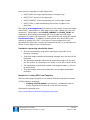
PDF Notes
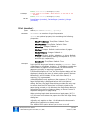
INM Impressario partially supports the Adobe Note object (also referred to as
a Comment or Annotation). If a Note is present in your PDF document, a
special note icon will appear at that location in the Impressario sprite.
When the user clicks this icon
, the event IMP_MouseClick is triggered,
allowing you to display the text of the note via a Lingo handler. For
information on handling Note objects, see #IMP_MouseClick and other events
in the section named Events for Form Controls and Hyperlinks.
Customization of PDF Content
The full version of INM Impressario 4 allows you to generate or change the
content of a PDF document in the following ways:
•
Generate a new PDF document (text and images) based on an
existing PDF document that serves as a template.
•
Set the text of form controls within an existing PDF document
•
Replace images within an existing PDF document
•
Insert, delete or move pages and merge pages from multiple PDF
documents.
Customization of content is such a large and specialized topic that we have
devoted an entire section to it in the user manual. See PDF Generation and
Customization.
Displaying Line Art, Text and Images
By default, INM Impressario sets the display of text, line art and images to
"anti-aliased" or smooth. However, for certain documents you may find it
useful to turn on or off the anti-aliasing of text, line art or images separately.
Use Impressario’s global method, IMP_SetSmoothing() to set the anti-aliasing
(smoothing) for your specific needs.
Examples:
-- Lingo syntax
INM Impressario User Manual
© 2003-2008 Integration New Media, Inc. (INM)
p.29/145
October 31, 2008
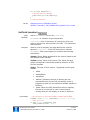
-- to display a document with line art smoothly
IMP_SetSmoothing([#SmoothText:True, #SmoothLineArt:True,
#SmoothImages:False]
-- to turn off anti-aliasing of line art
IMP_SetSmoothing([#SmoothText:True, #SmoothLineArt:False,
#SmoothImages:True]
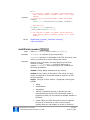
// JavaScript syntax
// to display a document with line art smoothly
lParams = propList("SmoothText",1, "SmoothLineArt",1 ,"SmoothImages",0);
Imp_SetSmoothing(lParams);
// to turn off anti-aliasing of line art
lParams = propList("SmoothText",1, "SmoothLineArt",0 ,"SmoothImages",1);
Imp_SetSmoothing(lParams);
See IMP_SetSmoothing (global) for details.
Localization of the User Interface
INM Impressario allows you to customize the language of messages that
appear at runtime, such as the text of error and warning messages, and the
Find dialog box.
The folder named Locales, within the Impressario Runtime folder, contains
XML-formatted files for English, French and German. These files include the
tags and text of all the error and warning messages that INM Impressario
displays at runtime.
You can add your own XML language files, following the format of those
existing files, or edit them to customize the messages that appear for your
end-users.
To add your own language file, or edit one of the existing files, use any text
editor that can save the encoding as UTF8. Microsoft Excel 2003 has some
nice XML editing capabilities that make it easy to separate the strings to be
changed from the XML tags.
When you publish your movie, create a folder named Locales, next to your
projector or Shockwave DCR file and place your language files in that folder.
This is especially important when deploying Shockwave movies, because INM
Impressario will need to download the files from that location. The files in the
folder closest to your movie will override the ones installed with INM
Impressario.
Tell INM Impressario which language file to use
To tell INM Impressario which XML language file to use, call the global
method IMP_SetLanguage(), on the StartMovie script.
Example:
on StartMovie
INM Impressario User Manual
© 2003-2008 Integration New Media, Inc. (INM)
p.30/145
October 31, 2008
-- set the language to German; the file name is "de.XML"
IMP_SetLanguage("de")
End
// JavaScript syntax
function startMovie () {
// set the language to German; the file name is "de.XML"
Imp_SetLanguage("de");
}
You can even switch between languages at runtime, so you can offer your
end-users a choice of which language they prefer to use.
See IMP_SetLanguage (global) for additional details.
Scripting with Impressario
The code examples in the Properties and Methods sections of this manual are
provided in both Lingo and JavaScript syntaxes. Note that JavaScript is case
sensitive, so method and property names must be typed exactly as they
appear.
In these sections, the parameter designated by “whichMember” is a reference
to a member of type Impressario. It can be specified using the member name
or its number in the cast.
Lingo examples:
member("myImpressarioMember").Pathtype = #RelativeToMovie
member("myImpressarioMember").FileName = "BigFile.pdf"
member(5).FileName = "BigFile.pdf"
theStatus = member(5).GetStatus()
-- if you know the sprite channel, but not the member name
sprite(mySprite).member.Pathtype = #RelativeToMovie
JS examples:
member("myImpressarioMember").Pathtype = symbol("RelativeToMovie");
member("myImpressarioMember").FileName = "BigFile.pdf";
member(5).FileName = "BigFile.pdf";
theStatus = member("myImpressarioMember").GetStatus();
// if you know the sprite channel, but not the member name
sprite(mySprite).member.Pathtype = symbol("RelativeToMovie");
The whichSprite parameter is a reference to a sprite of type Impressario. It
can be specified using the sprite channel number.
Lingo examples:
sprite(mySpriteNum).Page = 15
INM Impressario User Manual
© 2003-2008 Integration New Media, Inc. (INM)
p.31/145
October 31, 2008
mytext = sprite(5).GetPageText()
JS examples:
sprite(mySpriteNum).Page = 15;
myText = sprite(5).GetPageText();
Managing Errors
Managing error conditions is extremely important to the success of your
project. INM Impressario generates two levels of error conditions: Errors and
Warnings. Errors are more serious than warnings; they are generated when,
a function cannot be executed that is critical to the application, such as the
inability to open a document. Warnings, on the other hand, occur when the
operation attempted cannot be executed, but the general functionality of your
application is not compromised, such as when a document page number is
requested that is not present in the document.
Setting the global alert level
By default, INM Impressario alerts the user at runtime when any error or
warning occurs with an Impressario member or sprite. You can, however,
elect to automatically display only errors (not warnings), or no errors at all,
by calling the global method IMP_SetAlertLevel(). This method can only be
called through Lingo (or JavaScript), because changing the default Alert level
implies that you must control error checking at the Lingo level. If you are not
comfortable scripting in Director, do not reset the default Alert level.
Checking for errors
If you decide to set the alert level to #Critical (no warnings) or #None, you
must check for, and handle, errors in Lingo, throughout your application. Not
only should you check for errors that may occur under extreme cases; error
checking is necessary to the normal functioning of a project. For instance, an
error is generated when INM Impressario tries to open a PDF file with the
incorrect password. By checking for such an error, your movie can provide a
way for the user to enter another password and try again.
As a general rule, each time you call an Impressario sprite or member
property or method, check the error status of the corresponding Impressario
object. For example, after setting the Filename property of an Impressario
member, call the GetStatus() member method to determine if the document
has opened successfully. The most probable causes for a document to fail to
open are incorrect Filename, PathType or Password.
Lingo example:
-- open a PDF document
member("myGreatDoc").PathType = #RelativeToMovie
member("myGreatDoc").FileName = "PDFs/theVision.PDF"
INM Impressario User Manual
© 2003-2008 Integration New Media, Inc. (INM)
p.32/145
October 31, 2008
-- generic error-checking on the member
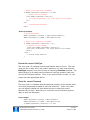
if member("myGreatDoc").GetStatus() <> 0 then
-- display the error message
alert member("myGreatDoc").GetError()
-- you could, alternatively, call a more specific error handler
exit
else
-- continue normal execution
end if
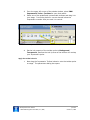
JavaScript example:
// open a PDF document
member("myGreatDoc").PathType = symbol("RelativeToMovie");
member("myGreatDoc").FileName = "PDFs/theVision.PDF";
// generic error-checking on the member
if (member("myGreatDoc").GetStatus() != 0) {
// display the error message
_player.alert(member("myGreatDoc").GetError());
//you could, alternatively, call a more specific error handler
abort();
} else {
// continue normal execution
}
Ensure the correct PathType
The error code -10 indicates that the specified file was not found. This may
mean the file is really not in the location specified, or it may mean that the
PathType property is not set correctly to match the Filename specified. The
safest thing to do is always set the member’s PathType property each time
you set the Filename property. Then, if you receive the error code -10, your
project can take appropriate action.
Check for correct Password
The error code -11 indicates that the password property of the member does
not match the password needed to open the document. If this is the case,
you can display a dialog box that allows the user to enter the correct
password at run-time. Note that you must then set the Filename property
again to open the document.
Lingo example:
member("myGreatDoc").PathType = #RelativeToMovie
member("myGreatDoc").FileName = "PDFs/theVision.PDF"
if member("myGreatDoc").GetStatus() <> 0 then
INM Impressario User Manual
© 2003-2008 Integration New Media, Inc. (INM)
p.33/145
October 31, 2008
-- check the password using custom handler
if CheckPassword("myGreatDoc") = "PasswordError" then
alert("Sorry. The password you entered is not correct.")
exit
end if
else
-- continue normal execution
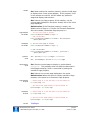
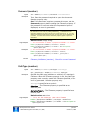
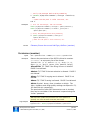
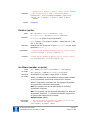
end if
-- check for password error and allow user to enter it
on CheckPassword myMember
errorCode = member(myMember).GetStatus()
if (errorCode = -11) then
-- give the user three chances to enter a password
numChances = 3
repeat with i = 1 to numChances
-- open a dialog box that allows the user to enter the password
member("passwordTextbox").spriteNum.visible = true
-- set the member password to the text entered by the user
member(myMember).Password = member("passwordTextbox").text
-- set the filename property again to open the document
member(myMember).FileName = myFilePath
if (member(myMember).GetStatus() = 0) then
return("OK") -- the passowrd was correct
else
alert("Incorrect password. Please try again.")
end if
end repeat
return("PasswordError")
else
return(errorCode) –- it was a different file error
end if
end CheckPassword
JS example:
// open a PDF document
member("myGreatDoc").PathType = symbol("RelativeToMovie");
member("myGreatDoc").FileName = "acroHelp/Document1.pdf";
// generic error-checking on the member
if (member("myGreatDoc").GetStatus() != 0) {
// check the password using custom handler
if (CheckPassword("myGreatDoc") == "PasswordError") {
_player.alert("Sorry. The password you entered is not correct.");
abort();
}
INM Impressario User Manual
© 2003-2008 Integration New Media, Inc. (INM)
p.34/145
October 31, 2008
} else {
// continue normal execution
}
// check for password error and allow user to enter it
function CheckPassword (myMember) {
errorCode = member(myMember).GetStatus();
if (errorCode == -11) {
// give the user three chances to enter a password
numChances = 3;
myFilePath = member(myMember).FileName;
// repeat with i = 1 to numChances
for (i=1; i<=numChances; i++) {
// open a dialog box that allows the user to enter the password
member("passwordTextbox").spriteNum.visible = 1;
// set the member password to the text entered by the user
member(myMember).Password = member("passwordTextbox").text;
// set the filename property again to open the document
member(myMember).FileName = myFilePath;
if (member(myMember).GetStatus() == 0) {
return("OK"); // the passowrd was correct
} else {
_player.alert("Incorrect password. Please try again.");
}
} // for loop
return("PasswordError");
} else {
return(errorCode); // it was a different file error
}
} // CheckPassword
INM Impressario User Manual
© 2003-2008 Integration New Media, Inc. (INM)
p.35/145
October 31, 2008
PDF Generation and Customization
Generating PDFs via templates
If you are looking for a way to print content that is dynamically generated in
your application at runtime – whether it is text entered manually by the user,
data from a database, or content that is stored in another format in Director –
you can print it in the fonts you want, and using the layout you choose.
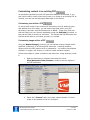
In order for INM Impressario to generate a PDF at runtime, you need to
create one or more PDFs that will serve as templates. These template PDFs
are created in Adobe Acrobat at authoring time. The templates consist of:
•
static items- text and images on the page that will be drawn, as
is, in the generated PDF, such as a corporate logo and perhaps a
title on the first page
•
placeholder items - form fields that will define the locations and
bounding rectangles of text and/or images, which will be
dynamically inserted at runtime. The placeholder form fields are
removed from the PDF that is created.
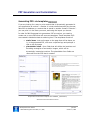
Simple PDF customization template with DYNAMIC_ placeholders,
and final content inserted at runtime
INM Impressario User Manual
© 2003-2008 Integration New Media, Inc. (INM)
p.36/145
October 31, 2008
Placeholder items in PDF templates
Placeholder items in a PDF template can be replaced by HTML-formatted text,
an image or a fill color in the generated PDF document at runtime, depending
on the Lingo methods used. There are four types of placeholder items which
are PDF fields that are treated differently by INM Impressario, based on their
naming conventions:
•
Dynamic items
•
Repeating items
•
Sliding items
•
Page items
Dynamic items
These items are replaced by text or images once per document, when you call
the InsertText() or InsertImage() methods. They will always appear at
the page location where they were placed in the template.
The field name representing a dynamic item must be prefixed by the word
DYNAMIC_ (not case-sensitive).
Repeating items
These items will be repeated vertically within the generated PDF document.
You can only insert repeating data once per PDF, by calling the method
InsertRepeating().
The field names representing repeating items must be prefixed by the word
REPEAT_ (not case-sensitive).
There can only be one set of repeating items within a PDF template, and all
repeating items must be fully enclosed by a two bounding fields:
•
REPEATLINE defines the height of the repeating section of the
PDF. This allows you adjust the vertical spacing between each
repeated set of values.
•
REPEATREGION must enclose all the REPEAT_ items and the
REPEATLINE field, as well as all SLIDING_ items that follow. This
region should not overlap any Page_ elements or other items that
you do not want to cover with repeating or sliding items.
If you expect repeated items to extend onto the following page,
include another field named REPEATREGION2 on that page, but do
not include the REPEAT_ items, REPEATLINE or sliding elements
again on that new page of the template.
INM Impressario User Manual
© 2003-2008 Integration New Media, Inc. (INM)
p.37/145
October 31, 2008
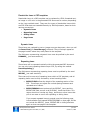
PDF template with repeating placeholders defined,
and final content inserted at runtime
You can only call the InsertRepeating()method once during PDF generation.
You pass it a 3-level nested list containing all the data that will be inserted
into the REPEATREGION:
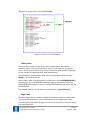
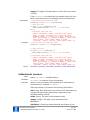
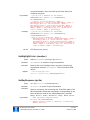
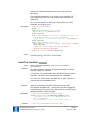
At the inner-most list level is a property list of the format [#Name:
<placeholder_fieldname>, #Value: <data_to_insert>, #options:
<drawing_options>], which specifies what to insert into one of the REPEAT_
placeholder items. You have to specify one of these property lists for each
REPEAT_ item within the REPEATLINE; this gives you the second level of the
nested list structure. Finally, at the outermost level of the nested list, you
have one list per set of repeated items.
INM Impressario User Manual
© 2003-2008 Integration New Media, Inc. (INM)
p.38/145
October 31, 2008
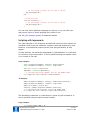
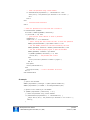
Example list structure for the REPEATREGION:
Example list structure for a REPEATREGION:
Sliding items
These items must be inserted in the PDF template below the section of
repeating items. They are like dynamic items in that they are only drawn
once. However, the position they occupy within the generated PDF depends
on the number of repeating items that precede them.
The field names representing sliding items must be prefixed by the word
SLIDE_ (not case-sensitive).
Sliding items must all be enclosed by a field that is named SLIDEREGION in
the template. The SLIDEREGION rectangle must lie completely within the
REPEATREGION rectangle. If there is no REPEATREGION, there cannot be any
SLIDEREGION.
The method used to set the values of sliding items is InsertSliding().
Page items
These are items that you want to appear at the same position on each page
of the final PDF document, such as information in the Header and Footer.
The field names representing page items must be prefixed by the word PAGE_
(not case-sensitive).
INM Impressario User Manual
© 2003-2008 Integration New Media, Inc. (INM)
p.39/145
October 31, 2008
Here are some examples of useful page items:
•
PAGE_LOGO: an image representing the company logo
•
PAGE_TITLE: the title of the document
•
PAGE_CURRENT: a field representing the current page number
•
PAGE_TOTAL: a field representing the number of pages in the
document
The method InsertPageItems() is used to set the values of text and images
within PAGE_ placeholders on each page of the newly created PDF, with two
exceptions: placeholders named PAGE_CURRENT and PAGE_TOTAL are
reserved for automatically calculating the current page and total pages
throughout the entire PDF document. These values are set using the method
InsertAutoValues(). In addition to setting these auto values during the
process of creating your PDF, if you insert or remove pages from your
generated PDF document, you can call InsertAutoValues() to re-calculate the
values on each page of your PDF document.
Limitations concerning placeholder items:
•
Text will automatically wrap when reaching the right side of the
bounding rectangle.
•
If the text length exceeds the bounding rectangle size, the text will be
truncated.
•
The bounding rectangle should be tall and wide enough to fit at least
one line of text. If a rectangle is too small, no text will be drawn at all.
•
If a placeholder is positioned outside of the page boundary, it will not
be drawn at all.
•
Text and images cannot be rotated within the template placeholder
rectangle.
Samples for Creating PDFs from Template
There are two sample projects on our website that demonstrate the creation
of PDFs based on templates:
•
Creating a PDF Proposal uses Dynamic_ placeholder fields to
print a proposal that is tailored to the client at runtime.
Download the samples here:
http://www.INM.com/products/Impressario/samples/
INM Impressario User Manual
© 2003-2008 Integration New Media, Inc. (INM)
p.40/145
October 31, 2008
Customizing content in an existing PDF
As opposed to generating a new PDF document based on a template, if you
just need to add or insert a few lines of text or an image to an existing PDF at
runtime, you can use the techniques described in this section.
Customizing text within a PDF
To edit a fixed portion of an existing PDF document, such as adding a name
and address on a form letter, you can create text fields within your PDF
document in Acrobat, with field borders set to NONE. These form fields can
then be filled from your Director application using the SetFields() method, or
they can be filled in directly by end-users. The customized PDF document can
then be saved under a new name, printed, or e-mailed.
Customizing images within a PDF
Using the ReplaceImage() method, you can replace existing images within
specified "containers" in an existing PDF document. Creating container
objects within the PDF requires a bit of preparation. You need to have Adobe
Acrobat 6 or higher (full version) in order to create container objects.
Follow these steps to create a container and place your image object(s) inside
it:
1
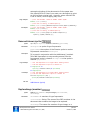
Open the document in Acrobat, then select the menu
View/Navigation Tabs/Content in order to see the objects in
the PDF document:
2
Select the "Content" tab in the newly opened window. Find the
image to be replaced in the list of objects:
INM Impressario User Manual
© 2003-2008 Integration New Media, Inc. (INM)
p.41/145
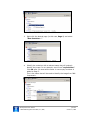
October 31, 2008
3
Right click the desired page (in this case, Page 1) and select
"New Container…"
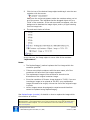
4
Identify the container with a relevant name that will uniquely
identify the image. In our example, we will use "myContainer".
Click OK after you entered the name. A new empty container is
added to Page 1.
This is the name that will be used to identify the image from INM
Impressario.
INM Impressario User Manual
© 2003-2008 Integration New Media, Inc. (INM)
p.42/145
October 31, 2008
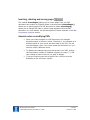
5
Click the icon of the desired image object and drag it onto the new
container with the mouse.
Make sure the red arrow appears under the container when you let
go of the mouse. This indicates that the dragged object will be a
"child" of the container. If the red arrow does not appear, click the
background to deselect the image object; and try it again starting
from the image icon.
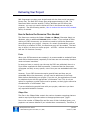
6
The end result looks as follows:
As you can see, the Image object is now a child of the container
"myContainer".
Notes:
•
The ReplaceImage() method replaces the first image within the
container specified.
•
If there are multiple containers with the same name, all of the
containers will have their first images replaced.
•
The replacement image will be stretched or shrunk to the
dimensions of the original container image.
•
Since the resolution of Director image objects is 72 DPI, if you are
inserting an image to be printed at 300 DPI, your replacement
image will need to be roughly 4 times the size of the original image
in pixels.
•
Vector images cannot be assigned to containers and therefore
cannot be replaced using ReplaceImage().
See ReplaceImage (member) for details on how to replace the image within
the container at runtime.
Note: With INM Impressario versions 3 and 4, a new method InsertImage() was added to
INM Impressario. This method allows you to insert an image into a new PDF document that is
generated from a PDF template. For more information on this new method, see Generating
PDFs via templates.
INM Impressario User Manual
© 2003-2008 Integration New Media, Inc. (INM)
p.43/145
October 31, 2008
Inserting, deleting and moving pages
The method InsertPages() allows you to insert pages from one PDF
document into another at a specific place in the document. DeletePages()
allows you to specify pages of a PDF document to delete. MovePages()
allows you to change the order in which a page appears within the PDF
document. For more details, see the descriptions of these methods in the INM
Impressario methods section.
General notes on modifying PDFs
•
When you make changes to a PDF document, the changed
document stays in Director’s cache. Therefore, if you navigate to a
different frame of your movie and then back to the PDF, you will
see the changes, even if you never saved the document or if you
saved it under a different name.
•
To display the changes that were last saved in your PDF, change
the Impressario member’s FileName property to empty (""), and
then change it back to the one you want to display.
•
If you are inserting text with a specific font, the font must be
available on the end-user's system.
INM Impressario User Manual
© 2003-2008 Integration New Media, Inc. (INM)
p.44/145
October 31, 2008
Delivering Your Project
INM Impressario projects must be delivered with the Xtra and all necessary
library files. The base PDF Library files weigh approximately 10 MB. The
Resources folder contains another 7 MB on Windows and 30 MB on Mac.
However, you may not need to deliver all files in the Resources with your
projector. See the following section, How to reduce the resource files needed
below, for details.
How to Reduce the Resource Files Needed
The Resources contains the folders: Fonts and CMaps (Character Maps) on
Windows, plus an additional Unicode folder on Mac. If you embed all fonts
within your PDF documents, you should not need to include the Resources
when distributing your project. However, for certain functionalities, such as
form-filling or creation of PDFs, the Resources may still be needed. The best
way to know is to test your entire project – all PDFs – without the Resources
and see if it functions correctly.
Fonts
When your PDF documents are created, it is recommended to embed all fonts
used within the documents, especially if the fonts are not commonly found on
most end-users' machines.
In case you have no control over the way the PDFs are published, there is a
Fonts folder supplied with INM Impressario. It ensures that the documents
will appear correctly on any system, even if they are not embedded within the
PDF.
However, if your PDF documents require special fonts and they are not
embedded within the documents, you will need to add them to the Fonts
folder before distributing your project. If you do not, the application will need
to substitute them with an appropriate "multimaster" font. This is only an
option for typefaces; symbol fonts must be present, as their glyphs cannot be
simulated with a "multimaster" font.
If you are distributing special fonts with your project, make sure you have
any required distribution licenses.
CMaps files
The files in the CMaps folder contain the various character mappings that are
used to map input keystroke values to the appropriate output "glyph".
Due to the number of CMaps files and the sum of their individual sizes, your
projector can become bloated if you include them unnecessarily. Therefore, if
INM Impressario User Manual
© 2003-2008 Integration New Media, Inc. (INM)
p.45/145
October 31, 2008
they are not needed for your project, you may be able to exclude them from
the projector’s Xtras folder.
If your project only involves viewing and printing PDF documents and the
fonts are embedded within the document, you can safely remove all the
CMaps files. However, if your PDF document contains form fields, you may
need the CMaps files to map the users’ keyboard strokes into the appropriate
display characters or glyphs.
For more information on the contents of the CMaps folder please refer to the
INM Impressario Knowledgebase.
Creating a projector on Windows
1 Click File > Create Projector… and create the projector (.exe).
2 Copy the entire folder named Runtime to a folder named Xtras
next to your projector.
3 Remove the Resources sub-folder if your application doesn't
require it (see How to reduce the resource files needed).
4 There is a sub-folder named Place Beside Projector inside the
Runtime folder. Move the two DLL files (msvc71.dll and msvr71.dll)
from that folder right next to your .EXE file.
5 If you are using your own language XML files (for localization of INM
Impressario messages), make sure they are included in the folder
named Locales within the Runtime folder.
6 Make sure to include your PDF files in the location where they are
accessed by your movie.
Creating a projector on Mac OS X
1 Click File > Create Projector… and create the projector.
2 Copy the Impressario Bundle to a folder named Xtras next to
your projector.
3 If your project requires the Resources (Fonts, C-Maps, Unicode),
copy those three files to the Contents sub-folder of the Impressario
Bundle.
4 If you are using your own language XML files, copy them to the
folder named Locales next to your projector.
5 Make sure to include your PDF files in the location where they are
accessed by your movie.
INM Impressario User Manual
© 2003-2008 Integration New Media, Inc. (INM)
p.46/145
October 31, 2008
Distributing Cross-platform Projects on CD-ROM
Regardless of which version of Director you use, if you are creating a crossplatform CD, you will need to create a separate Xtras folder for each of your
projectors, containing the correct Impressario Runtime folder for that
platform. The contents of the Impressario Runtime folder are the INM
Impressario Xtra itself, the necessary PDF Library files (DLLs), and optional
Resource files (Fonts and CMaps), if needed.
Note: In order to be accessible on Mac, make sure the CD name is not longer than 32
characters.
For more details on creating cross-platform projectors from Director MX 2004
and higher, see the knowledgebase article on our site named "How to publish
projectors for cross-platform distribution".
Distributing INM Impressario Shockwave Movies
INM Impressario full version supports Shockwave distribution for Windows
and Mac OS X.
When the Shockwave movie is launched for the first time, INM Impressario
and all needed DLL files are automatically downloaded from a VeriSign
approved package, and installed on your end-users’ computers. VeriSign is a
standard means of downloading software from secure sources. Users have the
choice of allowing or refusing the installation.
The total file size of the VeriSign package is around 6Mb, so it is a good idea
to notify your end-users that they must click OK when prompted to download
it, and that they may have to wait several seconds before the application
begins. Download times will vary depending on the connection speed.
Note: The CMaps folder, containing character encoding information for Chinese, Vietnamese,
Japanese and other non-Roman character sets is not downloaded in the Verisign package.
Therefore, forms applications using these fonts are not supported in Shockwave. However, if
all fonts are embedded and subset within your PDF documents, and there are no form fields,
the PDF documents should be displayed correctly in the Shockwave movie.
Auto-downloading INM Impressario for Shockwave
Before publishing your INM Impressario Shockwave movie, you need to give it
instructions on where to download the INM Impressario package. You do this
by adding a few lines of text to the file named Xtrainfo.txt, which is located
in “Adobe Director 11\Configuration”.
1
Open the Xtrainfo.txt file in any text editor.
INM Impressario User Manual
© 2003-2008 Integration New Media, Inc. (INM)
p.47/145
October 31, 2008
2
Go to the link below and get the updated Shockwave autoinstallation text for the Xtrainfo.txt:
http://www.INM.com/support/impressario/release-history/
Everything in square brackets must be on a single line without
line breaks.
3
Launch Director and open your movie.
4
Choose Modify > Movie > Xtras.
5
If Impressario is not in the list, click Add. Choose Impressario.x32
(Win) or Impressario (Mac) and click OK.
6
Click and highlight the Impressario Xtra in the Xtras list.
7
Check the “Download if Needed” checkbox.
At this point, Director will try to validate the URL of the INM
Impressario download package and will report any errors.
Important note: Whenever you download a new version of INM Impressario, copy/paste
the updated Shockwave auto-installation text to the Xtrainfo.txt file from our website at:
http://www.INM.com/support/impressario/release-history/.
INM Impressario User Manual
© 2003-2008 Integration New Media, Inc. (INM)
p.48/145
October 31, 2008
Providing for Accessibility
According to the U.S. Census Bureau, nearly 20% of the United States
population has some sort of disability, such as visual, hearing, cognitive, or
motor impairment. As the population ages, the proportion of people with
disabilities grows higher.
Accessibility standards, including Section 508 of the U.S. Rehabilitation Act,
and the W3C Web Content Accessibility Guidelines, usually pertain to webbased content, because it is aimed at the general public. However some CDand kiosk- based applications must also provide for accessibility by hearing,
sight and motor-impaired individuals. Making your application accessible to
the widest possible audience has many benefits – for instance, the more
people that can use your application the more sales you can make.
INM has taken accessibility into consideration when designing INM
Impressario. INM Impressario contains some accessibility features that are
built-in, such as keyboard shortcuts, and others that you may implement
using Director’s built-in accessibility features.
For more information on guidelines for accessibility in software, visit the
following links:
http://www.adobe.com/macromedia/accessibility/508standards.html
http://www.w3.org/TR/WCAG/
W3C priority 1 checkpoints
Keyboard Shortcuts
Impressario sprites will, by default, respond to keyboard shortcuts that the
user types. This allows users who cannot use the mouse to navigate and
interact with the document. The INM Impressario keyboard shortcuts are a
subset of those used by Adobe Reader.
Using the SetKeyResponse() method, you can tell INM Impressario to ignore
all keyboard shortcuts or a subset thereof.
Note: Some keyboard shortcuts only work in projector mode, because Director traps them
at authoring time.
This table shows the keyboard shortcuts and the commands they implement
on both Windows and Mac. Rows highlighted in blue are shortcuts that only
work in projector mode.
Command
Windows keys
Mac keys
Previous page
Page Up key, Left Arrow
Page Up key, Left Arrow
Next page
Page Down key, Right Arrow
Page Down key, Right Arrow
INM Impressario User Manual
© 2003-2008 Integration New Media, Inc. (INM)
p.49/145
October 31, 2008
First Page
Home
Home
Last Page
End
End
Scroll Up
Up Arrow
Up Arrow
Scroll Down
Down Arrow
Down Arrow
Go to next form control or next
hyperlink in document
TAB
TAB
Go to previous form control or
previous hyperlink in document
Shift+TAB
Shift+TAB
Select text of current page
Ctrl+A
Command+A
Copy selected text to clipboard
Ctrl+C
Command+C
Cut selected text from an
editable text field
Ctrl+X
Command+X
Paste text of clipboard to an
editable text field
Ctrl+V
Command+V
Open the Find dialog box
Ctrl+F
Command+F
Open the Print dialog box
Ctrl+P
Command+P
Using Director’s Accessibility Features
With Director MX and higher, there are Accessibility behaviors that allow you
to create Section 508- compliant projects. Using these behaviors requires
some effort and experience. Therefore the easiest way to learn how to use
them is by viewing and examining a Section 508 compliant sample.
We have created a Director sample movie that specifically addresses this
issue, called Impressario-Accessibility. Download this sample at:
http://www.INM.com/products/impressario/samples/
INM Impressario User Manual
© 2003-2008 Integration New Media, Inc. (INM)
p.50/145
October 31, 2008
INM Impressario Properties
Many of the properties of the INM Impressario API are common to both
Impressario members and sprites. However, there are important distinctions,
which will help you to know which properties to use in which circumstances.
Differences between Member and Sprite properties
The Impressario member properties are exactly the same ones that appear in
the Impressario Member Properties dialog box (and Property Inspector). They
are used to control how the document initially appears when it is displayed.
Sprite properties are used to access and modify the current properties of the
PDF document displayed in the sprite. Once the document is opened, the
sprite properties are usually used to navigate through the document and
dynamically change the appearance of the document on stage.
Impressario members work as Flash Asset members do. Changing the sprite
properties does not affect the initial settings of the member. However,
changing the member’s properties will change the sprite properties of all
sprites that refer to that member.
For example, if you change just the Filename property of an Impressario
member and there are two sprites on stage, which each reference that same
member, the PDF document displayed in both sprites will change to the new
one. However, if the sprites’ Page properties are different, they will each
show a different current page of that PDF document. On the other hand, if
you change the Page property of the member, both sprites will display the
same page.
AutoDownload (member)
Syntax
Set: member(whichMember).AutoDownload = T/F
Get: myAutoDownValue = member(whichMember).AutoDownload
Description
Boolean value. If True, hyperlinks to PDF documents on the
Internet will be automatically downloaded when clicked
(unless the IMP_AutoDownloadRequested event is trapped
and the action is terminated). If the value is set to False,
INM Impressario’s default behavior will be to treat URLs
containing PDF documents as it would other URLs, and
launch them in the associated web browser.
Set: This property can be set individually for different
Impressario members. Only hyperlink clicked within the
Impressario member whichMember are affected.
Get: This property can be retrieved individually for different
Impressario members.
INM Impressario User Manual
© 2003-2008 Integration New Media, Inc. (INM)
p.51/145
October 31, 2008
Default value: TRUE.
Note: If you are using the Light version of INM Impressario, this property
has no effect. It is always considered as if False.
Lingo examples
–- set the AutoDownload property to False for an Impressario
member
member("myPDF").AutoDownload = FALSE
-- if desired, you can create an event handler, "on
IMP_AutodownloadRequest", and allow specific files to be
downloaded
JS examples
// set AutoDownload property to False for an Impressario member
member("myPDF").AutoDownload = 0;
See also
IMP_AutodownloadRequest
Filename (member)
Syntax
Set: member(whichMember).Filename = whichLinkFile
Get: myPDFfile = member(whichMember).Filename
Description
String value. Get/Set the name of the PDF file associated
with the member. This is strictly a member property; there
is no sprite property equivalent.
Set: Links a specific PDF file to Impressario member,
whichMember. WhichLinkFile can be an absolute path or
relative to movie.
When Filename is set, the pathType property must specify
whether the path is absolute or relative.
Get: Returns an Absolute path when the PathType property
is #Absolute; returns a Relative path when the PathType
property is #RelativeToMovie.
Default value: Empty string.
Lingo examples
–- pathType is absolute
member("myPDF").PathType = #Absolute
set the Filename of member "myPDF" to the moviepath &
"MyDoc.pdf"
member("myPDF").Filename = the moviepath & "MyDocs/MyDoc.pdf"
--retrieve the full path of member "myPDF"
theFullPath = member("myPDF").Filename
-------------------------------------------------------–- pathType is Relative to Movie
set the Filename of member "myPDF" to "MySubfolder/MyDoc.pdf"
--retrieve the relative path of member "myPDF"
thePartialPath = member("myPDF").Filename
INM Impressario User Manual
© 2003-2008 Integration New Media, Inc. (INM)
p.52/145
October 31, 2008
JS examples
// pathType is absolute
member("myPDF").PathType = symbol("Absolute");
member("myPDF").FileName = _movie.path + "MyDocs/MyDoc.pdf";
//retrieve the full path of member "myPDF"
theFullPath = member("myPDF").Filename;
////////////////////////////////////////////////////////
// pathType is Relative to Movie
member("myPDF").FileName = "MySubfolder/MyDoc.pdf";
//retrieve the relative path of member "myPDF"
thePartialPath = member("myPDF").Filename;
See also
PathType
Highlighting (sprite)
Syntax
Description
Set: sprite(whichSprite).Highlighting = True/False
True/False. Turns on or off the highlighted words specified in
the last call to the Find method for the PDF document display
in sprite whichSprite.
Set: If the Highlighting property is set to True, the last words
that were specified in the Find dialog or Find() method call
are highlighted throughout the PDF on screen, using the color
list specified in SetHighlightColors().
If Highlighting is set to false no words are highlighted.
Get: Returns the state of highlighting of the PDF document in
sprite whichSprite.
Default value: False.
Note: The PDF is not highlighted when printed.
Lingo examples
-- set the highlighting of sprite 15 to true
sprite(15).Highlighting = True
JS examples
// set the highlighting of sprite 15 to true
sprite(15).Highlighting = 1;
See also
Find (sprite), SetHighlightColors(member)
Page (member or sprite)
Syntax for
member
Description for
Set: member(whichMember).Page = whichNumber
Get: firstPage = member(whichMember).Page
Integer value. Get/Set the page to display.
INM Impressario User Manual
© 2003-2008 Integration New Media, Inc. (INM)
p.53/145
October 31, 2008
member
Set: When setting the member property, sets the initial page
to display when a new sprite appears. If this property is set
in the member at runtime, this will affect any sprites on
stage that display that member.
Get: Returns the Page property of the member, not the
current page displayed in the sprite. Usually this is the initial
page displayed.
Default value: If the Filename property is empty, the
default value of Page is 0. If there is a Filename associated
with the member, the default Page property is 1.
Lingo examples
for member
-- set the intial page to display
member("myImpressarioMember").Page = 1
-- open the document
member("myImpressarioMember").Filename = the moviepath &
"MyDocs/MyDoc.pdf"
JS examples
for member
// set the intial page to display
member("myImpressarioMember").Page = 1;
// open the document
member("myImpressarioMember").Filename = _movie.path +
"MyDocs/MyDoc.pdf";
Syntax for
sprite
Description for
sprite
Set: sprite(whichSprite).Page = whichNumber
Get: currentPage = sprite(whichSprite).Page
Set: Sets the current page to display in sprite channel
whichSprite. This property does not affect the document’s
initial page to display, which is controlled by setting the
member’s Page property.
Get: Returns the current page displayed in the sprite.
Default value: When the sprite is initially opened its Page
property is the same as its member’s Page property.
Lingo examples
for sprite
-- display page 15 in the PDF open in sprite channel 10
sprite(10).Page = 15
-- get the current page showing in sprite channel 10
myCurrentPage = sprite(10).Page
JS examples
for sprite
// display page 15 in the PDF open in sprite channel 10
sprite(10).Page = 15;
// get the current page showing in sprite channel 10
myCurrentPage = sprite(10).Page;
See also
TotalPages
INM Impressario User Manual
© 2003-2008 Integration New Media, Inc. (INM)
p.54/145
October 31, 2008
Password (member)
Syntax
Description
Set: member(whichMember).Password = whichPassword
Text. Sets the password required to open the document.
Member property only.
Set: If the document requires a password to open, set the
Password property before setting the Filename property. If
the password is incorrect when the Impressario sprite is
displayed, an error is generated.
Note: Each time you set the Filename property for a member, check
the member’s error code, by calling GetStatus(), to determine if the
document password is correct. If the error code returned is -11, you can
display a dialog box that allows the user to enter the correct password at
run-time. You must then set the Filename property again to open the
document.
Default value: empty string.
Lingo examples
-- set the Password of member "myImpressarioMember" to "kookoo"
member("myImpressarioMember").Password = "kookoo"
member("myImpressarioMember").Filename = the moviepath &
"MyDocs/MyDoc.pdf"
JS examples
// set the Password of member "myImpressarioMember" to "kookoo"
member("myImpressarioMember").Password = "kookoo";
member("myImpressarioMember").Filename = _movie.path +
"MyDocs/MyDoc.pdf";
See also
Filename, GetStatus (member), Check for correct Password
PathType (member)
Syntax
Set: member(whichMember).PathType = whichType
Get: myPathType = member(whichMember).PathType
Description
Get/Set the path type (absolute or relative) of a member’s
Filename. When the Filename property is set, the PathType
property must correctly match the Filename specified, or an
error is generated. Member property only.
whichType is specified as a symbol:
#Absolute – The Filename property is specified as an
Absolute path
#RelativeToMovie - The Filename property is specified as a
relative path
Default value: #Absolute
Lingo examples
-- first set the PathType, then the Filename
member("myImpressarioMember").PathType = #Absolute
member("myImpressarioMember").Filename = the moviepath &
"MyDocs/MyDoc.pdf"
INM Impressario User Manual
© 2003-2008 Integration New Media, Inc. (INM)
p.55/145
October 31, 2008
-- verify the pathType before doing something
if (member("myImpressarioMember").PathType = #Absolute)
then
-- make sure the path is valid structure, etc.
end if
JS examples
// first set the PathType, then the Filename
member("myImpressarioMember").PathType = symbol("Absolute");
member("myImpressarioMember").Filename = _movie.path +
"MyDocs/MyDoc.pdf";
// verify the pathType before doing something
if (member("myImpressarioMember").PathType ==
symbol("Absolute")) {
// make sure the path is valid structure, etc.
}
See also
Filename, Ensure the correct PathType, GetError (member)
Permissions (member)
Syntax
Description
Get: myPermissions = member(whichMember).permissions
Returns the permissions of the PDF file linked to member
whichMember, as a property list of the format:
[#FormFillIn: {1, 0}, #Select: {1, 0}, #Copy: {1, 0},
#Save: {1, 0}, #Print: {#none, #low, #medium, #high}]
#FormFillIn: T/F. TRUE if the filling of forms is allowed.
FALSE if not allowed.
#Select: T/F. TRUE if the text selection is allowed. FALSE if
not allowed.
#Copy: T/F. TRUE if copying text is allowed. FALSE if not
allowed.
#Save: T/F. TRUE if saving is allowed. FALSE if not allowed.
#Print: Symbol. #none, #low, #medium or #high. The
#low, #medium and #high quality settings correspond to 72,
150 and 300 dpi, respectively.
The permissions of each PDF document are set in Acrobat;
they can be overridden if the document is opened using the
"owner" password.
Note: The permissions may change when a new password is specified.
INM Impressario updates the permissions once a new password is
specified, even if the document has already been loaded.
Lingo examples
-- get the permissions of member "myImpressarioMember"
mypermissions = member("myImpressarioMember").permissions
INM Impressario User Manual
© 2003-2008 Integration New Media, Inc. (INM)
p.56/145
October 31, 2008
-- [#FormFillIn:1, #Select:0, #Copy:0, #Save:0, #Print: #medium]
JS examples
// get the permissions of member "myImpressarioMember"
myPermissions = member("myImpressarioMember").permissions;
<[#FormFillIn: 0, #Select: 0, #copy: 0, #save: 0, #print:
#none]>
See also
Password
Rotation (sprite)
Syntax
Set: sprite(whichSprite).Rotation = angle
Get: myRotation = sprite(whichSprite).Rotation
Parameters
whichSprite: a sprite of type Impressario
angle: Integer. The angle of rotation. Values can be: [-180,
-90, 0, 90, 180]
Description
Lingo example
Rotates the PDF document in sprite whichSprite by the angle
specified in angle.
-- rotate the PDF document 90 degrees from its current rotation
sprite(15).Rotation = sprite(15).Rotation + 90
JS example
//rotate the PDF document 90 degrees from its current rotation
sprite(15).Rotation = sprite(15).Rotation + 90;
Scrollbars (member or sprite)
Syntax
for member
Set: member(whichMember).Scrollbars = scrollOption
Description
for member
ScrollOption is a symbol, either #Both, or #None.
Get: myScroll = member(whichMember).Scrollbars
#Both: scrollbars are automatically displayed when needed
for all Impressario sprites that reference this member.
#None: Impressario scrollbars are not displayed by default
for sprites that references the member.
Set: This property can be set individually for different
Impressario members.
Get: This property can be retrieved individually for different
Impressario members. It indicates the default property for
all sprites that reference the member.
Default value: #Both.
Lingo example
for member
–- set the scrollbars to automatically appear for all sprites
that reference the Impressario member
member("myPDF").Scrollbars = #Both
INM Impressario User Manual
© 2003-2008 Integration New Media, Inc. (INM)
p.57/145
October 31, 2008
JS example
for member
// set the scrollbars to automatically appear for all sprites
that reference the Impressario member
member("myPDF").Scrollbars = symbol("Both");
Syntax
for sprite
Description
for sprite
Set: sprite(whichSprite).Scrollbars = scrollOption
Get: myScroll = sprite(whichSprite).Scrollbars
ScrollOption is a symbol, either #Both, or #None.
#Both: scrollbars are automatically displayed when needed
for the current PDF document displayed in whichSprite.
#None: Impressario scrollbars are not displayed for the
current document in whichSprite.
Set: This property can be set individually for different
Impressario sprites. If not explicitly set, each Impressario
sprite takes the default #Scrollbars property of its associated
member.
Get: This property can be retrieved individually for different
Impressario sprites. It indicates the current setting for sprite
whichSprite.
Lingo examples
for sprite
–- disable scrollbars for this Impressario sprite
sprite(15).Scrollbars = #None
–- get the current scrollbars value for this Impressario sprite
scrollbar_val = sprite(15).Scrollbars
JS example
for sprite
// disable scrollbars for this Impressario sprite
sprite(15).Scrollbars = symbol("none");
// get the current scrollbars value for this Impressario sprite
scrollbar_val = sprite(15).Scrollbars;
ScrollH (member or sprite)
Member Syntax
Set: member(whichMember).ScrollH = leftPosition
Get: leftPosition = member(whichMember). ScrollH
Member
Description
Integer value. Set or retrieve the initial left position of the
PDF document in pixels. ScrollH = 0 means the left edge of
the document will be aligned to the left edge of the sprite, in
all sprites that display the member, except if the page width
is smaller than the sprite rectangle width, in which case the
document is centered in the sprite.
Set: Sets the initial left position of the PDF document, when
a new sprite appears.
Get: Returns the initial position of the left edge of the PDF
document. This value is NOT the sprite’s ScrollH property.
INM Impressario User Manual
© 2003-2008 Integration New Media, Inc. (INM)
p.58/145
October 31, 2008
Default value: 0
Lingo example
for member
--to specify an initial starting place in the document, shifted
to the right 100 pixels
member("myImpressarioMember").ScrollH = 100
member("myImpressarioMember").ScrollV = 0
member("myImpressarioMember").Page = 1
member("myImpressarioMember").Filename = "MyDoc.pdf"
JS example
for member
//to specify an initial starting place in the document, shifted
to the right 100 pixels
member("myImpressarioMember").ScrollH = 100;
member("myImpressarioMember").ScrollV = 0;
member("myImpressarioMember").Page = 1;
member("myImpressarioMember").Filename = "MyDoc.pdf";
Sprite Syntax
Set: sprite(whichSprite).ScrollH = leftPosition
Get: leftPosition = sprite(whichSprite).ScrollH
Sprite
Description
Integer value. Set or retrieve the current left position, in
pixels, of the PDF document in sprite channel whichSprite.
Set: Sets the current left position of the PDF document
within the sprite rectangle. ScrollH = 0 means the left edge
of the document will be aligned to the left edge of the sprite,
unless the page width is smaller than the sprite rectangle
width, in which case the document is centered in the sprite.
Get: Returns the current position of the left edge of the PDF
document within the sprite rectangle. This value is changed
when the user drags the Hand cursor over a document that is
wider than the current sprite rectangle.
Default value: 0
Lingo example
for sprite
-- the first horizontal pixel displayed from left
JS example
for sprite
// the first horizontal pixel displayed from left
See also
myHorizontalPos = sprite(15).ScrollH
myHorizontalPos = sprite(15).ScrollH;
ScrollV, ScrollHMax, ScrollVMax
ScrollHMax (sprite)
Syntax
Description
Get: maxScroll = sprite(whichSprite).ScrollHMax
Integer value. Sprite property only.
Get: Returns the maximum value for horizontal scrolling. The
value represents the difference between the page width and
the sprite width in pixels. If the entire page width fits into the
sprite’s rectangle, the returned value is zero.
Lingo xample
-- retrieve the number of pixels remaining to the right of the
sprite rectangle when ScrollH = 0
INM Impressario User Manual
© 2003-2008 Integration New Media, Inc. (INM)
p.59/145
October 31, 2008
myOffStageRight = sprite(15).ScrollHMax
JS example
// retrieve the number of pixels remaining to the right of the
sprite rectangle when ScrollH = 0
myOffStageRight = sprite(15).ScrollHMax;
See also
ScrollH, ScrollVMax, ScrollV
ScrollV (member or sprite)
Member Syntax
Set: member(whichMember).ScrollV = topPosition
Get: topPosition = member(whichMember). ScrollV
Description for
member
Integer value. Set or retrieve the initial top position of the
PDF document in pixels. ScrollV = 0 means the top edge of
the document will be aligned to the top edge of the sprite, in
all sprites that display the member, except if the height of
the page is smaller than the height of the sprite rectangle.
Set: Sets the initial top position of the PDF document, when
a new sprite appears.
Get: Returns the initial position of the top edge of the PDF
document. This value is NOT the sprite’s ScrollV property.
Default value: 0
Lingo examples
for member
--to specify an initial starting place in the document, halfway
in the middle of the second page
member(“myImpressarioMember”).ScrollH = 0
member(“myImpressarioMember”).ScrollV = 200
member(“myImpressarioMember”).Page = 2
member(“myImpressarioMember”).Filename = “MyDoc.pdf”
JS examples
for member
// to specify an initial starting place in the document, halfway
in the middle of the second page
member("myImpressarioMember").ScrollH = 0;
member("myImpressarioMember").ScrollV = 200;
member("myImpressarioMember").Page = 2;
member("myImpressarioMember").Filename = "MyDoc.pdf";
Sprite Syntax
Set: sprite(whichSprite).ScrollH = topPosition
Get: topPosition = sprite(whichSprite).ScrollV
Description
for sprite
Integer value. Set or retrieve the current top position, in
pixels, of the PDF document in sprite channel whichSprite.
Set: Sets the current top position of the PDF document
within the sprite rectangle. ScrollV = 0 means the top edge
of the document will be aligned to the top edge of the sprite,
except if the height of the page is smaller than the height of
the sprite rectangle.
Get: Returns the current position of the top edge of the PDF
document within the sprite rectangle. This value is changed
when the user drags the Hand cursor over a document that is
INM Impressario User Manual
© 2003-2008 Integration New Media, Inc. (INM)
p.60/145
October 31, 2008
longer than the current sprite rectangle.
Default value: 0
Lingo example
for sprite
-- first pixel displayed down from the top of the PDF
JS example
for sprite
// first pixel displayed down from the top of the PDF
See also
myVerticalPos = sprite(15).ScrollV
myVerticalPos = sprite(15).ScrollV;
ScrollH, ScrollHMax, ScrollVMax
ScrollVMax (sprite)
Syntax
Description
Get: maxScroll = sprite(whichSprite).ScrollVMax
Integer value. Sprite property only.
Get: Returns the maximum value for vertical scrolling. The
value represents the difference between the page height and
the sprite height in pixels. If the entire page height fits into
the sprite’s rectangle, the returned value is zero.
Lingo example
-- retrieve the number of pixels remaining below the sprite
rectangle when ScrollV = 0
myOffStageBottom = sprite(15).ScrollVMax
JS example
// retrieve the number of pixels remaining below the sprite
rectangle when ScrollV = 0
myOffStageBottom = sprite(15).ScrollVMax;
See also
ScrollV, ScrollHMax, ScrollH
TotalPages (member)
Syntax
Description
Get: myDocSize = member(whichMember).TotalPages
Integer value.
Get: the total number of pages of the document in member
whichMember . This property cannot be set.
Default value: 0, if there is no filename associated with the
member.
Lingo example
--display the number of pages in the PDF document
member("totalPages").text =
string(member("myImpressarioMember").TotalPages)
JS example
// display the number of pages in the PDF document
member("totalPages").text =
(member("myImpressarioMember").TotalPages).toString();
See also
Page
INM Impressario User Manual
© 2003-2008 Integration New Media, Inc. (INM)
p.61/145
October 31, 2008
TrackView (sprite)
Syntax
Set: sprite(whichSprite).TrackView = False
Get: myTrackStatus = sprite(whichSprite).TrackView
Description
True/False.
Set: If set to True, each 'view' (combination of filename,
page, zoom, and scroll settings) for the Impressario sprite,
whichSprite, is saved internally so that GoPreviousView()
and GoNextView() methods can access it.
If set to False, subsequent views are not saved. This is
useful when implementing scrolling functions, for instance,
where you do not want to save the view each time the user
scrolls down a few lines.
Get: Returns the current TrackView status for the
Impressario sprite specified.
Default value: True.
Lingo example
-- turn the view tracking off for this function
sprite(15).TrackView = False
JS example
// turn the view tracking off for this function
sprite(15).TrackView = 0;
See also
GoNextView (sprite), GoPreviousView (sprite)
UpdateURL (member)
Member Syntax
Set: member(whichMember).UpdateURL = whichURL
Get: myUpdateURL = member(whichMember).UpdateURL
Member
Description
Lingo examples
for member
String.
Set/Get the URL of a PDF on the Internet that will be
downloaded and displayed if it is newer than the local PDF
linked to member whichMember.
-- set the UpdateURL to one on the INM website
member("myPDF").UpdateURL = "http://www.INM.com/new.PDF"
member("myPDF").PathType = #RelativeToMovie
member("myPDF").Filename = "PDFs\old.PDF"
JS examples
for member
// set the initial page to 10
member("myPDF").UpdateURL = "http://www.INM.com/new.PDF";
member("myPDF").PathType = #RelativeToMovie;
member("myPDF").Filename = "PDFs\old.PDF";
See also
Filename
INM Impressario User Manual
© 2003-2008 Integration New Media, Inc. (INM)
p.62/145
October 31, 2008
ViewOptions (member or sprite)
Member Syntax
Set: member(whichMember).ViewOptions = whichOptions
Get: myViewOptions = member(whichMember).ViewOptions
Member
Description
Symbol.
Set/Get which view options are used when displaying an
Impressario member.
Possible values for whichOptions are:
#CustomViewOptions: The document is displayed using
the Page, Zoom, ScrollH, and ScrollV member properties.
#DocumentViewOptions: The member view properties are
reset to the document’s original view settings (as saved in
Acrobat).
Default value: #DocumentViewOptions
Lingo examples
for member
-- set the initial page to 10
member("myImpressarioMember").ViewOptions =
#CustomViewOptions
member("myImpressarioMember").Page = 10
JS examples
for member
// set the initial page to 10
member("myImpressarioMember").ViewOptions =
symbol("CustomViewOptions");
member("myImpressarioMember").Page = 10;
Sprite Syntax
Set: sprite(whichSprite).ViewOptions = whichOptions
Get: myViewOptions = sprite(whichSprite).ViewOptions
Sprite
Description
Symbol. Set/Get the view options that are used to display an
Impressario sprite.
Possible values for whichOptions are:
#CustomViewOptions: The document is displayed using
the custom defined Page, ZoomMode, Zoom, ScrollH, and
ScrollV properties.
#DocumentViewOptions: The sprite view properties are
reset to the original document settings (as saved in Acrobat).
Default value: #DocumentViewOptions
Lingo examples
for sprite
-- make the current view options the original document
defaults
JS example
for sprite
// make the current view options the original document
defaults
sprite(15).ViewOptions = #DocumentViewOptions
sprite(15).ViewOptions = symbol("DocumentViewOptions");
See also
Page, ScrollH, ScrollV, Zoom, GetView, SetView
INM Impressario User Manual
© 2003-2008 Integration New Media, Inc. (INM)
p.63/145
October 31, 2008
ZoomMode (member or sprite)
Member Syntax
Set: member(whichMember).ZoomMode = whichMode
Get: whichMode = member(whichMember).ZoomMode
Member
Description
Symbol.
Get/Set the initial scaling mode of the PDF document.
Possible values for whichMode are:
#ActualSize: The document is displayed at its original size,
aligned to the top left corner of the sprite rectangle in which
it is displayed.
#FitPage: Entire page fits in the sprite rectangle
#FitWidth: Document is scaled so that its width is equal to
the width of the sprite rectangle
#Custom: The document is scaled to the percentage
specified in the Zoom property.
When the Zoom property is set, the ZoomMode property is
automatically set to #Custom
Lingo examples
for member
-- set intial scale to show the entire width of the page
member("myImpressarioMember").ZoomMode = #FitWidth
-- get the intial zoom mode
myZoomMode = member("myImpressarioMember").ZoomMode
JS examples
for member
// set intial scale to show the entire width of the page
member("myImpressarioMember").ZoomMode = symbol("FitWidth");
// get the intial zoom mode
myZoomMode = member("myImpressarioMember").ZoomMode;
Sprite Syntax
Get: whichMode = sprite(whichSprite).ZoomMode
Set: sprite(whichSprite).ZoomMode = whichMode
Sprite
Description
Symbol.
Get/Set the current scaling mode of the PDF document in
sprite whichSprite. Possible values for whichMode are:
#ActualSize: The document is displayed at it’s original size,
aligned to the top left corner of the sprite rectangle in which
it is displayed.
#FitPage: Entire page fits in the sprite rectangle
#FitWidth: Document is scaled so that its width is equal to
the width of the sprite rectangle
#Custom: The document is scaled to the percentage
specified in the Zoom property.
When the Zoom property of the sprite is set, the ZoomMode
INM Impressario User Manual
© 2003-2008 Integration New Media, Inc. (INM)
p.64/145
October 31, 2008
sprite property is automatically set to #Custom.
Lingo examples
for sprite
-- set the current scale to show the entire width of the page
sprite(15).ZoomMode = #FitWidth
-- get the current zoom mode
myZoomMode = sprite(15).ZoomMode
JS examples
for sprite
// set the current scale to show the entire width of the page
sprite(15).ZoomMode = symbol("FitWidth");
// get the current zoom mode
myZoomMode = sprite(15).ZoomMode;
See also
Zoom
Zoom (member or sprite)
Member Syntax
Set: member(whichMember).Zoom = whichPercent
Get: whichPercent = member(whichMember).Zoom
Member
Description
Float value.
Set or retrieve the initial scale of the PDF document, as a
percentage of the original document size.
Get/Set: whichPercent is a float number, representing the
percentage (from 8% to 1600%) to scale the document,
based on its original (actual) size.
When Zoom is set, the ZoomMode property is automatically
set to #Custom
Lingo examples
for member
-- specify an initial scale of twice the original document size
member("myImpressarioMember").Zoom = 200
-- get the intial percentage scaled
myZoomPercent = member("myImpressarioMember").Zoom
JS examples
for member
// specify an initial scale of twice the original document size
member("myImpressarioMember").Zoom = 200;
// get the intial percentage scaled
myZoomPercent = member("myImpressarioMember").Zoom;
Sprite Syntax
Set: sprite (whichSprite).Zoom = zoomValue
Get: whichPercent = sprite (whichSprite).Zoom
Sprite
Description
Float value.
Set or retrieve the current scale of the PDF document.
Get/Set: whichPercent is a float number, representing the
percentage (8% to 1600%) to scale the document, based on
its original (actual) size.
When Zoom is set, the ZoomMode property is automatically
set to #Custom
Lingo examples
for sprite
-- scale the PDF document in sprite 10 to twice the document’s
actual size
INM Impressario User Manual
© 2003-2008 Integration New Media, Inc. (INM)
p.65/145
October 31, 2008
sprite(10).Zoom = 200
-- scale the PDF document to twice it’s current size
sprite(10).Zoom = 2 * sprite(10).Zoom
-- get the current zoom as a precentage of the actual size
myZoomFactor = sprite(10).Zoom
JS examples
for sprite
// scale the PDF document in sprite 10 to twice the document’s
actual size
sprite(10).Zoom = 200;
// scale the PDF document twice it’s current size
sprite(10).Zoom = 2 * sprite(10).Zoom;
// get the current zoom as a precentage of the actual size
myZoomFactor = sprite(10).Zoom;
See also
ZoomMode
INM Impressario User Manual
© 2003-2008 Integration New Media, Inc. (INM)
p.66/145
October 31, 2008
INM Impressario Methods
As with Impressario properties, some Impressario methods apply only to
members, others apply only to sprites, and a few can be applied to either
members or sprites. There are also global methods, which apply to the Xtra in
general and are not associated with any particular member or sprite.
Generally, member methods affect the PDF document directly or affect the
initial appearance of a PDF document. Sprite methods apply to the immediate
instance of an open document in the sprite channel specified.
AddListener (sprite)
Syntax
Parameters
sprite(whichSprite).AddListener(mySpriteNum)
whichSprite: a sprite of type Impressario
mySpriteNum: the number of the Director sprite to receive
Impressario events from whichSprite
Description
Allows any Director sprite to receive events generated from a
specific Impressario sprite. Place the AddListener() method in
the "on BeginSprite" handler of sprite mySpriteNum, and at
runtime, INM Impressario makes the association and
thereafter sends all events from Impressario sprite
whichSprite to your Director sprite.
This method is to be used in conjunction with the
RemoveListener() method.
Note: When handling events from a behavior script that uses
AddListener(), the first parameter of the event is a reference to the
behavior script itself, not the Impressario sprite channel.
Lingo example
-- register my button to receive events from
-- the Impressario sprite in channel 15
on BeginSprite me
sprite(15).AddListener(me.SpriteNum)
end BeginSprite
JS example
// register my button to receive events from
// the Impressario sprite in channel 15
function beginSprite (me) {
sprite(15).AddListener(me.SpriteNum);
}
See also
RemoveListener (sprite)
INM Impressario User Manual
© 2003-2008 Integration New Media, Inc. (INM)
p.67/145
October 31, 2008
CreateBookmark (sprite)
Syntax
Parameters
sprite(whichSprite).CreateBookmark (title[, id])
whichSprite: a sprite of type Impressario
title: String. The title of the bookmark.
id: Optional parameter. String. This string specifies the
hierarchical order of the new bookmark in the bookmarks list.
Description
Creates a bookmark in the PDF document using the current
view settings of the Impressario sprite.
The new bookmark will be inserted in the existing bookmarks
list at the position specified by id.
If the id specified is already used by another bookmark, the
new bookmark created will be inserted at that location in the
hierarchy and all bookmarks will be moved down in the
hierarchy, along with their children. A warning will be
generated to let the developer know that this adjustment has
been made.
If the developer doesn’t supply any id, the bookmark will be
created at the end of the list on the first level.
Lingo example
-- create a bookmark as the third one below the first bookmark
theBookmarksList = sprite(myPDF).CreateBookmark("How to Print
Reports", "1.3")
JS example
// get the list of bookmarks for the document
theBookmarksList = sprite(myPDF).CreateBookmark("How to Print
Reports", "1.3");
See also
GoToBookmark (sprite), GetBookmarks (member)
CreateFromTemplate (member)
Syntax
Parameters
member(whichmember).CreateFromTemplate ()
whichMember: an Impressario member that is linked to a
Template PDF document
Description
Begins the process of creating a new PDF document based on
the template PDF linked to member whichMember.
The template PDF must contain at least one field, whose
name begins with a valid template placeholder tag, such as:
"DYNAMIC_", "REPEAT_", "SLIDE_", or "PAGE_"
Following the CreatFromTemplate() method, you can call
InsertText, InsertImage, InsertRepeating, InsertSliding,
InsertPageItems, or InsertAutoValues. After inserting all
content in the new PDF, you must call SaveFromTemplate()
to finalize the PDF creation process. You may then load the
new PDF file into an Impressario member to display or print.
INM Impressario User Manual
© 2003-2008 Integration New Media, Inc. (INM)
p.68/145
October 31, 2008
Lingo example
-- start creating a new proposal based on a template PDF
member("PDF-Template").CreateFromTemplate()
JS example
// start creating a new proposal based on a template PDF
member("PDF-Template").CreateFromTemplate();
See also
InsertAutoValues, InsertImage, InsertRepeating,
InsertSliding, InsertText, SaveFromTemplate,
InsertPageItems
DeletePages (member)
Syntax
Parameters
member(whichMember).DeletePages(fromPage, numPages)
whichMember: Member of type Impressario, from which the
PDF pages are deleted.
fromPage: Integer. The first page number of the range to
delete from the PDF document.
numPages: Integer. The total number of pages to delete from
the PDF document. To delete a single page, specify 1.
Description
Lingo example
Deletes a set of consecutive pages from the PDF document
linked to member whichMember.
-- delete pages 9 and 10 of the PDF document linked to member
"Owner-Manual"
member("Owner-Manual").DeletePages(9,2)
JS example
// delete pages 9 and 10 of the PDF document linked to member
"Owner-Manual"
member("Owner-Manual").DeletePages(9,2);
See also
InsertPages (member), MovePages (member), Merge
(member)
Email (member)
Syntax
Parameters
member(whichMember).Email(toAddress, fromAddress,
subject, message)
whichMember: a member of type Impressario
toAddress: Optional parameter. String containing the
recipient's email address.
fromAddress: Optional parameter. String containing the
sender's email address.
subject: Optional parameter. String containing the subject.
message: Optional parameter. String containing the body of
the message.
INM Impressario User Manual
© 2003-2008 Integration New Media, Inc. (INM)
p.69/145
October 31, 2008
Description
Opens a new message in the user's default e-mail system,
fills the parameters that are included in the method, and
attaches the PDF document linked to member whichMember.
The user must then click the send button to actually send the
e-mail.
If there is no default e-mail system on the user's computer
an error message is displayed.
Note: If your PDF contains form fields, you need to save the PDF before
e-mailing it, in order to preserve the data.
Lingo example
-- send a PDF via e-mail
member("myPDF").Email("[email protected]",
"[email protected]", “My Document”, “Here is your
document…”)
JS example
// send a PDF via e-mail
member("myPDF").Email("[email protected]", "[email protected]",
“My Document”, “Here is your document…”)
Find(sprite)
Syntax
Parameters
sprite(whichSprite).Find(whichtext [, optionsProperties])
whichSprite: a sprite of type Impressario
whichText: a string value or list of strings containing the text
to search for.
OptionsProperties: Optional property list containing one or
more of the following options:
#showDialog: True/False. When True, a find dialog box is
displayed. Default value is False.
#caseSensitive: True/False. When True, only text with
matching case is highlighted. Default value is False.
#wholeWordsOnly: True/False. When True, the Find method
only locates whole words that match the text specified in
whichText. Default value is False.
#findBackwards: True/False. When True, the Find command
searches in reverse order. Default value is False.
#fromTop: True/False. When True, the Find method starts
searching from page 1 of the document. Default value is
False.
#exactPhrase: True/False. When True, the Find method
searches for and highlights the text exactly as it is entered –
each word in sequence; otherwise, if there are multiple words
in the search text, they are highlighted individually
throughout the PDF. Default value is False.
#highlightItems: True/False. When true, all occurrences of
INM Impressario User Manual
© 2003-2008 Integration New Media, Inc. (INM)
p.70/145
October 31, 2008
the specified text are highlighted throughout the document
(the #Highlighting property of the sprite becomes TRUE).
Highlighting is only turned off when the Find() method is
called with a new search string specified, or when the
#Highlighting property of the sprite is set to FALSE. The
default value is the current value of the #Highlighting
property of the sprite.
Description
Finds specific text in sprite whichSprite. If the text is a list of
strings, each string is included as a separate text to search
for throughout the document.
The first call to the Find method, finds and highlights the first
occurrence of the text, starting from the top of the current
page, except if #fromTop is True, in which case, it finds and
highlights the first occurrence from page 1 of document.
Subsequent calls to the Find method using the same text will
find the next occurrence (or previous occurrence, depending
on the value of #findBackwards) of the text on any page,
starting from the current found text.
If #showDialog is True, a dialog box appears, where the user
can type in a term or phrase to search for and choose from
among the options for match case or whole words. The dialog
box remains open until the user clicks its close button (the X
button) or the Impressario sprite instance is destroyed (user
moves to a frame that no longer displays the sprite).
When the find dialog box opens, the options are checked or
not, depending on the options passed to the Find method. If
no options are passed, the default options are used
(everything is unchecked).
If no text match is found, an alert is displayed: "No matching
text was found." This alert is always displayed, regardless of
the global alert level. If the search reaches the end of the
document, a dialog appears asking if the user would like to
continue the search at the beginning of the document.
To change the language of the Find dialog box, use the
IMP_SetLanguage () method.
Lingo examples
-- open a Find dialog box and allow the user to enter text to
search for
sprite(15).Find(“”,[#showDialog:True])
-- find and highlight all occurrences of the word “requirement”
Find(sprite 15, “requirement”,[#showDialog:False,
#highlightItems:True])
-- find and highlight all occurrences of the words
-- “requirement” and "operating procedures"
Find(sprite 15, [“requirement”, "operating procedures"],
[#showDialog:False, #highlightItems:True])
JS examples
// open a Find dialog box and allow the user to enter text to
search for
sprite(15).Find("", propList(symbol("showDialog"), 1));
INM Impressario User Manual
© 2003-2008 Integration New Media, Inc. (INM)
p.71/145
October 31, 2008
// find and highlight all occurrences of the word "requirement"
sprite(15).Find("requirement", propList(symbol("showDialog"),0,
symbol("highlightItems"),1));
See also
Highlighting, SetHighlightColors(member), IMP_SetLanguage
GetDocumentProperty (member)
Syntax
Parameters
whichMember.GetDocumentProperty(PropertyName)
whichMember: a member of type Impressario
propertyName: Optional parameter. String that determines
which PDF document property is returned.
Description
Returns the PDF document property specified by
propertyName, for the document in member whichMember.
propertyName can be one of:
"Title", "Author", "Subject", "Keywords", "Producer",
"CreationDate", "ModDate", or a custom-defined property
saved with the PDF document.
The property name is case sensitive. If the specified
document property is not defined, an empty string is
returned.
If propertyName is omitted in the method call, all the PDF
document properties (metadata) are returned in a list of
property lists of the format:
[[#Name:propertyName, #Value:propertyValue], …]
Lingo examples
-- get the Document title of the member named "PDF_Doc"
myTitle = member("PDF_Doc").GetDocumentProperty("Title")
-- return the keywords of the member named "PDF_Doc"
-- in a comma-delimited string
myKeyWords =
member("PDF_Doc").GetDocumentProperty("Keywords")
-- return all document properties in a list of property lists
lMetadata = member(“PDF_Doc”).GetDocumentProperty()
JS examples
// get the Document title of the member named "PDF_Doc"
myTitle = member("PDF_Doc").GetDocumentProperty("Title");
// return the keywords of the member named "PDF_Doc"
// in a comma-delimited string
myKeyWords = member("PDF_Doc").GetDocumentProperty("Keywords");
// return all document properties in a list of property lists
lMetadata = member("PDF_Doc").GetDocumentProperty();
INM Impressario User Manual
© 2003-2008 Integration New Media, Inc. (INM)
p.72/145
October 31, 2008
GetError (member)
Syntax
member(whichMember).GetError()
Parameters
whichMember: a member of type Impressario
Description
Returns a string describing the error associated with the
member specified by whichMember. Errors can be generated
whenever a member method is called, or a member property
is set.
If no error occurred, an empty string is returned.
Lingo example
-- check for errors when opening a file
member ("myPDF").Filename = "PDFs/WhitePaper.PDF"
if member("myPDF").GetStatus() then
-- display the error message
alert member ("myPDF").GetError()
end if
-- continue execution
JS example
// check for errors when opening a file
member("myPDF").FileName = "PDFs/WhitePaper.PDF";
if (member("myPDF").GetStatus()) {
// display the error message
_player.alert(member("myPDF").GetError());
}
// continue execution
See also
Managing errors, GetStatus (sprite)
GetError (sprite), IMP_SetAlertLevel (global)
GetError (sprite)
Syntax
sprite(whichSprite).GetError()
Parameters
whichSprite: a sprite of type Impressario
Description
Returns a string describing the error or warning associated
with the sprite specified by whichSprite. Errors (and
warnings) can be generated whenever a sprite method is
called, or a sprite property is set.
If no error occurred, an empty string is returned.
Lingo example
-- check for errors or warnings when setting the current page
sprite(15).Page = 55
if sprite (15).GetStatus() then
-- display the error message
alert sprite(15).GetError()
end if
-- continue execution
JS example
// check for errors or warnings when setting the current page
sprite(15).Page = 55;
INM Impressario User Manual
© 2003-2008 Integration New Media, Inc. (INM)
p.73/145
October 31, 2008
if (sprite(15).GetStatus()) {
// display the error message
_player.alert(sprite(15).GetError());
}
// continue execution
See also
Managing errors, GetStatus (sprite),
GetError (member), IMP_SetAlertLevel (global), Error codes
GetFields (member)
Syntax
Parameters
member(whichMember).GetFields(controlList)
whichMember: a member of type Impressario
controlList: a list of the names of controls for which you
want to retrieve the value stored in the PDF. The names are
case sensitive.
Description
Returns a list of property lists that describe the controls
passed in controlList, of the PDF document in member
whichMember. Each sub-property list contains the following
information:
#name: String. Name associated to the control (same as the
one passed to this method).
#value: String. Value of the control. The values for each
control correspond to those that would be saved in an FDF
file from Acrobat.
#type: The type of form control. Supported control types
include:
Lingo example
•
#field
•
#radioButton
•
#checkbox
•
#button (Javascript actions on buttons are not
executed directly, but an IMP_MouseClick event is
triggered so that you can execute a callback handler in
Director)
•
#note (When the IMP_MouseClick event is trapped,
the text of a comment or note is returned as a
#tooltip that you can display on screen in Director)
-- get the value in the fields named FirstName and LastName
fullName = member ("myPDF").GetFields(["FirstName","LastName"])
-- check for errors
if member ("myPDF").GetStatus() then
Check_FieldError(member "myPDF")
INM Impressario User Manual
© 2003-2008 Integration New Media, Inc. (INM)
p.74/145
October 31, 2008
end if
-- list returned is [[#name: "FirstName", #value:"Gabrielle",
#type: #field], [#name: "LastName", #value: "Krim", #type:
#field]]
JS example
// get the value in the fields named FirstName and LastName
fullName =
member("myPDF").GetFields(list("FirstName","LastName"));
// check for errors
if (member ("myPDF").GetStatus()) {
Check_FieldError(member("myPDF"));
}
// list returned is [[#name: "FirstName", #value:"Gabrielle",
#type: #field], [#name: "LastName", #value: "Krim", #type:
#field]]
See also
GetAllFields (member), SetFields (member),
#IMP_MouseClick
GetAllFields (member)
Syntax
Parameters
member(whichMember).GetAllFields([PageNumber])
whichMember: a member of type Impressario
PageNumber: Optional. A valid page of the PDF document, from
which to retrieve form control names and values.
Description
Returns a list of property lists that describe all the form
controls on page PageNumber, of the PDF document in
member whichMember. Each sub-property list contains the
following information:
#name: String. Name associated to the control.
#value: String. Value of the control. The values for each
control correspond to those that would be saved in an FDF
file from Acrobat.
#type: The type of form control. Supported control types
include:
•
#field
•
#radioButton
•
#checkbox
•
#button (Javascript actions on buttons are not
executed directly, but an IMP_MouseClick event is
triggered so that you can execute a callback handler in
Director)
•
#note (When the IMP_MouseClick event is trapped,
the text of a comment or note is returned as a
#tooltip that you can display on screen in Director)
INM Impressario User Manual
© 2003-2008 Integration New Media, Inc. (INM)
p.75/145
October 31, 2008
#page: The page of the document on which the form control
is found.
If the PageNumber is not specified, the method returns all form
fields- name/value pairs -for all pages within the document.
Lingo example
-- get the value first name text field
allControls = member ("myPDF").GetAllFields()
-- check for errors
if member ("myPDF").GetStatus() then
Check_FieldError(member "myPDF") -- your own method
end if
-- allControls looks like this:
-- [[#name: "cardholder", #value: "John Doe",#type: #field,
#page: 1],[#name: "PreviousClient", #value:"Yes",#type:
#checkbox, #page: 1], [#name: "expiry date", #value:"09-05",
#type: #field, #page: 1], [#name: "cardNumber", #value:"45001224-2346-8374", #type: #field, #page: 1],[#name:
"cardholder", #value: "John Doe", #type: #field, #page: 2]]
JS example
// get the value first name text field
allControls = member("myPDF").GetAllFields();
// check for errors
if (member ("myPDF").GetStatus()) {
Check_FieldError(member("myPDF")); // your own method
}
// allControls looks like this:
// [[#name: "cardholder", #value: "John Doe",#type: #field,
#page: 1],[#name: "PreviousClient", #value:"Yes",#type:
#checkbox, #page: 1], [#name: "expiry date", #value:"09-05",
#type: #field, #page: 1], [#name: "cardNumber", #value:"45001224-2346-8374", #type: #field, #page: 1],[#name:
"cardholder", #value: "John Doe", #type: #field, #page: 2]]
See also
GetFields (member), SetFields (member), #IMP_MouseClick
GetBookmarks (member)
Syntax
member(whichMember).GetBookmarks()
Parameters
whichMember: a member of type Impressario
Description
Returns a list of property lists containing the bookmarks of
the document in member whichMember.
Each sub-property list contains the following information:
#id: String. Each bookmark entry within a PDF document has
a unique ID that can be passed as an argument to the
GoToBookmark() method.
#title: String. The text of the bookmark entry.
#page: Integer. The page in the document of the
destination.
#children: If there are bookmarks that are children of the
INM Impressario User Manual
© 2003-2008 Integration New Media, Inc. (INM)
p.76/145
October 31, 2008
current bookmark, they are listed as sub lists within the
#children property.
Lingo example
-- get the list of bookmarks for the document
theBookmarksList = member("myPDF").GetBookmarks()
put theBookmarksList
-- [[#id:"1", #title:"Introduction", #page: 1,
#children[[#id:"1,1", #title:"System Requirements", #page: 1,
#children[]],[#id:"1,2", #title:"Features", #page: 3,
#children[]]],[#id:"2", #title:"Getting Started", #page: 5,
#children[[#id:"2,1", #title:"How to create an Impressario
member", #page: 5, #children[]],[#id:"2,2", #title:"How to
insert a toolbar", #page: 7, #children[]]]
JS example
// get the list of bookmarks for the document
theBookmarksList = member("myPDF").GetBookmarks();
trace(theBookmarksList);
<[[#id:"1", #title:"Introduction", #page: 1,
#children[[#id:"1,1", #title:"System Requirements", #page: 1,
#children[]],[#id:"1,2", #title:"Features", #page: 3,
#children[]]],[#id:"2", #title:"Getting Started", #page: 5,
#children[[#id:"2,1", #title:"How to create an Impressario
member", #page: 5, #children[]],[#id:"2,2", #title:"How to
insert a toolbar", #page: 7, #children[]]]>
See also
GoToBookmark (sprite)
GetHighlightColors (member)
Syntax
member(whichMember).GetHighlightColors()
Parameters
whichMember: a member of type Impressario
Description
Returns the list of highlight colors currently used by the
Impressario member whichMember. The list contains RGB
values.
Examples
-- Get the highlight colors
theColors = member("myPDF").GetHighlightColors()
GetKeyResponse (sprite)
Syntax
sprite(whichSprite).GetKeyResponse()
Parameters
whichSprite: a sprite of type Impressario
Description
Returns a property list containing the True/False state of all
INM Impressario keyboard commands, corresponding to the
same properties used in the SetKeyResponse() method:
#Page, #Scroll, #Tabs, #SelectAll, #Copy, #Find, #Print
Lingo example
-- check the keyboard response settings
put sprite (15).GetKeyResponse()
-- [#Page:1, #Scroll:1, #Tabs: 1, #SelectAll: 1, #Copy:False,
#Find:1, #Print:1])
INM Impressario User Manual
© 2003-2008 Integration New Media, Inc. (INM)
p.77/145
October 31, 2008
JS example
// check the keyboard response settings
trace(sprite(15).GetKeyResponse());
//<[#Page:1, #Scroll:1, #Tabs: 1, #SelectAll: 1, #Copy:0,
#Find:1, #Print:1]>
See also
SetKeyResponse (sprite), Keyboard shortcuts
GetPageImage (member)
Syntax
Parameters
member(whichMember).GetPageImage(pageNumber, quality)
whichMember: A member of type Impressario
pageNumber: Integer. The page of the document that you want
to retrieve, as an image.
quality: Symbol: #Low, #Medium, or #High. These quality
settings correspond to 72, 150 and 300 dpi, respectively.
Description
Returns the image of page pageNumber of the PDF document
linked to member whichMember. The quality setting
determines the print-resolution of the image returned. Since
the screen display is 72 DPI, #High quality images will
appear to be enlarged if viewed as a bitmap.
Note that the higher the quality setting the larger the bitmap
retrieved and the longer it takes.
Lingo example
-- Get the image of page 5 of the document at screen resolution
JS example
// Get the image of page 5 of the document at screen resolution
member("PDF-bmp").Image = member("myPDF").GetPageImage(5, #Low)
member("PDF-bmp").Image = member("myPDF").GetPageImage(5,
symbol("Low"));
See also
ReplaceImage (member)
GetPageText (member)
Syntax
Parameters
member(whichMember).GetPageText(pageNumber)
whichMember: a member of type Impressario
pageNumber: The page of the document that you want to
retrieve.
Description
Returns a string containing the text of the current page or
the text of the ageNumber specified, of the document
currently displayed in member whichMember.
If pageNumber is zero (0), the text of the current page is
returned.
If pageNumber is not a valid page for the document a warning
INM Impressario User Manual
© 2003-2008 Integration New Media, Inc. (INM)
p.78/145
October 31, 2008
is generated.
Lingo example
-- put the text of the page 5 of member "myPDF", into a field
JS example
// put the text of the page 5 of member "myPDF", into a field
member("myPage").text = member("myPDF").GetPageText(5)
member("myPage").text = member("myPDF").GetPageText(5);
See also
GetPageText (sprite)
GetPageText (sprite)
Syntax
sprite(whichSprite).GetPageText()
Parameters
whichSprite: a sprite of type Impressario
Description
Returns a string containing the text of the current page of the
document currently displayed in sprite whichSprite.
Lingo example
-- put the text of the current page in sprite 15, into a field
member("myPage").text = sprite(15).GetPageText()
JS example
// put the text of the current page in sprite 15, into a field
member("myPage").text = sprite(15).GetPageText();
See also
GetPageText (member), GetSelectedText (sprite)
GetPDFVersion (member)
Syntax
member(whichMember).GetPDFVersion()
Parameters
whichMember: a member of type Impressario
Description
Returns a string containing the version of PDF standard that
the document linked to member whichMember conforms to.
This method can be used to check if a document is
supported; INM Impressario supports documents that
conform to PDF standard 1.5 and lower (equivalent to
Acrobat 6, or lower).
Lingo example
-- check the PDF version when opening a file
member ("myPDF").Filename = "PDFs/WhitePaper.PDF"
ver = member("myPDF").GetPDFVersion()
if (Float(Chars(ver,1,3)) > 1.6) then
-- display message to user
alert ("Warning: This PDF document was created using a version
of PDF standard that is not fully supported." & RETURN & \
"Some features may not work as expected.")
end if
JS example
// check the PDF version when opening a file
member("myPDF").Filename = "PDFs/WhitePaper.PDF";
ver = member("myPDF").GetPDFVersion();
if (eval(ver.substring(0,3)) > 1.6) {
INM Impressario User Manual
© 2003-2008 Integration New Media, Inc. (INM)
p.79/145
October 31, 2008
// display message to user
_player.alert("Warning: This PDF document was created using a
version of PDF standard that is not fully supported. Some
features may not work as expected.");
}
GetSelectedText (sprite)
Syntax
sprite(whichSprite).GetSelectedText()
Parameters
whichSprite: a sprite of type Impressario
Description
Returns the currently selected text in sprite whichSprite.
If there is no current selection, an empty string is returned.
Lingo example
-- put the current selection in sprite 15, into a field
member ("mySelection").text = GetSelectedText(sprite 15)
JS example
// put the current selection in sprite 15, into a field
member("mySelection").text = sprite(15).GetSelectedText();
See also
GetPageText (sprite), GetPageText (member)
GetStatus (member)
Syntax
member(whichMember).GetStatus()
Parameters
whichMember: a member of type Impressario
Description
Returns a numeric error code associated with the member
specified by whichMember. For errors, the numeric codes are
negative; for warnings they are positive. If no error
occurred, zero (0) is returned.
Errors and warnings can be generated whenever a member
method is called, or a member property is set.
Lingo example
-- check for errors when opening a file
member ("myPDF").Filename = "PDFs/WhitePaper.PDF"
if member ("myPDF").GetStatus() then
-- call your own handler, for instance: CheckFileError(member
"myPDF")
end if
-- continue execution
JS example
// check for errors when opening a file
member("myPDF").Filename = "PDFs/WhitePaper.PDF";
if (member("myPDF").GetStatus()) {
// call your own handler, for instance: CheckFileError(member
"myPDF")
}
// continue execution
INM Impressario User Manual
© 2003-2008 Integration New Media, Inc. (INM)
p.80/145
October 31, 2008
See also
Managing errors, GetError (member), GetStatus (sprite),
IMP_SetAlertLevel (global), Error codes
GetStatus (sprite)
Syntax
sprite(whichSprite).GetStatus()
Parameters
whichSprite: a sprite of type Impressario
Description
Returns a numeric error code associated with the sprite
specified by whichSprite. Errors can be generated whenever
a sprite method is called, or a sprite property is set.
If no error occurred, zero (0) is returned.
Lingo example
-- check for errors when setting the current page
sprite(15).Page = 55
if sprite(15).GetStatus() then
-- call your own handler, e.g. CheckPageError(15,55)
end if
-- continue execution
JS example
// check for errors when setting the current page
sprite(15).Page = 55;
if (sprite(15).GetStatus()) {
// call your own handler, e.g. CheckPageError(15,55)
}
// continue execution
See also
Managing errors, GetError (sprite),
GetStatus (member), IMP_SetAlertLevel (global)
GetTool (sprite)
Syntax
sprite(whichSprite).GetTool()
Parameters
whichSprite: a sprite of type Impressario
Description
Returns the symbol of the tool currently in use:
#hand: page scrolling mode
#selectText: the text selection tool (I-beam)
#zoom: the zoom mode (magnifying glass)
#none: no tool is in effect (arrow cursor)
Lingo example
-- retrieve the current tool mode
currentTool = sprite(15).GetTool()
if (currentTool = #selectText) then
-- pop up a message to user
end if
INM Impressario User Manual
© 2003-2008 Integration New Media, Inc. (INM)
p.81/145
October 31, 2008
JS example
// retrieve the current tool mode
currentTool = sprite(15).GetTool();
if (currentTool == symbol("selectText")) {
// pop up a message to user
}
See also
SetTool (sprite)
GetView (member)
Syntax
member(whichMember).GetView()
Parameters
whichMember: a member of type Impressario
Description
Returns a property list containing the member’s view
properties. This list is the same as is passed to SetView
(member): #ViewOptions, #zoomMode, #zoom, #scrollH,
#scrollV, #page
Lingo example
-- the initial view of the document in member "myPDF"
mySettings = member("myPDF").GetView()
-- [#ViewOptions: #CustomViewOptions, #zoomMode: #ActualSize,
#zoom: 100.0000, #scrollH: 0, #scrollV: 0, #page: 1]
JS example
// the initial view of the document in member "myPDF"
mySettings = member("myPDF").GetView();
<[#ViewOptions: #CustomViewOptions, #zoomMode: #Custom, #zoom:
100.0000, #scrollH: 0, #scrollV: 200, #page: 1]>
See also
SetView (member), Zoom, ZoomMode, Page, ScrollH, ScrollV,
GetView (sprite)
GetView (sprite)
Syntax
sprite(whichSprite).GetView()
Parameters
whichSprite: a sprite of type Impressario
Description
Returns a property list containing the sprite’s current view
properties. This list has the same properties as the one that
is passed to the SetView (sprite) method: #ViewOptions,
#ZoomMode, #Zoom #ScrollH, #ScrollV, #Page
Lingo example
-- the current view of the document in sprite 15
mySettings = sprite (15).GetView()
-- the property list returned is…
-- [#ViewOptions: #CustomViewOptions, #zoomMode: #Custom, #zoom:
130.0003, #scrollH: 0, #scrollV: 0, #page: 1]
JS example
// the initial view of the document in member "myPDF"
mySettings = sprite(15).GetView();
-- <[#ViewOptions: #CustomViewOptions, #zoomMode: #Custom, #zoom:
100.0000, #scrollH: 0, #scrollV: 200, #page: 1]>
INM Impressario User Manual
© 2003-2008 Integration New Media, Inc. (INM)
p.82/145
October 31, 2008
See also
SetView (sprite), Zoom, ZoomMode, Page, ScrollH, ScrollV,
GetView (member)
GoNextView (sprite)
Syntax
sprite(whichSprite).GoNextView()
Parameters
whichSprite: a sprite of type Impressario
Description
Display the next view of the current document. This method
allows users to ‘browse" back and forth through hyperlinks.
INM Impressario saves in a "stack", as many views as
memory will allow.
Lingo example
-- Go forward to the next saved view
sprite (15).GoNextView()
JS example
// Go forward to the next saved view
sprite(15).GoNextView();
See also
GoPreviousView
GoPreviousView (sprite)
Syntax
sprite(whichSprite).GoPreviousView ()
Parameters
whichSprite: a sprite of type Impressario
Description
Display the previous view of the current document. This
method allows users to ‘browse" back and forth through
hyperlinks. INM Impressario saves in a "stack", as many
views as memory will allow.
Lingo example
-- Go back to the previous saved view
sprite (15).GoPreviousView()
JS example
// Go back to the previous saved view
sprite(15).GoPreviousView();
See also
GoNextView
GoToBookmark (sprite)
Syntax
Parameters
sprite(whichSprite).GotoBookmark(bookmarkID,
[inheritZoom])
whichSprite: a sprite of type Impressario
bookmarkID: String. The unique ID of the bookmark entry.
INM Impressario User Manual
© 2003-2008 Integration New Media, Inc. (INM)
p.83/145
October 31, 2008
inheritZoom: True/False. If TRUE, the current zoom of the
Impressario sprite is kept; if FALSE, the zoom value of the
bookmark is used. Default: TRUE.
Description
Navigates to the page, bookmarkID. The zoom value depends
on the value of inheritZoom.
Lingo example
-- go to the bookmark just clicked, keep the current zoom
JS example
// go to the bookmark just clicked, keep the current zoom
sprite(15).GoToBookmark(myID, TRUE)
sprite(15).GoToBookmark(myID, 1);
See also
GetBookmarks (member)
IMP_GetAlertLevel (global)
Syntax
IMP_GetAlertLevel()
Parameters
None.
Description
Returns the global alert level in effect, which determines
what errors are automatically displayed to the user. Possible
values are #None, #Critical, #All. The default alert level is
#All.
Lingo example
-- store the current alert level setting
myAlertLevel = IMP_GetAlertLevel()
JS example
// store the current alert level setting
myAlertLevel = IMP_GetAlertLevel();
See also
Managing errors, IMP_SetAlertLevel (global)
IMP_GetLanguage (global)
Syntax
whichLang = IMP_GetLanguage()
Parameters
None.
Description
Returns a string representing the language that is currently
being used by INM Impressario for displaying strings in the
user interface and error messages. This value is the
language parameter specified in the last call to
IMP_SetLanguage().
Lingo example
-- return the language file currently in use
put IMP_GetLanguage()
-- "fr"
JS example
// return the language file currently in use
trace(Imp_GetLanguage());
// “fr”
See also
IMP_SetLanguage (global)
INM Impressario User Manual
© 2003-2008 Integration New Media, Inc. (INM)
p.84/145
October 31, 2008
IMP_GetSmoothing (global)
Syntax
IMP_GetSmoothing()
Parameters
None
Description
Returns a property list containing the anti-aliasing
(smoothing) settings for three display properties:
#SmoothText, #SmoothLineArt and #SmoothImages.
A value of True indicates that documents are displayed with
anti-aliasing for the corresponding property.
Examples
-- retrieve the current global anti-aliasing settings
put IMP_GetSmoothing()
-- returns a property list like this…
--[#SmoothText:True, #SmoothLineArt:False, #SmoothImages:False]
JS example
// retrieve the current global anti-aliasing settings
trace(Imp_GetSmoothing());
// <[#SmoothText: 1, #SmoothLineArt: 1, #SmoothImages: 1]>
See also
IMP_SetSmoothing (global)
IMP_GetXtraVersion (global)
Syntax
IMP_GetXtraVersion()
Parameters
None.
Description
Returns a property list containing information regarding the
version number of INM Impressario currently running, the
variant (Light Version, Full Version or Trial), and the Date the
Xtra was compiled, in the form:
[#XtraVersion:[versionprops], #XtraVariant:variantString
#XtraDate: systemdate]
versionprops is a sub-property list with the following
properties, all of type integer: #Major, #Minor, #Revision,
#Build
variantString is a string – either "Light Version", "Full
Version", "Trial Version", or "No Valid Key"
systemdate is the date the Xtras was compiled, in the date
format of the user's operating system
Examples
-- put the current version of INM Impressario in the message
window
put IMP_GetXtraVersion()
-- [#XtraVersion: [#Major:2, #Minor:0, #Revision:0, #Build:50],
#XtraVariant: "Full Version", #XtraDate: "Nov 2, 2004 –
14:49:55"]
JS example
// put the current version of INM Impressario in the message
window
trace(Imp_GetXtraVersion());
INM Impressario User Manual
© 2003-2008 Integration New Media, Inc. (INM)
p.85/145
October 31, 2008
IMP_SetAlertLevel (global)
Syntax
Parameters
IMP_SetAlertLevel(whichLevel)
whichLevel: Possible values are:
#None – No errors are displayed to the user
#Critical – only critical errors are displayed automatically
#All – Both errors and warnings are automatically displayed
Description
Sets the global alert level in effect, which determines which
errors are automatically displayed to the user.
The default alert level is #All.
Lingo example
-- set the alert level to show errors, not warnings
IMP_SetAlertLevel(#Critical)
JS example
// set the alert level to show errors, not warnings
Imp_SetAlertLevel(symbol("Critical"));
See also
Managing errors, IMP_GetAlertLevel (global method)
IMP_SetLanguage (global)
Syntax
Parameters
error = IMP_SetLanguage(whichLang)
whichLang: String. The root part of the filename of the XML
file to be used for displaying INM Impressario interface
messages to the user. This is also the string that is returned
by the IMP_GetLanguage() method.
error: String. The error returned. If there is no error reading
the XML-formatted text, the error returned is "". Otherwise,
the string returned is a description of the first error
encountered, including the line number where it occurs in the
text.
Description
This global method allows you to customize the language
used in dialog boxes, and error and warning messages that
are displayed to the end-user at runtime, by specifying an
XML file conforming to the format of the default template file,
"en.xml", installed with INM Impressario. A few language files
are installed with INM Impressario, but you can create your
own to replace or add to the available languages.
The naming convention for the supplied language files is
<ISO language abbreviation>.xml e.g. "en.xml", but they
can be anything, as long as the filename matches the
whichLang parameter specified (without ".xml").
If the language file specified by whichLang is not found in a
INM Impressario User Manual
© 2003-2008 Integration New Media, Inc. (INM)
p.86/145
October 31, 2008
folder named Locales, either next to the movie, or in the
Runtime folder, INM Impressario will use the default English
language strings. No error message is generated, but an
error number is returned from the method.
If the language file specified is incomplete an error is
generated.
If a string definition is not found in the specified language
file, the default English string is used instead.
For details on the formatting of Impressario XML language
files open the file named "en.xml", installed within the
Impressario/Runtime/Locales folder. You can edit the file
with any text editor that has the ability to save with UTF8
encoding.
Note: In Shockwave, the language files must be in a folder named
Locales, next to the DCR file, in order for INM Impressario to download
them when IMP_SetLanguage() is called. After a file is downloaded, it is
available locally throughout the Shockwave session.
Lingo example
-- set the language file to French
Err = IMP_SetLanguage("fr")
if (Err <> "") then alert "error loading French language file"
JS example
// set the language file to French
Err = Imp_SetLanguage("fr");
if (Err != "") {
_player.alert("error loading French language file");
}
See also
IMP_GetLanguage (global)
IMP_SetProgressIndicator (global)
Syntax
IMP_SetProgressIndicator(showProgress)
Parameters
showProgress: True/False.
Description
If showProgress is True, progress bars are displayed for all
time-consuming operations, such as auto-downloading PDF
documents, replacing images, or inserting PDF pages. If
showProgress is False, progress indicators are not displayed.
Default: True.
Lingo example
-- turn off INM Impressario progress indicators
IMP_ SetProgressIndicator (FALSE)
JS example
// turn off INM Impressario progress indicators
Imp_SetProgressIndicator(0);
INM Impressario User Manual
© 2003-2008 Integration New Media, Inc. (INM)
p.87/145
October 31, 2008
IMP_SetSmoothing (global)
Syntax
IMP_SetSmoothing([smoothProperties])
Parameters
smoothProperties: a property list containing the following
smoothing properties: #SmoothText, #SmoothLineArt and
#SmoothImages.
Description
Sets the global anti-aliasing options for display of all PDF
documents. The smoothProperties property list passed can
contain one or more of the smoothing properties. A value of
True indicates that the document will be displayed with antialiasing for the corresponding property.
Lingo example
-- set the anti-aliasing levels for a smooth bitmap image
IMP_SetSmoothing([#SmoothImages:True, #SmoothLineArt:False])
JS example
// set the anti-aliasing levels for a smooth bitmap image
Imp_SetSmoothing(propList("SmoothImages",1 ,"SmoothLineArt",0));
See also
IMP_GetSmoothing (global)
InsertAutoValues (member)
Syntax
Parameters
member(targetMember).InsertAutoValues()
targetMember: Member of type Impressario, linked to any PDF
that contains fields named "Page_Total" and "Page_Current".
Description
Calculates the current page and total pages and sets the
values of fields named "Page_Current" and "Page_Total"
throughout the PDF document linked to
member(targetMember).
InsertAutoValues can be used with INM Impressario PDF
template documents, to create a new PDF, or with a nontemplate PDF. If the Impressario member specified is a PDF
template, the values will be transferred to the newly created
PDF once it is saved.
InsertAutoValues should be called after pages are added or
removed from a PDF to renumber the pages and recalculate
the total.
Lingo example
-- insert auto values into a template PDF
member("PDF-template").InsertAutoValues()
-- insert auto values into a PDF that was constructed by insert
pages
member("myPDF").InsertPages(member("newpage"), 1, 1, 1000)
member("myPDF").InsertAutoValues()
JS example
// insert auto values into a template PDF
member("PDF-template").InsertAutoValues();
See also
InsertPageItems (member)
INM Impressario User Manual
© 2003-2008 Integration New Media, Inc. (INM)
p.88/145
October 31, 2008
InsertImage (member)
Syntax
Parameters
member(targetMember).InsertImage(placeholder, image[,
alignment])
targetMember: Member of type Impressario which is linked to
a PDF that contains a placeholder field for the image to be
inserted.
placeholder: The name of the form field that defines the area
of the page into which the image is inserted.
image: The name of a member of type image, or a reference
to an image object.
alignment: Optional parameter. List of properties to specify
the alignment of the image within the placeholder object.
Possible alignment values are:
•
#HAlign : Horizontal alignment within the placeholder
rectangle. Values are: #Left, #Center, or # Right
•
#VAlign: Vertical alignment within the placeholder
rectangle. Values are: #Top, #Center, or #Bottom
•
#Scale: True/False. If true, the image is scaled up or
down to fit within the placeholder rectangle. If False,
the image is not resized.
If the alignment parameter is omitted, the image will be
positioned at the top left corner of the placeholder and will
not be scaled. If it does not fit within the placeholder
rectangle, it is cropped.
Note: InsertImage inserts the image above all items in the PDF. If you
need to preserve the layering of other graphics in your PDF, use
ReplaceImage() instead.
Description
Inserts a bitmap image in the PDF document specified by
targetMember. InsertImage can be used with INM
Impressario PDF template documents, to create a new PDF,
or with a non-template PDF. The position at which the image
is inserted on the page is defined by the placeholder field
specified in the targetMember PDF.
Alignment options can be used to align and scale the image
within the placeholder rectangle.
InsertImage() can be used instead of ReplaceImage() for
greater control over the positioning of the new image within
the page and to avoid naming "containers" within a PDF.
However, unlike with ReplaceImage, if you call InsertImage
repeatedly, new images are added on top of any existing
images and the size of the file grows accordingly.
Lingo example
-- insert photo into placeholder, without scaling
member("Brochure").InsertImage("photo", member("car-photo"))
INM Impressario User Manual
© 2003-2008 Integration New Media, Inc. (INM)
p.89/145
October 31, 2008
-- insert photo into placeholder, aligned to bottom right
member("Brochure").InsertImage("photo", member("car-photo"),
[#HAlign: #Right, #VAlign: #Bottom, #Scale:False])
JS example
// insert photo into placeholder, without scaling
member("Brochure").InsertImage("photo", member("car-photo"));
See also
ReplaceImage (member)
InsertPageItems (member)
Syntax
Parameters
member(PDFtemplateMember).InsertPageItems([listOfItems])
PDFtemplateMember: Member of type Impressario which is a
PDF template, containing placeholder fields.
listOfItems: A list of property lists containing the data to
be inserted into the PDF, based on the PAGE_ placeholders
defined in the template. Each property list within the
listOfItems will be of the format:
[#name:<placeholderName>,
#value: <data>,
#options: <optionsPropertyList>]
<placeholderName> is a the name of a PDF template field
beginning with "PAGE_", that defines the position where the
data will be inserted.
<data> can be HTML text, an image, or an RGB color value.
<optionsPropertyList> Optional property list. Depends on
the type of data specified in the #value property:
For text data, there are no options, since text can include
HTML tags to specify font styles and alignment within the
placeholder rectangle.
For image data, the options allowed are the same as those
used in the InsertImage() method.
For RGB values, the options allowed are:
Description
•
[#Border]: draws a 1-pixel empty rectangle in the
color specified, to fit the dimensions of the
placeholder.
•
[#Fill]: draws a filled rectangle in the color specified,
to fit the dimensions of the placeholder, and behind
any other objects.
Inserts data into each page of the new PDF document
created from the template specified by PDFtemplateMember.
INM Impressario User Manual
© 2003-2008 Integration New Media, Inc. (INM)
p.90/145
October 31, 2008
The listOfItems matches each piece of data to a particular
Page_ placeholder field of the template, which defines its
position relative to the page.
This method can be called only once during PDF creation
and should be called just before the SaveFromTemplate()
method is called to finalize the creation of the new PDF.
If a specified placeholder is not found the method will
return an error code and an explicit error statement.
For more information on defining a page items in a PDF
template, see Page items.
Lingo example
See also
InsertRepeating, InsertSliding ,InsertText, InsertImage
InsertPages (member)
Syntax
Parameters
member(targetMember).InsertPages(sourceMember, fromPage,
numPages, insertAfter)
targetMember: Member of type Impressario into which the PDF
pages are inserted.
sourceMember: Member of type Impressario which contains the
PDF pages to be inserted into targetMember.
fromPage: Integer. The first page number to insert from the
source document.
numPages: Integer. The number of pages to be inserted from
the source document.
insertAfter: Integer. The page number after which the
selected pages will be inserted within the target PDF. For
instance, to start inserting pages at the beginning of the
target PDF document, specify 0. To append pages to the end
of the target PDF document, specify any number greater than
or equal to the TotalPages property of the target document.
Description
Lingo example
Inserts a set of consecutive pages from the PDF document
linked to member sourceMember, into the PDF document
linked to member targetMember. The source and target
members must be distinct PDF documents. If they reference
the same PDF document an error will be generated.
-- insert page 5 of member "specs"
-- between pages 2 and 3 of the existing "Owner-Manual"
member("Owner-Manual").InsertPages(member("specs "),5,1,2)
JS example
// insert page 5 of member "specs"
// between pages 2 and 3 of the existing "Owner-Manual"
member("Owner-Manual").InsertPages(member("specs"),5,1,2);
INM Impressario User Manual
© 2003-2008 Integration New Media, Inc. (INM)
p.91/145
October 31, 2008
See also
MovePages (member), DeletePages (member), Merge
(member)
InsertRepeating (member)
Syntax
Parameters
member(PDFtemplateMember).InsertRepeating([listOfItems])
PDFtemplateMember: Member of type Impressario into which
the repeating data will be inserted.
listOfItems: A nested list of property lists containing the
data to be inserted into the PDF, based on the repeating
placeholder items defined in the template. Each property
list within the listOfItems will be of the format:
[#name:<placeholderName>,
#value: <data>,
#options: <optionSymbol>]
<placeholderName> is a the name of a PDF template field
that defines the position where the data will be inserted.
<data> can be HTML text, an image, or an RGB color value.
<optionSymbol> depends on the type of data specified in
the #value property:
For text data, there are no options, since text can include
HTML tags to specify font styles and alignment within the
placeholder rectangle.
For image data, the options allowed are the same as those
used in the InsertImage() method.
For RGB values, the options allowed are:
Description
•
#Border: draws a 1-pixel empty rectangle in the color
specified, to fit the dimensions of the placeholder.
•
#Fill: draws a filled rectangle in the color specified, to
fit the dimensions of the placeholder, and behind any
other objects.
Inserts repeating data into the PDF document specified by
PDFtemplateMember. Each list item in the listOfItems defines
values for all the placeholders of the RepeatRegion whose
names begin with "REPEAT_". The entire set of REPEAT_
items is redrawn on the page for each list within the
listOfItems.
This method should be called only once during PDF creation.
Once INM Impressario is done processing the repeated
items, it will remove all placeholder items related to
repeating.
If a specified placeholder is not found in the template PDF,
INM Impressario User Manual
© 2003-2008 Integration New Media, Inc. (INM)
p.92/145
October 31, 2008
the method will return an error code and an explicit error
statement.
For more information on defining a RepeatRegion in a PDF
template, see Repeating items.
Lingo example
-- build a list of property lists for the repeating section
lRepeat = []
counter = 0
repeat while flag = TRUE
lProduct = []
counter = counter + 1
if counter mod 2 = 0 then
-- color every other row yellow in the repeating region
rgbfill = rgb(255,220,100)
lItem = propList(#Name,"REPEAT_BACKCOLOR",
#Value,rgbfill, #Options,[#Fill]) –- fill yellow
lProduct.add(lItem)
lItem = propList(#Name,"REPEAT_BACKCOLOR",
#Value,rgb(0,0,0), #Options,[#Border]) –- black border
lProduct.add(lItem)
else
lItem = propList(#Name,"REPEAT_BACKCOLOR",
#Value,rgb(0,0,0),#Options,[#Border])
lProduct.add(lItem)
end if
lItem = propList(#Name,"REPEAT_Image",
#value,member("bmp_SmallImage").image.duplicate(),
#Options,[#HAlign:#Left,#VAlign:#Top,#Scale:TRUE])
lProduct.add(lItem)
lItem = propList(#Name,"REPEAT_ProductName",
#Value,member("txt_ProductName").HTML)
lProduct.add(lItem)
lItem = propList(#Name,"REPEAT_Model",
#Value,member("txt_Model").HTML)
lProduct.add(lItem)
lItem = propList(#Name,"REPEAT_Price",
#Value,member("txt_Price").HTML)
lProduct.add(lItem)
if NOT member("RS-Products").IsEnd() then
member("RS-Products").GoNext()
member("bmp_SmallImage").filename =
convertFilename(member("RSProducts").GetFieldValue("IMAGEPATH"))
else
flag = FALSE
end if
-- add the property list for this product to the repeat list
lRepeat.add(lProduct)
end repeat
-- insert all selected products into the repeating section
INM Impressario User Manual
© 2003-2008 Integration New Media, Inc. (INM)
p.93/145
October 31, 2008
member("PDF-Template").InsertRepeating (lRepeat)
See also
InsertSliding, InsertText, InsertImage
InsertSliding (member)
Syntax
Parameters
member(PDFtemplateMember).InsertSliding([listOfItems])
PDFtemplateMember: Member of type Impressario into which
the repeating data will be inserted.
listOfItems: A list of property lists containing the data to
be inserted into the PDF, based on the sliding placeholders
defined in the template. Each property list within the
listOfItems will be of the format:
[#name:<placeholderName>,
#value: <data>,
#options: <optionsPropertyList>]
<placeholderName> is a the name of a PDF template field
beginning with "SLIDE_", that defines the position where
the data will be inserted.
<data> can be HTML text, an image, or an RGB color value.
<optionsPropertyList> Optional property list. Depends on
the type of data specified in the #value property:
For text data, there are no options, since text can include
HTML tags to specify font styles and alignment within the
placeholder rectangle.
For image data, the options allowed are the same as those
used in the InsertImage() method.
For RGB values, the options allowed are:
Description
•
[#Border]: draws a 1-pixel empty rectangle in the
color specified, to fit the dimensions of the
placeholder.
•
[#Fill]: draws a filled rectangle in the color specified,
to fit the dimensions of the placeholder, and behind
any other objects.
Inserts data into the PDF document specified by
PDFtemplateMember. The listOfItems matches each piece of
data to a particular "SLIDE_" placeholder field of the
template, which defines its position relative to the
SLIDEREGION boundaries.
This method should be called only once during PDF
creation; it must be called after InsertRepeating, and must
contain all the sliding items to be inserted. Once INM
Impressario is done processing the sliding items, it will
INM Impressario User Manual
© 2003-2008 Integration New Media, Inc. (INM)
p.94/145
October 31, 2008
remove all related placeholder items from the new PDF
document.
If a specified placeholder is not found in the template PDF,
the method will return an error code and an explicit error
statement.
For more information on defining a sliding items in a PDF
template, see Sliding items.
Lingo example
-- Draw the sliding elements
lSlide = []
lItem = propList(#Name,"SLIDE_TotalBorder",
#Value,rgb(10,10,10),#Options,[#Fill])
lSlide.add(lItem)
lItem = propList(#Name,"SLIDE_LBLTotal", #Value,"<HTML><BODY><font
face="& QUOTE & "Helvetica, Helvetica" & QUOTE & "
size=4><B>Total: </B></FONT></BODY></HTML>") –- hard-coded HTML
lSlide.add(lItem)
lItem = propList(#Name,"SLIDE_Total",
#Value,member("txt_RecordCount").HTML) –-HTML property of member
lSlide.add(lItem)
-- insert the list of sliding items into the new PDF
-- based on the template placeholders
member("PDF-Template").InsertSliding(lSlide)
See also
InsertRepeating, InsertText, InsertImage
InsertText (member)
Syntax
Parameters
member(PDFtemplateMember).InsertText(placeholder,
textToInsert)
PDFtemplateMember: Member of type Impressario into which
the PDF pages are inserted.
placeholder: The placeholder field into which the text will be
inserted. The field name should begin with "DYNAMIC_"
textToInsert: Either HTML-encoded text or plain text to be
inserted into the placeholder field
Description
Lingo example
Used when creating new PDF document from an INM
Impressario template PDF. Inserts text into the rectangular
area defined by the placeholder field within a new PDF that is
created based on a PDF template.
-- insert the title INVOICE on the first page
member("templatePDF").InsertText("DYNAMIC_Title",
"<HTML><BODY><center><font face="& QUOTE & "Helvetica,
Helvetica" & QUOTE & "
size=4><B>INVOICE</B></FONT></center></BODY></HTML>")
JS example
// insert the title INVOICE on the first page
INM Impressario User Manual
© 2003-2008 Integration New Media, Inc. (INM)
p.95/145
October 31, 2008
member("templatePDF").InsertText("DYNAMIC_Title",
"<HTML><BODY><center><font face="& QUOTE & "Helvetica,
Helvetica" & QUOTE & "
size=4><B>INVOICE</B></FONT></center></BODY></HTML>");
See also
Generating PDFs via templates
Merge (member)
Syntax
Parameters
member(targetMember).Merge(sourceMember)
targetMember: Member of type Impressario which receives the
newly merged PDF file.
sourceMember: Member of type Impressario which contains the
PDF document to be appended to targetMember.
Description
Lingo example
Appends all the pages from the PDF document linked to
member sourceMember, onto the end of the PDF document
linked to member targetMember. The source and target
members must be distinct PDF documents. If they reference
the same PDF document an error will be generated.
-- merge "certificate" to the end of "final-exam"
member("final-exam").Merge (member("certificate"))
JS example
// merge "certificate" to the end of "final-exam"
member("final-exam").Merge(member("certificate"));
See also
InsertPages (member), DeletePages (member), MovePages
(member)
MovePages (member)
Syntax
Parameters
member(whichMember).MovePage(fromPage, numPages,
insertAfter)
whichMember: A member of type Impressario.
fromPage: Integer. The first page of the selection to be
moved.
numPages: Integer. The number of pages to be moved (to
move a single page, specify 1)
insertAfter: Integer. The page after which you want the set
of pages to be moved. For instance, specify 0 to move the
set to the beginning of the PDF document. If insertAfter is
greater than the number of pages in the document, the set of
pages is moved to the end of the document.
Description
Lingo example
Moves a selection of pages from the PDF document linked to
member whichMember, to a different location within that same
document.
-- move pages 6–8 of member "Owner-Manual" to the end of the
document
INM Impressario User Manual
© 2003-2008 Integration New Media, Inc. (INM)
p.96/145
October 31, 2008
member("Owner-Manual").MovePages(6,3,999)
JS example
// move pages 6-8 of member "Owner-Manual" to the end of the
document
member("Owner-Manual").MovePages(6,3,999);
See also
InsertPages (member), DeletePages (member), Merge
(member)
Print (member)
Syntax
Parameters
member(whichMember).Print([, Options])
whichMember: a member of type Impressario
Options: an optional property list containing the following
properties:
#ShowPrintOptions: True/False. Default: True.
#ShowPageSetup: True/False. Default: False.
#StartPage: Integer. Default: 1.
#EndPage: Integer. Default: total number of pages.
#NumberOfCopies: Integer. Default: 1.
#Quality: Symbol. #High, #Medium, or #Low. Default
is #High. These quality settings correspond to 72, 150
and 300 dpi, respectively.
#ShinkToFit: True/False. Default: True.
Description
Print the PDF document linked to member whichMember, from
#StartPage to #EndPage inclusive. If #EndPage exceeds the
total number of pages in the document, all the document
pages are printed; no warning is generated.
If #ShowPrintOptions is True, the Print Options dialog will be
displayed, allowing the user to select printer-specific options.
Otherwise it will be hidden. If the user clicks Cancel, a
warning (70) is generated.
#ShowPageSetup only applies on Mac systems. If True, the
Page Setup dialog is displayed before the Print Options
dialog. On Mac, the Page Setup dialog provides the only way
to ensure that the PDF document is correctly sized to the
paper being printed on. On Windows the Page Setup dialog is
accessible from the Print Options dialog, so there is never a
separate dialog box for page setup.
When printing legal sized documents on legal paper (8.5" X
14") the user must select the paper size from the Page Setup
dialog box.
#Quality only applies on Mac. On Windows the document’s
default print resolution is always used.
The #ShrinkToFit option allows you to turn on or off
INM Impressario User Manual
© 2003-2008 Integration New Media, Inc. (INM)
p.97/145
October 31, 2008
automatic shrinking of the document to fit the paper size.
Set #ShrinkToFit to False if you want your documents to print
at 100% of their original size. However, when #ShrinkToFit
is set to FALSE, some cropping may occur.
Lingo examples
-- print the document linked to member named “myPDF”
member("myPDF").Print()
-- print with no dialog, at medium quality
member("myPDF").Print([#ShowPrintOptions:False,#Quality:#Medium])
JS examples
// print the document linked to member named "myPDF"
member("myPDF").Print();
// print with no dialog, at medium quality
member("myPDF").Print(propList("ShowPrintOptions",0,
"Quality",symbol("Medium")));
RemoveListener (sprite)
Syntax
Parameters
sprite(whichSprite).RemoveListener(mySpriteNum)
whichSprite: a sprite of type Impressario
mySpriteNum: the number of the Director sprite to receive
Impressario events from whichSprite
Description
Lingo example
To be used in conjunction with the AddListener() method.
Tells INM Impressario to stop sending events from the
Impressario sprite in channel whichSprite to the sprite in
channel mySpriteNum.
-- tell INM Impressario to forget about sending events
-- from the Impressario sprite in channel 15
on BeginSprite me
sprite(15).RemoveListener(me.SpriteNum)
end BeginSprite
JS example
// tell INM Impressario to forget about sending events
// from the INM Impressario sprite in channel 15
function beginSprite (me) {
sprite(15).RemoveListener(me.SpriteNum);
}
See also
AddListener (sprite)
ReplaceImage (member)
Syntax
Parameters
member(whichMember).ReplaceImage(ContainerName,
whichImage)
whichMember: A member of type Impressario
ContainerName: String. The name of the PDF container in the
document that contains the image to be replaced.
whichImage: The name of a member of type image, or a
INM Impressario User Manual
© 2003-2008 Integration New Media, Inc. (INM)
p.98/145
October 31, 2008
reference to an image object.
Description
Lingo examples
Replaces the first image within the container named
ContainerName, in the PDF document linked to Impressario
member whichMember, with the image object whichImage. This
method cannot be used to replace vector images.
-- replace the image in container “logo-container” by the
-- bitmap image in the member named “mylogo”
ReplaceImage(member(“myPDF”), “logo-container”, member(“mylogo”))
-- create a new image to pad with black pixels before inserting
myNewImage = image(120,120,32)
myNewImage.fill(0, 0, 120, 120, color(#rgb, 0, 0, 0))
myNewImage.copyPixels(member("mylogo").image, rect(30, 30, 90,
90), rect(0, 0, 60, 60), [#ink:#copy])
ReplaceImage(member("myPDF"),"logo-container",myNewImage)
JS examples
// replace the image in container "logo-container" by the
// bitmap image in the member named "mylogo"
member("myPDF").ReplaceImage("logo-container",
member("mylogo"));
// create a new image to pad with black pixels before inserting
myNewImage = image(120,120,32);
myNewImage.fill(0, 0, 120, 120, color(symbol("rgb"), 0, 0, 0));
myNewImage.copyPixels(member("mylogo").image, rect(30, 30, 90,
90), rect(0, 0, 60, 60), propList(symbol("ink"),0));
member("myPDF").ReplaceImage("logo-container",myNewImage)
See also
GetPageImage (member), InsertImage (member)
Save (member)
Syntax
Parameters
member(whichMember).Save([, filename])
whichMember: a member of type Impressario
fileName: Optional parameter. String containing the path and
file name to save to.
Description
Saves the current PDF document of member whichMember.
fileName is the absolute pathname to save to.
This method is useful for saving a PDF document with form
data that has been entered by the user at run-time, or saving
a PDF that has been altered using InsertPages, DeletePages,
ReplaceImage, etc.
If the current document is a local file and there is no
password protection against saving (changes allowed), the
document can be saved. If the document is protected
against saving, the function displays an alert (or simply
INM Impressario User Manual
© 2003-2008 Integration New Media, Inc. (INM)
p.99/145
October 31, 2008
returns the error, if the global alert level is set to not display
the error messages).
If no fileName is specified, the saved document replaces the
original, and the save is incremental. If a fileName
parameter is specified, a complete save operation is
performed (equivalent to “SaveAs”), optimizing the file size.
Note: You cannot save over a document that is open in another
application, or by another user. INM Impressario will generate an error.
Lingo example
-- save the open PDF (the subfolder must exist)
member("myPDF").Save(the moviepath & "PDFs/myDoc2.pdf")
JS example
// save the open PDF (the subfolder must exist)
member("myPDF").Save(_movie.path + "PDFs/myDoc2.pdf")
SaveFromTemplate (member)
Syntax
Parameters
member(whichmember).SaveFromTemplate (filename)
whichMember: an Impressario member that is linked to a
Template PDF document
filename: the absolute filename to which the newly created
PDF document is saved.
Description
Lingo example
Finalizes the process of creating a new PDF document based
on the template PDF linked to member whichMember, and
saves the newly created PDF document on disk with the file
name specified.
-- create a new proposal based on a template PDF
member("PDF-Template").CreateFromTemplate()
member("PDF-Template").InsertText(
"DYNAMIC_Date",member("txt_Today").HTML)
member("PDF-Template").InsertImage(
"DYNAMIC_Logo",member("mylogo").image,[#HAlign:#LEFT,
#Valign:#TOP, #Scale:True])
member("PDF-Template").SaveFromTemplate(the moviepath
&"output.pdf")
JS example
// create a new proposal based on a template PDF
member("PDF-Template").CreateFromTemplate();
member("PDF-Template").InsertText(
"DYNAMIC_Date",member("txt_Today").HTML);
member("PDF-Template").InsertImage(
"DYNAMIC_Logo",member("mylogo").image,[#HAlign:#LEFT,
#Valign:#TOP, #Scale:True]);
member("PDF-Template").SaveFromTemplate(the moviepath
&"output.pdf");
See also
CreateFromTemplate, InsertAutoValues, InsertImage,
InsertRepeating, InsertSliding, InsertText
INM Impressario User Manual
© 2003-2008 Integration New Media, Inc. (INM)
p.100/145
October 31, 2008
SetFields (member)
Syntax
Parameters
member(whichMember).SetFields(fieldPropertiesList)
whichMember: a member of type Impressario
fieldPropertiesList: a list of property lists, each containing
the #name and #value pair for the form fields you are
setting. The name and value strings are case sensitive.
Description
Sets the form controls of the PDF document in member
whichMember, to the values specified in a list of property lists,
fieldPropertiesList. Each sub-list must contain:
#name: name associated to the field
#value: String. Value of the field, as assigned in Acrobat.
Note: For check boxes, you need to set the value to whatever export
value was defined in Acrobat when the form was created. By default, if no
export value was defined, the checked state is "Yes" and the unchecked
state is "Off". Also, remember that the #name and #value are case
sensitive strings.
Lingo example
-- set the values of all fields in member "MyPDF"
myFields = [[#name:"First", #value:"Gabrielle"], [#name: "Last",
#value:"Krim"], [#name:"title", #value:"Product Manager"]]
member("MyPDF").SetFields(myFields)
JS example
// set the values of all fields in member "MyPDF"
myFields = list();
myFields.append(propList(symbol("name"),"First",
symbol("value"),"Gabrielle"));
myFields.append(propList(symbol("name"),"Last",
symbol("value"),"Krim"));
myFields.append(propList(symbol("name"),"title",
symbol("value"),"Product Manager"));
member("MyPDF").SetFields(myFields);
See also
GetFields (member), GetAllFields (member)
SetFocus (sprite)
Syntax
Parameters
Sprite(whichSprite).SetFocus(controlName)
whichSprite: a sprite of type Impressario
controlName: String. The name of the PDF form control to
position the cursor in.
Description
Sets the focus to the form control specified by controlName
within the PDF document displayed in sprite whichSprite.
Lingo example
-- set the focus to the first text field on the page
JS example
// set the focus to the first text field on the page
sprite( ImpressarioSprite ).SetFocus("textfield1")
sprite(ImpressarioSprite).SetFocus("textfield1");
See also
GetFields (member), GetAllFields (member), IMP_LostFocus
INM Impressario User Manual
© 2003-2008 Integration New Media, Inc. (INM)
p.101/145
October 31, 2008
SetHighlightColors(member)
Syntax
Parameters
member(whichMember).SetHighlightColors(colors)
whichMember: a member of type Impressario
colors: List. A list of RGB values or an empty list.
Description
Sets the list of colors that are used to highlight multiple
words in the PDF during the Find operation and when the
Highlighting property is set to True. The first word searched
is highlighted using the first color in the list, the second word,
using the second color, and so on. Up to 10 different
highlight colors can be specified. The color list is recycled if
more words are searched than the number of colors in the
list.
Setting the value of colors to [] returns the highlight colors
to the default list :
Lingo example
-- define Red, green, and blue as highlighting colors
sprite(15).SetHighlightColors([rgb(255,0,0), rgb(0,255,0),
rgb(0,0,255)])
-- go back to default colors
sprite(15).SetHighlightColors ([])
JS example
// define Red, green, and blue as highlighting colors
sprite(15).SetHighlightColors([rgb(255,0,0), rgb(0,255,0),
rgb(0,0,255)]);
See also
Find (sprite), Highlighting (sprite)
SetKeyResponse (sprite)
Syntax
Parameters
sprite(whichSprite).SetKeyResponse ([keyList])
whichSprite: a sprite of type Impressario
keyList: a property list containing one or more of the
following:
#All: True/False. If True, all INM Impressario
keyboard commands are active. If False, all INM
Impressario keyboard commands are ignored.
#Page: True/False. If True, the Left arrow, Right
arrow, PageUp, PageDown, Home and End keys can be
used to navigate to Previous, Next, First and Last
pages.
#Scroll: True/False. If True, the Up and Down arrow
keys can be used to scroll the current page vertically
INM Impressario User Manual
© 2003-2008 Integration New Media, Inc. (INM)
p.102/145
October 31, 2008
within the sprite rectangle.
#Tabs: True/False. If True, TAB and Shift+TAB keys
can be used to navigate through form controls.
#SelectAll: True/False. If True, Ctrl+A or
Command+A keys can be used to select the entire
text of the document.
#Copy: True/False. If True, Ctrl+C or Command+C
keys can be used to copy the selected text to the
clipboard. This property only affects the ability to copy
selected text within the page, not text within fields.
The keyboard shortcuts are always active for editable
text fields.
#Find: True/False. If True, Ctrl+F or Command+F
keys can be used to open the Find dialog box.
#Print: True/False. If True, Ctrl+P or Command+P
keys can be used to open the Print dialog box.
Description
Lingo examples
Turns on or off the INM Impressario commands that can be
invoked from the keyboard. By default, all keyboard shortcuts
are active. The property #All can be used in combination
with other properties, as illustrated in the examples below.
-- enable only the up and down arrow keys for scrolling
sprite (15).SetKeyResponse([#All:False, #scroll:True])
-- turn on all keys, except Find and Print
sprite (15).SetKeyResponse ([#All:True, #Find:False,
#Print:False])
JS examples
// enable only the up and down arrow keys for scrolling
lProps = propList();
lProps.setaProp(symbol("All"),
0);
lProps.setaProp(symbol("scroll"), 1);
sprite(15).SetKeyResponse(lProps);
// turn on all keys, except Find and Print
lProps = propList();
lProps.setaProp(symbol("All"),
1);
lProps.setaProp(symbol("Find"),
0);
lProps.setaProp(symbol("Print"), 1);
sprite(15).SetKeyResponse(lProps);
See also
GetKeyResponse (sprite), Keyboard shortcuts
INM Impressario User Manual
© 2003-2008 Integration New Media, Inc. (INM)
p.103/145
October 31, 2008
SetTool (sprite)
Syntax
sprite(whichSprite).SetTool(whichMode)
Parameters
whichSprite: a sprite of type Impressario
whichMode: #hand, #selectText, #zoomIn, #zoomOut #none.
#hand: sets the mode to allow scrolling when user
drags the cursor within the sprite.
#selectText: sets the mode to allow the user to select
text by clicking the mouse and dragging
#zoom: sets the mode to allow the user to zoom in (or
out) on a specific area of the PDF document. The
cursor is displayed as a magnifying glass with a plus
(+) sign inside.
When the document is clicked, it is displayed at the
next higher percentage, from a list of predetermined
zoom values [8, 12.5, 25, 33.33, 50, 66.67, 75, 100,
125, 150, 200, 300, 400, 600, 800, 1200, 1600], and
centered on the point that was clicked.
When the mouse button is held down and dragged to
define a rectangular zoom area, the largest dimension
of that rectangle fills the Impressario sprite rectangle.
Holding the Shift key down puts the zoom tool in
Zoom Out mode; the cursor is displayed with a minus
(-) sign and the document is zoomed out keeping the
center point clicked, or the center of the defined
rectangular area.
#none: sets the mode to nothing; the cursor becomes
an arrow.
Description
Lingo example
Changes the mode of user interaction for the PDF document
in sprite whichSprite. The cursor icon is a hand, when #hand
is specified, an I-beam, when #selectText is specified, a
magnifying glass when #zoom is specified, and an arrow
when #none is specified.
-- set the current mode to selectText
sprite (15).SetTool(#selectText)
JS example
// set the current mode to selectText
sprite(15).SetTool(symbol("selectText"));
See also
GetTool (sprite)
INM Impressario User Manual
© 2003-2008 Integration New Media, Inc. (INM)
p.104/145
October 31, 2008
SetView (member)
Syntax
Parameters
member(whichMember).SetView(viewProperties)
whichMember: a member of type Impressario
viewProperties: a property list containing one or more
document properties:
#ViewOptions: either #CustomViewOptions or
#DocumentViewOptions.
#Page: Integer. Initial page number to display.
Default: 1.
#ZoomMode: One of the following predefined values:
#ActualSize, #FitWidth, #FitPage or #Custom.
Default: #FitPage.
#Zoom: Percentage (between 8 and 1600) Default:
100.
#ScrollH: Horizontal position of the scroll. Default: 0.
#ScrollV: Vertical position of the scroll. #FitWidth
Description
Changes the view properties of the document in member
whichMember (zoom, zoom mode, scroll, page). If a property is
not specified its value doesn’t change, except the
#ViewOptions property, which changes to
#CustomViewOptions when one of the other properties is set.
Calling this member method also changes the current view
options in all sprites that display whichMember.
Lingo example
-- set the view properties for member "myPDF" to show the entire
page
SetView(member "myPDF", [#Page:1, #ZoomMode:#FitPage])
JS example
// set the view properties for member "myPDF" to show the entire
page
lProps = propList();
lProps.setaProp(symbol("Page"), 1);
lProps.setaProp(symbol("ZoomMode"), symbol("FitPage"));
member("myPDF").SetView(lProps);
See also
Page, ScrollH, ScrollV, ZoomMode, Zoom, GetView (member)
INM Impressario User Manual
© 2003-2008 Integration New Media, Inc. (INM)
p.105/145
October 31, 2008
SetView (sprite)
Syntax
Parameters
sprite(whichSprite).SetView(viewProperties)
whichSprite: a sprite of type Impressario
viewProperties: a property list to specify one or more
document properties
#ViewOptions: either #CustomViewOptions or
#DocumentViewOptions.
#Page: Integer. Page number to display. Default:1.
#ZoomMode: One of the following predefined values:
#ActualSize, #FitWidth, #FitPage or #Custom.
Default: #FitPage.
#Zoom: Percentage (between 8 and 1600) Default:
100.
#ScrollH: Horizontal position of the scroll.
#ScrollV: Vertical position of the scroll.
Description
Changes the current view based on the specified view
properties (zoom, scroll, page). If a property is not specified,
its value doesn’t change, except the #ViewOptions property,
which changes to #CustomViewOptions when one of the
other properties is set.
Lingo example
-- set the current view to show page 9, 200 pixels down from the
top
SetView(sprite 15, [#Page:9, #ZoomMode:#FitWidth, #ScrollV:200])
JS example
// set the current view to show page 9, 200 pixels down from the
top
lProps = propList();
lProps.setaProp(symbol("Page"),9);
lProps.setaProp(symbol("ZoomMode"), symbol("FitWidth"));
lProps.setaProp(symbol("ScrollV"), 200);
sprite(15).SetView(lProps);
See also
Page, ScrollH, ScrollV, ZoomMode, Zoom, GetView (sprite)
INM Impressario User Manual
© 2003-2008 Integration New Media, Inc. (INM)
p.106/145
October 31, 2008
INM Impressario Events
INM Impressario allows developers increased control over PDF interaction by
triggering events, which can be handled by Director through Lingo or
Javascript. The events are sent directly to the Impressario sprite; if the sprite
contains the appropriate event handler in a behavior script, that handler is
executed.
This section provides a list of all the events and the syntax and parameters
for scripting each event handler. Some of the events allow the associated
handler to override the INM Impressario default behavior, such as preventing
the execution of a hyperlink click.
How INM Impressario Events are Received
By default the Impressario sprite receives all events. If a handler is present
on the Impressario sprite, it is executed and control returns to INM
Impressario.
If there is no handler on the Impressario sprite itself, or if there is a handler
and it contains the command "Pass", the event is passed along Director's
object hierarchy first to the frame, and then to the movie itself. If the
associated event handler is present in either of these objects' scripts, it gets
executed.
If there is a sprite that is registered to receive INM Impressario events, via
the AddListener() method, that sprite also receives events that are triggered
by the Impressario sprite it has registered to "listen" to.
Note: When the event is received through the default Impressario sprite > frame > movie
hierarchy, the first parameter of the event handler is a reference to the Impressario sprite.
However, if AddListener() is used to register any sprite to receive Impressario events, the first
parameter of the handler is a reference to the script instance.
Events for Page and Document Changes
These events allow you to refresh the display of controls in your movie
depending on the PDF document and current page being displayed.
#IMP_DocumentChanged
Syntax
Parameters
on IMP_DocumentChanged(spriteRef, oldDocumentPath,
newDocumentPath)
spriteRef: Object reference to the Impressario sprite, or, if
AddListener is used, a reference to the script instance that
receives the event.
oldDocumentPath: the full path of the previous document
INM Impressario User Manual
© 2003-2008 Integration New Media, Inc. (INM)
p.107/145
October 31, 2008
newDocumentPath: the full path of the new document
Description
Lingo example
The #IMP_DocumentChanged event is triggered whenever
the filename of an Impressario member changes. It cannot
be intercepted or overridden. In order to prevent a new
document from being opened when a hyperlink is clicked,
trap the #IMP_HyperlinkClick or #IMP_AutoDownloadRequest
events.
-- track which documents have been opened by the user
-- append the document name to a list
global gViewedList[]
on IMP_DocumentChanged me, oldPDF, newPDF
myPDFmember = sprite(pImpressarioSprite).member
gViewedList.append(member(myPDFmember).filename)
end
JS example
// track which documents have been opened by the user
// append the document name to a list
_global.gViewedList;
function IMP_DocumentChanged (me, oldPDF, newPDF) {
if (typeof(gViewedList)=="undefined") {
gViewedList = list();
}
myPDFmember = sprite(pImpressarioSprite).member;
gViewedList.append(myPDFmember.filename);
} // IMP_DocumentChanged
See also
Filename
#IMP_PageChanged
Syntax
Parameters
on IMP_PageChanged spriteRef oldPageNumber, newPageNumber
spriteRef: Object reference to the Impressario sprite, or, if
AddListener is used, a reference to the script instance that
receives the event.
oldPageNumber: the previous page displayed in the
Impressario sprite.
newPageNumber: the new page about to be displayed in the
Impressario sprite.
Description
The #PageChanged event is triggered whenever the current
page displayed in an Impressario sprite changes.
In order to cancel the page change, you would set the Page
property of the Impressario sprite to oldPageNumber.
Lingo example
-- show the current page number in a text member on screen
on IMP_PageChanged me oldPageNum newPageNum
member("txt_CurrentPage").text = newPageNum
INM Impressario User Manual
© 2003-2008 Integration New Media, Inc. (INM)
p.108/145
October 31, 2008
end
JS example
// show the current page number in a text member on screen
function IMP_PageChanged (me, oldPageNum, newPageNum) {
member("txt_CurrentPage").text = (newPageNum).toString();
} // IMP_PageChanged
See also
Page
Events for Form Controls and Hyperlinks
These events let you know how the user is interacting with your PDF
document, including which form control or hyperlink the user has clicked, and
when a PDF document is being auto-downloaded.
#IMP_AutodownloadRequest
Syntax
Parameters
on IMP_AutodownloadRequest (spriteRef, URL)
spriteRef: Object reference to the Impressario sprite.
URL: String—the URL that requires downloading.
Description
This event is sent after the #IMP_HyperlinkClick event, only
when the destination is a URL that is a PDF file and needs to
be downloaded. If the IMP_HyperlinkClick event is trapped
and TRUE is returned, the IMP_AutoDownload event is not
sent.
This event is sent even if the #AutoDownload property for
the member is set to FALSE. It is not sent if the same URL
has already been downloaded once during the current session
of the application.
If the event handler returns FALSE, INM Impressario will
perform the AutoDownload; if the handler returns TRUE, INM
Impressario will ignore it.
Lingo examples
-- stop the download if the URL is not known
on IMP_AutodownloadRequest me theURL
if NOT(theURL contains "www.INM.com") then
alert ("The PDF document requested cannot be downloaded." &
RETURN & "Only documents from INM's website are allowed.")
return TRUE
-- prevent the download
end if
return FALSE
-- let INM Impressario handle the download
end
JS example
// stop the download if the URL is not known
function IMP_AutodownloadRequest (me, theURL) {
if (theURL.indexOf("www.INM.com") == -1) {
_player.alert( "The PDF document requested cannot be
downloaded. Only documents from INM's website are allowed.");
INM Impressario User Manual
© 2003-2008 Integration New Media, Inc. (INM)
p.109/145
October 31, 2008
return 1;
// prevent the download
}
return 0;
// let INM Impressario handle the download
} // IMP_AutodownloadRequest
See also
IMP_HyperlinkClick, AutoDownload (member)
#IMP_HyperlinkClick
Syntax
Parameters
on IMP_HyperlinkClick spriteRef, hyperlinkInfo
spriteRef: Object reference to the Impressario sprite that
receives the event.
hyperlinkInfo: Property list. The properties included in the
list depend on the #Type of hyperlink clicked. The #Type and
#FilePath are always included.
#Type: Symbol. One of the following:
#GoTo: a reference to a page/view in the current PDF
document.
#GoToRemote: a reference to a page/view in another
document (but not an URL).
#Launch: a reference to a local document that is not a
PDF or URL. It will be opened using the application that is
registered in the OS as a handler for that document type.
#Url: - a URL that will be opened with the default
browser (the OS handles the opening of this URL)
#UrlPdf: - a URL to a PDF file that INM Impressario will
attempt to open in the Impressario member if the
member's AutoDownload property is set to true.
#FilePath: String. The absolute filename of the destination
document (if applicable).
#Text: String. The text of the hyperlink.
#Tooltip: String. The text of any tooltip associated with the
hyperlink.
The following properties are only returned for hyperlinks to
destinations within the current PDF document or hyperlinks to
a specific location within a remote PDF:
#ViewOptions: Symbol. Either #DocumentViewOptions or
#CustomViewOptions.
#zoomMode: Symbol. Either #FitPage, #FitWidth,
#ActualSize, #InheritZoom, or #Custom. #InheritZoom
keeps the current zoom value of the sprite.
INM Impressario User Manual
© 2003-2008 Integration New Media, Inc. (INM)
p.110/145
October 31, 2008
#zoom: Float. The percentage of scaling that will be applied
to the document once the hyperlink destination is loaded.
#ScrollH: Integer. The horizontal scroll position of the
destination
#ScrollV: Integer. The vertical scroll of the destination, in
pixels.
#Page: Integer. The page of the destination.
Description
This event is sent to the Impressario sprite when the user
clicks a hyperlink in the PDF document or when the
GoToBookmark method is called.
To override the INM Impressario default behavior, return
TRUE from the on HyperlinkClick event handler; INM
Impressario will then ignore the hyperlink and do nothing.
If the on HyperlinkClick handler returns FALSE, or if it is not
present, INM Impressario will behave normally and try to
open (or download) the destination.
Lingo example
on IMP_HyperlinkClick me, linkInfo
-- restrict hyperlinks to the INM website
if (linkInfo.Type = #Url) OR (linkInfo.Type = #UrlPDF)
then
if NOT (linkInfo.FilePath contains "www.INM.com")
then
alert("Sorry, access to this site is denied")
return TRUE -- tell INM Impressario to ignore the
link
end if
end if
-- let INM Impressario process local and INM web links
return FALSE
end IMP_ HyperlinkClick
JS example
function IMP_HyperlinkClick (me, linkInfo) {
// restrict hyperlinks to the INM website
if ((linkInfo.Type == symbol("Url")) || (linkInfo.Type
= symbol("UrlPDF"))) {
if (theURL.indexOf("www.INM.com") == -1) {
_player.alert("Sorry, access to this site is
denied");
return 1; // tell INM Impressario to ignore the
link
}
}
// let INM Impressario process local and INM web links
return 0;
} // IMP_ HyperlinkClick
See also
IMP_AutodownloadRequest, IMP_MouseClick
INM Impressario User Manual
© 2003-2008 Integration New Media, Inc. (INM)
p.111/145
October 31, 2008
#IMP_GotFocus
Syntax
on IMP_GotFocus (spriteRef, controlType, controlName,
Parameters
spriteRef: Object reference to the Impressario sprite that
receives the event.
controlTooltip)
controlType: Symbol. One of the following values:
#button, #field, #radioButton, #checkbox.
controlname: String. The name of the PDF form control just
entered.
controltooltip: String. The tooltip associated with the control.
Description
Lingo example
This event is sent to the Impressario sprite when the focus
moves from one PDF form control to another, i.e., when the
user presses Enter, Return, TAB or Shift+TAB, or as a result
of a call to SetFocus().
-- if the control is a the SEND button pop up a message
on IMP_GotFocus me controlType controlName controlTip
if controlName = "btnSubmit") then
alert ("Click the Submit button to send your information.")
-- when the button is clicked, a Lingo handler executed on the
IMP_MouseClick event will send the data.
end if
end IMP_GotFocus
JS example
// if the control is the SEND button pop up a message
function IMP_GotFocus (me, controlType, controlName,
controlTip) {
if (controlName == "btnSubmit") {
_player.alert ("Click the Submit button to send your
information.");
// when the button is clicked, a Lingo handler that executes
on the IMP_MouseClick event will send the data.
}
} // IMP_GotFocus
See also
GetFields (member), SetFocus (sprite), IMP_LostFocus
INM Impressario User Manual
© 2003-2008 Integration New Media, Inc. (INM)
p.112/145
October 31, 2008
#IMP_KeyPress
Syntax
Parameters
on IMP_KeyPress (spriteRef, objectType, objectName,
keyValue)
spriteRef: Object reference to the Impressario sprite that
receives the event.
objectType: Symbol. One of the following values:
#field, #radioButton, #checkbox.
objectName: String. The name of the field that has the focus
when the key is pressed.
keyValue: Integer. The code of the key pressed, as is
returned by the platform.
Description
This event is sent to the Impressario sprite when a key is
pressed inside an editable control (field).
To abort the default behavior, return TRUE from the
IMP_KeyPress handler; INM Impressario will ignore the key.
Return FALSE to allow INM Impressario to handle the key
press normally.
Lingo example
-- prevent user from entering non-numeric characters
on IMP_KeyPress me, oType, oName, key
if oName = "fldPercentage" then
if "1234567890" contains key then
Return FALSE
else
Return TRUE -- ignore the character
end if
end if
end IMP_KeyPress
JS example
// prevent user from entering non-numeric characters
function IMP_KeyPress (me, oType, oName, key) {
if (oName == "fldPercentage") {
if (("1234567890").indexOf(key) != -1) {
return 0;
} else {
return 1; // ignore the character
}
}
} // IMP_KeyPress
See also
IMP_GotFocus
INM Impressario User Manual
© 2003-2008 Integration New Media, Inc. (INM)
p.113/145
October 31, 2008
#IMP_LostFocus
Syntax
Parameters
on IMP_LostFocus (spriteRef, controlType, controlName,
controlTooltip)
spriteRef: Object reference to the Impressario sprite that
receives the event.
controlType: Symbol. One of the following values:
#button, #field, #radioButton, #checkbox.
controlname: String. The name of the PDF form control that
just lost the focus.
controltooltip: String. The tooltip associated with the control.
Description
This event is sent to the Impressario sprite when the focus
moves from one PDF form control to another (when the user
presses Enter, Return, TAB or Shift+TAB).
If the form control loses focus due to the document being
closed, or the page being changed, the #Imp_LostFocus
event is not sent. In order to know if the value of the field
has changed, the developer must compare it to a previous
value.
Lingo example
-- check that the value entered is valid
on IMP_LostFocus me controlType controlName controlTip
newVal = me.member.GetFields([controlName])
validCodes = "12345"
if NOT(validCodes contains newVal) then
-- set the focus back to that control and alert user
me.SetFocus(controlName)
alert ("You must enter a value between 1 and 5.")
end if
end IMP_LostFocus
JS example
// check that the value entered is valid
function IMP_LostFocus (me, controlType, controlName,
controlTip) {
newVal = me.member.GetFields(list(controlName));
validCodes = "12345";
if (validCodes.indexOf(newVal) == -1) {
// set the focus back to that control and alert user
me.SetFocus(controlName);
_player.alert ("You must enter a value between 1 and 5.");
}
} // IMP_LostFocus
See also
GetFields (member), SetFocus (sprite), IMP_GotFocus
INM Impressario User Manual
© 2003-2008 Integration New Media, Inc. (INM)
p.114/145
October 31, 2008
#IMP_MouseClick
Syntax
Parameters
on IMP_MouseClick (spriteRef, objectType, mouseX, mouseY,
[contextInfo]])
spriteRef: Object reference to the Impressario sprite that
receives the event.
objectType: Symbol. One of the following values:
#hyperlink, #button, #field, #radioButton, #checkbox.
mouseX: Integer. The X-value of the mouse in Director
space.
mouseY: Integer. The Y-value of the mouse in Director space.
[contextInfo]: Property list. The format of the list depends on
the value of objectType.
When objectType = #hyperlink:
The property list [contextInfo]is of the format:
[#hyperlinkType: hlType, #filePath: path, #text: hltext,
#toolTip: hltooltip ],
hlType: Symbol. One of the following:
{#GoTo, #GoToRemote, #Launch, #Url, #UrlPdf}
path: String. The full path of the destination file.
hltext: String. The text of the link.
hltooltip: String. The tooltip associated with the hyperlink.
When objectType = #field, #radioButton, #checkbox,
or #button:
[contextInfo] is of the format:
[#objectName: objectName, #tooltip: objectTooltip],
objectName: String. The name of the control.
objectTooltip: String. The tooltip text of the control.
When objectType = #note:
[contextInfo] is of the format:
[#objectName: objectName, #objectValue: objectNote],
objectName: String. The name of the control.
objectNote: String. The text of the note.
Description
Lingo example
This event is sent to the Impressario sprite when the user
clicks a hyperlink or form control in the PDF document.
on IMP_MouseClick me, oType, mouseX, mouseY, lObject
-- if user clicks the Submit button, execute the
-- equivalent JavaScript POST operation from Lingo
if oType = #button then
INM Impressario User Manual
© 2003-2008 Integration New Media, Inc. (INM)
p.115/145
October 31, 2008
if lObject.objectName = "btnSubmit" then
allData = me.GetAllFields()
DoSendData(allData)
end if
end if
end IMP_ MouseClick
JS example
function IMP_MouseClick (me, oType, mouseX, mouseY, lObject) {
// if user clicks the Submit button, execute the equivalent
JavaScript POST operation from Director
if (oType == symbol("button")) {
if (lObject.objectName == "btnSubmit") {
allData = me.GetAllFields();
DoSendData(allData);
}
}
} // IMP_ MouseClick
See also
IMP_MouseEnter, IMP_MouseLeave, IMP_MouseWithin
#IMP_MouseEnter
Syntax
Parameters
on IMP_MouseEnter (spriteRef, objectType, mouseX, mouseY,
[contextInfo]])
spriteRef: Object reference to the Impressario sprite that
receives the event.
objectType: Symbol. One of the following values:
#hyperlink, #button, #field, #radioButton, #checkbox,
#note.
mouseX: Integer. The X-value of the mouse in Director
space.
mouseY: Integer. The Y-value of the mouse in Director space.
[contextInfo]: Property list. The format of the list depends on
the value of objectType.
When objectType = #hyperlink:
The property list [contextInfo]is of the format:
[#hyperlinkType: hlType, #filePath: path, #text: hltext,
#toolTip: hltooltip ],
hlType: Symbol. One of the following:
{#GoTo, #GoToRemote, #Launch, #Url, #UrlPdf}
path: String. The full path of the destination file.
hltext: String. The text of the link.
hltooltip: String. The tooltip associated with the hyperlink.
When objectType = #field, #radioButton, #checkbox,
INM Impressario User Manual
© 2003-2008 Integration New Media, Inc. (INM)
p.116/145
October 31, 2008
or #button:
[contextInfo] is of the format:
[#objectName: objectName, #tooltip: objectTooltip],
objectName: String. The name of the control.
objectTooltip: String. The tooltip text of the control.
When objectType = #note:
[contextInfo] is of the format:
[#content: noteText],
contents: String. The text of the note.
Description
Lingo example
This event is sent to the Impressario sprite when the user’s
mouse enters the boundary of a hyperlink or form control in
the PDF document. This event, in combination with
#IMP_MouseLeave can be used to display tooltips for form
controls and hyperlinks.
global gStartTicks
-- show a tooltip when the mouse enters the control
on IMP_MouseEnter me, oType, mouseX, mouseY, lObject
-- start timer to figure out when to turn off tooltip
gStartTicks = the ticks
if oType = #note then
member("txt_ToolTip").text = lObject.contents
else
member("txt_ToolTip").text = lObject.toolTip
end if
Sprite(gToolTipChannel).locH = mouseX + 2
Sprite(gToolTipChannel).locV = mouseY + 2
Sprite(gToolTipChannel).Visible = TRUE
end IMP_MouseEnter
JS example
_global.gStartTicks;
// show a tooltip when the mouse enters the control
function IMP_MouseEnter (me, oType, mouseX, mouseY, lObject) {
// start timer to figure out when to turn off tooltip
gStartTicks = _system.ticks();
member("txt_ToolTip").text
= lObject.toolTip;
sprite(gToolTipChannel).locH
= mouseX + 2;
sprite(gToolTipChannel).locV
= mouseY + 2;
sprite(gToolTipChannel).visible = 1;
} // IMP_MouseEnter
See also
IMP_MouseLeave, IMP_MouseWithin, IMP_MouseClick
INM Impressario User Manual
© 2003-2008 Integration New Media, Inc. (INM)
p.117/145
October 31, 2008
#IMP_MouseLeave
Syntax
Parameters
on IMP_MouseLeave (spriteRef, objectType, mouseX, mouseY,
[contextInfo]])
spriteRef: Object reference to the Impressario sprite that
receives the event.
objectType: Symbol. One of the following values:
#hyperlink, #button, #field, #radioButton, #checkbox,
#note.
mouseX: Integer. The X-value of the mouse in Director
space.
mouseY: Integer. The Y-value of the mouse in Director space.
[contextInfo]: Property list. The format of the list depends on
the value of objectType.
When objectType = #hyperlink:
The property list [contextInfo]is of the format:
[#hyperlinkType: hlType, #filePath: path, #text: hltext,
#toolTip: hltooltip ],
hlType: Symbol. One of the following:
{#GoTo, #GoToRemote, #Launch, #Url, #UrlPdf}
path: String. The full path of the destination file.
hltext: String. The text of the link.
hltooltip: String. The tooltip associated with the hyperlink.
When objectType = #field, #radioButton, #checkbox,
or #button:
[contextInfo] is of the format:
[#objectName: objectName, #tooltip: objectTooltip],
objectName: String. The name of the control.
objectTooltip: String. The tooltip text of the control.
When objectType = #note:
[contextInfo] is of the format:
[#content: noteText],
contents: String. The text of the note.
Description
Lingo example
This event is sent to the Impressario sprite when the user’s
mouse leaves a form control or hyperlink object in the PDF
document.
global gStartTicks
-- hide tooltip when the mouse leaves the control
on IMP_MouseLeave me, oType, mouseX, mouseY, lObject
INM Impressario User Manual
© 2003-2008 Integration New Media, Inc. (INM)
p.118/145
October 31, 2008
member("txt_ToolTip").text = ""
sprite(gToolTipChannel).visible = FALSE
gStartTicks = 0
end IMP_MouseLeave
JS example
_global.gStartTicks;
// hide tooltip when the mouse leaves the control
function IMP_MouseLeave (me, oType, mouseX, mouseY, lObject) {
member("txt_ToolTip").text
= "";
sprite(gToolTipChannel).visible = 0;
gStartTicks = 0;
} // IMP_MouseLeave
See also
IMP_MouseWithin, IMP_MouseEnter, IMP_MouseClick
#IMP_MouseWithin
Syntax
Parameters
on IMP_MouseWithin (spriteRef, objectType, mouseX,
mouseY, [contextInfo]])
spriteRef: Object reference to the Impressario sprite that
receives the event.
objectType: Symbol. One of the following values:
#hyperlink, #button, #field, #radioButton, #checkbox,
#note.
mouseX: Integer. The X-value of the mouse in Director
space.
mouseY: Integer. The Y-value of the mouse in Director space.
[contextInfo]: Property list. The format of the list depends on
the value of objectType.
When objectType = #hyperlink:
[contextInfo]is of the format:
[#hyperlinkType: hlType, #filePath: path],
hlType: Symbol. One fo the following:
{#GoTo, #GoToRemote, #Launch, #Url, #UrlPdf} and
path: String. The full path of the destination file.
When objectType = #field, #radioButton, #checkbox,
or #button:
[contextInfo] is of the format:
[#objectName: objectName, #tooltip: objectTooltip],
objectName: String. The name of the control.
INM Impressario User Manual
© 2003-2008 Integration New Media, Inc. (INM)
p.119/145
October 31, 2008
objectTooltip: String. The tooltip text of the control.
When objectType = #note:
[contextInfo] is of the format:
[#content: noteText],
contents: String. The text of the note.
Description
Lingo example
This event is triggered at set intervals while the user’s mouse
is over a form control or hyperlink in sprite whichSprite.
global gStartTicks
-- hide tooltip when the mouse has been in the control
-- for more than 5 seconds
on IMP_MouseWithin me oType, mouseX, mouseY, lObject
ticksInControl = the ticks - gStartTicks
if ticksInControl > 150 then
HideAllTips()
-- Lingo handler to hide tooltips
end if
end IMP_MouseWithin
JS example
_global.gStartTicks;
// hide tooltip when the mouse has been in the control
// for more than 5 seconds
function IMP_MouseWithin (me, oType, mouseX, mouseY, lObject) {
ticksInControl = _system.ticks() - gStartTicks;
if (ticksInControl > 150) {
HideAllTips();
// custom handler to hide tooltips
}
} // IMP_MouseWithin
See also
IMP_MouseEnter, IMP_MouseLeave, IMP_MouseClick
INM Impressario User Manual
© 2003-2008 Integration New Media, Inc. (INM)
p.120/145
October 31, 2008
INM Impressario Behaviors
The INM Impressario Behaviors library allows you to create dynamically
interactive INM Impressario projects, without having to know Lingo
programming. The INM Impressario behaviors can be used to perform simple
user-interactions, such as opening, closing and navigating through PDF
documents, as well as more sophisticated text searches.
How to Access INM Impressario Behaviors
The INM Impressario Behaviors can be accessed through Director’s Library
palette. Click Window > Library Palette and choose the library named INM
Impressario Tools > Standard Behaviors from the palette menu, in the
upper left corner of the palette window. When you roll your mouse over a
behavior, a brief tooltip description appears. When you select a behavior, you
can view a more complete description in the Behavior property window.
How to Use Behaviors
Behaviors are simple to use. They are bits of Lingo code that allow you to
specify various parameters in order to interact with your specific project.
Behaviors are "attached" to sprites (or frames) and they are executed when
the sprites receive certain events, such as a "mouseUp".
A single behavior may be attached to many different sprites. Each time a
behavior is attached to a sprite, a new "instance" of the behavior is created
and, for each sprite, the resulting action may be different, depending on the
parameters you specify.
Here is the typical procedure for implementing INM Impressario behaviors.
1
Drag a behavior from the behavior library palette onto the sprite
on the stage to which you want the behavior to apply.
The object is usually a button or graphic that the user clicks to
perform an action. However, in some cases it can be a frame in
the score, or an object on the stage that responds to the "on
enterFrame" or "on beginSprite" events.
Drag a behavior from the INM Impressario Behaviors library onto a sprite on stage.
INM Impressario User Manual
© 2003-2008 Integration New Media, Inc. (INM)
p.121/145
October 31, 2008
2
Enter the required parameters for the behavior in the dialog box
that appears.
3
Click OK.
If the behavior is not already in your internal cast it will be copied
to your internal cast.
INM Impressario Standard Behaviors Reference
The INM Impressario Behaviors are FREE and are distributed as open-source
files, so that you can use portions of the code or modify them for your own
projects. All we require is that you place Integration New Media’s copyright
notice within your source code:
Copyright 2003 - 2008, used under license by Integration New Media, Inc.
(INM)
EmailPDF
Parameters
Event: mouseUp or mouseDown
Impressario member to be emailed: the Impressario cast
member that you want to attach to the e-mail.
Description
Usage
Opens the system default e-mail application and attaches the
PDF document linked to the Impressario member specified.
Drag this behavior onto a button in a frame that contains an
Impressario sprite.
FindText with dialog
Parameters
Event: mouseUp or mouseDown
Impressario sprite is in channel: which channel contains the
Impressario sprite
Description
Opens the INM Impressario Find dialog box, which allows the
INM Impressario User Manual
© 2003-2008 Integration New Media, Inc. (INM)
p.122/145
October 31, 2008
user to specify:
- which text to search for
- whether or not the search is case-sensitive
- whole word matches
- whether the search should begin from the top of the
document or the current page.
- whether to search forward or backward
Usage
See also
Drag this behavior onto a button or background object in a
frame that contains an Impressario sprite.
FindText from field
FindText from field
Parameters
Event: mouseUp or mouseDown
Impressario sprite is in channel: which channel contains the
Impressario sprite
String to find is in: the field or text cast member that contains
the text to search for in the PDF document.
Match case: If checked, the search is case-sensitive
Match whole words only: If checked, only whole word matches
are found
Direction: Forward or backward.
From top:
If checked, the search will begin from the top of the
document. Keep unchecked if you want to Find the next
occurrence relative to the current position in the document.
Description
Usage
See also
Finds and highlights the text specified in the field or text
member specified, within the current PDF document in the
specified sprite channel. The From top parameter allows you
to specify whether or not to search from the beginning of the
document.
Drag this behavior onto a button or background object in a
frame that contains an Impressario sprite.
FindText with dialog
GetCurrentPage
Parameters
Event: mouseUp or mouseDown
Impressario sprite is in channel: channel that contains the
INM Impressario User Manual
© 2003-2008 Integration New Media, Inc. (INM)
p.123/145
October 31, 2008
Impressario sprite.
Put result in: the name of a text or field cast member to store
the number in.
Description
Usage
See also
Returns the number of the page currently displayed in the
Impressario sprite specified.
Drag this behavior onto a button or background object in a
frame that contains an Impressario sprite.
Page property
GetCurrentZoom
Parameters
Event: mouseUp, mouseDown
Impressario sprite is in channel: channel that contains the
Impressario sprite.
Put result in: the name of a text or field cast member to store
the number in.
Description
Usage
See also
Returns the current scale factor (percentage of actual size) of
the PDF document currently displayed in the Impressario
sprite specified.
Drag this behavior onto a button or background object in a
frame that contains an Impressario sprite.
Zoom property
GetNumberOfPages
Parameters
Event: mouseUp, mouseDown
Impressario sprite is in channel: channel that contains the
Impressario sprite.
Put result in: the name of a text or field cast member to store
the number in.
Description
Usage
See also
Returns the total number of pages in the PDF document
currently displayed in the Impressario sprite specified.
Drag this behavior onto a button or background object in a
frame that contains an Impressario sprite.
TotalPages property
GetPageText
Parameters
Event: mouseUp, mouseDown
INM Impressario User Manual
© 2003-2008 Integration New Media, Inc. (INM)
p.124/145
October 31, 2008
Impressario sprite is in channel: which channel contains the
Impressario sprite.
Put result in: the name of a field or text member to put the
text in.
Description
Usage
See also
Returns the text of the current page of the PDF document
open in the specified sprite channel, and puts it into the field
or text member specified in Put result in. The word order is
not guaranteed to be in the order of appearance in the
document, due to the fact that a PDF document can contain
many layers. The order of the text depends on the structure
of the PDF document.
Drag this behavior onto a button or background object in a
frame that contains an Impressario sprite.
GetPageText (sprite method)
GoFirst, Last, Next, Previous
Parameters
Event: mouseUp or mouseDown
Impressario sprite is in channel: channel that contains the
Impressario sprite.
Go to: First Page, Previous Page, Next Page, Last Page.
Description
Usage
See also
Displays the first (last, next or previous) page of the
document in the PDF sprite PDF Sprite is in channel.
Drag this behavior onto a button or background object in a
frame that contains an Impressario sprite.
GoToPage, GoToPage from field
GoPreviousNextView
Parameters
Event: mouseUp or mouseDown
Impressario sprite is in channel: channel that contains the
Impressario sprite
Which view: Forward, Back
Description
Usage
See also
Used for browsing hyperlinks within or between PDF
documents. Displays the next or previous view stored in
memory for the member associated with the specified sprite
channel.
Drag this behavior onto a button or background object in a
frame that contains an Impressario sprite.
SetView (sprite method)
INM Impressario User Manual
© 2003-2008 Integration New Media, Inc. (INM)
p.125/145
October 31, 2008
GoToPage from field
Parameters
Event: mouseUp or mouseDown
Impressario sprite is in channel: channel that contains the
Impressario sprite.
Page number is in: Director field or text member that contains
the page number to display.
Description
Usage
See also
Sets the current page number of the document in the specified
sprite channel, to the value of the text in the field specified in
Page number is in.
Drag this behavior onto a button or background object in a
frame that contains an Impressario sprite.
GoToPage, GoFirst,Last,Next,Previous
GoToPage
Parameters
Event: mouseUp, mouseDown
Impressario sprite is in channel: channel that contains the
Impressario sprite
Page number: Number of the page to display
Description
Usage
See also
Displays page number Page number of the Impressario sprite
in the specified sprite channel.
Drag this behavior onto a button or background object in a
frame that contains an Impressario sprite.
GoToPage from field, GoFirst,Last,Next,Previous
Link
Parameters
Event: mouseUp, mouseDown
Impressario sprite is in channel: which channel contains the
Impressario sprite
PDF file path: a string that contains the relative or full path
and file name of the PDF document to open.
Path type is: Absolute or Relative to Movie.
Start at page: Which page of the document should be
displayed on opening.
Zoom mode: Actual Size, Fit Page, Fit Width, Custom (specify
INM Impressario User Manual
© 2003-2008 Integration New Media, Inc. (INM)
p.126/145
October 31, 2008
below)
Custom zoom percent (8..1600): A number representing the
percentage to scale the document, e.g., 400 means four times
the actual document size.
Scroll H: Set the horizontal scroll position to the number of
pixels specified
Scroll V: Set the vertical scroll position to the number of pixels
specified
Description
Opens the PDF document, whose path is a string, specified in
the PDF file path parameter; displays the document in the
specified sprite channel, with the specified display options.
The Path type is parameter must match the document file
path specified.
Usage
See also
Drag this behavior onto a button or background object in a
frame that contains an Impressario sprite.
Link from field
Link from field
Parameters
Event: mouseUp, mouseDown
Impressario sprite is in channel: which channel contains the
Impressario sprite
File name is in member: the field or text member that
contains the name of the PDF document to open.
Path type is: Absolute or Relative to Movie.
Start at page: Which page of the document should be
displayed on opening.
Zoom mode: Actual Size, Fit Page, Fit Width, Custom (specify
below)
Custom zoom percent (8..1600): A number representing the
percentage to scale the document, e.g., 400 means four times
the actual document size.
Scroll H: Set the horizontal scroll position to the number of
pixels specified
Scroll V: Set the vertical scroll position to the number of pixels
specified
Description
Opens the PDF document, whose file path is the text of the
member specified in the File name is in member parameter;
displays the document in the specified sprite channel, with the
specified display options.
The Path type is parameter must match the document file
path specified.
INM Impressario User Manual
© 2003-2008 Integration New Media, Inc. (INM)
p.127/145
October 31, 2008
Usage
See also
Drag this behavior onto a button or background object in a
frame that contains an Impressario sprite.
Link
Print
Parameters
Event: mouseUp or mouseDown
Impressario sprite is in channel: which channel contains the
Impressario sprite
From Page: start printing at this page
To Page: print up to this page
Show Print Options dialog: If this box is checked, the Print
Options dialog is displayed, allowing the user to select which
pages are printed and other (printer-specific) options.
Otherwise it is hidden.
Show Page Setup dialog: If this box is checked, the Page
Setup dialog is displayed before the Print Options dialog, to
allow the user to change paper size on Mac. On Windows, the
Page Setup dialog is accessible via the Print Options dialog, so
the Page Setup dialog is never displayed separately.
Description
Usage
See also
Prints the PDF document in the sprite channel specified, from
From Page to To Page inclusive. If To Page exceeds the total
number of pages in the document, no error occurs and
selected pages up to the last page of the document are
printed.
Drag this behavior onto a button or background object in a
frame that contains an Impressario sprite.
Print (member method)
Print Current Page
Parameters
Event: mouseUp or mouseDown
Impressario sprite is in channel: which channel contains the
Impressario sprite
Show Print Options dialog: If this box is checked, the Print
Options dialog is displayed, allowing the user to select printerspecific options. Otherwise it is hidden.
Show Page Setup dialog: If this box is checked, the Page
Setup dialog is displayed before the Print Options dialog, to
allow the user to change paper size on Mac. On Windows, the
Page Setup dialog is accessible via the Print Options dialog, so
the Page Setup dialog is never displayed separately.
INM Impressario User Manual
© 2003-2008 Integration New Media, Inc. (INM)
p.128/145
October 31, 2008
Description
Usage
See also
Prints the current page of the open PDF document in the sprite
channel specified.
Drag this behavior onto a button or background object in a
frame that contains an Impressario sprite.
Print (member method)
Print Member Off Stage
Parameters
Event: mouseUp or mouseDown
PDF document is in member: which Impressario cast member
is linked to the PDF document to print
From Page: start printing at this page
To Page: print up to this page
Show Print Options dialog: If this box is checked, the Print
Options dialog is displayed, allowing the user to select which
pages are printed and other (printer-specific) options.
Otherwise it is hidden.
Show Page Setup dialog: If this box is checked, the Page
Setup dialog is displayed before the Print Options dialog, to
allow the user to change paper size on Mac. On Windows, the
Page Setup dialog is accessible via the Print Options dialog, so
the Page Setup dialog is never displayed separately.
Description
Allows you to print a PDF document directly from an
Impressario member; it doesn’t have to be a sprite on the
stage. This can be useful if you want to display on screen a
low-res version of your PDF, but have the user print out a high
quality version from a member in the cast.
The document is printed from From Page to To Page inclusive.
If To Page exceeds the total number of pages in the
document, no error occurs and selected pages up to the last
page of the document are printed.
Usage
See also
Drag this behavior onto a button or background object in a
frame that contains an Impressario sprite.
Print (member method)
INM Impressario User Manual
© 2003-2008 Integration New Media, Inc. (INM)
p.129/145
October 31, 2008
Save from field
Parameters
Event: mouseUp or mouseDown
Impressario sprite is in channel: channel that contains the
Impressario sprite
File name is in: a text member or field that contains the full
or relative path and file name to save to.
Path type is: Absolute or Relative to movie. This value must
correspond to the file name specified in the FileName is in
member.
Description
Usage
See also
Saves the PDF document that is currently open in the sprite
channel specified, to the filename specified by the text or
field member and the Path type parameter.
Drag this behavior onto a button or background object in a
frame that contains an Impressario sprite.
Save (member method), Save with dialog
Save with dialog
Parameters
Event: mouseUp or mouseDown
Impressario sprite is in channel: channel that contains the
Impressario sprite
Description
Usage
See also
Opens a Save dialog box, to allow the user to save the
current PDF document displayed in the sprite channel
specified. The PathType is automatically set to Absolute.
Drag this behavior onto a button or background object in a
frame that contains an Impressario sprite.
Save (member method), Save from field
INM Impressario User Manual
© 2003-2008 Integration New Media, Inc. (INM)
p.130/145
October 31, 2008
Scroll Horizontal
Parameters
Event: mouseUp, mouseDown
Impressario sprite is in channel: channel that contains the
Impressario sprite
Scroll H Direction: Right, Left
Scroll increment (in pixels): a number specifying the number
of pixels to scroll the document.
Description
Usage
See also
Horizontally scrolls the current PDF document in the specified
sprite channel, in the direction specified by Scroll H Direction,
by the number of pixels specified by Scroll increment.
Drag this behavior onto a button or background object in a
frame that contains an Impressario sprite.
ScrollH property
Scroll Vertical
Parameters
Event: mouseUp, mouseDown
Impressario sprite is in channel: channel that contains the
Impressario sprite
Scroll V Direction: Up, Down
Scroll increment (in pixels): a number specifying the number
of pixels to scroll the document.
Continuous Scrolling: if checked, the document will scroll up
or down continuously, through all pages, as opposed to just
scrolling the current page.
Description
Vertically scrolls the current PDF document in the specified
sprite channel, in the direction specified by Scroll V Direction,
by the number of pixels specified by Scroll increment.
The default event is mouseDown; with mouseDown selected,
scrolling continues until the mouse is released.
Usage
See also
Drag this behavior onto a button or background object in a
frame that contains an Impressario sprite.
ScrollV property
INM Impressario User Manual
© 2003-2008 Integration New Media, Inc. (INM)
p.131/145
October 31, 2008
SetTool
Parameters
Event: mouseUp or mouseDown
Impressario sprite is in channel: channel that contains the
Impressario sprite
Tool mode: Hand tool or Select text tool
Description
Usage
See also
Sets the current mode of interaction to the Hand tool or
Select text tool, for the document in the specified sprite
channel.
Drag this behavior onto a button or background object in a
frame that contains an Impressario sprite.
SetTool (sprite method)
SetView
Parameters
Event: mouseUp, mouseDown
Impressario sprite is in channel: channel that contains the
Impressario sprite
Zoom mode: Actual Size, Fit Page, Fit Width, Other (specify
below)
Other (8..1600): A number representing the percentage to
scale the document, e.g., 400 means four times the actual
document size.
Scroll H: the horizontal scroll position (in pixels)
Scroll V: vertical scroll position (in pixels)
Description
Usage
See also
Displays the current PDF document in PDF Sprite is in
channel, with the scale specified in Zoom mode, and
positioned so that the Scroll H and Scroll V coordinates of the
document align with the upper left corner of the sprite
rectangle.
Drag this behavior onto a button or background object in a
frame that contains an Impressario sprite.
ScrollH property, ScrollV property
INM Impressario User Manual
© 2003-2008 Integration New Media, Inc. (INM)
p.132/145
October 31, 2008
Zoom
Parameters
Event: mouseUp, mouseDown
Impressario sprite is in channel: channel that contains the
Impressario sprite
Zoom to: Actual Size, Fit Page, Fit Width, Zoom In, Zoom
Out, Other (specify below)
Other (8..1600): A number representing the percentage to
scale the document, e.g., 400 means four times the actual
document size.
Upper Zoom Limit: The highest zoom value you want the user
to be able to zoom in to.
Lower Zoom Limit: The lowest value you want the user to
zoom out to.
Description
Scales the current PDF document in the specified sprite
channel, to the value specified by Zoom to.
Select Zoom In or Zoom Out to scale the document to the
next higher/lower percentage within this predefined list:
[8, 12.5, 25, 33.33, 50, 66.67, 75, 100, 125, 150, 200, 300,
400, 600, 800, 1200, 1600]
Usage
See also
Drag this behavior onto a button or background object in a
frame that contains an Impressario sprite.
Zoom property, ZoomMode property
INM Impressario Customization Behaviors
The Customization behaviors allow you to create a new PDF document at
runtime, with content from Director text and image members, based on a
predefined PDF template. These behaviors are accessible via the Library
Palette by choosing INM Impressario Tools > PDF Customization.
When using the behaviors to create PDFs, you need to first drag the script
named REQUIRED-PDFCustomization into your Director movie cast.
InsertText Using Template
Parameters
Impressario member that contains Template: the
Impressario cast member linked to a valid INM Impressario
PDF creation template.
Template field name: the template placeholder field where
you want the text inserted.
Text encoding type: HTML or Text to movie. When HTML is
specified, the text font, style, color and alignment are
specified by the HTML attribute of the text member to which
INM Impressario User Manual
© 2003-2008 Integration New Media, Inc. (INM)
p.133/145
October 31, 2008
you have attached this behavior.
Description
Usage
See also
Associates the plain text or HTML of a Director text or field
member to a placeholder field within the specified INM
Impressario template. The text is actually inserted and the
new PDF created when the script of behavior Create PDF
from Template is executed.
Drag this behavior onto a text or field member. The script of
this behavior runs on the beginSprite event.
InsertImage Using Template, Create PDF from Template
InsertImage Using Template
Parameters
Impressario member that contains Template: the
Impressario cast member linked to a valid INM Impressario
PDF creation template.
Template field name: the template placeholder field where
you want the image inserted.
Horizontal alignment: Left, center, or right. Specifies the
horizontal alignment of the image within rectangular area of
the template field name.
Vertical alignment: Top, center, or bottom. Specifies the
vertical alignment of the image within rectangular area of the
template field name.
Scale: On/Off. When Scale is checked, the image is scaled so
that it fits within the rectangle of the placeholder field. The
aspect ratio of the original image is maintained. When Scale
is not checked, the image is not scaled; if it doesn't fit into
the template placeholder rectangle, it is cropped.
Description
Associates an image on screen to a placeholder field within
the specified INM Impressario template. The image is
actually inserted and the new PDF created when the script of
behavior Create PDF from Template is executed.
Usage
Drag this behavior onto a Director bitmap image. The script
of this behavior runs on the beginSprite event.
See also
InsertText Using Template, Create PDF from Template
Create PDF from Template
Parameters
Impressario member that contains Template: the
Impressario cast member linked to a valid INM Impressario
PDF creation template.
Which member contains the PDF output filename: the
Director member that contains the absolute path to which the
INM Impressario User Manual
© 2003-2008 Integration New Media, Inc. (INM)
p.134/145
October 31, 2008
new PDF will be saved.
Impressario member to display the new PDF: Optional
parameter. If you are going to display or print the new PDF
once it is created, you need to link the new file to an
Impressario member.
Description
Usage
See also
Creates a new PDF document based on the template PDF
specified. This behavior inserts text and images from all the
sprites where the InsertText from Template and InsertImage
from Template behaviors are attached. It then saves the
new PDF to the specified filename. If the third parameter,
Impressario member to display the new PDF, is specified, it
links the newly created PDF file to that member so that the
new PDF can be displayed on screen or printed.
Drag this behavior onto a Director button. The script of this
behavior runs on the mouseUp event.
InsertText Using Template, InsertImage Using Template
INM Impressario User Manual
© 2003-2008 Integration New Media, Inc. (INM)
p.135/145
October 31, 2008
Error Codes
INM Impressario automatically displays Errors and Warnings at runtime,
unless you choose to set the global alert level to a lower value.
For more information on setting the alert level, see:
•
Managing errors
•
IMP_GetAlertLevel (global)
•
IMP_SetAlertLevel (global)
Errors
-10
Error opening file. Invalid Document File Name. The file name or
path type is incorrect.
-11
Error opening file. Invalid Password. The password required to open
the document is missing or incorrect.
-12
Error opening file. Invalid PDF. The document is not a valid PDF file
or the file is corrupted.
-30
Error saving. Cannot save document because it is not open.
-31
Error saving. The document was saved correctly, but the original file
has become corrupted. Close and reopen the file before making any
changes.
-32
Error saving. Cannot save over a file that is already open. Choose a
different file name and try again.
-33
Invalid file path. Cannot save the document, because the directory
does not exist.
-34
Cannot save document. Possible causes: you do not have write
permission for the file specified, or the file may be open by another
application, or the disk may be full.
-35
Error saving. PDF document is empty.
-40
Permissions error. Printing is not permitted for this document.
-41
Permissions error. Saving is not permitted for this document.
-42
Permissions error. Find text is not allowed because the document is
password protected.
-43
Permissions error. Text selection is not permitted for this document.
-44
Permissions error. GetPageText is not permitted for this document.
-45
Permissions error. GetSelectedText is not permitted for this
document.
INM Impressario User Manual
© 2003-2008 Integration New Media, Inc. (INM)
p.136/145
October 31, 2008
-60
Error opening link. File not found.
-61
Error opening link. Access denied. The file may be in use or
protected.
-62
Error opening link. The file you are trying to open is not associated
with an application.
-63
Error opening link. Sharing violation. The file may be in use.
-64
Error opening link. Cannot launch requested application.
-81
Error opening link. Hyperlink destination is not valid.
-70
Page error. The page requested is not in the current document.
-90
Either the movie has not yet been saved, or the PDF is not located
within the movie's folder hierarchy.
-101
Error opening link. Bookmark destination is not valid.
-111
Server not found. Please specify a valid URL and make sure that you
are connected to the Internet.
-112
Could not find the PDF document on the site. Please specify a valid
URL.
-121
Document permissions don't allow replacing or inserting an image.
-122
Cannot replace image. The container specified is invalid.
-123
The container specified was not found in the PDF document.
-124
Cannot replace image because there is no page in the document.
-125
Cannot replace image with an empty bitmap.
-126
Cannot replace image because the image depth is invalid.
-127
Cannot replace image. The container specified doesn't contain an
image.
-131
Cannot merge documents because the source PDF is empty.
-141
Cannot get the page image because the document is empty.
-150
Cannot InsertPages or Merge PDFs because the source and
INM Impressario User Manual
© 2003-2008 Integration New Media, Inc. (INM)
p.137/145
October 31, 2008
destination PDFs are the same.
-240
CreateFromTemplate could not be completed. Cannot perform PDF
customization operations on the template PDF specified. There are
no fields named "DYNAMIC_", "PAGE_", "REPEAT_" or "SLIDE".
-241
SaveFromTemplate could not be completed. The path specified is
not valid.
-242
SaveFromTemplate could not be completed. The path is empty. You
must provide a path to save the newly created PDF document.
-243
Text or image could not be inserted because the specified
placeholder field was not found within the PDF template document.
-244
InsertRepeating could not be completed. This method can only be
called once during PDF creation, and it was already called.
-245
InsertSliding could not be completed. This method can only be
called once during PDF creation, and it was already called.
-246
InsertRepeating could not be completed. There is no field named
"REPEAT_REGION" within the PDF template document.
-247
InsertRepeating could not be completed. There is no field named
"REPEAT_LINE" within the PDF template document.
-248
InsertSliding could not be completed. This method can only be
called after InsertRepeating.
-249
InsertSliding could not be completed. There is no field named
"SLIDE_REGION" within the PDF template document.
-250
Cannot insert text or images because there is no template PDF
document defined. Check that CreateFromTemplate was completed
successfully.
-253
InsertRecordset could not be completed. The INM VizionDB
Recordset member specified is invalid.
-260
Email could not be completed. Operating system or e-mail
application returned an error.
-269
Email could not be completed. Insufficient memory to attach the
PDF.
-1000
The last action could not be completed.
-1001
Out of memory.
-2000
Invalid zoom mode. Valid zoom modes are #ActualSize #FitPage,
#FitWidth and #Custom.
-2001
Invalid path type. Valid path types are #RelativeToMovie and
#Absolute.
-2002
Invalid view options.
INM Impressario User Manual
© 2003-2008 Integration New Media, Inc. (INM)
p.138/145
October 31, 2008
-2003
Invalid tool mode. Valid tools are #Hand, #SelectText, #Zoom and
#None.
-2004
Invalid scrollbar mode. Valid modes are #None and #Both.
-3000
Cannot find the Impressario Xtra libraries. Verify that the library
files are present in the Xtras folder and restart the application.
INM Impressario User Manual
© 2003-2008 Integration New Media, Inc. (INM)
p.139/145
October 31, 2008
Warnings
10
Cannot complete the operation because there is no PDF document
open.
30
Attempted to display page number lower than 1.
31
Attempted to display page greater than the number of pages in the
document.
32
Attempted to scale document lower than minimum allowed (8%).
33
Attempted to scale document higher than maximum allowed
(1600%).
34
Attempted to scroll document horizontally too far left. Number of
pixels specified is smaller than 0.
35
Attempted to scroll document horizontally too far right. Number of
pixels specified exceeds the ScrollHMax property.
36
Attempted to scroll document vertically beyond the beginning of the
page. Number of pixels specified is smaller than 0.
37
Attempted to scroll document vertically beyond the end of the page.
Number of pixels specified exceeds the ScrollVMax property.
50
"No matching text was found." (End-user alert; automatically
displayed when Find dialog box is used.)
51
"No other occurrences were found." (End-user alert; automatically
displayed when Find dialog box is used.)
52
"You have searched to the beginning of the document." (End-user
alert; automatically displayed when Find dialog box is used.)
53
"You have searched to the end of the document." (End-user alert;
automatically displayed when Find dialog box is used.)
70
Print has been cancelled.
71
The print option selected is not supported.
80
Autodownload of the selected PDF document is not allowed.
90
Email command was cancelled by the user.
140
InsertPageItems or InsertAutoValues was called, but there are no
fields in the PDF document whose names begin with "Page_"
150
A bookmark already exist with this ID, the new bookmark was
inserted before it.
2000
Relative path does not exist until the movie is saved. Save your
movie before specifying Relative To Movie.
You are upgrading from an older version of Impressario Xtra.
2001
Once your movie is saved, this warning will no longer appear.
2002
<this functionality> is not available in Impressario Xtra Light
INM Impressario User Manual
© 2003-2008 Integration New Media, Inc. (INM)
p.140/145
October 31, 2008
version. If you wish to use this functionality, you will need
to upgrade to Impressario Xtra Full version.
You are currently using a trial version of Impressario Xtra Full
version, in trial mode.
2003
<this functionality> is not available in Impressario Xtra Light
version. You will need to buy the Full version to use this feature.
INM Impressario User Manual
© 2003-2008 Integration New Media, Inc. (INM)
p.141/145
October 31, 2008
Index
SetTool, 132
A SetView, 132
Accessibility, 49
anti-aliasing, 29
Zoom, 133
bookmark parameters, 25
bookmarks, 24
B Behaviors, 20, 121
C Create PDF from Template, 134
CMaps, 45, 47
EmailPDF, 122
Contact Information, 22
FindText from field, 123
Creating an Impressario member, 14
FindText with dialog, 122
Customization, 29
GetCurrentPage, 123
GetCurrentZoom, 124
D GetNumberOfPages, 124
Delivering your project, 45
GetPageText, 124
Development Services, 22
GoFirst,Last,Next,Previous, 125
DYNAMIC_ placeholders, 36, 37
GoPreviousNextView, 125
GoToPage, 126
E GoToPage from field, 126
Entering the key, 20
InsertImage Using Template, 134
Error codes, 136
InsertText Using Template, 133
errors, 32
Link, 126
Events, 28
Link from field, 127
IMP_AutodownloadRequest, 109
Print, 128
IMP_DocumentChanged, 107
Print Current Page, 128
IMP_GotFocus, 112
Print Member Off Stage, 129
IMP_HyperlinkClick, 110
Save from field, 130
IMP_KeyPress, 113
Save with dialog, 130
IMP_LostFocus, 114
Scroll Horizontal, 131
IMP_MouseClick, 115
Scroll Vertical, 131
IMP_MouseEnter, 116
INM Impressario User Manual
© 2003-2008 Integration New Media, Inc. (INM)
p.142/145
October 31, 2008
IMP_MouseLeave, 118
Email, 69
IMP_MouseWithin, 119
Find, 70
IMP_PageChanged, 108
GetBookmarks, 76
GetDocumentProperty, 72
F GetError, 73
Features, 9
GetFields, 74, 75
Fonts, 45, 47
GetHighlightColors, 77
Forms, 27
GetKeyResponse, 77
GetPageImage, 78
H GetPageText, 78, 79
Hyperlink events, 27
GetPDFVersion, 79
hyperlinks, 26
GetSelectedText, 80
GetStatus, 80, 81
I GetTool, 81
Inserting a PDF document, 14
GetView (member), 82
Integration New Media, Inc, 22
GetView (sprite), 82
GoNextView, 83
K GoPreviousView, 83
Keyboard shortcuts, 49
GoToBookmark, 83
IMP_GetAlertLevel, 84
L IMP_GetLanguage, 84
Licensing, 20
IMP_GetSmoothing, 85
line art, 29
IMP_GetXtraVersion, 85
Lingo, 20
IMP_SetAlertLevel, 86
Localization, 30
IMP_SetLanguage, 86
IMP_SetProgressIndicator, 87
M IMP_SetSmoothing, 88
Metadata, 72
InsertImage, 88, 89
Methods, 67
InsertPageItems, 90
AddListener, 67
InsertPages, 91
CreateBookmark, 68
InsertRepeating, 92
CreateFromTemplate, 68
InsertSliding, 94
DeletePages, 69
INM Impressario User Manual
© 2003-2008 Integration New Media, Inc. (INM)
p.143/145
October 31, 2008
InsertText, 95
Rotation, 57
Merge, 96
Scrollbars, 57
MovePages, 96
ScrollH, 58
Print, 97
ScrollHMax, 59
RemoveListener, 98
ScrollV, 60
ReplaceImage, 98
ScrollVMax, 61
Save, 99
TotalPages, 61
SaveFromTemplate, 100
TrackView, 62
SetFields, 101
ViewOptions, 62, 63
SetFocus, 101
Zoom, 65
SetHighlightColors, 102
ZoomMode, 64
SetTool, 102, 104
SetView (member), 105
R SetView (sprite), 106
REPEAT_ placeholders, 37
Requirements, 12
N Resources, 45
navigation, 23, 24
Note Objects, 29
S scrolling, 23
P Section 508, 49
PAGE_ placeholders, 37, 39
Shockwave, 47
password, 33
SLIDE_ placeholders, 37, 39
PathType, 33
Projectors, 45, 46
T Properties, 51
Templates for PDF creation, 36
AutoDownload, 51
Filename, 52
Toolbars, 17
Highlighting, 53
W Member vs. Sprite properties, 51
Warnings, 140
Page, 53
Password, 55, 56
X PathType, 55
Xtrainfo.txt, 47
INM Impressario User Manual
© 2003-2008 Integration New Media, Inc. (INM)
p.144/145
October 31, 2008
INM Impressario User Manual
© 2003-2008 Integration New Media, Inc. (INM)
p.145/145
October 31, 2008