1
Tips and tricks
This section contains a few of the most commonly used techniques for
working with PDF Xtra, such as:
• Detecting end-user's configuration at runtime
• Faking transparency
• Avoiding flicker when document opens
• Avoiding Acrobat/Reader conflict
• Preventing Acrobat/Reader splash screen from appearing
• Managing a large number of PDF documents
• Indexing and searching PDF documents
Detecting end-user's configuration at runtime
You can check whether Acrobat and/or Reader are installed on the enduser's computer and make appropriate decisions before displaying frames
that contain PDF sprites.
Here are a few examples of what you can do:
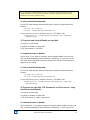
Check via Lingo for Adobe Reader:
on isAdobeReaderPresent
x = PDF_AcrobatInfo()
repeat with i = 1 to count(x)
app = GetProp(GetAt(x, i), #appname)
if (app = "Reader") then
appver = GetProp(GetAt(x, i), #version)
ver = char (1) of appver
if (ver = "5") OR (ver = "6") OR (ver = "7") OR (ver = "8") then
return TRUE
end if
end if
end repeat
return FALSE
end isAdobeReaderPresent
Check via Lingo for the full version of Acrobat (needed for the
GetText command):
on isAcrobatPresent
x = PDF_AcrobatInfo()
repeat with i = 1 to count(x)
app = GetProp(GetAt(x, i), #appname)
if (app = "Acrobat") then
appver = GetProp(GetAt(x, i), #version)
ver = char (1) of appver
PDF Xtra for Director® Version 8.0
36