1
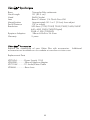
correctly, it should be operated at between 5V-16V with a minimum of 500mA.
Substitution or use of non-Video Flex® parts may void your warranty.
7200HD:
This digital camera is powered by the attached USB connected to the unit, and
in order to power the USB Plug must be inserted into the USB port of your
computer. In general it is better to wait until you have loaded the Applied
Vision™ Software on your computer before powering up your unit.
2. Connecting the Video Flex® to an Output Device:
7600, 7600P, 7610 analog/video connection:
Composite Connections;
Connecting the Video Cable (RCA type Composite, yellow is for video, red is
for audio). Simply connect the yellow video composite connector into the
"video-in" on your TV/Monitor, VCR or Projector (output device). Connect the
other end of the composite cable to the yellow "C-VID" female plug on your
Video Flex® camera unit (plug is located on back of unit, slightly left of center).
If unit is powered up and red light of unit is on, the video image from camera
should appear on your output device.
S-Video Connections:
The S-Video cable is a 4-pin cable which plugs into the rear of your Video
Flex® camera unit. Simply connect S-Video connector into the "S-Video-in" on
your TV/Monitor, VCR or Projector (output device). Connect the other end of
the S-Video cable to the "S-VID" female plug on your Video Flex® camera unit
(plug on back of unit, at the far left of center). If unit is powered up and red
light of unit is on, video image from camera should appear on your S-Video
output device.
•
TV/Monitor
Connect the composite (RCA type) yellow video cable or the S-Video
cable from the Video Flex® camera into the "Video In" connector of the
TV/Monitor. If no "Video-in" is available, you may need an RF Modulator
or a VCR recorder. See owner's manual of TV/Monitor for operating
procedures. (Commonly TV/Monitor must be set on "AUX" for auxiliary).
•
VCR (Recorder)
Connect the composite (RCA type) yellow video cable or the S-Video
cable from the Video Flex® camera into the "Video-In" connector on the
5