1
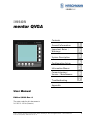
iVISOR
mentor QVGA
Contents
General Information
Important Notes /
Warnings
System Description
Configuration Setup
Information Menus
Commissioning /
Service / Maintenance
Troubleshooting
Appendix
User Manual
Edition 2/2009 Rev. A
The order code for this document is
24 183 19 1012e (Generic)
© 2009 Hirschmann Automation and Control GmbH · Branch Office Ettlingen · eMail: [email protected] · www.hirschmann.com
24 183 19 1012e (Generic) / 2009-02-26 / Rev. 01 / rk.
1
TABLE OF CONTENTS
1.
General Information ........................................................................... 3
2.
Important Notes .................................................................................. 4
3.
System Description ............................................................................ 5
3.1
System start.......................................................................................... 6
3.2
Displays and Controls .......................................................................... 7
3.3
Status displays ................................................................................... 14
4.
Configuration setup (LMI operation mode) ................................... 15
4.1
Interactive operation mode setup....................................................... 15
4.2
Quick adjusting the reeving ................................................................ 20
4.3
Adjusting the language....................................................................... 22
4.4
Working area definition system (WADS)............................................ 23
4.4.1
Radius monitoring .......................................................................... 25
4.4.2
Tip height monitoring...................................................................... 26
4.4.3
Boom angle monitoring .................................................................. 27
4.4.4
Slew angle monitoring .................................................................... 28
4.4.5
Virtual wall monitoring .................................................................... 30
5.
Information menus ........................................................................... 32
5.1
Overview, LMI values ......................................................................... 34
6.
Commissioning / Service / Maintenance........................................ 35
6.1
Checks before commissioning ........................................................... 35
6.2
Service menus.................................................................................... 36
6.3
Maintenance and Service................................................................... 37
7.
Troubleshooting ............................................................................... 38
7.1
General information............................................................................ 38
7.2
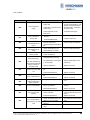
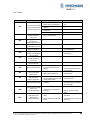
Error code list ..................................................................................... 39
Appendix: Important notes for crane operators ..................................... 45
© 2009 Hirschmann Automation and Control GmbH · Branch Office Ettlingen · eMail: [email protected] · www.hirschmann.com
24 183 19 1012e (Generic) / 2009-02-26 / Rev. 01 / rk.
2
Introduction
1.
GENERAL INFORMATION
This manual describes the functions and operation of the iVISOR mentor QVGA load moment
indicator (LMI).
The purpose of the load moment indicator (below called the LMI) is to provide key information to the
operator of the loader which is needed for the operation of the loader within the operating ranges
specified by the manufacturer. The LMI provides the operator with information about the angle and
height of the boom, working radius, rated load and the actual load.
The iVISOR mentor QVGA load moment indicator comprises a central microprocessor unit with an
integrated display and operating console together with various sensors to record measured values.
The system components are connected via CAN bus.
The system works on the principle of a target / actual comparison. The actual value, resulting from the
pressure and angle measurement, is compared with the target values stored in the central unit’s
memory and analysed by the microprocessor.
If the crane nears its safe load limit, the system will warn the crane operator by means of both
acoustic and optical signals. In addition, as soon as the crane reaches an unauthorized operating
status, all crane movements will be switched off that would increase the load moment on the crane.
The manufacturer reserves the right to modify the contents of this manual without notice. Hirschmann offers no guarantee
whatsoever for this material, including guarantees with reference to commercial availability and suitability for particular
applications. Hirschmann shall not be liable for errors contained herein or for identical or consequential damages in connection with the furnishing, performance, or use of this manual. This manual is protected by copyright. All rights reserved. The
manual may not be copied, reproduced or translated into another language, neither whole nor in part, without advance
written authorization from Hirschmann..
© 2009 Hirschmann Automation and Control GmbH · Branch Office Ettlingen · eMail: [email protected] · www.hirschmann.com
24 183 19 1012e (Generic) / 2009-02-26 / Rev. 01 / rk.
3
Introduction
2.
IMPORTANT NOTES
The LMI is an operating aid that warns the crane operator of imminent overloading or of the approach
of the hook block to the boom head, in order to avoid possible property damage or injury to personnel.
The device is not, nor is it intended to be, a substitute for good operator judgment and/or experience,
nor does it remove the need for utilizing only recognized safe procedures during crane operations.
The crane operator continues to bear ultimate responsibility for safe operation of the crane.
He must ensure that he fully understands and follows the displayed notes and instructions
in their entirety.
Before beginning crane operations, the crane operator must carefully read and understand
the entire manual in order to ensure that he is aware of the operation and limitations of both
the LMI and the crane itself.
Proper functioning is dependent upon proper daily inspection and observation of the
operating instructions set forth in the manual.
The LMI is not able to provide aid to the crane operator unless it has been properly adjusted
and unless the correct load capacity chart and the correct operating code have been
entered for the respective rigging configuration. The correctness of the LMI settings must
be guaranteed before beginning crane work in order to avoid damage to property and
severe or even fatal injuries to personnel.
This system can be equipped with an external key-operated switch located in the crane
operator's cab. This key-operated switch overrides control lever function switch-off by the
LMI or by the hoist limit switch system. This switch may only be used during emergency
situations, and even then only by authorized personnel. Failure to observe these
instructions could result in damage to property and severe or even fatal injuries to
personnel.
The LMI cannot perform correctly unless it has been properly adjusted. The prerequisite for this is
making conscientious and correct entries during the set-up procedure, in accordance with the actual
configuration of the crane. The correctness of the LMI settings must be ensured before beginning
crane work in order to avoid damage to property and severe or even fatal injuries to personnel.
© 2009 Hirschmann Automation and Control GmbH · Branch Office Ettlingen · eMail: [email protected] · www.hirschmann.com
24 183 19 1012e (Generic) / 2009-02-26 / Rev. 01 / rk.
4
Introduction
3.
SYSTEM DESCRIPTION
The iVISOR mentor QVGA load moment indicator system comprises a central microprocessor unit
with an integrated display and control console together with various sensors to record the measured
values.
Fig. 1: Components of the iVISOR mentor QVGA LMI system (without optional extras)
The system operates on the principle of reference/real comparison. The actual value is compared
with the calculated reference values and evaluated by the system. An overload warning signal is
triggered on the display and operating console once limit values are reached. All crane movements
that increase the load moment are switched off at the same time.
The crane-specific data specified by the manufacturer, such as load capacity charts, boom weights,
centers of gravity and dimensions, are stored in the central data memory. This data is the reference
information used to calculate the operating conditions.
The boom angle and length is measured by means of an length/angle sensor that is mounted on the
boom. The crane load is determined indirectly with the aid of pressure transducers.
The operating console is located in the operator's cab in plain view of the crane operator. All displays
and operating elements have background illumination for enhanced ease of recognition. The console
contains various operating elements as well as a multifunction LC display, all of which are described
in detail in chapter 3.2
The contrast of the LC display is adjustable manually in accordance with ambient light levels.
© 2009 Hirschmann Automation and Control GmbH · Branch Office Ettlingen · eMail: [email protected] · www.hirschmann.com
24 183 19 1012e (Generic) / 2009-02-26 / Rev. 01 / rk.
5
Introduction
3.1
System start
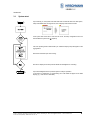
Upon switching on, the system boots and starts with an automatic test of the LMI system,
lamps and audible alarm. During the test, the LC display shows the start screen.
If the system was turned off for more than two hours, the setup configuration has to be
entered after the system test. (⇒ chapter 4)
First, the operating mode is determined by an interactive step-by-step interrogation of the
rigging states.
Next is the interactive input of the reeving.
Now the LC display shows all inputs and awaits acknowledgment or cancelling.
Upon acknowledgment of the inputs the system is ready for operation.
In the event of a malfunction, a corresponding error code "E##" will appear on the Data
display (1). (> refer to error code table)
© 2009 Hirschmann Automation and Control GmbH · Branch Office Ettlingen · eMail: [email protected] · www.hirschmann.com
24 183 19 1012e (Generic) / 2009-02-26 / Rev. 01 / rk.
6
Introduction
3.2
Displays and controls
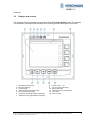
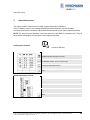
The illustration shows the displays and controls of the iVISOR mentor QVGA console. The numbers
in the illustration correspond to the numbers in the following functional description for each item.
1
2
3
4
5
6
7
Data display (background lit)
Bar graph (utilisation)
Prewarning light
Overload warning light (load moment)
Hoist limit warning light (A2B)
“LMI bypass” warning light (flashes if bypassed)
"A2B bypass" warning light (flashes if bypassed)
8
9
10
11
12
13
Function keys F1 ... F4
“Info" key (system information)
System setup button
“LIM” button (working area definition)
“Tare” button
“Alarm off” button
© 2009 Hirschmann Automation and Control GmbH · Branch Office Ettlingen · eMail: [email protected] · www.hirschmann.com
24 183 19 1012e (Generic) / 2009-02-26 / Rev. 01 / rk.
7
Displays and controls
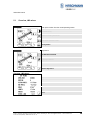
(1)
Data display
The Data display (1) is dot matrix LC display with background illumination and extended temperature
range, on which essential data are displayed depending on the operating mode, such as load values,
geometry and crane data, symbols etc. The design enables good legibility even in bright sunlight,
and at night too thanks to the integrated background lighting.
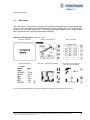
Examples of display menus (values are not real)
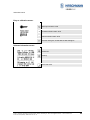
Start after system test
Display, normal operation
Entry to Info menu
Display of LMI values
Entry menu – working area definition
Service menu (code-protected)
Pressure sensor adjustment
You can find a detailed description of symbols and displays in the chapters and the appendix of this manual.
© 2009 Hirschmann Automation and Control GmbH · Branch Office Ettlingen · eMail: [email protected] · www.hirschmann.com
24 183 19 1012e (Generic) / 2009-02-26 / Rev. 01 / rk.
8
Displays and controls
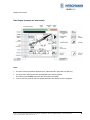
Data display (example w/o man basket):
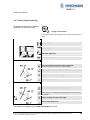
Notes:
•
If required, various symbols are displayed in the “status indication” field (refer to chapter 3.3).
•
If required, active working area limits are displayed by the relevant symbols.
The relevant symbol flashes if the limit value is reached or exceeded.
•
In the “function key symbols" field, the symbol allocated to the relevant function key appears.
© 2009 Hirschmann Automation and Control GmbH · Branch Office Ettlingen · eMail: [email protected] · www.hirschmann.com
24 183 19 1012e (Generic) / 2009-02-26 / Rev. 01 / rk.
9
Displays and controls
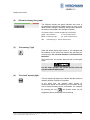
(2)
Utilisation display (bar graph)
The Utilisation display (bar graph) indicates how much of
the admissible load moment (rated moment) is used. As the
rated moment changes constantly during loader operation,
the load moment display also changes constantly.
The utilisation display is marked with differently coloured fields:
green: "Safe” operation
(0...90% of rated moment)
yellow: “Prewarning range”
(90...100% of rated moment)
red:
(3)
“Overload range” (> 100% of rated moment)
“Pre-warning” light
When this amber display light comes on, this indicates that
the utilisation of the crane has reached the specified prewarning range. An overload situation could therefore be
imminent!
At the same time, the acoustic alarm sounds an interrupted
signal.
For the crane operator, this means that the work can
only be continued with caution.
(4)
“Overload” warning light
This red display light lights up to indicate that the maximum
capacity has been reached or exceeded.
At the same time, the acoustic alarm sounds an
uninterrupted signal and, depending on the system wiring,
load moment-increasing boom movements are stopped.
By actuating the key
the acoustic alarm can be
suppressed after a minimum 5-second warning.
© 2009 Hirschmann Automation and Control GmbH · Branch Office Ettlingen · eMail: [email protected] · www.hirschmann.com
24 183 19 1012e (Generic) / 2009-02-26 / Rev. 01 / rk.
10
Displays and controls
(5)
"Hoist limit” warning light (A2B)
This red warning light lights up when the hoist limit switch
contacts open, i.e. when a hoist limit situation has occurred.
The acoustic alarm sounds and load-moment-increasing
crane movements are switched off at the same time.
A hoist limit situation occurs when the hook block
comes into contact with the boom head. The danger
exists in such situations that the hoist rope will
break, causing the load to fall. A hoist limit situation
could arise from the load being pulled against the
boom head or from the boom being extended or
lowered without the hoist rope being spooled off the
winch.
(6)
“LMI bypass” warning light
This warning light flashes when the cut-out function of the
LMI system has been manually bypassed.
(7)
“Hoist limit switch bypass” warning light
This red warning light lights up when the switch-off function
of the hoist limit switch has been manually bypassed.
© 2009 Hirschmann Automation and Control GmbH · Branch Office Ettlingen · eMail: [email protected] · www.hirschmann.com
24 183 19 1012e (Generic) / 2009-02-26 / Rev. 01 / rk.
11
Displays and controls
(8)
Function keys F1 ... F4
Function keys with the allocated symbol.
During normal operation
(9)
“Info” key
Key to bring system information and service menus.
Refer to chapter 5 and chapter 6.2.
(10)
“SEL” key
Key to set up LMI system.
Refer to chapter 4.
(11)
“LIM” key
Key to set up working area limits.
Refer to chapter 4.3
© 2009 Hirschmann Automation and Control GmbH · Branch Office Ettlingen · eMail: [email protected] · www.hirschmann.com
24 183 19 1012e (Generic) / 2009-02-26 / Rev. 01 / rk.
12
Displays and controls
(12)
“Tare” key
The “TARE” key is used to display the net load on the actual
load display. The net load is the actual load less the lifting
gear and hook block. The “TARE” key must be pressed
before the lift process starts.
After actuation, the current load display is reset to zero (tared). After lifting
the load, the actual load display shows the net load (working load). Once
the working radius changes (due to a change of angle or radius), the
display changes back to the actual load and the tare function is ended.
NOTE: The actual load includes the load suspension device, the lifting
cable and all load limit stop equipment. The net load is the current load
without any load limit stop equipment. Display errors can be caused by
environmental factors, e.g. wind on the boom or load.
(13)
“Alarm acknowledge” key
When this key is pressed, the acoustic alarm can be
suppressed after sounding for at least 5 secs.
After around 10 secs., the alarm sounds again if the reason
which triggered the alarm is still present.
The acoustic alarm sounds in the following cases:
System test, overload status, LMI system fault, and operating errors
detected by the system.
© 2009 Hirschmann Automation and Control GmbH · Branch Office Ettlingen · eMail: [email protected] · www.hirschmann.com
24 183 19 1012e (Generic) / 2009-02-26 / Rev. 01 / rk.
13
Displays and controls
3.3
Status displays
If required, various symbols are displayed in the “status area” of the data display (1).
Some of the symbols flash depending on the operating status.
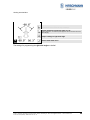
LMI error in combination with a code (refer to error code list)
Constant: radius monitoring active
Flashing: limit reached or exceeded.
Constant: height monitoring active
Flashing: limit reached or exceeded.
Constant: boom angle monitoring active
Flashing: limit reached or exceeded.
Constant: slew angle monitoring active
Flashing: limit reached or exceeded.
Constant: virtual wall monitoring active
Flashing: limit reached or exceeded.
© 2009 Hirschmann Automation and Control GmbH · Branch Office Ettlingen · eMail: [email protected] · www.hirschmann.com
24 183 19 1012e (Generic) / 2009-02-26 / Rev. 01 / rk.
14
Configuration Setup
4.
Configuration SETUP
The configuration setup procedure allows the operator to input the crane configuration using
interactive displays.
The LMI cannot perform correctly unless it has been properly adjusted. The prerequisite for
this is making conscientious and correct entries during the setup procedure, in accordance
with the actual configuration of the crane. The accuracy of the LMI settings must be
ensured before beginning crane work in order to avoid damage to property and severe or
even fatal injuries to personnel.
The correct setting is of utmost importance for the proper functioning of the system and the
crane.
Therefore, only operators who are thoroughly familiar with the crane and the operation of
the system should execute this configuration procedure.
4.1
Interactive operation mode setup
It is necessary to setup the mode of operation of the LMI system every time the crane structure has
been changed or if the system has been turned off for more than 2 hours.
If the system was switched off, for example during short breaks (less than 2 hours), all adjustments
remain stored. When switching on again the system these adjustments can be acknowledged by
merely pressing the "Enter" key (provided that the crane configuration has not been modified!).
During the programming procedure the Load Moment Pre-warning Light (3) and the Load Moment
Limit Light (4) will light up and the aggravating crane movements will be interrupted.
The LMI programming procedure consists of the following steps (interactive operation):
•
•
•
•
•
•
•
•
setting the boom type configuration
specify jib / selecting man basket /
setting outrigger configuration
specify working range
setting option: stowed jib operation
setting hoist
setting reevings
confirming of inputs
For easy operation, the computer guides the operator through the procedure step by step.
© 2009 Hirschmann Automation and Control GmbH · Branch Office Ettlingen · eMail: [email protected] · www.hirschmann.com
24 183 19 1012e (Generic) / 2009-02-26 / Rev. 01 / rk.
15
Configuration Setup
Calling up the function:
(automatically with system restart if shut down time longer than 2 hours ago)
Actuate "SEL" key
Overview menu with symbols appears, with any previously programmed
limits. In this menu screen, the operator is prompted to confirm the
previous made entries or to renew the setup.
The system will temporarily interrupt the movements of the crane during the
setup procedure.
Check the displayed values before confirming them!
•
Start setup procedure or confirm previous settings:
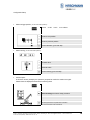
Setup reeving
START configuration setup procedure
OK, only if all entries are correct
The entering of the mode of operation code is completed after this confirmation,
and the normal operation screen is displayed.
•
Select main boom with or without man basket:
1=boom operation
2=man basket operation
Cursor to next position
Cursor to previous position
Confirm selection, go to next step
>
© 2009 Hirschmann Automation and Control GmbH · Branch Office Ettlingen · eMail: [email protected] · www.hirschmann.com
24 183 19 1012e (Generic) / 2009-02-26 / Rev. 01 / rk.
16
Configuration Setup
•
Select boom with or without jib:
1=main boom
2=Main boom with jib
Cursor to next position
Cursor to previous position
Confirm selection, go to next step
•
Select jib length: (if jib operation was selected)
1=short jib
2=long jib
Cursor to next position
Cursor to previous position
Confirm selection, go to next step
•
Select jib offset angle:
1=offset 1
2=offset 2
3=offset 3
Cursor to next position
Cursor to previous position
Confirm selection, go to next step
© 2009 Hirschmann Automation and Control GmbH · Branch Office Ettlingen · eMail: [email protected] · www.hirschmann.com
24 183 19 1012e (Generic) / 2009-02-26 / Rev. 01 / rk.
17
Configuration Setup
•
Select working area:
1=over front
2=360°
Cursor to next position
Cursor to previous position
Confirm selection, go to next step
•
Select hoist:
1=main hoist
2=auxiliary hoist
Cursor to next position
Cursor to previous position
Confirm selection, go to next step
•
Select boom with or without stowed jib: (not with man basket operation)
1=main boom
2=man boom with stowed jib
Cursor to next position
Cursor to previous position
Confirm selection, go to next step
© 2009 Hirschmann Automation and Control GmbH · Branch Office Ettlingen · eMail: [email protected] · www.hirschmann.com
24 183 19 1012e (Generic) / 2009-02-26 / Rev. 01 / rk.
18
Configuration Setup
•
Select outrigger position: (not with man basket operation)
1=max
2=mid
3=min
4=on rubbers
Cursor to next position
Cursor to previous position
Confirm selection, go to next step
•
Select reeving: (not with man basket operation)
Increase value
Decrease value
Confirm reeving, go to next step
•
Confirm inputs:
In this menu screen (example), the operator is prompted to confirm the entries once again.
Please check the displayed values before confirming them!
Discard settings and renew setup procedure
OK, only if all entries are correct
The setup procedure is completed after confirmation.
The normal operation screen is displayed.
© 2009 Hirschmann Automation and Control GmbH · Branch Office Ettlingen · eMail: [email protected] · www.hirschmann.com
24 183 19 1012e (Generic) / 2009-02-26 / Rev. 01 / rk.
19
Configuration Setup
4.2
Quick adjusting the reeving
It is necessary to program the system by entering the respective number of reevings each time the
rope reeving arrangement is modified.
Calling up the function:
Actuate "SEL" key
The system will temporarily interrupt the movements of the crane during the
setup procedure.
•
Start setup procedure
Note: Start of setup reeving procedure is not possible with man masket
operation!
Setup reeving
START configuration setup procedure
OK, only if all entries are correct
The entering of the mode of operation code is completed after this confirmation,
and the normal operation screen is displayed.
•
Select reeving: (not with man basket operation)
Increase value
Decrease value
Confirm reeving
© 2009 Hirschmann Automation and Control GmbH · Branch Office Ettlingen · eMail: [email protected] · www.hirschmann.com
24 183 19 1012e (Generic) / 2009-02-26 / Rev. 01 / rk.
20
Configuration Setup
•
Confirm inputs:
In this menu screen, the operator is prompted to confirm the entries once again.
Please check the displayed values before confirming them!
Discard settings and renew setup procedure
OK, only if all entries are correct
The setup procedure is completed after confirmation.
The normal operation screen is displayed.
© 2009 Hirschmann Automation and Control GmbH · Branch Office Ettlingen · eMail: [email protected] · www.hirschmann.com
24 183 19 1012e (Generic) / 2009-02-26 / Rev. 01 / rk.
21
Configuration Setup
4.3
Adjusting the language
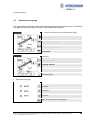
The system features a function which allows language selection for the display menus. The following
languages are selectable: English, German, French, Spanish and Russian.
•
Call up the function from the normal operating screen:
Contrast setting
Delete all working area limits
Info screen operation mode
to key level 2
Key level 2:
to LMI value overview
Language selection
back to key level 1
•
Select desired language
for English
for German
for French
switch to key level 2 for more languages
© 2009 Hirschmann Automation and Control GmbH · Branch Office Ettlingen · eMail: [email protected] · www.hirschmann.com
24 183 19 1012e (Generic) / 2009-02-26 / Rev. 01 / rk.
22
Working area definition
4.4
Working area definition system (WADS)
The LMI system has programmed functions for monitoring the working area in accordance with the
area of use of the crane:
•
easy to program by menus
•
functions can be used individually or in combination
•
acoustic alarm and display of a symbol when a programmed limit value is reached or exceeded
•
clear display of the programmed limit value in an information menu screen.
The “Working area definition” function described below is an aid for moving the crane
within adjustable boom ranges.
Reaching or exceeding a programmed limit value
does not stop the boom movements!
The crane driver alone is responsible for the safe operation of the crane!
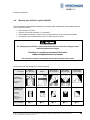
Working area limits are indicated by the following symbols:
Limit type:
Radius
(min. and max.)
Height
Boom angle
(min. and max.)
Slew angle
(left and right)
"Virtual" wall
(up to 5 walls)
⇒ 4.4.1
⇒ 4.4.2
⇒ 4.4.3
⇒ 4.4.4
⇒ 4.4.5
Symbols on
limit info page:
with active limits
displayed
Symbols in the
status display:
Constant =
limit active
Flashing=
Limit reached or
exceeded
refer to chapter:
© 2009 Hirschmann Automation and Control GmbH · Branch Office Ettlingen · eMail: [email protected] · www.hirschmann.com
24 183 19 1012e (Generic) / 2009-02-26 / Rev. 01 / rk.
23
Working area definition
Calling up the function
Actuate LIM key
Overview menu with symbols appears, with any previously programmed
limits.
Refer to chapter:
Radius monitoring
4.4.1
Tip height monitoring
4.4.2
Boom angle monitoring
4.4.3
Go to next key level
second key level:
Slew angle monitoring
4.4.4
Virtual wall monitoring
4.4.5
Go to previous key level
back / end limit menu
© 2009 Hirschmann Automation and Control GmbH · Branch Office Ettlingen · eMail: [email protected] · www.hirschmann.com
24 183 19 1012e (Generic) / 2009-02-26 / Rev. 01 / rk.
24
Working area definition
4.4.1 Radius monitoring
Programmable function to monitor the
minimum and / or maximum boom
radius
Calling up the function
Overview menu with symbols appears, with any previously programmed
limits.
edit radius limit
edit height limit
edit boom angle limit
Go to next key level
save current boom radius as minimum limit
(the last saved value for the min. boom radius is displayed)
switch monitoring of minimum boom radius on / off
(having switched on, the relevant symbol appears near the limit value and in the
status display)
jump to settings of maximum boom radius
back to limits main menu
save current boom radius as minimum limit
(the last saved value for the min. boom radius is displayed)
switch monitoring of minimum boom radius on / off
(having switched on, the relevant symbol appears near the limit value and in the
status display)
jump to settings of maximum boom radius
back to limits main menu
The settings for programming the maximum boom radius are similar.
© 2009 Hirschmann Automation and Control GmbH · Branch Office Ettlingen · eMail: [email protected] · www.hirschmann.com
24 183 19 1012e (Generic) / 2009-02-26 / Rev. 01 / rk.
25
Working area definition
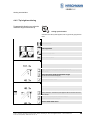
4.4.2 Tip height monitoring
Programmable function to monitor the
maximum height of the boom tip
Calling up the function
Overview menu with symbols appears, with any previously programmed
limits.
edit radius limit
edit height limit
edit boom angle limit
Go to next key level
switch monitoring of maximum tip height on / off
(having switched on, the relevant symbol appears near the limit value and in the
status display)
save current tip height as maximum height
(the last saved limit value is displayed)
back to limits main menu
switch monitoring of maximum tip height on / off
(having switched on, the relevant symbol appears near the limit value and in the
status display)
save current tip height as maximum height
(the last saved limit value is displayed)
back to limits main menu
© 2009 Hirschmann Automation and Control GmbH · Branch Office Ettlingen · eMail: [email protected] · www.hirschmann.com
24 183 19 1012e (Generic) / 2009-02-26 / Rev. 01 / rk.
26
Working area definition
4.4.3 Boom angle monitoring
Programmable function to monitor the
upper and / or lower boom angle
Calling up the function
Overview menu with symbols appears, with any previously programmed
limits.
edit radius limit
edit height limit
edit boom angle limit
Go to next key level
save current boom position as upper angle limit
(the last saved value for the upper boom angle is displayed)
switch monitoring of upper boom angle on / off
(having switched on, the relevant symbol appears near the limit value and in the
status display)
jump to settings of lower boom angle
back to limits main menu
save current boom position as upper angle limit
(the last saved value for the upper boom angle is displayed)
switch monitoring of upper boom angle on / off
(having switched on, the relevant symbol appears near the limit value and in the
status display)
jump to settings of lower boom angle
back to limits main menu
The settings for programming the lower boom angle are similar!
© 2009 Hirschmann Automation and Control GmbH · Branch Office Ettlingen · eMail: [email protected] · www.hirschmann.com
24 183 19 1012e (Generic) / 2009-02-26 / Rev. 01 / rk.
27
Working area definition
4.4.4 Slew angle monitoring
Programmable function to monitor the
left and / or the right slew angle
Calling up the function
Overview menu with symbols appears, with any previously programmed
limits.
edit radius limit
edit height limit
edit boom angle limit
Go to next key level
edit slew angle limit
edit virtual wall
back
save current slew angle as left limit
(the last saved value for the left slew angle is displayed)
switch monitoring of left slew angle on / off
(having switched on, the relevant symbol appears near the limit value and in the
status display)
jump to settings of right slew angle
back to limits main menu
>
© 2009 Hirschmann Automation and Control GmbH · Branch Office Ettlingen · eMail: [email protected] · www.hirschmann.com
24 183 19 1012e (Generic) / 2009-02-26 / Rev. 01 / rk.
28
Working area definition
save current slew angle as left limit
(the last saved value for the left slew angle is displayed)
switch monitoring of left slew angle on / off
(having switched on, the relevant symbol appears near the limit value and in the
status display)
jump to settings of right slew angle
back to limits main menu
The settings for programming the right slew angle are similar!
© 2009 Hirschmann Automation and Control GmbH · Branch Office Ettlingen · eMail: [email protected] · www.hirschmann.com
24 183 19 1012e (Generic) / 2009-02-26 / Rev. 01 / rk.
29
Working area definition
4.4.5 Virtual wall monitoring
Programmable function to monitor the
working area by up to 5 "virtual" walls
Calling up the function
Overview menu with symbols appears, with any previously programmed
limits.
The working area definition system helps the operator to define the crane’s working area. This is done by creating vertical wall(s) that can
represent obstacles (i.e. buildings, towers, poles, etc.) in the crane’s working range. The wall(s) are set by defining points with the boom tip
along the outer limits of the operator’s work area, see setup procedure below. Because these walls are defined by the operator and are not
“actual real” walls, we refer to them as “virtual” walls. When setting the walls, always keep a safe working distance to any obstacles. Never
work outside a safe working area as outlined by common practice, standards, and manuals.
A virtual wall is set by defining two points. To prevent inaccuracies when defining the two points for the virtual wall, use the following to
rules:
•
The two points should be the same distance form the obstacle
•
Set the two points at the maximum distance apart, which can be safely reached by the boom tip
The operator can setup up to 5 virtual walls, the first wall is defined by a straight line between two set points. The second through fifth walls
are created by one new point and the previously selected point. After the walls have been set, the system alerts the operator and when the
boom approaches them. This is done both visual and audible. Similarly, the “virtual wall” symbol in the main screen blinks.
edit radius limit
edit height limit
edit boom angle limit
Go to next key level
edit slew angle limit
edit virtual wall(s)
(the previous stored walls will be displayed, if any)
Go to previous key level
back to limits main menu
>
© 2009 Hirschmann Automation and Control GmbH · Branch Office Ettlingen · eMail: [email protected] · www.hirschmann.com
24 183 19 1012e (Generic) / 2009-02-26 / Rev. 01 / rk.
30
Working area definition
set a point in the working area to start a wall
(having pressed SET, the point is marked by" X")
delete existing walls
back to limits main menu
move the boom tip to an other point of the imaginary wall… and
set the second point in the working area
to create a virtual wall
delete existing walls
back to limits main menu
allows for further walls to be added (up to 5 virtual walls)
delete existing walls
back to limits main menu
< example with 3 virtual walls
© 2009 Hirschmann Automation and Control GmbH · Branch Office Ettlingen · eMail: [email protected] · www.hirschmann.com
24 183 19 1012e (Generic) / 2009-02-26 / Rev. 01 / rk.
31
Information menus
5.
Information menus
The system contains various menus in which system information is displayed.
In the "Calibration menus” area, settings which affect system behaviour can also be made.
Access to these menus is therefore code-protected and reserved only for trained service personnel.
NOTE: The service menus described in this user manual are provided for information only. They do
not constitute a description or instructions for the alignment process.
Calling up the function:
Actuate the INFO key
to digital inputs and outputs overview
to calibration menus
(access is code protected)
to software information screen
back
Digital in/outputs overview:
back
© 2009 Hirschmann Automation and Control GmbH · Branch Office Ettlingen · eMail: [email protected] · www.hirschmann.com
24 183 19 1012e (Generic) / 2009-02-26 / Rev. 01 / rk.
32
Information menus
Entry to calibration menus:
abort input of service code
increase marked numeric value
reduce marked numeric value
mark the next figure, access after the last valid figure
Software information screen:
scroll down
scroll up
back / end menu
© 2009 Hirschmann Automation and Control GmbH · Branch Office Ettlingen · eMail: [email protected] · www.hirschmann.com
24 183 19 1012e (Generic) / 2009-02-26 / Rev. 01 / rk.
33
Information menus
5.1
Overview, LMI values
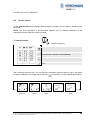
Call up the function from the normal operating screen:
Contrast setting
Delete all working area limits
Info screen operation mode
to key level 2
Key level 2:
to LMI value overview
Language selection
back to key level 1
Overview, LMI values:
back
© 2009 Hirschmann Automation and Control GmbH · Branch Office Ettlingen · eMail: [email protected] · www.hirschmann.com
24 183 19 1012e (Generic) / 2009-02-26 / Rev. 01 / rk.
34
Commissioning / Service / Maintenance
6.
Commissioning / Service / Maintenance
6.1
Checks before commissioning
Before commissioning, the signals and electrical connections must be checked to guarantee that the
components of the LMI system are working properly.
•
Check that the boom angles displayed match the actual angles
•
Check that the slew angle displayed match the actual slew angle
•
Check that the crane radius displayed matches the actual radius
•
Check the load display by lifting a known load
If any of the displays shows any difference between the values displayed and the actual
values, please contact your local service centre to have the LMI calibration checked or the
system repaired.
www.hirschmann.com > USA > Electronic Control Systems > Contact - ECS
Following any modifications to the mechanical structure or changes to the load suspension
devices, your loader’s LMI calibration needs to be checked or corrected.
© 2009 Hirschmann Automation and Control GmbH · Branch Office Ettlingen · eMail: [email protected] · www.hirschmann.com
24 183 19 1012e (Generic) / 2009-02-26 / Rev. 01 / rk.
35
Commissioning / Service / Maintenance
6.2
Service menus
In this code-protected area, settings affecting system precision can be made by trained service
personnel.
NOTE: This short description is for information purpose only. For detailed description of the
calibration procedure refer to the service manual.
To start the function:
Actuate the INFO key.
to service menu (access is code protected)
back
After entering the service menu you can follow the calibration procedure step by step or can select
the type of calibration by scrolling with function key
. Press "ESC" to finish calibration procedure:
pressure signal
piston side
pressure signal
rod side
slewing angle
signal
boom length signal
boom angle
signal
© 2009 Hirschmann Automation and Control GmbH · Branch Office Ettlingen · eMail: [email protected] · www.hirschmann.com
24 183 19 1012e (Generic) / 2009-02-26 / Rev. 01 / rk.
36
Commissioning / Service / Maintenance
6.3
Maintenance and Service
The maintenance and service of the LMI system comprises the following checks:
•
the wiring connecting the various parts of the system to each other.
If a cable is damaged, it must be replaced immediately.
•
the hydraulic connection to the pressure sensors for leaking oil.
Personnel without special training may only remedy the operating problems listed in the error
table, and must not replace any mechanical or electrical parts or cables.
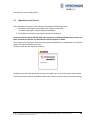
Once switched on, the system starts the boot procedure followed by an automatic test run of the LMI
system, the lights and the acoustic alarm.
During this time, the data display is as follows:
During this test, check that the display is working, the lights come on and the acoustic alarm sounds.
If the system does not start as described, please notify customer service before you continue working.
© 2009 Hirschmann Automation and Control GmbH · Branch Office Ettlingen · eMail: [email protected] · www.hirschmann.com
24 183 19 1012e (Generic) / 2009-02-26 / Rev. 01 / rk.
37
Troubleshooting
7.
TROUBLESHOOTING
7.1
General information
In the event of a malfunction, if the range is not reached or is exceeded or if an operating error is
detected by the system, a message appears on the data display (1) starting with an “E” followed by a
two-digit code which indicates the reason for the malfunction.
The error codes listed in the following table describe the various error codes which can be displayed
in this system.
Faults in the microprocessor system must be dealt with only by the manufacturer’s trained customer
service personnel. If faults occur, please contact Hirschmann Service USA:
www.hirschmann.com > USA > Electronic Control Systems > Contact - ECS.
© 2009 Hirschmann Automation and Control GmbH · Branch Office Ettlingen · eMail: [email protected] · www.hirschmann.com
24 183 19 1012e (Generic) / 2009-02-26 / Rev. 01 / rk.
38
Error code list
7.2
Error code list
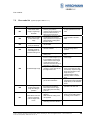
Error Code
(System program LSQN V 1.11)
Error
Cause
•
E01
Fallen below radius
range or angle range
exceeded
E02
Radius range exceeded
or fallen below angle
range
E03
Non-permitted slewing
zone (no load area)
•
E04
Operating mode not
acknowledged or non
permitted slewing zone
•
•
A non existing operating mode
has been selected
•
The boom is in a non-permitted •
slewing zone
Boom has been extended either •
too far or not far enough, e.g. if
it is prohibited to go beyond a
certain maximum boom length
or with load curves for jibs
where the main boom has to be
extended to a certain length
Length sensor adjustment has
•
changed, e.g. the cable slid off
the length sensor reel.
•
•
E05
E06
Prohibited length range
Radius range exceeded
or fallen below angle
range with luffing jib
operation
E11
•
•
Clutch between length sensor
pot and drive is defective
•
•
Maximum radius as specified in
the load chart exceeded or
fallen below minimum angle
due to luffing down the luffing
jib too far
Length potentiometer is
defective
PDB variable for analog value
not supported
•
•
Fallen below lower limit
value for measuring
channel "length main
boom"
Elimination
Fallen below the minimum
•
radius or gone past the
maximum angle specified in the
respective load chart due to
luffing up the boom too far
Gone past the maximum radius •
or fallen below the minimum
angle specified in the respective
load chart due to luffing down
the boom too far
The slewing zone with load is
•
not permitted
•
•
Electronic component in the
measuring channel is defective
Luff down the boom to a radius
or angle specified in the load
chart.
Luff up the boom to a radius or
angle specified in the load
chart.
Slew to permitted area
Set the correct operating mode
for the operating state in
question
Slew the boom to a permitted
area.
Extend/retract boom to the
correct length
Retract boom. Check the prestress of the cable reel (cable
must be taut). Open the length
sensor and carefully turn the
length sensor pot
counterclockwise until the
detent by means of a screw
driver
Replace the complete clutch
including drive wheel and adjust
length sensor pot as described
above
Luff the jib to a radius or angle
specified in the load chart.
•
•
Replace length potentiometer
Setup of correct PDB variable
for analog value in DGA6.i.3
•
Replace sensor unit
© 2009 Hirschmann Automation and Control GmbH · Branch Office Ettlingen · eMail: [email protected] · www.hirschmann.com
24 183 19 1012e (Generic) / 2009-02-26 / Rev. 01 / rk.
39
Error code list
Error Code
E12
E13
E14
E15
E16
E17
E18
E1A
Error
Fallen below the lower
limit value in the
measuring channel
"pressure piston side"
Fallen below lower limit
value in the measuring
channel "pressure rod
side"
Fallen below lower limit
value in measuring
channel "force"
Fallen below lower limit
value in measuring
channel "angle main
boom"
Fallen below lower limit
value in measuring
channel "angle 2"
Cause
•
•
•
•
Fallen below lower limit
value in measuring
channel "slewing angle
1".
slew below allowed
range
E1B
E1C
Fallen below lower limit
Replace pressure transducer
Setup of correct PDB variable
for analog value in DGA6.i.3
Electronic component in the
measuring channel is defective.
refer to E12
•
Replace sensor unit
•
refer to E12
Force transducer defective
Electronic component in the
measuring channel is defective.
•
•
Replace force transducer
Replace sensor unit
•
•
Angle potentiometer defective
PDB variable for analog value
not supported
•
Replace angle sensor
•
Setup of correct PDB variable
for analog value in DGA6.i.3
Electronic component in the
measuring channel defective.
Angle potentiometer defective
Electronic component in the
measuring channel defective.
•
Replace sensor unit
•
•
Replace angle sensor
Replace sensor unit
Length potentiometer defective
Electronic component in the
measuring channel defective
•
•
Replace length sensor.
Replace sensor unit
•
Front outrigger overloaded
•
•
Cable between the central unit
and the slewing angle sensor
defective or loose. Water inside
the plug of the angle sensor
•
Check cable as well as plugs,
replace, if need be.
•
•
•
move to allowed slew range
Replace slewing angle sensor
•
Replace sensor unit
•
1-cannel slew sensor min. value
DGA 11.5.7 <> 0
Slewing angle potentiometer is
defective
Electronic component in the
measuring channel defective
refer to E1A
•
refer to E1A
•
Angle potentiometer defective
•
Replace angle sensor
•
•
•
•
•
Fallen below lower limit
value in measuring
channel "slewing angle
2"
•
•
•
•
Fallen below lower limit •
value "length telescope I •
(+II)"
Front outrigger
overloaded
Elimination
Pressure transducer is
defective.
PDB variable for analog value
not supported
© 2009 Hirschmann Automation and Control GmbH · Branch Office Ettlingen · eMail: [email protected] · www.hirschmann.com
24 183 19 1012e (Generic) / 2009-02-26 / Rev. 01 / rk.
40
Error code list
Error Code
E21
E22
E23
E24
E25
E26
E27
E2A
Error
value in measuring
channel "luffing jib
angle"
Upper limit value in
measuring channel
"main boom length" has
been exceeded.
Upper limit value in
measuring channel
"pressure piston side"
has been exceeded
Upper limit value in
measuring channel
"pressure rod side" has
been exceeded.
Upper limit value in
measuring channel
"force" has been
exceeded.
Upper limit value in
measuring channel
"main boom angle" has
been exceeded.
Upper limit value in
measuring channel
"angle 2" has been
exceeded.
Upper limit value in
measuring channel
"length telescope I (+II)
has been exceeded.
Upper limit value in
measuring channel
"slewing angle 1" has
been exceeded
slew above allowed
range
E2B
E2C
E31
Upper limit value in
measuring channel
"slewing angle 2" has
been exceeded
Upper limit value in
measuring channel
"luffing jib angle" has
been exceeded
Error in the system
program
Cause
Elimination
•
Electronic component in the
measuring channel defective.
•
Replace sensor unit
•
refer to E11
•
refer to E11
•
refer to E12
•
refer to E12
•
refer to E12
•
refer to E12
•
refer to E14
•
refer to E14
•
refer to E15
•
refer to E15
•
refer to E16
•
refer to E16
•
refer to E17
•
refer to E17
•
refer to E1A
•
refer to E1A
•
1-cannel slew sensor max.
value DGA 11.5.8 <> 0
•
move to allowed slew range
•
refer to E1A
•
refer to E1A
•
Angle potentiometer defective
•
Replace angle sensor
•
Electronic component in the
measuring channel defective.
•
Replace sensor unit
•
The system program file is
defective.
Flash-EPROM defective
•
Upload valid system software
•
•
Replace central unit
© 2009 Hirschmann Automation and Control GmbH · Branch Office Ettlingen · eMail: [email protected] · www.hirschmann.com
24 183 19 1012e (Generic) / 2009-02-26 / Rev. 01 / rk.
41
Error code list
Error Code
E32
Error
Error in the power
supply
Cause
•
+UB System not present at the
system start
•
+UB System not present at the
system finish
•
Contact problems at +UB
switch off/on
System program file is
defective
•
E37
E38
E39
E43
E47
E51
E52
E53
E56
E57
E61
Error in the logical
program flow
System program and
crane data file do not
match.
System program and
load chart file do not
match
Error in the write/read
memory, (RAM)
Error in the monitored
write/ read memory.
•
•
•
Flash-EPROM defective
The system program in the LMI
does not match to the
programming in the crane data
file
The system program in the LMI
and the programming in the
load chart file do not match.
Elimination
•
+UB System and +UB Power
must be wired separately: +UB
System connected direct with
the crane battery. +UB Power
for switch on/off
•
+UB switch off/on again
•
Upload valid system software
•
Replace central unit
•
Upload valid system program
file or the valid crane data file
•
Upload valid system program
file or the valid load chart file
•
Write/read memory (RAM) or
central unit defective.
•
Replace central unit
•
The CRC sign of the monitored
write/read memory is wrong
•
Restart the LMI
•
The CRC verification of
the monitored write/read
memory provides an
•
incoherent result
•
Error in the crane data
file
•
•
Error in load chart file.
•
•
Wrong setup of min.
analog inputs length1,
angle1, pressure1
•
Error in crane data file.
The buffer battery is decharged
(< 2V at 1kOhm).
•
Replace buffer battery on the
central unit.
Central unit defective.
•
Replace central unit
No valid data in the crane data
file.
•
Upload valid crane data file
Flash-EPROM defective
No valid data in the load chart
file
Flash-EPROM defective
Analog input not supported
•
•
Replace central unit
Upload valid load chart file
•
•
Replace central unit
Setup correct Flag in in DGA
6.i.2
No valid data in the crane data
file during calibration.
•
Restore or upload valid crane
data file
•
•
Flash-EPROM defective
Calibration data file does not
contain valid data.
•
•
•
•
Flash-EPROM defective
CAN Bus cable between the
central unit and the sensor unit
defective or not connected.
Can bus port in the central unit
defective
Short circuit in a CAN Bus
cable
•
•
•
Replace central unit
Upload calibration data file by
changing data (OM, limits) and
save
Replace central unit
Check the connection between
the central unit and the sensor
units
Replace the central unit
•
Replace Can Bus cable
Error in serial crane
data file.
Error in the CAN bus
data transfer for all CAN •
units
•
© 2009 Hirschmann Automation and Control GmbH · Branch Office Ettlingen · eMail: [email protected] · www.hirschmann.com
24 183 19 1012e (Generic) / 2009-02-26 / Rev. 01 / rk.
42
Error code list
Error Code
Error
Cause
•
E62
E63
E64
E65
E66
E67
E68
E69
E84
Error in the can bus data •
transfer of the pressure
transducer sensor unit •
Error in the can bus
pressure transducer
sensor unit
Error in the can bus data
transfer of the
length/angle sensor unit
Error in the can bus
length/angle sensor unit
Error in the data of the
digital I/O MENTOR
Error in the can bus data
transfer of the digital I/O
external module
Error in the can bus data
transfer of the force
sensor unit
Error in the can bus
force sensor unit
Error in the radius
determination
E89
Operating mode
switchover with load.
EAB
EAC
•
Replace the sensor unit
•
•
Replace the sensor unit
Replace the sensor unit
•
See E62
•
See E63
•
See E63
•
PDB variable invalid
•
•
Change system software
Change MENTOR
•
PDB variable invalid
•
Connect digital I/O external
CAN module
•
See E62
•
See E62
•
See E63
•
See E63
•
The selected rigging condition
is not contained in the crane
data file.
•
Select another rigging condition
•
•
The computed radius is too
small (negative deflection)
•
Check the programming in the
crane data file.
Check the programming in the
crane data file.
•
The operating mode on the
•
console has been switched over
with the boom loaded.
LMI processing time limit
•
exceeded
•
•
A2B switch circuit
disconnected
(not with radio A2B)
•
Check the cable to the sensor
unit
Replace the central unit
See E62
LMI watchdog activated
Short circuit in the A2B
switch circuit
(not with radio A2B)
Elimination
•
•
Wrong rigging condition.
E85
E98
•
•
Cable between the central unit
and the sensor unit defective.
Can bus port in the central unit
defective
Can bus port in the sensor unit
is defective
Sensor unit is defective
The analog values of the
sensor unit are invalid
•
Short circuit in the A2B switch
•
•
Short circuit in the cable to the
A2B switch
•
•
Disconnected cable in the A2B
switch
•
•
Disconnected cable to the A2B
switch
•
Select operating mode without
load on the boom
Reset system
Connect PC terminal and watch
error messages
Replace A2B switch
Replace cable to the A2B
switch
Connect or replace cable in the
A2B switch
Connect or replace cable to the
A2B switch
© 2009 Hirschmann Automation and Control GmbH · Branch Office Ettlingen · eMail: [email protected] · www.hirschmann.com
24 183 19 1012e (Generic) / 2009-02-26 / Rev. 01 / rk.
43
Error code list
Error Code
EAD
Error
No valid A2B switch
status
EDB
Datalogger setup error
EDC
Datalogger watchdog
activated
EDD
EDE
EDF
EFD
Cause
Sensor wrong function
•
Replace A2B switch
•
CAN bus delay
•
Replace cable to the A2B
switch
•
Radio telegram delay module
(radio A2B)
•
Replace battery of radio module
(radio A2B)
•
Radio telegram ID is invalid
•
Setup ID in DGA12.9
•
Setup of the datalogger is
cleared (ser. crane data file or
battery buffered RAM)
•
transfer data and setup
datalogger again
•
datalogger processing time limit •
exceeded
•
•
Battery check detected a low
voltage of the battery
•
•
Not possible to save data
because other task saves data
at the same time
Not possible to save any more
data
•
Message disappears after a few
seconds
•
Message disappears after a few
seconds
•
Message disappears after a few
seconds
Battery empty
Record lost
Flash block full
LMI Watchdog
extra time
Elimination
•
•
•
a function needs more than 0.5
sec, e.g. Flash PROM write
Reset system
Connect PC terminal and watch
error messages
change battery, after this setup
of RTC
NOTE:
If an error message not included in the above list is displayed, please contact Hirschmann Service USA:
www.hirschmann.com > USA > Electronic Control Systems > Contact - ECS.
© 2009 Hirschmann Automation and Control GmbH · Branch Office Ettlingen · eMail: [email protected] · www.hirschmann.com
24 183 19 1012e (Generic) / 2009-02-26 / Rev. 01 / rk.
44
Appendix: Important notes for crane operators and crane operating companies
NOTICE 1
Cut-out values for boom cranes with load-bearing capacity which
varies depending on the differing load
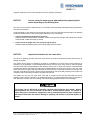
The crane cut-out values are determined by us on the basis of the load tables and design drawings specified by
the crane manufacturers.
These theoretical cut-out values must be checked by tests on the crane with balanced test loads in all operating
modes and at least with the following equipment depending on the crane design.
• Cranes with fixed boom length during operation:
Smallest, middle and largest radius at shortest, middle and longest boom length, and at these boom lengths
at the shortest, middle and longest tip booms.
• Cranes with boom length which can change during operation:
Smallest, middle and largest radius at every length stage and all tip booms.
NOTICE 2
Important information for the crane driver
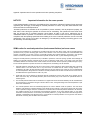
The LMI is an operating aid which warns the crane driver of an imminent overload to prevent personal injury or
damage to property.
This system cannot and is not intended to be used as a substitute for the crane driver’s good judgement or
experience or the application of acknowledged safe working practices when using cranes. It does not release
the crane driver from his responsibility for safe operation of the crane. He must ensure that he understands and
complies fully with the information and instructions displayed. Before he starts work with the crane, the crane
driver must have thoroughly read and understood the entire manual to ensure that he knows the operation and
the limits of the LMI and the crane. Perfect functioning depends on the correct daily checking of the system and
compliance with the operating information provided in this manual.
The system can only help the crane driver if the LMI is correctly set and the right load table and correct
operating mode number is entered for the particular equipment. To prevent damage to property and serious or
even fatal injury to people, the correct setting of the LMI must be guaranteed before crane work begins.
This system can be fitted with a manually operated external device (key switch / button)
which bypasses the cut-out function of the LMI or lift limit switch system. The switch or
button may only be actuated in emergencies and by authorised personnel. Non-compliance
with these instructions can result in damage to property and serious or even fatal injuries to
people.
© 2009 Hirschmann Automation and Control GmbH · Branch Office Ettlingen · eMail: [email protected] · www.hirschmann.com
24 183 19 1012e (Generic) / 2009-02-26 / Rev. 01 / rk.
45
Appendix: Important notes for crane operators and crane operating companies
NOTICE 3
Important information for the crane operator
In the Federal Republic of Germany, the guidelines of the Association of German Engineers [Verein deutscher
Ingenieure] VDI 3570 apply for the design of overload protections for cranes. They also make reference to the
sense and limits of overload protections.
“Overload protections are intended as far as possible to prevent accidents, risks to people and property, the
load and the crane during the operation of the crane due to overloading. The operator and crane driver must
take into account that an overload protection cannot detect all risks in time and a malfunction due to
undetectable factors is possible. You therefore must continue to exercise caution and remain responsible for
compliance with the operating specifications and loading of the crane. Overload protections are not to be used
operationally. They are only to be used in an emergency. The load-bearing capacity of the lifting gear is not to
be reduced by an overload protection.”
VDMA notice for overload protections (load moment limiters) on boom cranes
The boom crane supplied to you is equipped, in accordance with §24 of the UVV “Boom crane”, with an overload protection
(overload cut-out), by which the lifting gear and the boom retractor of the crane are switched off if the admissible load
moment is exceeded. To be able to remove a load after actuating the overload protection, movement in the opposite
direction must still be possible. It must therefore still be possible to lower the load, e.g. after disabling the lifting gear.
Fitting the overload protection (overload cut-out) is intended to prevent the crane from picking up loads which endanger its
stability. The overload protection (overload cut-out) is thus an emergency switch which, in the event of the crane being
overloaded, disables all movements which would increase the load moment and thus prevents possible damage or injury.
For the overload protection to perform its function as a safety device, the following must be observed:
1.
Overload protections (overload cut-outs) are not to be used in normal operation to switch off the lifting gear of the boom
retraction device. The crane driver must in any event check for himself that the crane’s carrying capacity is not
exceeded by the load to be lifted. Excessive loads above the carrying capacity of the crane are not to be lifted despite
an overload protection being fitted. Nor should the overload protection ever be used as scales and the crane must not
be loaded above the highest maximum load in any case.
2.
Fixed loads may only be pulled off in agreement with the manufacturer and only with cranes set up specially for this.
When used in this way, the overload protection (load moment limiter) may not be used as an operational device for
measuring force.
3.
The overload protection fitted must be maintained on a regular basis and its functional reliability must be checked before
work commences. In accordance with §35 of the UVV “Boom crane”, the regular testing of the overload protection is part
of the crane maintenance.
4.
The overload protection does not automatically adjust to the crane’s different modes of operation. The crane driver
therefore must adjust the overload protection to the altered carrying capacity or load moment range when the crane's
mode of operation changes. Here, the manufacturer’s instructions for the overload protection fitted are to be observed.
The reliable functioning of the equipment and accident-free operation of the crane depend heavily on the careful
observation of these provisions. An incorrectly set overload protection, e.g. a high load moment when the supports are
retracted, is substantially more dangerous than a crane without an overload protection as it can give the crane driver a
false sense of security; this can lead to serious accidents.
© 2009 Hirschmann Automation and Control GmbH · Branch Office Ettlingen · eMail: [email protected] · www.hirschmann.com
24 183 19 1012e (Generic) / 2009-02-26 / Rev. 01 / rk.
46
Appendix: Important notes for crane operators and crane operating companies
5. The overload protection fitted (overload cut-out) must be adjusted to the altered carrying capacity or load moment range
by the crane driver when the crane is adjusted to different operating situations, e.g.:
a) when the support is extended and retracted (switch to the large or small load moment)
b) when the boom length changes due to:
manual extension and retraction (telescoping)
fitting and removal of connectors
c) when turning or slewing the crane in the area of the larger or smaller standing moment (switching to the large or small
load moment)
d) when transferring to another carrying capacity range by multiple cutting-in of the cable lines of the lifting gear or boom
retraction device.
6. It must be expressly stated that incorrect use of the crane can render the overload protection ineffective or can result in
the drive gear not cutting out sufficiently quickly. In this case, accidents cannot be completely ruled out despite an
overload protection being fitted. This applies, for example, for:
- under-hooking of the load or load suspension gear
- excessive forces of inertia
- loads falling into the cable
- diagonal pull
- crane travel in an area of heavily sloping ground
- soft subsoil
wind loading.
7. If a device for switching off or bypassing the overload protection (load moment limiter) is fitted, then it may only be used
subject to special precautions in the presence of the crane supervisor, e.g. when testing the crane, and in the situations
of use specified by the crane manufacturer.
Careful compliance with the provisions contained in this notice and in the crane manufacturer’s
directions for use is the prerequisite for the safe operation of the overload protection (overload cut-out).
In the event of any doubt, the manufacturer’s instructions for use are to be consulted. If this is not
sufficient, the relevant company should be consulted.
Unauthorised interventions in the mechanism of the overload protection invalidate any claims under the
warranty.
Publisher:
VDMA Fachgemeinschaft für Hebezeuge und Fördermittel
im Verein Deutscher Maschinenbau-Anstalten e.V.
Düsseldorf-Oberkassel
© 2009 Hirschmann Automation and Control GmbH · Branch Office Ettlingen · eMail: [email protected] · www.hirschmann.com
24 183 19 1012e (Generic) / 2009-02-26 / Rev. 01 / rk.
47
Appendix: Important notes for crane operators and crane operating companies
NOTICE 4
Notes on the electromagnetic compatibility (EMC) of electronic
systems under the effect of electromagnetic fields
Electromagnetic fields increasingly affect electronic systems and can cause malfunctions; they can be avoided
by taking preventive state-of-the-art measures:
1.
Preventive measures are based primarily on the fundamental principle of screening electronic circuits
against radiating high frequency by a closed low-ohm protective skin for high-frequency interference.
− All components have outer housings made of metal with earthing option;
− Only cables with shielding braid are used. The shielding layer must be made so that it is readily
conductive over the surface at all connections.
− Connecting the crane earth and the electronic earth at only one point in the system.
2.
The general measures listed in item 1 cannot however ensure complete protection against electromagnetic
fields in the individual case as the scale and type of effect depends on the local conditions.
The influencing factors include:
− particularly unfavourable arrangement of antennas to the system,
− very high transmission performance,
− consistent compliance with the measures in item 1 not possible due to local conditions,
− long cables,
− coupling of interference in the power lines.
In unfavourable situations, therefore, it is essential to take measures over and above preventive
precautions, in compliance with the principles stated in item 1, experimentally on site, e.g.:
• insertion of filters or short-circuiting of interference frequencies by condensors,
• making or breaking earth connections,
• use of double-screened cables (guarded shield system).
© 2009 Hirschmann Automation and Control GmbH · Branch Office Ettlingen · eMail: [email protected] · www.hirschmann.com
24 183 19 1012e (Generic) / 2009-02-26 / Rev. 01 / rk.
48
Appendix: Important notes for crane operators and crane operating companies
NOTICE 5
Caution:
Notes on works safety during repairs to display and control
consoles
Liquid crystal displays contain fluid chemical substances inside the display.
Particular caution and care is therefore essential:
• when operating equipment containing LCDs
• during storage and transport (danger of breakage)
• in the disposal of LCDs which can no longer be used or which are surplus to requirements.
Possible sources of danger are chemical action in the event of skin coming into contact
with broken LCD displays. Therefore, in the event of contact, wash the wetted areas of the
body thoroughly with soap. Particular care is called for in the event of open wounds.
NOTICE 6
Installation specifications for display and control consoles without
an enclosed metal housing
To prevent radio interference, high-frequency equipment and installations which come under the general
approval which the Federal Minister for Post and Telecommunications published in his Official Journal no.
163/1984 as Decree no. 1045/1984 and no. 1046/1984, must comply with the limit values and requirements
stipulated therein.
For display and control consoles without an enclosed metal housing (instrument panel installation), therefore,
the cable shield must be connected directly onto the instrument panel in front of the console by means of a
cable clamp.
© 2009 Hirschmann Automation and Control GmbH · Branch Office Ettlingen · eMail: [email protected] · www.hirschmann.com
24 183 19 1012e (Generic) / 2009-02-26 / Rev. 01 / rk.
49
Revision History
Rev.
Rev. A
Date
Changes
2009-02-26 First edition
System software
LMI software
Graphics
Application
Name
Konopka
SQG2 V 3.14
LSQN V 1.11 (20090223)
V 1.00
MQVGA V 1.00 (20090220)
© 2009 Hirschmann Automation and Control GmbH · Branch Office Ettlingen · eMail: [email protected] · www.hirschmann.com
24 183 19 1012e (Generic) / 2009-02-26 / Rev. 01 / rk.
50