1
Agilent 1200 Series
Binary Pump SL
User Manual
A
Notices
© Agilent Technologies, Inc. 2006
Warranty
No part of this manual may be reproduced in
any form or by any means (including electronic storage and retrieval or translation
into a foreign language) without prior agreement and written consent from Agilent
Technologies, Inc. as governed by United
States and international copyright laws.
The material contained in this document is provided “as is,” and is subject to being changed, without notice,
in future editions. Further, to the maximum extent permitted by applicable
law, Agilent disclaims all warranties,
either express or implied, with regard
to this manual and any information
contained herein, including but not
limited to the implied warranties of
merchantability and fitness for a particular purpose. Agilent shall not be
liable for errors or for incidental or
consequential damages in connection with the furnishing, use, or performance of this document or of any
information contained herein. Should
Agilent and the user have a separate
written agreement with warranty
terms covering the material in this
document that conflict with these
terms, the warranty terms in the separate agreement shall control.
Manual Part Number
G1312-90010
Edition
02/06
Printed in Germany
Agilent Technologies
Hewlett-Packard-Strasse 8
76337 Waldbronn, Germany
Software Revision
Technology Licenses
This guide is valid for B.02.xx revisions of
the Agilent ChemStation software, where xx
refers to minor revisions of the software
that do not affect the technical accuracy of
this guide.
The hardware and/or software described in
this document are furnished under a license
and may be used or copied only in accordance with the terms of such license.
Restricted Rights Legend
Software and technical data rights granted
to federal government customers include
only those rights customarily provided to
end user Customers of Software. Agilent
provides this customary commercial license
in Software and technical data pursuant to
FAR 12.211 (Technical Data) and FAR 12.212
(Computer Software) and, for Department of
Defense purchases, DFARS 252.227-7015
(Technical Data - Commercial Items) and
DFARS 227.7202-3 (Rights in Commercial
Computer Software or Computer Software
Documentation). If a federal government or
other public sector Customer has a need for
2
rights not conveyed under these terms, they
must negotiate with Agilent to establish
acceptable terms in a written agreement
executed by all relevant parties.
Safety Notices
CAUTION
A CAUTION notice denotes a hazard. It calls attention to an operating procedure, practice, or the like
that, if not correctly performed or
adhered to, could result in damage
to the product or loss of important
data. Do not proceed beyond a
CAUTION notice until the indicated
conditions are fully understood and
met.
WA R N I N G
A WARNING notice denotes a
hazard. It calls attention to an
operating procedure, practice, or
the like that, if not correctly performed or adhered to, could result
in personal injury or death. Do not
proceed beyond a WARNING
notice until the indicated conditions are fully understood and
met.
1200 Series Binary Pump SL User Manual
In This Guide…
1
Introduction to the Binary Pump SL
This chapter provides an overview of the functionality of the
Binary Pump SL.
2
Site Requirements and Specifications
This chapter provides information about site requirements and
specifications for the Binary Pump SL.
3
Installing the Pump
This chapter gives information about the preferred stack setup
for your system and the installation of your Binary Pump SL.
4
Using the Pump
This chapter explains the operational parameters of the Binary
Pump SL.
5
Optimizing Performance
This chapter gives information on how to optimize the
performance of the Binary Pump SL under special operational
conditions.
6
Tests and Calibration Functions
This chapter explains all test functions that are available for the
Binary Pump SL.
7
Maintenance and Repair
This chapter provides general information on repairing the
Binary Pump SL.
8
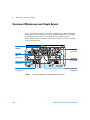
Maintenance and Simple Repairs
This chapter describes all maintenance and simple repair
procedures that can be performed without removing the pump
from the system stack.
1200 Series Binary Pump SL User Manual
3
9
Parts and Materials for Maintenance
This chapter lists all parts and tools that are required for
maintenance and simple repairs.
A
4
Appendix
1200 Series Binary Pump SL User Manual
Contents
1
Introduction to the Binary Pump SL
Introduction to the Binary Pump SL
Instrument Layout 12
Principle of Operation 13
Optimization Features 15
Electrical Connections
Firmware Updates
2
18
20
Site Requirements and Specifications
Site Requirements
22
Physical Specifications
24
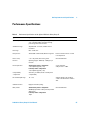
Performance Specifications
3
12
25
Installing the Pump
Unpacking the Binary Pump SL
30
Optimizing the Stack Configuration
Single Stack Setup 33
Twin Stack Setup 35
Installing the Binary Pump SL
32
37
Flow Connections with Solvent Selection Valve
Flow Connections without Solvent Selection Valve
41
44
Priming the System 47
Initial Priming 47
Regular Priming 48
1200 Series Binary Pump SL Service Manual
5
Changing Solvents
4
49
Using the Pump
Hints for Successful Use of the Binary Pump SL
Solvent Information
52
54
Setting the Pump up with the G4208A Instant Pilot
Setting the Pump up with Agilent ChemStation
Overview 56
Setup of Basic Pump Parameters 58
Pump Control 60
Auxiliary Pump Parameters 61
Data Curves 63
Bottle Filling 64
Early Maintenance Feedback (EMF)
EMF Counters 66
Using the EMF Counters 67
5
55
56
66
Optimizing Performance
Prevent Blocking of Solvent Filters 70
Checking the Solvent Filters 70
Cleaning the Solvent Filters 71
When to Use a Vacuum Degasser 72
Operational Hints for the Vacuum Degasser
When to Use the Active Seal Wash Option
When to Use Alternative Seals
72
73
74
When to Remove Damper and Mixer 75
Convert the Binary Pump SL to Low Delay Volume Mode
How to Optimize the Compressibility Compensation Setting
Solvent Compressibility Calibration 78
6
76
78
1200 Series Binary Pump SL Service Manual
Optimization of Legacy Compressibility Settings
6
79
Tests and Calibration Functions
Pressure Test 82
Running the Pressure Test 84
Evaluating the Results 85
Pump Test 87
Running the Pump Test
Evaluating the Results
88
88
Solvent Compressibility Calibration 89
Running the Solvent Compressibility Calibration
Pump Elasticity Calibration 91
Running the Pump Elasticity Calibration
7
90
92
Maintenance and Repair
Introduction to Maintenance and Repair 94
Simple Repairs - Maintenance 94
Exchanging Internal Parts - Repair 94
Warnings and Cautions
95
Cleaning the Binary Pump SL
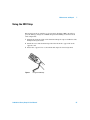
Using the ESD Strap
8
96
97
Maintenance and Simple Repairs
Overview of Maintenance and Simple Repairs
100
Maintenance Procedures 101
Exchanging the Purge Valve Frit or the Purge Valve
Removing the Pump Head Assembly
104
Disassembling the pump head 106
Exchanging the Pump Seals
107
Seal Wear-in Procedure 109
1200 Series Binary Pump SL Service Manual
102
7
Exchanging the Plungers
110
Exchanging the Wash Seals 111
Reinstalling the Pump Head Assembly
113
Simple Repair Procedures 115
Exchanging the Active Inlet Valve Cartridge
116
Exchanging the Active Inlet Valve Body 118
Exchanging the Outlet Ball Valve
121
Exchanging the Solvent Selection Valve
124
Installing the Active Seal Wash Option 126
Exchanging the Optional Interface Board
Replacing the Pump’s Firmware
9
131
133
Parts and Materials for Maintenance
Bottle Head Assembly
136
Hydraulic Path with Solvent Selection Valve
Hydraulic Path without Solvent Selection Valve
Pump-Head Assembly SL
144
145
Active Inlet Valve Assembly
Cover Parts
146
147
Accessory Kit G1312-68725
148
Active Seal Wash Option G1312-68721
G1316B SL Capillary System Kit
Optional Interface Boards
A
149
150
152
Appendix
General Safety Information
8
140
142
Outlet Ball Valve Assembly
Purge Valve Assembly
138
154
1200 Series Binary Pump SL Service Manual
Lithium Batteries Information
Radio Interference
Sound Emission
157
158
159
Solvent Information
160
Agilent Technologies on the Internet
162
Index
1200 Series Binary Pump SL Service Manual
9
10
1200 Series Binary Pump SL Service Manual
Agilent 1200 Series Binary Pump SL
User Manual
1
Introduction to the Binary Pump SL
Introduction to the Binary Pump SL 12
Instrument Layout 12
Principle of Operation 13
Optimization Features 15
Electrical Connections 18
Firmware Updates 20
This chapter provides an overview of the functionality of the Binary Pump SL.
Agilent Technologies
11
1
Introduction to the Binary Pump SL
Introduction to the Binary Pump SL
The Binary Pump SL comprises two identical pumps integrated into one
housing. Binary gradients are created by high-pressure mixing. An optional
degasser is available for applications that require best flow stability, especially
at low flow rates, for maximum detector sensitivity. Pulse damper and mixer
can be bypassed for low flowrate applications or whenever a minimal
transient volume is desirable. Typical applications are high throughput
methods with fast gradients on high resolution 2.1 mm columns. The pump is
capable of delivering flow in the range of 0.1 - 5 mL/min against up to 600 bar.
A solvent selection valve (optional) allows to form binary mixtures (isocratic
or gradient) from one of two solvents per channel. Active seal wash (optional)
is available for use with concentrated buffer solutions.
Instrument Layout
The industrial design of the module incorporates several innovative features.
It uses Agilent’s E-PAC concept for the packaging of electronics and
mechanical assemblies. This concept is based upon the use of expanded
polypropylene (EPP) foam plastic spacers in which the mechanical and
electronic boards components of the module are placed. This pack is then
housed in a metal inner cabinet which is enclosed by a plastic external
cabinet. The advantages of this packaging technology are:
• virtual elimination of fixing screws, bolts or ties, reducing the number of
components and increasing the speed of assembly/disassembly,
• the plastic layers have air channels molded into them so that cooling air can
be guided exactly to the required locations,
• the plastic layers help cushion the electronic and mechanical parts from
physical shock, and
the metal inner cabinet shields the internal electronics from electromagnetic
interference and also helps to reduce or eliminate radio frequency emissions
from the instrument itself.
12
1200 Series Binary Pump SL User Manual
Introduction to the Binary Pump SL
1
Principle of Operation
The Binary Pump SL is based on a two-channel, dual-piston in-series design
which comprises all essential functions that a solvent delivery system has to
fulfill. Metering of solvent and delivery to the high-pressure side are
performed by two pump assemblies which can generate pressure up to
600 bar.
Each channel comprises a pump assembly including pump drive, pump head,
active inlet valve with replaceable cartridge and outlet valve. The two channels
are fed into a low-volume mixing chamber which is connected via a restriction
capillary coil to a damping unit and a mixer. A pressure sensor monitors the
pump pressure. A purge valve with integrated PTFE frit is fitted to the pump
outlet for convenient priming of the pumping system.
Purge
valve
Mixer
Damper
Pump outlet
to waste
Pressure
sensor
Outlet
valve
Inlet
valve
from
solvent
bottle A
Seals
Pistons
Outlet
valve
Mixing
Chamber
Inlet
valve
Seals
Pistons
Pump head A
Figure 1
from
solvent
bottle B
Pump head B
The Hydraulic Path of the Binary Pump SL with Damper and Mixer
Damper and mixer can be bypassed for lowest delay volume of the Binary
Pump SL. This configuration is recommended for low flow rate applications
with steep gradients, see the Rapid Resolution System Manual.
1200 Series Binary Pump SL User Manual
13
1
Introduction to the Binary Pump SL
Figure Figure 2 on page 14 illustrates the flow path in low delay volume mode.
For instructions on how to change between the two configurations, see
“Convert the Binary Pump SL to Low Delay Volume Mode” on page 76.
Bypassing the mixer while the damper remains in line is not a supported configuration and
may lead to undesired behavior of the Binary Pump SL.
NOTE
Mixer
Damper
Purge
valve
Pump outlet
Pressure
sensor
to waste
Outlet
valve
Outlet
valve
Inlet
valve
from
solvent
bottle A
Seals
Mixing
chamber
Seals
from
solvent
bottle B
Pistons
Pistons
Pump head B
Pump head A
Figure 2
Inlet
valve
The Hydraulic Path of the Binary Pump SL with bypassed Damper and Mixer
Table 1
Binary Pump SL Details
Delay volume
From mixing point to pump outlet, dependent on back pressure
120 µL without damper and mixer
600 – 800 µL with damper and mixer
Materials in contact with mobile phase
14
1200 Series Binary Pump SL User Manual
Introduction to the Binary Pump SL
Table 1
1
Binary Pump SL Details, continued
Pump head
SST, gold, sapphire, ceramic
Active Inlet Valve
SST, sapphire, ruby, ceramic, PTFE
Outlet Valve
SST, gold, sapphire, ruby, tantalum
Adapter
SST, gold
Purge Valve
SST, gold, PTFE, ceramic
Damping Unit
Gold, SST
For pump specifications, see Chapter 2, “Site Requirements and
Specifications”.
Optimization Features
What is Pump Elasticity Compensation?
The flow path of the pump consists of pump chambers, sapphire pistons,
polymer seals, stainless steel tubing of different dimension, pressure sensor,
and so forth. All of these parts deform when pressurized. The sum of this
deformation is called pump elasticity. The performance of the pump is greatly
enhanced by correcting for this elasticity.
The Pump Elasticity Calibration calculates correction factors to compensate
for the individual elasticity of the pump that was calibrated.
The elasticity is different for every pump and may change with the
replacement of parts in the flow path, e.g. pump seals.
All Binary Pumps SL are elasticity calibrated at the factory and require
recalibration only after preventive maintenance or major repairs to the flow
path. Replacement of capillaries or PTFE frits are not considered a major
repair.
What is Solvent Compressibility Compensation?
Although the compressibility of liquids is orders of magnitude lower then the
compressibility of gases, a noticeable volume error is seen when typical
chromatographic solvents are compressed to operating pressures as high as
1200 Series Binary Pump SL User Manual
15
1
Introduction to the Binary Pump SL
600 bar. In addition, the compressibility changes with pressure, temperature
and the amount of dissolved gas. In order to minimize the influence of the
latter, the use of a vacuum degasser is mandatory for high precision delivery
of liquids. Unfortunately, the influence of the temperature on compressibility
is non-linear and cannot be calculated.
The Agilent Binary Pump SL features a new multi point compressibility
calibration. The compressibility of a solvent is determined at different
pressures from 0 - 600 bar and stored in an XML file. This file can be
distributed to other pumps because the solvent compressibility is independent
from the pump.
The Binary Pump SL and ChemStation come with predetermined solvent
compressibility data for the most common HPLC solvents like water,
acetonitrile, methanol, etc. Users can calibrate their own solvent mixtures
with the help of an easy to use calibration procedure in the Agilent LC
Diagnostic software.
CAUTION
A correct pump elasticity calibration is an essential prerequisite for successful solvent
compressibility calibrations!
Solvent compressibility calibrations acquired with a miscalibrated pump will work, but
they are not transferable to other pumps!
How Does Variable Stroke Volume Work?
The smaller the solvent volume in the pump chamber is, the faster it can be
recompressed to operating pressure. The Binary Pump SL allows to manually
or automatically adjust the pump stroke volume of the first piston in the range
of 20 - 100 µL. Due to the compression of the solvent volume in the first pump
chamber, each piston stroke of the pump will generate a small pressure
pulsation, influencing the flow ripple of the pump. The amplitude of the
pressure pulsation is mainly dependent on the stroke volume and the
compressibility compensation for the solvent in use. Small stroke volumes
generate less pressure pulsation than larger stroke volumes at the same flow
rate. In addition, the frequency of the pressure pulsation will be higher. This
will decrease the influence of flow pulsations on quantitative results.
In gradient mode, smaller stroke volume results in less flow ripple and
improves the composition ripple.
16
1200 Series Binary Pump SL User Manual
Introduction to the Binary Pump SL
1
The Binary Pump SL uses a processor-controlled ball screw system to drive its
pistons. The normal stroke volume is optimized for the selected flow rate.
Small flow rates use a small stroke volume while higher flow rates use a higher
stroke volume.
The stroke volume for the pump is by default set to AUTO mode. This means
that the stroke is optimized for the flow rate in use. A change to larger stroke
volumes is possible but not recommended.
1200 Series Binary Pump SL User Manual
17
1
Introduction to the Binary Pump SL
Electrical Connections
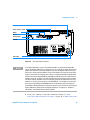
• The CAN bus is a serial bus with high-speed data transfer. The two
connectors for the CAN bus are used for internal Agilent 1200 Series
module data transfer and synchronization.
• One analog output provides a pressure signal for integrators or data
handling systems.
• The REMOTE connector may be used in combination with other non
1100/1200 Series equipment if you want to use features such as common
shut down, prepare, and so on.
• The RS-232 connector may be used to control the Binary Pump SL from a
computer via RS-232 connection, using appropriate software. This
connector needs to be activated by the configuration switch module at the
rear of the pump. The software needs the appropriate drivers to support
this communication. See your software documentation for further
information.
• The power input socket accepts a line voltage of 100 – 120 or 220 – 240 volts
AC ± 10 % with a line frequency of 50 or 60 Hz. Maximum power
consumption is 220 VA (Volt-Amps). There is no voltage selector on your
Binary Pump SL because the power supply has wide-ranging capability.
There are no externally accessible fuses, because automatic electronic fuses
are implemented in the power supply. The security lever at the power input
socket prevents that the Binary Pump SL cover is taken off when line power
is still connected.
• The interface board slot is used for external contacts, BCD output or the
installation of a G1369A LAN interface.
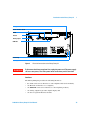
WA R N I N G
18
Never use cables other than the ones supplied by Agilent Technologies to ensure
proper functionality and compliance with safety or EMC regulations.
1200 Series Binary Pump SL User Manual
Introduction to the Binary Pump SL
1
Configuration switch
Slot for interface board
RS232
Remote
Analog output
CAN-Bus
Power Plug
Security Lever
Figure 3
WA R N I N G
Electrical Connections to the Binary Pump SL
To disconnect the binary pump from line, unplug the power cord. The power supply
still uses some power, even if the power switch on the front panel is turned off.
Interfaces
The Binary Pump SL provides the following interfaces:
• two CAN connectors as interface to other Agilent 1200 Series modules,
• one RS-232C as interface to a computer,
• one REMOTE connector as interface to other Agilent products,
• one analog output for pressure signal output, and
• one slot for optional interface boards
1200 Series Binary Pump SL User Manual
19
1
Introduction to the Binary Pump SL
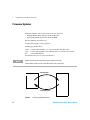
Firmware Updates
Firmware updates can be done using your user interface:
• G4208A Instant Pilot with files from a USB-stick
• Agilent ChemStation with files from CD-ROM
The file naming conventions are:
1312B_A601_12.dlb, or more general:
xxxxx_yyyy_zz.dlb, where
xxxx
yyyy
zz
is the product number, e.g. 1316 for the G1316A TCC, and
is the revision number, for example A601 is revision A.06.01, and
is the build number
For instructions refer to your user interface.
NOTE
Update of main system can be done in the resident system only.
Update of the resident system can be done in the main system only.
main FW update
Resident System
Main System
resident FW update
Figure 4
20
Firmware Update Mechanism
1200 Series Binary Pump SL User Manual
Agilent 1200 Series Binary Pump SL
User Manual
2
Site Requirements and Specifications
Environment 23
Physical Specifications 24
Performance Specifications 25
This chapter provides information about site requirements and specifications
for the Binary Pump SL.
Agilent Technologies
21
2
Site Requirements and Specifications
Site Requirements
A suitable environment is important to ensure optimal performance of the
pump.
Power Considerations
The power supply of the pump has wide ranging capabilities and accepts any
line voltage in the range mentioned in Table 2. Consequently, there is no
voltage selector at the back of the instrument. There are also no externally
accessible fuses, as automatic electronic fuses are implemented in the power
supply.
WA R N I N G
To disconnect the pump completely from line power, unplug the power cord. The
power supply still uses some power, even if the power switch on the front panel is
turned off.
WA R N I N G
Shock hazard or damage of your instrumentation can result if the devices are
connected to line voltage higher than specified.
CAUTION
Make sure to have easy access to the power cable of the instrument in order to
disconnect the instrument from line.
Power Cords
Different power cords are offered as options with the pump. The female end of
all power cords is identical. It plugs into the power-input socket at the back of
the pump. The male end of each power cord is different and designed to match
the wall socket of a particular country or region.
22
1200 Series Binary Pump SL User Manual
Site Requirements and Specifications
2
WA R N I N G
Never operate your instrumentation from a power outlet that has no ground
connection. Never use a power cord other than the Agilent Technologies power cord
designed for your region.
WA R N I N G
Never use cables other than the ones supplied by Agilent Technologies to ensure
proper functionality and compliance with safety or EMC regulations.
Bench Space
The pump dimensions and weight (see Table 2) allow you to place the module
on almost any table or laboratory bench. It needs additional 2.5 cm
(1.0 inches) of space on either side and approximately 8 cm (3.1 inches) in the
rear for air circulation and electric connections.
Should the bench carry a Agilent 1200 Series system, be sure it is designed to
bear the weight of all modules.
The pump must be operated horizontal position.
Environment
Your pump will work within the specifications at ambient temperature and
relative humidity described in Table 2.
CAUTION
NOTE
Do not store, ship or use your pump under conditions where temperature fluctuations
could cause condensation within the pump. Condensation will damage the system
electronics. If your pump has been shipped in cold weather, leave it in its box and allow
it to warm up to room temperature slowly to avoid condensation.
The G1312B pump is designed to operate in a typical electromagnetic environment
(EN61326-1) where RF transmitters, such as mobile phones, should not be used in close
proximity.
1200 Series Binary Pump SL User Manual
23
2
Site Requirements and Specifications
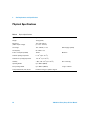
Physical Specifications
Table 2
Physical Specifications
Type
Specification
Weight
15.5 kg (34 lbs)
Dimensions
(width × depth × height)
180 × 345 × 435 mm
(7 × 13.5 × 17 inches)
Line voltage
100 – 240 VAC, ± 10 %
Line frequency
50 or 60 Hz ± 5 %
Power consumption (G1312B)
160 VA
Maximum
Ambient operating temperature
0 – 55 °C (32 – 131 °F)
.
Ambient non-operating temperature
-40 – 70 °C (-4 – 158 °F)
Humidity
< 95%, at 25 – 40 °C (77 – 104 °F)
Operating altitude
Up to 2000 m (6500 ft)
Non-operating altitude
Up to 4600 m (14950 ft)
Safety standards: IEC, CSA, UL, EN
Installation category II, pollution degree 2
24
Comments
Wide-ranging capability
Non-condensing
storage conditions
1200 Series Binary Pump SL User Manual
Site Requirements and Specifications
2
Performance Specifications
Table 3
Performance Specifications of the Agilent 1200 Series Binary Pump SL
Type
Specification
Hydraulic system
Two dual piston in series pumps with proprietary
servo-controlled variable stroke drive, floating
piston design and active inlet valve
Setable flow range
Stipends 0.001 – 5 mL/min, in 0.001 mL/min
increments
Flow range
0.05 – 5.0 mL/min
Flow precision
≤0.07% RSD or ≤0.02 min SD, whatever is greater
based on retention time at constant
room temperature
Flow accuracy
± 1% or 10 µL/min, what ever is greater
measured with water
Pressure
Operating range 0 – 600 bar (0 – 7800 psi) up to
5 ml/min
Pressure pulsation
Standard delay volume configuration:
< 2% amplitude (typically < 1%)
Low delay volume configuration:
< 5% amplitude (typically < 2%)
Compressibility
compensation
Automatic, pre-defined, based on mobile phase
compressibility
Recommended pH range
1.0 – 12.5
Gradient formation
High-pressure binary mixing
Delay volume
Standard delay volume configuration:
600-800 µl, dependent on back pressure (includes
400 µl mixer)
Low delay volume configuration:
120 µl
1200 Series Binary Pump SL User Manual
Comments
at 1 mL/min water,
at all pressures > 1 MPa
Solvents with pH < 2.3 should not
contain acids which attack stainless
steel.
measured with water
25
2
Site Requirements and Specifications
Table 3
Performance Specifications of the Agilent 1200 Series Binary Pump SL, continued
Type
Specification
Composition range
settable range: 0 – 100%
recommended range: 1 – 99% or 5 µl/min per
channel, whatever is greater
Composition precision
< 0.15 % RSD
at 1mL/min
Composition accuracy
± 0.35% absolute
(water/caffeine tracer)
Control
Agilent ChemStation for LC (32-bit)
G4208A Handheld Controller
EZ Chrom Elite
Revision B.02.00 or above
Analog output
For pressure monitoring, 1.33 mV/bar, one output
Communications
Controller-area network (CAN), RS-232C, APG
Remote: ready, start, stop and shut-down signals,
LAN optional
Safety and maintenance
Extensive diagnostics, error detection and display
(through Agilent LC Diagnostics), leak detection,
safe leak handling, leak output signal for
shutdown of pumping system. Low voltages in
major maintenance areas.
GLP features
Early maintenance feedback (EMF) for continuous
tracking of instrument usage in terms of seal wear
and volume of pumped mobile phase with
pre-defined and user-settable limits and feedback
messages. Electronic records of maintenance and
errors.
Housing
All materials recyclable.
26
Comments
1200 Series Binary Pump SL User Manual
Site Requirements and Specifications
NOTE
2
For use with flow rates below 500 µl/min or for use without damper and mixer a vacuum
degasser is required.
All specification measurements are done with degassed solvents.
1200 Series Binary Pump SL User Manual
27
2
28
Site Requirements and Specifications
1200 Series Binary Pump SL User Manual
Agilent 1200 Series Binary Pump SL
User Manual
3
Installing the Pump
Unpacking the Binary Pump SL 30
Optimizing the Stack Configuration 32
Single Stack Setup 33
Twin Stack Setup 35
Installing the Binary Pump SL 37
Flow Connections with Solvent Selection Valve 41
Flow Connections without Solvent Selection Valve 44
Priming the System 47
This chapter gives information about the preferred stack setup for your system
and the installation of your Binary Pump SL.
Agilent Technologies
29
3
Installing the Pump
Unpacking the Binary Pump SL
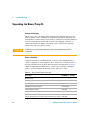
Damaged Packaging
When you receive your Binary Pump SL inspect the shipping boxes for any
signs of damage. If the containers or cushioning material are damaged, save
them until the contents have been checked for completeness and the pump has
been mechanically and electrically checked. If the shipping container or
cushioning material is damaged, notify the carrier and save the shipping
material for inspection by the carrier.
CAUTION
If there are signs of damage to the pump, please do not attempt to install the
instrument.
Delivery Checklist
Compare the delivery checklist with the contents of the shipping boxes to
ensure completeness of the shipment. The contents lists is shown in Table 4.
For parts identification check the illustrated parts breakdown in Chapter 9,
“Parts and Materials for Maintenance”. Please report missing or damaged
parts to your local Agilent Technologies sales and service office.
Table 4
Binary Pump SL Delivery Checklist
Description
Part Number
Binary Pump SL
30
Quantity
1
Calibration capillary assembly
G1312-67500
1
Agilent LC Diagnostic CD-ROM
G2173-64000
1
1200 Binary Pump SL Start up Kit
G1312-68700
1
Syringe adapter luer/barb
0100-1681
1
Syringe
9301-0411
1
Solvent cabinet (4 bottles, for pumps with solvent selection valve), or 5067-1531
Solvent cabinet (2 bottles, for pumps without solvent selection valve) 5067-1532
1
1200 Series Binary Pump SL User Manual
Installing the Pump
Table 4
3
Binary Pump SL Delivery Checklist, continued
Description
Part Number
Quantity
Solvent bottle amber
Solvent bottle transparent
9301-1450
9301-1420
1
1 or 3
Bottle head assembly
G1311-60003
2 or 4
1200 Binary Pump SL User Manual
G1312-90010
1
SB-C18, 2.1x50mm,1.8um,600bar, or
SB-C18, 4.6x50mm, 1.8um, 600bar, or
Eclipse XDB-C18, 4.6x50mm, 1.8um, 600bar
827700-902
827975-902
927975-902
1, or
1, or
1
Power cable (matching your country’s power socket)
Accessory kit (see Table 11)
1200 Series Binary Pump SL User Manual
1
G131268725
1
31
3
Installing the Pump
Optimizing the Stack Configuration
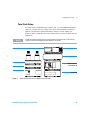
If your Binary Pump SL is part of a complete Agilent 1200 series Rapid
Resolution LC System, system performance can be optimized by stacking the
instrument modules in either of the ways shown below.
32
1200 Series Binary Pump SL User Manual
Installing the Pump
3
Single Stack Setup
Solvent cabinet
Micro-degasser
Instant Pilot
Binary pump SL
High Performance Autosampler SL
Thermostat
Thermostatted Column
Compartment SL
Detector SL
Figure 5
Recommended Single Stack Configuration (Front View)
NOTE
For a detailed view of the flow connections refer to the section “Flow connections in the
Rapid Resolution LC System manual.
1200 Series Binary Pump SL User Manual
33
3
Installing the Pump
AC power cord
V 100- 1 20/ 220- 24 0
Hz 50/ 60
RS232 connector,
for factory use only
G13 7 9 B M
IC R O
DE G A S E
S R
WA R N I N G :
( 2 5 0 V )
P O WE R M A X
T OA V OD
I
E L
E CTR
I CA L S H
CO C K
T
50 0 m
A
3 0W
D IS C O N N E C
T
A T E
T N T IO N :
IN S T R U ME N T F O R M P O W
R
E
P O U R E V IT E R L E
S
L
E E CT
R I QU E S
CHOS
C
S
UP P LY B E F
ORE
R E M O V IN G C O E
VR .
COUP E
R Ĺ A L IM E N T A T
I O NA V A N T
G1 379 B
É N L E V E
E C CO U V E R L E
L
.
88D 80
- R 10
M
A DE
N
I
SEE M ANUAL
J A P AN
CAN bus cable to
Instant Pilot
Connection cable, ALS to
Thermostat, PN G1330-81600
H P IB
H P - IB
A d d re s s
Analog signal to
recorder, for
PN see page 64
L AN
Figure 6
34
L in k
Cn
of i g
n
I i t M
de
o
CAN Bus cable for intermodule communication
5181-1516 (0.5m)
5161-1519 (1.0m)
LAN to Data System,
for PN see page 81
Recommended Single Stack Configuration (Rear View)
1200 Series Binary Pump SL User Manual
Installing the Pump
3
Twin Stack Setup
If a single stack configuration becomes too tall, e.g. if an additional module is
added or if your bench is too high, a two stack setup should be considered.
Split the stack between pump and sampler. Put the solvent cabinet, the
degasser and the pump into the left stack and the rest of the modules into the
right stack.
.
NOTE
In order to optimize the flow path, the stacking order of the right stack is reversed. The
sampler is located at the bottom and the detector is at the top.
Detector SL
Instant Pilot
Column Thermostat SL
Solvent cabinet
Degasser
High Performance
Autosampler SL
Binary Pump SL
Thermostat
Figure 7
Recommended Twin Stack Configuration (Front View)
1200 Series Binary Pump SL User Manual
35
3
Installing the Pump
Analog signal to
recorder, for
PN see page 64
LAN
Li nkC onf g
i
I nit M ode
LAN to Data
System, for PN
see page 81
AC power cord
RS232 port
for factory use only
V 1 00 - 1 20 /2 20 - 2 40
H z 50 /6 0
G13 79B M ICR O DEGA SSER
( 250 V)
W A RNI NG:
P OW
TO
A V OI DE LE CT RI CA L
S CHOCK
AT T E N T I O N :
I N S T R U M E NT F O R
M
PO U R
C H O CS
E V I T ER L E S
RE M
OV I NG
CO U
P E R L ´ A L IM
P OW
ERSU
DI S C O N N E C
PL Y
E L E C T R IQ
ERM
AX
T 500 mA
30 W
T
B E F ORE
UES
COV E R.
E NT A T I ON
AVANT
G 1 37 9B
D´ E N L E V E R
8 88 0 -
L
EC
10
COU
V ER L E .
M A DE I N JA PAN
SEE MA NUAL
APG remote cable
Pressure output
to recorder, for
PN of cable see
page 64
Figure 8
36
HP IB
HP - IB Add ress
CAN Bus cable
for inter-module
communication
5181-1516 (0.5m)
Recommended Twin Stack Configuration (Rear View)
1200 Series Binary Pump SL User Manual
Installing the Pump
3
Installing the Binary Pump SL
Preparations
Locate bench space
Provide power connections
Unpack the pump
Parts required
Pump
Power cord, for other cables see text below and “Cable Overview” on page 62
Agilent Control Software and/or Instant Pilot G4208A
1 Place the Binary Pump SL horizontally on the bench.
2 Ensure the power switch on the front of the pump is OFF (switch stands
out).
3 At the rear of the pump turn the security lever to expose the power inlet
socket.
1200 Series Binary Pump SL User Manual
37
3
Installing the Pump
Status Indicator
Power Switch
Serial number
Figure 9
Front of Binary Pump SL
4 Connect the power cable to the power connector at the back of the Binary
Pump SL. The security lever prevents that the cover is opened while the
power cord is connected to the pump.
5 Connect the required interface cables to the rear of the Binary Pump SL.
38
1200 Series Binary Pump SL User Manual
Installing the Pump
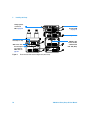
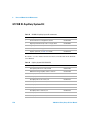
3
Configuration switch
Slot for interface board
RS232
Remote
Analog output
CAN-Bus
Power Plug
Security Lever
Figure 10
NOTE
Rear of the Binary Pump SL
In an Agilent 1200 Series system, the individual modules are connected through CAN
cables. The Agilent 1200 Series vacuum degasser is an exception. It can be connected via
APG remote connector to the other modules in the stack. An Agilent 1200 Series Instant
Pilot can be connected to the CAN bus at any of the modules in the system except for the
degasser. Connection to an Agilent data systems is established through an optional LAN
board or the built-in LAN port (DAD SL). Although the LAN board can be installed into all
modules except for the degasser and the Thermostatted Column Compartment, the LAN
port of the detector should be used as the detector generates the highest data rate of all
modules. In case the system comprises a G1315C DAD SL, it is mandatory to connect the
data system to the LAN port of the DAD SL.For more information about connecting the
Instant Pilot or Agilent Data System refer to the respective user manual. For connecting the
Agilent 1200 Series equipment to non-Agilent equipment, see Chapter 15, “Hardware
Information” in the Binary Pump SL Service Manual.
6 Connect the capillary, solvent tubes and waste tubings (see “Flow
Connections with Solvent Selection Valve” on page 41 or “Flow Connections
1200 Series Binary Pump SL User Manual
39
3
Installing the Pump
without Solvent Selection Valve” on page 44).
7 Press the power switch to turn the pump on.
NOTE
The power switch stays pressed in and the green indicator LED in the power switch is on
while the Binary Pump SL is turned on. When the line power switch stands out and the
green light is off, the pump is turned off.
8 Purge the Binary Pump SL (see “Priming the System” on page 47).
WA R N I N G
To disconnect the Binary Pump SL from line power, unplug the power cord. The
power supply still uses some power, even if the power switch on the front panel is
turned off.
The pump is shipped with default configuration settings. To change these
settings, see “Setting the 8-bit Configuration Switch” in the Binary Pump SL
Service Manual.
40
1200 Series Binary Pump SL User Manual
Installing the Pump
3
Flow Connections with Solvent Selection Valve
WA R N I N G
When opening capillary or tube fittings, solvents may leak out. Please observe
appropriate safety procedures (for example, goggles, safety gloves and protective
clothing) as described in the material handling and safety data sheet supplied by the
solvent vendor, especially when toxic or hazardous solvents are used.
Preparation
Pump is installed in the LC system
Parts required
Other modules
Parts from accessory kit (see “Cover Parts” on page 147)
Two wrenches 1/4 - 5/16 inch for capillary connections
1 Remove the front cover by pressing the snap fasteners on both sides.
1200 Series Binary Pump SL User Manual
41
3
Installing the Pump
Figure 11
Removing the Front Cover
2 If available, place the online degasser on top of the pump.
3 Place the solvent cabinet on top of the Binary Pump SL.
4 Set the four bottles into the solvent cabinet and screw a bottle head
assembly onto each bottle.
5 Connect the solvent tubes from the bottle head assemblies to the inlet
connectors A1, A2, B1 and B2 of the solvent selection valve. Make sure to
use the brown bottle for the aqueous solvent (usually channel A1).
6 Label the tubes accordingly using the supplied stickers and fix the tubes in
the clips of solvent cabinet and Binary Pump SL.
7 Hold the waste tubing with a piece of sandpaper and push it onto the purge
valve outlet. Place the end into your waste system.
8 If the Binary Pump SL is not part of an Agilent 1200 Series system stack or
placed at the bottom of a stack, connect the corrugated waste tube from the
solvent leak drain of the pump to the leak handling system.
9 Connect the outlet capillary (pump to injection device) to the 1/4 inch
Sawgelok outlet port of the purge valve.
10 Purge your system prior to the first use (see “Priming the System” on
page 47).
42
1200 Series Binary Pump SL User Manual
Installing the Pump
3
Bottle-head assembly
Solvent cabinet
Tube clip (not visible)
Degasser
Channel A1
Pressure sensor
Static Mixer
Purge valve
Pump head B
Pump head A
Active inlet valve B
Active inlet valve A
Waste tubing
Outlet capillary to autosampler
Leak drain
Channel A2
Channel B2
Solvent selection valve
Figure 12
Binary Pump SL with Solvent Selection Valve
1200 Series Binary Pump SL User Manual
43
3
Installing the Pump
Flow Connections without Solvent Selection Valve
WA R N I N G
When opening capillary or tube fittings, solvents may leak out. Please observe
appropriate safety procedures (for example, goggles, safety gloves and protective
clothing) as described in the material handling and safety data sheet supplied by the
solvent vendor, especially when toxic or hazardous solvents are used.
Preparation
Pump is installed in the LC system
Parts required
Other modules
Parts from accessory kit (see “Cover Parts” on page 147)
Two wrenches 1/4 - 5/16 inch for capillary connections
1 Remove the front cover by pressing the snap fasteners on both sides.
44
1200 Series Binary Pump SL User Manual
Installing the Pump
Figure 13
3
Removing the Front Cover
2 Place the solvent cabinet on top of the Binary Pump SL.
3 Place the bottles into the solvent cabinet and place a bottle head assembly
into each bottle.
4 Connect the solvent tubes from the bottle head assemblies to the inlet
adapters of the active inlet valves. Fix the tubes in the clips of solvent
cabinet and Binary Pump SL.
5 Hold the waste tubing with a piece of sandpaper and push it onto the purge
valve outlet. Place the end into your waste system.
6 If the Binary Pump SL is not part of an Agilent1200 System stack or placed
at the bottom of a stack, connect the corrugated waste tube from the solvent
leak drain of the pump to the leak handling system.
7 Connect the outlet capillary (pump to injection device) to the 1/4 inch
Sawgelok outlet port of the purge valve.
8 Purge your system before first use (see “Priming the System” on page 47).
1200 Series Binary Pump SL User Manual
45
3
Installing the Pump
Bottle-head assembly
Solvent cabinet
Tube clip (not visible)
Degasser
Pressure sensor
Static Mixer
Purge valve
Pump head B
Pump head A
Adapter
Active inlet valve B
Active inlet valve A
Waste tubing
Outlet capillary to autosampler
Figure 14
46
Waste outlet
Flow Connection of Binary Pump SL Without Solvent Selection Valve
1200 Series Binary Pump SL User Manual
Installing the Pump
3
Priming the System
Initial Priming
NOTE
Purpose
Before a new degasser or new solvent tubing can be used, it is necessary to
prime the system. Isopropanol (IPA) is recommended as priming solvent due
to its miscibility with nearly all HLPC solvents and its excellent wetting
properties.
Preparation
Connect all modules hydraulically as described in the respective module
manuals.
Fill each solvent bottle with 100 mL isopropanol
Switch the system on
Parts required
Isopropanol
If the pump is not able to aspirate the solvent from the bottles, a syringe can be used to
draw the solvent manually through tubing and degasser.
WA R N I N G
When opening capillary or tube fittings, solvents may leak out. Please observe
appropriate safety procedures (for example, goggles, safety gloves and protective
clothing) as described in the material handling and safety data sheet supplied by the
solvent vendor, especially when toxic or hazardous solvents are used.
NOTE
When priming the vacuum degasser with a syringe, the solvent is drawn through the
degasser tubes very quickly. The solvent at the degasser outlet will therefore not be fully
degassed. Pump for approximately 10 minutes at your desired flow rate before starting an
analysis. This will allow the vacuum degasser to properly degas the solvent in the degasser
tubes.
1200 Series Binary Pump SL User Manual
47
3
Installing the Pump
1 Open the purge valve of the pump
2 Set the flow rate to 5 mL/min.
3 Select channel A1
4 Turn the flow on
5 Observe if the solvent in the tubing of channel A1 is advancing towards the
pump. If it isn’t, disconnect the solvent tubing from the solvent selection
valve, attach a syringe with a syringe adapter and pull the liquid through
the degasser. Reattach the tubing to the solvent selection valve.
6 Pump 30 mL isopropanol to remove to remove residual air bubbles.
7 Switch to the next solvent channel and repeat steps 5 and 6 until all
channels have been purged.
8 Turn the flow off and close the purge valve.
Regular Priming
Purpose
When the pumping system has been turned off for a certain time (for example,
overnight) air will rediffuse into the solvent channel between the vacuum
degasser and the pump. Solvents containing volatile ingredients will slightly
lose these if left in the degasser without flow for a prolonged period of time.
Preparation
Switch the system on
Parts required
none
1 Open the purge valve of your pump by turning it counterclockwise and set
the flow rate to 5 mL/min.
2 Flush the vacuum degasser and all tubes with at least 10 mL of solvent.
3 Repeat step 1 and 2 for the other channel(s) of the Binary Pump SL.
4 Set the required composition and flow rate for your application and close
the purge valve.
5 Pump for approximately 10 minutes before starting your application.
48
1200 Series Binary Pump SL User Manual
Installing the Pump
3
Changing Solvents
Purpose
When the solvent of a channel is to be replaced by another solvent that is not
compatible (solvents are immiscible or one solvent contains a buffer) it is
necessary to follow the procedure below to prevent clogging of the pump by
salt precipitation or residual liquid droplets in parts of the system.
Preparation
Remove the column and replace it by a ZDV fitting.
Prepare bottles with appropriate intermediate solvents (see Table 5 on
page 50)
Parts required
Purging solvent(s), see Table 5 on page 50
1 If the channel is not filled with a buffer, proceed to step 4.
2 Place the solvent intake filter into a bottle of water.
3 Flush the channel at a flow rate suitable for the installed tubing (typically
3-5 mL/min) for 10 min.
4 Modify the flow path of your system as required for your application.
For delay volume optimization see the Rapid Resolution System manual.
5 Replace the solvent bottle by a bottle of isopropanol.
6 Flush the channel at a flow rate suitable for the installed tubing (typically
3-5 mL/min) for 5 min.
7 Swap the bottle of isopropanol with a bottle of solvent for your application.
CAUTION
Don’t perform steps 5 to 7 if the solvent to be run is an aqueous buffer, because
buffer salt may precipitate in residual isopropanol and clog the capillaries.
8 Repeat steps 1 to 7 for the other channel(s) of the Binary Pump SL.
9 Install the desired column, set the required composition and flow rate for
your application and equilibrate the system for approx. 10 minutes prior to
starting a run.
1200 Series Binary Pump SL User Manual
49
3
Installing the Pump
Table 5
50
Choice of Priming Solvents for Different Purposes
Activity
Solvent
Comments
After an installation
Isopropanol
Best solvent to flush air out of
the system
When switching between
reverse phase and normal
phase (both times)
Isopropanol
Miscible with almost all
solvents
After an installation
Ethanol or methanol
Alternative to isopropanol
(second choice) if no
isopropanol is available
To clean the system when
using buffers
HPLC grade water
Best solvent to re-dissolve
buffer crystals
After changing aqueous
solvents
HPLC grade water
Best solvent to re-dissolve
buffer crystals
After the installation of normal
phase seals (P/N 0905-1420)
Hexane + 5% isopropanol
Good wetting properties
1200 Series Binary Pump SL User Manual
Agilent 1200 Series Binary Pump SL
User Manual
4
Using the Pump
Hints for Successful Use of the Binary Pump SL 52
Solvent Information 54
Setting the Pump up with the G4208A Instant Pilot 55
Setting the Pump up with Agilent ChemStation 56
Setup of Basic Pump Parameters 58
Pump Control 60
Auxiliary Pump Parameters 61
Data Curves 63
Bottle Filling 64
Early Maintenance Feedback (EMF) 66
This chapter explains the operational parameters of the Binary Pump SL.
Agilent Technologies
51
4
Using the Pump
Hints for Successful Use of the Binary Pump SL
• Place solvent cabinet with the solvent bottles always on top (or at a higher
level) of the Binary Pump SL.
• When using the Binary Pump SL without vacuum degasser, shortly degas
your solvents (for example, water vacuum pump for 15 – 30 s in an
appropriate vessel) before using them in the pump. If possible apply solvent
conditions that will decrease the gas solubility over time (for example,
warming up the solvents).
• The use of a vacuum degasser is mandatory for flow rates below 0.5 mL/min
and for configurations without damper and mixer.
• When using the binary pump with vacuum degasser, flush the degasser with
at least 5 mL per channel before operating the Binary Pump SL, especially
when the pumping system had been turned off for a certain length of time
(for example, overnight) and volatile solvent mixtures are used in the
channels (see “Regular Priming” on page 48).
• Prevent blocking of solvent inlet filters (never use the pump without solvent
inlet filters). Growth of algae should be avoided (see “Prevent Blocking of
Solvent Filters” on page 70).
• Check purge valve frit and column frit in regular time intervals. A blocked
purge valve frit can be identified by black, yellow or greenish layers on its
surface or by a pressure greater than 10 bar when pumping distilled water
at a rate of 5 ml/min with an open purge valve.
• Whenever possible use a minimum flow rate of 5 µl/min per solvent channel
to avoid crossflow of solvent into the unused pump channel.
• Whenever exchanging the pump seals, the purge valve frit should be
exchanged, too.
• When using buffer solutions, flush the system with water before switching
it off. The seal wash option should be used when buffer solutions with
concentrations of 0.1 M or higher are being pumped for long periods of
time.
• Check the pump plungers for scratches, grooves and dents when changing
the piston seals. Damaged plungers cause micro leaks and will decrease the
lifetime of the seals.
52
1200 Series Binary Pump SL User Manual
Using the Pump
4
• After changing the plunger seals, apply the seal wear-in procedure (see
page 107).
• Place the aqueous solvent on channel A and the organic solvent on
channel B. The default compressibility settings are set accordingly.
1200 Series Binary Pump SL User Manual
53
4
Using the Pump
Solvent Information
Always filter solvents through 0.4 µm filters. Small particles can permanently
block the capillaries and valves. Avoid the use of the following steel-corrosive
solvents:
• Solutions of alkali halides and their respective acids (for example, lithium
iodide, potassium chloride, and so on).
• High concentrations of inorganic acids like sulfuric and nitric acid,
especially at higher temperatures (replace, if your chromatography method
allows, by phosphoric acid or phosphate buffer which are less corrosive to
stainless steel).
• Halogenated solvents or mixtures which form radicals and/or acids, for
example:
2CHCl3 + O2 →2COCl2 + 2HCl
This reaction, in which stainless steel probably acts as a catalyst, occurs
quickly with dried chloroform if the drying process removed the stabilizing
alcohol.
• Chromatographic grade ethers, which can contain peroxides (for example,
THF, dioxane, di-isopropylether). Such ethers should be filtered through
dry aluminium oxide which adsorbs the peroxides.
• Solvents containing strong complexing agents (e.g. EDTA).
• Mixtures of carbon tetrachloride with 2-propanol or THF dissolve stainless
steel.
54
1200 Series Binary Pump SL User Manual
Using the Pump
4
Setting the Pump up with the G4208A Instant Pilot
Generic operation of the G4208A Instant Pilot is covered in the Instant Pilot
User’s Guide, part number G4208-90000. Details about setting up module
specific parameters can be found in the Instant Pilot online help.
The pump parameters are described in depth in “Setting the Pump up with
Agilent ChemStation” on page 56
1200 Series Binary Pump SL User Manual
55
4
Using the Pump
Setting the Pump up with Agilent ChemStation
Overview
The pump parameters are grouped into six different panels:
• Set up Pump
• More Pump
• Auxiliary
• Data Curves
• Bottle Filling
• Contacts
• Control
Most of these panels can be accessed in two different ways:
Pulling down the Instrument menu or left-clicking on the pump icon the GUI.
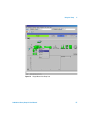
Figure 15
56
Pump Parameters in the Instrument Menu
1200 Series Binary Pump SL User Manual
Using the Pump
Figure 16
4
Popup Menu of the Pump Icon
1200 Series Binary Pump SL User Manual
57
4
Using the Pump
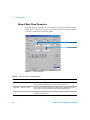
Setup of Basic Pump Parameters
The most important parameters of the pump are grouped in the Set up Pump
panel. Open it either from the Instrument menu or by left-clicking the pump
icon in the graphical user interface (GUI).
Solvent type
Solvent comment
Figure 17
Table 6
Set up Pump Panel
Parameters of the Set up Pump Panel
Parameter
Limits
Description
• Flow
0.001 - 5 mL/min
Total flow rate of the pump. See “When to Remove Damper and Mixer” on page 75
for pump hardware modifications to achieve lowest delay volume.
• Stop Time
0.01 min - no limit
The stop time of the pump usually controls the run time of the whole LC system.
Use no limit to stop the run manually (useful for method development).
• Post Time
off - 99999 min
Time between the end of a run and the start of the next. Used for column
equilibration after a gradient.
58
1200 Series Binary Pump SL User Manual
Using the Pump
Table 6
Parameters of the Set up Pump Panel
Parameter
Limits
Description
• Pressure
Limits
Max: 0 - 600 bar
Min: 0 - 600 bar
Max must be bigger than Min! Set max pressure to the maximum operating
pressure of your column. A min pressure setting of e.g. 10 bar will turn off your
pump automatically when running out of solvent. A smarter way, however, is to
use the bottle fillings function (see page 64).
• Solvent A
0 - 100%
Although channel A can be set to 0%, it cannot be turned off. This channel should
be used for the aqueous phase (water).
• Solvent B
off - 100%
The percentage of channel B is automatically complemented by channel A to give
100%.
• (Solvent
type)
H2O, ACN, MeOH, IPA
Select the solvent you are using in the respective solvent channel from the
drop-down list. In case your solvent is not listed, perform a solvent compressibility
calibration.
• (Solvent
Comment)
• Timetable
• Display
4
Free text field for a description of the solvent. This description will show up in
method printouts, etc.
max. number of lines
depends on free space
in pump memory.
Use the timetable to build solvent gradients, flow gradients, or combinations of
both. Gradients are always linear. Use multiple timetable entries to mimic
exponential or parabolic gradients.
There are three ways to display the timetable:
• in tabular form
• as flow/pressure graph
• as solvent percentage plot
Values can only be changed in tabular view.
1200 Series Binary Pump SL User Manual
59
4
Using the Pump
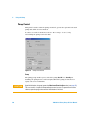
Pump Control
This panel is used to turn the pump on and off, operate the optional seal wash
pump and define an error method.
It can be accessed via menu Instrument - More Pump - Control or by
left-clicking the pump icon in the GUI.
Figure 18
Pump Control Panel
Pump
The pump group enables you to switch the pump On, Off or to Standby. In
Standby, the pump motor is still energized. When the pump is switched on
again, it does not re-initialize.
CAUTION
60
Upon initialization, the pump ignores the Maximum Flow Gradient value (see page 62).
This can result in a rapid and uncontrolled pressure increase. To prevent harm to the
column, open the purge valve until the initialization is finished.
1200 Series Binary Pump SL User Manual
Using the Pump
4
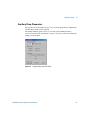
Auxiliary Pump Parameters
The parameters in this panel are pre-set to fit most applications. Adjustments
should only be made when required.
The Pump Auxiliary panel can be accessed by either pulling down the
Instrument menu and selecting More Pump - Auxiliary or by left-clicking the
pump icon in the GUI.
Figure 19
Pump Auxiliary Parameter Panel
1200 Series Binary Pump SL User Manual
61
4
Using the Pump
Parameters of the Pump Auxiliary Panel
Table 7
Parameter
• Maximum
Flow Gradient
Limits
Description
2
0.1 - 100 mL/min
default: 100 mL/min2
• Minimum
Stroke
20 µL - 100 µL
default: Auto
• Compressibility 0 - 150 E10-6/bar
or enhanced
compressibility
calibration
default: use
enhanced comp.
calibration
62
With this parameter flow rate changes can be ramped up and down slowly to
avoid pressure shocks to the column. The default value is 100 ml/min2 which in
fact turns the function off.
Caution!
The flow is shut off immediately when the pump switched to standby.
When the pump is turned On from the Off status, the pump drive initializes,
thereby ignoring the maximum flow gradient setting. Depending on system delay
volume and flow restriction, the system pressure may rise very quickly to a high
value. To protect your column from damage, it is suggested to open the purge
valve during initialization.
The volume one pump piston delivers per stroke. Generally, a smaller stroke
volume results in lower pump ripple. The Auto setting adjusts the strokes
dynamically to the lowest possible value.
The strokes can be set individually for pump heads A and B.
It is highly recommended to tick the Use enhanced compressibility calibration
box. This forces the pump to use either stored solvent compressibility data or
user generated compressibility parameters from solvent compressibility
calibrations.
For legacy support, the solvent compressibility can still be set manually for each
channel when the box is unticked.
1200 Series Binary Pump SL User Manual
Using the Pump
4
Data Curves
The Binary Pump SL provides the possibility to store operational data in the
data file of the Agilent data system.
Solvent percentage for each channel, pump flow and pressure are stored when
the respective boxes are ticked.
Access the Data Curves panel either from the Instrument - More Pump - Data
Curves menu or by left-clicking the pump icon in the GUI.
Figure 20
NOTE
Data Curves Panel
The pressure data curve is generated from the pressure sensor readings, while %A, %B and flow are
calculated from the method settings of the pump.
1200 Series Binary Pump SL User Manual
63
4
Using the Pump
Bottle Filling
The pump offers a powerful feature to monitor the liquid level in the solvent
bottles. With total bottle volume and initial filling volume set correctly, the
pump subtracts the displaced volume continuously from the initial value and
reacts before the system runs dry or an analysis is corrupted.
The Bottle Filling panel can be found in Instrument - More Pump - Bottle
Filling or by left-clicking on the solvent bottles below the pump icon in the
GUI.
Figure 21
Table 8
Bottle Filling Panel
Bottle Filling Parameters
Parameter
Limits
Description
• Total Volume
0 - 1000 L
default: 0 L
Enter the total capacity of the solvent vessel in this box.
Mind that the dimension is Liters!
• Actual
Volume
0 - 1000 L
default: 0 L
After filling the solvent bottles, enter the actual volumes into these boxes.
The actual volume must not be larger than the total volume of the bottle.
64
1200 Series Binary Pump SL User Manual
Using the Pump
Parameter
Limits
Description
• Prevent
analysis.......
default: turned off
When ticked, the pump won’t start a new run if the solvent level in one or more
bottles is below the given value. When setting this parameter, consider the size
and shape of the solvent vessel and make sure the pump does not draw air when
coming close to the limit.
• Turn pump
off...
default: turned off
When ticked, the pump will turn off before air is aspirated.
However, the residual solvent volume has been calculated for 1 L solvent bottles
and may be too small for large bottles or other vessels.
CAUTION
4
The bottle filling feature will fail if multiple channels are fed from one solvent bottle!
In that case implement a minimum pressure limit (see page 59) to avoid that the Binary
Pump SL runs dry when solvents are empty,
1200 Series Binary Pump SL User Manual
65
4
Using the Pump
Early Maintenance Feedback (EMF)
Maintenance requires the exchange of components in the flow path which are
subject to mechanical wear or stress. Ideally, the frequency at which
components are exchanged should be based on the intensity of usage of the
instrument and the analytical conditions, and not on a predefined time
interval. The early maintenance feedback (EMF) feature monitors the usage of
specific components in the instrument, and provides feedback when the
user-settable limits have been exceeded. The visual feedback in the user
interface provides an indication that maintenance procedures should be
scheduled.
EMF Counters
The binary pump provides a series of EMF counters for the left and right pump
heads. Each counter increments with pump use, and can be assigned a
maximum limit which provides visual feedback in the user interface when the
limit is exceeded. Each counter can be reset to zero after maintenance has
been done. The binary pump provides the following EMF counters:
• liquimeter pump A,
• seal wear pump A,
• liquimeter pump B, and
• seal wear pump B.
Liquimeters
The liquimeters display the total volume of solvent pumped by the left and
right pump heads since the last reset of the counters. Both liquimeters can be
assigned an EMF (maximum) limit. When the limit is exceeded, the EMF flag in
the user interface is displayed.
66
1200 Series Binary Pump SL User Manual
Using the Pump
4
Seal Wear Counters
The seal wear counters display a value derived from pressure and flow (both
contribute to seal wear). The values increment with pump usage until the
counters are reset after seal maintenance. Both seal wear counters can be
assigned an EMF (maximum) limit. When the limit is exceeded, the EMF flag in
the user interface is displayed.
Using the EMF Counters
The user-settable EMF limits for the EMF counters enable the early
maintenance feedback to be adapted to specific user requirements. The wear
of pump components is dependent on the analytical conditions, therefore, the
definition of the maximum limits need to be determined based on the specific
operating conditions of the instrument.
Setting the MF Limits
The setting of the EMF limits must be optimized over one or two maintenance
cycles. Note the pumped volumes and the seal wear values of both pump heads
when symptoms of excessive seal wear are observed. Perform pump
maintenance and enter the noted EMF values minus a safety margin of 10% as
new EMF limits. Reset the EMF counters to zero. The next time the EMF
counters exceed the new EMF limits, the EMF flag will be displayed at the
appropriate time, providing a reminder that maintenance needs to be
scheduled
1200 Series Binary Pump SL User Manual
67
4
68
Using the Pump
1200 Series Binary Pump SL User Manual
Agilent 1200 Series Binary Pump SL
User Manual
5
Optimizing Performance
Prevent Blocking of Solvent Filters 70
When to Use a Vacuum Degasser 72
When to Use the Active Seal Wash Option 73
When to Use Alternative Seals 74
When to Remove Damper and Mixer 75
How to Optimize the Compressibility Compensation Setting 78
This chapter gives information on how to optimize the performance of the
Binary Pump SL under special operational conditions.
Agilent Technologies
69
5
Optimizing Performance
Prevent Blocking of Solvent Filters
Contaminated solvents or algae growth in the solvent bottle will reduce the
lifetime of the solvent filter and will influence the performance of the Binary
Pump SL. This is especially true for aqueous solvents or phosphate buffers (pH
4 to 7). The following suggestions will prolong lifetime of the solvent filters and
maintain the performance of the Binary Pump SL.
• Use a sterile, if possible amber, solvent bottle to slow down algae growth.
• Filter solvents through filters or membranes that remove algae.
• Exchange aqueous solvents every two days or refilter.
• If the application permits, add 0.0001 to 0.001 Molar sodium azide to the
solvent.
• Place a layer of argon on top of your solvent.
• Avoid exposure of the solvent bottles to direct sunlight.
Checking the Solvent Filters
The solvent filters are located on the low-pressure side of the Binary Pump SL.
A blocked filter therefore does not necessarily affect the high pressure
readings of the pump. The pressure readings cannot be used to check whether
the filters are blocked or not. If the solvent cabinet is placed on top of the
Binary Pump SL, the filter condition can be checked in the following way:
Remove the solvent inlet tube from the inlet port of the solvent selection valve
or the adapter at the active inlet valve. If the filter is in good condition, the
solvent will freely drip out of the solvent tube (due to hydrostatic pressure). If
the solvent filter is partly blocked only very little solvent will drip out of the
solvent tube.
WA R N I N G
70
When opening capillary or tube fittings, solvents may leak out.Please observe
appropriate safety procedures (for example, goggles, safety gloves and protective
clothing) as described in the material handling and safety data sheet supplied by the
solvent vendor, especially when toxic or hazardous solvents are used.
1200 Series Binary Pump SL User Manual
Optimizing Performance
5
Cleaning the Solvent Filters
• Remove the blocked solvent filter from the bottle-head assembly and place
it in a beaker with concentrated nitric acid (35%) for one hour.
• Thoroughly flush the filter with HPLC-grade water (remove all nitric acid,
some capillary columns can be damaged by nitric acid).
• Replace the filter.
NOTE
Never use the system without solvent filter installed.
1200 Series Binary Pump SL User Manual
71
5
Optimizing Performance
When to Use a Vacuum Degasser
The Binary Pump SL does not necessarily require degassing. However, for the
following conditions a vacuum degasser is mandatory:
• Your detector is used with maximum sensitivity in the low UV wavelength
range,
• Your application requires highest injection precision, or
• Your application requires highest retention-time reproducibility (flow rates
below 0.5 mL/min).
• The Binary Pump SL is used with bypassed damper and mixer.
Operational Hints for the Vacuum Degasser
If you are using the vacuum degasser for the first time, if the vacuum degasser
was switched off for any length of time (for example, overnight), or if the
vacuum degasser chambers are empty, you have to prime the vacuum degasser
before running an analysis. Priming is usually done by pumping at a high flow
rate (3 - 5 mL/min). Alternatively, a syringe can be used to draw the solvent
through the (empty) degasser if the pump does not aspirate the solvent by
itself.
For details see “Priming the System” on page 47.
For more information see the Reference Manual of the Agilent 1200 Series
vacuum degasser.
72
1200 Series Binary Pump SL User Manual
Optimizing Performance
5
When to Use the Active Seal Wash Option
Concentrated buffer solutions will reduce the lifetime of the seals and
plungers in your Binary Pump SL. The active seal wash option allows to
maintain the seal lifetime by flushing the low pressure side of the seals with a
wash solvent.
The seal wash option is strongly recommended if buffer concentrations of
0.1 M or higher are used regularly with the Binary Pump SL.
The active seal wash option kit can be ordered by quoting part number
G1312-68712.
The seal wash option comprises a peristaltic pump, secondary seals, gaskets,
seal keepers and tubing for both pump heads. A bottle of premixed
water/isopropanol (90/10 vol%) is placed in the solvent cabinet and connected
to the peristaltic pump as described in the technical note that comes with the
active seal wash kit.
Always use a mixture of HPLC-water (90 %) and isopropanol (10 %) as wash
solvent. This mixture prevents bacteria growth in the wash bottle and reduces
the surface tension of the water.
The operation of the peristaltic pump can be controlled from the data system
or the Instant Pilot.
NOTE
The Binary Pump SL comes with pre-installed seal wash capable support rings.
When the user decides to use seal wash it is recommended to replace the secondary seals
and gaskets by new ones to ensure tightness.
For information on the installation of the continuous seal wash option refer to
“Installing the Active Seal Wash Option” on page 126.
1200 Series Binary Pump SL User Manual
73
5
Optimizing Performance
When to Use Alternative Seals
The standard seals for the Binary Pump SL can be used for most applications.
However, normal phase applications (for example, hexane) are not compatible
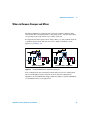
with the standard seals. They cause extremely high abrasion and significantly
shorten seal life time.
Special polyethylene pistons seals (yellow color), part number 0905-1420
(pack of 2). These seals have less abrasion compared to the standard seals.
NOTE
WA R N I N G
74
Polyethylene seals have a limited pressure range of 0–200 bar.
When used above 200 bar, their lifetime will be significantly reduced.
DO NOT apply the seal wear-in procedure performed to normal phase seals (yellow)
because they will be destroyed by the procedure.
1200 Series Binary Pump SL User Manual
Optimizing Performance
5
When to Remove Damper and Mixer
The Binary Pump SL is equipped with a pressure pulsation damper and a
static mixer. The total delay volume of the pump is 600 – 800 µL (depending
on system pressure). The mixer has a volume of 400 µL.
For applications that require lowest delay volume (e.g. fast gradient methods
or gradient applications with low flow rates), damper and mixer can be
bypassed. (see Figure 22)
Standard configuration
Figure 22
Low delay volume configuration
Flow Path Modifications of the Binary Pump SL
Both configurations have advantages and weaknesses. For use with Agilent
1200 Series Rapid Resolution System check the System Configuration
Optimizer on the CD-ROM that shipped with the pump for detailed plumbing
recommendations for your application.
1200 Series Binary Pump SL User Manual
75
5
Optimizing Performance
Convert the Binary Pump SL to Low Delay Volume Mode
The Binary Pump SL is delivered in standard configuration (damper and
mixer connected). This paragraph shows how to bypass damper and mixer and
convert the pump to low delay volume mode.
Configurations where only damper or mixer are disconnected while the other
part is still in line are not supported by Agilent Technologies.
Tools required
Wrench 1/4 – 5/16 inch, part no. 8710-0510
Wrench, 14 mm, part no. 8710-1924
Hex driver open, 1/4 inch, part no. 5023-0240
Preparations for this Flush the system (water if buffers were used, otherwise IPA).
procedure
Turn the flow off.
1 Remove the front cover by pressing the clip fastener on
both sides of the cover.
2 Use the 1/4 inch hex driver to remove fitting B from port 2
of the pressure sensor.
A
B
2
76
1
1200 Series Binary Pump SL User Manual
Optimizing Performance
3 Fold capillary end B away. It remains unconnected.
Disconnect fitting A from outlet 1 of the mixer.
5
4 Connect fitting A to port 2 of the pressure sensor.
Seal port 1 of the mixer with a plastic blank nut.
A
A
2
B
B
1
1200 Series Binary Pump SL User Manual
2
1
77
5
Optimizing Performance
How to Optimize the Compressibility Compensation Setting
When a solvent is metered at ambient pressure and compressed to a higher
pressure, the volume decreases. This is due to an effect known as solvent
compressibility. Solvent compressibility is a non-linear function of pressure
and temperature. It is unique to every solvent.
In order to deliver the desired flow accurately at all pressures, Agilent pumps
use a compressibility compensation. Usually, an average compressibility value
for the solvent is used across the whole pressure range of the pump.
The G1312B Binary Pump SL introduces a new compressibility compensation
concept. The compressibility of a solvent is determined at different pressures
between 0 to 600 bar. The pump uses the obtained non-linear function to select
the correct compressibility value for the actual pump pressure.
Compressibility data for the most common solvents is readily available in the
pump firmware.
The compensation algorithm is so powerful that the damper and mixer can be
removed from the pump flow path at low flow rate while the pressure ripple
and composition ripple remain at low levels.
For method compatibility reasons, the legacy compressibility compensation is
still available.
Solvent Compressibility Calibration
Unlisted or premixed solvents can be calibrated with the Solvent
Compressibility Calibration function. For a detailed description, see page 89.
78
1200 Series Binary Pump SL User Manual
Optimizing Performance
5
Optimization of Legacy Compressibility Settings
The compressibility compensation default settings are 50 × 10-6 /bar (best for
most aqueous solutions) for pump head A and 115 × 10-6 /bar (to suit organic
solvents) for pump head B. The settings represent average values for aqueous
solvents (A side) and organic solvents (B side). Therefore it is always
recommended to use the aqueous solvent on the A side of the pump and the
organic solvent on the B side. Under normal conditions, the default settings
reduce the pressure pulsation to below 2 % of system pressure, which is
sufficient for most applications. If the compressibility values for the solvents
used differ from the default settings, it is recommended to change the
compressibility values accordingly. Compressibility settings can be optimized
by using the values for various solvents described in Table 9 on page 80. If the
solvent in use is not listed in the compressibility table, when using premixed
solvents and if the default settings are not sufficient for your application, the
following procedure can be used to optimize the compressibility settings:
1 Start channel A of the Binary Pump SL with the required flow rate.
2 Before starting the optimization procedure, the flow must be stable. Use
degassed solvent only. Check the tightness of the system with the pressure
test (see “Pressure Test” on page 82).
3 Your pump must be connected to a Chemstation or Instant Pilot, the
pressure- and %-ripple can be monitored with one of these instruments,
otherwise connect a signal cable between the pressure output of the
isocratic pump and a recording device (for example, 339X integrator) and
set following parameters.
Zero 50 %
Att 2^3
Chart Speed 10 cm/min
4 Start the recording device in plot mode.
5 Starting with a compressibility setting of 10 × 10-6 /bar, increase the value
in steps of 10. Re-zero the integrator as required. The compressibility
compensation setting that generates the smallest pressure ripple is the
optimum value for your solvent composition.
6 Repeat step 1 through step 5 for the B channel of your Binary Pump SL.
1200 Series Binary Pump SL User Manual
79
5
Optimizing Performance
Table 9
80
Solvent Compressibility
Solvent (pure)
Compressibility (10-6/bar)
Acetone
126
Acetonitrile
115
Benzene
95
Carbon tetrachloride
110
Chloroform
100
Cyclohexane
118
Ethanol
114
Ethyl acetate
104
Heptane
120
Hexane
150
Isobutanol
100
Isopropanol
100
Methanol
120
1-Propanol
100
Toluene
87
Water
46
1200 Series Binary Pump SL User Manual
Agilent 1200 Series Binary Pump SL
User Manual
6
Tests and Calibration Functions
Pressure Test 82
Pump Test 87
Solvent Compressibility Calibration 89
Pump Elasticity Calibration 91
This chapter explains all test functions that are available for the Binary Pump
SL.
Agilent Technologies
81
6
Tests and Calibration Functions
Pressure Test
Description
The pressure test is a quick built-in test designed to demonstrate the leak
tightness of the system. The test involves monitoring the flow profile while the
Binary Pump SL delivers against a blank nut. The result is presented as the
leak rate of the pump and provides information about the leak tightness of the
system between the outlet ball valves of the Binary Pump SL and the blank
nut.
NOTE
CAUTION
The blank nut can be positioned anywhere between the purge valve of the pump and the
detector inlet to pressure test the desired part of the system.
Never include the flow cell in the pressure test as the applied pressure may cause
permanent leaks or bursting (FLD, RID) of the flow cell.
Step 1
The test begins with the initialization of both pump heads. After initialization,
the pump is starting the compression phase and the required flow rate is
constantly monitored and adjusted. The Binary Pump SL continues to pump
until a system pressure of around 600 bar is reached.
Step 2
When the system pressure reaches 600 bar, the Binary Pump SL continues to
pump at a flow rate that keeps the pressure constant. The flow that is needed
to keep the pressure constant is directly translated into a leak rate.
Positioning the blank nut
To test the complete system for pressure tightness, the blank nut should be
positioned at the column compartment outlet (or the outlet of the last module
in front of the detector).
82
1200 Series Binary Pump SL User Manual
Tests and Calibration Functions
6
If a specific component is suspected to cause the system leak, place the blank
nut immediately in front of the suspected component, and run the pressure
test again. If the test passes, the defective component is located behind the
blank nut. Confirm the diagnosis by placing the blank nut immediately behind
the suspected component. The diagnosis is confirmed if the test fails.
1200 Series Binary Pump SL User Manual
83
6
Tests and Calibration Functions
Running the Pressure Test
When required
The test should be used when problems with small leaks are suspected, or
after maintenance of flow path components (e.g., pump seals, injection seal)
to prove pressure tightness up to 600 bar
Tools required
• Wrench 1/4 - 5/16 inch, e.g. PN 8710-0510
• 1/16 inch blank nut, PN 01080-83202
Preparations for this Place two bottles of HPLC-grade water in channels A and B (A1 and B1 if the
procedure
pump is equipped with a solvent selection valve)
NOTE
Make absolutely sure that all parts of the flow path that are part of the test are very
thoroughly flushed with water before starting to pressurize the system! Any trace of other
solvents or the smallest air bubble inside the flow path definitely will cause the test to fail!
Running the test from the Agilent LC Diagnostic Software
1 Select the pressure test from the test selection menu.
2 Start the test and follow the instructions.
NOTE
84
Make sure to release the pressure by opening the purge valve when the test has finished
completed.
Otherwise the pump may generate an overpressure error.
1200 Series Binary Pump SL User Manual
Tests and Calibration Functions
6
Evaluating the Results
The sum of all leaks between the pump and the blank nut will add up to the
total leak rate. Note that small leaks may cause the test to fail, but solvent may
not be seen leaking from a module.
NOTE
Please notice the difference between an error in the test and a failure of the test! An error
is caused by the abnormal termination during the operation of the test whereas a failure of
a test indicates that the test results were not within the specified limits.
If the pressure test fails:
• Ensure all fittings between the pump and the blank nut are tight. Repeat the
pressure test.
NOTE
Often it is only a damaged blank nut itself (poorly shaped from overtightening) that causes
the test to fail. Before investigating on any other possible sources of failure make sure that
the blank nut you are using is in good condition and properly tightened!
• If the test fails again, insert the blank nut at the outlet of the previous
module in the stack (e.g. autosampler, port 6 of the injection valve), and
repeat the pressure test. Exclude each module one by one to determine
which module is leaking.
• If the pump is determined to be the source of the leak, run the pump test to
identify the defective pump component.
Potential Causes of Pressure Test Failure
After isolating and fixing the cause of the leak, repeat the pressure test to
confirm the system is pressure tight.
Table 1
Potential Cause (Pump)
Corrective Action
Purge valve open.
Close the purge valve.
1200 Series Binary Pump SL User Manual
85
6
Tests and Calibration Functions
Table 1
Loose or leaky fitting.
Tighten the fitting or exchange the capillary.
Damaged pump seals or plungers.
Run the pump test to identify the defective
component.
Loose purge valve.
Tighten the purge valve nut (14 mm wrench).
Table 2
Potential Cause (Autosampler)
Corrective Action
Loose or leaky fitting.
Tighten or exchange the fitting or capillary.
Rotor seal (injection valve).
Exchange the rotor seal.
Damaged metering seal or plunger.
Exchange the metering seal. Check the plunger
for scratches. Exchange the plunger if required.
Needle seat.
Exchange the needle seat.
Table 3
86
Potential Cause (Column Compartment)
Corrective Action
Loose or leaky fitting.
Tighten or exchange the fitting or capillary.
Rotor seal (column switching valve).
Exchange the rotor seal.
1200 Series Binary Pump SL User Manual
Tests and Calibration Functions
6
Pump Test
Description
The pump test provides a fast and accurate way to verify proper hydraulic
operation of the Binary Pump SL. Problems related to defective valves, seals
or pistons can be diagnosed and usually the defective part is identified.
Step 1
The system is setup with water on both channels and a restriction capillary is
attached to the outlet of the pump.
Pump head A is delivering at 1 mL/min. The pressure signal is monitored and
overlaid with the piston movement plot. The pressure pattern and the slope of
the pressure signal are evaluated for the delivery strokes of both pistons.
Step 2
The procedure from step 1 is repeated on pump head B.
Step 3
The data from step 1 and 2 are evaluated. In case test failed, a conclusion
about the defective part is made.
1200 Series Binary Pump SL User Manual
87
6
Tests and Calibration Functions
Running the Pump Test
When required
The test should be used to prove proper operation of the Binary Pump SL after
repairs or when a the pressure test (see page 82) determined a problem with
the pump.
Tools required
• Wrench 1/4 - 5/16 inch, e.g. PN 8710-0510
• Restriction capillary, PN G1312-67500
Preparations for this Place two bottles of HPLC-grade water in channels A and B (A1 and B1 if the
procedure
pump is equipped with a solvent selection valve)
NOTE
Make absolutely sure that the pump is very thoroughly flushed with water before starting
the test! Any trace of other solvents or the smallest air bubble inside the flow path
definitely will cause the test to generate misleading results!
Running the test from the Agilent LC Diagnostic Software
1 Select the pump test from the test selection menu.
2 Start the test and follow the instructions.
NOTE
Make sure to release the pressure by opening the purge valve when the test is completed.
Otherwise the pump may generate an overpressure error.
Evaluating the Results
Refer to the help file of the Agilent LC Diagnostic Software for further details.
88
1200 Series Binary Pump SL User Manual
Tests and Calibration Functions
6
Solvent Compressibility Calibration
Description
Each solvent or solvent mixture has unique compressibility at different
pressures. In order to deliver accurate flow with minimal pressure- and
composition ripple over the full operational pressure range, it is necessary
that the Binary Pump SL compensates precisely for the compressibility of the
solvents in use.
The Binary Pump SL comes with compressibility parameters for the most
common HPLC solvents and solvent mixtures. If a solvent is not available in
the list of pre-calibrated solvents, the solvent compressibility calibration
allows to generate appropriate compressibility data.
Technical background
The solvent compressibility calibration relies on an accurate elasticity
calibration of the pump. With a proper elasticity calibration in place, the pump
is switched into pressure control mode. A restriction capillary is connected to
the purge valve outlet. By varying the flow rate, the pump maintains a certain
pressure. The pump optimizes the compressibility value of the solvent until
the lowest possible pump ripple is reached. The pump increases the flow rate
and adjusts the pressure to the next calibration step where the pump ripple is
minimized again. This process is repeated until solvent compressibility data
for the whole operating pressure range of the pump are available.
The compressibility data set for this solvent is stored in an XML-file and can
be shared with other G1312B pump via Agilent ChemStation.
1200 Series Binary Pump SL User Manual
89
6
Tests and Calibration Functions
Running the Solvent Compressibility Calibration
When required
If a solvent is not available in the list of pre-calibrated solvents, the solvent
compressibility calibration allows to generate appropriate compressibility
data.
Tools required
• Wrench 1/4 - 5/16 inch, e.g. PN 8710-0510
• Restriction capillary, PN G1312-67500
Preparations for this Place a bottles with solvent to be calibrated in channel A (resp. A1 if a solvent
procedure
selection valve is installed).
CAUTION
Accurate pump elasticity calibration is required to obtain valid and portable solvent
compressibility data.
NOTE
Make absolutely sure that the pump is very thoroughly flushed with the solvent to be
calibrated before starting the procedure! Any trace of other solvents or the smallest air
bubble inside the flow path definitely will cause the calibration to fail!
Running the Solvent Compressibility Calibration from the Agilent LC Diagnostic
Software
1 Select the solvent from the test selection menu.
2 Start the test and follow the instructions.
NOTE
90
Make sure to release the pressure by opening the purge valve when the test is completed.
Otherwise the pump may generate an overpressure error.
1200 Series Binary Pump SL User Manual
Tests and Calibration Functions
6
Pump Elasticity Calibration
Description
The flow path components of the Binary Pump SL pump have an inherent and
pressure dependent elasticity which differs from pump to pump. When this
elasticity/pressure function is known, a correction algorithm can be applied.
This results in significantly improved pump performance in low delay volume
mode (damper and mixer bypassed).
The pump elasticity calibration uses a solvent with well known properties
(HPLC-grade water) to determine the pump elasticity over the entire operating
pressure range and stores the calibration values in the non-volatile RAM of the
pump mainboard.
The initial calibration is done at the factory. It only needs to be repeated after
replacement of major pump parts (mainboard, pump drive). The test allows to
define which pump head will be calibrated.
NOTE
CAUTION
Results of the pump elasticity calibration rely on known compressibility parameters for pure
water. If the water is not HPLC-grade, not well degassed or degasser and pump are not
flushed properly, the pump elasticity calibration will fail. The pump elasticity calibration has
to be performed for each pump head individually.
Missing or inaccurate pump elasticity calibration will result in a wrong solvent
compressibility calibration (see page 89) parameters
1200 Series Binary Pump SL User Manual
91
6
Tests and Calibration Functions
Running the Pump Elasticity Calibration
When required
The initial calibration is done at the factory. It only needs to be repeated after
replacement of major pump parts (mainboard, pump drive).
Tools required
Wrench 1/4 - 5/16 inch, e.g. PN 8710-0510
Restriction capillary, PN G1312-67500
Preparations for this Place all bottle heads in to a bottle of HPLC-grade water.
procedure
NOTE
Make absolutely sure that the pump is very thoroughly flushed with the solvent to be
calibrated before starting the procedure! Any trace of other solvents or the smallest air
bubble inside the flow path definitely will cause the calibration to fail!
NOTE
If a solvent selection valve is installed flush all four solvent channels to avoid that air from a
dry solvent intake tube is drawn into the flow path upon initialization.
Running the Pump Elasticity Calibration from the Agilent LC Diagnostic Software
1 Select the pump elasticity calibration from the test selection menu.
2 Start the test and follow the instructions.
92
1200 Series Binary Pump SL User Manual
Agilent 1200 Series Binary Pump SL
User Manual
7
Maintenance and Repair
Introduction to Maintenance and Repair 94
Warnings and Cautions 95
Cleaning the Binary Pump SL 96
Using the ESD Strap 97
This chapter provides general information on repairing the Binary Pump SL.
Agilent Technologies
93
7
Maintenance and Repair
Introduction to Maintenance and Repair
Simple Repairs - Maintenance
The pump is designed for easy repair. The most frequent repairs such as
piston seal replacement and purge valve frit exchange can be done from the
front side without removing the pump from the system stack. These repairs
are described in “Overview of Maintenance and Simple Repairs” on
page 100(part of the User Manual and Service Manual).
Exchanging Internal Parts - Repair
Some repairs require the exchange of defective internal parts. Exchange of
these parts involves removing the pump from the stack, removing the covers,
and disassembling the module. The security lever at the power input socket
prevents that the detector cover is taken off when line power is still connected.
These repairs are described in the Binary Pump SL Service Manual.
94
1200 Series Binary Pump SL User Manual
Maintenance and Repair
7
Warnings and Cautions
WA R N I N G
To prevent personal injury, the power cable must be removed from the instrument
before opening the pump cover. Do not connect the power cable to the pump while
the covers are removed.
WA R N I N G
To prevent personal injury, be careful when getting in contact with sharp metal
areas.
WA R N I N G
When working with solvents please observe appropriate safety procedures (for
example, goggles, safety gloves and protective clothing) as described in the
material handling and safety data sheet supplied by the solvent vendor, especially
when toxic or hazardous solvents are used.
CAUTION
Electronic boards and components are sensitive to electrostatic discharge (ESD). In
order to prevent damage always use an ESD protection when handling electronic
boards and components (see “Using the ESD Strap” on page 97).
1200 Series Binary Pump SL User Manual
95
7
Maintenance and Repair
Cleaning the Binary Pump SL
The pump case should be kept clean. Cleaning should be done with a soft cloth
slightly dampened with water or a solution of water and mild detergent. Do
not use an excessively damp cloth as liquid may drip into the pump.
WA R N I N G
96
Do not let liquid drip into the pump. It could cause shock hazard and it could damage
the module.
1200 Series Binary Pump SL User Manual
Maintenance and Repair
7
Using the ESD Strap
Electronic boards are sensitive to electrostatic discharge (ESD). In order to
prevent damage, always use an ESD strap when handling electronic boards
and components.
1 Unwrap the first two folds of the band and wrap the exposed adhesive side
firmly around your wrist.
2 Unroll the rest of the band and peel the liner from the copper foil at the
opposite end.
3 Attach the copper foil to a convenient and exposed electrical ground.
Figure 1
Using the ESD Strap
1200 Series Binary Pump SL User Manual
97
7
98
Maintenance and Repair
1200 Series Binary Pump SL User Manual
Agilent 1200 Series Binary Pump SL
User Manual
8
Maintenance and Simple Repairs
Overview of Maintenance and Simple Repairs 100
Maintenance Procedures 101
Exchanging the Purge Valve Frit or the Purge Valve 102
Removing the Pump Head Assembly 104
Exchanging the Pump Seals 107
Seal Wear-in Procedure 109
Exchanging the Plungers 110
Exchanging the Wash Seals 111
Reinstalling the Pump Head Assembly 113
Simple Repair Procedures 115
Exchanging the Active Inlet Valve Cartridge 116
Exchanging the Active Inlet Valve Body 118
Exchanging the Outlet Ball Valve 121
Exchanging the Solvent Selection Valve 124
Installing the Active Seal Wash Option 126
Exchanging the Optional Interface Board 131
Replacing the Pump’s Firmware 133
This chapter describes all maintenance and simple repair procedures that can
be performed without removing the pump from the system stack.
Agilent Technologies
99
8
Maintenance and Simple Repairs
Overview of Maintenance and Simple Repairs
Figure 2 shows the main user accessible assemblies of the Binary Pump SL.
The pump heads and its parts do require normal maintenance (for example,
seal exchange) and can be accessed from the front (simple repairs).
Replacement of valve cartridges or filters don’t require to remove the pump
from the system stack.
Delay volume
reduction
Seal wash option,
see page 126
Outlet ball
valve,
see page 121
Pump head,
see page 104
Active inlet valve,
see page 116
Purge valve,
see page 102
Solvent selection valve
see page 124
Figure 2
100
Overview of Maintenance and Simple Repair Procedures
1200 Series Binary Pump SL User Manual
Maintenance and Simple Repairs
8
Maintenance Procedures
The procedures described in this section can be done with the Binary Pump
SL in place in the system stack.
Table 1
Maintenance Procedures
Procedure
Typical Frequency
Notes
“Exchanging the Purge Valve Frit or the
Purge Valve” on page 102
Yearly, or if the frit shows
indication of
contamination or
blockage
A pressure drop of > 10 bar across the frit
(5 mL/min H2O with purge valve open) indicates
blockage
“Removing the Pump Head Assembly” on
page 104as
During yearly
maintenance
Necessary to get access to pump seals and
plungers.
“Disassembling the pump head” on page 106 During yearly
maintenance
Necessary to get access to pump seals and
plungers.
“Exchanging the Pump Seals” on page 107
Yearly, or if pump
performance indicates
seal wear
Leaks at lower pump head side, unstable
retention times, pressure ripple unstable — run
pump test for verification
“Exchanging the Plungers” on page 110
If scratched or if dents
are visible
Seal life time shorter than normally
expected — check plungers while changing the
seals
“Exchanging the Wash Seals” on page 111
Yearly
Only necessary when Seal Wash Option is
installed.
Leaks at lower pump head side, loss of wash
solvent
1200 Series Binary Pump SL User Manual
101
8
Maintenance and Simple Repairs
Exchanging the Purge Valve Frit or the Purge Valve
When required
Frit - when plunger seals are exchanged or when contaminated or blocked
(pressure drop of > 10 bar across the frit at a flow rate of 5 mL/min of H20
with purge valve opened)
Purge valve - if purge valve cannot be closed leak tight
Tools required
tools:wrench 1/4 - 5/16 inchWrench 1/4 inch
Wrench 14 mm
Pair of tweezers or toothpick
Parts required
PTFE Frit (pack of 5), part no. 01018-22707
Purge valve, part no. G1312-60023
1 Using a 1/4 inch wrench disconnect the pump outlet capillary at the purge
valve.
2 Disconnect the waste tube. Beware of leaking solvents due to hydrostatic
pressure.
3 Using the 14 mm wrench, unscrew the purge valve and remove it from the
purge valve holder.
4 Remove the plastic cap with the gold seal from the purge valve.
5 Use a pair of tweezers or a toothpick to remove the frit.
Valve body
PTFE frit
Gold seal
Plastic cap
Figure 3
102
Purge Valve Parts
1200 Series Binary Pump SL User Manual
Maintenance and Simple Repairs
8
6 Place a new frit into the purge valve with the slit facing the gold seal (see
Figure 3).
7 Replace the cap with the gold seal.
NOTE
Before reinstallation always check the gold seal. A deformed seal or a cracked cap should
be replaced.
8 Insert the purge valve into the purge valve holder and orient he waste outlet
nozzle downward as shown below.
9 Tighten the purge valve and reconnect outlet capillary and waste tubing.
Pump outlet
capillary
Purge valve
Waste tube
Figure 4
Exchanging the Purge Valve
1200 Series Binary Pump SL User Manual
103
8
Maintenance and Simple Repairs
Removing the Pump Head Assembly
WA R N I N G
Never start the pump when the pump head is removed. This may damage the pump
drive.
NOTE
Both pump head assemblies use the same internal components. In addition, pump head A
is fitted with the purge valve. The following procedure describes the removal and
disassembly of pump head A (left). For pump head B (right) proceed in the same way and
skip steps that deal with the purge valve.
When required
Exchanging pump seals
Exchanging plungers
Exchanging seals of the seal wash option
Tools required
Wrench 1/4 inch
3-mm hexagonal key
4-mm hexagonal key
1/4 inch slitted socket wrench
Preparations for this Switch off the Binary Pump SL at power switch
procedure
1 Remove the front cover.
2 Disconnect the capillary at the pump head adapter and the tube at the
active inlet valve. Beware of leaking solvents.
3 Using a 3-mm hexagonal key loosen the purge valve holder and lift it up.
4 Disconnect the active inlet valve cable.
5 Using a 4-mm hexagonal key stepwise loosen and remove the two pump
head screws
104
1200 Series Binary Pump SL User Manual
Maintenance and Simple Repairs
8
Pump head screws
Figure 5
Removing the Pump Head
1200 Series Binary Pump SL User Manual
105
8
Maintenance and Simple Repairs
Disassembling the pump head
1 Place the pump head with the front face onto a bench.
2 Open the two hex screws on the rear side with a 3 mm hex driver.
3 Open the PEEK lock screw two to three turns.
4 Pull the spring housing up and remove it from the pump head.
Spring housing
Lock screw
106
1200 Series Binary Pump SL User Manual
Maintenance and Simple Repairs
8
Exchanging the Pump Seals
When required
Seals leaking, if indicated by the results of the pump test (check both pump
heads individually!)
Tools required
3-mm hexagonal key
4-mm hexagonal key
1/4 inch wrench
Parts required
Seals (pack of 2), part no. 5065-6589 (standard)
or part no. 0905-1420 (for normal phase application)
For the seal wear-in procedure:
Restriction capillary, part no. 5022-2159
Preparations for this Switch off Binary Pump SL at power switch
procedure
Remove the front cover to have access to the pump mechanics
“Removing the Pump Head Assembly” on page 104
1 Disassemble the pump head assembly, see“Disassembling the pump
head” on page 106.
2 Use one of the plungers to carefully remove the seal from the pump head
(be careful not to break the plunger).
Plunger
Pump seal
Pump head
Figure 6
Removing the Pump Seals from the Pump Head
1200 Series Binary Pump SL User Manual
107
8
Maintenance and Simple Repairs
3 Insert seals into the pump head and press firmly in position.
Pump seals
Figure 7
Inserting of new Pump Seals
4 Reassemble the pump head assembly (see “Reinstalling the Pump Head
Assembly” on page 113).
NOTE
108
Reset the seal wear counter and liquimeter with the in the Agilent LC Diagnostic software.
1200 Series Binary Pump SL User Manual
Maintenance and Simple Repairs
8
Seal Wear-in Procedure
NOTE
This procedure is required for standard seals only (part no. 5063-6589), but it will definitely
damage the normal phase application seals (part no. 0905-1420).
1 Put a bottle with 100 ml of isopropanol in the solvent cabinet and place the
solvent intake filter of the pump head you want to wear in into this bottle.
2 Screw the PEEK adapter (part no. 0100-1847) onto the Active Inlet Valve
and connect the inlet tube directly to it.
3 Connect the restriction capillary (part no. 5022-2159) to the purge valve.
Put its other end into a waste container.
4 Open the purge valve and purge the system for 5 minutes with isopropanol
at a flow rate of 2 mL/min.
5 Close the purge valve, set the flow to a value that gives a pressure of
350 bar. Pump 15 minutes at this pressure to wear the seals in. The
pressure can be monitored on the analog output connector of the pump,
with the Instant Pilot, Chemstation or any other controlling device
connected to your pump.
6 Turn the pump Off, slowly open the purge valve to release the pressure
from the system, disconnect the restriction capillary and reconnect the
outlet capillary to the purge valve. Reconnect the intake tubing to the
solvent selection valve and the connecting tube from solvent selection valve
(if installed) to the AIV.
7 Purge your system with the solvent used for your next application.
1200 Series Binary Pump SL User Manual
109
8
Maintenance and Simple Repairs
Exchanging the Plungers
When required
When scratched
Tools required
3-mm hexagonal key
4-mm hexagonal key
Parts required
Plunger 5063-6586
Preparations for this Switch off Binary Pump SL at power switch
procedure
Remove the front cover to have access to the pump mechanics
“Removing the Pump Head Assembly” on page 104
“Disassembling the pump head” on page 106
1 Check the plunger surface and remove any deposits or layers. Most suitable
is polishing of the plunger rod with toothpaste. Replace the plunger if
scratched of if dents are visible.
NOTE
The best way to inspect a piston is to hold it up and watch e.g. a light bulb though the
piston rod. The transparent sapphire acts as a very strong magnifier and even smallest
surface abnormalities become visible.
Plunger rod surface
Figure 8
110
Plunger
1200 Series Binary Pump SL User Manual
Maintenance and Simple Repairs
8
Exchanging the Wash Seals
When required
If leaking
Tools required
3-mm hexagonal key
4-mm hexagonal key
Insert tool
Small flat-head screwdriver
Parts required
Wash seal 0905-1175
Gasket, seal wash (pack of 6) 5062-2484
Preparations for this Switch off Binary Pump SL at power switch
procedure
Remove the front cover to have access to the pump mechanics
“Removing the Pump Head Assembly” on page 104
“Disassembling the pump head” on page 106
1 Remove the seal keeper and the seal wash support rings
from the plunger housing. Remove the seal keeper from
the support ring assembly.
2 Using the blade of a flat head screwdriver remove seal
wash gasket and the secondary seal from the support ring.
Seal keeper
Seal wash support ring
Plunger housing
Secondary seal
Plunger
1200 Series Binary Pump SL User Manual
Support ring
111
8
Maintenance and Simple Repairs
3 Using the insert tool press the seal (spring pointing
upwards) into the recess of the support ring. Place a seal
wash gasket in the recess of the support ring and replace
the seal keeper.
4 Reassemble the pump head assembly (see “Reinstalling
the Pump Head Assembly” on page 113).
Insert tool
Seal
Support ring
112
1200 Series Binary Pump SL User Manual
Maintenance and Simple Repairs
8
Reinstalling the Pump Head Assembly
When required
When reassembling the pump
Tools required
3-mm hexagonal key
4-mm hexagonal key
Parts required
lubricant, part no. 79841-65501
1 Slide the pump head assembly onto the pump drive.
Purge valve holder
Pump head
screws
2 Using a 4 mm hexagonal key tighten the pump head screws stepwise with
increasing torque.
3 Using a 3 mm hexagonal key fix the purge valve holder to the pump head.
4 Reconnect the capillaries, tubing and the active inlet valve cable to the
connector.
1200 Series Binary Pump SL User Manual
113
8
Maintenance and Simple Repairs
Active inlet
valve connector
Capillary to
T-piece
Figure 9
114
Reinstallation of Pump head Capillaries and AIV Connector
1200 Series Binary Pump SL User Manual
Maintenance and Simple Repairs
8
Simple Repair Procedures
The procedures described in this section can be done with the Binary Pump
SL in place in the system stack.
Table 2
Simple Repair Procedures
Procedure
Typical Frequency
Notes
“Exchanging the Purge Valve Frit or the
Purge Valve” on page 102
If internally leaking
Solvent dripping out of waste outlet when valve
is closed
“Exchanging the Active Inlet Valve
Cartridge” on page 116
If internally leaking
Pressure ripple unstable, run leak test for
verification
“Exchanging the Active Inlet Valve Body” on
page 118
If leaking externally
If solenoid is defective
Error messages “Inlet Valve Fuse” or “Inlet
Valve Missing”
“Exchanging the Outlet Ball Valve” on
page 121
If internally leaking
Pressure ripple unstable, run leak test for
verification
“Exchanging the Solvent Selection Valve” on
page 124
If internally leaking
If solenoid is defective
Cross port flow
Error message “Valve Failed”
“Installing the Active Seal Wash Option” on
page 126
When upgrading to
Active Seal Wash
Recommended if buffers of > 0.1M are used
regularly.
1200 Series Binary Pump SL User Manual
115
8
Maintenance and Simple Repairs
Exchanging the Active Inlet Valve Cartridge
When required
If internally leaking (backflow)
Tools required
Wrench 14 mm
Material
Cartridge for active inlet valve 600bar, part no. G1312-60020
Preparations for this Switch off Binary Pump SL at power switch
procedure
1 Remove the front cover.
2 Unplug the active inlet valve cable from the connector.
3 Disconnect the solvent inlet tube at the inlet valve (beware of leaking
solvents).
NOTE
Binary Pump SLs without the solvent selection valve (SSV) have an adapter installed
between the solvent line and the active inlet valve (AIV). Disconnect the solvent tubes at
the adapter and remove the adapter from the AIV.
4 Using a 14-mm wrench loosen the active inlet valve and remove the valve
from the pump head.
5 With a pair of tweezers, remove the valve cartridge from the active inlet
valve.
6 Clean the inside of the active inlet valve body. Flush the cartridge area
thoroughly.
7 Push a new valve cartridge into the valve body. Make sure the valve
cartridge is fully inserted.
8 Screw the valve into the pump head. Using the 14 mm wrench turn the nut
until it is hand tight.
9 Position the valve so that the solvent inlet tube connection points towards
the front.
10 Using the 14 mm wrench tighten the nut by turning the valve in its final
position (do not overtighten the valve).
11 Reconnect the Active Inlet Valve cable to the connector in the Z-panel and
the inlet tube to the valve.
116
1200 Series Binary Pump SL User Manual
Maintenance and Simple Repairs
8
12 Reinstall the front cover.
NOTE
After an exchange of the valve it may be required to pump several mL of solvent before the
flow stabilizes at a pressure ripple as low as it used to be when the system was still
working properly.
Active inlet valve
Active inlet valve cartridge
Figure 10
Replacement of the Active Inlet Valve Cartridge
1200 Series Binary Pump SL User Manual
117
8
Maintenance and Simple Repairs
Exchanging the Active Inlet Valve Body
When required
• External leak (leak sensor is activated, or
• Error message ”Inlet Valve Fuse”
• Error message “Inlet Valve Missing”
Tools required
Wrench 14 mm
Material
Active inlet valve without cartridge, part no. G1312-60025
Preparations for this Switch off Binary Pump SL at power switch
procedure
1 Remove the front cover.
2 Unplug the active inlet valve cable from the connector.
3 Disconnect the solvent inlet tube at the inlet valve (beware of leaking
solvents).
NOTE
Binary Pump SLs without the solvent selection valve (SSV) have an adapter installed
between the solvent line and the active inlet valve (AIV). Disconnect the solvent tubes at
the adapter and remove the adapter from the AIV.
4 Using a 14-mm wrench, loosen the active inlet valve and remove the valve
from pump head.
118
1200 Series Binary Pump SL User Manual
Maintenance and Simple Repairs
8
Connector
Solvent intake tubing
Active inlet valve
Figure 11
Removal of Active Inlet Valve
5 Using a pair of tweezers, remove the valve cartridge from the defective
active inlet valve.
6 Push the cartridge into the new active inlet valve.
Active inlet valve
Active inlet valve cartridge
Figure 12
Replacement of the Active Inlet Valve Cartridge
7 Insert the new valve into the pump head. With the 14 mm wrench turn the
nut until it is hand tight.
1200 Series Binary Pump SL User Manual
119
8
Maintenance and Simple Repairs
8 Position the valve so that the solvent inlet tube connection points towards
the front.
9 Using the 14 mm wrench tighten the nut by turning the valve in its final
position (not more than a quarter turn). Do not overtighten the valve.
WA R N I N G
Overtightening the active inlet valve will destroy the active inlet valve cartridge.
10 Reconnect the Active Inlet Valve cable to the connector in the Z-panel and
the inlet tube to the valve.
11 Reinstall the front cover.
NOTE
120
After an exchange of the valve it may be required to pump several mL of the solvent used in
the current application before the flow stabilizes at a pressure ripple as low as it used to be
when the system was still working properly.
1200 Series Binary Pump SL User Manual
Maintenance and Simple Repairs
8
Exchanging the Outlet Ball Valve
When required
if leaking internally
Tools required
tools:wrench 1/4 - 5/16 inchWrench 1/4 inch
Wrench 14 mm
Parts required
Outlet ball valve G1312-60022
Preparations for this Switch off Binary Pump SL
procedure
NOTE
Before exchanging the outlet ball valve you can try to clean it in an ultrasonic bath. Remove
the gold seal and put the plastic cap back on to protect the sealing surface from scratches.
Place the valve in upright position (sitting on the plastic cap) in a small beaker with
premixed water/isopropanol (50/50). Sonicate for 5 to 10 minutes. Replace the gold seal.
1 Using a 1/4 inch wrench disconnect the valve capillary from the outlet ball
valve.
2 Unscrew the valve with the 14 mm wrench and remove it from the pump
body.
3 In case you are only sonicating the valve, check the plastic cap and the gold
seal for damage.
NOTE
Check the gold seal. It should be exchanged when heavily deformed.
Inspect the cap and replace it with a new one if cracks are visible.
1200 Series Binary Pump SL User Manual
121
8
Maintenance and Simple Repairs
Outlet ball valve
Gold seal
Plastic cap
Figure 13
Outlet Ball Valve
4 Reinstall the outlet ball valve and tighten it.
5 Reconnect the valve capillary.
122
1200 Series Binary Pump SL User Manual
Maintenance and Simple Repairs
8
Absorber capillary
Outlet ball valve
Figure 14
Outlet Ball Valve Replacement
1200 Series Binary Pump SL User Manual
123
8
Maintenance and Simple Repairs
Exchanging the Solvent Selection Valve
When required
If leaking internally ( croossflow between the ports),
or if one of the channels is blocked
Tools required
Screwdriver Pozidriv #1
Parts required
Solvent selection valve (PN gives half of a complete solvent selection block),
part no. G1312-60000
1 Lift solvent bottle A1 out of the solvent cabinet and place it on the table.
Disconnect the solvent tube from channel A1 (upper left) of the solvent
selection valve and empty the tube into the bottle. Place the bottle back into
the solvent cabinet.
2 Repeat step 1) for the remaining solvent channels.
3 Disconnect the active inlet valve connection tubes from the solvent
selection valve.
4 Using a Pozidriv screwdriver #1 loosen the holding screws of the valves.
5 Pull the valve module out.
6 Hold the two plastic bodies of the valves and pull the two solvent selection
valves apart.
7 Exchange the defective solvent selection valve. Join the new valve (new
half) and the properly working old one.
8 Push the valve module into the cutout of the pump body until the electrical
connectors are properly seated and fix the assembly with the two holding
screws.
9 Reinstall solvent tubes and the active inlet valve connection tubes.
124
1200 Series Binary Pump SL User Manual
Maintenance and Simple Repairs
8
Solvent intake tubing
Active inlet valve
connection tubing B
Solvent selection valve
Fixing screw
Active inlet valve
connection tubing A
Figure 15
Solvent Selection Valve Replacement
1200 Series Binary Pump SL User Manual
125
8
Maintenance and Simple Repairs
Installing the Active Seal Wash Option
When required
When using concentrated buffers (> 0.1 M)
Tools required
4-mm hexagonal key
Screwdriver Pozidrive #1
Parts required
Active Seal Wash Option kit for Binary Pump SL, part no. G1312-68721
Preparations for this Switch off the pump at the main power switch
procedure
Remove the front cover
Remove the top cover and foam
1 By using a screwdriver remove the metal plug in the z-panel.
Figure 16
126
Removing the Metal Plug from the Z-Plane
1200 Series Binary Pump SL User Manual
Maintenance and Simple Repairs
8
2 Insert the socket, delivered with the Seal Wash pump assembly, into the
hole on the z-panel.
3 Guide the wire of the active seal wash assembly through the hole and screw
it onto the z-panel.
4 Guide the wire over the fan and plug the connector onto the mainboard
connector P7.
Figure 17
Mounting the Seal Wash Pump
5 Replace the foam and top cover.
6 Disconnect all capillaries and tubes from the pump head and disconnect the
active inlet valve cable.
7 Using a 4-mm hexagonal key stepwise loosen and remove the two pump
head screws and remove the pump head from the pump drive
8 Place the pump head on a flat surface. Loosen the lock screw (two
revolutions) and while holding the lower half of the assembly carefully pull
the pump head away from the plunger housing.
1200 Series Binary Pump SL User Manual
127
8
Maintenance and Simple Repairs
Figure 18
Exploded Diagram of the Pump Head with Seal Wash
9 Remove the support rings from the plunger housing and lift the housing
away from the plungers.
10 Replace the seal wash seals and the film gaskets of the support rings.
128
1200 Series Binary Pump SL User Manual
Maintenance and Simple Repairs
Figure 19
8
Inserting the active seal wash support rings.
11 Place the support rings on the plunger housing (plungers not installed) and
snap the pump head and plunger housing together.
12 Insert the plungers and carefully press them into the seal.
13 Tighten the lock screw.
14 Slide the pump head assembly onto the metering drive. Apply a small
amount of pump head grease (part no. 79846-65501) to the pump head
1200 Series Binary Pump SL User Manual
129
8
Maintenance and Simple Repairs
screws and the balls of the spindle drive. Tighten the pump head screws
stepwise with increasing torque until they are tight.
15 Reconnect all capillaries, tubes and the active inlet valve cable to its
connector
16 Route the wash tubings as shown in inlet tube into a bottle filled with a
mixture of distilled water and isopropanol (90/10) and place the bottle in
the solvent cabinet.
17 Route the outlet of the wash tube back into the wash solvent bottle.
Figure 20
130
Routing of Active Seal Wash Tubing
1200 Series Binary Pump SL User Manual
Maintenance and Simple Repairs
8
Exchanging the Optional Interface Board
CAUTION
The interface board is sensitive to electrostatic discharge. Always use the ESD kit
when handling electronic boards.
When required
Board defective
Part required
BCD (Interface) board, see “Optional Interface Boards” on page 152
1 Switch OFF the Binary Pump SL at the main power switch. Unplug the
pump from main power.
2 Disconnect cables from the interface board connectors.
3 Loosen the screws. Slide out the interface board from the Binary Pump SL.
4 Install the new interface board. Secure screws.
5 Reconnect the cables to the board connector
1200 Series Binary Pump SL User Manual
131
8
Maintenance and Simple Repairs
BCD (Interface)
Figure 21
132
Exchanging the Interface Board
1200 Series Binary Pump SL User Manual
Maintenance and Simple Repairs
8
Replacing the Pump’s Firmware
When required
If a new version resolves problems of the currently installed version or if the
firmware version of a new CSM board is different from the previous one.
Tools required
LAN/RS-232 Firmware Update Tool, or Instant Pilot G4208A
Parts required
Firmware, tools and documentation from Agilent web site
Preparations
Read update documentation provided with the Firmware Update Tool.
The installation of older firmware might be necessary:
• to keep all systems on the same (validated) revision, or
• if third part control software requires a special version.
To upgrade/downgrade the pumps’s firmware the following steps have to be
performed:
1 Download the module’s firmware, the LAN/RS-232 FW Update Tool version
2.1 or above and the documentation from the Agilent web site:
http://www.chem.agilent.com/scripts/cag_firmware.asp.
2 Load the firmware into the pump as described in the documentation.
NOTE
The G1312B Binary Pump SL requires firmware revision A.06.02 or above (main and
resident).
1200 Series Binary Pump SL User Manual
133
8
134
Maintenance and Simple Repairs
1200 Series Binary Pump SL User Manual
Agilent 1200 Series Binary Pump SL
User Manual
9
Parts and Materials for Maintenance
Bottle Head Assembly 136
Hydraulic Path with Solvent Selection Valve 138
Hydraulic Path without Solvent Selection Valve 140
Pump-Head Assembly SL 142
Outlet Ball Valve Assembly 144
Purge Valve Assembly 145
Active Inlet Valve Assembly 146
Cover Parts 147
Cover Parts 147
Active Seal Wash Option G1312-68721 149
This chapter lists all parts and tools that are required for maintenance and
simple repairs.
Agilent Technologies
135
9
Parts and Materials for Maintenance
Bottle Head Assembly
Table 3
136
Bottle-Head Assembly Parts
Item
Description
Part Number
1
Bottle amber, volume 1L
9301-1450
2
Bottle transparent, volume 1L
9301-1420
3
Bottle-head assembly, complete (includes 1 ea. of parts 4 - 8)
G1311-60003
4
Ferrules with lock ring
5063-6598 (10x)
5
Tube screw
5063-6599 (10x)
6
Solvent tubing, 5 m
5062-2483
7
Inlet filter adapter (pack of 4)
5062-8517
8
Solvent inlet filter, 20 µm
5041-2168
1200 Series Binary Pump SL User Manual
Parts and Materials for Maintenance
9
6
4
5
3
1/2
7
8
Figure 22
Bottle-Head Assembly Parts
1200 Series Binary Pump SL User Manual
137
9
Parts and Materials for Maintenance
Hydraulic Path with Solvent Selection Valve
Table 4
Item
Description
Part Number
1
Solvent tubing, (kit of 4 ea. degasser to pump SSV)
G1322-67300
2
Solvent selection valve (SSV)
(PN gives half of a complete solvent selection block)
Blank Plug for SSV
G1312-60000
Connecting tube (solvent selection valve to active inlet valve)
G1311-67304
Plug for unused SSV ports (not shown)
5041-8365
3
5041-8365
4
Active inlet valve, see page 146
5
Pump head, see page 142
6
Outlet ball valve, see page 144
7
Absorber capillary
G1312-87300
8
Mixing capillary
G1312-67302
9
Restriction capillary (mixing capillary to pressure sensor)
G1312-87301
10
Pressure sensor
see Service Manual
11
Capillary SSL, 0.17 x 150 mm (pressure sensor to damper)
G1312-87305
12
Damper
see Service Manual
13
Solvent mixer
G1312-87330
14
Capillary SSL, 0.17 x 105 mm (connections to solvent mixer)
G1312-87306
Bracket for solvent mixer
G1312-04100
15
138
Hydraulic Path with Solvent Selection Valve
Purge valve SL, see page 145
Peristaltic pump cartridge (silicone tubing), not shown
5042-8507
Tubing, 1 mm ID, 3 mm OD, silicone, 5 m, for seal wash option
5065-9978
1200 Series Binary Pump SL User Manual
Parts and Materials for Maintenance
Table 4
9
Hydraulic Path with Solvent Selection Valve, continued
Item
Description
Part Number
16
Capillary, pump to injector device (0.17 x 400 mm, SSL)
Capillary, pump to thermostattable autosampler (0.17 x 700 mm,
SSL)
G1312-87303
G1312-87304
17
Waste tube, 5 m
5062-2461
11
13
8
12
14
9
10
6
15
5
7
4
16
17
Figure 23
1
2
3
Hydraulic Path with Solvent Selection Valve
1200 Series Binary Pump SL User Manual
139
9
Parts and Materials for Maintenance
Hydraulic Path without Solvent Selection Valve
Table 5
140
Hydraulic Path without Solvent Selection Valve, With Active Seal Wash
Item
Description
Part Number
1
Solvent tubing, (kit of 4 ea. degasser to pump SSV)
G1322-67300
2
PEEK adapter 1/4-28 to 10-32
0100-1847
3
Active inlet valve, see page 146
4
Pump head, see page 142
5
Outlet ball valve, see page 144
6
Absorber capillary
G1312-87300
7
Mixing capillary
G1312-67302
8
Restriction capillary (mixing capillary to pressure sensor)
G1312-87301
9
Pressure sensor
see Service Manual
10
Capillary SSL, 0.17 x 150 mm (pressure sensor to damper)
G1312-87305
11
Damper
see Service Manual
12
Solvent mixer
G1312-87330
13
Capillary SSL, 0.17 x 105 mm (connections to solvent mixer)
G1312-87306
Bracket for solvent mixer
G1312-04100
14
Purge valve SL, see page 145
15
Capillary, pump to injector device (0.17 x 400 mm, SSL)
Capillary, pump to thermostattable autosampler (0.17 x 700 mm,
SSL)
G1312-87303
G1312-87304
16
Waste tube, 5 m
5062-2461
17
Peristaltic pump (silicone tubing)
5042-8507
18
Tubing, 1 mm ID, 3 mm OD, silicone, 5 m, for seal wash option
5065-9978
1200 Series Binary Pump SL User Manual
Parts and Materials for Maintenance
10
12
11
13
9
18
8
17
9
5
14
7
4
3
2
Figure 24
1
16
15
6
Hydraulic Path with Solvent Selection Valve, with Active Seal Wash
1200 Series Binary Pump SL User Manual
141
9
Parts and Materials for Maintenance
Pump-Head Assembly SL
Table 6
Item
142
Pump-Head Assembly with Seal Wash
Description
Part Number
Complete assembly, included items marked with (*)
G1312-60045
1*
Sapphire piston
Lubricant, black (apply to piston base)
5063-6586
79841-65501
2*
Plunger housing (including springs)
G1311-60002
3*
Support ring (includes wash seal)
5062-2465
4*
Wash seal
0905-1175
5
Tubing for seal wash option (not shown)
1 mm ID, 3 mm OD, silicone, 5 m,
5065-9978
6*
Gasket, seal wash (pack of 6)
5062-2484
7*
Seal keeper (pack of 2)
5042-8586
8*
Seal (pack of 2) or
Seal (pack of 2), for normal phase applications (optional)
5063-6589
0905-1420
9
Absorber capillary
G1312-87300
10*
Pump chamber housing
G1311-25200
11
Active inlet valve body (without cartridge)
Replacement cartridge for active inlet valve SL
G1312-60025
G1312-60020
12*
Screw, purge-valve holder
0515-0175
13
Purge-valve holder
G1312-23200
14
Outlet ball valve SL
G1312-60022
15*
Screw lock
5042-1303
16
Adapter
G1312-23201
17
Purge valve assembly SL
G1312-60023
18
Screw M5 60 mm lg
0515-2118
1200 Series Binary Pump SL User Manual
Parts and Materials for Maintenance
Table 6
9
Pump-Head Assembly with Seal Wash, continued
Item
Description
Part Number
19
Seal wash pump assembly (includes item 20)
5065-9953
20
Peristaltic pump (silicone tubing)
5042-8507
17
12
5
1
2
13
13
17
15
3
14
4
8
6
7
10
18
16
9
19
11
Figure 25
20
Pump Head Assembly with Seal Wash Option
1200 Series Binary Pump SL User Manual
143
9
Parts and Materials for Maintenance
Outlet Ball Valve Assembly
Table 7
Item
Outlet Ball Valve Assembly
Description
Part Number
Outlet ball valve SL — complete assembly
G1312-60022
1
Housing screw
01018-22410
2
Outlet valve cartridge
No part number
3
Gold seal, outlet
5001-3707
4
Cap (pack of 4, reorder number)
5062-2485
1
2
3
4
144
1200 Series Binary Pump SL User Manual
Parts and Materials for Maintenance
9
Purge Valve Assembly
Table 8
Item
Purge-Valve Assembly
Description
Part Number
Purge valve SL — complete assembly
G1312-60023
1
Valve body
No part number
2
PTFE frit (pack of 5)
01018-22707
3
Gold seal
5001-3707
4
Cap (pack of 4, reorder number)
5062-2485
1
2
3
Figure 26
4
Purge Valve
1200 Series Binary Pump SL User Manual
145
9
Parts and Materials for Maintenance
Active Inlet Valve Assembly
Table 9
Active Inlet Valve Assembly
Item
Description
Part Number
1
Active inlet valve body
G1312-60025
2
Valve cartridge SL
G1312-60020
1
Valve body
2
Valve cartridge
Figure 27
146
Active Inlet Valve Assembly
1200 Series Binary Pump SL User Manual
Parts and Materials for Maintenance
9
Cover Parts
Table 10
Cover Parts
Item
Description
Part Number
1
Front plate
G1312-68724
1
Figure 28
Cover Parts
1200 Series Binary Pump SL User Manual
147
9
Parts and Materials for Maintenance
Accessory Kit G1312-68725
Table 11
148
Accessory Kit G1312-68725
Description
Part Number
Insert tool for wash seals
01018-23702
PTFE Frit (pack of 5)
01018-22707
PTFE tubing, 1.45 mm ID, length 2 m, purge valve to waste
PTFE tubing, 1.45 mm ID, reorder (gives 5 m)
not orderable
5062-2461
Waste tubing assembly
Corrugated waste tube, reorder, (gives 5 m)
not orderable
5062-2463
Hex key 4 mm, 15 cm long T-handle
8710-2392
Wrench 1/4 – 5/16 inch
8710-0510
Hex key 3 mm, 12 cm long
8710-2411
Wrench, 14 mm
8710-1924
Hex driver open, 1/4 inch
5023-0240
CAN cable, 1 m long
5181-1519
Capillary, pump to sampler, 400 mm lg, id 0.17 mm
G1312-87303
Capillary, pump to thermostatted sampler, 700 mm lg, id 0.17 mm
G1312-87304
1200 Series Binary Pump SL User Manual
Parts and Materials for Maintenance
9
Active Seal Wash Option G1312-68721
Table 12
Active Seal Wash Option Kit for Binary Pump SL
Description
Part Number
Seal wash pump assembly (includes peristaltic pump and pump motor)
5065-9953
Peristaltic pump, silicone tubing
5042-8507
Secondary seal (4 ea.)
0905-1175
Gasket, wash seal (4 ea) (reorder gives pack of 6)
5062-2484
Silicone rubber tubing 1mm I.D. (3m)
0890-1764
Seal (2 packs of 2 for Binary Pump SL)
5063-6589
Seal insertion tool
01018-2370
1200 Series Binary Pump SL User Manual
149
9
Parts and Materials for Maintenance
G1316B SL Capillary System Kit
Table 13
G1316B SL Capillary System Kit G1316-68744
Item
Description
Part Number
*
Carrier for Heater or Cooling Devices, QTY=2
G1316-83200
*
High Temperature Heater (0.12 mm i.d. 1.6 µl), QTY=1
G1316-80002
*
High Temperature Heater (0.12 mm i.d. 1.6 µl), QTY=1
G1316-80003
*
Cooler (0.12 mm i.d. 1.5 µl), QTY=1
G1316-80004
Capillary System Kit, see Table 14 for details
G1316-68716
For items * see also “Heater and Cooler Devices for G1316B” in the G1316B
User Manual.
Table 14
Item
150
Capillary System Kit G1316-68716
Description
Part Number
Seat Capillary 100 mm x 0.12 mm, 0.8 OD
G1367-87303
DAD Heat Exchanger Capillary 310 mm x 0.12 mm
G1315-87339
SS Capillary 340 mm x 0.12 mm, m/m
G1316-87319
SS Capillary 300 mm x 0.12 mm, m/m
G1316-87318
SS Capillary 210 mm x 0.12 mm, m/m
G1316-87317
SS Capillary 170 mm x 0.12 mm, m/m
G1316-87316
SS Capillary 130 mm x 0.12 mm, m/f
G1316-87315
SS Capillary 90 mm x 0.12 mm, m/f
G1316-87314
SS Capillary 70 mm x 0.12 mm, m/f
G1316-87313
SS Capillary 50 mm x 0.12 mm, m/f
G1316-87312
SS Capillary 170 mm x 0.12 mm, m/f
G1316-87327
1200 Series Binary Pump SL User Manual
Parts and Materials for Maintenance
Table 14
Item
9
Capillary System Kit G1316-68716, continued
Description
Part Number
SS Capillary 500 mm x 0.12 mm, m/m
G1316-87309
SS Capillary 500 mm x 0.12 mm, m/m
G1315-87307
1200 Series Binary Pump SL User Manual
151
9
Parts and Materials for Maintenance
Optional Interface Boards
The Agilent 1200 Series modules have one optional board slot that allows to
add an interface board to the modules.
Table 15
152
Optional Interface Boards
Description
Part Number
BCD Board
G1351-68701
Fuse 250 mA (four are on the board
2110-0004
LAN Communication Interface Board
G1369A or G1369-60001
1200 Series Binary Pump SL User Manual
Agilent 1200 Series Binary Pump SL
User Manual
A
Appendix
General Safety Information 154
Lithium Batteries Information 157
Radio Interference 158
Sound Emission 159
Solvent Information 160
Agilent Technologies on the Internet 162
This appendix provides general safety and environmental information.
Agilent Technologies
153
A
Appendix
General Safety Information
The following general safety precautions must be observed during all phases of
operation, service, and repair of this instrument. Failure to comply with these
precautions or with specific warnings elsewhere in this manual violates safety
standards of design, manufacture, and intended use of the instrument. Agilent
Technologies assumes no liability for the customer’s failure to comply with
these requirements.
General
This is a Safety Class I instrument (provided with terminal for protective
earthing) and has been manufactured and tested according to international
safety standards.
The Agilent 1200 modules are designed and certified as a general purpose
laboratory instrument for research and routine application only. It is not
certified for in-vitro or medical applications.
Operation
Before applying power, comply with the installation section. Additionally the
following must be observed.
Do not remove instrument covers when operating. Before the instrument is
switched on, all protective earth terminals, extension cords,
auto-transformers, and devices connected to it must be connected to a
protective earth via a ground socket. Any interruption of the protective earth
grounding will cause a potential shock hazard that could result in serious
personal injury. Whenever it is likely that the protection has been impaired,
the instrument must be made inoperative and be secured against any intended
operation.
154
1200 Series Binary Pump SL User Manual
Appendix
A
Make sure that only fuses with the required rated current and of the specified
type (normal blow, time delay, and so on) are used for replacement. The use of
repaired fuses and the short-circuiting of fuseholders must be avoided.
CAUTION
The operator of this instrument is advised that if the equipment is used in a manner not
specified in this manual, the protection provided by the equipment may be impaired.
Some adjustments described in the manual, are made with power supplied to
the instrument, and protective covers removed. Energy available at many
points may, if contacted, result in personal injury.
Any adjustment, maintenance, and repair of the opened instrument under
voltage should be avoided as much as possible. When inevitable, this should be
carried out by a skilled person who is aware of the hazard involved. Do not
attempt internal service or adjustment unless another person, capable of
rendering first aid and resuscitation, is present. Do not replace components
with power cable connected.
Do not operate the instrument in the presence of flammable gases or fumes.
Operation of any electrical instrument in such an environment constitutes a
definite safety hazard.
Do not install substitute parts or make any unauthorized modification to the
instrument.
Capacitors inside the instrument may still be charged, even though the
instrument has been disconnected from its source of supply. Dangerous
voltages, capable of causing serious personal injury, are present in this
instrument. Use extreme caution when handling, testing and adjusting.
When working with solvents please observe appropriate safety procedures
(e.g. goggles, safety gloves and protective clothing) as described in the material
handling and safety data sheet by the solvent vendor, especially when toxic or
hazardous solvents are used.
1200 Series Binary Pump SL User Manual
155
A
Appendix
Safety Symbols
Table 16 shows safety symbols used on the instrument and in the manuals.
Table 16
Symbol
!
Safety Symbols
Description
The apparatus is marked with this symbol when the user should refer to the
instruction manual in order to protect the apparatus against damage.
Indicates dangerous voltages.
Indicates a protected ground terminal.
WA R N I N G
A warning alerts you to situations that could cause physical injury or damage to the
equipment. Do not proceed beyond a warning until you have fully understood and
met the indicated conditions.
CAUTION
A caution alerts you to situations that could cause a possible loss of data. Do not
proceed beyond a caution until you have fully understood and met the indicated
conditions.
156
1200 Series Binary Pump SL User Manual
Appendix
A
Lithium Batteries Information
WA R N I N G
Danger of explosion if battery is incorrectly replaced. Replace only with the same or
equivalent type recommended by the equipment manufacturer. Lithium batteries
may not be disposed-off into the domestic waste.
Transportation of discharged Lithium batteries through carriers regulated by
IATA/ICAO, ADR, RID, IMDG is not allowed. Discharged Lithium batteries shall be
disposed off locally according to national waste disposal regulations for batteries.
WA R N I N G
Lithiumbatteri - Eksplosionsfare ved fejlagtig håndtering. Udskiftning må kun ske
med batteri af samme fabrikat og type. Lever det brugte batteri tilbage til
leverandøren.
WA R N I N G
Lithiumbatteri - Eksplosionsfare. Ved udskiftning benyttes kun batteri som anbefalt
av apparatfabrikanten. Brukt batteri returneres appararleverandoren.
NOTE
Bij dit apparaat zijn batterijen geleverd. Wanneer deze leeg zijn, moet u ze niet weggooien
maar inleveren als KCA.
1200 Series Binary Pump SL User Manual
157
A
Appendix
Radio Interference
Never use cables other than the ones supplied by Agilent Technologies to
ensure proper functionality and compliance with safety or EMC regulations.
Test and Measurement
If test and measurement equipment is operated with equipment unscreened
cables and/or used for measurements on open set-ups, the user has to assure
that under operating conditions the radio interference limits are still met
within the premises.
158
1200 Series Binary Pump SL User Manual
Appendix
A
Sound Emission
Manufacturer’s Declaration
This statement is provided to comply with the requirements of the German
Sound Emission Directive of 18 January 1991.
This product has a sound pressure emission (at the operator position) < 70 dB.
• Sound Pressure Lp < 70 dB (A)
• At Operator Position
• Normal Operation
• According to ISO 7779:1988/EN 27779/1991 (Type Test)
1200 Series Binary Pump SL User Manual
159
A
Appendix
Solvent Information
Observe the following recommendations on the use of solvents.
Flow Cell
Avoid the use of alkaline solutions (pH > 9.5) which can attack quartz and thus
impair the optical properties of the flow cell.
If the flow cell is transported while temperatures are below 5 degree C, it must
be assured that the cell is filled with alcohol.
Aqueous solvents in the flow cell can built up algae. Therefore do not leave
aqueous solvents sitting in the flow cell. Add small % of organic solvents (e.g.
acetonitrile or methanol ~5%).
Solvents
Brown glass ware can avoid growth of algae.
Always filter solvents through 0.4 µm filters, small particles can permanently
block the capillaries and valves. Avoid the use of the following steel-corrosive
solvents:
• Solutions of alkali halides and their respective acids (for example, lithium
iodide, potassium chloride, and so on).
• High concentrations of inorganic acids like sulfuric acid and nitric acid,
especially at higher temperatures (replace, if your chromatography method
allows, by phosphoric acid or phosphate buffer which are less corrosive
against stainless steel).
• Halogenated solvents or mixtures which form radicals and/or acids, for
example:
2CHCl3 + O2 →2COCl2 + 2HCl
This reaction, in which stainless steel probably acts as a catalyst, occurs
quickly with dried chloroform if the drying process removes the stabilizing
alcohol.
160
1200 Series Binary Pump SL User Manual
Appendix
A
• Chromatographic grade ethers, which can contain peroxides (for example,
THF, dioxane, di-isopropylether) such ethers should be filtered through dry
aluminium oxide which adsorbs the peroxides.
• Solvents containing strong complexing agents (e.g. EDTA).
• Mixtures of carbon tetrachloride with 2-propanol or THF.
1200 Series Binary Pump SL User Manual
161
A
Appendix
Agilent Technologies on the Internet
For the latest information on products and services visit our worldwide web
site on the Internet at:
http://www.agilent.com
Select “Products” - “Chemical Analysis”
It will also provide the latest firmware of the Agilent 1200 series modules for
download.
162
1200 Series Binary Pump SL User Manual
Index
Index
Numerics
B
0100-1681, 30
5041-2168, 136
5062-2483, 136
5062-8517, 136
5063-6598, 136
5063-6599, 136
5067-1531, 30
5067-1532, 30
827700-902, 31
827975-902, 31
927975-902, 31
9301-0411, 30
9301-1420, 31, 136
9301-1450, 31, 136
battery, 157
BCD
board, 131
fuses, 152
output, 18
bench space, 23, 29
binary pump SLdelivery checklist, 30
blank nut, 1/16 inch, 84
bottle head assembly, 31, 136
inlet filter adapter, 136
solvent inlet filter, 136
solvent tubing, 136
tube screw, 136
bottles
amber, 136
transparent, 136
buffer application, 52
buffer solutions, 12
A
accessory kit, 31, 147
active inlet valve, 116, 118, 146
active inlet valve body, 115
active seal wash, 73
Active seal wash, seal wash, active, 12
adapter, 45, 116, 118
inlet filter, 136
syringe luer/barb, 30
Agilent LC Diagnostic
CD-ROM, 30
Agilent LC Diagnostic SW, 84
Agilent on internet, 162
algea, 52, 70, 160
alternative seal material, 74
amber bottle, 70
analog output, 18
analog pressure signal, 36
analog signal, 36
analog signal output, 26
APG remote cable, 36
APG remote connector, 39
assembly
bottle head, 136
AUTO, pump stroke, 17
C
cable
APG remote, 36
CAN, 36, 39
interface, 38
LAN, 36
power, 31
Calibration capillary assembly, 30
CAN
bus, 18
CAN cable, 36, 39
capillary
calibration, 30
CD-ROM
Agilent LC Diagnostic, 30
column
Eclipse XDB-C18, 4.6x50mm, 1.8um,
600bar, 31
SB-C18, 2.1x50mm,1.8um,600bar, 31
SB-C18, 4.6x50mm, 1.8um,
600bar, 31
compensation, compressibility, 25
composition precision, 26
composition ripple, 89
1200 Series Binary Pump SL User Manual
compressibility calibration, 89
compressibility compensation, 25, 78
configuration
low flow rates, 52
stacking, 32
connections
flow, 41, 44
connector
APG remote, 39
RS-232C, 18
control and data evaluation, 26
cover parts, 142, 147
D
damaged packaging, 30
damaged parts, 30
damper
when to remove, 75
data evaluation and control, 26
delay volume, 14, 75
delivery checklist, 30
binary pump SL, 30
design, 13
detector signal, 36
dimensions and weight, 24
dual-piston in-series design, 13
E
early maintenance feedback (EMF), 12
Eclipse XDB-C18, 4.6x50mm, 1.8um,
600bar, 31
electrical connections, 18
electronic fuses, 18
EMF, 12
EMF counters, 66
(maximum) limit, 66
liquimeter, 66
seal wear, 67
setting limits, 67
usage, 67
EMF flag, 66
EMF limits, 67
environment, 23
error messages
163
Index
overpressure, 84
ESD (electrostatic discharge) strap, 97
exchange
active inlet valve, 116
Exchanging, 102, 111
exchanging
active inlet valve, 115, 116, 118
interface board, 131
internal parts, 133
outlet ball valve, 115, 121
outlet ball valve sieve, 115, 121
pistons, 101, 110
pump seals, 101, 107
purge valve, 102, 115
purge valve frit, 102, 115
solvent selection valve, 124
wash seals, 101, 111, 126
external contacts, 18
F
features
GLP, 26
instrument layout, 12
safety and maintenace, 26
ferrules with lock ring, 136
filter
solvent inlet, 52
solvent inlet filter, 136
Filters
prevent blockages, 70
filters
algae, 70
firmware
updates, 133
flow cell
solvent information, 160
flow connections, 41, 44
flow path
Low delay volume configuration, 75
Standard configuration, 75
flow precision, 25
flow range, 12
operational, 25
setable, 25
flow rate
minimum, 52
foam parts, 142
frequency range, 18
164
frit, 102
front view, single stack, 33
front view, twin stack, 35
fuse, 18
fuses
BCD board, 152
internet, 162
introduction to the pump, 12
K
kit
accessory, 31
G
L
G1311-60003, 136
G1312-67500, 30, 92
G1312-68700, 30
G131268725, 31
G1312-90010, 31
G2173-64000, 30
gas solubility, 52
gradient formation, 25
LAN cable, 36
leak parts, 142
line frequency, 18
line voltage, 18
Liquimeter, 66
liquimeter, 108
lithium battery, 157
low delay volume configuration, 75
H
hexagonal key 4 mm, 110, 111, 113
hexagonal key, 3 mm, 104, 107, 110, 111,
113
hexagonal key, 4 mm, 104, 107, 110, 111,
113
high-pressure mixing, 12
hints for successful use, 52
humidity, 24
hydraulic path with solvent selection
valve, 138
hydraulic path without solvent selection
valve, 140
hydraulic system, 25
I
injection precision, 72
inlet filter adapter, 136
insert tool, 111, 113
installation
bench space, 23
environment, 23
physical specifications, 24
power considerations, 22
power cords, 22
pump module, 35
interface board, 131
interface cable, 38
interfaces, 19
M
main assemblies, overview, 100
maintenance
replacing firmware, 133
maintenance procedures, 66
minimum flow rate, 52
missing parts, 30
mixer, 13
when to remove, 75
O
operating altitude, 24
operation temperature, 24
outlet ball valve, 115, 121, 144
overpressure error, 84
P
packaging
shipping container, 30
packaging, damaged, 30
parts
accessory kit, 147
active inlet valve, 146
bottle head assembly, 136
cover, 142, 147
damaged, 30
foam, 142
1200 Series Binary Pump SL User Manual
Index
hydraulic path with solvent selection
valve, 138
hydraulic path without solvent selection
valve, 140
leak handling, 142
missing, 30
outlet ball valve, 144
pump head assembly with seal
wash, 142
purge valve, 145
sheet metal kit, 142
solvent cabinet, 136
performance
specifications, 25
pH range, 25
physical specifications, 24
humidity, 24
line voltage and frequency, 24
operating altitude, 24
operation temperature, 24
power consumption, 24
safety standards, 24
weight and dimensions, 24
piston, 101, 110
power
considerations, 22
consumption, 24
cord, 36
cords, 22
power cable, 31
power cord, 36
power switch, 37
pressure
operating range, 25
pulsation, 25
pressure pulsation, 16, 79
pressure range, 74
pressure ripple, 89
pressure signal, analog, 36
pressure test, 82
results, 88
priming
with a pump, 48
PTFE frit, 102, 115, 145
pulsation
pressure, 16
pump elasticity calibration, 92
pump head assembly with seal wash, 142
pump module
installation, 35
pump seals, 52, 101, 107
alternative material, 74
for normal phase solvents, 74
pump stroke
AUTO mode, 17
purge valve, 52, 102, 115, 145
R
radio interference, 158
Rapid Resolution LC System, 32
rear view, single stack, 34
rear view, twin stack, 36
reassembling the pump head, 113
recommended pH range, 25
remote cable, 36
remote connector, 18
remove damper and mixer, 75
removing the pump head, 104
repair procedures, 101
repairs
cleaning the instrument, 96
definition of, 94
introduction, 94
using the ESD strap, 97
warnings and cautions, 94
replacing
firmware, 133
restriction capillary, 92
results
pressure test, 85, 88
ripple
composition, 89
pressure, 89
RS-232C
connector, 18
S
safety information
standards, 24
SB-C18, 2.1x50mm,1.8um,600bar, 31
SB-C18, 4.6x50mm, 1.8um, 600bar, 31
screwdriver pozidriv #1, 104, 107, 110,
111, 113, 124
screwdriver, flat-head, 111
seal wash
wash solvent, 73
1200 Series Binary Pump SL User Manual
when to use, 73
seal wear, 67
seal wear counter, 108
seals, 52, 101, 126
alternative material, 74
normal phase, 74
security lever, 37
setable flow range, 25
sheet metal kit, 142
shipping container, 30
sieve, 115, 121
signal
analog, 36
detector, 36
pressure, analog, 36
simple repair procedures, 101
simple repairs
exchanging active inlet valve
cartridge, 115
exchanging AVI cartridge, 115
single stack
front view, 33
rear view, 34
Site Requirements, 21
site requirements
power considerations, 22
snap fastener, 41, 44
solubility, gas, 52
Solvent bottle
transparent, 31
solvent bottles
amber, 31, 70, 136
transparent, 136
solvent cabinet, 30, 42, 52, 136
solvent compressibility calibration, 89, 90
solvent filters
algea, 70
checking, 70
cleaning, 71
prevent blockages, 70
solvent information, 54, 160
solvent inlet filter, 52, 136
solvent selection valve, 12, 30, 41, 124
solvent tubing, 136
solvents, 160
sonic bath, 121
sound emission, 159
specifications
analog signal output, 26
165
Index
communications, 26
control and data evaluation, 26
performance, 25
physical, 24
stack configuration, 32
front view, single stack, 33
front view, twin stack, 35
rear view, single stack, 34
rear view, twin stack, 36
stroke volume, 16
Syringe, 30
adapter luer/barb, 30
T
tests
pressure test, 82
pressure test results, 85
pump elasticity calibration, 92
running the pressure test, 84
solvent compressibility calibration, 89,
90
tools
blank nut, 1/16 inch, 84
hexagonal key 4 mm, 110, 111, 113
restriction capillary, 92
screwdriver pozidriv #1, 104, 107, 110,
111, 113, 124
wrench 1/4 - 5/16 inch, 84, 92
wrench 1/4 inch, 107
wrench 1/4 inch, slitted socket, 104
wrench 14 mm, 88, 90, 102, 116, 118,
121
tube screw, 136
tubing PTFE, 136
tweezers, 102
tools, 102
twin stack
front view, 35
rear view, 36
operational hints, 72
when to use, 72
valve
active inlet valve, 116
active inlet valve cartridge, 116
active inlet valve, replacement, 115
solvent selection, 124
variable stroke volume, 16
voltage
range, 18
selector, 18
W
wash seals, 101, 111
wash solvent, 73
weight and dimensions, 24
wrench 1/4 - 5/16 inch, 84, 92
wrench 1/4 inch, 107
wrench 1/4 inch, slitted socket, 104
wrench 14 mm, 88, 90, 102, 116, 118,
121
U
unpacking the pump, 30
User Manual, 31
V
vacuum degasser, 12, 27, 52
166
1200 Series Binary Pump SL User Manual
www.agilent.com
In This Book
This manual contains user
information about the
Agilent 1200 Series Binary
Pump SL. The manual
describes the following:
• introduction to the pump
• installation,
• optimizing performance,
• diagnostics and
troubleshooting,
• maintenance and easy
repairs,
• parts and materials,
• specifications.
©
Agilent Technologies 2006
Printed in Germany
02/06
*G1312-90010*
*G1312-90010*
G1312-90010
Agilent Technologies