1
Epson Discproducer PP-100N/PP-100N Security
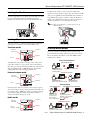
In batch mode, stacker 1 and 2 are used for blank discs.
Stacker 2 and 3 are both for output discs. For instance, if 100
discs are to be published, first the 50 blank discs in stacker 2
are published and output to stacker 3. Then the 50 discs in
stacker 1 are published and output to stacker 2. Stacker 3 is
installed, and tray 4 is not used at all and is locked.
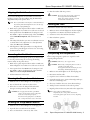
Locking the Disc Cover
You can set the disc cover so that it opens only with one of the
keys provided with the unit. The shipment position is
unlocked. To lock the disc cover, see the illustration below.
Note: When you install stacker 3, you must lock tray 4. See the
illustration below.
Loading Discs
There are 3 modes — standard, external output, and batch —
and stackers for each mode are loaded a different way.
Standard mode
Stacker 3
(removed)
Security Model Modes
Stacker 1
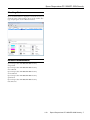
There are 2 modes for the Discproducer Security model —
pin-controlled and security. The basic operations are shown
below. For further information, see the PP-100N Security
Administrator’s Guide.
Stacker 2
Tray 4
PIN-Controlled Mode
User Submits Job
Standard mode uses stacker 1 as input source, and you can
select either stacker 2 or 4 for output. Tray 4 only holds 5
discs, but you can keep unloading it while a job runs until all
discs are published. Up to 1000 discs can be processed by
adding blank discs and removing published ones.
Authorized user —
Creates a disc using
Total Disc Maker
External output mode
Stacker 3
(removed)
Discproducer publishes disc.
User Picks Up Job
Stacker 1
Authorized user —
Enters a user number and PIN.
Stacker 2
Authorized user —
Retrieves the disc.
Tray 4
Security Mode
User Submits Job
External output mode uses stacker 1 and 2 as input sources.
Tray 4 is for output. A job is interruped when tray 4 fills to let
you empty it. Up to 1000 discs can be processed by empting
tray 4 and reloading the stackers. If automatic stacker is
selected, maximum discs per job is 50.
Authorized user —
Creates disc using
Total Disc Maker.
Sends request to
approve publishing disc.
Batch mode
Stacker 3
(installed)
Tray 4
(locked)
Job Released for Publishing
Discproducer publishes
Approver —
disc.
Approves disc publishing.
Notification of approval status
is sent automatically.
Stacker 1
User Picks Up Job
Stacker 2
Authorized user —
Enters a user number and PIN.
1/10
Authorized user —
Retrieves the disc.
Epson Discproducer PP-100N/PP-100N Security - 3