1
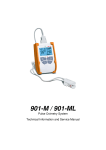
sat 801
Pulse Oximetry System
Technical Information and Service Manual
V 1.0
CONTENTS
1.
2.
PRELIMINARY REMARK ................................................................
...............................................................................
............................................... 4
FUNCTION
FUN CTION DESCRIPTION ................................................................
............................................................................
............................................5
............ 5
2.1.
INTENDED USE......................................................................................................... 5
2.2.
CONTRAINDICATION .............................................................................................. 5
2.3.
PRODUCT DESCRIPTION......................................................................................... 5
2.4. THEORY OF OPERATION.........................................................................................6
3.
TECHNICAL DESCRIPTION
DESCRIPTION OF THE SAT 801 ..............................................
.............................................. 7
4.
ASSEMBLY ................................................................
................................................................................................
....................................................................
.................................... 7
4.1.
DISPLAYS AND CONTROLS..................................................................................... 7
4.1.1.
Front ................................................................................................................... 7
4.1.2.
Back .................................................................................................................... 7
4.2. CONNECTIONS ON THE UNIT...............................................................................8
4.2.1.
Block diagram ....................................................................................................8
4.3.
POWER SUPPLY ........................................................................................................9
4.4. ON/OFF BUTTON................................................................................................... 10
4.5.
MASIMO BOARD .................................................................................................... 10
4.6. MICROPROCESSOR AND PERIPHERALS ............................................................. 10
4.7. SELF-DIAGNOSTIC CAPABILITY OF THE SAT 801 ................................................11
4.7.1.
Watchdog and undervoltage reset ...................................................................11
4.7.2.
ROM check ........................................................................................................11
4.7.3.
RAM check.........................................................................................................11
4.7.4.
Clock module check ..........................................................................................11
4.7.5.
Communication check with the Masimo board ..............................................11
4.7.6.
Operating voltage check .................................................................................. 12
4.7.7.
Loudspeaker check........................................................................................... 12
4.7.8.
Stack monitoring.............................................................................................. 12
4.7.9.
Detection of an uncontrolled reset.................................................................. 12
5.
MAINTENANCE PROCEDURES
PROCEDURES ................................................................
...................................................................
...................................14
... 14
5.1.
PRELIMINARY REMARK.......................................................................................... 14
5.2.
BATTERY REPLACEMENT ....................................................................................... 14
6.
POSSIBLE ERRORS AND THEIR CORRECTION ..........................................
................................ .......... 15
6.1.
ERROR: SYSTEM ALARMS .......................................................................................15
6.1.1.
Hardware-related system alarms......................................................................15
6.2. ERROR: GREEN AC POWER LEDS DO NOT COME ON .......................................15
6.3.
ERROR: SAT 801 CANNOT BE SWITCHED ON IN BATTERY MODE...................15
6.4. ERROR: SAT 801 WILL NOT SWITCH ON IN MAINS MODE ...............................15
6.5.
ERROR: YELLOW AND/OR RED ALARM LEDS DO NOT COME ON ..................15
6.6. ERROR: FAULTY LOUDSPEAKER ........................................................................... 16
6.7. ERROR: DISPLAY VALUES NOT PLAUSIBLE AND/OR FAULTY.......................... 16
7.
SAT 801 CHECK ROUTINE
ROUTIN E ................................................................
...........................................................................
........................................... 17
7.1.
PRELIMINARY REMARK.......................................................................................... 17
7.2.
POWER SUPPLY CHECK ......................................................................................... 17
7.3.
DEVICE SELF-TEST AND BRIEF CHECK ................................................................ 17
7.4. ALARM LIMITS CHECK ........................................................................................... 18
2
7.5.
7.6.
7.7.
7.8.
8.
8.1.
8.2.
8.3.
A.
9.
9.1.
9.2.
9.3.
9.4.
SENSOR ALARMS CHECK ...................................................................................... 18
ACOUSTIC SIGNALS CHECK.................................................................................. 19
DEVICE VALIDATION.............................................................................................. 19
BRIEF CHECK........................................................................................................... 19
SERVICE PROGRAM SERV
SERVICE801
ICE801 ...............................................................
............................................................... 20
PRELIMINARY REMARKS........................................................................................20
GENERAL INFORMATION ABOUT THE SERVICE801..........................................20
PERFORMING A PARAMETER UPDATE................................................................ 21
PERFORMING A SOFTWARE UPDATE.................................................................. 21
DATA DOWNLOAD PROGRAM DOWNLOAD801
DOWNLOAD801................................
........................................
........................................23
........ 23
PRELIMINARY REMARK.......................................................................................... 23
GENERAL INFORMATION ABOUT DOWNLOAD801 .......................................... 23
DOWNLOADING DATA.......................................................................................... 23
SETTING TIME AND DATE..................................................................................... 25
3
1. PRELIMINARY REMARK
This technical information requires the knowledge of the sat801 Instructions for Use
manual. It is assumed that the operation and menu structure of the sat 801 are known. In
individual cases, it is necessary to use the Instructions for Use manual together with this
technical information.
4
2. FUNCTION DESCRIPTION
DESCRIPTION
2.1.
Intended
Int ended Use
Continuous, non-invasive monitoring of the functional oxygen saturation of arterial
hemoglobin (SpO2) and the pulse rate (measured by the SpO2 sensor) in adults, children,
and neonates for use in hospitals, home care, for mobile or stationary applications.
Monitoring may only be carried out with approved Masimo sensors.
2.2.
Contraindication
Contraindication
Disposable SpO2 sensors of the Masimo LNOP series shall not be used in patients who
show an allergic reaction to the adhesive tape.
The sensors must be removed and repositioned every 8 hours and as soon as indicated by
insufficient blood circulation or other skin irritations.
Reusable sensors of the Masimo LNOP series shall not be used for long-term applications.
These sensors are not suitable for long-term monitoring. They must be removed and
repositioned every 4 hours and as soon as indicated by insufficient blood circulation or
other skin irritations.
2.3.
Product description
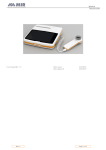
The sat 801 pulse oximetry system comprises the sat 801 pulse oximeter, based on the
Masimo SET technology, a plug-in power pack, a patient cable, and different disposable or
reusable SpO2 sensors.
The sat 801 pulse oximeter consists of a housing that is suitable for stationary (e.g.
hospital, sleep laboratories, home care) and, due to its small size and low weight, also for
mobile use inside and outside of health care facilities such as emergency and home care
applications.
The sat 801 has a customized LC display for indication of numerical SpO2 and pulse values
and the status of the unit. Additional LED displays indicate the power supply and alarm
status of the device. Vital signs, sensor, status, and system alarms are given visually
and/or acoustically. Upper and lower alarm limits can be adjusted both for SpO2 and for
pulse rate.
5
The unit is operated by means of four buttons.
The sat 801 is based on the Masimo MS-13 OEM board. Communication with the device
control hardware takes place at 9600 baud via a serial interface.
The sat 801 has an internal memory of 2 Mbytes for every-second recording of at least 160
hours of SpO2, pulse rate and IQ monitoring. The internal memory can be read out via the
USB interface only.
The sat 801 is powered via an external plug-in power pack with a wide-range voltage input.
2.4.
Theory of operation
The function principle of the sat 801 pulse oximeter with Masimo-SET is based on the fact
that oxyhemoglobin and desoxyhemoglobin differ in their capability of absorbing red and
infrared light, that the volume of arterial blood in the tissues varies from pulse to pulse
(thus also the light absorption by the blood) and the arteriovenous shunting is very
variable and the fluctuating absorption by the venous blood is the dominant noise
component.
Since oxyhemoglobin and desoxyhemoglobin absorption capabilities are different, the
amount of red and infrared light absorbed by the blood is related to the oxygen saturation
of the hemoglobin. Masimo-SET divides the red and infrared pulsating portion of the
absorption signal into an arterial and a noise signal thereby calculating the ratio of the
arterial signals without the noise portion. The ratio of the two arterial absorption values is
used by an empirically derived equation in order to determine the oxygen saturation. The
values in a table are based on studies conducted with patients whose oxygen saturation
values measured with Masimo-SET technology were compared with the results obtained
with an Co oximeter.
6
3. TECHNICAL DESCRIPTIO
DESCRIPTION
N OF THE SAT 80
801
4. ASSEMBLY
4.1.
Displays and controls
4.1.1. Front
1
LCD-Display
2
Green latticed-LED
3
Yellow alarm LED
4
Red alarm LED
5
Backlight button
and Down-arrow navigational button
1
8
7
2
3
4
5
6
Menu button
7
On-/Off button
8
Alarm mute button
and
Up-arrow navigational button
6
Fig.1: Front
4.1.2. Back
1
Loud speaker
2
Battery compartment -lock
3
Battery compartment
1
2
3
Fig.2: Back
7
4.2.
Connections on the unit
Connections on the upper panel of the unit:
1
USB-Interface
2
Patient cable connection
3
AC adapter socket
Fig.3: Upper panel of unit
4.2.1.
Block diagram
The following block diagram describes the functional units of the sat 801.
8
Main board
Buzzer
Batterys
Progr.Flash
usb Interface
DatenFlash
RTC
SuperCap
WDT
ResetMonitor
LCDController
3x
Timers
Netz
ADC
PowerSupply
µC
SRAM
EEPROM
Masimoboard
LED
yellow
Loudspeaker
LED red
LED
green
Film-keyboard
DC-In
Jack
LCD-Display
Patientconnector
USB connector
Fig. 1: sat 80
801 system overview
All functions of the sat 801 are arranged on two printed circuit board:
•
Masimo MS-13 board: pulse oximetry signal acquisition
•
Main board: microprocessor with USB interface, buzzer , power supply and LCD
4.3.
Power supply
The sat 801 is either powered via an external plug-in power pack (4.5 V) or by two AA
batteries.
•
Euro version: Egston N1EFM 12 W 4.5 V +/-1 %
The sat 801 works with two different internal operating voltages
•
DC 5.0 volts: Masimo board
•
DC 3.3 volts: Main voltage
A circuitry is available which protects the device against incorrect polarity and overvoltage.
No sufficient voltage is supplied if the input voltage is less than 4.0 volts.
9
The input voltage is measured at 0.125-second intervals. If this voltage is below the
specified threshold, the device switches to battery mode. The battery voltage monitoring
then applies.
The current battery voltage is measured at 0.125-second intervals, averaged over 10
seconds, and the resulting value is continually shown graphically on the display.
4.4.
ON/OFF button
When the ON/OFF button is pressed, the sat 8o1 is waked from the sleep mode.
4.5.
Masimo board
The Masimo
Masimo OEM board and the CPU communicate via a 9600 baud serial interface.
4.6.
Microprocessor and peripherals
A microcontroller,
microcontroller type ATMEL Atmega 329V, controls the task sequence of the sat 801. It
belongs to the AVR series and has an 8-bit core, an internal in-System Self-Programmable
32 kByte flash EPROM, an internal 2 kByte static RAM, an internal 1 kByte EEPROM. In
addition, the Atmega 329V has, amongst other things, an integrated 4 x 25 segment LCD
driver, 10- bit A/D converter, programmable Serial USART, master/slave SPI serial
interface, programmable watchdog timer with separate on-chip oscillator, an interrupt
controller, a 2-channel 8-bit timer, a 16-bit timer, and a real time counter with separate
oscillator.
A real time clock module DS1374C is used to keep a real time and as a additional
external watchdog timer with a directly buzzer control possibility.
The loudspeaker is controlled via a timer output (pitch signal) and a pulse width output
(volume signal). This solution relieves the microcontroller from the task of direct waveform
generation and ensures a good tone quality. The loudspeaker can be tested for "shortcircuit" and "no contact" error conditions. If such a system occurs, an additional buzzer
will be activated.
10
4.7.
SelfSelf-diagnostic capability of
of the sat 80
8 01
4.7.1.
Watchdog and undervoltage reset
To check the watchdog (WDT) function, the WDT toggle signal is interrupted and the reset
function is checked at undervoltage (voltage divider simulates undervoltage) after program
start.
If these tests are not passed, respective system alarms are generated.
4.7.2.
ROM check
The internal flash program memory is checked upon initialization and at regular time
intervals (< 10 h) according to the CRC-16 method.
If the ROM check is not passed, a system alarm is generated.
4.7.3.
RAM check
The whole internal RAM area is checked once before the major loop is started.
If the RAM check is not passed, the sat 801 is rebooted.
4.7.4.
Clock module check
The data in the NVRAM are protected with CRC-16. After each device start from the poweroff status, the data are loaded from the NVRAM and checked using the CRC- 16 method. If
the CRC is not correct, a system alarm is generated.
4.7.5.
Communication check with the Masimo board
After power-on and completion of the above mentioned internal self tests, the Masimo
board is supplied with voltage, reset, and initialized.
All data packages received by the Masimo board are constantly checked for start and stop
bytes as well as for checksum.
If no new data package is sent by the Masimo board within 2.5 seconds, a system alarm is
triggered.
In addition, the board mode, the algorithm mode, the averaging time, and the set data
format are checked for consistency once every second.
In the event of deviations, a medium priority alarm is generated.
11
If more than 5 transmission errors occur within 2 seconds, or if incorrect board mode,
algorithm mode, averaging time, or data format information is detected more than 4
times, a system alarm is also triggered.
4.7.6.
Operating voltage check
Mains voltage check
The battery voltage is measured at 0.5-second intervals and the measured value is averaged
over a period of 10 seconds. If the calculated average falls below a predefined 1-hour alarm
threshold, the 1-hour battery alarm (low priority) is generated. If the calculated average
value falls below the 15-minute alarm threshold, the 15- minute battery alarm is generated.
If the average value falls below the U_battery-flat threshold, a system alarm is generated.
If the average value falls below the U_switch-off threshold, the device is switched off
automatically.
Input voltage check
The input voltage is measured at 0.5-second intervals. If this voltage is below the specified
threshold, the current operating mode is recognized as battery mode. The above
mentioned battery voltage monitoring then applies.
4.7.7.
Loudspeaker check
The loudspeaker is checked once after program start, and then each time before an audio
alarm is generated. Two potential error conditions are detected: (short-circuit and nocontact). If the check is not passed (= loudspeaker is faulty), all audio signals are then
issued via the buzzer. If the error has been detected, an additional low priority alarm is
started.
4.7.8.
Stack monitoring
The stack is continually monitored for overflow status. If the stack pointer exceeds a predefined limit, a system alarm is generated.
4.7.9.
Detection of an uncontrolled reset
After the program start, the system always checks whether or not the previous monitoring
was completed as specified. The monitoring status at the start of monitoring is stored in
the NVRAM area of the clock module. If monitoring was completed as specified, the
12
respective status is deleted. If a respective monitoring status is detected after program
start, the system recognizes this as an uncontrolled reset. A system alarm is triggered.
13
5. MAINTENANCE PROCEDURES
PROCEDURES
This chapter covers the following items:
•
5.1.
Regular maintenance procedures to be carried out on the sat 801
Preliminary remark
The following sat 801 components are subject to wear:
•
Li battery
All other components are not subject to ageing.
5.2.
Battery replacement
The manufacturer recommends replacing the Li battery at 10-year intervals.
Note !
Since the service philosophy is a complete-replacement strategy, the Lithium battery may only
be changed in the manufacturer’s service department.
14
6. POSSIBLE ERRORS AND THEIR CORRECTION
This chapter covers the following items:
•
•
Description of possible errors
Information about their causes and correction
6.1.
Error: System alarms
6.1.1.
Hardware-related system alarms
All hardware-related system alarms need to be serviced at the manufacturer.
6.2.
Error: Green AC power LEDs do not come on
Error situation:
Green AC power LEDs do not come on
Error correction:
1. Check function of plug-in power supply
2. Hardware failure: send unit in
6.3.
Error: sat 80
801 cannot be switched on in battery mode
Error situation:
sat 801 cannot be switched on in battery mode
Error correction:
1. Replacement of the batteries
2. Hardware failure: send unit in
6.4.
Error: sat 80
8 01 will not switch on in mains mode
Error situation:
sat 801 will not switch on in mains mode
Error correction:
1. Check function of plug-in power supply
2. Hardware failure: send unit in.
6.5.
Error:
Error: Yellow and/or red alarm LEDs do not come on
Error situation:
Yellow and/or red alarm LEDs do not come on
Error situation
is confirmed by visual self test
Error correction:
Hardware failure: send unit in.
15
6.6.
Error: Faulty loudspeaker
Error situation:
Loudspeaker is not activated, buzzer is activated instead of the
loudspeaker
Error correction:
6.7.
1. Hardware failure: send unit in.
Error: Display values not plausible and/or faulty
Error situation:
The displayed values are not plausible or not within specification.
Error correction:
1. Replacement of the sensor
2. Replacement of the patient cable
3. Hardware failure: send unit in
16
7. SAT 80
801 CHECK ROUTINE
This chapter covers the following items:
•
Complete check routine for testing the sat 801 function
7.1.
Preliminary remark
All checks of this complete check routine can also be carried out individually. The
operability of the device, however, can only be assessed after completing the entire routine.
7.2.
Power supply check
Action
• Connection of plug-in power pack to
Result
• Green LED on plug-in power pack comes
on.
public power supply
•
Connection of plug-in power pack to the
•
Green LED comes on.
sat 801
7.3.
Device selfself-test and brief check
Action
• Switching the device on using the
Result
• sat 801 performs several self-tests in
ON/OFF button
short succession:
•
Watchdog test - internal
•
Undervoltage test - internal
•
Reset test - internal
•
LC display test - visual check for pixel
errors
•
LED test. visual check to find out
whether or not both yellow and red LEDs
are on
•
17
Loudspeaker test. Acoustic check
7.4.
Alarm limits check
Note: The upper and lower alarm limits must differ by at least 2 units.
Action
• Deletion of data memory
•
•
Result
• Existing data are deleted.
Connection of a sensor for generation of •
SpO2 and pulse values are displayed
physiological signals
after a short delay
Adjusting the upper alarm limit for SpO2 •
"SpO2 high" alarm is triggered
to a value below the displayed SpO2
value
•
If possible: Adjusting the lower alarm
•
SpO2 low" alarm is triggered
limit for SpO2 to a value above the
displayed SpO2 value
•
Adjusting the upper alarm limit for pulse •
"Pulse high" alarm is triggered
to a value below the displayed pulse
value
•
Adjusting the lower alarm limit to a value •
"Pulse low" alarm is triggered
above the displayed pulse value
7.5.
Sensor alarms check
Action
Result
• Switching on the device while the sensor • sat 801 changes to search mode, then
is put on.
displays the current SpO2 and pulse rate
values.
•
Disconnecting the sensor from the
•
Sensor alarm is triggered
patient connecter while the sat 801 is
operating
•
Reconnect sensor to sat 801
•
Alarm stops
•
Remove sensor from finger
•
Sensor alarm is triggered
•
Reapply sensor on finger
•
Alarm stops
•
Slightly lift sensor off finger and direct
•
Sensor alarm is triggered
light from a light source to sensor
18
7.6.
Acoustic signals check
Action
Result
• Selection of alarm tone volume from 1 to • Alarm tone volume varies from very low
10
•
to very loud
Selection of alarm tone OFF
•
Alarm tone is switched off. At the same
time, the symbol appears on the LC
display.
•
•
Selection of pulse tone volume from 1 to •
Pulse tone volume varies from very low
10
to very loud
Selection of pulse tone OFF
7.7.
•
Pulse tone is switched off
Device validation
This test requires the use of the pulse oximetry simulator SmartSat from Clinical Dynamics
and cannot be carried out on a patient. Additional test equipment: Stop watch.
These tests are not part of standard service.
Contact the manufacturer for a detailed test description.
7.8.
Brief check
A brief check is carried out by allowing the device to complete its self-test.
1. Connect the sat 801 to the public power supply via the plug-in power pack.
2. Switch the sat 801 on.
3. Allow it to complete its self-test.
4. The brief check is completed successfully if the device reaches the monitoring mode
without generating a system error.
5. Switch the sat 801 off.
19
8. SERVICE PROGRAM S
SERVICE
ERVICE801
ERVICE801
This chapter covers the following items:
•
•
8.1.
Using the service program
Performing software updates
Preliminary rema
remark
rks
rk s
The service program allows you to read out, modify and save again device constants,
parameters and settings stored in the sat 801. In addition, it can be used to update the sat
801 firmware and the Masimo board software.
This requires a PC with a USB interface and an operating system W2k or later (free memory
space: at least 10 Mbytes).
8.2.
General information about the Service8
Service 8 0 1
The welcome screen appears after starting the sat 801 service program:
In the left area you are able to
•
display and modify alarm limits for SpO2 and Pulse Rate
•
display and modify the SpO2 signal processing algorithm parameters such as
averaging time and sensitivity
•
display and modify the acoustical settings
•
display and modify the access codes for clinical and home care mode
20
In the right area you are able to
•
identify the serial numbers for the internal PCBs
•
identify the firmware version
•
perform a firmware update
8.3.
Performing a parameter update
1. Setup the connection between the PC and the sat 801.
2. Start Service801. The welcome screen is displayed.
3. Turn on the sat 801.
4. All stored parameters are displayed.
5. Perform the necessary modifications in the masks.
6. Click on the Transmit button to allow for parameter update of the sat801.
7. Remove the USB cable from the sat 801.
8. The sat 801 automatically switches off.
a. Performing a software update
1. Setup the connection between the PC and the sat 801.
2. Start Service801. The welcome screen is displayed.
3. Turn on the sat 801.
4. All stored parameters are displayed.
21
5. Click on the Update button to allow for a software update of the sat801.
6. Remove the USB cable from the sat 801.
7. The sat 801 automatically switches off.
22
9. DATA DOWNLOAD PROGRAM DOWNLOAD801
This chapter covers the following items:
•
Using the Download801 program
Performing a data download
•
9.1.
Preliminary remark
The Download801 program allows you to transmit stored monitoring data from the sat801
to a PC. This data can be further analysed by an oximetry program such as TrendLibrary.
9.2.
General
Ge neral information about Download801
Download801
With Download801, you are able to
•
set and synchronize the system time of the sat 801
•
perform a data download procedure
9.3.
Downloading
ownloading data
1. Setup the connection between the PC and the sat 801.
2. Start Download801.
3. Turn on the sat 801.
4. Automatically, the current sat 801 time setting, S/N and software version are
transmitted to the PC and displayed.
5. Click on Transmit to allow for the data download. The data download starts.
23
6. You will then be prompted for the target file.
7. After successful storage of the file, remove the USB cable from the sat 801.
8. The sat 801 automatically switches off.
24
9.4.
Setting time and date
1. Setup the connection between the PC and the sat 801.
2. Start Download801.
3. Turn on the sat 801.
4. Automatically, the current sat 801 time, S/N and software version is transmitted to
the PC and displayed.
5. Synchronize the PC-time with the sat 801 time by clicking Transfer PC-time.
6. Remove the USB cable from the sat 801.
7. The sat 801 automatically switches off.
25