1
GENERAL MOTORS
Turbo-Hydramatic 350 and 400
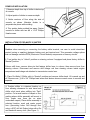
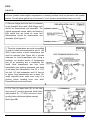
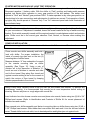
1. Remove backdrive linkage rod and
stock transmission arm from gear selector
shaft on transmission using a 9/16” socket
and replace with Hurst transmission arm
PT. 1058561 re-using stock bolt or nut.
Transmission arm must be installed with
round hole down and bend in arm
positioned away from transmission. (See
Figure 4).
FIGURE 4
IMPORTANT
VEHICLES EQUIPPED WITH STEERING COLUMN LOCK
In some applications the stock backdrive linkage system that locks the steering column and shifter in
“Park” position may be retained depending on the stock transmission arm configuration.
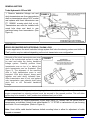
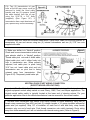
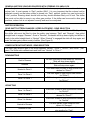
One side of the stock transmission arm must
have a flat unobstructed surface in order to
be used and retain the factory backdrive
linkage system. Carefully position Hurst
transmission arm on top of or behind the
stock transmission arm as illustrated. (See
Figure 3). The alignment of the mounting
slots in both transmission arms is very
important. With slots aligned, clamp arms
together and weld along indicated lines.
Allow transmission arm to cool, and replace
onto transmission gear selector shaft using
stock bolt or nut. Re-install backdrive
linkage.
FIGURE 3
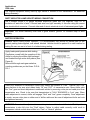
Note: If the backdrive linkage system is not going to be retained, the linkage rod lever (located inside
engine compartment on steering column) must be secured in the upward position. This will allow
ignition key to be turned to “Lock” position and withdraw freely out of lock.
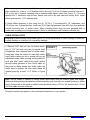
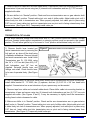
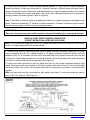
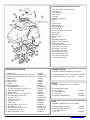
2. Remove the two (2) center transmission oil pan bolts (using 1/2” socket) from left (driver) side of
transmission as indicated. Attach Hurst cable bracket Pt. 117 4778Z to transmission oil pan re-using
stock bolts. Do not overtighten. (Refer to Figure 4).
Note: Hurst shifter cable bracket features slotted mounting holes to allow for adjustment of cable
forward or rearward.
Technical Support (707) 544‐4761 4 www.HURST‐SHIFTERS.com