1
DELAY LOCK
AUTO UNLK (Unlock)
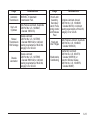
This feature, which delays the actual locking of the
vehicle, can be enabled or disabled. When DELAY LOCK
appears on the display, press and hold the reset button
for at least one second to scroll through the available
settings:
This feature, which allows the vehicle to automatically
unlock certain doors, can be enabled or disabled.
When AUTO UNLK appears on the display, press
and hold the reset button for at least one second
to scroll through the available settings:
ON (default): The doors will not lock until five seconds
after the last door is closed. You can temporarily
override delayed locking by pressing the power lock
switch or the lock button on the Remote Keyless
Entry (RKE) transmitter a second time.
ALL (default): All of the doors will automatically unlock.
OFF: The doors will lock immediately when pressing
the power lock switch or the lock button on the
RKE transmitter.
If you have a manual transmission vehicle, the door(s)
will automatically unlock when the ignition is turned off.
See Power Door Locks on page 2-9, Delayed Locking
on page 2-9, and Remote Keyless Entry (RKE) System
Operation on page 2-3 for more information.
If you have an automatic transmission vehicle, you
can select when the automatic unlocking will occur.
See “UNLK (Unlock) (Automatic Transmission Only)”
following.
To select a setting and move on to the next feature,
press the information button while the desired setting is
displayed on the DIC.
See Programmable Automatic Door Unlock on page 2-10
for more information.
DRIVER: The driver’s door will automatically unlock.
NONE: None of the doors will automatically unlock.
You will need to manually unlock the doors.
To select a setting and move on to the next feature,
press the information button while the desired setting is
displayed on the DIC.
3-50