1
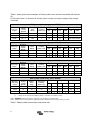
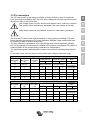
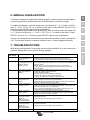
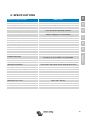
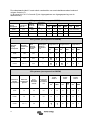
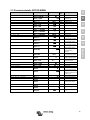
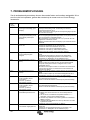
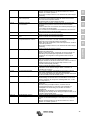
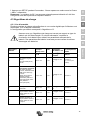
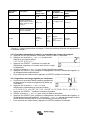
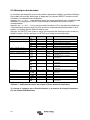
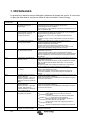
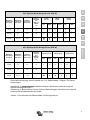
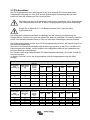
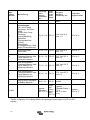
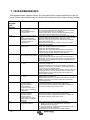
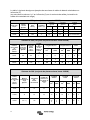
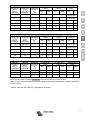
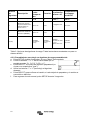
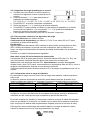
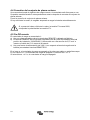
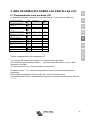
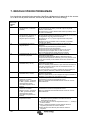
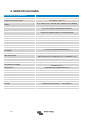
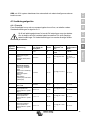
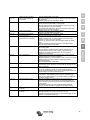
Error nr. on
LCD display
Err 17
Err 18
Problem
Cause / Solution
sensor failure
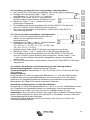
1. Scroll through the LCD-screens to find the battery temperature.
2. If the LCD indicates an unrealistic temperature value or "---", replace
the remote sensor.
3. Press and hold the SETUP-button for 2 seconds to enter the SETUPMENU.
4. Exit the SETUP-MENU by pressing SETUP for 2 seconds.
5. Check if the battery temperature is now valid.
This error will auto-reset after charger has cooled down.
Check the ambient temperature and check for obstructions near the air
inlet and outlet holes of the charger cabinet.
This error will auto-reset.
Disconnect the charge controller from all power-sources, wait 3 minutes,
and power up again.
If the error persists the charge controller is probably faulty.
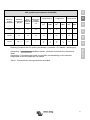
This error can only occur when the maximun bulk-time protection is
active. This error will not auto-reset.
This error is generated when the battery-absorption-voltage is not
reached after 10 hours of charging.
For normal solar installations it is advised not to use the maximum bulktime protection.
The charge controller is probably faulty.
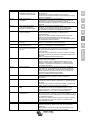
This error will not auto-reset.
The charge controller is probably faulty.
This error will not auto-reset.
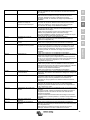
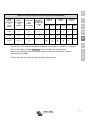
Disconnect all power-sources from the charger, and open the front cover.
Check if the white connector on the control-pcb (at the left of the LCD) is
properly connected.
If connected properly, close front cover and power-up again.
If the error persists the charge controller is probably faulty.
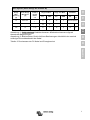
This error will auto-reset.
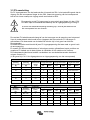
This error will auto-reset after PV-voltage has dropped to safe limit.
This error is an indication that the PV-array configuration with regard to
open-circuit voltage is critical for this charger. Check configuration, and if
required, re-organise panels.
The current from the solar-panel array has exceeded 50A. This error
could be generated due to an internal system fault.
Disconnect the charger from all power-sources, wait 3 minutes, and
power-up again. If the error persists the controller is probably faulty.
This error will auto-reset.
Communication with one of the paralleled controllers was lost. To clear
the warning, switch the controller off and back on
The controller is being paralleled to another controller that has different
settings and/or a different charge algorithm.
Make sure all settings are the same and update firmware on all chargers
to the latest version
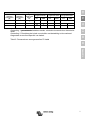
Connection to the BMS lost, check the CAN bus cabling. When the
charger needs to operate in stand-alone mode again, change to setup
menu setting ‘BMS’ from ‘Y’ to ‘N’ (setup item 31).
This error will reset after the CPU has cooled down.
If the error persists, check the ambient temperature and check for
obstructions near the air inlet and outlet holes of the charger cabinet.
Check manual for mounting instructions with regard to cooling. If error
persists the controller is probably faulty.
This error will not auto-reset.
This error will not auto-reset.
Restore defaults in the setup menu (setup item 62).
Disconnect the charge controller from all power-sources, wait 3 minutes,
and power up again.
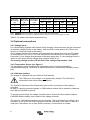
Controller overheated
despite reduced output
current
Controller over-current
Err 20
Maximum Bulk-time
exceeded
Err 21
Current sensor issue
Err 22
Internal temperature
sensor short
Internal temperature
sensor connection lost
Err 23
Err 33
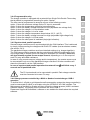
PV over-voltage
Err 34
PV over-current
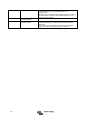
Inf 65
Inf 66
Communication
warning
Incompatible device
Err 67
BMS connection lost
Err 114
CPU temperature to
high
Err 116
Err 119
Calibration data lost
Settings data lost
18