1
All and more about Sharp PC-1500 at http://www.PC-1500.info
4 - 2 It is suggested t o make duplication of the cassette tape for the service use in
the following manner:
NEW 0 IENTER I
2 . NEW& 44F0
3. CLOADM
~
4. ~YEM "ooo"; 140C6, & 44E6
NOTE: "coo" represents the file name.
I.
5 . CHECKER SPECIFICATIONS
TI1e check program in the cassette tape is recommended for your use to check operation of t11e
11nit. Operating condition of the CE· l 53 may easily known by this checker.
I) Outline of check method
• Load in the PC·ISOO the CE-153 machine language program and tlic check BASIC pro·
gram using the CE· J 50 and CE-152.
• Execute the progr•m for the PC-1500 and make entry of the given procedure on the key·
board of CE-153.
• The message "OK' " is pul on the display when the check is finished .
2) Check program entry
I. Turn the power off to PC-1 500, then connect the PC·l 500 with the CE-150 and CE· 152.
2. loNI
3. ! CL I
4.
5.
6.
7.
Set to the PRO mode.
Push @lli][i\'.f~@IIJ[l[Q]IENT I .
Set the machine language program tape on the CE· 152 and tum it into t11e PLAY mode.
Push 1£)(jJ[Q)~~)£NTI t Ii
ii
8. Enter the check program a(ter pushing [g[jJ[QJ[QJIENTI .
With the above procedure, it tem1inates the program loading. If the program is not needed,
you can disconnect the CE- I :.50 after turning off the PC-1 500 .
3) Check procedure
I. Turn the power off 10 PC-1500.
2. Connect the CE-153 with the PC· 1500.
3. Turn the power on to the PC-1500.
4. Sec to the RUN mode.
5. Push @WJffij) £NTI .
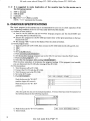
CE - 153 C llECI< STAl~T
I
Push the key on the "O 0 0 O"
posicion (upper left corner).
Push the key on the " O I 0 O"'
position
········· --·······!
00 00
0 I 0 0
020 0
'
'
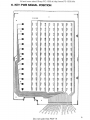
After this push the key on the indicated position. Twenty three keys must be operated o.n
t11e Software Board in the following sequence.
Ci I !i!
~1 1 1
6. Push the key on the "O 9 1 8'" position.
OK! CE 153 KEY INPUT CHECK
7. End of check.
2
Do not sale this PDF !! !