1
----SHARP----
SERVICE MANUAL
CE-150
Printer and cassette interface
WWW.
PC-1500
.INFO
SHARP CORPORATION
Do not sale this PDF !!!
All and more about Sharp PC-1500 at http://www.PC-1500.info
CE-150
PC-1500 Option Printer & Cassette Interface
Service Manual
TABl.E Of CONTENTS
l.
Specifications . . . . . . . . . . . . . . . . . . . . . . . • . • . . . . . . . . • . . . . .
I
2.
System Block Diagram . . . . . . . . . . . . . . • . . . . . . . . . . . . . . . . . . . .
7
3.
Cicuit Discription . . . . . . . . . . . . . . . . . . . . . . . . . . . . . . . . . . . • . .
8
4.
Circuit Daigram . . . . . . . . . . . . . . . . . . . . . . • . . . . . • . . . . . . . . . . I I
S.
Parts and Signals Position . . . . . . . . . . . • . . . . . . . . . . . . . . . . . . . . . I2
6.
Parts List & Guide . . . . . . . . . . . • . . . • . . . . . . . . . • . . . . . . . . • . . 13
Do not sale this PDF !! !
All and more about Sharp PC-1500 at http://www.PC-1500.info
1. SPECIFICATIONS
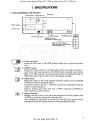
• Parts ident ification and functions
Connector
§§'~·~~
. -r=~~--
115·.
Printer cover
Ti It ------~
j
w ~-0
~-
Cill:J j
t
Printer cover latch
=
f4--i
0
-1
• l"itrl
95,l
.. ' ......
i-+
• •p .. -
;;
PRINT switch
. . .....
AC odaptor ieck ~j
REMOTE switch
r-'t-® :
(connec-tOd to REM O jack)
Ceblo connect term inal
(Used to connect CE·150 w ith
a tape recorder uni t.)
® •
I-® !
'-+-® :
• Printer cover latch
Moving the latch lever to the OPEN position enables you to remove the printer
cover.
•
REMOTE switch
Moving the remote switch to the ON position allows the pocket computer to
control start and stop operation of the REM 0 jack connected tape recorder.
When in the OFF position, the remote control function is disabled through the
REM 0 jack, and the tape recorder can then be operated manually.
Lj
•
PR I NT switch
Placing the switch to the P side performs automatic printout of the computing
formula and results of manual calculation.
Turning the switch to the dot ( . ) side does not print the computing formula and
results of manual calculation .
However, printout takes plaoe with such a PRINT command as LPRJNT and
LINE, regardless of switch position.
•
PAPER FEED key
Basically, this key is used to feed paper. But, depression of this key together with
the (]] key permits the printing pen exchange mode.
Also, simultaneous depression of this key with the I CL ikey cancels the pen
exchange mode and the machine returns to the nonnal operation mode.
PRINT
I
Do not sale this PDF !!!
All and more about Sharp PC-1500 at http://www.PC-1500.info
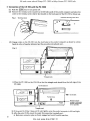
• Connection of the CE-1 50 with the PC-1500
I
(1) Push the IOFF key t<> turn power off.
( 2) Remove the terminal cover located on the left side panel of Ute pocket computer and place the
cover in the terminal cover reserve slot located on the back panel of the CE-I SO for future. use.
Fig. l
Hold the terminal cover here
Terminal cover
0
0
•0
•
·t
.
a -=n
~
I~
Cl
3I
(3) Engage studs on the CE-150 into the stud holes in the pocket computer as shown by arrowheads in order of number indicated and the procedure introduced next.
Fig. 2
Triangle mark
I) Place the PC-1 500 on the CE-1 50 so that the triangle mark should be at the left edge of the
PC-1500.
To the bottom
1
I
I
~1
I
To the left
~\///
t
~~\
~
.
I
==::=::::;;::·
:
::===M-Jlj~=:;=::;====='====:=:::==t--Match surfaces:
t..
........,_
straight,
o therwise,
<
'"======='=£=~=='1-!r
,
...
:.x I ~ I
To the front
··-·-·---
proper
connect;on
is
not possible,
Tri@nglt;t m-@rk
2) If the point 2) of Fig . 2 does not fit well, lightly move the pocket computer to left and right.
3) After the point 2) fits, insert the point 3)(connection terminal) next.
• Make sure connector pins. are firmly engaged and avoid force ful insertion.
2
Do not sale this PDF !! !
All and more about Sharp PC-1500 at http://www.PC-1500.info
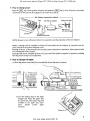
• How to charge power
I
P11s!l the J CL I key of the pocket computer and push the OFFI key to turn off power, then make
connection of the EA· l50 AC Adaptor in the o rder of 1) and 2) .
. - -- - -- - AC Adaptor cannection method - - - - - -Plug
EA· 150 AC Adaptor
\
~
I
Power cord plug
}..--~.:~
{AC line voltage)
AC Adapt<><
connection terminal
NOTE: De sure to turn off power before the connection and disconnection of lhe AC Adaptor.
Battery recha,-ge will be complete in about 15 hours when the AC Adaptor is connected and the
power switch of the pocket computer is off.
Printing of ab out I ,I 00 characters for the size-2 print characters are permitted, when operated with
the rechargeable ballery supply.
Recharge will also be complete in about 15 hours even if the pocket computer is operated, providing
that the printer is kept out of operation.
• How to change roll paper
I) Move the printer cover latch lever towards the arrow direction to remove.
o I olol o
DODOO
00000
OOODC
CJ
0 0 0
00 0 0 0
0 00 00
_,
o o o =
..J U
.- =1
=
l
0
o ooo c::
Gl OO ~
f!tt=cs I
2) Cut the leading edge of the paper
straight and insert the paper into
the pl.aten slit. Bent paper edge and
wrinkles in the paper may sometimes
impede
proper paper
inserti1on .
Plaftln slit
3
Do not sale this PDF !!!
All and more about Sharp PC-1500 at http://www.PC-1500.info
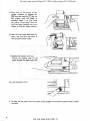
3) Now, tum on the power of the
pocket computer by pushing the
IONI key and push the
key on
the printer until the paper is
advanced about 3 to 5cm from
the platen. If the platen does not
feed the paper properly use your
fingers to help the paper advance.
m
4) Insert the roll paper shaft into the
paper roll core hole and place it
into the paper holder casing.
:1
I... ~
OCOQ
coco
c c cc
CCC
5) Replace the printer cover now.
Thread the leading edge of the
paper through the paper eutte r slit.
.,,
....., '
6) Lock the printer cover.
\\
• To take out the paper from the printer, pull it straight out through the paper holder or paper
feed side.
4
Do not sale this PDF !! !
All and more about Sharp PC-1500 at http://www.PC-1500.info
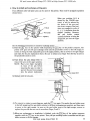
• How to install and exchange writing pens
Four different color ball poinl pens can be used on this printer, They must be arranged in positiun
shown below.
When pen position, 0-3, is
chosen by the COLOR command, it will be selected by
the action of the pen position detect ma;gnet. Pen positions are arranged in order of
0, I, 2, 3, clockwise from the
magnet position. However,
the pen holder rotates
counterclockwise to bring the
designated pen into the upper
position.
Pen position
detect magnet
Use the following i11structions to install or exchange pen(s).
I) Push the
key on the printer while depressing the [QJ key on the pocket computer. The
printer now goes into the pen exchange mode and the pen holder mO\·es to the left margin. It
rotates to bring the first replaceable pen to the upper position, then it moves to the right margin
and waig for the pen replacement there. Be sure to release your finger from the key as soon as
the pen holder starts to move.
W
2) Push down the pen release lever to
remove the pen on the upper position.
NOTE : Place yo11r finger tip lightly
in front of the pen before
ren1ovi.ng the pen, in order to
prevent the pen from jumping
into the printer mechanism .
3) Replace with the new pen.
J]
4) To remove or replace a succeeding pen, p1nh the
key again. This makes the pen holder move
to the left margin 3Jld the pen holder ro!ates to !he next exchanging pen position, and then starts
to move M the right margin. As soon as. !he pen holder stops al the right margin, remove M
replace the pen witl1 tlie new one in accordance Steps, 2 and '.l.
5) Y..l 1en pen replacement or instaJlation is finished, push the I CL J key of the pocket compuler
together with the [I) key on the printer. Then, the pen exchange mode is cancelled and the pen
holder returns to the left margin .
Do not sale this PDF !!!
s
All and more about Sharp PC-1500 at http://www.PC-1500.info
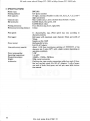
• SPECIFICATIONS
Printer type:
Printing method:
Print capacity:
Character size:
Ball point pen:
Printing directions:
Minimum pen moving distance:
Print speed:
Print paper:
Pow.e r source:
Line print power capacity:
Power consumption:
Operating temperature:
Physical dimensions:
Weight:
Accessories:
6
DPG!301
x.Y plotter method
18 digits, nominal. (Possible to select 36, 18, 12, 9, 7, 6, 5, and 4
digits operations)
Nine variable sizes, l.2mm x 0.8mm thru I O.Smm x 7 .2mm.
EA850C (black, blue, green, red)
EA850B (black only)
Four directions (up, down, right, left)
0.2mm
I E characters/sec, max. (Print speed may vary according to
character printed,)
Roll paper with maximum outer diameter 30mm and width of
58mm.
Supplies as EA·l 500P
Rechargeable battery.
EA· 150 AC Adaptor
About 1,100 lines (continuous printing of 555555555 of the
character size 2 under 20°C, with a slight variation depending on
operating condition).
5.2W
5 ·to 40°C
330(W) x llS(D) x SO(H)mm
900g, except accessories
Carrying case, tape recorder connection cables (one each of three.
line and one.Jine wires), EA·ISO AC Adaptor, 3 rolls of paper,
one each of black, blue, green, and red pen, name label, instruction manual.
Do not sale this PDF !! !
All and more about Sharp PC-1500 at http://www.PC-1500.info
2. SYSTEM BLOCK DIAGRAM
50
z
~6
l
",.s
..
I
~ MI C
CMT
I NTERFACE
::>EAR
PHONE
I"'"
REMOTE SW
1/ 0
r
PORT
2
.J
l DRIVER
~.JoR IVER
-OR EMOTE
J
~REMOTE
~
Relay
2 L
'
•J v-}
u
Vee
PF
PRINT
MOOE
color
)l -
2
~
{
1)1{1 Vl;R
}
~olmoid
co lor'
GRAPHIC
PRINTER
X.Y
8Kl3
ROM
2
mo tor
DRIVER
r
DPG 1301
~ VsAT
ADAPTOR
.....
~
Power source
NiCd
. . Vp
(Type
AA(R-6)
x 5)
1
LOW BATTERY
CllECK
+
1 /0
7
Do not sale this PDF !!!
All and more about Sharp PC-1500 at http://www.PC-1500.info
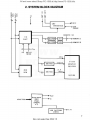
Refering to the block diagram, the CE-150 is the printer (DGP! 301) and the CMT (cassette tape
recorder interface) which consists o f three blocks, the CMT interface, printer interface and power
supply circuit.
• CMT interface
"!he CMT interface is the circuit that handles data transfer betwe.en the PC· I 500 and the CMT and
consists of a simple driver circuit (voltage level conversion circuit).
In addition, there is the CMT on/off remote controlling circuit which is under the program control
of the PC-I 500 and performs switching operation via the 1/0 port usiJig the relay circuit.
• Pr inter interface
The printer intefoee consists of character generator ROM (LH5367-01),l/0 port ( LH580J), motor
drive circuit, print solenoid drive circuit, and the pen color detect input signal circuit.
• Power supply block
A simple power stabilization circuit is provided to take care of recharge to the built-in NiCd
batteries from the AC Adaptor.
3. CIRCUIT DESCRIPTION
3· 1. CMT Interface circuit diagram
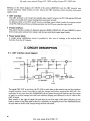
The signal CMT OUT is sent from the PC-1 500 to write data on the cassette tape and the capacitor
coupled interface circuit is provided to shift the voltage level before supplying the MIC jack. The
read signal is the input from the £ARPHONE jack and passed through the capacitor and two stages
of gates to perform voltage level shift and waveform shaping and delivered to the PC- I 500 as the
CM!T IN signal.
With respect to the CMT IN signal , the gate input to the first stage of the gate is forced to a low
level by means of the PAO signal as there is a possibility of supplying noise to the EARPHONE jack
as input data to the PC· I 500, except during the data read mode.
e
Do not sale this PDF !! !
All and more about Sharp PC-1500 at http://www.PC-1500.info
•
Recording signal
When the contents of the start bit or data bit is "O", four pulses of I .27kHz are recorded in a time
of 3.J 5ms. When the contents of the data bit is "I", eight pulses of 2.54kHz are recorded in the
tape in a time of 3. l Sms.
Shown below is an example of the conents of.S (one byte) is "O 1 O 1 O 1 1 O".
5
- 6
~:~P
+ ~);"'+
$4
"1"
-+- + + +
S5
"o"
S6
fl 1"
S7
.. o,.
Stop
bH
Stop
bit
3-2. Remote circuit
VGG
( +5.8V )
74nx4
14
110 port 2
3
4
PAI
1~
f>1\2
12
PA3
11
PA4
10
9
7
OFF
ON
REMOTE
REMOTEO
~
@
REMOTE !
8
M545! 6P
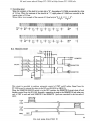
This circuit is provided to perform automatic control of CMT on/off action. Signal from the
PC-1500 is used to actuate the relay via the 1/0 port(LH5810 or LH58 1l).
When the REMOVE ON/OFF switch is in the OFF position, the REMOTE 0 circuit shuts off and
disables conlrol from the PC-1 500. Normally, connection is made to the REMOTO 0 jack when one
unit of CMT is used and both REMOTE 0 and REMOTE I jacks are connected to use two units of
CMT.
PA I
or
PAS
ON
Rolav
OFF
9
Do not sale this PDF !!!
All and more about Sharp PC-1500 at http://www.PC-1500.info
• Solenoid drive circuit
Y.iw o.ssn
2Sl192G
10
PB!
1.SKO
PBO
1.5KO
.__ _ _4-·. :.r;:.64---+----0 Soleno;d(- )
t/O pott
9
1500
] 500
..--+--+-~--i-o---4--Q Solenoid!+>
27KO
5601\
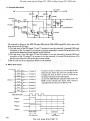
The solenoid is driven by the PEN UP signal PBO and the PEN DOWN signal PB I that is sent to the
drive circuit via the 1/0 port.
I) TI1e high state of the PB! signal, TS and T7 actuates to turn the solenoid(- ) terminal GND level.
Actuation of tl1e TS causes T6 to actuate to tum the solenoid(+) tenninal VM level (about +6V)
and drive the solenoid of lower the pen to start printing.
2) The high state of the PB! signal, T2 and T4 actuates to turn tl1e solenoid(+) terminal GND level.
Actuation of tl1e T2 causes T3 to actuate to tum the solenoid(- ) terminal VM level (about +6V)
and drive the solenoid to lift up tile pen to stop rinting.
3) DI thru OS are ihe arc suppressor diodes for ihe solenoid.
•
Motor drive circuit
PC7
251-'-"-'--·C::»--Y motor D
2•
2;
1/0 port Z2
21
aJ
19
18
PC6
f•C5
>:..->:>--
Y motor c
Y motor B
f'C4
pc ·
f'C2
~--XmotorD
X motor A thru X motor D are the signals that
drive the step motor ·the move the carriage on the
carriage rail . And, Y motor A thru Y motor Dare
the paper feed step motor drive signals.
As the PC-1 SOO fetches character data from the
ROM of the CE-I SO, Ilic motor drive action is
cont roUed via Ilic 1/0 port of the CE-I SO.
:>o- - X motor C
PCl
PCO
:>o- -
Basic drive pulw
X motor A
D
D
D
PhawA
Phase B
Phase C
Phase D
Motor dock
~
•I
Min
10
3.85-mS~
Hold time
tMH
Mi n 12rnSec
Do not sale this PDF !! !
All and more about Sharp PC-1500 at http://www.PC-1500.info
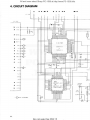
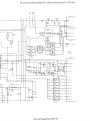
4. CIRCUIT DIAGRAM
I
I
I
,,
A
,, ,,
I~ •
•---q----
1:.00 I
I
I
0
I
•
,••
... ,, ..- ,,,,
-'
.
,
..•.
•
;; •
••"' ~
• •
•
- - --9-- - - - -- -<?---<r-- - - -- -- - -
!
;:
;;
•
-"9'--<;>- --<;> -- - - -<>-
-- -----,
0
'
-
I
I
"'
"'
.. .
\t
~
I :>"l t
•
y
.i..
T
,.
I
.. 'i'r.TI
.,, ,,
.:..
y
.....•·
1-·••
..
I
'4
Atit- 1~
~
[l.\ •-1
~
•
"
9I
... .,.. kl... ••o kJ-
...
...
...
...
...
"
1/ 0 PORT
'"
Lll5 8 10
"'
.kJ•
hll l t
11111 I
I . ti 5 8 I I
~
•
KJ.
'" 9
9
I
J>\'
I
I
I
...
...
'"'
~
I·
•
.. ,. ~
tt-++--+- -o- •
kl•
ll tV
9
\'~'
~
r r:.:-1
-,.
.,.•
101\U
•
"'
•
•
•
re 9
'-' I'
...
...
_
~
.
I ll•I
~
•
r
9
I
N.::"I
9
_ _ _ _ _ _ .J
"'
...,.. >--"
1""11
I
-[>-
l t .,,M •tt•• t
~~;:
11
Do not sale this PDF !!!
-=- •
:::::: ,,
- -·
All and more about Sharp PC-1500 at http:f/www.PC-1500.info
• •
, 'If
r---c.-....
-----
,
,
-- ----- - ------- - -<?--
L
'
.__ - - -- - ·- . .. -·- ····-·· ·· ··------· ------ ----·· ·-···· ...
r- ------••
~
.~~
r'-r+-....~-1•-1:+;.'_..;c..,.::i;O) ,_.... f'HI'. ..,
:
'•
...
"
'°""' •~"\'
..,....
'--J--'
l l-~ ltOOCI'
~
,,;. -;=31
~"p
"
I
L- --·--<' ' "-'1
111'•111(
"'
If
,..--,,
fl>"
~ K>1
f>.!1.f1>-J
, ;:..
~
'1.!!_
~
-..:::r
-• l.....
ll!l l SIU'
..•
.
{.
I
'----
L
'
0
I
.- .
]\
.
'----
'
, .......
.
.... ._
c..~
..... u .
'
; v ""h• l'
t-"-"--rl-ID<>-+.,--- - ,,1;-;:4
t-"-'---:-1-1 :><>-+.;:----~,~i' ~ ....t .... c
f'-1>..i'-..-l-l;)o-+..,---~.4~' T .._,..,.. 0
t-""''---:-1-1 :><>-+.;:-----.,,q~ ' ""'"' '
•
":>>-f.,,---T
·~QI ~ ~,. Ill
'
t-!:>..!-...1-1')<>-+.,---~(",Q' x ~~·
l
'-..l:!..!.-:-f-j>~+.:----,4 lt Mot"" II
•
L.----- -
Do not sale this PDF !! !
All and more about Sharp PC-1500 at http://www.PC-1500.info
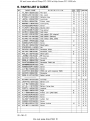
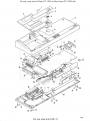
6. PARTS UST & GUIDE
NO.
1
2
3
4
5
6
.7
8
9
10
11
12
13
14
15
16
17
18
19
20
21
22
23
24
25
26
27
28
29
30
31
32
33
34
35
36
37
38
39
40
41
42
43
44
PARTS COOE
TLABHl628CCZZ
HOECA2018CCZZ
PTPEH I J 33CCZZ
.JBTN- 1009CCZZ
CC0VAl335CCOI
MSPRP I I 89CCZZ
XUPS026P04000
TCAUH I I aocczz
DUNTG6387CCZZ
GC0VH J336CCZZ
QJ AKC I003CCZZ
QJAKC l016CCZZ
QJAKCIOJ3CCZZ
ILA NGTl448CCZZ
XBBSD20P04000
P SLOCl33 5CCZZ
XNES020- 16000
QC NCWl293CCZZ
GFTAA 1267CCOI
PSLDCl324CCZZ
.JKNBZ l 7 3 7 CCO I
QCNCM l295CC6J
QSW-Kl295CCZZ
DUNTK6388CCZZ
QPWBM2029CCZZ
XBBSD20PIOOOO
IL X-BZI038CCZZ
DU NTK5169CSZZ
QC NCW l296CCOI
QSW- SI074CCZZ
DESCR IPTI ON
Pen lab-el
Dec. panel
NEW
MAHK
N
N
PARTS
HANK ~RA'I<
D
D
Adhesive tape
N
0
Lock knob
N
c
Printer cover
N
0
Lock spring
N
c
c
Screw
Caution lab-el
Top cabinet
N
N
N
Jack cover
Jack socket (AC adaptor)
Jack socket (Remote)
Jack socket (MiC, EAR)
Angle
c
c
c
N
Screw
Shield plate
Nu!
N
Connec1or 60pin
Connector covor
Shield plate
PF key IOI)
D
D
D
N
N
c
c
c
c
c
D
c
c
Connector
c
Switch
8
E
Connect or
PWB unit
N
c
c
c
FPC
Screw
Screw
PWB unit
with
connector PWB
N
E
A
A
A
A
A
A
A
A
A
A
A
A
A
A
A
A
A
A
A
A
A
A
A
E
8
8
E
8
A
c
T
E
D
c
c
8
A
c
A
y
c
c
G
v
A D
A z
A v
A A
A A
Connector
c
*A *K
Select switch
8
A E
c
A 8
A z
QTANSl372CCZZ Terminal
UBATN2135CCZZ Bauery unit
L. X- BZI038CCZZ Screw
LF i X- 1 I 27CCZZ Battery fixing plate
P ZETL 1429CCZZ Insulator
QTANS l 365CCZZ Angle
Ki-0B0066CCZZ Pr inter unit (DPG-1301)
XUPS030P06000 Screw
XUPSF26P08000 Screw
GLEGPl009CCZZ Lubb-er foot
XBBSF20 P 0 6000 Screw
GC ABA2605CCZZ Cabinet bottom
IL X-BZ I I I 6CCZZ Screw
CE-150-!Il
Do not sale this PDF !!!
N
8
c
N
N
c
c
c
E
c
c
c
c
N
D
c
A A
A E
A D
A E
8 T
A A
A A
A A
A A
A L
A A
All and more about Sharp PC-1500 at http://www.PC-1500.info
NO.
PARTS CODE
DESCRIP TION
Paper
shaft
unit
DSFTZ0480CSZZ
QPLG.JIO l 3CCZZ Cassell plug B
QPLG.Jl014CCZZ Cassell plug A
TLABZl295CCZZ Name label
UBAGZl292CCZZ
Hard case
DUNT- 6452CC OI
OUNT- 6453CCOI
DUNT-6 454CCOI
OUNT- 6455CCOI
OUNT-6457CCOI
OUNT- 6458CCO I
OUNT-6459CCOI
DUNT- 6461CCO I
DU NT- 6 4 62CCOI
OU NT- 6463CCOI
OU NT- 6553CCO I
OU NT- 6452C CO I
AC Ada.J)tOr (U.S.A. Caro.da)
AC Adaptor (Australia)
AC Adaptor (England)
AC Adaptor (Europe 'l2fN Round-2pin)
.......... Pti.hlf:N&. 01.u.1)
AC Adaptor CT110V/220Y
. •·2Po"
AC Adaptor (Horg ~ 110/220Y Raro-3jlin)
M lddll• ~•t
}
AC Adaptor (E"~·
11 /220V Roulod • 2'>-11
AC Adaptor (South Alrica)
AC Adaptor (Kuwait)
AC Adaptor ($in9apore)
AC Adaptor .(Soudi-Arabia)
AC Adap<or {120V lJltin-Amorica)
RC- EZ107ACC I A
RMPTC610 4 QCK.J
RRLYZ9999QCNI
RVR- MB4 10QCZZ
SPAKA6718CCZZ
SPAKC6719CCZZ
T i NSE3 4 39CCZZ
TiNSE3 485CCZZ
Ti NSM3 4 8 4CCZZ
VCEA AUIHWIOSQ
VCTYPUIE X l 03M
VCTYPUIEX 472M
VCTYPUIEX 4 73M
VCTYPUI NX10 4M
VHOOSl588 L l -I
VHOIOO l ////- 1
-'V HEHZ4 CLL//-I
VHEROIOE9 //-I
VH iL B l2 5 7 //- i
VH iLH536702- I
Capacitor lOV 100.uF
Block resistor IOOKohmX6
Relay
Voliable resistor 22Kohm
Packing cushion
Packing case (U.S. A)
Instruction book (U.S.A)
lnstructfon book (English)
lnsrructron book (E. F, G, S)
Capacito( 50V/111F
Capacitor 25V O.Ol11F
Capaci tor 25V 4700PF
C3paci tor 25V 0.047PF
Capacitor 12V 0.1.uF
Diode IS1588L1
Diode 1001
Zener diode 4- 4. 4V
Zener diode 9.3-9.9V
I. C. (LB1257)
L. S. I. (LH536702)
CE- 150-[%]-1
Do not sale this PDF !! !
......
NEW
N
N
N
N
N
N
N
N
N
N
N
N
N
N
N
PARTS ~RAN(
RANK
c
c
c
A
A
A
A
F
K
R
A
A
y
E.
E
E
E
E
E
E
E
E
E
E
E
c
c
N
D
A B
A c
A u
A 0
A K
N
D
A
N
0
A N
N
D
A
N
0
A H
c
c
A
B
A
B
c
A A
c
c
A
B
B
M
B
N
c
c
N
B
A
A
A
A
A
A
N
8
B
B
B
B
B
K
0
0
0
E
c
All and more about Sharp PC-1500 at http://www.PC-1500.info
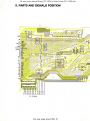
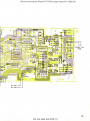
5. PARTS AND SIGNALS POSITION
11 1098&543 13 12 712
To Pr;,,te y
Do not sale this PDF !!!
All and more about Sharp PC-1500 at http:/lwww.PC-1500.info
•
I
•
;1m~~. . tz~~io:.:!:.4i
.-.............=~1
l~.o,.
•
I.
1Ni -C1H+l
12
Do not sale this PDF !! !
All and more about Sharp PC-1500 at http://www.PC-1500.info
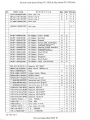
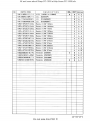
NO.
PARTS COOE
DESCRIP T I ON
NEW
MA.AK
PARTS l'Rx:E RA~
RANK
B
A
z
(M545 16P}
B
A
F
I. C.
(TC40HOOOP)
B
A
F
VHi T CSOHOOIFN
I. C.
(TC50H001 F)
B
A
H
VRD- ST2EY I 0 3J
Resistor 1/ 4W 10Kohm
c
A
A
VRO-ST2E Y 104J
Resistor 1/4W 100Kohm
A
Resistor 1/ 4W 1Mohm
VRD- ST2EYl5 1J
Resistor 1/4W 150ohm
VR D-S T 2EY 152J
Resistor 1/ 4W 1. 5Kohm
c
c
c
c
A
VRD- ST2E Y I OSJ
VRD- ST2E:VI S :3J
Resistor 1/4W 18 Kohm
c
A A
VRD-ST2E V 27 1J
Resistor 1/ 4W 270ohm
c
A A
VRD- ST2EY273J
Resistor 1/ 4W 27 Kohm
c
A A
VRD-ST2E Y47 0 J
Resistor 1/ 4W 47ohm
Resistor 1/4W 560ohrn
VRD- S T 2HYR56J
RAsistor 1/2W 0.56ohm
VRD- ST2 H Y2 7 0J
Resistor 1/2W 27ohm
c
c
c
c
A A
VRD- ST2EY 561J
VS2 S B926- S/TC
T ransistor (2S8926)
8
A D
VS2SC2021 - RSC
Tro.nsistor (2SC2021)
8
A F
VS2 SC458K S/- 1
Transistor (2.SC458K)
8
A
c
VS2SD l 246-S TC
Transistor (2.$01246)
B
A
c
VHi L HSB l 1/ / - 1
L.S. I. (LH5811 or LH5810)
VH i M545 16P / - I
I. C.
VHiTC40HOOOP I
N
N
N
A A
A
A
A
A
A A
A 8
A 8
CE- 150- IZJ- 2
Do not sale this PDF !!!
All and more about Sharp PC-1500 at http://www.PC-1500.info
3
9
l
12 ~10
11
14-~~
.~
~
T!-~
~
12
"'•
I
28
.
43
14
Do not sale this PDF !! !