1
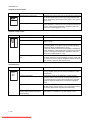
2F8/2F9/2GA
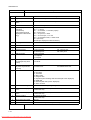
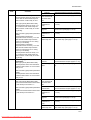
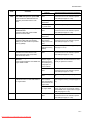
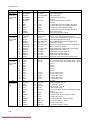
Problem
(6)
Defective message
displaying (LCD) [2].
No message appears
on the message display (LCD), even
thought the message background
does not illuminate
faintly. (The power is
not supplied to the
operation panel
PWB.)
(7)
"Close rear unit" display is not cancelled
to closing the rear
unit.
(8)
"Close top cover" display is not cancelled
to closing the top
cover.
(9)
"Close left side
cover" display is not
cancelled to closing
the left side cover.
Causes
Check procedures/corrective measures
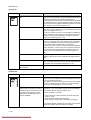
Broken power cord.
Replace the power cord.
The power cord is not
plugged in properly.
Check the contact between the printer’s AC inlet and the AC
power outlet.
No electricity at the AC
power outlet.
Measure the AC input voltage.
Defective power source
unit.
Replace the power source unit (See page P.1-5-28).
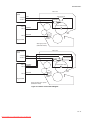
Defective harness between
operation panel PWB (YC1)
and main PWB (YC13), or
improper connector insertion.
Reinsert the connector. Also check for continuity within the connector harness. If none, remedy or replace the harness.
Defective operation panel
PWB.
Replace the operation panel PWB.
Defective main PWB (system DIMM PWB).
Replace the main PWB [system DIMM PWB] (See page P.1-5-26).
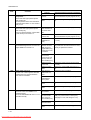
Defective fuser unit’s
drawer connector.
If a fuser unit which is known to work normally is available for
check, replace the current fuser unit in the printer with the normal
one. If the symptom disappears, replace the fuser unit with a new
one.
Defective harness between
engine PWB (YC6) and
fuser drawer connector, or
improper connector insertion.
Reinsert the connector. Also check for continuity within the connector harness. If none, remedy or replace the harness.
Defective engine PWB.
Replace the engine PWB (See page P.1-5-22).
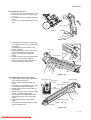
Deformed interlock switch
1's actuator lever.
Check the bending of the actuator lever of the interlock switch 1, if
there is trouble, remedy or replace.
Defective power source
unit.
Replace the power source unit (See page P.1-5-28).
Defective engine PWB.
Replace the engine PWB (See page P.1-5-22).
Deformed interlock switch
2's actuator lever.
Check the bending of the actuator lever of the interlock switch 2, if
there is trouble, remedy or replace.
Defective harness between
interlock switch 2 and connect-L PWB (YC12), or
improper connector insertion.
Reinsert the connector. Also check for continuity within the connector harness. If none, remedy or replace the harness.
Defective interlock switch 2. Replace the interlock switch 2.
Defective engine PWB.
Replace the engine PWB (See page P.1-5-22).
1-4-15
Downloaded From ManualsPrinter.com Manuals