1
specialist guide
FUSER MODULE
HIGH VOLTAGE RELATED PROBLEMS
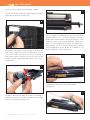
Very often the service technician is called on site to repair
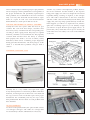
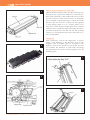
Very often these copiers are not cleaned thoroughly. The
a not fusing properly copier. Indeed the copy is not fused
transfer and separation corotron assembly collect a lot of
and the toner gets stained. This is due to the lower pressure
dust, toner and developer material. As the time passes,
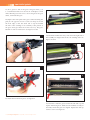
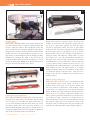
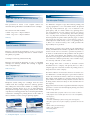
roller coming off its support levers. The bearings A at the
these deposits form a conductive layer and a leakage
end of the roller fall of their supports when a miss feed in
occurs. This phenomenon happens around the corotron
the fuser happens. The users pull violently and the roller
terminals A. The result is a faint copy or no image at all.
falls off. The solution is simply to adjust the lower pressure
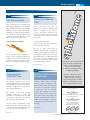
The solution is to replace the terminals or to clean them and
roller bearings back onto their supports. And by the way – it
pain with nail-varnish. To check if there is still a leakage
is useful to clean and lubricate the cleaning felt.
you can remove the process unit, block the interlock key
and power on the copier with the front cover open. Enter
4
the 05 adjustment mode and energize the transfer and
separation corotron (codes 39 and 40). You should see
the corotron wires glow in violet and if the assembly is
operating properly, there wouldn’t be arches from the
wire to the terminals. Be careful not to touch the assembly
during these checks.
6
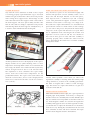
Another problem is the C7 code displayed on the copier’s
display and the service symbol flashing. This is a fuser
temperature related problem. Often one would check the
fuser lamp, the thermo fuse and the thermistor, but they
will be all right. However the C7 code will still flash.
The explanation is that sometimes the copier simply
cannot reach the normal fuser temperature for the
predetermined time. The copier counts each failure and
when the count reaches 3, the C7 code is displayed. The
solution is to enter 08 mode and to set the C7 counter to
zero (code 89).
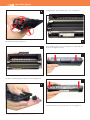
Another similar problem occurs when you remove the
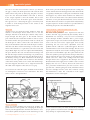
registration assembly for cleaning. Often the auxiliary high
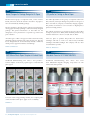
voltage terminal C, located on the assembly gets broken.
The effect is irregular and is visible as a faint and foggy
5
copy. The solution is to replace the terminal or to glue it or
to attach it with cable tie.
PAPER FEED PROBLEMS
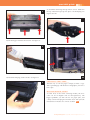
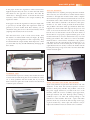
Often after 100 000 or more copies, the copier experiences
frequent paper feed problems. Don’t hurry to change the
feed tires. These are so durable, that even after 400 000 copies
they are still like new. The problem is elsewhere. There are
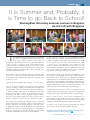
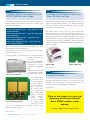
two electromagnetic clutches A located in the registration
assembly. If the paper doesn’t reach the registration rollers,
you should clean or replace the feed clutch. You should also
clean the one way bearing B, located between the two feed
tires. Sometimes it sticks and doesn’t transmit the torque
from the electromagnetic clutch to the feed tires.
24 | RechargEast Magazine, August’08| www.rechargeast.com