1
STARTUP INSTRUCTIONS CONTINUED
4. Position the valve to the rapid rinse position. Check the
drain line flow, and run for 5 minutes or until the water
runs clear.
5. Position the valve to the start of the brine tank fill cycle.
Ensure water goes into the brine tank at the desired
rate. The brine valve drive cam will hold the valve in this
position to fill the brine tank for the first regeneration.
6. Replace control box cover.
7. Put salt in the brine tank.
NOTE: Do not use granulated or rock salt.
3200 TIMER SETTING PROCEDURE
How To Set Days On Which Water Conditioner Is To
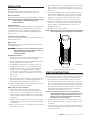
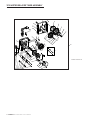
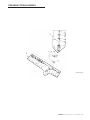
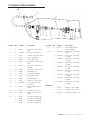
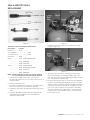
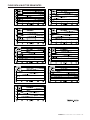
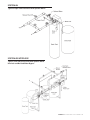
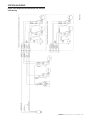
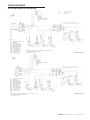
Regenerate (Figure 2)
Rotate the skipper wheel until the number “1” is at the red
pointer. Set the days that regeneration is to occur by sliding
tabs on the skipper wheel outward to expose trip fingers.
Each tab is one day. Finger at red pointer is tonight. Moving
clockwise from the red pointer, extend or retract fingers to
obtain the desired regeneration schedule.
How To Set The Time Of Day
1. Press and hold the red button in to disengage the
drive gear.
2. Turn the large gear until the actual time of day is at the
time of day pointer.
3. Release the red button to again engage the drive gear.
How To Manually Regenerate Your Water Conditioner At
Any Time
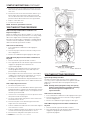
1. Turn the manual regeneration knob clockwise.
2. This slight movement of the manual regeneration knob
engages the program wheel and starts the
regeneration program.
3. The black center knob will make one revolution in the
following approximately three hours and stop in the
position shown in the drawing.
4. Even though it takes three hours for this center knob to
complete one revolution, the regeneration cycle of your
unit might be set for only one half of this time.
5. In any event, conditioned water may be drawn after rinse
water stops flowing from the water conditioner drain line.
How to Adjust Regeneration Time
1. Disconnect the power source.
2. Locate the three screws behind the manual regeneration
knob by pushing the red button in and rotating the 24 hour
dial until each screw appears in the cut out portion of the
manual regeneration knob.
3. Loosen each screw slightly to release the pressure on the
time plate from the 24-hour gear.
4. Locate the regeneration time pointer on the inside of the
24 hour dial in the cut out.
5. Turn the time plate so the desired regeneration time
aligns next to the raised arrow.
6. Push the red button in and rotate the 24 hour dial. Tighten
each of the three screws.
7. Push the red button and locate the pointer one more time
to ensure the desired regeneration time is correct.
8. Reset the time of day and restore power to the unit.
4 • FLECK 2850 Control Valve Service Manual
61502-3200 Rev A
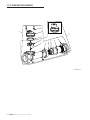
Figure 2
3210 TIMER SETTING PROCEDURE
Typical Programming Procedure
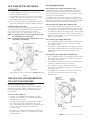
Calculate the gallon capacity of the system, subtract the
necessary reserve requirement and set the gallons available
opposite the small white dot on the program wheel gear
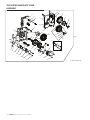
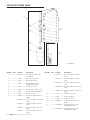
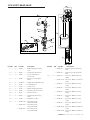
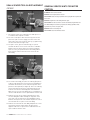
(Figure 3).
NOTE: Drawing shows 8,750 gallon setting. The capacity
(gallons) arrow (15) shows zero gallons remaining.
The unit will regenerate tonight at the set
regeneration time.
How To Set The Time Of Day
1. Press and hold the red button in to disengage the drive gear.
2. Turn the large gear until the actual time of day is opposite
the time of day pointer.
3. Release the red button to again engage the drive gear.
How To Manually Regenerate Your Water Conditioner At
Any Time
1. Turn the manual regeneration knob clockwise.
2. This slight movement of the manual regeneration knob
engages the program wheel and starts the
regeneration program.