1
E-90-TCS:Series QV (F-87)
10/14/09
2:28 PM
Page 1
Bulletin E-90-TCS
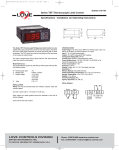
Series TCS Thermocouple Switch
Specifications - Installation and Operating Instructions
1-11/32
[34]
3
[76]
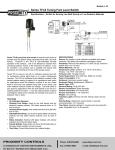
Monitor and control temperature in heating and cooling applications
with the Series TCS Thermocouple Switch. The Series TCS offers a
wide temperature range, two selectable alarm sets, and an internal
buzzer indicating alarm condition or error. The user can define set point,
heating/cooling regulation, cycle time, alarm configuration, load status,
and ambient probe adjustment. The thermocouple switch features password protection and error/alarm messaging. Temperature and output
status is indicated on the bright red LED display. Use the configuration
key (sold separately) to quickly program multiple units. The Series TCS
includes a fitting clip for panel mounting, gasket, rear terminal cover and
instruction manual.
INSTALLATION
NOTE: Unit must be mounted away from vibration, impacts, water and
corrosive gases.
• Cut hole in panel 2.80 x 1.14 inches (71 x 29 mm).
• Apply silicone (or rubber gasket) around the perimeter of the hole to
prevent leakage.
• Insert unit into hole of panel.
• Slide removable fitting clips onto unit from the back until secure to
panel.
• Remove back cover to wire unit.
• Wiring diagram is displayed on the top of the unit.
• (Note: PROBE CABLE LENGTH MUST NOT EXCEED 238 ft (100 m).
DO NOT INSTALL PROBE CABLE NEAR POWER CABLES).
• Replace cover once wiring is complete.
LOVE CONTROLS DIVISION
DWYER INSTRUMENTS INC.
P.O. BOX 338 - MICHIGAN CITY, INDIANA 46361, U.S.A.
1-7/64
[28]
2-3/8
[60]
SPECIFICATIONS
Probe Range: 0 to 700°C (32 to 999°F) for thermocouple J. 0 to 999°C
(32 to 999°F) for thermocouples K, S.
Input: Type J, K or S thermocouple.
Output: 16A SPDT relay @ 250 VAC resistive.
Horsepower Rating (HP): 1 HP.
Control Type: ON/OFF.
Power Requirements: 110 VAC, 230 VAC, 12 VAC/VDC or 24
VAC/VDC (depending on model).
Accuracy: ±1% FS.
Display: 3-digit, red, 1/2˝ (12.7 mm) digits, plus sign.
Resolution: 1°.
Memory Backup: Nonvolatile memory.
Temperature Limits: Ambient: 32 to 158°F (0 to 70°C).
Storage Temperature: -4 to 176°F (-20 to 80°C).
Weight: 2.3 oz (65 g).
Front Panel Rating: IP64.
Agency Approvals: CE, UL, ULc.
WIRING DIAGRAM
Phone: 219/879-8000 www.love-controls.com
Fax: 219/872-9057 e-mail:[email protected]
E-90-TCS:Series QV (F-87)
10/14/09
2:28 PM
Page 2
PARAMETERS
SP
r0
r1
r2
d0
c0
c2
P1
P5
H5
Description
Set Point
Differential or Hysteresis
Lower Value Set Point
Higher Value Set Point
Heating or Cooling Control
Min. Stop Time for Load
Load Status During Probe Error
Ambient Probe Adjustment
Ambient Probe Type
Parameter Access code
Units
Degrees
Degrees
Degrees
Degrees
Option
Minutes
0/1
Degrees
Option
Numeric
A0
A1
A2
A3
A4
A5
A6
A7
Alarm
Alarm
Alarm
Alarm
Alarm
Alarm
Alarm
Alarm
Degrees
Degrees
Seconds
Option
Degrees
Degrees
Seconds
Option
Range
r1 to r2
1 to 99°
0 to 999°
0 to 999°
Ht/Co
0 to 59
Off/On
-10 to 10°
J, K, S
0 to 255
PARAMETER PROGRAMMING
Set Point (SP) is the only parameter the user can access
without code protection.
• Press SET. SP text will appear on the display.
• Press SET again. The real value is shown on the display.
• The value can be modified with the UP and DOWN arrows.
• Press SET to enter any new values.
• Press SET and DOWN at the same time to quit programming or wait
one minute and the display will automatically exit programming mode.
*The keyboard code can be reset to ZERO by turning off the controller
and turning it on again while keeping the SET key depressed.
(SET AT 0 FROM FACTORY)
1
1
1
1
2
2
2
2
Hysteresis
Threshold
Exclusion Time
Configuration
Hysteresis
Threshold
Exclusion Time
Configuration
1 to 999°
0 to 999°
0 to 999
0, 1, or 2
1 to 999°
0 to 999°
0 to 999
0, 1, or 2
PARAMETER DESCRIPTIONS
SP= Set Point- Desired Regulation Temperature
r0= Differential or Hysteresis
r1= Lower Set Point Limit
r2= Higher Set Point Limit
d0= Heating or Cooling Control-Regulation cycles only performed,
neither defrosting nor continuous cycles exist. Heating: To choose
Heating Control: Set d0=Ht (The output is active when TS1
(temperature of ambient probe) is less than or equal to Set Point.)
TS1<=SP. It then disconnects when TS1>=SP-r0. Cooling: To
choose Cooling Control: Set d0=Co (The output is activated when
TS1>=SP+r0.) The display will switch off when TS1<=SP.
c0= Minimum Time Between Start to Stop.
c2= Load Status During Probe Error. In the event of an open or short
circuited probe, the unit will connect or disconnect the load as
defined by this parameter.
P1= Ambient Probe Calibration. Offset degrees to adjust ambient probe.
If the probe is not placed in the exact point that is to be measured,
use a standard thermometer and adjust the difference with
parameter.
P5= Ambient Probe Type. Select between J, K, or S Type
Thermocouple.
H5= Access to Probe Parameters. (The code is set to 0 from the
factory.)
A0= Alarm 1 Hysteresis. The differential associated with A1 parameter.
A1= Alarm 1 Threshold. Number of degrees to the working set point that
initiates an alarm condition.
A2= Alarm 1 Exclusion Time. The amount of time the alarm is disabled
from instrument activation.
A3= Alarm 1 Configuration. Determines the alarm type: A3=0 alarm is
disabled; A3=1 alarm is activated if the ambient temperature
>=SP+A1 and deactivated if <+SP+A1-A0; A3=2 alarm is activated
if the ambient temperature <=SP+A1 and deactivated if
>+SP+A1-A0.
A4= Alarm 2 Hysteresis. The differential associated with A5 parameter.
A5= Alarm 2 Threshold. Number of degrees to the working set point that
initiates an alarm condition.
A6= Alarm 2 Exclusion Time. The amount of time the alarm is disabled
from instrument activation.
A7= Alarm 2 Configuration. Determines the alarm type: A7=0 alarm is
disabled; A7=1 alarm is activated if the ambient temperature
>=SP+A5 and deactivated if <+SP+A5-A4; A7=2 alarm is activated
if the ambient temperature <=SP+A5 and deactivated if
>+SP+A5-A4.
©Copyright 2009 Dwyer Instruments, Inc.
LOVE CONTROLS DIVISION
DWYER INSTRUMENTS INC.
P.O. BOX 338 - MICHIGAN CITY, INDIANA 46361, U.S.A.
Access to all code protected parameters.
• Press SET for 8 seconds. The access code value 00 is shown on the
display. (Unit comes with code set at 00 from factory).
• With the UP and DOWN arrows, code can be set to user needs.
• Press SET to enter the code. If code is correct, the first parameter label
is shown on the display (SP).
• Move to the desired parameter with the UP and DOWN keys.
• Press SET to view the value on the display.
• The value can be modified with the UP and DOWN arrows.
• Press SET to enter the value and exit to text parameter.
• Repeat until all necessary parameters are modified.
• Press SET and DOWN at the same time to quit programming or wait
one minute and the display will automatically exit programming mode.
BUZZER
In the event of alarm or error condition, the internal buzzer is
activated. To silence the buzzer, press and hold the SET and
Down keys.
LED INDICATIONS
OUT
This indicates the load is connected. The system waits for the
programmed minimum stop time of the load.
DISPLAY MESSAGES
In normal operation, the probe temperature will be shown on the display.
In case of alarm or error, the following messages will be shown:
• Er = Memory Error
• -- = Short-Circuit Probe Error (output determined by c2).
• oo = Open Probe Error (output determined by c2).
MAINTENANCE/REPAIR
After final installation of the TCS Series Digital Thermocouple Switch, no
routine maintenance is required. A periodic check of system calibration
is recommended. The devices are not field repairable and should be
returned to the factory if recalibration or other service is required. After
first obtaining a Returned Goods Authorization (RGA) number, send the
material, freight prepaid, to the following address. Please include a clear
description of the problem plus any application information available.
Dwyer Instruments
Attn: Repair Department
102 Highway 212
Michigan City, IN 46360 U.S.A
Printed in U.S.A. 10/09
FR# R7-443801-00
Phone: 219/879-8000 www.love-controls.com
Fax: 219/872-9057 e-mail:[email protected]