1
•
•
•
Press the start/stop button to stop the platter rotating, push
the power button to turn of the power.
Suspend play:
Set the cueing lever to ‘up’ postion during play, the stylus tip of
the cartridge will be lifted from the record.
Target light:
This unit is provided with a target light for illuminating the
stylus tip during play. Push the target light button, the target
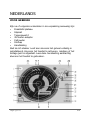
light will be raised into position for illuminating the stylus tip.
When not in use, keep the target light lowered.
CHANGING THE SPEED
As long as the pitch control slider is in center click position, the
turntable is operated with quartz controlled rated speed. The green
LED (12) will then be lit. The speed can be increased or decreased
with via the pitch control slider. The red LED (12) will then be lit.
If the change of the speed does not correspond to the pitch control
change, it is possible to correct this with the trim control (15).
An incorrect adjustment done on purpose can also be used to have
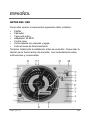
the turntable rotate extremely slow or fast. The strobe dots (4) at
the edge of the turntable issued for speed monitoring.
MAINTENANCE
•
•
•
•
7
Clean the stylus periodically with a soft brush to prevent the
accumulation of dust.
When the sound becomes distorted or noisy, check the stylus.
If worn out, replace it with a new one.
From time to time, the dust cover and turntable cabinet should
be wiped with a soft, dry cloth.
Do not use any volatile materials as alcohol, thinner, benzine,
etc… they may remove the paint or damage the lustre.
High Q20 D