1
Contents
Thank you for buying this Pioneer product.
Please read through these operating instructions so you will know how to operate
your model properly. After you have finished reading the instructions, keep this manual in a safe place for future reference.
Before You Start
About this unit 5
About this manual 5
Features 5
About WMA 6
About AAC 6
Resetting the microprocessor 6
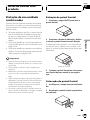
Protecting your unit from theft 6
Removing the front panel 7
Attaching the front panel 7
About the demo mode 7
Reverse mode 7
Feature demo mode 8
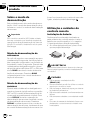
Use and care of the remote control 8
Installing the battery 8
Using the remote control 8
FUNCTION button and AUDIO
button 8
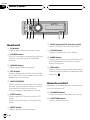
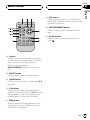
Whats What
Head unit 10
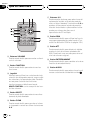
Remote control 10
Basic Operations
Turning the unit on 12
Selecting a source 12
Loading a disc 12
Adjusting the volume 13
Turning the unit off 13
Tuner
Listening to the radio 14
Introduction of advanced tuner
operation 15
Storing and recalling broadcast
frequencies 15
Storing the strongest broadcast
frequencies 15
2
En
Selecting stations from the preset channel
list 16
Tuning in strong signals 16
Built-in CD Player
Playing a CD 17
Selecting a track directly 17
Introduction of advanced built-in CD player
operation 18
Repeating play 18
Playing tracks in random order 18
Scanning tracks of a CD 19
Pausing CD playback 19
Using compression and BMX 19
Selecting the search method 19
Searching every 10 tracks in the current
disc 20
Using disc title functions 20
Entering disc titles 20
Displaying disc titles 21
Using CD TEXT functions 21
Displaying text information on CD
TEXT discs 21
Scrolling text information in the
display 21
Selecting tracks from the track title
list 22
MP3/WMA/AAC/WAV Player
Playing MP3/WMA/AAC/WAV files 23
Selecting a track directly in the current
folder 24
Introduction of advanced built-in CD player
(MP3/WMA/AAC/WAV) operation 24
Repeating play 25
Playing tracks in random order 25
Scanning folders and tracks 25
Pausing MP3/WMA/AAC/WAV playback 26
Using compression and BMX 26