1
Noise/vibration information
FITTING THE DUST EXTRATCTION COLLAR
(PICTURE 6)
Measured values determined according to EN
60 745.
Typically the A-weighted noise levels of the tool
are: Sound pressure level: 91 dB (A).
Sound power level: 102 dB (A).
Wear ear protection!
The typical weighted acceleration is 5,88 m/s2.
The jig saw has a collar designed to accept a
vacuum cleaner hose. The collar is an tight fit so
that the hose fits securely.
Ensure the saw is unplugged.
Identify the locking tabs on the collar.
Insert the collar into the exhaust duct.
Turn the collar sharpy to the left to lock it firmly
into place.
Assembly
SLIDING SHOE
When working surfaces that are easily scratched,
the sliding shoe I can be attached onto the base
plate H in order to prevent the surface from being scratched.
To attach the sliding shoe I, insert it at the front
of the base plate H, push the rear part upward
and allow it to latch.
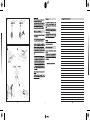
REPLACING/INSERTING THE SAW BLADE
(PICTURE 2)
Before any work on the machine itself,
pull the mains plug.
The machine is equipped with SDS (Special
Direct System) clamping device. This makes
possible easy and quick changing of the saw
blade without additional tools.
Operation
Wear protective gloves!
• Before any work on the machine itself, pull the
mains plug.
ADJUSTAMENT OF THE BASE PLATE
(FIGURE 6)
The semi-circle on base plate H (is marked 15°,
30° and 45° which denote the cutting angles
most commonly used.
Loose screw, move the base plate H to the desired angle, and retighten screw.
Inserting the saw blade
2.A When inserting the saw blade, the red SDS
clamping lever K must be in the insertion position (“I”) (at the front on the contact protector).
2.B
- Slide the saw blade (teeth in the cutting direction) into the stroke rod Q until it latches: The
SDS clamping lever K springs by itself to the
rear (“II”) and the saw blade is locked automatically.
When inserting the saw blade, take care that the
rear edge of the saw blade comes to rest in the
groove of the roller R.
ORBITAL ACTION SETTINGS
The four orbital action settings allow for optimal
adaptation of cutting speed, cutting capacity
and cutting pattern to the material being
sawed.
The orbital action can be adjusted with the adjusting lever G, even during operation.
Ejecting the saw blade
2.C To eject the saw blade, simply turn the red
SDS lever 8 again to the front to the insertion
position (“I”). This releases the saw blade and it
is ejected automatically. In this manner, the SDS
clamping device is ready for the insertion of a
new saw blade.
Setting 0 No orbital action
Setting I Small orbital action
Setting II Medium orbital action
Setting III Large orbital action
The optimal orbital action setting for the respective application can be determined through
practical testing. The following recommendations apply:
– Select a lower orbital action setting (or switch it
off) for a finer and cleaner cutting edge.
– For thin materials such as sheet metal, switch
the orbital action off.
When changing the saw blade, the machine should be held so that no persons or animals can be injured by the
ejection of the saw blade.
Attention! The back off the jig saw blade
should always be positioned against
guide roller R.
22
– For hard materials such as steel, work with low
orbital action.
– For soft materials and when sawing in the direction of the grain, work with maximum orbital action.
Use the appropriate saw blades (picture 7)
• Use T-shank blades only.
When cutting metals, lubricate saw blade regularly with oil
Pre-drill a hole before making cut-outs (figure 9).
SPLINTER-FREE CUTTING
Cover cutting-line with several layers of wide
tape before cutting.
Aalways face the good side of the workpiece
down.
Starting Operation
ON/OFF SWITCH
Intermittent switching
ON - Press trigger of switch C.
OFF - Release trigger
Continuous switching
ON - Press trigger of switch C, then lock button
B and release it.
OFF - Press and release trigger on switch A.
• Before the sanding surface reaches the
workpiece, you should switch on the tool.
• Before switching off the tool, you should lift
it from the workpiece.
PLUNGE CUTTING
• Plunge cuts may only be applied to soft materials, such as wood, gypsum plaster boards,
etc.!
Use only short saw blades for plunge cutting.
Plunge cutting is possible only with the mitre
angle set at 0°.
Place the machine with the front edge of the
base plate H on to the workpiece without the
saw blade P touching the workpiece and switch
on. For machines with stroke rate control, select
the maximum stroke rate. Firmly hold the machine against the workpiece and by tilting the
machine, slowly plunge the saw blade into the
workpiece.
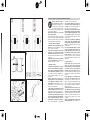
STROKE RATE PRESELECTION (FIGURE 5)
The required stroke rate can be preselected
(also during operation) using the wheel A.
• If the tool does not run with wheel A in position low, select a higher sawing speed. Adjust the sawing speed while the tool runs.
The required stroke rate is dependent on the
material and the working conditions and can be
determined by a practical trial.
After working for longer periods at low stroke
rate allow the machine to cool down by running
it at maximum stroke rate and no-load for approx. 3 minutes.
When the base plate H fully lays on the workpiece, continue sawing along the desired cutting
line.
PARALLEL GUIDE (ACCESSORY)
For cuts using the parallel guide (accessory),
the thickness of the material must not exceed a
minimum of 30 mm.
Parallel Cuts (see figure 8): Loosen the locking screw L and slide the scale of the parallel
guide through the lead in the base plate. Set the
desired cutting width as the scale value on the
inside edge of the base plate. Tighten the locking screw L.
LASER LIGHT ON/OFF BUTTON
The laser “ON/OFF” button allows you to turn
the laser feature on or off.
To turn laser ON, depress the button.
To turn laser OFF, depress the button again.
Operating the tool
Before switching on the tool, ensure that front
end of footplate rests flat on the workpiece.
Hold tool firmly with both hands, so you will
have full control of the tool at all times.
Ensure that complete surface of footplate rests
firmly on the workpiece.
Ensure that the blade has come to a complete
standstill, before you lift the tool from the workpiece.
USING THE LASER LINE GUIDE
Only turn on the laser light on when the tool is
on the workpiece.
First mark the line of cut on your workpiece
(good side down.)
Insert plug into the power source.
Place the front edge of the saw foot on the
workpiece, turn laser light ON and align beam
23







![1] n T169](http://vs1.manualzilla.com/store/data/005696581_1-b5b272b0c99ea5fca956b563015d9b67-150x150.png)